Acronis Cyber Protect Cloud
Acronis Cyber Protect Cloud (now Acronis Cyber Platform) is Acronis's backup, disaster-recovery and endpoint-protection service, sold mostly through managed service providers. Fluency polls its REST API for alerts, completed activities and EDR incidents, and keeps a roster of its agents and tenants on Resources (v1: SIEM → Resources). Backup alerts matter because backups are among the first things ransomware operators disable: a failed or cancelled backup shows up here before anything is encrypted.
Authentication is an Acronis API client, a client ID and secret on the data center that hosts your tenant. API clients have no roles: a client reaches the tenant it is created on and every tenant below it, so which tenant you create it on decides which customers Fluency collects.
The setup has two halves:
- In Acronis: create an API client on the partner tenant (every customer below it) or on one customer tenant, and copy its client ID, secret and data center URL.
- In Fluency: install the Acronis Cyber Protect Cloud application template and paste those three values in.
What arrives
| Stream | What it holds | Lands in |
|---|---|---|
| Alerts | Every alert Acronis raises, raises again or dismisses: backup failures, machines offline, malware and Active Protection detections, and the rest of its alert catalog. | The Acronis index |
| Activities | Completed runs (backup, recovery, discovery, protection update and so on), with their result. | The Acronis index |
| EDR incidents | Acronis EDR incident summaries, on tenants with Advanced Security + XDR. | The Acronis index |
| Agents | Every registered Acronis agent: host name, platform, online state, versions, network interfaces. | Resources |
| Tenants | The client's tenant and every partner, folder, customer and unit below it. | Resources |
One install collects all five: the event streams every five minutes, the two rosters every twelve hours. Every record is tagged with the Acronis customer it belongs to, so a partner-level install can be searched and alerted on per customer. The Acronis audit log (console sign-ins, plan changes) is not collected; see What does not arrive.
Record layouts, field meanings and deduplication keys are in Data reference.
Before you begin
| Requirement | Detail |
|---|---|
| An administrator of the tenant that will own the client | Creating an API client takes administrator rights on that tenant: the partner's for a partner-level client, the customer's for a customer-level one. In Cyber Console a partner administrator can also create one for a customer; see step 2. |
| To know where the client should sit | Partner tenant or customer tenant decides what is collected. Decide before you create it; see step 1. |
| Partner access to every customer you expect to see | For a partner-level client only. Customers in self-service management mode, or with support access disabled, are invisible to it, silently. |
| Acronis EDR, for the incidents stream | Incidents come from Acronis's endpoint detection and response, sold in the Advanced Security + XDR pack. On a tenant without it the incidents stream stays empty; alerts, activities and the rosters are unaffected. |
| Outbound reach from Fluency to Acronis | The collector calls your data center (https://<data center>/api/...) from Fluency's infrastructure, not from your network. |
Part 1: Acronis
1. Decide which tenant owns the API client
The client sees the tenant it is created on and everything below it, and the template has no setting that narrows that down. So choose the tenant to match what this Fluency installation should collect:
| Create it on | Fluency collects | Use it when |
|---|---|---|
| The partner tenant | Every customer below the partner, in one install, each record tagged with its customer in @acronisTenant. Customers that block partner access are left out. | One Fluency installation serves the MSP as a whole, or the MSP's own SOC watches all customers together. |
| A sub-partner or folder | That branch of the hierarchy and nothing else. | Only part of the client base belongs in this Fluency installation. |
| One customer tenant | That customer only. | Each customer has its own Fluency account, or you run Acronis for your own organisation. Also the way to reach a customer that blocks partner access. |
To collect several customers into several Fluency installations, create one client in each customer tenant and install the application once per customer. Each install needs its own datalake index name; see Install the Application.
2. Create the API client
In the Acronis Management Portal, signed in as an administrator of the tenant you chose, go to Settings → API clients. The page lists the tenant's existing clients with their Status, Client ID, Created by, Last used from IP and Last used, and Create API client is at the top right.
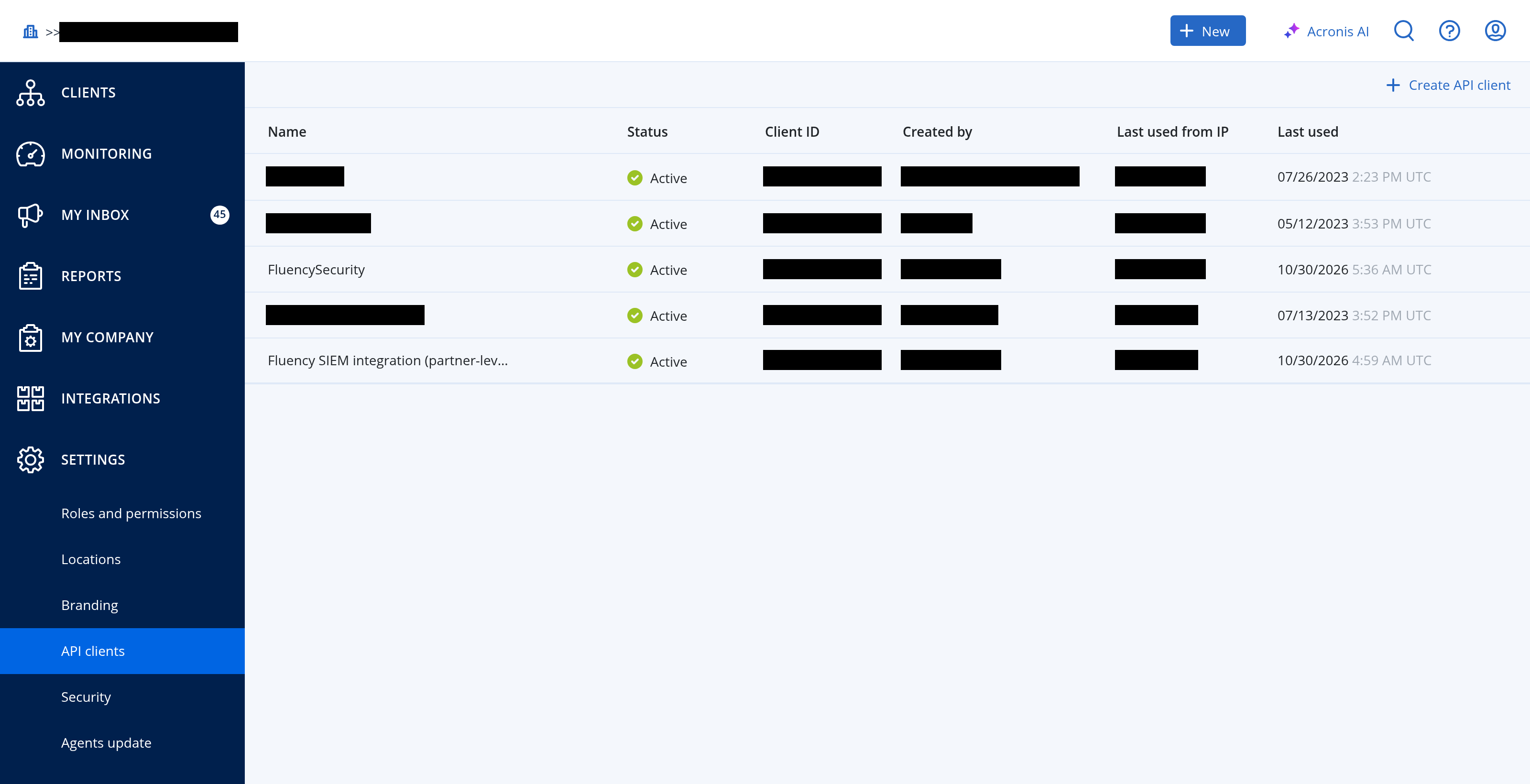
-
Click Create API client.
-
In Name, enter a name that identifies the consumer, such as
Fluency SIEM. It is how the client is recognised later in this list. The dialog's one other line is "The API client will have the same privileges as your account has", which is why the account you are signed in with matters.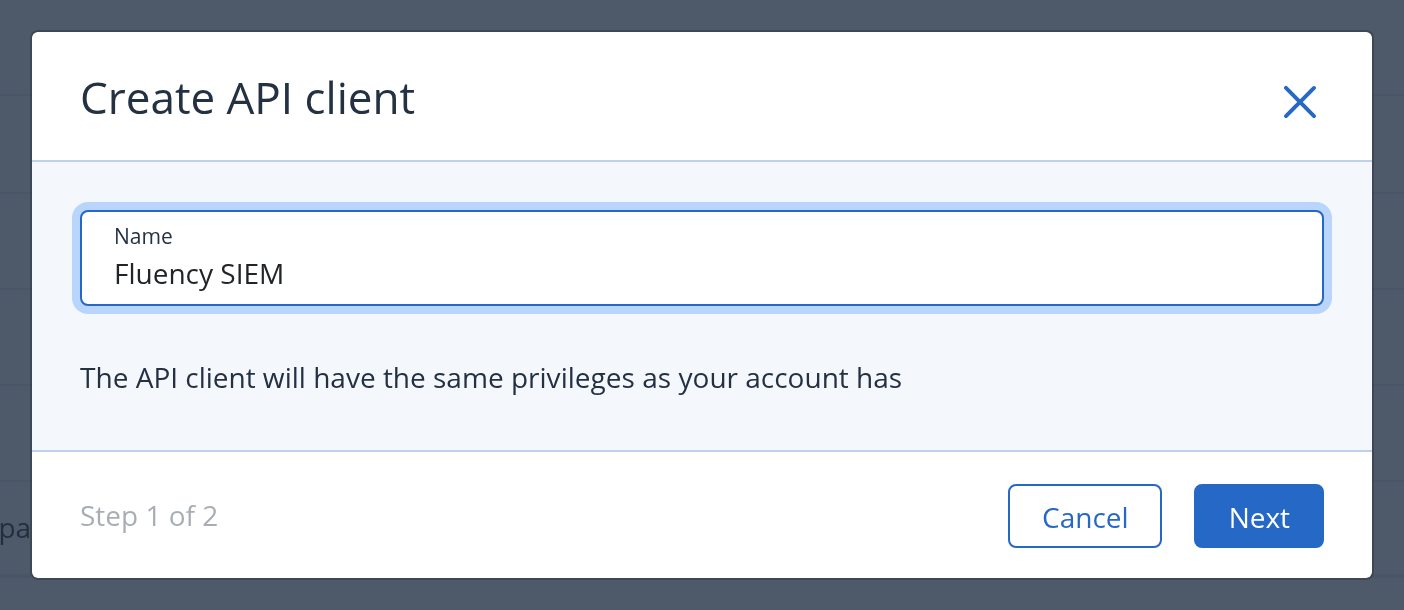
-
Click Next. This creates the client, with status Active, and moves to step 2 of 2, which shows its credentials.
There is no role to pick. Acronis's documentation says a client "acts as an administrator in the tenants it can access", so a client created by an administrator can do through the API what that administrator can do, across every tenant below it: create and delete tenants and users through the Account Management API, and change what is protected and how through the Resource and Policy Management API. Fluency only reads, but the secret is worth exactly that much, and Acronis notes that "two-factor authentication cannot be enabled for an API client", so the secret is the only factor. Store it like an administrator's password and keep it out of tickets and chat.
Acronis is rolling out a new interface, Cyber Console, alongside the Management Portal. There the same list is under Settings → General settings → API clients. It shows your own tenant's clients; choosing a customer in the tenant selector shows that customer's, and a client created while a customer is selected belongs to that customer.
3. Copy the three values
The next screen shows the client ID, the secret and the data center URL.
Acronis shows the secret once: "There is no way to retrieve this value if you lose it." It can be reset later, but a reset replaces it, which means reinstalling the application (see Rotating the secret).
| Acronis shows | Goes into the Fluency parameter |
|---|---|
| Client ID | API Client ID |
| Secret | API Client Secret |
Data center URL, such as https://us5-cloud.acronis.com | Data center URL of the API client's tenant |
Click Done. The credentials do not expire.
The client exists only in the data center that hosts its tenant. Every other data center answers its credentials with 401 invalid_client and the message client (ID "…") not found, which is the same answer a mistyped client ID gets. Take the URL from this screen rather than from memory. If you have already closed it, the Management Portal itself is served from the data center: the host in your browser's address bar while you are on Settings → API clients (https://us-cloud.acronis.com/mc/…, for example) is the value to use. The client's details panel does not show it. https://cloud.acronis.com, the sign-in address, is not a data center: its token endpoint answers 404 with an nginx page.
Verify before you leave Acronis
One request proves the client ID, the secret and the data center together, and its answer says which kind of tenant the client sits on. A second one lists the tenants the client can see.
DC="https://us5-cloud.acronis.com"   # step 3: the data center URL
CLIENT_ID="..."                      # step 3
SECRET="..."                         # step 3

# 1. The token request: proves the three values and names the tenant kind
curl -sS -u "$CLIENT_ID:$SECRET" -d grant_type=client_credentials \
  -o token.json -w 'HTTP %{http_code}\n' "$DC/api/2/idp/token"
jq -r '.scope // .' token.json

# 2. The tenants this client can see, counted by kind
TOKEN=$(jq -r .access_token token.json)
TENANT=$(jq -r .scope token.json | cut -d: -f4)
curl -sS -H "Authorization: Bearer $TOKEN" \
  "$DC/api/2/tenants?subtree_root_id=$TENANT&lod=basic&limit=500" \
  | jq -r '[.items[].kind] | group_by(.) | map("\(.[0]): \(length)") | .[]'
rm token.json
| Response | What it means |
|---|---|
HTTP 200 and a scope ending :partner_admin | The client works and sits on a partner tenant: Fluency collects every customer below it that allows partner access. The second call counts the partners, folders, customers and units in that hierarchy. |
HTTP 200 and a scope ending :company_admin | The client works and sits on a customer tenant: Fluency collects that customer only. The second call shows customer: 1 and its units. |
HTTP 401, invalid_client, client (ID "…") not found | The data center is wrong, or the client ID is. Check the data center first; see the caution in step 3. |
HTTP 401, invalid_client, invalid client credentials | Data center and client ID are right; the secret is wrong, or has been reset since. |
HTTP 404 and an HTML page | The host is not an Acronis data center (cloud.acronis.com, for one). |
curl: (6) Could not resolve host | A typo in the host name. |
Part 2: Fluency
Install the Application
- v2 interface
- Classic v1 interface
In the navigation rail, open Applications and click Install Application, then choose Acronis Cyber Protect Cloud, the first card in the Endpoint Management category of the Application Catalog.
Go to Platform → Applications → Install Application From Template and choose Acronis Cyber Protect Cloud, the first tile in the Endpoint Management category.
The three parameters are required and open empty.
| Parameter | Notes |
|---|---|
| Data center URL of the API client's tenant, e.g. https://us-cloud.acronis.com | The data center URL from step 3. A bare host is accepted and completed to https://; anything after the host is ignored, so a Management Portal address copied from the browser also works, provided its host is the data center. |
| API Client ID | The client ID from step 3. |
| API Client Secret | The secret from step 3. Flagged sensitive. |
Below those, the collapsed Advanced configuration section (v1: the Advanced Configurations row) holds the destination:
| Parameter | Notes |
|---|---|
| datalake | Pre-filled managed. |
| datalake index name | Pre-filled Acronis. Two applications writing to the same index name in the same lake will collide, and the second one aborts. When you install one application per customer, give each its own name (Acronis-Acme, Acronis-Globex). |
- v2 interface
- Classic v1 interface
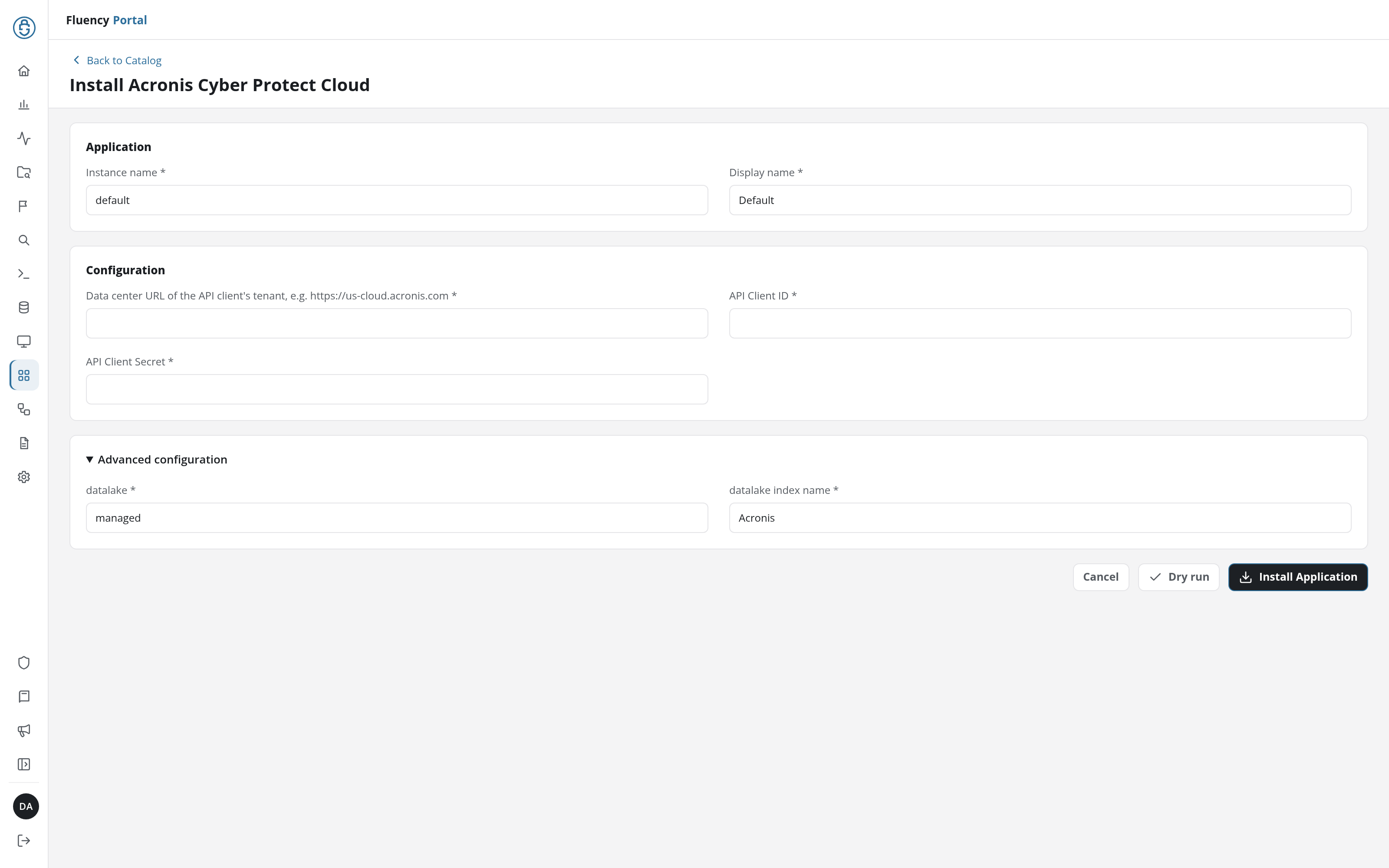
Leave Instance name and Display name at default / Default for a single install. For a second one (another customer, another data center) give each a name you will recognise; the instance name also becomes part of the integration name every record carries in @customer.
Click Dry run first to have the platform check the data center and the client credentials before anything is installed, then click Install Application. The Applications page opens with the notice Default is launching., and the new application is listed with a green Running badge once the pipeline is up.
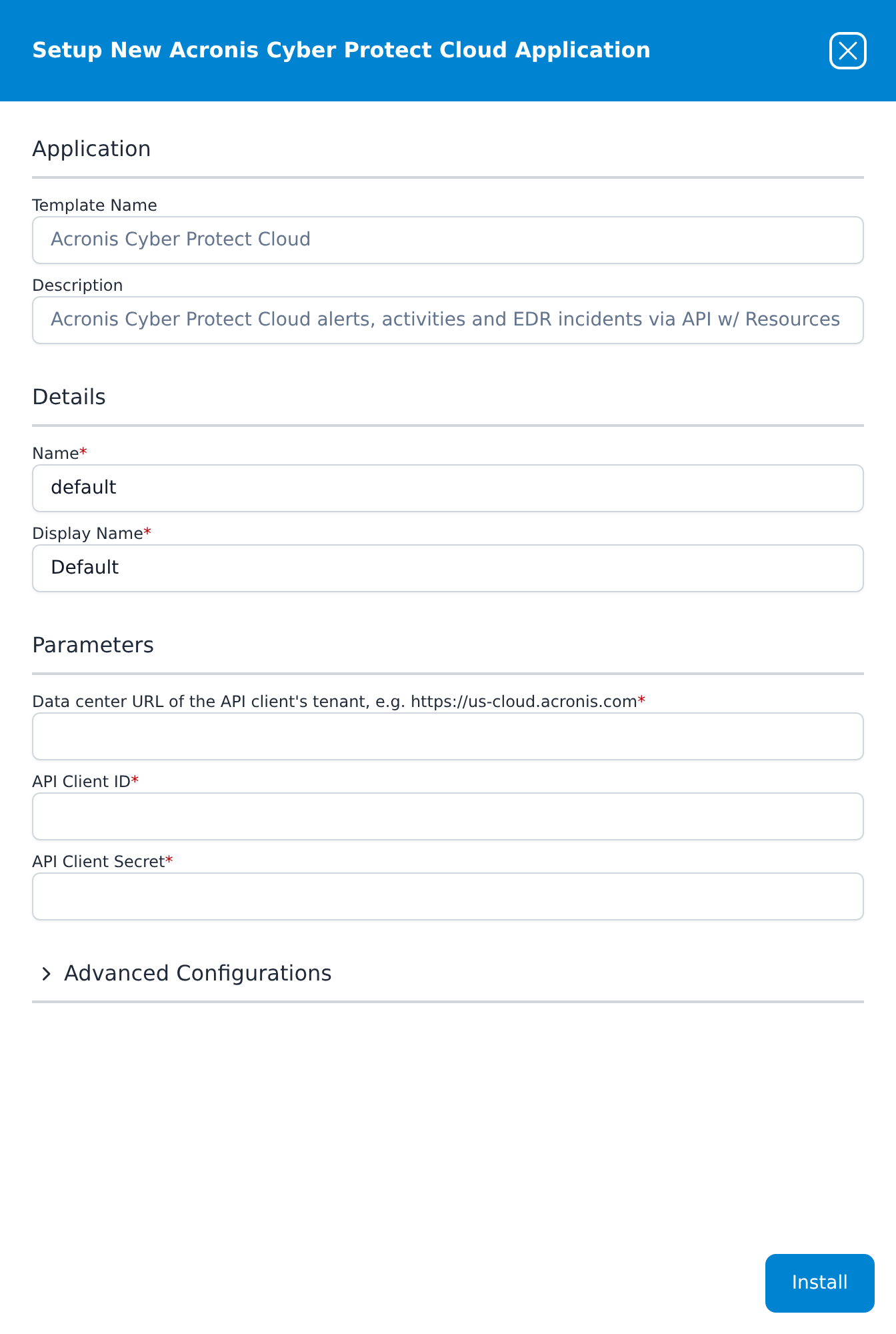
Leave Name and Display Name at default / Default for a single install. For a second one (another customer, another data center) give each a name you will recognise; the name also becomes part of the integration name every record carries in @customer.
Press Install. The application then appears in the Installed Applications view, where its badge reads Running once the pipeline is up.
Confirm it is running
A Running badge means the pipeline started, not that Acronis accepted the credentials, and the event streams can be quiet for hours on a small tenant. The rosters cannot: the tenant roster always holds at least the client's own tenant. Acronis also records when each client was last used. So check in this order.
- Acronis has seen the client. In the Management Portal, open Settings → API clients. Within minutes of the install, the client's Last used is recent and Last used from IP is an address of Fluency's, not yours. The collector requests a token on its first poll and again at least every two hours, and a request is enough to update both columns, so a Last used older than that while the application is Running means the collector cannot reach Acronis with these credentials.
- v2 interface
- Classic v1 interface
-
The application is up. On Applications, Acronis Cyber Protect Cloud is listed with
Defaultbeneath it and a green Running badge. Click its row to open the application details: the Pipeline card draws theAcronisCP-defaultsource feeding theAcronisCP-defaultrouter and theAcronisCP-defaultdestination, and the Actions card begins with addDatalakeIndexmanaged-Acronis. A red Error badge means the pipeline aborted or reported errors in the last hour, and the details page shows the error message beneath the summary figures. -
The rosters are there. Open Resources from the navigation rail. Under Other there are two tiles, acronisAgent and acronisTenant; click one to list its records, each with
AcronisCP-defaultin the Customer column. The first snapshot is taken on the first poll, within minutes of the install, and then every 12 hours. An acronisTenant list with records proves the data center, the client ID and the secret all work; it holds one record per tenant in the client's hierarchy. acronisAgent holds one record per registered agent, so a customer you expect and do not find there is the first sign of a customer that blocks partner access.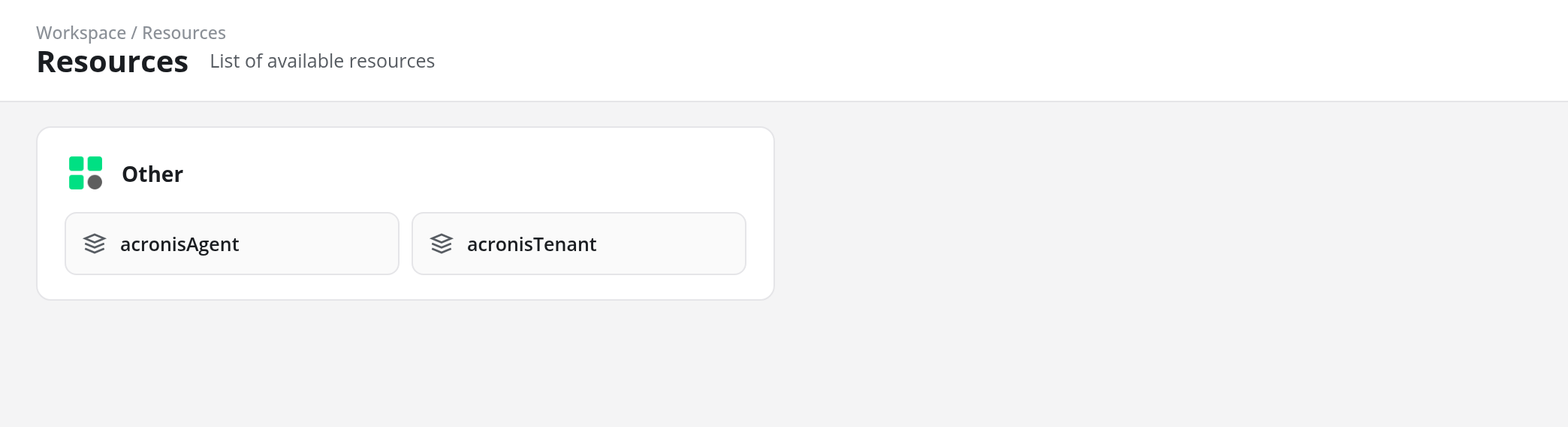
-
The application is up. The card in Installed Applications reads
Acronis Cyber Protect Cloud: Defaultwith a Running badge. Expanding it draws anAcronisCP-defaultPlugin Data Source feeding a router and anAcronisCP-defaultMgmt Queue destination. The blue eye button opens Viewing AcronisCP Application, whose Actions list beginsaddDatalakeIndex: managed to Acronis. -
The rosters are there. Open SIEM → Resources. Under Other there are two cards, acronisAgent and acronisTenant, and each record's Customer column reads
AcronisCP-default. The first snapshot is taken on the first poll, within minutes of the install, and then every 12 hours. An acronisTenant card with records proves the data center, the client ID and the secret all work; it holds one record per tenant in the client's hierarchy. acronisAgent holds one record per registered agent, so a customer you expect and do not find there is the first sign of a customer that blocks partner access.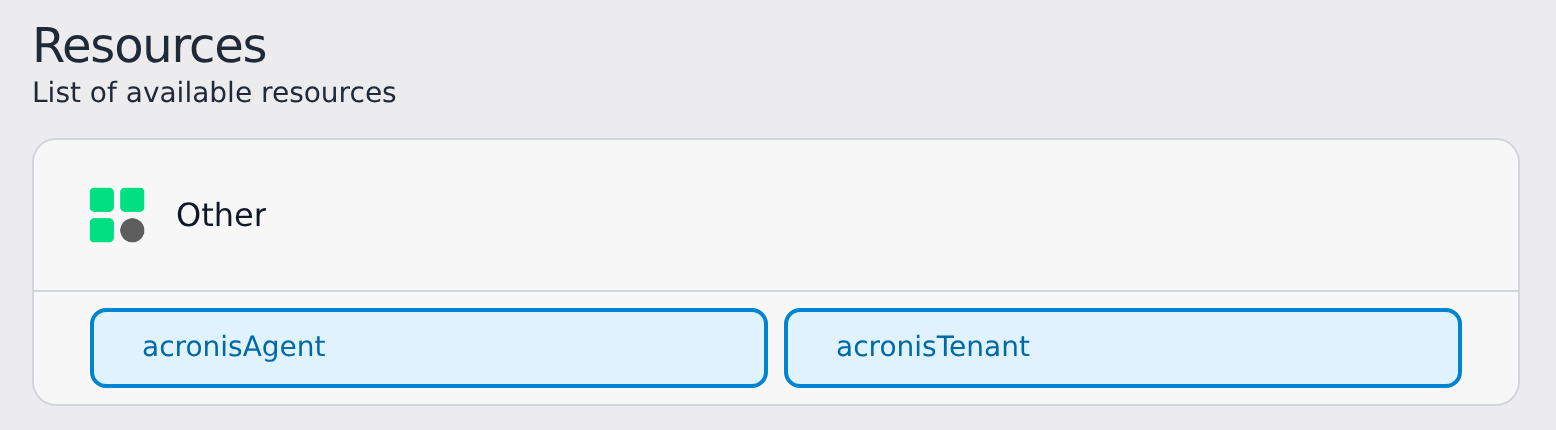
- Events are arriving. Open Datalake Search (v1: Data Lake → Search, see Search), choose
managed-Acronisin the index selector and search the last few hours. The Event Types group of the Filters panel (v1: the EventTypes facet) listsAcronisAlert,AcronisActivityandAcronisIncidentas each appears. A quiet tenant may have none yet; to make one, run a backup on any protected machine from the Acronis console and look for itsacronisActivityrecord, which arrives within about ten minutes of the run completing.
If the rosters are empty after fifteen minutes, run the verify calls again with the values you installed. See Confirm data is arriving for the three platform-side checks: application health, ingress volume and storage-side queueing.
Maintenance
Rotating the secret
Acronis API client credentials do not expire, so there is no date to track; rotate when your policy requires it or when the secret may have been exposed. Template parameters are read-only after install, so a new secret means a new application. A reset takes effect at once, so do it in this order to keep the gap short:
-
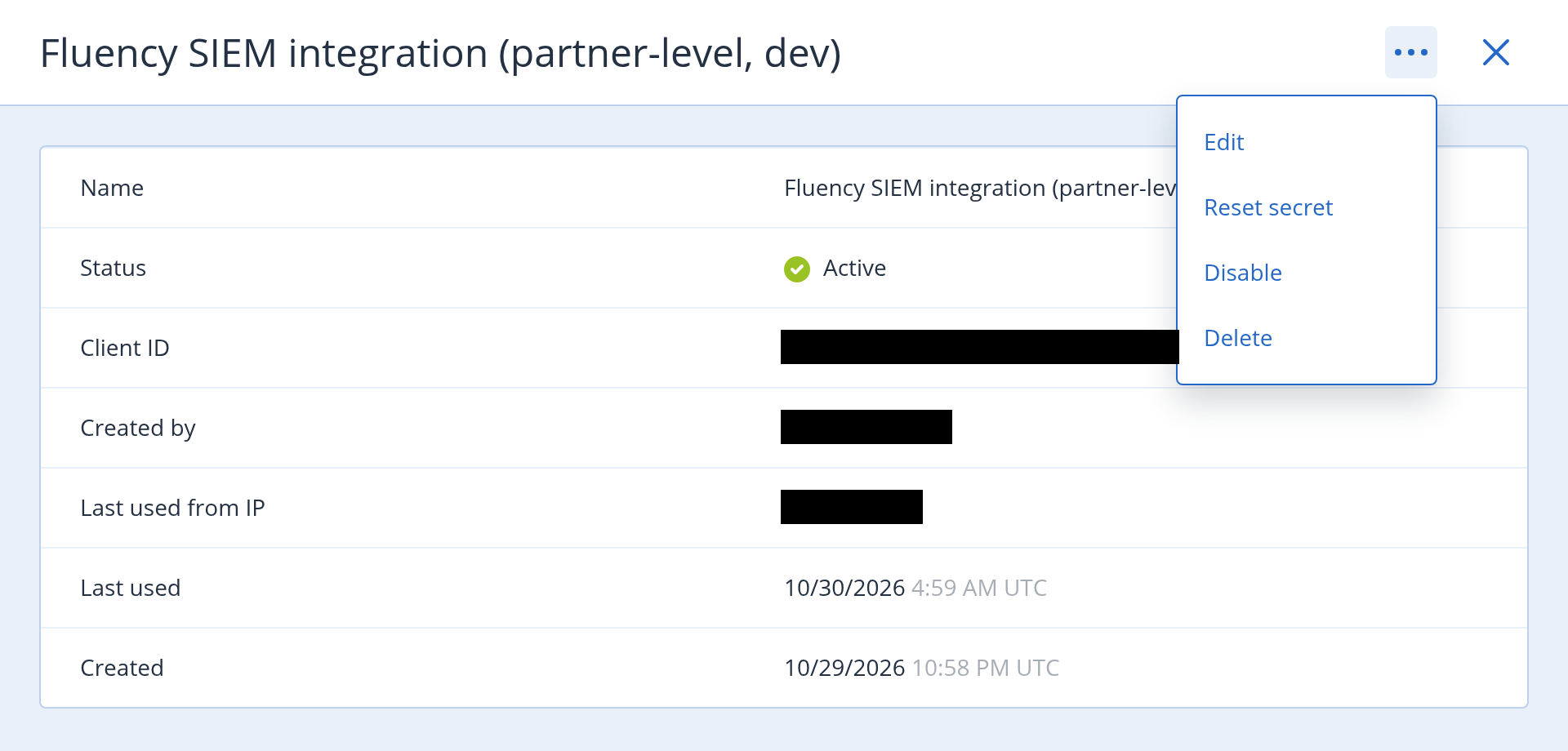
In Acronis, open the client under Settings → API clients, choose Reset secret from the … menu at the top of its details panel, and copy the new secret. The client ID and the data center stay the same.
-
In Fluency, uninstall the Acronis Cyber Protect Cloud application and install it again with the same data center and client ID and the new secret. To uninstall, click Uninstall at the top right of the application's details page (v1: the red Uninstall button at the foot of its details panel on Platform → Applications).
The new installation's first poll reaches back 24 hours, so a gap of less than a day is filled automatically, and records the previous installation already collected in that window arrive a second time. Deduplicate on the keys given in Alerts and incidents are state, not events.
Outages
The collector keeps a checkpoint per stream and resumes from it: after an outage on either side it collects everything Acronis still holds since the last record it forwarded. A stream that fails keeps its checkpoint and is retried on the next poll while the others carry on. When every collection in a poll fails, the next attempt is delayed 5, 10, 20, 40 and then 60 minutes, and the error is reported as an Acronis Poll Error notification when it first appears or changes, and again once a day while it persists.
Removing the integration
- Uninstall the Acronis Cyber Protect Cloud application in Fluency, so nothing is polling: the Uninstall button at the top right of its details page (v1: the red Uninstall button at the foot of its details panel on Platform → Applications).
- In Acronis, open the client under Settings → API clients and choose Disable or Delete from its … menu. Disable keeps it in the list with status Disabled; either way, its Last used stops advancing.
Troubleshooting
| Symptom | Likely cause | Fix |
|---|---|---|
Running, no acronisAgent or acronisTenant records on Resources, an Acronis Poll Error about rejected API client credentials or invalid_client | Wrong client ID, wrong secret, or wrong data center; or the client was deleted, disabled or had its secret reset | Run the verify call: not found points at the data center or the client ID, invalid client credentials at the secret. Reinstall with the corrected value. |
An error saying there is no Acronis token endpoint, or naming a 404 | The data center field holds a host that is not a data center, such as cloud.acronis.com | Reinstall with the data center URL shown when the client was created (step 3). |
| One customer's data never appears, with no error | The customer is in self-service management mode or has disabled support access, so a partner-level client cannot see it | This is correct behaviour for that setting. Restore partner access on the customer's side, or create a client on that customer's tenant and install a second application. |
An error saying the API client has no access (403) | A customer blocks partner access, or the tenant lacks the service being read | As above for the customer case. The error names the endpoint that refused, which says which stream is affected; the others keep collecting. |
No acronisIncident records at all | No Advanced Security + XDR on the tenant, or simply no incidents | Not a fault. Check in the Acronis console whether the tenant has any EDR incidents. |
| The same alert appears many times | A recurring alert raised again, or an alert dismissed | Expected; see Alerts and incidents are state, not events. Deduplicate on id plus updatedAt; dismissals carry deletedAt. |
| A rule fires when an analyst closes an incident or dismisses an alert | The rule fires on arrival, and closing or dismissing produces a record | Select on state for incidents and exclude records with deletedAt for alerts. |
Records carry a tenant ID but no names in @acronisTenant | The tenant hierarchy could not be loaded that poll | Collection continues; the poll error names the cause. Names return once the hierarchy loads. |
| An Acronis Warning that an agent's tenant could not be placed | Acronis reports an agent's tenant by a legacy numeric ID that the collector could not map to a tenant | That agent's record keeps the tenant name only. No action unless it persists for many agents. |
| An Acronis Warning that the integration's activation could not be reported | Acronis's integration-status endpoint refused the report | Harmless: it is retried after 24 hours and does not affect collection. |
Errors mentioning 429 | Acronis rate-limited the request; the EDR API is "quota-limited based on the size of the result set" | The collector retries, honouring Acronis's Retry-After up to five minutes and otherwise on the next poll. |
| Worked for months, then stopped with no change in Fluency | The client was disabled or deleted, or its secret was reset | Check its Status and Last used under Settings → API clients. A reset secret means a reinstall. |
| Console sign-ins and plan changes are missing | Not in this feed | The audit log reaches a SIEM only through the Acronis SIEM Connector; see What does not arrive. |
Data reference
What the five streams look like once they land, for searches and detection rules written against them.
The customer on every record
Acronis identifies tenants by ID, so on a partner-level install a raw alert says which tenant but not which customer. The collector resolves each record against the tenant hierarchy and adds an @acronisTenant block, which is what lets an MSP filter, count and alert per customer:
| Field | Value |
|---|---|
@acronisTenant.id | The UUID of the tenant the record belongs to |
@acronisTenant.name | That tenant's name |
@acronisTenant.kind | partner, folder, customer or unit |
@acronisTenant.customerId, .customerName | The nearest customer at or above it |
@acronisTenant.partnerId, .partnerName | The partner serving that customer |
@acronisTenant.path | The chain from the API client's tenant down, such as Example MSP / Acme / Acme HQ |
What one record holds
An alert as it lands, with identifiers replaced:
{
  "@acronisAlert": {
    "id": "5D1F0C2A-7E44-4B0B-9C1E-2F6A8B3D9E10",
    "type": "MachineOffline30",
    "category": "System",
    "severity": "critical",
    "receivedAt": "2025-11-01T05:15:03.272834028Z",
    "createdAt": "2026-10-30T04:44:21.182489863Z",
    "updatedAt": "2026-10-30T04:44:21.182489863Z",
    "tenant": { "id": "1234567", "uuid": "…", "locator": "/1/…/1234567/" },
    "details": { "resourceName": "WS-0042", "resourceId": "…", "…": "…" }
  },
  "@acronisTenant": {
    "id": "…", "name": "Acme HQ", "kind": "unit",
    "customerId": "…", "customerName": "Acme",
    "partnerId": "…", "partnerName": "Example MSP",
    "path": "Example MSP / Acme / Acme HQ"
  },
  "@event_type": "acronisAlert",
  "@eventType": "AcronisAlert",
  "@customer": "AcronisCP-default",
  "@timestamp": 1793335461182
}
Each stream stores the Acronis record whole under its own key, with the same fields added around it:
| Stream | Record under | @event_type | @eventType | @timestamp from |
|---|---|---|---|---|
| Alerts | @acronisAlert | acronisAlert | AcronisAlert | updatedAt |
| Activities | @acronisActivity | acronisActivity | AcronisActivity | completedAt |
| EDR incidents | @acronisIncident | acronisIncident | AcronisIncident | updated_at |
@customer is the installed application's integration name (AcronisCP-default for an install named default), not an Acronis customer; the Acronis customer is in @acronisTenant. The pipeline adds @type: event and @parser: fpl-plugin.
The fields that carry the weight in a detection are these. Descriptions in quotes are Acronis's, from its API reference.
| Stream | Field | Meaning |
|---|---|---|
| Alerts | type, category | What happened, such as BackupFailed in category Backup, or MachineOffline30 in System. |
| Alerts | severity | "Alert severity level": ok, information, warning, error or critical. |
| Alerts | receivedAt | "A server-side date and time when the alert was received." For an alert that keeps being raised, this stays at the first occurrence. |
| Alerts | updatedAt | "A date and time when the alert has been activated, deleted or dismissed." The record's time. |
| Alerts | deletedAt | "A date and time when the alert was dismissed." Present only on dismissals. |
| Alerts | details | The alert's context: the machine (resourceName, resourceId), the plan, the error. Its contents vary by type. |
| Activities | type, resource, policy | What ran, against which machine or workload, under which plan. |
| Activities | result.code | ok, error, warning, cancelled, abandoned or timedout. A run of cancelled backups across one customer is worth a rule. |
| Activities | startedAt, completedAt, startedByUser | When it ran and, for a manual run, "the name of the user who created the activity". |
| EDR incidents | severity, verdict | LOW to CRITICAL; SUSPICIOUS or MALICIOUS. |
| EDR incidents | state, mitigation_state | Investigation state (NOT_STARTED, INVESTIGATING, TRIAGED, FALSE_POSITIVE, CLOSED) and NOT_MITIGATED, MITIGATED or AUTO_MITIGATED. |
| EDR incidents | host_name, host_address, incident_link | The endpoint, its address, and a link to the incident in the Acronis console. |
Alerts and incidents are state, not events
The same alert arrives more than once, by design. Acronis keeps one alert per condition and updates it: when a recurring alert such as MachineOffline30 fires again it keeps its id and gets a new createdAt and updatedAt, and when someone dismisses it, it arrives once more with deletedAt set. EDR incidents behave the same way, one record per revision, so an analyst closing an incident or marking it FALSE_POSITIVE produces a new acronisIncident record.
Two consequences for detection content. Deduplicate alerts on id plus updatedAt, and incidents on incident_id plus updated_at; activities, which are written once, on uuid plus completedAt. And a rule that fires on every acronisAlert also fires when an alert is dismissed: exclude records that carry deletedAt, and for incidents select on state rather than on arrival.
What does not arrive
The Acronis audit log. Who signed in to the console, who changed a protection plan, who deleted a backup: none of this is in any of the five streams, and the template has no parameter that reaches it. Acronis delivers the audit log through its SIEM Connector, an Acronis agent on a machine in each customer's network that writes CEF or JSON to files or syslog. That is a separate ingestion path (syslog plus a parser), configured per customer tenant. If you find Fluency in Acronis's own integration catalog, its description is of that SIEM Connector route, not of this template.
Customers that block partner access. Acronis says API clients "cannot be managed for" a tenant "in self-service management mode, or one where support access is disabled", and a partner-level client cannot read those customers' data either. Their alerts, activities and agents are simply absent, with no error on either side. See step 1.
The detail behind an EDR incident. The stream is Acronis's incident list: one summary per incident, with its host, severity, verdict and state. The detections and attack chain inside each incident, which Acronis serves one incident at a time, are not collected, and neither is raw process or file telemetry from the agents.
History from before the install. The first poll of each event stream reaches back 24 hours.
Under the hood
Engineering reference: template, collection behaviour and output format
Template. Template ID AcronisCP, display name Acronis Cyber Protect Cloud, filed under Endpoint Management. Description: Acronis Cyber Protect Cloud alerts, activities and EDR incidents via API w/ Resources. Parameters dataCenterUrl, clientId, clientSecret (sensitive), datalake (default managed) and index (default Acronis). The install creates the Acronis data-lake index, an AcronisCP-<name> integration holding the data center as configuration and the client ID and secret as its secret, a plugin data source, a router, one pipe through the standard Plugin_Passthrough processor, and a data sink on the management queue carrying the lake and index; the installed application's Actions list records them.
Authentication. POST /api/2/idp/token with HTTP basic auth (client ID and secret) and grant_type=client_credentials. The token lasts two hours; the collector renews it five minutes before expiry, or once immediately when a call is answered 401. Every call carries X-Application-Secret with Fluency's Acronis application code, which Acronis asks of the integrations in its catalog so it can attribute API load. After the first poll in which any collection succeeds, the collector reports the integration as activated on the client's tenant (POST /api/integration_management/v2/status); a refused report is a warning, retried after 24 hours. Uninstalling does not report a deactivation. The Management Portal lists integrations that report activation under Integrations → INTEGRATIONS IN USE, where this one appears as Fluency (Fluency Security) with a count of Enabled integrations.
Endpoints. On the data center URL: alerts GET /api/alert_manager/v1/alerts, activities GET /api/task_manager/v2/activities, EDR incidents GET /api/mdr/v1/incidents, agents GET /api/agent_manager/v2/agents and tenants GET /api/2/tenants.
Tenant scope. The client's own tenant comes from GET /api/2/clients/{client id}; the hierarchy from GET /api/2/tenants?subtree_root_id=<tenant>. The EDR API needs customer_id=descendants(<tenant>) from a partner-level client and refuses it from a customer-level one, so the collector chooses by the kind of the client's tenant. Agents name their tenant only by a legacy numeric ID; the collector maps it to a UUID from the tenant.id / tenant.uuid pairs that alerts and activities carry, and otherwise looks it up (GET /api/1/groups/{id}, at most 200 per snapshot).
Cadence and paging. Every five minutes each event stream is listed from its checkpoint less a five-minute overlap, so records that become visible a little after their own timestamp are still collected; records already forwarded are dropped by key. Alerts are listed with updated_at=ge(…), ascending and with show_deleted=true, so dismissals arrive as updates, and paged by keyset on updatedAt, because the Alert Manager ignores skip and its after cursor keeps its filters only when all of them are sent again. Activities are listed with state=completed on completedAt, so each run is one record rather than one per state change. Incidents use the EDR API's cursor with updated_at=ge(…). With no checkpoint, the window starts 24 hours before the first poll.
Snapshots. Agents and tenants are listed in full every 12 hours, the first time on the first poll, and sent as resource dumps: @resource_type acronisAgent keyed by agent ID, and acronisTenant keyed by tenant UUID, each with @acronisTenant. acronisAgent is the resource type the earlier Acronis connector used, so behavior rules written against it carry over.
Failures. 429 and 5xx responses and network errors are retried with backoff, honouring Retry-After up to five minutes (the EDR API can ask for up to an hour; such a request is left to the next poll). Error messages carry a diagnosis: rejected credentials, a refused token, no access, wrong data center. Notifications are Acronis Poll Error (on change, then daily while it persists) and Acronis Warning (on change).
Collector options the template does not expose. The collector can also take a different first-poll window, a subset of streams or snapshots, a snapshot interval, and include or exclude lists of tenants by UUID or name. The template sets none of them, so every installation collects all five, every 12 hours for the rosters, from every tenant the client can see.
Output. One gzip-JSONL file per stream per poll with records, one line per record, in the envelope shown in What one record holds. @timestamp is the record's own time in epoch milliseconds.
References
Acronis
- Creating an API client: the Management Portal procedure and the shown-once secret
- API clients (Cyber Console): what a client can reach, its administrator rights, credentials that do not expire, and the tenants it cannot be managed for
- Authenticating to the platform: the token request and data center URLs
- Acronis Cyber Protect Cloud is now Acronis Cyber Platform: the rename and the Cyber Console rollout
- Acronis SIEM Connector: the agent-based route that carries the audit log
Fluency
- Acronis Cyber Protect Cloud install form: the template's fields and defaults (v1: Install Application From Template)
- Resources: where the agent and tenant rosters land (v1: SIEM → Resources)
- Confirm data is arriving
Related
- Endpoint Management integrations: the rest of this category
- Integration Matrix: which ingress method each product uses
- Resource Release / Sync: pushing rules and parsers from a parent account to customer accounts, for an MSP that installs this once per customer