Bitdefender GravityZone
Bitdefender GravityZone is a cloud-managed endpoint protection platform: one Control Center, one agent (Bitdefender Endpoint Security Tools, or BEST) and a stack of modules (antimalware, Advanced Threat Control, HyperDetect, firewall, content and device control, Network Attack Defense, sandboxing and EDR). It emits two quite different kinds of data, and Fluency carries a template for each. Both are push integrations: GravityZone sends to a Splunk-compatible HEC endpoint that the platform provides, rather than Fluency polling an API.
The two feeds are complementary rather than alternatives: most deployments start with Bitdefender EventPush for coverage and add Bitdefender SecurityTelemetry HEC when they want the raw material for hunting. Install either or both.
| Bitdefender EventPush | Bitdefender SecurityTelemetry HEC | |
|---|---|---|
| Template name | BitdefenderEP | BitdefenderST |
| What it carries | The console's own events: detections, blocks, EDR incidents, agent and task status | Raw operating-system events from the endpoint: process, file, registry, logon, network connection, DNS query |
| Licence needed | Any GravityZone with Public API access | One that includes the EDR feature |
| Typical volume | Modest: it is an alert-and-status feed | Large, and largest of all if DNS query is enabled |
The two feeds are set up in opposite directions:
- Bitdefender EventPush is sent by the GravityZone cloud, once per company: collect a credential in GravityZone, then paste it into Fluency.
- Bitdefender SecurityTelemetry HEC is sent by each endpoint's BEST agent: install the template in Fluency first, then paste the HEC Server URL and HEC Token the install produces into a GravityZone policy.
What arrives
| Stream | What it holds | Lands in |
|---|---|---|
| EventPush: detections | Malware and attack detections from every protection module, with the endpoint, the user and the action the agent took. | The data lake, @event_type bep |
| EventPush: policy enforcement | What the firewall, content control, data protection and device control modules blocked. | The data lake, @event_type bep |
| EventPush: EDR incidents | Each new Root Cause Analysis under Incidents, flattened so it can be correlated without opening the console. | The data lake, @event_type bep |
| EventPush: estate and agent health | Agent installs and removals, module and licence changes, task outcomes and Security Server status. | The data lake, @event_type bep |
| SecurityTelemetry | Raw process, file, registry, logon, network connection and DNS query events, straight from each endpoint. | The data lake, @event_type bst |
SecurityTelemetry sends only the event types ticked in the GravityZone policy. Network connection and DNS query events also need the Network Attack Defense module on the endpoint, and DNS query is the largest contributor to volume; see Enable Security Telemetry on the policy.
Event identifiers, what each event type carries and the fields on every telemetry record are in Data reference.
Before you begin
A GravityZone administrator account. For EventPush, the account that generates the API key needs Manage Networks, Manage Users, Manage Company and View and analyze data. For SecurityTelemetry, editing the policy needs Company Administrator, or a custom role with Manage Network and Manage Company.
Know which GravityZone cloud instance you are on. There are six, each with its own console and API host, and a key issued by one is meaningless to the others. Fluency's Access URL parameter is pre-filled with Instance 2, which is right for some tenants and wrong for five:
| Instance | Host |
|---|---|
| GravityZone Cloud Instance 1 | cloudgz.gravityzone.bitdefender.com |
| GravityZone Cloud Instance 2 | cloud.gravityzone.bitdefender.com, the Fluency default |
| GravityZone Cloud Instance 3 | cloudap.gravityzone.bitdefender.com |
| GravityZone RBX Cloud Instance | cloudrbx.ovh.gravityzone.bitdefender.com |
| GravityZone SysEleven Cloud Instance | cloudham.s11.gravityzone.bitdefender.com |
| GravityZone DTS IT AG Cloud Instance | cloudher.dts.gravityzone.bitdefender.com |
You do not have to work this out from the table: the console tells you, and step 1 is reading it off the screen. The table is here so you can recognise the value when you see it, and so that a mismatch with the pre-filled default is not mistaken for a typo.
A licence that includes the EDR feature, for SecurityTelemetry only. Bitdefender lists the option as available with Bitdefender Cloud MSP Security (with the ATS and EDR add-ons) and with GravityZone Business Security Enterprise. The practical test is quicker than reading the contract: open any policy and look for General → Agent → Security Telemetry. If the section is not there, the licence does not carry it. EventPush needs no such entitlement.
Agent versions, for SecurityTelemetry only. BEST for Windows 6.6.25.362 or newer; BEST for Linux 7.1.0.200110 or newer.
Network egress, and it differs between the two feeds. EventPush is sent by the GravityZone cloud, from twenty published source addresses that have to reach the platform's HEC endpoint. SecurityTelemetry is sent by each endpoint, so it is every laptop and server that needs HTTPS egress to the platform's HEC endpoint; host firewalls and proxies count. Both require TLS 1.2 or higher; anything less is refused rather than downgraded.
Bitdefender EventPush
Part 1: In GravityZone
1. Copy the Access URL
Sign in to the Control Center, click the user icon in the upper-right corner and choose My Account. The Control Center API section holds a single read-only field:

Copy the Access URL exactly as shown, including the trailing /api. This is the value Fluency's Access URL parameter wants, and it is the one place the six cloud instances become visible.
2. Create the API key
Further down the same My Account page is the API keys section. Click Add.

The API key configuration dialog asks for a description and a set of APIs:
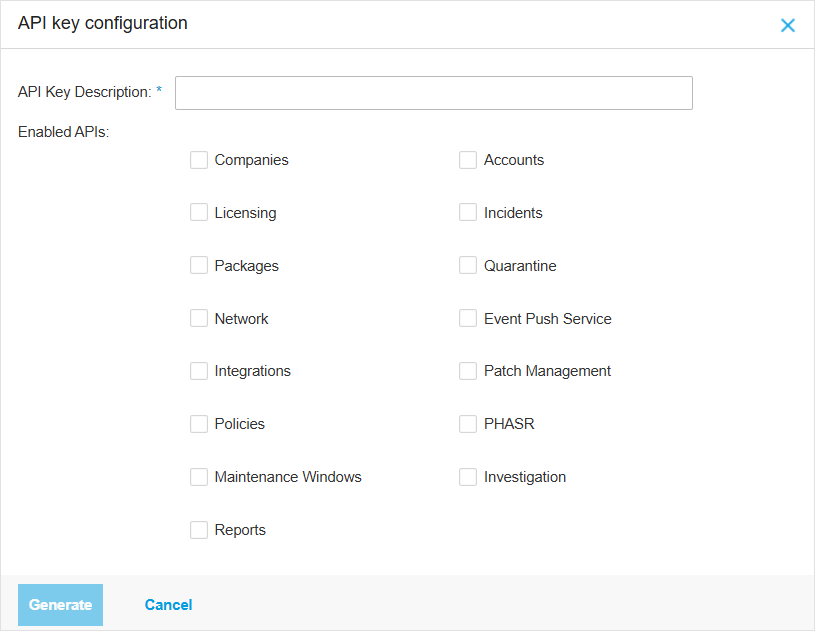
Give it a description you will recognise in a year; the key value itself is obfuscated in the list afterwards, so the description is the only thing that tells one key from another. Tick two boxes:
- Event Push Service: required. This is the API that registers and manages the push target. Bitdefender's own integration guides call it "Event Push Service API"; the dialog calls it Event Push Service.
- Companies: needed only to read your Company ID in step 3. If you would rather not leave it enabled, see the note at the end of that step.
The neighbouring entries are tempting and all of them are wrong here. Incidents, Network, Policies and Investigation grant read and write access to endpoints and policy; none of them affects what the push feed carries. A key that can push events cannot move an endpoint, change a policy or quarantine a file, and that is the point of keeping the selection to two.
Click Generate.
The key appears once, in a modal with a copy button beside it. After you close that window the value is gone: the list shows only the first four characters. There is no reveal, no reissue and no recovery: a lost key means generating a new one and re-registering the push target.

3. Read your Company ID
Fluency's install form asks for a Company ID, and the Control Center does not display one anywhere in the interface. Ask the API instead. It answers for whichever company the key belongs to, so there is nothing to look up first:
GZ_API='https://cloud.gravityzone.bitdefender.com/api'   # your Access URL from step 1
GZ_KEY='<the API key from step 2>'

curl -s -u "$GZ_KEY:" -H 'Content-Type: application/json' \
  -d '{"jsonrpc":"2.0","id":"1","method":"getCompanyDetails","params":{}}' \
  "$GZ_API/v1.0/jsonrpc/companies"
GravityZone authenticates with HTTP Basic using the API key as the username and an empty password, which is what -u "$GZ_KEY:" produces, trailing colon included. The reply looks like this, and result.id is the value you want:
{"id":"1","jsonrpc":"2.0","result":{"type":1,"name":"Example Ltd","id":"59a14b271da197c6108b4567","country":"GB",…}}
Once you have the ID, drop Companies. The key list lets you delete a key but not edit one, so that means generating a replacement with Event Push Service alone, a minute's work, and worth it: the Companies API also carries updateCompanyDetails, suspendCompany and deleteCompany, so leaving it enabled on a long-lived integration key grants a great deal more than the single read you needed it for.
4. Check where Event Push is pointing now
GravityZone stores a single push configuration per company: one service type, one URL, one token. Registering Fluency does not add a second subscriber, it overwrites whatever was there. If this tenant already streams to Splunk, QRadar, Sentinel or another collector through Event Push, that feed stops, silently, with no notice on either side.
Check before you install, not after:
curl -s -u "$GZ_KEY:" -H 'Content-Type: application/json' \
  -d '{"jsonrpc":"2.0","id":"2","method":"getPushEventSettings","params":{}}' \
  "$GZ_API/v1.0/jsonrpc/push"
A tenant with nothing configured answers {"result":{"status":0}}. A tenant with something configured returns the full settings object including the url it is pushing to; read that URL before you go any further. Where another SIEM genuinely has to keep receiving these events, Event Push is not the right transport for both; take that one to your Fluency contact rather than working around it.
Verify before you leave GravityZone
The two calls above have already exercised the credential end to end. Read them against this table before moving on: a wrong value caught here costs a minute, and the same value inferred later from an application that installs cleanly and collects nothing costs an afternoon.
| Response | What it means |
|---|---|
HTTP 200 and a result object | The key works and the API is enabled on it. Continue. |
HTTP 401, "details": "Invalid API key. Please generate an API key in Control Center." | Either the key is wrong or deleted (step 2), or the Access URL points at a different GravityZone cloud instance (step 1): a key exists only on the instance that issued it, so both mistakes produce this one message. |
HTTP 401, "details": "Authorization header not passed, HTTP Basic Authentication should be used." | The -u argument did not reach curl. Check the quoting, and the trailing colon. |
HTTP 200 with "code": -32601, "details": "The requested API is not available." | The API named at the end of the URL is not enabled on this key, or the path is misspelled. Note that this arrives as a 200: JSON-RPC reports its own errors in the body, so a script that only checks the status code will treat it as success. |
HTTP 429 with a Retry-After header | The per-key rate limit, which is 10 requests per second for these methods. Wait the stated number of seconds. |
Part 2: In Fluency
Install Bitdefender EventPush
- v2 interface
- Classic v1 interface
In the navigation rail, open Applications and click Install Application, then choose Bitdefender EventPush from the Endpoint Management category of the Application Catalog.
Go to Platform → Applications → Install Application From Template and choose Bitdefender EventPush from the Endpoint Management category.
All three parameters are required:
| Parameter | Notes |
|---|---|
| Company ID | The result.id from step 3. |
| Access URL | Pre-filled https://cloud.gravityzone.bitdefender.com/api. Replace it with the value from step 1 unless your tenant is on Cloud Instance 2. |
| API Key | The key from step 2. Masked once the application is installed. |
- v2 interface
- Classic v1 interface
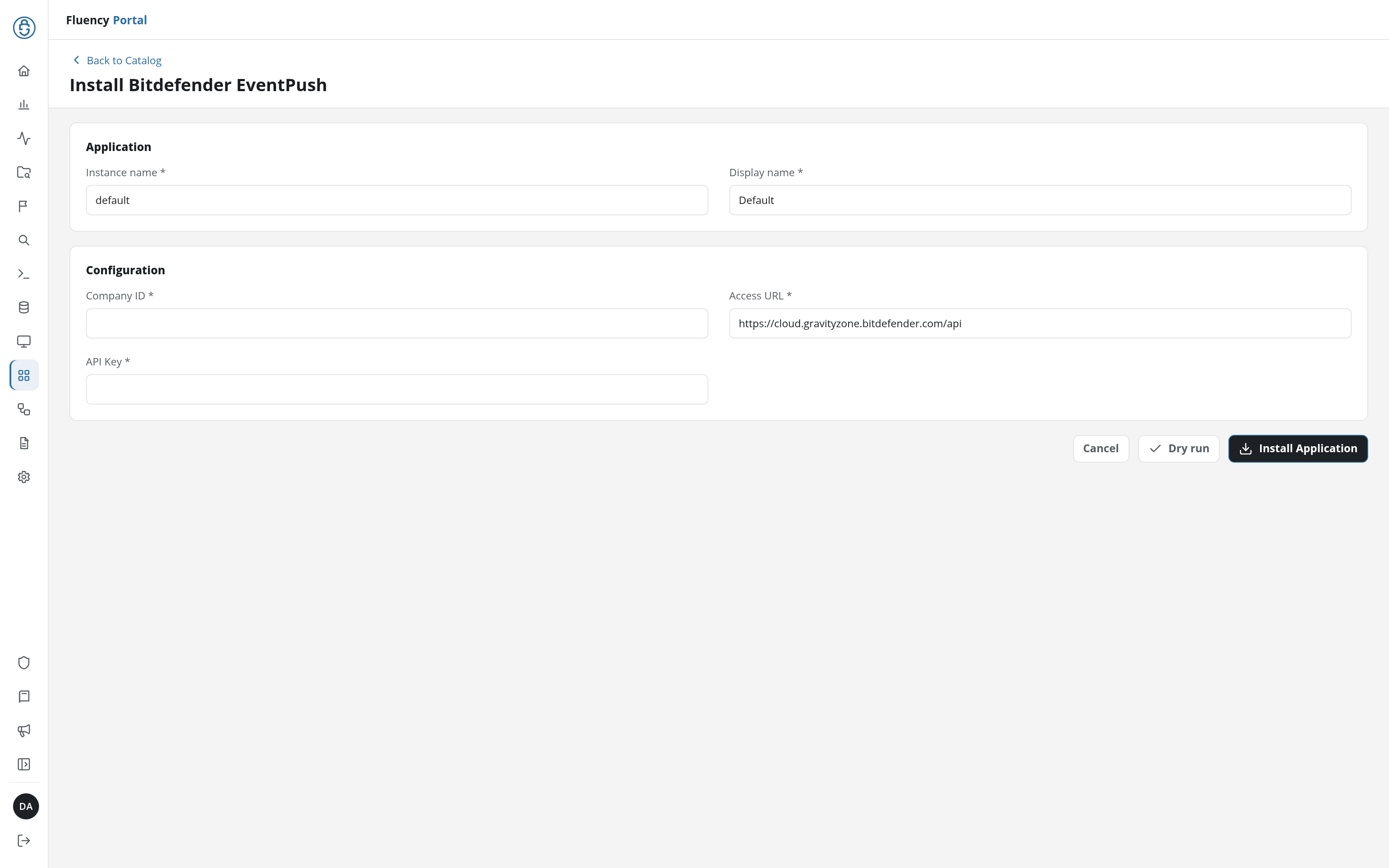
Click Dry run first to have the platform check the three values before anything is installed, then click Install Application. The Applications page opens with the notice Default is launching., and the new application is listed with a green Running badge once the pipeline is up.
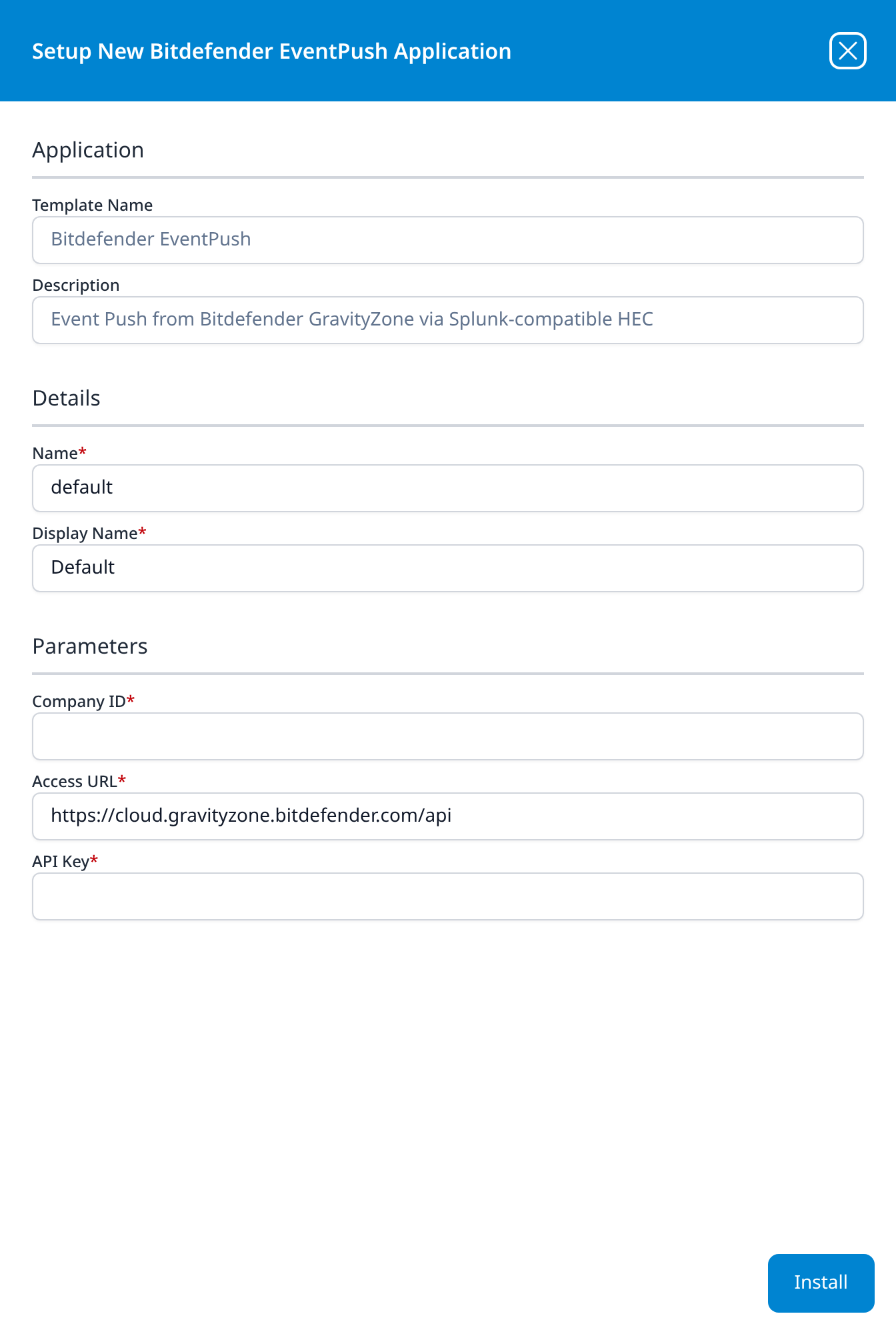
Press Install. The application then appears in the Installed Applications view, where its badge reads Running once the pipeline is up.
Unlike most templates, Bitdefender EventPush takes no datalake or datalake index name parameter: the destination is fixed by the template rather than chosen on the form, so there is nothing here to collide with another application. To see where the data actually lands, open the installed application's details and read its Actions list, which records every object the install created.
Confirm it is running
- v2 interface
- Classic v1 interface
The application is listed on Applications as Bitdefender EventPush, with its display name (Default if you left the form alone) beneath it.
The card is named Bitdefender EventPush: followed by the instance name (Default if you left the form alone).
A Running badge means the HEC listener is up; it does not mean GravityZone is sending anything, because a listener is a receiver and looks identical whether or not it has a sender. Two checks close that gap.
First, confirm GravityZone is pointed at Fluency. There is no page in the Control Center for this (Event Push is configured only through the API), and the Fluency form never asked for the HEC values, so registration has to happen at install time. Confirm it rather than assume it:
curl -s -u "$GZ_KEY:" -H 'Content-Type: application/json' \
  -d '{"jsonrpc":"2.0","id":"3","method":"getPushEventSettings","params":{}}' \
  "$GZ_API/v1.0/jsonrpc/push"
You want "status": 1 and a url matching the HEC Server URL in the application's Outputs section. If status is still 0, the registration did not happen; register it by hand.
Then send yourself a test event. GravityZone will manufacture one on demand, which exercises the whole path without waiting for real malware:
curl -s -u "$GZ_KEY:" -H 'Content-Type: application/json' \
  -d '{"jsonrpc":"2.0","id":"4","method":"sendTestPushEvent","params":{"eventType":"av"}}' \
  "$GZ_API/v1.0/jsonrpc/push"
Test events carry _testEvent_: true, so they are easy to find and easy to exclude later. See Confirm data is arriving for where to look.
GravityZone reloads its Event Push settings on a cycle, and Bitdefender documents that cycle as every ten minutes. A freshly registered target will not receive anything before the next reload, including test events. Silence at minute two means nothing; silence at minute twenty means something.
Bitdefender SecurityTelemetry HEC
Remember that this feed runs the other way round: install in Fluency first, then carry the generated values to GravityZone. Nothing arrives until the policy has reached the endpoints, so an empty index between those two steps is expected, not a fault.
Part 1: In Fluency
Install Bitdefender SecurityTelemetry HEC
- v2 interface
- Classic v1 interface
In the navigation rail, open Applications and click Install Application, then choose Bitdefender SecurityTelemetry HEC from the Endpoint Management category of the Application Catalog. The template takes no parameters: the form holds only the Application section's Instance name and Display name; click Install Application.
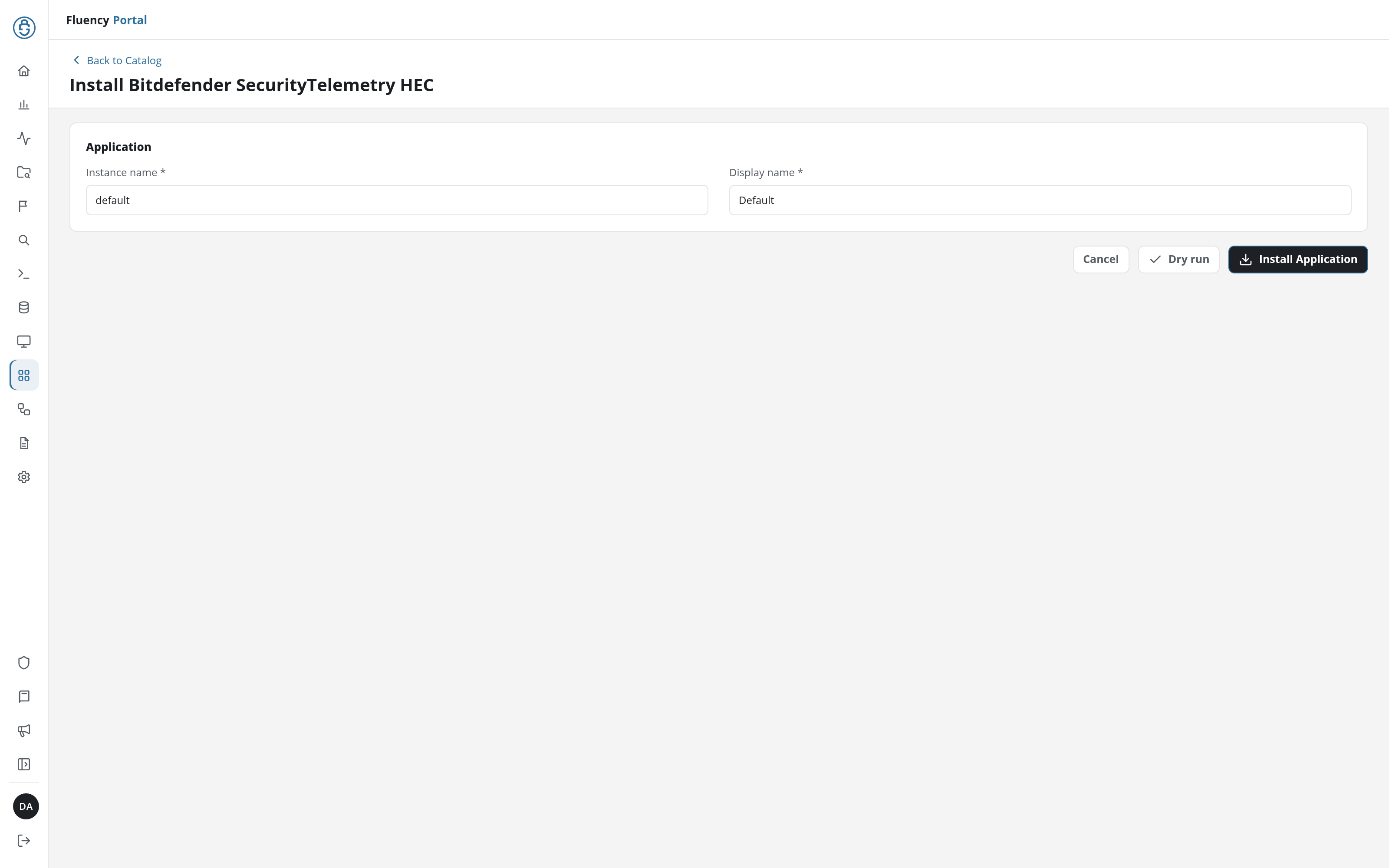
The Applications page opens with the notice Default is launching., and the new application is listed with a green Running badge once the pipeline is up.
Go to Platform → Applications → Install Application From Template and choose Bitdefender SecurityTelemetry HEC from the Endpoint Management category. The template takes no parameters; press Install.
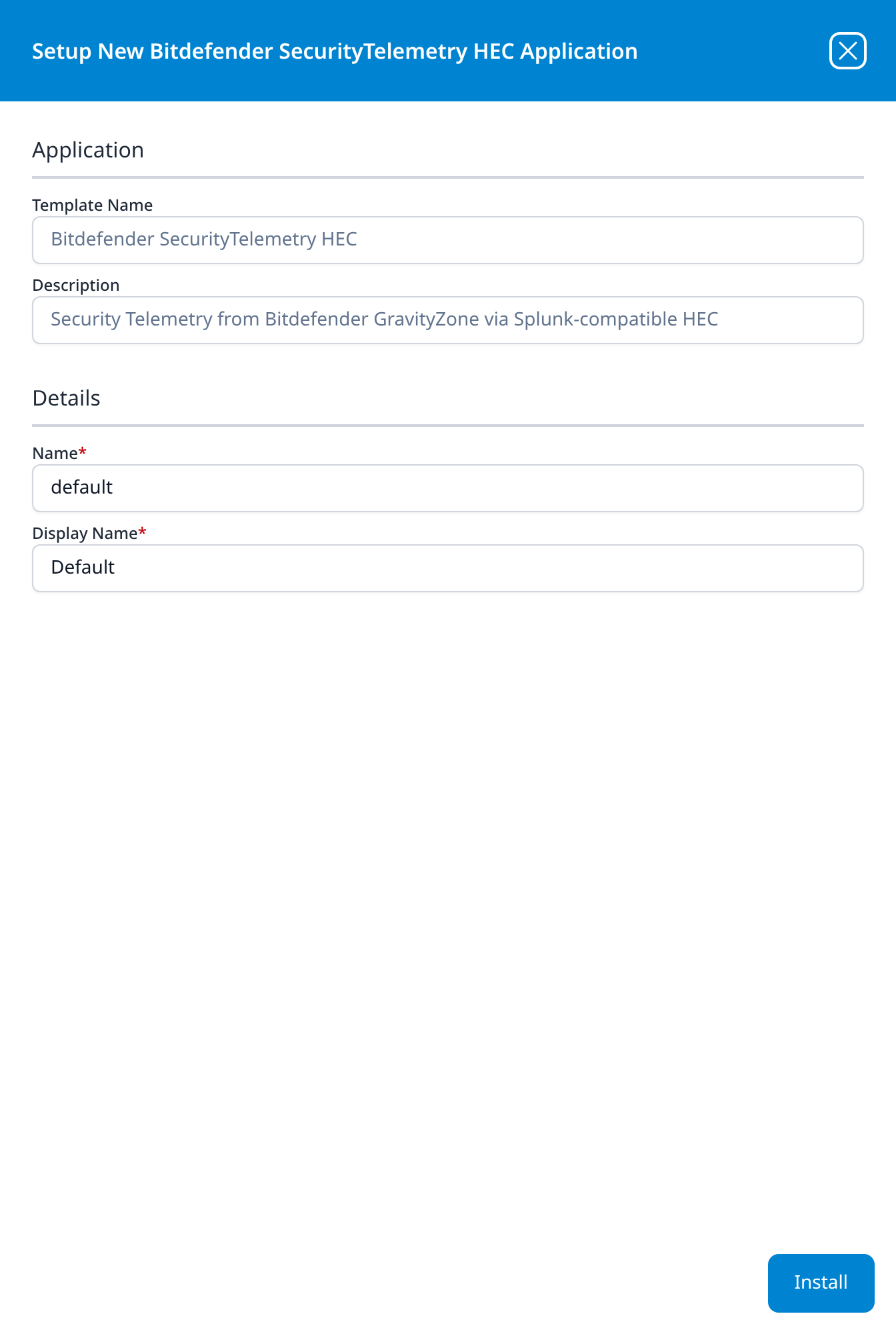
As with EventPush, there is no datalake or datalake index name parameter; the installed application's Actions list records what the install created.
Read the HEC Server URL and HEC Token
- v2 interface
- Classic v1 interface
On Applications, click the new application's row to open its details page. Its Outputs card, at the bottom left, holds values the installation produced rather than consumed, two fields:
Open the new application's details panel with the blue eye button. Below Details is an Outputs section, values the installation produced rather than consumed, holding two fields:
- HEC Server URL: goes into the policy's Server URL.
- HEC Token: goes into the policy's Token.
Anyone holding the URL and token can write arbitrary events into your data lake. They are as sensitive as the API key, and they travel in the opposite direction, towards the vendor rather than away from it, which makes them easy to treat casually. Move them straight into the policy; do not park them in a ticket, a chat message or a runbook.
If a token is exposed, install a second Bitdefender SecurityTelemetry HEC application to mint a fresh pair, repoint the policy, and only then uninstall the first.
Part 2: In GravityZone
Enable Security Telemetry on the policy
Open Policies, and edit the policy applied to the endpoints you want telemetry from, or clone it, edit the clone and reassign, which is the safer habit on a policy covering a large estate. Then go to General → Agent → Security Telemetry.
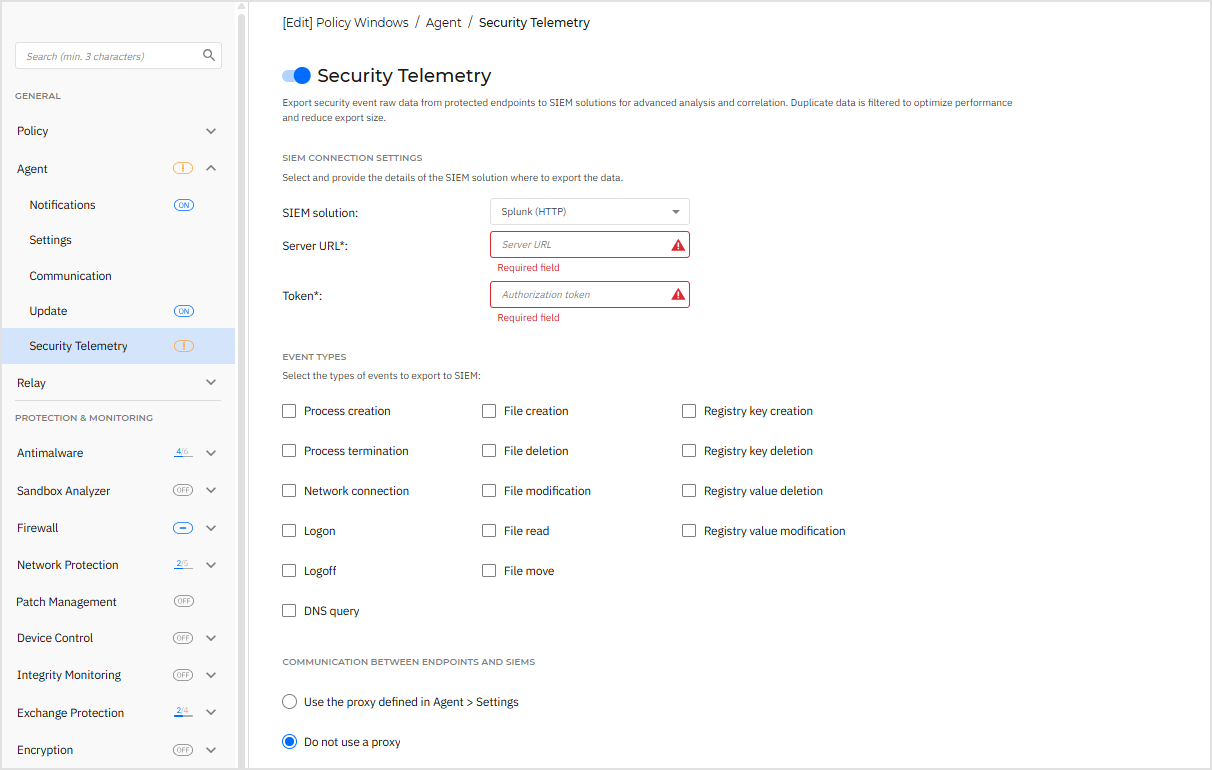
- Click the toggle to enable Security Telemetry.
- Under SIEM Connection Settings, set SIEM solution to Splunk (HTTP). The alternative, Syslog (JSON), sends to a syslog listener instead and is not what this template provides.
- Put the HEC Server URL into Server URL, and the HEC Token into Token.
- Under Event types, tick what you want. Process, file, registry and logon events are the safe starting set; leave DNS query and Network connection until you have measured the rest, and remember both need Network Attack Defense.
- Under Communication between endpoints and SIEMs, choose Use the proxy defined in Agent > Settings or Do not use a proxy. That is the same proxy the agent already uses to reach GravityZone, so where one works the other will.
- Click Save, and confirm the policy is assigned to the endpoints you intended.
Both require the Network Attack Defense module to be installed on the endpoint and enabled in the applied policy. Tick them in a policy that does not have it and the checkbox saves happily while the events never appear. Bitdefender also warns that DNS query events "can generate a significant volume of logs"; enable that one deliberately, and after you have seen what the rest of the feed costs.
The option appears only when Control Center cannot validate the collector's certificate; it exists for self-hosted SIEMs using self-signed certificates. Fluency's HEC endpoint presents a publicly-issued certificate, so if that checkbox shows up, something in the path is intercepting or re-signing TLS and that is the thing to fix. Ticking it hides the symptom without fixing the interception, and it only ever governed the Control Center's own check; the endpoints validate separately.
Confirm it is running
Policy changes reach endpoints on the agent's own sync, which is minutes for a machine that is online and longer for one that is not. GravityZone will tell you when an endpoint has picked it up: go to Network, click an endpoint that the policy covers, and on the Protection tab find Security Telemetry Status. Communication status should read Established.
Once it does, events flow as they occur: this is a live stream, not a poll, so the first records should appear within seconds of real activity on that endpoint. Zero rows before Established appears is expected; zero rows after it is a problem.
Maintenance
Rotating the GravityZone API key
GravityZone API keys carry no expiry date (the key list has a Created column and no counterpart), so rotation is a decision rather than a deadline. Deleting one, on the other hand, takes effect at once: Bitdefender's own warning is that "any connections to third party apps using them will be terminated". Rotate in this order:
- Generate a replacement key in My Account → API keys with the same APIs enabled.
- In Fluency, uninstall the Bitdefender EventPush application and install it again with the new key. Template parameters are read-only after install, so there is no way to edit the key in place. To uninstall, click Uninstall at the top right of the application's details page (v1: the red Uninstall button at the foot of its details panel on Platform → Applications).
- Confirm with
getPushEventSettingsthatstatusis1and the URL is right. - Only then delete the old key in the Control Center.
Deleting first leaves a window in which the push target cannot be re-registered, and because GravityZone stops trying for good once its retry buffer overflows, a long enough window turns the feed off rather than merely delaying it.
Rotating the HEC token
The HEC values are generated per installed application and cannot be regenerated in place. Install a second Bitdefender SecurityTelemetry HEC application, put its Outputs into the policy, wait for Communication status to return to Established, then uninstall the first.
Removing the integration
EventPush. Turn the push off at the source first, or GravityZone will keep sending to an endpoint that has gone:
curl -s -u "$GZ_KEY:" -H 'Content-Type: application/json' \
  -d '{"jsonrpc":"2.0","id":"5","method":"setPushEventSettings","params":{"status":0}}' \
  "$GZ_API/v1.0/jsonrpc/push"
Bitdefender documents serviceType, serviceSettings and subscribeToEventTypes as required on this method, so if the minimal call above is rejected, repeat the full registration call with status set to 0. Confirm with getPushEventSettings, then uninstall the application in Fluency and delete the API key in My Account → API keys.
SecurityTelemetry. Disable Security Telemetry in the policy and save, so the endpoints stop sending, then uninstall the application in Fluency. Doing it the other way round leaves every endpoint posting to a dead URL until the policy change reaches it.
To uninstall, click Uninstall at the top right of the application's details page (v1: the red Uninstall button at the foot of its details panel on Platform → Applications).
Troubleshooting
| Symptom | Likely cause | Fix |
|---|---|---|
| EventPush application is Running, nothing has ever arrived | The push target was never registered | getPushEventSettings returns "status": 0. Register it (see Under the hood) or reinstall the application. |
| EventPush worked, then stopped, and never recovered on its own | GravityZone gave up. Undelivered events queue in a buffer that holds 1000 messages; past that, the service stops trying and resets status to 0 | Fix whatever made the collector unreachable, then set status back to 1. It will not restart itself, and no notification is raised on either side. getPushEventStats shows the error counters that explain which failure it was. |
| Another SIEM stopped receiving Bitdefender events around the time this was installed | Event Push holds one destination per company, and registering Fluency replaced it | Confirm with getPushEventSettings. See step 4; this is not recoverable by having both. |
HTTP 401, "Invalid API key. Please generate an API key in Control Center." | Wrong or deleted key, or an Access URL pointing at a different cloud instance | Both produce this message. Re-read the Access URL from My Account → Control Center API, then the key. |
"code": -32601, "The requested API is not available." | That API is not enabled on the key | Event Push Service for the push methods, Companies for getCompanyDetails. The key's enabled APIs are listed in the API keys table. |
HTTP 429 | The per-key rate limit: 10 requests per second for these methods | Honour the Retry-After header. |
| Security Telemetry section is absent from the policy | The licence does not include the EDR feature | Confirm the subscription with Bitdefender. Nothing on the Fluency side changes this. |
| Policy saved, Communication status never reaches Established | The endpoint cannot reach the HEC URL | The agent posts directly, so check that endpoint's egress, its host firewall and its proxy, not the Control Center's. TLS 1.2 or higher is required. |
| Everything Established, but no DNS or network-connection events | Network Attack Defense is not installed on the endpoint or not enabled in the policy | Both are required for those two event types alone; the rest of the feed is unaffected. |
| Control Center refuses to save the policy with a certificate error | Something is intercepting or re-signing TLS between Control Center and the collector | Fix the interception. Do not reach for Bypass collector CA validation (see the note in Part 2). |
| Events in the lake are older than expected, or arrive in a burst | The failed-delivery buffer drained after a reachability problem was fixed | Expected. Up to 1000 queued messages are delivered on recovery. |
Data reference
The event types each feed carries, for searches and detection rules written against them. How the records are tagged in the lake is in Under the hood.
EventPush event types
GravityZone pushes each event as a Splunk HEC record as it happens. Which types are sent is chosen when the push target is registered; the Event Types table is the vendor's full list, and every record carries its event-type identifier and the company it belongs to.
| Group | Event identifiers | Contents |
|---|---|---|
| Detections | av, avc, hd, antiexploit, aph, network-sandboxing, ransomware-mitigation, network-monitor, exchange-malware | Antimalware, Advanced Threat Control, HyperDetect, Advanced Anti-Exploit, antiphishing, Sandbox Analyzer, ransomware mitigation, Network Attack Defense and Exchange detections: the malware or attack name, the endpoint and user, the file path and hash where there is one, and the action the agent took. |
| Policy enforcement | fw, uc, dp, device-control | What the firewall, content control, data protection and device control modules blocked, and under which rule. |
| EDR | new-incident, new-extended-incident | A new Root Cause Analysis appearing under Incidents, flattened into the items extracted from the RCA so it can be correlated without opening the console. |
| Estate and agent health | install, uninstall, registration, modules, hwid-change, endpoint-moved-in, endpoint-moved-out, task-status, troubleshooting-activity, supa-update-status, sva, sva-load, adcloud, security-container-update-available | Agents installed and removed, licence registration changes, protection modules enabled or disabled, hardware ID changes, endpoints moved between companies, task outcomes, Security Server status and load, and Active Directory sync problems. Unglamorous, and the reason an endpoint that stops reporting is visible at all. |
SecurityTelemetry event types
The agent sends raw security events as JSON as they occur, straight from each endpoint. The event types are chosen per policy from a fixed list:
| Group | Events | Notes |
|---|---|---|
| Process | Process creation, process termination | Command line, elevation and integrity level, parent, hashes. |
| File | File creation, deletion, modification, read, move | |
| Registry | Registry key creation and deletion, registry value modification and deletion | Windows only. |
| User | Logon, logoff | Fluency's parser adds a geo-IP lookup on the source address of logon events. |
| Network | Network connection | Fluency's parser also emits a normalised network flow record from these. |
| DNS | DNS query | Needs Network Attack Defense, and is the single largest contributor to volume. |
Every record carries company_id, hardware_id (a stable per-endpoint identifier generated by BEST), machine_name and a datetime in Unix epoch form.
Under the hood
Engineering reference: wire format, registration, and what the records look like in the lake
Registration. Event Push is configured entirely through the Public API; there is no page for it in the Control Center. The method is setPushEventSettings on <Access URL>/v1.0/jsonrpc/push, and this is the call to make by hand if an install did not take:
curl -s -u "$GZ_KEY:" -H 'Content-Type: application/json' -d '{
  "jsonrpc": "2.0", "id": "1", "method": "setPushEventSettings",
  "params": {
    "status": 1,
    "serviceType": "splunk",
    "serviceSettings": {
      "url": "<HEC Server URL from the application Outputs>",
      "requireValidSslCertificate": true,
      "splunkAuthorization": "Splunk <HEC Token from the application Outputs>"
    },
    "subscribeToEventTypes": {
      "av": true, "avc": true, "hd": true, "antiexploit": true, "aph": true,
      "network-sandboxing": true, "ransomware-mitigation": true, "network-monitor": true,
      "fw": true, "uc": true, "dp": true, "device-control": true,
      "new-incident": true, "new-extended-incident": true,
      "install": true, "uninstall": true, "registration": true, "modules": true,
      "task-status": true, "hwid-change": true, "adcloud": true
    }
  }
}' "$GZ_API/v1.0/jsonrpc/push"
serviceType is splunk because the Fluency endpoint is Splunk-HEC compatible; the token goes in splunkAuthorization prefixed with the literal word Splunk, as Splunk's own HEC requires; and requireValidSslCertificate stays true, because the endpoint presents a publicly-issued certificate and there is no reason to stop checking it.
subscribeToEventTypes is a complete replacement, not a delta. Every type you omit is switched off, so this object has to list everything you want, not just what you are adding. The set above is a reasonable default rather than the full catalogue; the Event Types table has the rest, and getPushEventSettings will show you what is currently subscribed before you overwrite it. The call returns {"result": true}.
Delivery contract. GravityZone requires a 2xx response to every push. Anything else, including no response, counts as an error, queues the message, and counts towards the 1000-message buffer that ends with the service disabling itself. Each request carries an Event-Push-Service-Md5 header computed as md5(api_key + md5(body)), which a receiver can use to authenticate the sender independently of the token.
Settings reload. GravityZone re-reads its push configuration every ten minutes, so registration changes are not instant.
How the records land. Both feeds are parsed on arrival, and both tag their output so the two are separable in search:
| EventPush | SecurityTelemetry | |
|---|---|---|
| Payload under | @bep | @bst |
@event_type | bep | bst |
@source | eventpush | telemetry |
@sender | bitdefender | bitdefender |
@parser | fpl-BitdefenderEventPush | fpl-BitdefenderTelemetry |
So @sender:"bitdefender" finds everything from this vendor and @event_type splits the two feeds. Fields sit under their prefix (@bst.user_name, @bst.event_name), which is the form you will see in behavior rules built on this data, such as the worked example in Investigating a behavior alert. The telemetry parser additionally runs a geo-IP lookup on ip_source for log_on events and emits a normalised flow record for network_connection events, so those show up as network flows as well as raw events.
Raw Events does not gate this. GravityZone's company-level Raw Events page filters what the console processes. Bitdefender states explicitly that it does not affect endpoints with Security Telemetry enabled in policy, so the policy checkboxes are the only control over what reaches Fluency, and turning events off in Raw Events to save console volume will not reduce what you ingest.
Existing push registrations. A Bitdefender integration registered from the Event Push API Wizard on Platform → Integrations, or configured by Fluency support, keeps pushing to whatever HEC endpoint it registered; check getPushEventSettings before installing the template over the top of it, for the reason given in step 4.
References
Vendor
- Public API: the Access URL, API key generation, and HTTP Basic authentication.
- Push: the five Event Push methods.
- setPushEventSettings: service types, service settings, and the twenty source addresses to allow.
- getPushEventStats: the error counters, and the 1000-message buffer that disables the service.
- Event Types: every event category and its API identifier.
- Push event JSON RPC messages: per-event field reference.
- Integrate GravityZone Cloud with Splunk: the worked Event Push registration this page adapts.
- Security Telemetry: the policy section, its event list and its licence requirement.
- Send security telemetry from GravityZone to Splunk Enterprise: prerequisites, agent versions, and the Security Telemetry Status check.
- Security Telemetry events sent to SIEM: field-by-field reference for the raw event types.
- API rate limits: per-key limits and the
Retry-Afterbehaviour.
Fluency
- Bitdefender EventPush and Bitdefender SecurityTelemetry HEC: the two Bitdefender templates as the interface presents them (v1: Install Application From Template).
- Application Details: an installed application's details, and where Outputs appears (v1: Installed Applications).
- HEC (Splunk-compatible): the transport both feeds use.
- Bitdefender parser cookbook: the processors behind
@bepand@bst. - Confirm data is arriving