PaloAlto Cortex XDR
Fluency polls Palo Alto Networks' Cortex XDR public API for incidents, alerts and audit logs; nothing is installed and nothing is pushed from Palo Alto. Cortex XDR is both a sensor and a correlation layer: its agents and the firewalls, cloud logs and identity sources feeding it raise alerts, and its analytics engine groups related alerts into incidents. What arrives is therefore already triaged (scored, grouped and mapped to MITRE ATT&CK), which makes it good material for driving tickets and a poor substitute for raw endpoint telemetry if you need to hunt across process trees.
Authentication is an API key and the numeric API Key ID that identifies it, issued with a read-only role at one of two security levels. The level you choose has to be mirrored in Fluency's AuthMode parameter, whose default matches Advanced; see step 2.
The setup has two halves:
- In Cortex XDR: generate an API key with a read-only role, then collect the key, its ID, and the tenant's API URL.
- In Fluency: install the PaloAlto Cortex XDR application template and paste those values into its form.
What arrives
| Stream | What it holds | Lands in |
|---|---|---|
| Incidents | Correlated groups of alerts: severity, status, assignee, the hosts and users involved, MITRE tactics and techniques, and a link back into the console. | The Cortex index |
| Alerts | Individual detections, each with the process, file and network detail behind it. | The Cortex index |
| Management audit logs | Console activity: sign-ins, configuration changes, response actions. | The Cortex index |
| Agent audit reports | Agent-side events: installs, upgrades, policy applications, scan results. | The Cortex index |
Incidents, alerts and agent audit reports need a Cortex XDR Prevent, Pro per Endpoint or Pro per GB licence; without one the API refuses them with 402 while management audit logs still arrive (see Before you begin). The key's role caps what is collected, and on Cortex XDR 5 with Scope Based Access Control enabled so does its scope: a key scoped away from your assets collects nothing, without an error (see step 2).
Endpoints, the licence each stream needs, and how incidents relate to alerts are in Data reference.
Before you begin
A Cortex XDR licence that covers the APIs you want. The Incidents and Alerts APIs need Cortex XDR Prevent, Cortex XDR Pro per Endpoint or Cortex XDR Pro per GB. This is the one prerequisite that does not fail loudly: a key with the right role on a tenant without the right licence authenticates successfully and then returns 402 Unauthorized access. User does not have the required license type to run this API. Management audit logs need no licence at all, which makes them a useful control when you are trying to tell a licence problem from a credential problem.
An administrator who can reach Settings → Configurations → Integrations → API Keys. The roles offered in the key's Role list are whatever has been defined for the tenant, in Cortex Gateway or in Cortex XDR Access Management, so if the read-only role you want is not on that list, it has to be created there first.
The tenant's API URL: copied, not constructed. Cortex XDR is deployed into one of 21 regions, and the host name carries both the tenant and the region: https://api-<tenant>.xdr.<region>.paloaltonetworks.com. Step 4 copies it out of the console. Do not type it from memory.
The address in the administrator's browser is https://<tenant>.xdr.<region>.paloaltonetworks.com. The API host is the same name with api- in front of it. Paste the console URL into Fluency and you get a host that resolves, answers, and returns the sign-in page instead of JSON, a failure that looks nothing like a bad credential. Use Copy API URL and you cannot get this wrong.
Cortex XDR 5 renamed incidents and alerts in the console, not in the API. From Cortex XDR 5, Incidents are called Cases and Alerts are called Issues, and the Alert Source field is now Detection Method. Palo Alto states that existing APIs continue to function as expected after the upgrade, including the Alerts and Incidents APIs, and adds new Cases and Issues APIs alongside them. The integration calls the Incidents and Alerts APIs, so its records keep the names incidents and alerts. If your console shows Cases and Issues, you are on Cortex XDR 5, and everything here applies.
On Cortex XDR 5, check whether Scope Based Access Control is on. SBAC is disabled by default under Settings → Configurations → General → Server Settings. Where it has been enabled, an API key also carries a Scope, and a key whose scope excludes the assets you care about authenticates, returns 200, and returns nothing. If SBAC is on in this tenant, set the key's scope deliberately in step 2 rather than accepting the default.
Access to the Fluency portal with permission to install applications.
Part 1: Cortex XDR
The screenshots in this section come from another vendor's published guide and show the pre-5 Generate API Key dialog, with a General tab and a Components accordion. On Cortex XDR 5 the same dialog has a Role tab and a Scope tab instead; the fields named below are all still there, under Role. The navigation path is unchanged.
1. Open the API Keys page
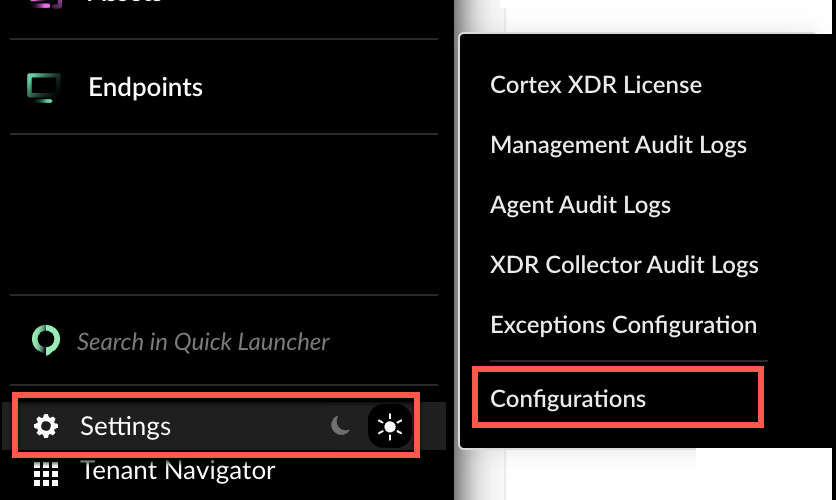
In the Cortex XDR console, select Settings at the foot of the left rail, then Configurations.
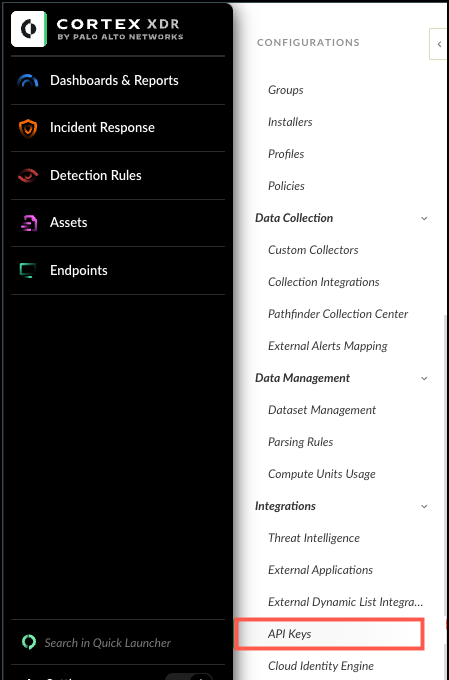
In the CONFIGURATIONS panel, scroll to Integrations and select API Keys.
2. Create the key
On the API Keys page, select + New Key.
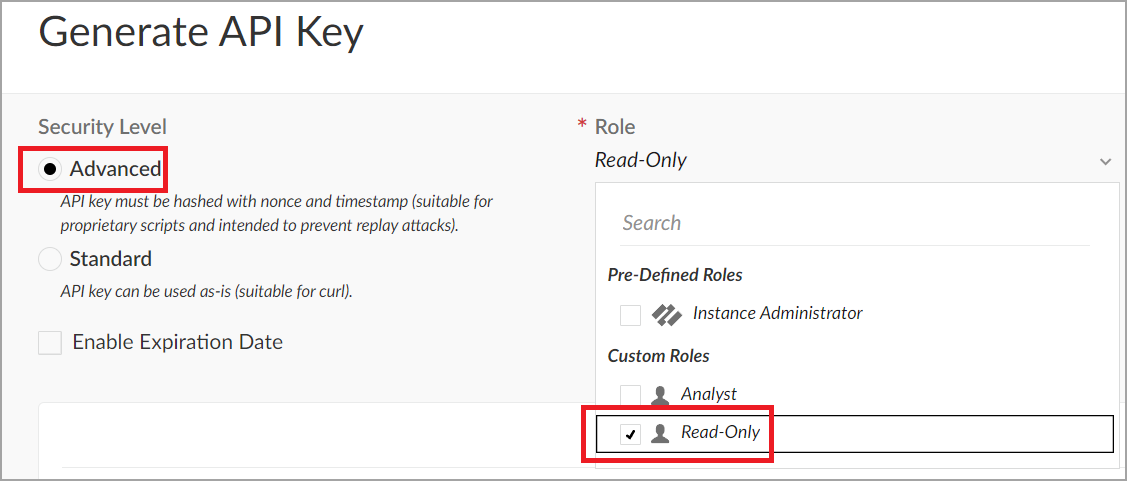
- Security Level: Advanced. See the caution below; this is the field that has to agree with Fluency.
- Role: a read-only role. See the tip below.
- Enable Expiration Date: optional, and worth using. Cortex tracks the expiry on the API Keys page and raises an API Key Expiration notification in the Notification Center one week and one day before the date. Fluency gives you no such warning, so this checkbox is the only advance notice you will get.
- Comment: free text. Say which Fluency instance holds the key, so a later reader of this list knows what revoking it would break.
- Scope: Cortex XDR 5 only, and only relevant where SBAC has been enabled. See Before you begin.
Select Generate.
The two levels are not two strengths of the same credential; they are two different ways of signing a request. A Standard key is sent verbatim in the Authorization header. An Advanced key is never sent at all: the client hashes it together with a nonce and a timestamp and sends the digest, which is why Palo Alto describes Advanced as replay-resistant and unsuitable for plain cURL.
The Fluency template records that choice in its AuthMode parameter, which arrives pre-filled with advanced. Generate an Advanced key and the default is already right. Generate a Standard key and you have a free-text field to correct with a value the form does not offer, does not validate, and does not document; so unless you have a reason to prefer Standard, choose Advanced and leave AuthMode alone.
This integration only reads. Palo Alto ships a default role called Viewer, described as broad read-only access across almost all areas (dashboards, policies, endpoints, configurations and audit) with no edit, respond or configure permissions. That is the right shape for a collector: it covers every stream in What arrives and it cannot isolate an endpoint or change a policy if the key leaks.
Do not reach for Instance Administrator because it is the one you recognise. A role that turns out too broad is a standing risk; a role that turns out too narrow fails as 403 Forbidden access. The provided API Key does not have the required RBAC permissions to run this API. after the application is already installed, which is a more expensive place to discover it than the verification step below.
Tenants often define their own read-only roles too; the screenshot above shows one named Read-Only. Either works, provided it can view incidents and alerts.
3. Copy the API key
Cortex shows the generated key once.
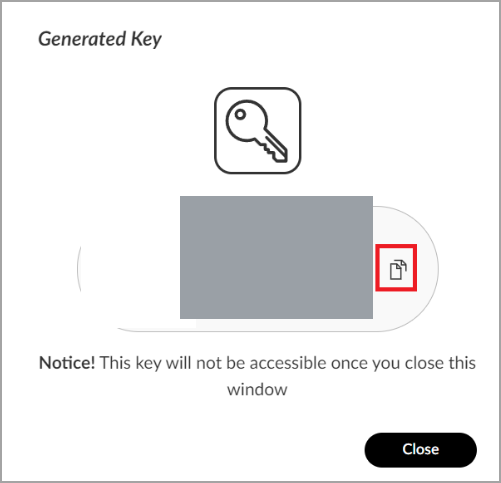
The dialog says it plainly: "This key will not be accessible once you close this window." There is no reveal and no regenerate. If you lose it, delete the key on the API Keys page and generate a new one.
4. Read the API Key ID and the API URL
The key you just copied is only half the credential, and the other half is not in that dialog; it is a column in the table behind it.
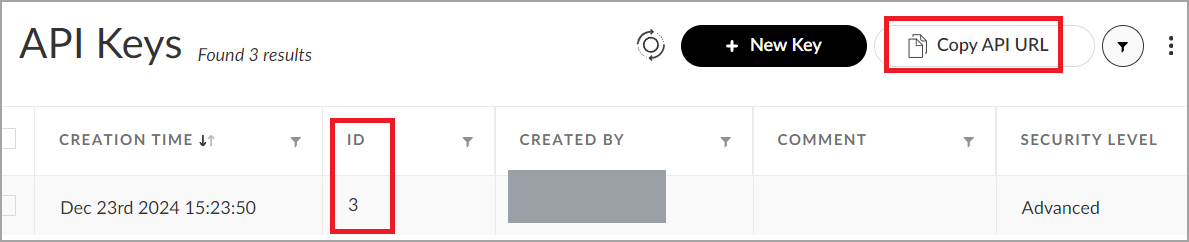
- Find your key's row and note the value in the ID column. It is a small integer (
1,2,3), not a long string. - With the row selected, click Copy API URL. That puts
https://api-<tenant>.xdr.<region>.paloaltonetworks.comon the clipboard. Paste it somewhere you can read before it is overwritten.
The API Key ID is a one- or two-digit number; The API Key is a long random string. They are easy to tell apart and still easy to swap, because the ID field is short and a short field invites whatever short value is on the clipboard. A transposed pair authenticates as nothing and returns 401, exactly like a mistyped key.
You should now be holding four values:
| Value | Where it came from |
|---|---|
| API Key | The Generated Key dialog in step 3 |
| API Key ID | The ID column of the API Keys table |
| API URL | The Copy API URL button, scheme and api- prefix included |
| Security Level | Advanced or Standard, as chosen in step 2 |
The console, the Fluency form and Palo Alto's API reference each name these differently:
| Value in the Cortex XDR console | Fluency parameter | Sent to the API as |
|---|---|---|
| The key from the Generated Key dialog | The API Key | Authorization: verbatim for a Standard key, as a SHA-256 digest for an Advanced one |
| ID column | API Key ID | x-xdr-auth-id |
| Copy API URL | Tenant API base URL | the request host |
| Security Level | AuthMode | not a header; it selects which headers are sent |
Verify before you leave Cortex XDR
One request confirms the URL, the key, the ID, the role and the licence together. For an Advanced key, Cortex expects the SHA-256 digest of the key, a 64-character nonce and a millisecond timestamp concatenated in that order:
FQDN='api-yourtenant.xdr.us.paloaltonetworks.com'
KEY='<the API Key>'
KEYID='<the API Key ID>'

NONCE=$(LC_ALL=C tr -dc 'A-Za-z0-9' < /dev/urandom | head -c 64)
TS=$(( $(date -u +%s) * 1000 ))
SIG=$(printf '%s%s%s' "$KEY" "$NONCE" "$TS" | sha256sum | cut -d' ' -f1)

curl -s -w '\n%{http_code}\n' -X POST "https://$FQDN/public_api/v1/incidents/get_incidents" \
  -H "x-xdr-timestamp: $TS" \
  -H "x-xdr-nonce: $NONCE" \
  -H "x-xdr-auth-id: $KEYID" \
  -H "Authorization: $SIG" \
  -H "Content-Type: application/json" \
  -d '{"request_data":{"search_from":0,"search_to":1}}'
With a Standard key, drop the x-xdr-timestamp and x-xdr-nonce headers and send Authorization: $KEY unhashed; everything else is identical. On macOS, use shasum -a 256 in place of sha256sum.
| Response | What it means |
|---|---|
200 with an incidents array | URL, key, ID, role and licence are all correct. |
200 with "result_count": 0 | The credential is fine; the tenant had no incidents matching, or SBAC is scoping them away. See Confirm it is running before treating this as a fault. |
400 Bad Request. Got an invalid JSON. | The request body is malformed; check the -d argument survived the paste. |
401 Unauthorized access. | Wrong key, wrong ID, the two swapped, an expired key, or an Advanced key signed as Standard. Back to step 2. |
402 Unauthorized access. User does not have the required license type to run this API. | The credential is good and the tenant's licence does not cover this API. Re-run against /public_api/v1/audits/management_logs, which needs no licence; a 200 there confirms the key and isolates the problem to entitlement. |
403 Forbidden access. | The key authenticated but its role is too narrow. Generate a new key with a read-only role that can view incidents and alerts. |
429 / Too many requests | More than 10 requests per second reached the tenant, across every consumer of its API. Wait and retry. |
| An HTML sign-in page instead of JSON | The host is the console, not the API. Add the api- prefix, or use Copy API URL. |
curl: (6) Could not resolve host | The host name is mistyped. Copy it from the console. |
Part 2: Fluency
Install the Application
- v2 interface
- Classic v1 interface
In the navigation rail, open Applications and click Install Application, then choose PaloAlto Cortex XDR from the Endpoint Management category of the Application Catalog.
Go to Platform → Applications → Install Application From Template and choose PaloAlto Cortex XDR from the Endpoint Management category.
Every parameter is required:
| Parameter | Notes |
|---|---|
| Tenant API base URL | The value from Copy API URL in step 4, pasted whole: scheme, api- prefix, no trailing path. Not the console URL. |
| API Key ID | The small integer from the ID column: the identifier of the key, not the key itself. |
| AuthMode | A plain text field, not a drop-down, pre-filled with advanced. It records the Security Level the key was issued at. Leave it alone if you followed step 2. |
| The API Key | The key value from step 3. Masked once the application is installed. |
| datalake | Pre-filled managed. |
| datalake index name | Pre-filled Cortex. Two applications writing to the same index name in the same lake will collide, and the second one aborts. |
- v2 interface
- Classic v1 interface
datalake and datalake index name sit in the collapsed Advanced configuration section below Configuration; click its heading to reach them.
Leave Instance name and Display name at default / Default unless you are installing a second instance (collecting from two Cortex tenants, for example), in which case give each one a name you will recognise on the applications list, and give the second one its own datalake index name.
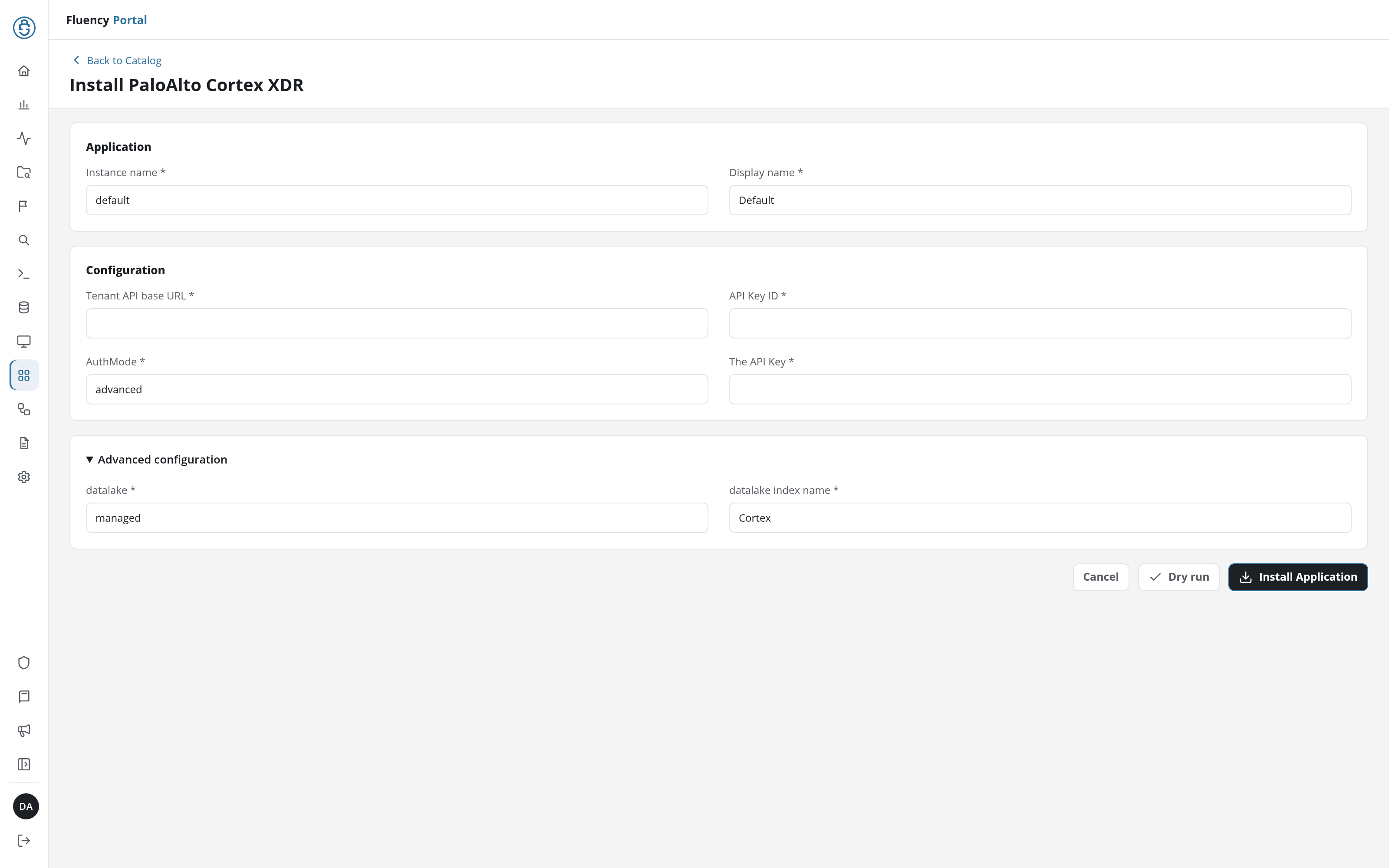
Click Dry run first to have the platform check the URL and the key before anything is installed, then click Install Application. The Applications page opens with the notice Default is launching., and the new application is listed with a green Running badge once the pipeline is up.
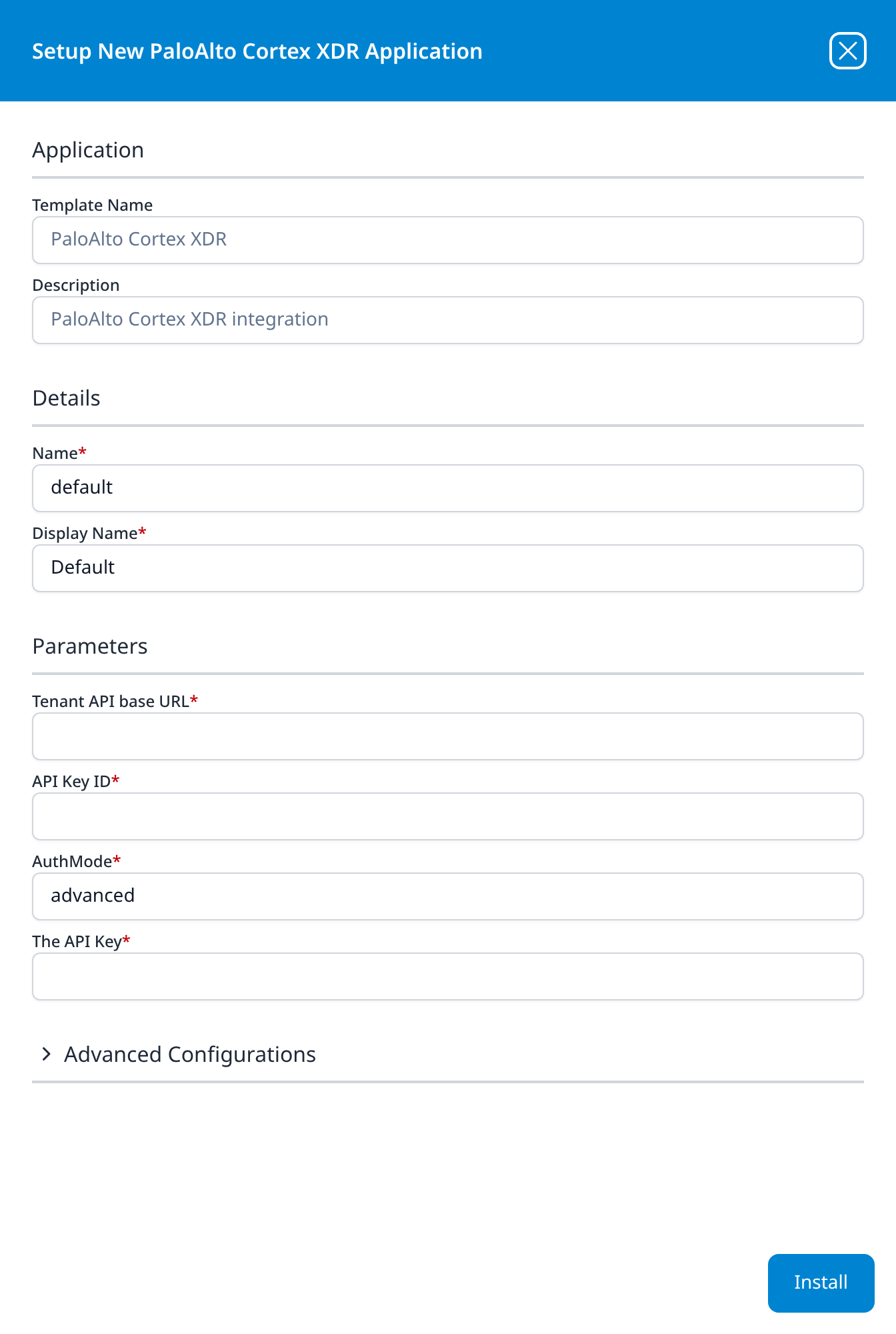
Leave Name and Display Name at default / Default unless you are installing a second instance (collecting from two Cortex tenants, for example), in which case give each one a name you will recognise on the applications list, and give the second one its own datalake index name.
Press Install. The application then appears in the Installed Applications view, where its badge reads Running once the pipeline is up.
Confirm it is running
- v2 interface
- Classic v1 interface
The application is listed on Applications as PaloAlto Cortex XDR, with the display name Default beneath it. Its badge should read Running in green within a few seconds; a red Error badge means the pipeline aborted or reported errors in the last hour, and the details page shows the error message beneath the summary figures.
Click its row to open the application details page: the summary card carries the status and the traffic in and out, Parameters shows the values back with the key masked, and Actions lists the setup steps the install carried out.
The application appears under Installed Applications as PaloAlto Cortex XDR: Default. Its badge should read Running in green within a few seconds; Aborted in red means the pipeline stopped on an error, and the details panel will carry the message.
Every field in that panel is read-only.
Nothing an install records can be edited afterwards. Changing the key, the ID, the URL or the AuthMode means uninstalling the application and installing it again.
An empty Cortex index shortly after install is not by itself evidence of a fault. Cortex XDR only raises incidents when its analytics correlate something, and a quiet estate can go days without one. Before treating silence as a failure, work down this list:
- Open Incident Response in the Cortex XDR console (Cases on Cortex XDR 5) for the same time window. If Palo Alto's own queue is empty, so is the feed, and nothing is wrong.
- Check the licence with the
management_logsprobe from Verify before you leave Cortex XDR. A200there and a402on incidents is an entitlement problem, not a collection problem. - Check SBAC, if this tenant has it enabled. A key with no scope sees no cases and no issues.
- Only then go to Troubleshooting.
See Confirm data is arriving for how to check that events are landing.
Maintenance
Rotating the API key
If you set an expiry, Cortex will tell you a week ahead in its own Notification Center, but nothing tells Fluency, and collection simply stops on the day. Rotate before then:
- In Cortex XDR, go to Settings → Configurations → Integrations → API Keys and generate a new key with the same Security Level and role. Leave the old key in place for now.
- Copy the new key, and note its new ID: a new key gets a new ID, and reusing the old one is the most common way to get a
401out of a rotation. - In Fluency, uninstall the PaloAlto Cortex XDR application and install it again with the new key and ID. Template parameters are read-only after install, so reinstalling is the supported way to change a credential. To uninstall, click Uninstall at the top right of the application's details page (v1: the red Uninstall button at the foot of its details panel on Platform → Applications).
- Once data is flowing again, delete the old key in Cortex XDR. Generating a new key does not revoke the old one; it stays valid until you remove it.
Removing the integration
Uninstall the application in Fluency first, with the Uninstall button at the top right of its details page (v1: the red Uninstall button at the foot of its details panel on Platform → Applications), so the pipeline stops cleanly before its credentials stop working. Then delete the key on the Cortex XDR API Keys page.
Troubleshooting
| Symptom | Likely cause | Fix |
|---|---|---|
| The application shows Error (v1: Aborted) immediately after install | The key was mistyped (it is shown exactly once, so a bad paste is easy) or the base URL is missing its api- prefix | Uninstall, then reinstall. If the key was never captured, delete it and generate a new one; it cannot be recovered. |
Every call returns 401 although the key was pasted correctly | The API Key ID and The API Key are the wrong way round, the ID belongs to a different key, or AuthMode does not match the key's Security Level | Check the ID against the ID column, and check AuthMode against the SECURITY LEVEL column on the same page. |
Authentication succeeds, then every call returns 402 | The tenant's licence does not cover the Incidents and Alerts APIs | Confirm with the management_logs probe, then take it to your Palo Alto account team; no key can work around this. |
Authentication succeeds, then every call returns 403 | The key's role cannot view incidents and alerts | Generate a new key with a read-only role that can, and reinstall. |
| The application is Running, no data, and the console shows incidents | SBAC is enabled and the key's scope excludes them | Generate a key with the scope you need and reinstall. |
| Collection worked, then stopped on a date | The key hit the expiry set when it was created | Rotate the key. |
| Collection stops with no expiry due | The key was deleted, or the role behind it was changed or removed | Check the API Keys page and the role's permissions; generate a fresh key and reinstall. |
429 in the logs | The tenant is over 10 requests per second across all API consumers: Fluency, XSOAR, a script, another SIEM | Give each consumer its own key so the traffic is attributable, then reduce whatever is loudest. A second Fluency instance polling the same tenant doubles the load for no benefit. |
| An HTML page in the logs where JSON was expected | The Tenant API base URL is the console URL | Reinstall with the value from Copy API URL. |
| The customer runs Cortex XSIAM, Cortex XSOAR or Cortex Cloud and has no Cortex XDR console | Those are different products on the same platform | This template does not apply to them. |
Data reference
The API behind each stream and what its records hold, for searches and detection rules written against them.
Streams, endpoints and licences
An API key inherits its permissions from the role assigned at creation, so what a read-only role reaches is the ceiling of what this integration can collect. Every call is a POST, even the reads:
| Stream | Endpoint | Licence required | Contents |
|---|---|---|---|
| Incidents | /public_api/v1/incidents/get_incidents | Cortex XDR Prevent, Pro per Endpoint, or Pro per GB | Correlated groups of alerts: severity, status, assignee, the scoring that drove them, per-severity alert counts, the hosts and users involved, MITRE tactic and technique IDs, and an xdr_url deep link back into the console. |
| Alerts | /public_api/v1/alerts/get_alerts | Cortex XDR Prevent, Pro per Endpoint, or Pro per GB | Individual detections, after Cortex has applied its own alert exclusions. Each carries a nested events array with the process, file and network detail behind it (image paths, command lines, SHA256 hashes), so alerts are far larger per record than incidents. |
| Management audit logs | /public_api/v1/audits/management_logs | none | Console activity (sign-ins, configuration changes, response actions) as AUDIT_ENTITY / AUDIT_ENTITY_SUBTYPE pairs with an owner and a result. |
| Agent audit reports | /public_api/v1/audits/agents_reports | Cortex XDR Prevent, Pro per Endpoint, or Pro per GB | Agent-side events: installs, upgrades, policy applications, scan results. |
Incidents arrive as incidents, not as a stream of the alerts inside them. An incident's alert_count tells you how many alerts it groups, and the alert bodies come from the Alerts API, which is why a pipeline that wants both is polling two endpoints, not one.
The template decides which of these it polls; the form does not
PaloAlto Cortex XDR takes four parameters and none of them selects a stream. To see what your installation actually created and where it writes, open the installed application's details and read its Actions list, which records every object the install made. Confirm it is running covers what to look for.
Under the hood
Engineering reference: the API surface behind this integration
The Fluency template's internal polling schedule and output format are not exposed on the form. What follows is Palo Alto's side of the contract, which bounds anything the template can do.
Authentication
Every request carries x-xdr-auth-id: {key_id}. What goes in Authorization depends on the key's security level:
| Security Level | Headers | Authorization contains |
|---|---|---|
| Standard | Authorization, x-xdr-auth-id | The API key, verbatim |
| Advanced | Authorization, x-xdr-auth-id, x-xdr-timestamp, x-xdr-nonce | sha256(api_key + nonce + timestamp), hex-encoded |
The nonce is 64 random alphanumeric characters, generated fresh per request. The timestamp is the current UTC time in milliseconds. Neither is a secret; together they make a captured request useless to replay. The key itself never crosses the wire in Advanced mode, which is the whole point of it.
There is no token exchange, no refresh and no OAuth flow: the key generated in the console is the credential until it expires or is deleted, and its permissions are fixed at creation by the role assigned to it.
Endpoints and paging
POST /public_api/v1/incidents/get_incidents
POST /public_api/v1/alerts/get_alerts
POST /public_api/v1/audits/management_logs
POST /public_api/v1/audits/agents_reports
All are POST with a JSON body of the shape {"request_data": {...}}; an empty request_data returns everything. Paging is by offset (search_from and search_to) with a maximum result set size of 100 per call, so a busy day is a loop, not a request. Filters combine with AND only; OR is not supported. Timestamps in both directions are epoch milliseconds.
total_count is capped at 10,000: a filter matching more than that does not report a true total, and you page through the result set rather than reading one. Some response fields are permission-dependent (original_tags and tags on an incident are only returned to a key whose role has full permissions), so a narrower role produces a slightly narrower record, not an error.
Cortex XDR 5 adds /public_api/v1/case/search and /public_api/v1/issue/search as the successors to the incidents and alerts endpoints, and Palo Alto recommends moving to them over time. The older endpoints remain supported.
Limits
There is a limit of 10 API requests per second for each tenant. This includes all endpoints.
That budget is per tenant, not per key, so every consumer of the Cortex API shares it: Fluency, XSOAR, any home-grown script. Exceeding it returns 429 and a Too many requests error. Palo Alto notes that these limits are subject to change.
Retention, and what it bounds
An outage longer than Cortex's retention window is unrecoverable: the data is gone from Palo Alto's side, not merely un-collected.
| Data | Cortex XDR Prevent | Cortex XDR per Endpoint / Cloud per Host | Cortex XDR per GB |
|---|---|---|---|
| Case and Issue data (incidents and alerts) | 186 days, minimum 200 endpoints | 186 days | 186 days |
| Query data | 186 days | 186 days | 186 days |
| Ingested data | not applicable | 31 days | 31 days |
| Forensic data | not applicable | 365 days, with the Forensics add-on | - |
Incidents and alerts sit in the 186-day tier, which is generous as these integrations go. The 31-day figure on ingested data is the one to watch if you are ever asked to backfill from Cortex's raw logs rather than from its detections. Both can be extended with paid retention add-ons.
References
Palo Alto Networks
- Get started with Cortex XDR 3.x APIs: generating the key, both authentication modes with working samples, and the rate limit
- Manage API keys: the Cortex XDR 5 dialog, including the Scope tab and SBAC
- Incident Management APIs: request and response shapes, licence requirements and status codes
- Audit Log APIs: management logs and agent reports
- Default PANW roles: including Viewer
- Cortex XDR supported regions: the 21 regions the tenant host name can name
- Data retention in Cortex XDR: the table above, and the add-ons that extend it
- Improved incident management workflow with cases and issues: what Cortex XDR 5 renamed, and its promise that existing APIs keep working
Fluency
- Applications: what the Applications page does (v1: Platform → Applications)
- PaloAlto Cortex XDR install form: the template's fields and defaults (v1: Install Application From Template)
- Confirm data is arriving
- Endpoint Management: the rest of this category
- Palo Alto NGFW: the firewall side of the same vendor, which can also feed Cortex XDR