CrowdStrike Falcon
Fluency collects from CrowdStrike Falcon over the Falcon OAuth2 API, on three surfaces rather than one: it polls the Alerts API for every alert product enabled in your CID, holds a persistent connection to the Event Streams API for detection, incident and console-audit events as they happen, and syncs the host roster from the Hosts API so that the device identifiers in those events resolve to machines you recognise.
Authentication is a client-credentials OAuth2 exchange with one API client holding three read scopes. Its Client ID, Client Secret and the Base URL of the CrowdStrike cloud your tenant lives in go on the Fluency install form; nothing has to be consented to, and the credential has no expiry.
The setup has two halves:
- In CrowdStrike Falcon: create one OAuth2 API client, grant it three read scopes, and copy three values off the one screen that shows them.
- In Fluency: install the CrowdStrike Falcon application template, which covers all three surfaces, and paste the three values into it. The catalog's FalconResource tile is a legacy add-on that a new install does not need; see Part 2.
Scopes are not granted retroactively, so an API client created for an earlier version of this integration can lack Alerts: Read, Event streams: Read or Hosts: Read. One that holds only Incidents: Read fails in the worst way: the install succeeds and all three feeds are refused, because /incidents/* no longer routes. Add the missing scopes to the existing client; it takes a minute and does not disturb the Client ID or Secret.
What arrives
| Stream | What it holds | Lands in |
|---|---|---|
| Alerts | Every alert product licensed in the CID (endpoint, identity, cloud, mobile and third-party), with the host, process, file hash, severity, triage status and MITRE ATT&CK mapping of each alert. | The Falcon index |
| Streaming events | Detection, incident and Falcon console audit events, as they happen. | The Falcon index |
| Host roster | Each host's name, OS build and last-seen time, which the device IDs in events resolve to. | Resources (v1: SIEM → Resources) |
Alerts are polled every five minutes, the stream is held open, and the roster syncs every twelve hours; each needs its own Read scope on the API client, and a missing one is refused with 403 while the others keep working (see step 3). The first poll reaches back 72 hours and no further, so an outage longer than three days is a permanent gap. Raw sensor telemetry (process, file and network events) is not collected.
Endpoints and scopes per stream, the alert products and streaming event types, and how to deduplicate alerts are in Data reference.
Before you begin
You need the Falcon Administrator role. Creating, viewing or modifying API clients is restricted to it. The symptom of not having it is simply that API clients and keys is not in your menu; ask someone who has it rather than hunting for the page.
Know which CrowdStrike cloud you are on. Falcon is partitioned into regional clouds, each with its own API host, and your credentials exist in exactly one of them:
| Cloud | API base URL |
|---|---|
| US-1 | https://api.crowdstrike.com |
| US-2 | https://api.us-2.crowdstrike.com |
| EU-1 | https://api.eu-1.crowdstrike.com |
| US-GOV-1 | https://api.laggar.gcw.crowdstrike.com |
| US-GOV-2 | https://api.us-gov-2.crowdstrike.mil |
You do not have to work this out. Falcon prints it on the screen that hands you the credentials, and again in the OAuth2 API Clients header on the API clients and keys page. Copy it from there rather than typing it, and read the warning about getting it wrong before you do.
CrowdStrike's SDK documentation says that "developers using the US1, US2 or EU1 regions no longer need to specify their base_url as this value is auto-discovered as part of the authentication process". That is a feature of their Python library, not of the API. Fluency's templates have an API Base URL field, it is required, and it ships empty with no default and no drop-down. You have to supply it.
Use one API client for both templates, and do not stand up a second one later. The Event Streams API identifies each consumer by an appId, and CrowdStrike is explicit about what happens when two consumers collide:
The 'appId' serves as a unique name for that Falcon instance and the Event Streams gateway. This name is created by the customer but needs to be unique within the Falcon instance. If a client attempts to connect to the Event Streams API with the same 'appId' of another connection that's already established the connection will be refused.
That is from CrowdStrike's own Event Streams add-on guide. A second client polling the same feed can drop the connection the first one is holding, and events go missing while nothing reports an error on either side. If your policy requires a replacement credential rather than an edited one, say so before you enable it, so the swap can be sequenced instead of collided.
Part 1: CrowdStrike Falcon
The console screenshots below come from CrowdStrike's own published integration guides and from other vendors' public documentation, with anything belonging to another vendor greyed out. They span several console revisions, so each shows you which control you are looking for and roughly where; your screen may not match pixel for pixel.
1. Open API clients and keys
In the Falcon console, open the navigation menu and choose Support and resources → Resources and tools → API clients and keys.
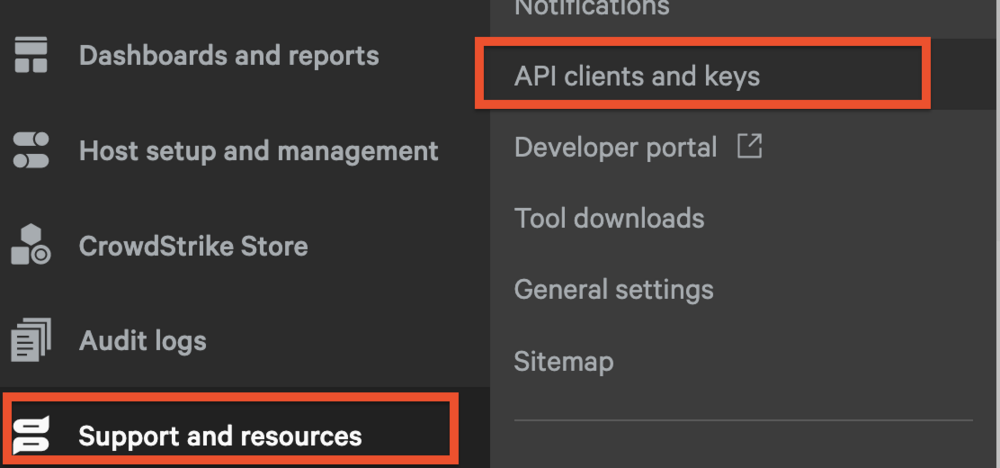
A guide that sends you to Support → API Clients and Keys in a full-screen grid of headings, rather than a left rail, describes an older console; use the path above.
2. Create the API client
Choose Add new API client. The Create API client panel opens with a name, a description, and a long scrolling list of scopes.
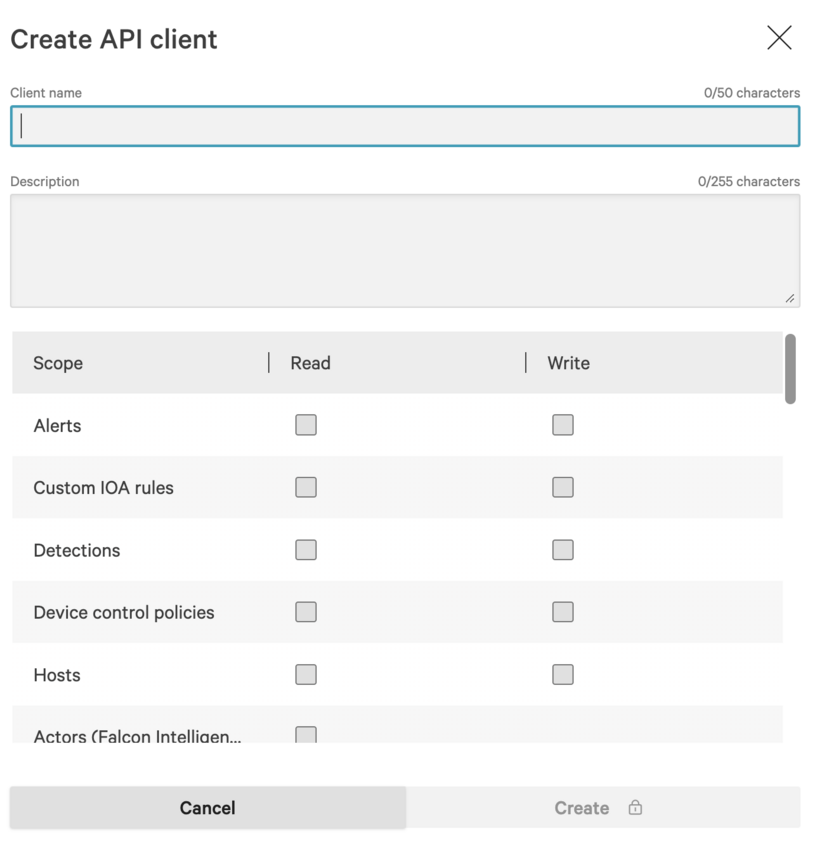
Give it a Client name that says what it is and where it goes: Fluency is enough, Fluency Falcon collector is better. The Description is free text and is the only place the next administrator will find out why this credential exists; a date and an owner there will save someone a decision later.
Leave every Write box alone. Nothing in this integration writes to Falcon.
3. Grant the three scopes
Tick Read on three rows, and only those three. All three go on the same API client: ticking only one of them produces a credential that authenticates perfectly and then returns 403 on the feeds it was not granted, forever, with nothing on the Fluency side naming the missing box.
| Scope | Column | What it buys | What happens without it |
|---|---|---|---|
| Alerts | Read | The polled alert stream: every alert product in the CID | 403 access denied, scope not permitted on /alerts/*, every five minutes, indefinitely |
| Event streams | Read | The persistent detection, incident and console-audit feed | 403 on /sensors/entities/datafeed/v2, so the stream never establishes, while the polled alerts keep arriving and the integration goes on looking healthy |
| Hosts | Read | The device roster behind Resources (v1: SIEM → Resources) | Events arrive with device IDs that never resolve to hostnames; the CrowdStrike roster on Resources stays empty |
The scope table in the panel is long, its order differs between console versions, and the three rows are nowhere near each other; scroll for each one rather than assuming where it sits. Alerts is at or near the top:
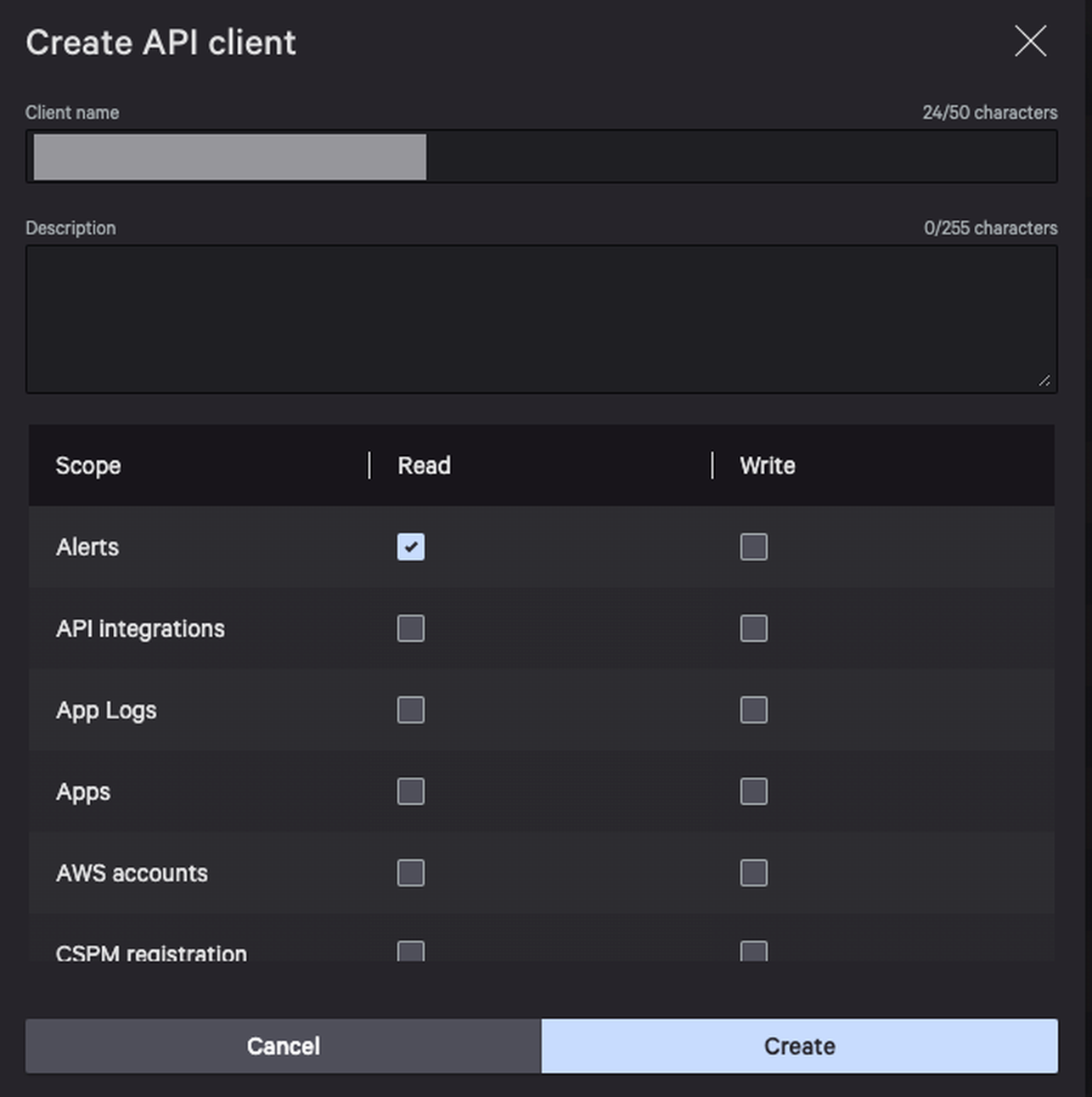
Event streams is near the bottom, immediately above User management. Note that its Write column is a dash; the scope is read-only by construction:

Hosts sits in the middle of the list, a few rows above Incidents:
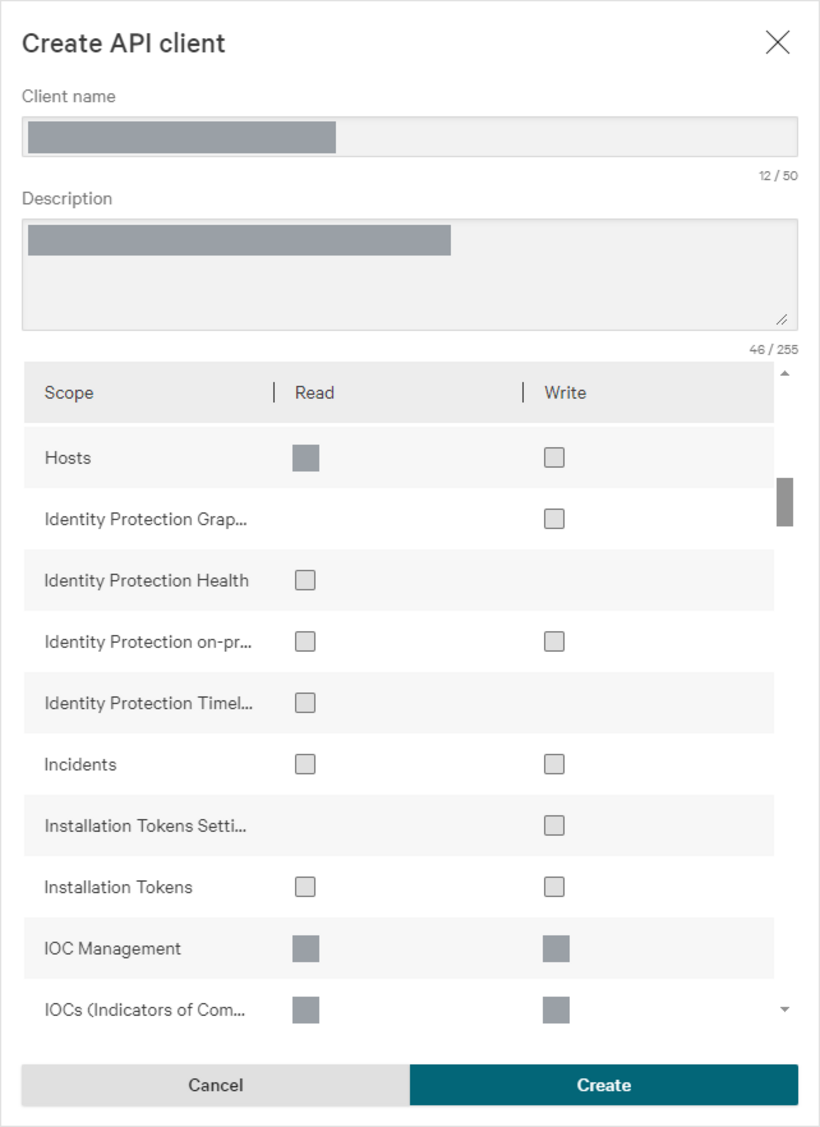
Incidents and Detections both sit in this picker, both sound like what you want, and neither does anything for this integration. Ticking either produces no error at any point: the client is created, the scope is granted, and it buys access to nothing.
Detections grants a service collection CrowdStrike has already switched off. Their API reference is unambiguous:
DEPRECATED: This entire service collection is deprecated. Developers should leverage operations from the Alerts service collection instead. These endpoints will be decommissioned on September 30, 2025.
That date has passed. Its live replacement is Alerts, which you have already ticked. If an existing client carries Detections: Read you can leave it (it is inert, not harmful), but it is not a substitute for Alerts: Read.
Incidents grants a collection that no longer routes. On api.crowdstrike.com and api.eu-1.crowdstrike.com, every /incidents/* path answers 404 Not Found (the same response an invented path gets), while /alerts/*, /devices/* and /sensors/entities/datafeed/v2 all answer 401 on a bad token, which is what a route that exists returns. Falcon's incident data reaches this integration as IncidentSummaryEvent on the Event streams feed instead.
This is a read-only integration, but that is no reason to select every box in the Read column. Read is not a synonym for harmless. That column includes scopes covering every host and user in the tenant, the sensor installers, the installation tokens, policy configuration, real-time-response session history and cloud-security findings. A credential holding all of it is a complete, portable map of your estate, and it is going to sit in a second system for years. CrowdStrike's own guidance on scopes is a section headed Principle of least privilege, and its instruction is "Request only the scopes your app actually needs."
Three boxes do this job, and widening later costs nothing (see Adding a scope to an existing client).
4. Copy the credentials and the base URL
Press Create. The API client created panel appears, and it is the only time you will see the secret.
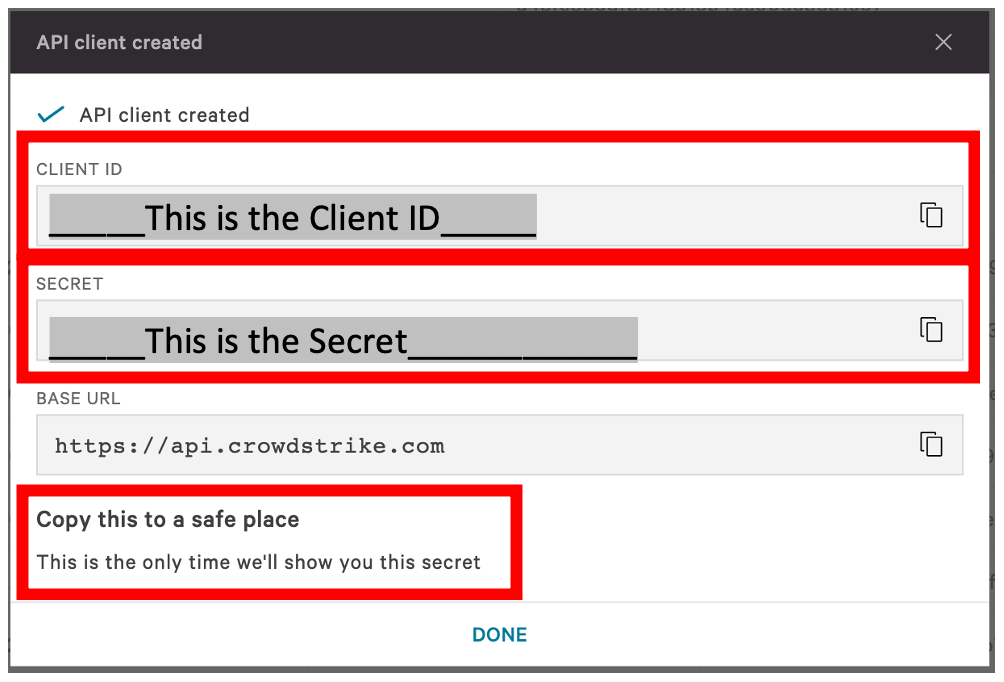
The panel's own words are "Copy this to a safe place" and "This is the only time we'll show you this secret". There is no reveal button and no recovery. Losing it means resetting the secret, which invalidates the old one immediately and takes the integration down until you reinstall (see Rotating the credential).
Take all three values, not two:
| Value | Where it came from | Fluency parameter |
|---|---|---|
| CLIENT ID | The panel above. 32 hexadecimal characters. | Client ID |
| SECRET | The panel above. Shown once. | Client Secret |
| BASE URL | The panel above, and also in the OAuth2 API Clients header on the API clients and keys page, if you have already closed it. | API Base URL |
If you closed the panel before copying the base URL, it is on the page behind it:

Every commercial regional host resolves and answers. A client ID belonging to another cloud is, to this one, simply an ID it has never heard of, which is exactly what a typo is. So a US-2 credential sent to api.crowdstrike.com returns what a mistyped secret returns on the correct host:
{"errors": [{"code": 400, "message": "Failed to generate access token for clientID=<your client id>."}]}
For the same unrecognised credentials, api.crowdstrike.com, api.us-2.crowdstrike.com and api.eu-1.crowdstrike.com return the same status, the same body and the same headers. Nothing anywhere in the response names a region. This is why the base URL is worth copying rather than typing, and why the verification step below is worth the two minutes.
Adding a scope to an existing client
If you already have a Falcon API client for Fluency (most tenants that have run this integration for a while do), you are editing it, not replacing it. Two things make this the normal case rather than an edge case:
- Scopes are not granted retroactively. A client created before the collector polled
/alerts/*does not hold Alerts: Read, and nothing in Falcon or Fluency asks anyone to add it. The symptom is a403on one feed while the others keep working. - Editing scopes does not touch the credential. The Client ID and Secret are unchanged, so nothing has to be reinstalled and there is no gap in collection.
- Go to Support and resources → Resources and tools → API clients and keys.
- On the OAuth2 API clients tab, find the client the integration uses. Match it by Client ID against the value configured in Fluency: with several clients present, editing the wrong one is the most common reason this does not take effect.
- Choose Edit API client.
- Tick Read on any of Alerts, Event streams and Hosts that are missing, and confirm the other two are still ticked.
- Press Update client details.
The dialog will not show the client secret again, and does not need to. New scopes take effect on the next OAuth2 token the collector requests; tokens last 30 minutes and the alert poll runs every 5, so collection resumes within about 30 minutes. The first successful poll then backfills up to 72 hours.
A second API client is not a neutral choice here. The Event Streams API refuses a connection whose appId matches one already established, so a replacement credential attached to the same integration can drop the stream the first one is holding, and events missed while that is happening are not recoverable from either side.
Verify before you leave Falcon
Run this before you open Fluency. It exercises each scope separately, so a failure names the checkbox rather than leaving you to guess, and an error read here costs a minute where the same error inferred from a silent application costs an afternoon.
BASE=https://api.crowdstrike.com          # the BASE URL from the panel above
CID=<client id>
SEC=<client secret>

TOKEN=$(curl -s -X POST "$BASE/oauth2/token" \
  -H "Content-Type: application/x-www-form-urlencoded" \
  -d "client_id=$CID&client_secret=$SEC" \
  | sed -n 's/.*"access_token":"\([^"]*\)".*/\1/p')

echo "--- Alerts: Read"
curl -s "$BASE/alerts/queries/alerts/v1?limit=1"          -H "Authorization: Bearer $TOKEN"
echo; echo "--- Hosts: Read"
curl -s "$BASE/devices/queries/devices-scroll/v1?limit=1" -H "Authorization: Bearer $TOKEN"
echo; echo "--- Event streams: Read"
curl -s "$BASE/sensors/entities/datafeed/v2?appId=fluencyprecheck" -H "Authorization: Bearer $TOKEN"
| Response | What it means |
|---|---|
A JSON body with a resources array, populated or empty | That scope is good. An empty array from the alerts call on a quiet tenant is a pass, not a failure; the hosts call should never be empty on a tenant with sensors deployed |
403 and access denied, scope not permitted | The credential is valid and that one scope is missing. Go back to Adding a scope; the failing call names which |
403 and access denied, authorization failed | The broader form of the same refusal. Usually a missing scope, but it is also what an IP allowlist on the client returns, so check both |
401 and Unauthorized: Please provide trace-id='…' to support from the token call | What you pasted is not a client ID. Falcon only recognises exactly 32 hexadecimal characters; 31, 33, a trailing space, or a copy that took the surrounding label all produce this |
400 and Failed to generate access token for clientID=… from the token call | The Client ID is well-formed but the pair is wrong: wrong secret, wrong region, or a deleted client. Check the echoed client ID against what you pasted (it is the fastest way to spot a truncated copy), then check the base URL against the region |
401 on a data call | $TOKEN is empty or malformed. Check that the token call actually returned an access_token before reading anything into the data calls |
404 Not Found on a data call | The path is wrong, not the credential: Falcon answers 401 on a real path with a bad token and 404 only on one it does not route |
The appId in the last call is a throwaway label used only to prove the scope. Use something that will not collide with the one the running collector holds.
Part 2: Fluency
CrowdStrike Falcon syncs the host roster itself; its description reads CrowdStrike Falcon XDR incidents w/ Resources. The catalog's FalconResource tile, under Endpoint Management, is that roster sync on its own, and its description says what it is for: Falcon Resource Sync (legacy add-on).
On a new deployment, install CrowdStrike Falcon and stop; installing the add-on as well would sync the same roster twice. On an existing deployment, a FalconResource application that is already installed keeps running and needs no action; leave it in place, and do not reinstall it after uninstalling. Check which state you are in by looking for a FalconResource application on Applications (v1: a FalconResource card in Installed Applications).
The FalconResource section below applies to existing installs only; the roster it syncs is what Confirm it is running checks either way. Both forms, field by field, are in the Application Catalog's CrowdStrike Falcon and FalconResource pages (v1: Install Application From Template).
One template covers this integration, and takes the three values from Part 1.
| Template | Category | Collects | Destination |
|---|---|---|---|
| CrowdStrike Falcon | Endpoint Management | Alerts, streaming events, and the host roster | The Falcon index, plus Resources (v1: SIEM → Resources) |
Install the CrowdStrike Falcon application
- v2 interface
- Classic v1 interface
In the navigation rail, open Applications and click Install Application, then choose CrowdStrike Falcon from the Endpoint Management category of the Application Catalog.
Go to Platform → Applications → Install Application From Template and choose CrowdStrike Falcon from the Endpoint Management category.
| Parameter | Notes |
|---|---|
| API Base URL | The BASE URL from Part 1, including the https:// prefix. Required, no default, no drop-down; and getting it wrong looks like a bad credential rather than a bad host. |
| Client ID | The CLIENT ID from Part 1. |
| Client Secret | The SECRET from Part 1. |
Below those, the collapsed Advanced configuration section (v1: the Advanced Configurations row) holds the destination:
| Parameter | Notes |
|---|---|
| datalake | Pre-filled managed. |
| datalake index name | Pre-filled Falcon. Two applications writing to the same index name in the same lake will collide, and the second one aborts; expand it and change the name when you install a second CID. |
- v2 interface
- Classic v1 interface
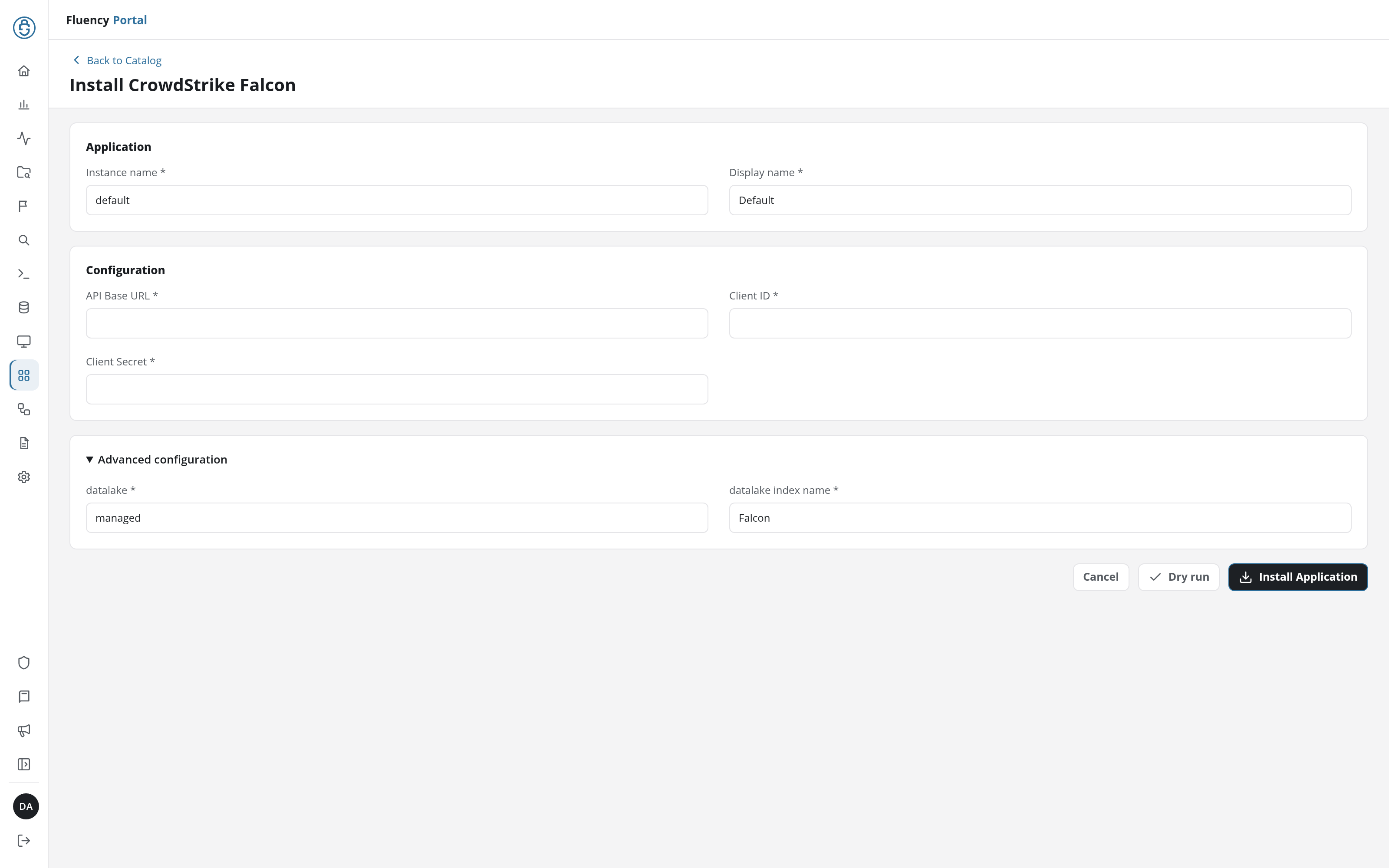
Click Dry run first to have the platform check the base URL and the credential before anything is installed, then click Install Application. The Applications page opens with the notice Default is launching., and the new application is listed with a green Running badge once the pipeline is up.
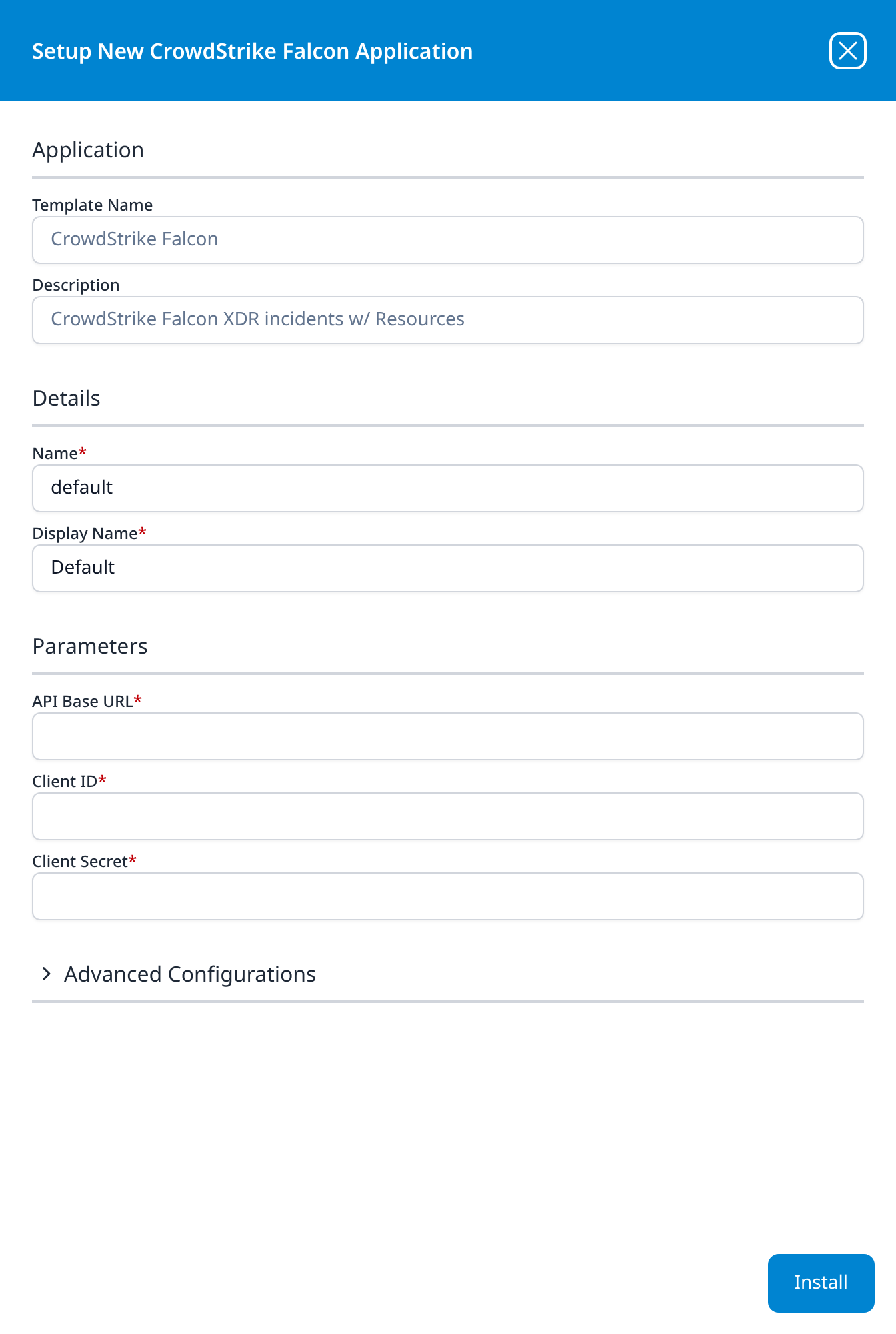
Press Install. The application then appears in the Installed Applications view, where its badge reads Running once the pipeline is up.
Install the FalconResource application
The roster sync is part of CrowdStrike Falcon above, so a new deployment skips this step. The FalconResource tile is still in the catalog for deployments that already run the pair; installing it alongside a current CrowdStrike Falcon application syncs the same roster twice and buys nothing.
Repeat with the FalconResource template, pasting the same API Base URL, Client ID and Client Secret.
| Parameter | Notes |
|---|---|
| API Base URL | As above. |
| Client ID | As above. |
| Client Secret | As above. |
Unlike most templates, FalconResource takes no datalake or datalake index name parameter: the destination is fixed by the template rather than chosen on the form, so there is nothing here to collide with another application. To see where the data actually lands, open the installed application's details and read its Actions list, which records every object the install created.
A missing roster fails quietly: alerts and streaming events arrive, the application reports Running, and the integration looks complete, but without the roster that resolves device IDs to hostnames, events identify their subject by an identifier nobody can read, and the gap surfaces weeks later during an investigation. A missing Hosts: Read scope does this. That is the failure Confirm it is running checks for, and it is worth checking on any deployment that has run the older CrowdStrike Falcon and FalconResource pair.
Neither template takes a member CID parameter, so each collects from the tenant its credential belongs to and no other. If you run Falcon Flight Control across several CIDs, create an API client in each child CID and install one CrowdStrike Falcon application per CID (a pair, on a deployment still running the older split), changing the datalake index name each time, because the second install onto Falcon will collide with the first.
Confirm it is running
A Running badge tells you the pipeline built, not that data is arriving, and volume alone will not separate a healthy quiet tenant from a half-granted credential. Confirm it in this order, cheapest first.
1. Ask Falcon whether the stream connected. This is the vendor-side signal, and it is the only check that proves the Event Streams half specifically. In the Falcon console open the API Audit Trail, set API action to Stream Started, and set the time range far enough back to include when the application was installed: the connection is persistent, so there is one event when it starts and none for as long as it stays up. An install left running over a weekend and checked on Monday needs a range covering Friday, not the last hour.
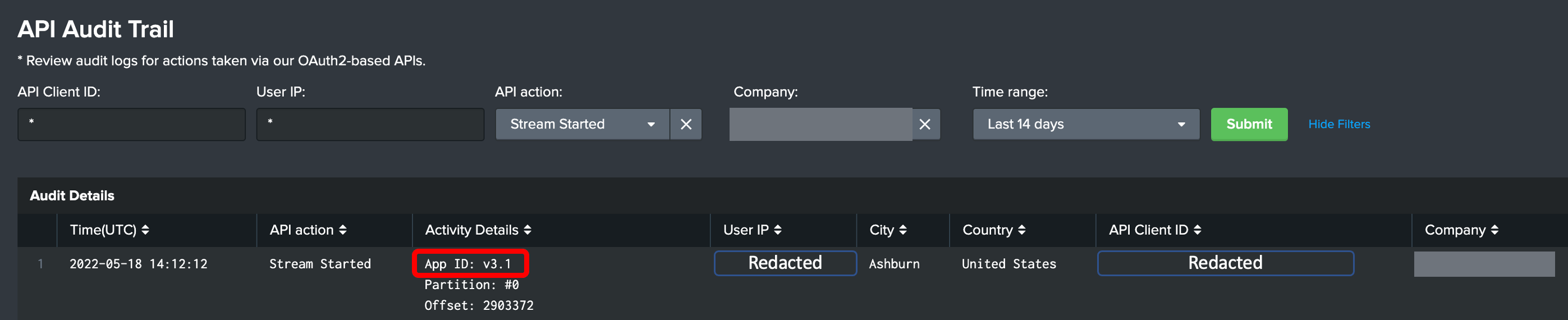
Under Activity Details you get the App ID, the partition and the offset. If there is no Stream Started row at all, the Event streams scope is the thing to check first.
2. Check the roster, not the index. Open Resources from the navigation rail (v1: SIEM → Resources) and look for the CrowdStrike device records. This is the strictest signal available on a quiet tenant: an event feed can legitimately be empty for a day, but a tenant with sensors deployed always has hosts. An empty roster means Hosts: Read is missing, or, on a deployment still running the older pair, that the FalconResource application was never installed.
3. Re-run the three curl calls from Verify before you leave Falcon. They answer "which scopes does this credential actually hold today" definitively, in one pass, regardless of how quiet the tenant is, and scopes can be edited in Falcon at any time without anything changing on the Fluency side.
4. Only then look at volume. Open the alerts queue in Falcon (or the Incident Workbench, for the streaming half), pick something you can see there, and search the Falcon index for it. A count on its own is not evidence either way; a named record found in both places proves the whole path.
See Confirm data is arriving for the general procedure.
Maintenance
Reviewing what the client can reach
This credential does not expire and nothing prompts you to look at it, so put it on whatever cycle you use for long-lived keys. Two things are worth checking, both on the API clients and keys page:
- Its scopes. Select the client on the OAuth2 API clients tab and open Edit API client. Scopes can be changed there at any time, by anyone with the Falcon Administrator role, without reissuing the credential, so what this client can reach today is not necessarily what was granted when it was made, and nothing on the Fluency side would show a difference. It should hold exactly Alerts, Event streams and Hosts, all Read. If it holds every read scope in the product, or Incidents alone, bring it back to those three.
- That it is still the only one. A rotation done by uninstall-and-reinstall leaves no trace in Falcon; a rotation done by creating a second client and forgetting the first leaves a working credential nobody is watching, and, on the streaming feed, one that can fight the live one for the connection. Delete what you replaced.
Rotating the credential
Falcon can reset an API client's secret in place, keeping the Client ID. The old secret stops working the moment you do, and Fluency's template parameters are read-only after install, so the two sides have to be sequenced or you will take a gap:
- In Falcon, open Support and resources → Resources and tools → API clients and keys, find the client, and reset its secret. Copy the new one; it is shown once, exactly as at creation.
- In Fluency, uninstall the CrowdStrike Falcon application, and any legacy FalconResource application alongside it. To uninstall, click Uninstall at the top right of the application's details page (v1: the red Uninstall button at the foot of its details panel on Platform → Applications).
- Reinstall both with the same API Base URL and Client ID and the new Client Secret.
Between steps 1 and 3 the integration is down. Alerts raised in that window are recovered on the next poll only if it falls inside the 72-hour backfill; anything older is lost. Treat the streaming half of the gap as lost as well. Do the reset when you are ready to do the reinstall, not on a Friday.
Removing the integration
Uninstall the CrowdStrike Falcon application in Fluency first, and any legacy FalconResource application alongside it, then delete the API client in Falcon. In that order the credential is dead before it is orphaned; in the other order the applications spend the interval failing to authenticate. To uninstall, click Uninstall at the top right of the application's details page (v1: the red Uninstall button at the foot of its details panel on Platform → Applications).
Troubleshooting
| Symptom | Likely cause | Fix |
|---|---|---|
| API clients and keys is not in the menu | You do not hold the Falcon Administrator role | Have someone who does create the client; the page is restricted, not hidden by a setting |
403 access denied, scope not permitted on /alerts/*, repeating every 5 minutes | The client predates the Alerts API and never received the scope; scopes are not granted retroactively | Add Alerts: Read to the existing client. No reinstall; collection resumes within ~30 minutes and backfills 72 hours |
403 access denied, authorization failed on a data call | The scope is missing, or an IP allowlist on the API client is blocking the caller | Check the scope first with the three curl calls; if all three fail identically on a credential that authenticates, look at the client's IP restrictions |
| Alerts arrive but there is no Stream Started row in the API Audit Trail | Event streams: Read is missing, or another consumer holds the same appId | Add the scope; if it is already granted, look for a second API client attached to the same integration |
| Events arrive and the CrowdStrike roster on Resources is empty | Hosts: Read is missing, or, on a deployment still running the older pair, the FalconResource application was never installed | Both are silent failures; check which by running the devices-scroll call from the verify step |
401 Unauthorized from the token call, body carries only a trace ID | What was pasted is not a well-formed client ID: Falcon requires exactly 32 hexadecimal characters | Re-copy the CLIENT ID. A trailing space, a truncated selection, or a copy that included the field label all produce this |
400 Failed to generate access token for clientID=… | Well-formed ID, wrong pair: wrong secret, wrong region, or a deleted client | Compare the echoed client ID with what you pasted, then compare the base URL with your cloud. The response is identical for all three causes |
| Authentication fails and the credentials are definitely right | The API Base URL points at the wrong CrowdStrike cloud | Read the base URL off the OAuth2 API Clients header in your own console: every region answers, so this cannot be diagnosed from the error |
| The same alert appears many times with different timestamps | Working as designed: alerts are state, and the feed re-collects them on updated_timestamp | Deduplicate on composite_id; sort on updated_timestamp. See Alerts are state, not events |
| Detection rules fire when an analyst closes an alert | The rule matches on arrival, and closures arrive as updates | Filter on the alert's status; closed, true_positive and false_positive are all normal values on a re-collected record |
| Data is missing for a period longer than three days | The first poll after an outage backfills 72 hours and no further | The gap is unrecoverable through this integration. The records are still in Falcon's console if they are needed for an investigation |
| No process, file or network telemetry | These templates collect alerts, streaming events and hosts only | Raw sensor telemetry is Falcon Data Replicator, delivered to S3. There is no Fluency template for it |
| It worked, then stopped, with no change on the Fluency side | The API client's secret was reset, the client was deleted, or its scopes were edited in Falcon | Check the client still exists and still holds all three scopes; none of those changes notify Fluency |
| Sporadic authentication failures under load | The token endpoint has its own request budget, shared across every API client in the CID | The token endpoint reports X-Ratelimit-Limit: 300 on the commercial hosts. Other integrations sharing the tenant draw on the same pool |
Data reference
What the three streams look like once they land, for searches and detection rules written against them.
Streams, endpoints and scopes
| Stream | API and endpoints | Scope | Where it lands |
|---|---|---|---|
| Alerts: polled every 5 minutes | GET /alerts/queries/alerts/v1POST /alerts/entities/alerts/v1 | Alerts: Read | The Falcon index |
| Streaming events: a persistent connection | GET /sensors/entities/datafeed/v2POST /sensors/entities/datafeed-actions/v1/{partition} | Event streams: Read | The Falcon index |
| Host roster: synced every 12 hours | GET /devices/queries/devices-scroll/v1POST /devices/entities/devices/v2 | Hosts: Read | Resources (v1: SIEM → Resources), not an index |
Three things about that table are worth reading twice.
The Alerts scope is broader than "endpoint". Falcon's Alerts API is the unified alert surface for the whole tenant, and the collector polls it without a product filter, so it collects every alert product licensed in your CID:
| Product | What it contributes |
|---|---|
| Endpoint (EPP) | Malware, behavioural detections, exploit and ransomware activity |
| Identity Protection | Suspicious authentication, credential attacks, risky account behaviour |
| Cloud / CSPM | Cloud workload and posture alerts |
| Mobile | Detections on managed mobile endpoints |
| Third-party / Next-Gen SIEM | Alerts from other vendors ingested into Falcon and surfaced as Falcon alerts |
Each alert carries the detail Falcon holds for it: the affected host and device identifiers, process and command-line context, file hashes, severity and confidence, triage status and assignee, and MITRE ATT&CK tactic and technique mapping. If you need collection narrowed to one product, that is a filter set on the Fluency side; it does not change the scope you grant here, because the Alerts API uses one Alerts: Read scope for all of them.
The streaming feed is a different shape from the polled one. Event Streams is a long-lived HTTP connection rather than a poll, and it carries CrowdStrike's summary event types: DetectionSummaryEvent, IncidentSummaryEvent, UserActivityAuditEvent, AuthActivityAuditEvent, FirewallMatchEvent and others, depending on what your CID has enabled. The two audit types are the reason this scope earns its place: they are the record of who did what in the Falcon console itself, including changes to the very API client this guide has you create.
The host roster is not an event feed and does not go to the data lake. It populates the Resources record set, and it is what turns a device ID in an alert into a hostname, an OS build and a last-seen time. It is also the better health check (see Confirm it is running).
Alerts are state, not events; they arrive again when they change
The collector watermarks on Falcon's updated_timestamp field, so an alert is re-collected every time its record is updated: a status change, an assignment, a comment. The same alert therefore appears in the index more than once, with the same identity and a later timestamp.
- Deduplicate on
composite_id. That is the value Falcon's own detail endpoint takes as itsidsargument, and it is the alert's stable identity. - Order on
updated_timestamp, not on ingest order. - Do not fire detection content on arrival alone. The status values include
closed,true_positiveandfalse_positive, so a rule that triggers on any Falcon alert record will also trigger when an analyst closes one or marks it a false positive.
The first collection reaches back 72 hours, and no further
On its first successful poll (a new install, or an existing one whose missing scope has just been granted), the collector backfills alerts from up to 72 hours prior. Alerts raised earlier than that are not retrieved, even though Falcon still holds them in the console.
So an outage longer than three days is a permanent gap rather than a delayed one. Fix a missing scope or a bad credential when you notice it, not at the next maintenance window.
This is not raw endpoint telemetry
Process, file and network events from the sensor are a different CrowdStrike product (Falcon Data Replicator, delivered to an S3 bucket), and there is no Fluency template for it. If somebody is expecting sensor telemetry in the lake, this integration will not provide it.
The template's catalog description, "CrowdStrike Falcon XDR incidents", names only part of what it collects: incidents arrive as IncidentSummaryEvent on the streaming feed, but they are one event type among several rather than the whole integration.
Under the hood
Engineering reference: templates and API behaviour
Templates. Two, category endpoint, resource group ["CrowdStrike"]:
Falcon, display name CrowdStrike Falcon, description "CrowdStrike Falcon XDR incidents w/ Resources". TakesbaseURL,clientIDandclientSecret(sensitive), plusdatalake(defaultmanaged) andindex(defaultFalcon), the last two rendered inside the form's collapsed Advanced configuration section (v1: Advanced Configurations row).FalconResource, display name FalconResource, description "Falcon Resource Sync (legacy add-on)". The same three credential parameters and nodatalakeorindexparameter, because its destination is the resource roster rather than an index.
The w/ Resources in the first description is the roster sync folded into Falcon, which is what makes the second one an add-on rather than a half. Neither has conditional fields.
Collection behaviour. The collector polls GET /alerts/queries/alerts/v1 on a 5-minute cycle and fetches detail with POST /alerts/entities/alerts/v1, using composite_id as the ids value and updated_timestamp as both filter and checkpoint. It holds a connection to the Event Streams API (GET /sensors/entities/datafeed/v2) and syncs host inventory from /devices/queries/devices-scroll/v1 and /devices/entities/devices/v2 on a 12-hour cycle. The first poll after a scope fix backfills 72 hours. All three run on one credential.
Division of work. Falcon drives all three: the alert poll, the Event Streams connection and the Hosts sync, writing events to the Falcon index and the roster to the resource set. FalconResource runs the Hosts sync alone. Each installed application's Actions list, in its details, records every object that install created, including the appId the collector registers with Event Streams.
Authentication. Client-credentials OAuth2 against POST /oauth2/token, returning a bearer token with, in CrowdStrike's words, a "standard 30-minute expiry". Tokens can be revoked early at POST /oauth2/revoke. The client ID and secret themselves have no expiry.
API behaviour towards an unauthenticated caller on the commercial hosts, api.crowdstrike.com, api.us-2.crowdstrike.com and api.eu-1.crowdstrike.com:
- The token endpoint distinguishes a malformed client ID from an unrecognised one. Exactly 32 hexadecimal characters, upper or lower case, yields
400withFailed to generate access token for clientID=<value>, echoing the value back. Anything else yields401withUnauthorized: Please provide trace-id='…' to support. - All three commercial regions return identical status, body and headers for the same unrecognised credentials. There is no region signal in any error response.
- Responses carry
X-Cs-Traceid, which is the value CrowdStrike support asks for. The token endpoint also returnsX-Ratelimit-Limit: 300andX-Ratelimit-Remaining. - Data endpoints reached with an absent, empty or garbage bearer token return
401, not403or404. A404from a data path means the gateway does not route that path. - The
/incidents/*pathsqueries/incidents/v1,queries/behaviors/v1,combined/crowdscores/v1andPOST entities/incidents/GET/v1return404on bothapi.crowdstrike.comandapi.eu-1.crowdstrike.com, matching an invented path rather than a real one. By contrast/detects/*, decommissioned in September 2025, still returns401, so a404here is a routing answer and not an authorisation one. CrowdStrike's developer centre publishes no Incidents collection page, andfalconpy.io's Incidents page redirects to Alerts.
API generations. /alerts/queries/alerts/v1 and /alerts/entities/alerts/v1, the operations the collector uses, are marked deprecated in CrowdStrike's current reference in favour of GetQueriesAlertsV2 and PostEntitiesAlertsV2. Both v1 operations still route and answer. The v2 status enum (ignored, new, in_progress, true_positive, false_positive) differs from v3's (new, in_progress, reopened, closed), which is worth knowing before writing detection content against status values.
The /detects/* collection was decommissioned on 30 September 2025, replaced by /alerts/*. The Detections scope row survives in the console picker.
Event Streams mechanics. GET /sensors/entities/datafeed/v2 returns one or more data-feed URLs rather than events; the client connects to each and holds it open. CrowdStrike's own guidance: "All data URL feed connection must be successfully established and maintained to ensure all the appropriate data is being collected." Each event carries a numeric offset within its feed, which is the resume marker after a disconnection. Sessions are kept alive by POST /sensors/entities/datafeed-actions/v1/{partition} with action_name=refresh_active_stream_session; CrowdStrike's Splunk add-on refreshes its OAuth2 token every 20 minutes. The appId is a customer-chosen label, limited to alphanumeric characters, that must be unique within the Falcon instance; a second connection presenting the same one is refused.
References
Vendor
- CrowdStrike Developer Center: API reference, collections and SDKs
- Alerts collection: the polled alert feed and its v1/v2/v3 operations
- Event Streams collection:
listAvailableStreamsOAuth2andrefreshActiveStreamSession - Hosts collection: the device roster endpoints
- OAuth2 collection: the token and revoke operations, and the 30-minute token lifetime
- Detects collection: carries the deprecation and decommission notice quoted above
- Falcon Event Streams Splunk Add-on Guide v3.5 (PDF): CrowdStrike's own account of
appIduniqueness, data-feed URLs, offsets, and validating a stream from the API Audit Trail - Unified Alerts Add-on for Splunk Guide (PDF): the Alerts API call flow, the
composite_idandupdated_timestampcheckpoint behaviour, and the regional base URLs - SDK configuration: the regional base URL table
- Falcon Foundry API scopes: CrowdStrike's least-privilege guidance for scopes
Fluency
- CrowdStrike Falcon install form: the template's fields and defaults (v1: Install Application From Template)
- Resources: where the host roster lands (v1: SIEM → Resources)
- Confirm data is arriving
- Endpoint Management: the rest of this category
- Integration Matrix: which ingress method each product uses