Sophos EDR
Sophos Intercept X with EDR is the endpoint detection and response tier of Sophos Central, the cloud console that manages Sophos endpoint, server and firewall products. Fluency polls Sophos Central's public API for the detections and events it records (malware, behavioural and exploit detections, web and application control, peripherals, tamper protection and policy changes) and lands them in the data lake, where they take part in correlation, retention and reporting alongside identity, mail and network data.
Authentication is OAuth2 client credentials: an API credential created in Sophos Central (a "service principal", in Sophos's terminology) yields a Client ID and a Client Secret, and nothing is installed on the endpoints. The credential resolves to one tenant and that tenant's data region on its own, so unlike most integrations in this category there is no region or URL to get wrong, but it has to be created in the right console; see Before you begin.
The setup has two halves:
- In Sophos Central: create an API credential with a read-only role. This produces two values, one of which is shown exactly once.
- In Fluency: install the Sophos EDR application template and paste those two values into its form.
What arrives
| Stream | What it holds | Lands in |
|---|---|---|
| Events | Every endpoint event Sophos Central records: malware, PUA, behavioural and exploit detections, IPS hits, web and application control, peripheral and data-loss events, firewall, isolation and policy activity. | The data lake |
| Alerts (SIEM API) | The subset Sophos raised for an administrator to act on, with the remediation Central offers for each. | The data lake |
| Alerts (Common API) | The console's own Alerts queue: severity, category, the product that raised it, and the agent and person it belongs to. | The data lake |
Sophos's SIEM API serves only the last 24 hours, so the first collection reaches back hours rather than weeks, and a stop in collection longer than a day leaves a gap that cannot be backfilled. The credential's role decides what it can read: Service Principal ReadOnly reaches all three streams, and Forensics reaches none of them (see step 2).
Endpoints, record contents and how far back each stream reaches are in Data reference.
Before you begin
Create the credential in Sophos Central Admin, not in Partner or Enterprise. The Sophos EDR form has two fields, and neither of them names a tenant, so the credential has to be one that resolves to a single tenant on its own. Sophos issues three kinds:
| Console | What /whoami/v1 returns | Usable here |
|---|---|---|
Sophos Central Admin (central.sophos.com) | "idType": "tenant", with a dataRegion | Yes |
| Sophos Central Partner | "idType": "partner", no dataRegion | No |
| Sophos Central Enterprise | "idType": "organization", no dataRegion | No |
A partner or organization credential authenticates perfectly well and then has nowhere to point: a partner is not a place data lives, so Sophos returns no data region for it, and the caller is expected to list tenants first and pick one. Verify before you leave Sophos Central surfaces exactly this, in one call, before it becomes a Fluency problem. An MSP that manages several tenants needs one credential and one installed application per tenant.
Super Admin in Sophos Central. Sophos requires the Super Admin role to open API Credentials at all: "You must be a Super Admin to manage and add API credentials." Nothing lower can create, view or delete them.
The first visit needs terms accepted. Sophos notes that "the first time you click API Credentials Management you must read and accept the terms and conditions of use." Worth knowing before you schedule a five-minute change window.
Outbound HTTPS to Sophos. Three hosts are involved: id.sophos.com for the token, api.central.sophos.com for the tenant lookup, and then the tenant's regional host, which is one of nine api-XXnn.central.sophos.com names. Because the third one is not known until the lookup runs, an egress allowlist either has to cover *.central.sophos.com or the tenant's region has to be confirmed first so that one host can be named; Verify before you leave Sophos Central prints it.
Part 1: Sophos Central
Sophos has moved this page from Global Settings → Administration → API Credentials Management to Global Settings → Access Control → API Credentials, and the account menu now sits along the top rather than down the left. The dialogs themselves are unchanged, and the field names below are the current ones. The screenshots come from another vendor's public integration guide.
1. Open the API Credentials page
Sign in to Sophos Central Admin at central.sophos.com as a Super Admin. Click the Global Settings icon, go to Access Control, and click API Credentials.
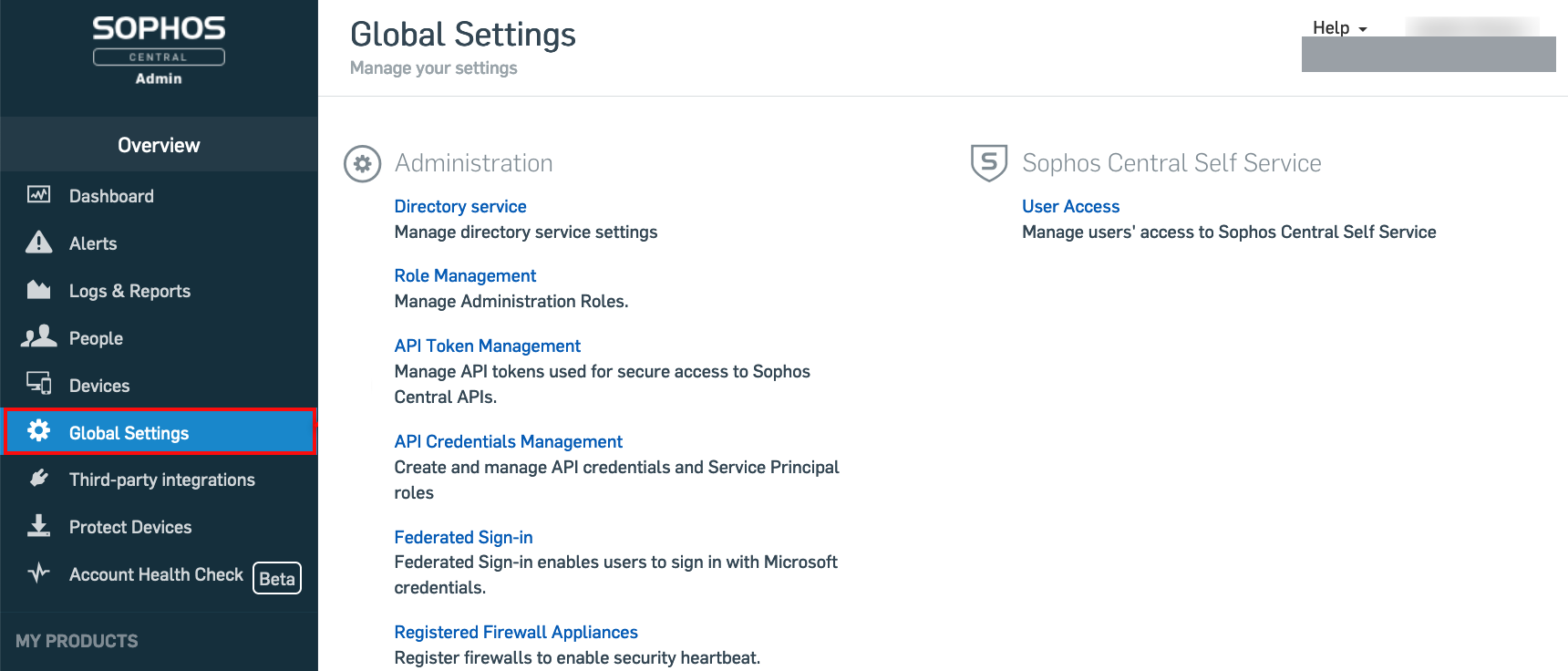
The entry directly above is API Token Management, and it looks like the same thing. It is not: it manages the legacy SIEM API token (a x-api-key header plus HTTP Basic authentication against api1.central.sophos.com/gateway), which is a different credential shape that the Sophos EDR template does not accept.
It is also on its way out. The page carries Sophos's own retirement banner: existing tokens keep working until they expire, no new ones can be created, and their lifetimes cannot be extended.
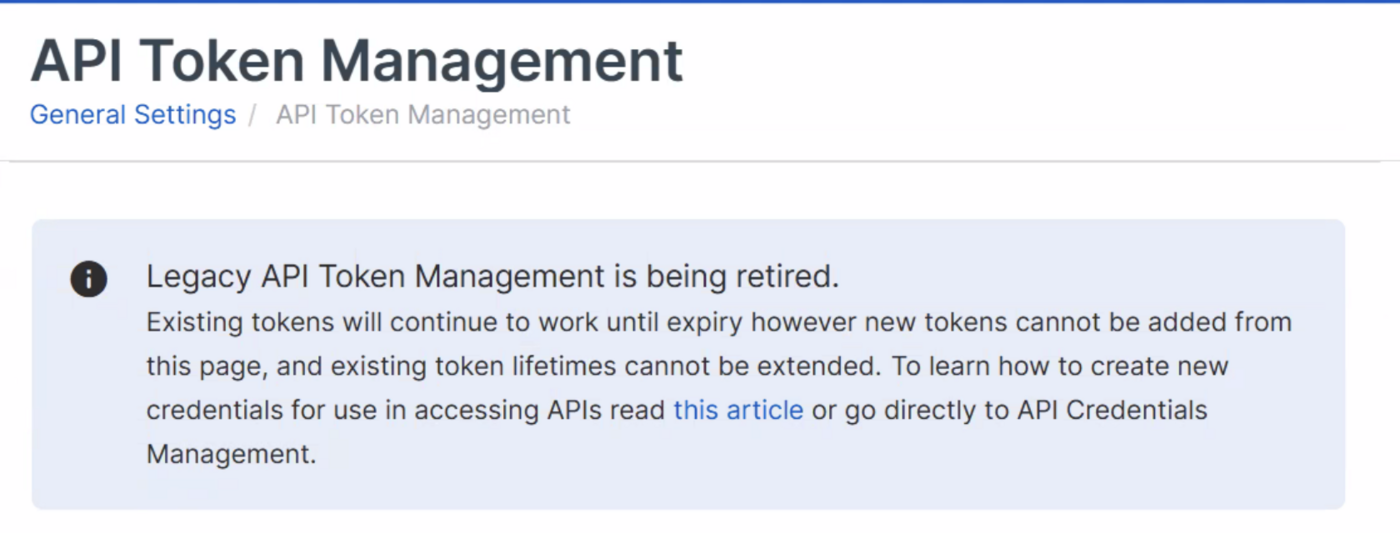
If an administrator hands you a URL and a pair of headers rather than a Client ID and a Client Secret, they have been to the wrong page.
2. Add the credential
Click Add Credential. Give it a name that says what it is for (the credential list is the only record of who issued it) and a description.
In Role, choose Service Principal ReadOnly.
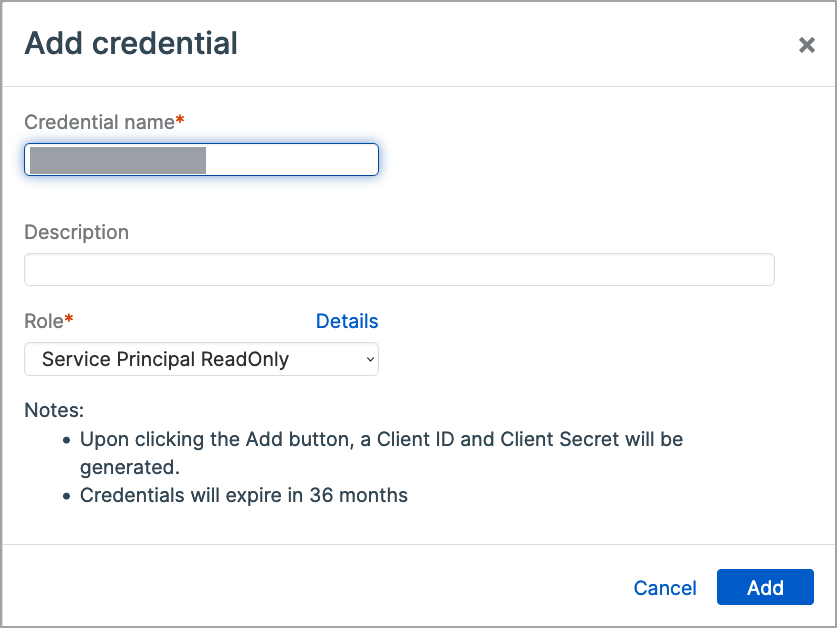
Sophos offers six service principal roles, and only one of them is right for a collector:
| Role | What it can do |
|---|---|
| Service Principal ReadOnly | "View all information in the account but can't add, modify, or remove information. They can't run Live Discover queries." |
| Service Principal Super Admin | All API operations, full create/read/update/delete, plus queries. |
| Service Principal Management | View and manage admins, roles, endpoints and security policies; cannot run queries. |
| Service Principal Forensics | Create, view, run and delete Live Discover queries. |
| Service Principal Active Directory Sync | Active Directory synchronisation only. |
| Service Principal Firewall | Firewall management only. |
ReadOnly reaches every stream in What arrives and cannot isolate an endpoint, change a policy or delete an admin if the credential leaks. The two that look tempting are traps in opposite directions: Super Admin grants write access this integration never uses, and Forensics grants Live Discover but not the alert and event feeds.
Sophos's help text spells the role Service Principal Read-Only; the dropdown in the console spells it Service Principal ReadOnly. Same role.
Note the second line under Notes: "Credentials will expire in 36 months." That is a hard, non-renewable clock; see Before it expires.
Click Add.
3. Copy the Client ID and the Client Secret
Sophos generates both values and opens the credential's summary page.
The secret is displayed once, behind a Show Client Secret link, and only on this screen. Come back to the credential later and the summary says so in as many words: "For security purposes, the Client Secret cannot be shown again. If need be, you may create a new API credential." There is no reveal, no reset, and no support path: a lost secret means deleting the credential and issuing a new one.
Click Show Client Secret, then Copy, and put it somewhere safe before you navigate away.
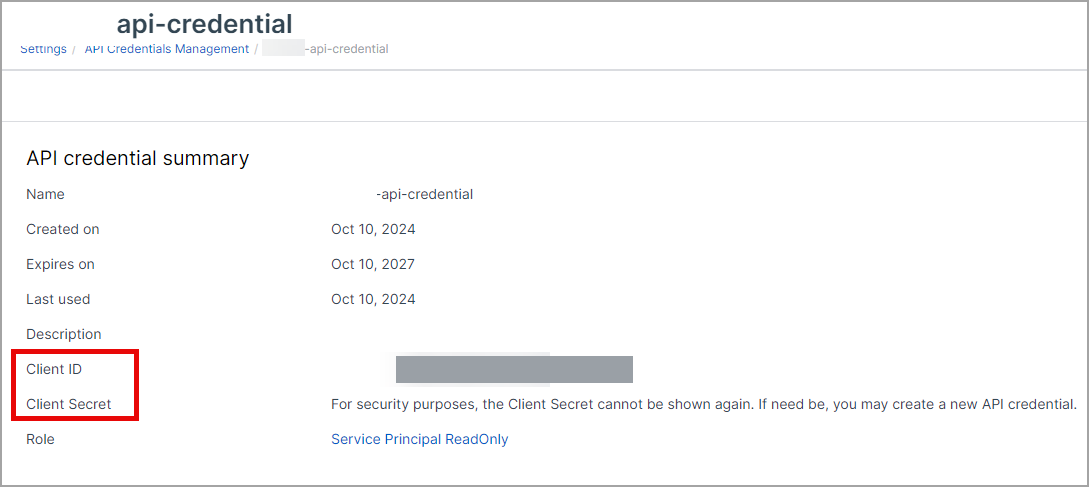
The Client ID stays visible on this page indefinitely and has its own Copy button, so only the secret is time-critical.
| Value | Where it came from |
|---|---|
| Client ID | The Client ID row of the API credential summary. A UUID. Re-readable at any time. |
| Client Secret | Revealed once by Show Client Secret on the summary page, immediately after Add. |
Verify before you leave Sophos Central
Three calls confirm the credential works, tell you whether it was created in the right console, and prove the streams answer, before any of it becomes a Fluency problem.
CLIENT_ID='<the Client ID>'
CLIENT_SECRET='<the Client Secret>'

# 1. Exchange the credential for a one-hour bearer token.
JWT=$(curl -s -X POST https://id.sophos.com/api/v2/oauth2/token \
  -H 'Content-Type: application/x-www-form-urlencoded' \
  -d "grant_type=client_credentials&client_id=$CLIENT_ID&client_secret=$CLIENT_SECRET&scope=token" \
  | sed -n 's/.*"access_token"[[:space:]]*:[[:space:]]*"\([^"]*\)".*/\1/p')

# 2. Ask Sophos who this credential is and where its data lives.
curl -s -H "Authorization: Bearer $JWT" https://api.central.sophos.com/whoami/v1
A credential created in the right place answers like this:
{
  "id": "7e29b4c2-e68a-4617-bfe1-844666b5300f",
  "idType": "tenant",
  "apiHosts": {
    "global": "https://api.central.sophos.com",
    "dataRegion": "https://api-us03.central.sophos.com"
  }
}
"idType": "tenant" and the presence of dataRegion are the two things to look for. Take those values and read one page of events:
TENANT='<the id from whoami>'
REGION='<the dataRegion from whoami>'

curl -s -w '\n%{http_code}\n' \
  -H "Authorization: Bearer $JWT" \
  -H "X-Tenant-ID: $TENANT" \
  "$REGION/siem/v1/events?limit=200"
| Response | What it means |
|---|---|
200 with an items array | The credential works and the stream answers. Done. |
200 with "items": [] | Also success. The tenant raised no endpoint events in the last 24 hours, normal on a quiet estate, and why an empty first day is not a fault (see The SIEM API serves the last 24 hours and nothing older). Generate a test detection to be certain. |
401 and "message": "Client ID is invalid." from step 1 | Sophos does not recognise the Client ID at all. Usually a copy error, or a credential that has passed its 36-month expiry and been removed. Re-read it from step 3. |
401 from step 1 with any other message | The Client Secret is wrong. It cannot be re-read, so if it was not captured at creation, delete the credential and issue a new one. |
"idType": "partner" or "organization", and no dataRegion | The credential was created in Sophos Central Partner or Sophos Central Enterprise. It cannot be used here (see Before you begin), so create a tenant credential in Sophos Central Admin instead. |
401 on step 3 with a token that worked on step 2 | The token expired. They last one hour; re-run step 1. |
403 | Authenticated, but the role does not cover this API. Check the credential's Role row reads Service Principal ReadOnly and not Active Directory Sync or Firewall. |
429 | Rate limited. Sophos counts per credential, per account and per source IP; see Under the hood. Wait and retry. |
| Connection refused or a timeout | Egress is blocked to one of the three hosts. Confirm all of id.sophos.com, api.central.sophos.com and the dataRegion host are reachable. |
To generate a detection on demand, download the EICAR test file onto a protected endpoint, or use Sophos's own test procedure. It appears in the console within a minute or two and in the API on the next poll.
Part 2: Fluency
Install the Application
- v2 interface
- Classic v1 interface
In the navigation rail, open Applications and click Install Application, then choose Sophos EDR from the Endpoint Management category of the Application Catalog.
Go to Platform → Applications → Install Application From Template and choose Sophos EDR from the Endpoint Management category.
| Parameter | Notes |
|---|---|
| Client ID | The UUID from step 3. |
| Client Secret | The value revealed once by Show Client Secret. Masked once the application is installed. |
Unlike most templates, Sophos EDR takes no datalake or datalake index name parameter: the destination is fixed by the template rather than chosen on the form, so there is nothing here to collide with another application. To see where the data actually lands, open the installed application's details and read its Actions list, which records every object the install created.
- v2 interface
- Classic v1 interface
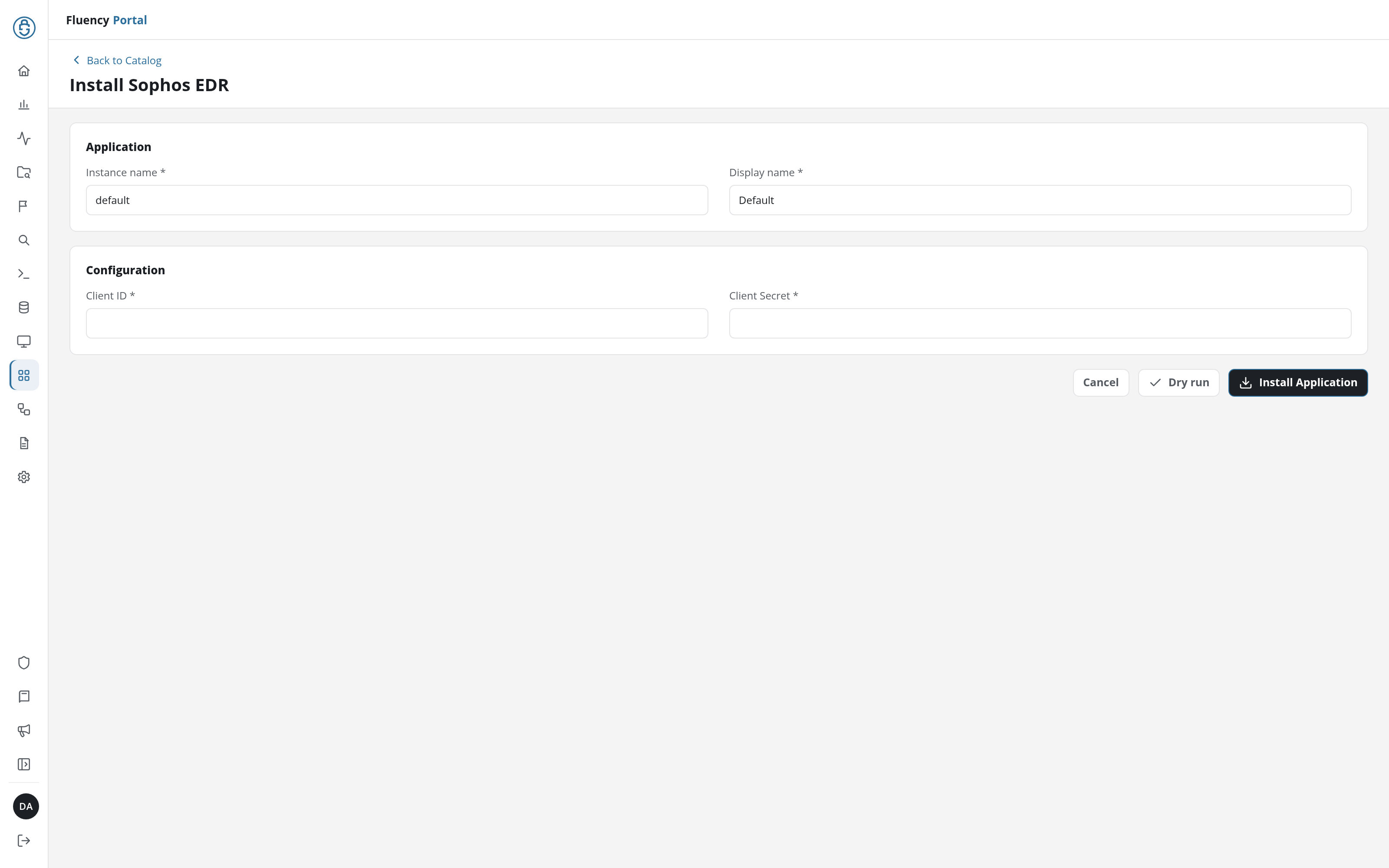
Click Dry run first to have the platform check the credential before anything is installed, then click Install Application. The Applications page opens with the notice Default is launching., and the new application is listed with a green Running badge once the pipeline is up.
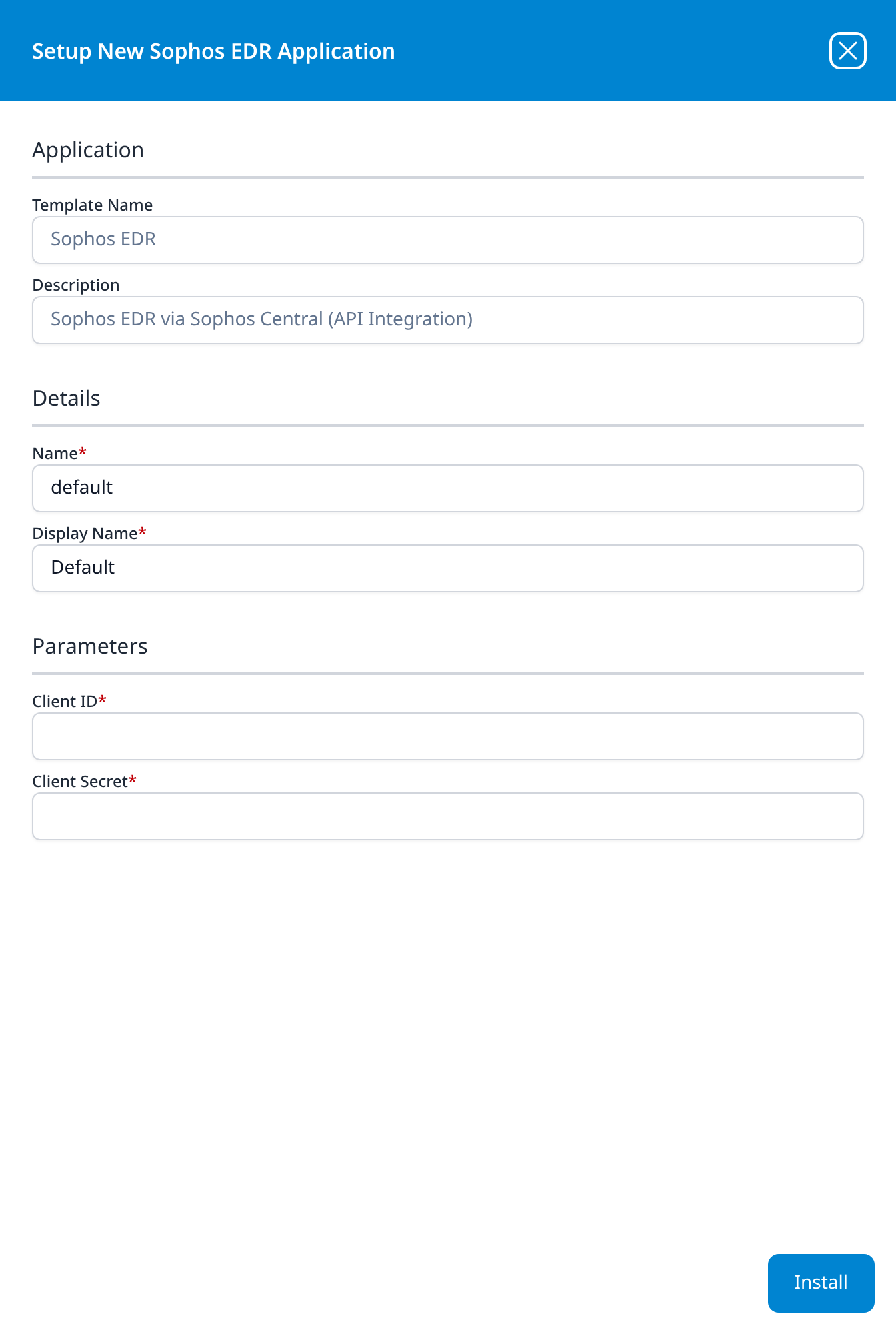
Press Install. The application then appears in the Installed Applications view, where its badge reads Running once the pipeline is up.
Confirm it is running
- v2 interface
- Classic v1 interface
The application is listed on Applications as Sophos EDR, with the display name you gave it beneath it. A healthy application's badge reads Running in green; anything else means the pipeline did not start. Click its row to open the application details page, whose summary carries the status and the traffic in and out.
The card is named after the Name you gave it at install, under the Sophos EDR template. A healthy card reads Running; anything else means the pipeline did not start, and the details panel carries the reason.
Two things to check in the first hour, in this order:
- The credential exchange succeeded. This is the only step that can fail silently: a bad Client ID or Secret produces an application that is up and collecting nothing. If you ran Verify before you leave Sophos Central you have already ruled it out.
- v2 interface
- Classic v1 interface
- Records are landing. Search the data lake for the source on Datalake Search. Confirm data is arriving covers the general procedure.
- Records are landing. Search the data lake for the source. On Data Lake → Search the facet selector ships a Default: Sophos EDR configuration; selecting it offers to rewrite the query to match this source, which is the quickest way to see whether anything has arrived. Confirm data is arriving covers the general procedure.
Expect the first collection to reach back hours rather than days: the API serves a 24-hour tail, and a quiet estate may legitimately produce nothing at all on day one. If you need certainty rather than patience, trigger a test detection as described in Verify before you leave Sophos Central.
Maintenance
Before it expires
Sophos issues API credentials with a 36-month lifetime that cannot be renewed or extended, and the summary page shows the exact date in its Expires on row. Sophos is explicit about what happens next:
You won't receive an alert when an API credential expires. When it expires, you can no longer use it to authenticate with Sophos APIs, and it's automatically removed from Sophos Central. To restore access, you must create a new API credential.
Three years is long enough that nobody will remember, and the failure is quiet in both directions: no warning from Sophos, and a Fluency application whose card gives no sign of it. Because expiry removes the credential, the symptom is 401 with "message": "Client ID is invalid.", an ID Sophos genuinely no longer knows.
Put the Expires on date in whatever calendar the team actually reads, and treat the rollover as a rotation.
Rotating the credential
Template parameters are read-only after install, so changing a credential means uninstalling and reinstalling:
- Create a new credential in Sophos Central under a name that distinguishes it from the old one, with the Service Principal ReadOnly role. Copy the new Client ID and Client Secret.
- Uninstall the existing Sophos EDR application in Fluency. To uninstall, click Uninstall at the top right of the application's details page (v1: the red Uninstall button at the foot of its details panel on Platform → Applications).
- Install Sophos EDR again with the new values.
- Once data is arriving, delete the old credential in Sophos Central: select it in API Credentials and click Delete.
Rotate promptly rather than carefully. The API serves a 24-hour tail, so a rotation that drags past a day loses the gap permanently.
Removing the integration
Uninstall the Sophos EDR application in Fluency first, with the Uninstall button at the top right of its details page (v1: the red Uninstall button at the foot of its details panel on Platform → Applications), then delete the credential in Sophos Central. Deleting the credential first leaves an application that can no longer authenticate, failing on every poll until someone removes it.
Troubleshooting
| Symptom | Likely cause | Fix |
|---|---|---|
| Application installs, badge reads Running, no data ever arrives | Client ID or Client Secret mistyped, or the secret was never captured | Run Verify before you leave Sophos Central. A 401 at the token step confirms it. The secret cannot be re-read, so reissue the credential and reinstall. |
| Same symptom, but the credential authenticates fine by hand | The credential was created in Sophos Central Partner or Enterprise | /whoami/v1 returns "idType": "partner" or "organization" and no dataRegion. Create a tenant credential in Sophos Central Admin and reinstall. |
| Worked for years, then stopped with no change on either side | The credential hit its 36-month expiry and was removed | 401 with "message": "Client ID is invalid." Issue a new credential and reinstall; see Before it expires. |
403 on every call | Role is Active Directory Sync or Firewall, which reach nothing else | Reissue with Service Principal ReadOnly. |
| Detections appear in the Sophos console but not in Fluency | Collection has been down longer than a day | The SIEM API serves only the last 24 hours and cannot backfill. The console keeps 90 days; the gap in the data lake is permanent. Restore collection and treat the older records as console-only. |
| Nothing arrives, and nothing is wrong | A quiet estate genuinely raised no events in the last 24 hours | Download the EICAR test file on a protected endpoint and check again after a poll. |
429 in bursts, especially in an MSP environment | The account-level quota is shared | Sophos's limits apply per credential, per account and per source IP. If Sophos's own siem.py script, another SIEM, and Fluency all poll the same tenant, they compete. Retire the duplicate collectors. |
| Endpoints stopped reporting, but other endpoints still arrive | The Sophos agent was removed or the device is offline | This is a Sophos-side gap, not an integration fault. Check Devices in Sophos Central for last-seen times before investigating the pipeline. |
| Credential exists in Sophos but Fluency shows an auth error, and the ID looks right | The values were transposed: Client ID into the secret field and back | Both are opaque strings; the Client ID is a UUID and the secret is not. Compare shapes. |
Data reference
The API behind each stream, what its records hold, and how far back Sophos serves it.
Streams and endpoints
An API credential inherits its permissions from the role you assign it. Service Principal ReadOnly, the role this guide uses, can read the account and change nothing, so what it reaches is the ceiling of what this integration can collect:
| Stream | Endpoint | Contents | How far back the API serves |
|---|---|---|---|
| Events | GET /siem/v1/events | Every endpoint event Sophos Central records: malware and PUA detections, behavioural and AMSI detections, IPS hits, web and application control blocks, peripheral and data-loss events, firewall, updating, isolation and policy activity. Each record carries the host name, the user, the threat name, a group such as MALWARE, WEB or RUNTIME_DETECTIONS, and, for core detections, the SHA-256 of the file involved and what the agent did about it. | 24 hours |
| Alerts (SIEM API) | GET /siem/v1/alerts | The subset Sophos raised for an administrator to act on, in the same record shape as events, with the remediation Central offers for each. | 24 hours |
| Alerts (Common API) | GET /common/v1/alerts | The console's own Alerts queue in the newer object shape: severity of high, medium or low, a category, the product that raised it, the managed agent and person it belongs to, and the allowedActions an administrator could take. | As far back as Sophos Central keeps alerts: 90 days |
The SIEM API serves the last 24 hours and nothing older
/siem/v1/events and /siem/v1/alerts are a tail, not an archive. Sophos states the constraint plainly in its own reference implementation: "A maximum of 24 hours of historical data can be retrieved." Ask for from_date older than that and you get the last 24 hours instead: no error, just less data than you asked for.
Two consequences worth planning for. The first collection reaches back hours, not weeks, so an empty first day is normal rather than a fault. And if collection stops for longer than a day (an expired credential, a paused application, an outage), the gap cannot be backfilled. Sophos Central still holds those records for 90 days and the console will show them to you; the API will not hand them back.
The template decides which of these it polls; the form does not
Sophos EDR takes two parameters and neither of them selects a stream. To see what your installation actually created, open the installed application's details and read its Actions list, which records every object the install made. Confirm it is running covers what to look for.
Under the hood
Engineering reference: authentication, hosts, paging and rate limits
Authentication. OAuth2 client credentials against Sophos ID:
POST https://id.sophos.com/api/v2/oauth2/token
Content-Type: application/x-www-form-urlencoded

grant_type=client_credentials&client_id=<id>&client_secret=<secret>&scope=token
The response carries access_token (a JWT), expires_in: 3600 and a refresh_token. The JWT goes in Authorization: Bearer <jwt> on every subsequent call.
Tenant and region discovery. GET https://api.central.sophos.com/whoami/v1 is the one Sophos API that needs no multi-tenancy header. It returns the principal's id, its idType (tenant, partner or organization) and its apiHosts. Tenant principals get a dataRegion; partner and organization principals do not, because they have to enumerate tenants first: GET /partner/v1/tenants with X-Partner-ID, or GET /organization/v1/tenants with X-Organization-ID.
Regional hosts. All data-bearing APIs are regional. Sophos currently operates nine:
| Data geography | Region | API host |
|---|---|---|
| United States | US (West) | https://api-us01.central.sophos.com |
| United States | US (East) | https://api-us03.central.sophos.com |
| EU | Ireland | https://api-eu01.central.sophos.com |
| EU | Germany | https://api-eu02.central.sophos.com |
| Canada | Canada | https://api-ca01.central.sophos.com |
| Australia | Australia | https://api-au01.central.sophos.com |
| Japan | Japan | https://api-jp01.central.sophos.com |
| Brazil | Brazil | https://api-br01.central.sophos.com |
| India | India | https://api-in01.central.sophos.com |
Tenant calls carry X-Tenant-ID: <uuid> alongside the bearer token.
Paging. The two APIs page differently. /siem/v1/events and /siem/v1/alerts use an opaque cursor: limit defaults to 200 and caps at 1000, the response carries next_cursor, and passing it back as cursor fetches the next slice. A cursor older than 24 hours is silently reset to the 24-hour window. /common/v1/alerts uses Sophos's key-based paging instead: pageSize defaults to 50, pageFromKey takes the previous response's nextKey, and a page holds at most 100 alerts.
Severity scales differ between the two. SIEM events grade NONE, LOW, MEDIUM, HIGH, CRITICAL; Common API alerts grade only high, medium, low. Anything normalising both onto one scale has to reconcile that.
Rate limits. Sophos publishes four, and they apply across all its APIs:
| Window | Maximum | Status |
|---|---|---|
| 1 second | 10 calls | Recommended |
| 1 minute | 100 calls | Enforced, with bursts to 300 |
| 1 hour | 1,000 calls | Recommended |
| 1 day | 200,000 calls | Enforced |
The first three apply separately and equally to each set of credentials, each account and each originating IP, so splitting traffic across several credentials from the same account does not buy headroom. The daily quota applies per account and per credential set but not per IP. Exceeding any of them returns 429 with a standard error object; Sophos asks for exponential backoff with jitter.
Error object. Failures return JSON with error (a camelCase identifier), and optionally message, code, correlationId, requestId and createdAt. The correlationId is what Sophos support will ask for.
Retention, both sides. Sophos Central applies "a 90 day retention period for time series data such as events, alerts and audit logs", but the SIEM API only serves the most recent 24 hours of that. The two numbers answer different questions: 90 days is how long you can look something up in the console, 24 hours is how much a collector can recover after an outage.
Legacy credential shape. Before API credentials, Sophos issued SIEM API tokens from Global Settings → API Token Management: an API Access URL of https://api1.central.sophos.com/gateway plus two headers, x-api-key and Authorization: Basic <base64>. That page is retired: existing tokens work until they expire, no new ones can be issued, and lifetimes cannot be extended. The Sophos EDR template does not take this shape.
References
Sophos
- API Credentials: creating credentials, all six service principal roles, and the expiry behaviour
- Getting Started as a Tenant: the credential, the token exchange and the tenant lookup, with working cURL
- How Our APIs Work: regional hosts, status codes, paging, rate limits and the partner/organization/tenant model
- SIEM Integration API Schemas: the full event and alert record shape, including every
groupandoriginvalue - Sophos-Central-SIEM-Integration: Sophos's own reference collector, and the source of the 24-hour statement
- Sophos Central help: Sophos's product documentation. Confirm the 90-day retention figure for events, alerts and audit logs against your own tenant before relying on it.
- Test the detection features: generating a benign detection to validate the feed
Fluency
- Applications: what the Applications page does (v1: Platform → Applications)
- Sophos EDR install form: the template's fields (v1: Install Application From Template)
- Confirm data is arriving
- Endpoint Management: the rest of this category
- Sophos Firewall: the network-side Sophos product, collected by syslog rather than API