Horizon3.ai NodeZero
NodeZero is Horizon3.ai's autonomous penetration-testing service. Fluency polls the NodeZero API for each finished pentest's results (a summary, every weakness, every host, and the action log of every command NodeZero ran) and, every five minutes, for Tripwires alerts: trips of the decoys NodeZero plants, such as an AWS key or an Active Directory account that nobody has a legitimate reason to touch. The weaknesses put proven, exploitable findings beside the alerts on the same hosts, the action log shows which of NodeZero's attack steps your detections saw, and a trip is a high-confidence sign of an intruder.
Authentication is a NodeZero API key. A key is scoped to one client account and belongs to the user who generates it, and tripwire alerts reach the API as that user's notifications, so whose key it is decides whether tripwire alerts are collected.
The setup has two halves:
- In NodeZero: as a user who receives the account's tripwire alerts, generate a Read-only API key, and note which region hosts the account.
- In Fluency: install the Horizon3.ai NodeZero application template and paste the key in.
What arrives
| Stream | What it holds | Lands in |
|---|---|---|
| Pentests | One summary per finished pentest: its name, type, state, scope, timings and counts of what it found. | The Horizon3 index |
| Weaknesses | Every weakness the pentest found, with its CVE or Horizon3 ID, CISA KEV and ransomware flags, severity and scores, whether NodeZero proved it, MITRE ATT&CK mapping, the affected host and a link to it in the Portal. | The Horizon3 index |
| Hosts | Every host the pentest discovered, in scope or not, with its operating system, counts of weaknesses and credentials, and risk score. | The Horizon3 index |
| Action logs | Every command NodeZero ran during the pentest: the module, the command, the target IP, start and end time, and MITRE tactics. | The Horizon3 index |
| Tripwire trips | Each trip of a deployed tripwire: which decoy, where it was deployed, and the source IP, host name and user that touched it. | The Horizon3 index |
Pentest data arrives once per pentest, after the pentest has finished and NodeZero has finished post-processing its results, never while it runs; the first poll reaches back 30 days, so if no pentest finished in that window, no pentest data arrives until one does. Tripwire trips are collected only when the key's user has Full Access to Tripwires in NodeZero; see step 1. The credentials NodeZero captured, its attack paths and the status of a weakness across pentests (fixed, regressed) are not collected; see What does not arrive.
Record layouts, field meanings and deduplication keys are in Data reference.
Before you begin
| Requirement | Detail |
|---|---|
| A NodeZero user who can generate API keys | Keys are generated under the user's own My Settings. For a managed service provider generating a key for a client account, the Org Admin role on the parent account; see step 2. |
| Full Access to Tripwires on that user, for the tripwire alerts | An Org Admin grants it under Settings → User Management: the ⋯ menu next to the user, Edit User, then the Full Access to Tripwires toggle. A key from a user without it collects pentest data normally and no trips. |
| To know your NodeZero region | US (commercial and Federal), EU, Australia or US GovCloud. If you are not sure, the verify call tries all four. |
| Room for the action logs | The action log holds one row per command NodeZero ran on every host, which for an internal pentest of any size runs to tens of thousands of rows. The template collects it for every pentest; size your ingest for it. |
| Outbound reach from Fluency to Horizon3 | The collector calls the region's API gateway (https://api.horizon3ai.com in the US) from Fluency's infrastructure. Nothing is installed in your network, and the NodeZero Runner plays no part. |
Part 1: NodeZero
1. Decide whose key it is
The key fixes two things that nothing on the Fluency side can change: the client account it reads, and the user whose tripwire alerts it collects.
- The client account. The pentest listing returns, in Horizon3's words, "Pentest records in the current client account", and a key reads one account. An organisation running NodeZero for itself has one account and needs one key. A managed service provider generates one key per client account and installs the application once per client; see step 2.
- The user. The notifications the API serves are "for the authenticated user", and Horizon3 describes them as "scoped to a specific user (by email) within a client account". Tripwire alerts go to the users with Full Access to Tripwires, who, in Horizon3's words, "will receive all relevant alert communications". So generate the key as a user who has that access in the account the key reads.
The key is that user's: it is listed under their My Settings, and the tripwire alerts it collects are theirs. Where you can, use an account that does not leave with one person.
2. Generate the API key
In the NodeZero Portal, signed in as the user you chose:
- Open the profile menu at the upper right and click Settings, then My Settings. (The install form's label for the key gives the same path: Portal > Settings > My Settings > API Keys.)
- In the API Keys section, click Generate API Key.
- Set the permission level to Read-only and click Generate.
- Copy the key.
The permission level is the only choice on the screen, and Fluency only reads:
| Permission level | Horizon3's description | For this integration |
|---|---|---|
| Read-only | "The API key can read pentest results, but cannot run pentests." | Choose this. |
| User | "Basic read/write permissions. The API key can run pentests and read results." | Collects the same data, but the key can also launch pentests against your network. Do not use it here. |
| NodeZero Runner | "A specialized, heavily restricted role designed specifically for NodeZero Runners." | For Runners, not for reading results. |
Horizon3: "Keep your API key secure, as anyone with your API key can access your H3 account." A Read-only key cannot launch a pentest, but it reads every result in the account: which hosts are exploitable, and how.
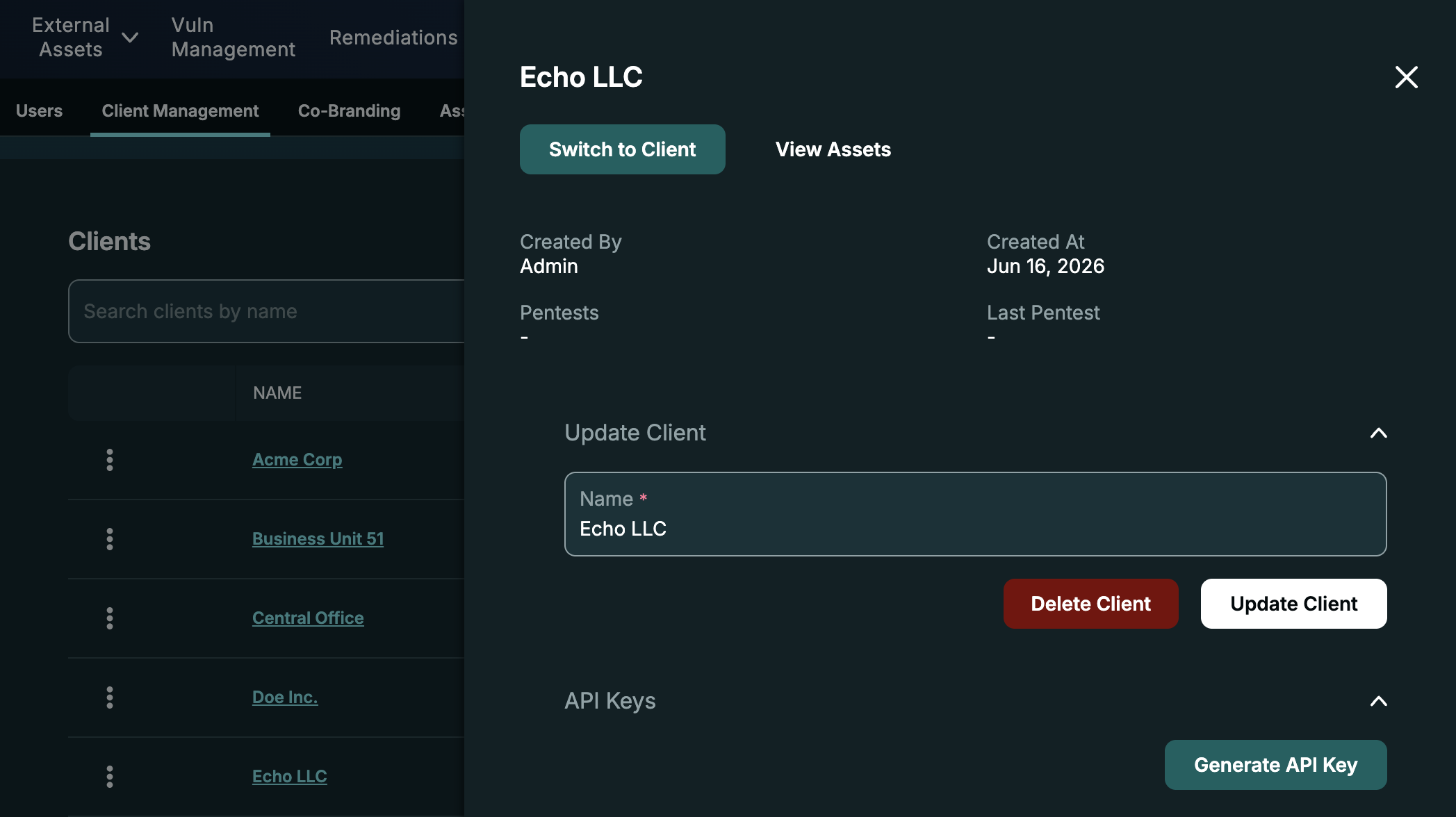
For a managed service provider, a client's key is generated from the parent account. As an Org Admin of the parent, open the profile menu, click Settings, then Client Management, and select the client. Its drawer has an API Keys section with Generate API Key; Horizon3: "API keys that you generate from this drawer will be scoped to the selected client." Choose Read-only where it asks for a permission level. Repeat for each client, and keep each key with the client's name, since nothing in the key says which client it reads.
3. Note the region
NodeZero runs separate regional deployments, each with its own API gateway, and the key exists only in the one that hosts your account. The install form asks for it as NodeZero Region:
| NodeZero Region | API gateway |
|---|---|
| US (Commercial and Federal) (the default) | https://api.horizon3ai.com |
| EU | https://api.horizon3ai.eu |
| Australia | https://api.horizon3ai.au |
| US GovCloud | https://api.gateway.gov-horizon3ai.com |
Every gateway answers a key it does not hold with 401 and {"message":"Unauthorized"}, the same answer a mistyped or deleted key gets. Most accounts are in the US region, which is the form's default; if yours might not be, run the verify call, which tries all four.
Verify before you leave NodeZero
Two calls. The first finds the region that accepts the key; the second, against that region, lists the newest pentests the key can read and counts the tripwire alerts its user has received.
KEY="..."   # step 2

# 1. Which region accepts the key: 200 on one gateway, 401 on the others
for GW in https://api.horizon3ai.com https://api.horizon3ai.eu \
          https://api.horizon3ai.au https://api.gateway.gov-horizon3ai.com; do
  printf '%-40s ' "$GW"
  curl -sS -o /dev/null -w '%{http_code}\n' -H 'Content-Type: application/json' \
    -d "{\"key\":\"$KEY\"}" "$GW/v1/auth"
done

# 2. With the gateway that answered 200
GW="https://api.horizon3ai.com"
TOKEN=$(curl -sS -H 'Content-Type: application/json' -d "{\"key\":\"$KEY\"}" "$GW/v1/auth" | jq -r .token)
gql() { curl -sS -H "Authorization: Bearer $TOKEN" -H 'Content-Type: application/json' -d "$1" "$GW/v1/graphql"; }

# the five newest pentests
gql '{"query":"query($p: PageInput) { pentests_page(page_input: $p) { pentests { name op_type state client_name etl_completed_at } } }",
      "variables":{"p":{"page_size":5,"sort_inputs":[{"order_by":"scheduled_at","sort_order":"DESC"}]}}}' | jq .

# the key user's notifications, counted by type
gql '{"query":"query($p: PageInput) { notifications_page(page_input: $p) { notifications { type } } }",
      "variables":{"p":{"page_size":100}}}' \
  | jq '.errors // ([.data.notifications_page.notifications[].type] | group_by(.) | map({(.[0]): length}) | add)'
| Response | What it means |
|---|---|
Call 1: 200 on one gateway, 401 on the others | The key works, and that gateway's region is the one to choose on the form (step 3). |
Call 1: 401 on all four | The key is mistyped, truncated or deleted. Copy it again, or generate a new one (step 2). |
Call 1: 403 and {"message":"Forbidden"} | The request carried no User-Agent header, which the gateway refuses. curl sends one unless told not to; another tool may not. |
| Call 2: a list of pentests | The key reads results. client_name names the client account it is scoped to. Pentests in state done or ended with etl_completed_at set are the ones Fluency collects. |
Call 2: "pentests": [] | The account has no pentests the API lists (archived ones are left out). Pentest data starts arriving with the next pentest that finishes; tripwire alerts are unaffected. |
Call 2: errors with [403] You are not authorized | The key's permission level does not allow the query (a NodeZero Runner key, for one). Generate a Read-only key. |
Notifications: {"TripwireTripped": n} | The key's user receives tripwire alerts; n of their newest 100 notifications are trips. |
Notifications: null, or no TripwireTripped | No trips yet, or the user lacks Full Access to Tripwires. A test trip settles which; see Confirm it is running. |
Part 2: Fluency
Install the Application
- v2 interface
- Classic v1 interface
In the navigation rail, open Applications and click Install Application, then choose Horizon3.ai NodeZero from the Endpoint Management category of the Application Catalog.
Go to Platform → Applications → Install Application From Template and choose Horizon3.ai NodeZero from the Endpoint Management category.
Both parameters are required.
| Parameter | Notes |
|---|---|
| NodeZero API Key (Portal > Settings > My Settings > API Keys; one key per client account) | The key from step 2. Opens empty; flagged sensitive. |
| NodeZero Region | A drop-down list: US (Commercial and Federal) (the default), EU, Australia and US GovCloud. The region from step 3. |
Below those, the collapsed Advanced configuration section (v1: the Advanced Configurations row) holds the destination:
| Parameter | Notes |
|---|---|
| datalake | Pre-filled managed. |
| datalake index name | Pre-filled Horizon3. Two applications writing to the same index name in the same lake will collide, and the second one aborts. When you install one application per client account, give each its own name (Horizon3-Acme, Horizon3-Globex). |
- v2 interface
- Classic v1 interface
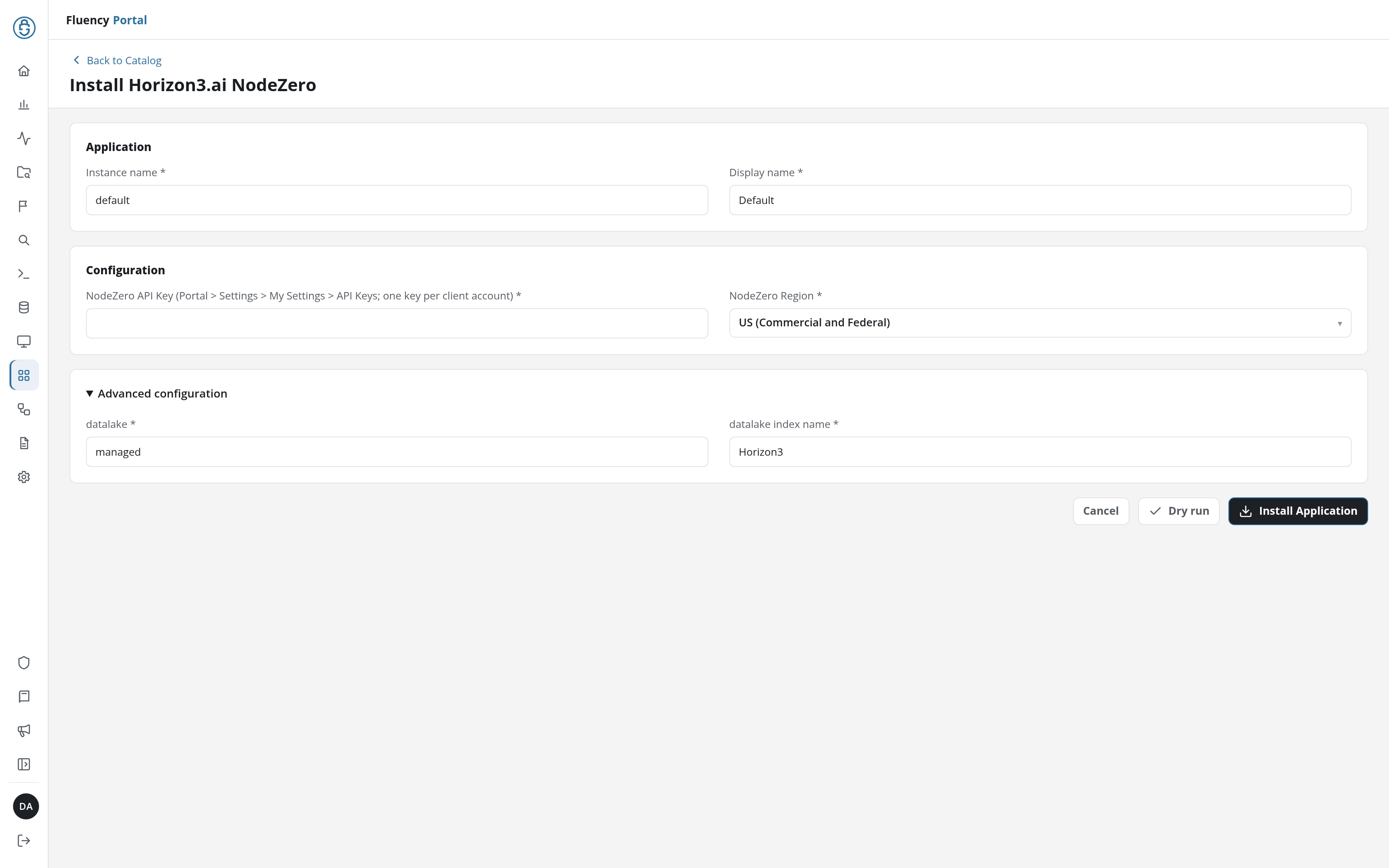
Leave Instance name and Display name at default / Default for a single install. For a second one (another client account) give each a name you will recognise; the instance name also becomes part of the integration name every record carries in @customer.
Click Dry run first to have the platform check the configuration before anything is installed, then click Install Application. The Applications page opens with the notice Default is launching., and the new application is listed with a green Running badge once the pipeline is up.
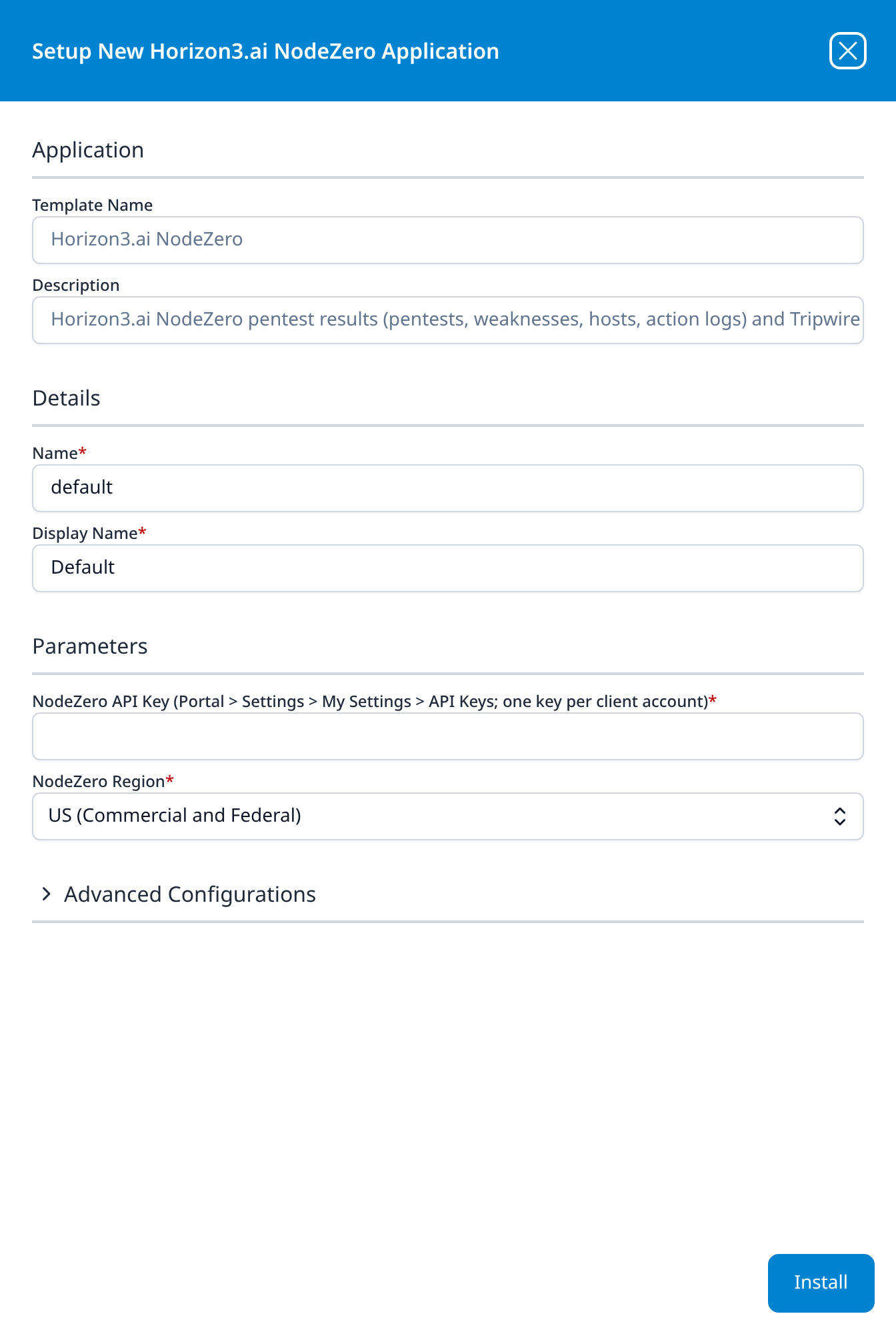
Leave Name and Display Name at default / Default for a single install. For a second one (another client account) give each a name you will recognise; the name also becomes part of the integration name every record carries in @customer.
Press Install. The application then appears in the Installed Applications view, where its badge reads Running once the pipeline is up.
Confirm it is running
A Running badge means the pipeline started, not that NodeZero accepted the key, and pentest data arrives only when a pentest finishes, so a quiet index proves nothing either way. Check in this order.
- v2 interface
- Classic v1 interface
- The application is up and the key was accepted. On Applications, Horizon3.ai NodeZero is listed with
Defaultbeneath it and a green Running badge. Click its row to open the application details: the Pipeline card draws theHorizon3-defaultsource feeding theHorizon3-defaultrouter and destination, and the Actions card records theHorizon3index the install created. The collector authenticates on its first poll, within minutes of the install. A red Error badge means the pipeline aborted or reported errors in the last hour, and the details page shows the error message beneath the summary figures; one saying NodeZero rejected the API key means a wrong key or a wrong region (see Troubleshooting).
- The application is up and the key was accepted. The card in Installed Applications reads
Horizon3.ai NodeZero: Defaultwith a Running badge. Expanding it draws aHorizon3-defaultPlugin Data Source feeding a router and aHorizon3-defaultMgmt Queue destination. The collector authenticates on its first poll, within minutes of the install; the blue eye button opens the details panel, where an aborted application shows its Error Message in red.
- A test trip arrives. This is the one check that does not wait for a pentest, and it also proves the key's user receives tripwire alerts. In the NodeZero Portal, open Tripwires, open any deployed tripwire and click Test Tripwire at the bottom of its details page. The collector checks for trips every five minutes; within a few checks of the alert appearing under Tripwires → Tripwire Alerts, a
horizon3Tripwirerecord withtrip.is_testset totruelands in the index. (With no tripwires deployed, skip this step.) - Pentest data is there. Open Datalake Search (v1: Data Lake → Search, see Search), choose
managed-Horizon3in the index selector and set the range to the last 30 days: records carry the time NodeZero found or did something during the pentest, not the time they arrived, so a search of the last hour misses them. The Event Types group of the Filters panel (v1: the EventTypes facet) listsHorizon3Pentest,Horizon3Weakness,Horizon3HostandHorizon3ActionLogfor each pentest collected, andHorizon3Tripwirefor trips. Pentests that finished in the 30 days before the install are collected first, up to five per poll, oldest first. After that, a pentest's records arrive within about 20 minutes of NodeZero finishing its post-processing.
See Confirm data is arriving for the three platform-side checks: application health, ingress volume and storage-side queueing.
Maintenance
Rotating the API key
Template parameters are read-only after install, so a new key means a new application. Do it in this order, so that collection never runs on a deleted key:
- In NodeZero, generate a new Read-only key as the same user (step 2).
- In Fluency, uninstall the Horizon3.ai NodeZero application and install it again with the new key and the same region and index name. To uninstall, click Uninstall at the top right of the application's details page (v1: the red Uninstall button at the foot of its details panel on Platform → Applications).
- In NodeZero, remove the old key from the same API Keys section.
The new installation starts with no memory of what the old one collected: its first poll reaches back 30 days again, so every pentest that finished in those 30 days, action logs included, and every trip in them arrives a second time. Deduplicate on the keys in Pentest results are snapshots.
Outages
The collector keeps its place per pentest and per data type, and resumes from it. Pentests that finished while it was not collecting are collected afterwards, provided they have not been archived in the meantime; trips detected in the gap arrive with the next check, provided they are still among the user's 2,000 most recent notifications. One data type of one pentest that fails (an action-log export, say) is retried on the next sweeps while everything else carries on; after 72 hours of failures it is given up, with a Horizon3 Warning notification naming the pentest. When every collection in a poll fails, the next attempt is delayed 5, 10, 20, 40 and then 60 minutes, and the error is reported as a Horizon3 Poll Error notification when it first appears or changes, and again once a day while it persists.
Removing the integration
- Uninstall the Horizon3.ai NodeZero application in Fluency, so nothing is polling: the Uninstall button at the top right of its details page (v1: the red Uninstall button at the foot of its details panel on Platform → Applications).
- In NodeZero, remove the key from the API Keys section of the user's My Settings (or of the client's drawer under Client Management).
Troubleshooting
| Symptom | Likely cause | Fix |
|---|---|---|
Error badge or a Horizon3 Poll Error saying NodeZero rejected the API key, 401 Unauthorized | Wrong key, a key that was deleted, or the wrong NodeZero Region: every gateway answers a key it does not hold the same way | Run the verify call: it names the region that accepts the key, or shows that none does. Reinstall with the corrected key or region. |
An error containing [403] You are not authorized | The key's permission level does not allow the query (a NodeZero Runner key, for one) | Generate a Read-only key and reinstall. |
| Running, no error, nothing in the index | No pentest has finished since 30 days before the install, and no trip has fired | Not a fault. Make a test trip; pentest data arrives with the next finished pentest. |
| A pentest visible in the Portal never arrives | It is still running or post-processing; it ended in a state other than done or ended (an error, a cancellation); it finished more than 30 days before the install; it was archived before it was collected; or it belongs to another client account | Check its state and dates in the Portal. A pentest of another client account needs that client's key and its own installation; an archived one is never listed to the API. |
| Pentest data arrives, tripwire trips never do | The key's user lacks Full Access to Tripwires, or no tripwire has been tripped | Make a test trip. If it appears under Tripwires → Tripwire Alerts but not in Fluency, grant the user the access, or generate the key as a user who has it. |
| Rules fire on tripwire trips nobody caused | Test trips from Test Tripwire are collected like real ones | They carry trip.is_test: true; exclude them in the rule. |
| A Horizon3 Warning that a data type of a pentest was given up after 72 hours | That export failed on every attempt for three days | That data type of that pentest is not collected; the rest of the pentest, and later pentests, are. Reinstalling within 30 days of the pentest collects it again, along with everything else in those 30 days. |
| The same pentest's records appear twice | The application was reinstalled within 30 days of the pentest | Expected; see Rotating the API key. Deduplicate on the keys in Pentest results are snapshots. |
| A weakness fixed and re-verified in NodeZero still shows as found | Each pentest is collected once, as it was when it finished | The follow-up pentest is collected on its own; a fixed weakness is simply absent from it. The weakness status across pentests is not collected; see What does not arrive. |
| A large jump in ingest after a pentest | The action log | Expected: one row per command NodeZero ran. |
Errors mentioning 429 | NodeZero rate-limited a request | The collector retries with backoff, honouring Retry-After up to five minutes, and otherwise on the next poll. |
| Worked for months, then stopped with no change in Fluency | The key was removed, or its user was | Run the verify call with the installed key. If it is refused, generate a new one and reinstall. |
Data reference
What the five streams look like once they land, for searches and detection rules written against them.
Streams
Each stream stores the NodeZero record whole under its own key:
| Stream | From | Record under | @event_type | @eventType | @timestamp from |
|---|---|---|---|---|---|
| Pentests | pentests_page | @horizon3Pentest | horizon3Pentest | Horizon3Pentest | completed_at |
| Weaknesses | weaknesses_page | @horizon3Weakness | horizon3Weakness | Horizon3Weakness | created_at (when NodeZero found it) |
| Hosts | hosts_csv_url (CSV export) | @horizon3Host | horizon3Host | Horizon3Host | FirstSeen |
| Action logs | action_logs_csv_presigned_url (CSV export) | @horizon3ActionLog | horizon3ActionLog | Horizon3ActionLog | StartTime |
| Tripwire trips | notifications_page (TripwireTripped) | @horizon3Tripwire | horizon3Tripwire | Horizon3Tripwire | trip.tripped_at |
@customer is the installed application's integration name (Horizon3-default for an install named default), not a NodeZero client; the client is in @horizon3Op.clientName and, on pentest summaries, client_name. NodeZero's own timestamps are UTC without a zone (2026-11-02T09:14:03.512000) and are kept as sent; @timestamp is epoch milliseconds UTC.
The pentest on every record
Weaknesses, hosts and action logs carry the pentest they came from in a @horizon3Op block, so a search can be grouped or filtered by pentest without a join:
| Field | Value |
|---|---|
@horizon3Op.opId | The pentest's ID (op_id) |
@horizon3Op.name | Its name in the Portal |
@horizon3Op.opType | NodeZero (internal), ExternalAttack, AWSPentest, AzurePentest and the other pentest types |
@horizon3Op.state | done or ended (Horizon3: "ended early by the user. Partial results may still be available") |
@horizon3Op.clientName | The NodeZero client account |
@horizon3Op.completedAt, .etlCompletedAt | When the pentest finished, and when its results became fully available |
What one record holds
A weakness as it lands, with identifiers replaced:
{
  "@horizon3Weakness": {
    "uuid": "8c1f…",
    "op_id": "1234abcd-…",
    "created_at": "2026-11-02T09:14:03.512000",
    "vuln_id": "CVE-2024-3400",
    "vuln_name": "Palo Alto PAN-OS GlobalProtect Command Injection",
    "vuln_category": "…",
    "vuln_cisa_kev": true,
    "vuln_known_ransomware_campaign_use": true,
    "severity": "CRITICAL",
    "score": 10.0,
    "base_score": 10.0,
    "context_score": 10.0,
    "has_proof": true,
    "ip": "10.0.0.5",
    "affected_asset_display_name": "fw01.example.local",
    "downstream_impact_types": ["DomainCompromise"],
    "mitre_mappings": [{ "mitre_tactic_id": "TA0001", "mitre_technique_id": "T1190" }],
    "time_to_finding_hms": "00:42:10",
    "portal_url": "https://portal.horizon3ai.com/…",
    "affected_host": { "uuid": "…", "host_name": "fw01", "ip": "10.0.0.5", "os_names": ["PAN-OS"], "is_in_scope": true },
    "vuln": { "description": "…", "mitigations": [{ "description": "…" }], "references": [{ "name": "…", "url": "…" }] }
  },
  "@horizon3Op": {
    "opId": "1234abcd-…",
    "name": "Weekly Internal",
    "opType": "NodeZero",
    "state": "done",
    "clientName": "Example Corp",
    "completedAt": "2026-11-02T11:30:00Z",
    "etlCompletedAt": "2026-11-02T11:48:12Z"
  },
  "@event_type": "horizon3Weakness",
  "@eventType": "Horizon3Weakness",
  "@customer": "Horizon3-default",
  "@timestamp": 1793610843512
}
The fields that carry the weight in a detection or a report:
| Stream | Field | Meaning |
|---|---|---|
| Weaknesses | vuln_id, vuln_aliases, vuln_name | A CVE, or a Horizon3 ID such as H3-2021-0020, with its other identifiers and its name. |
| Weaknesses | severity, score, base_score, context_score | INFO, LOW, MEDIUM, HIGH or CRITICAL; context_score is NodeZero's score for this weakness in your environment, base_score the generic one. |
| Weaknesses | has_proof, proofs | Whether NodeZero exploited it rather than only detecting it. |
| Weaknesses | vuln_cisa_kev, vuln_known_ransomware_campaign_use | On CISA's Known Exploited Vulnerabilities list; used in ransomware campaigns. |
| Weaknesses | ip, affected_host, affected_asset_display_name | The host, with its name, addresses, operating system and whether it was in scope. |
| Weaknesses | downstream_impact_types, mitre_mappings | What exploiting it led to (DomainCompromise and the like), and the ATT&CK tactic and technique. |
| Weaknesses | portal_url | The weakness in the NodeZero Portal. |
| Hosts | IP, Hostname, DNSHostnames, OS, InScope | The host as NodeZero found it; InScope is false for a host discovered outside the pentest's scope. |
| Hosts | NumWeaknesses, NumConfirmedWeaknesses, NumCredentials, RiskScore, RiskScoreDescription | What the pentest found on it, typed as numbers. |
| Action logs | IP, ModuleName, Cmd, StartTime, EndTime, Targets, MitreTactics | One command NodeZero ran: from which address, what, against which targets, when, under which ATT&CK tactics. |
| Pentests | op_type, state, min_scope, max_scope, exclude_scope, duration_s | What kind of pentest, how it ended, its scope and how long it ran. |
| Pentests | weaknesses_count, hosts_count, credentials_count, impacts_count | Its headline counts. |
| Tripwire trips | tripwire.type, tripwire.external_id, tripwire.deployment_asset_name | Which decoy, its identifier (the planted AWS access key ID, the file or account name) and where it was deployed. |
| Tripwire trips | trip.tripped_at, trip.detected_at | When it was touched, and when NodeZero detected it; some detection methods take longer, so the two can differ. |
| Tripwire trips | trip.attributes.source_ip_address, .source_hostname, .source_username, .source_process_name, .geoip, .dc_hostname | Who and what touched it, as far as the decoy's detection channel can tell. |
| Tripwire trips | trip.is_test | true for a trip made with Test Tripwire. |
The tripwire types, with Horizon3's descriptions:
tripwire.type | Horizon3's description |
|---|---|
AWS_ACCESS_KEY | "A decoy AWS credentials file placed on network shares or compromised hosts. Tripped when an actor attempts to use the embedded AWS access key ID, which is a real credential generated by Horizon3 for detection purposes." |
MYSQL_DUMP | "A deceptive MySQL dump file placed on network shares or Linux servers. Tripped when an actor attempts to import or load the contents, which triggers a DNS callback to Horizon3 detection systems." |
WINDOWS_SUSPICIOUS_PROCESS | "A process monitor deployed on Windows 7+ machines that watches for execution of commonly used attacker reconnaissance tools (e.g., tasklist.exe, certutil.exe, systeminfo.exe, netstat.exe, at.exe). Tripped when a monitored process is executed, triggering a DNS callback to Horizon3 detection systems." |
KERBEROAST | "A decoy Active Directory account configured with a Service Principal Name (SPN). Tripped when an attacker requests a Kerberos TGS (Ticket Granting Service) ticket for the account, a technique used to obtain service tickets for offline password cracking." |
AS_REP_ROAST | "A decoy Active Directory account configured with Kerberos pre-authentication disabled. Tripped when an attacker requests an AS-REP (Authentication Server Response) for the account, a technique used to obtain authentication responses for offline password cracking." |
EXPOSED_PASSWORD | "A decoy Active Directory account with a credential hint embedded in the user description. Tripped when an attacker scrapes the exposed credential and attempts to authenticate to Active Directory with it." |
NodeZero raises "one alert per tripwire per asset", so repeated touches of one decoy in a short period are one alert, and one record.
Pentest results are snapshots
Each pentest reports the hosts and weaknesses as it found them, and the next pentest reports them again. A host that appears in every weekly pentest has one horizon3Host record per pentest; a weakness fixed between two pentests is simply absent from the second. So group a pentest's records by @horizon3Op.opId, and count across pentests on vuln_id plus ip for weaknesses and IP for hosts, not on records.
Where the same pentest has been collected twice (after a reinstall), deduplicate on: pentests op_id; weaknesses uuid; hosts OpID plus IP; action logs OpID, IP, StartTime and Cmd together (the export carries no row ID); tripwire trips tripwire.uuid, trip.tripped_at and trip.detected_at together.
Two uses are worth building on:
- Detection validation. An action log is a timed list of attacks against known addresses. Join
IPandStartTimetoEndTimeagainst your own detections for the same addresses and window, and the pentest becomes a test of the SOC: which of NodeZero's steps raised an alert, and which went unseen. - Exposure on alerting hosts. A weakness with
has_proof: trueand a highcontext_scoreon a host that is also the subject of an alert is the one to look at first.
What does not arrive
Pentests that are not finished, or not finished cleanly. Only pentests in state done or ended are collected, and only once NodeZero has finished post-processing them. Pentests that ended in an error or were cancelled are not, and neither is anything from a pentest still running.
Archived pentests. The pentest listing leaves archived pentests out (Horizon3: "By default, archived pentests are excluded"), so a pentest archived before the collector reached it is never collected.
Other client accounts, Horizon3's sample pentests, and operations that are not pentests. A key reads its own client account only. The sample pentests Horizon3 shows to every account live in a separate sample account, and the listing "always" excludes "non-pentest operation types (such as external asset discovery)".
Captured credentials, attack paths and the weakness status across pentests. NodeZero's list of the credentials it captured is not collected, deliberately: even masked, it is sensitive. Neither are its impacts and attack paths, nor the per-weakness status across pentests (open, mitigated, regressed) that NodeZero tracks for remediation; NodeZero's Portal and its own vulnerability-management integrations carry those.
Later changes to a pentest. Each pentest is collected once, as it was when its results became available. A later re-verification is reflected in the follow-up pentest, which is collected on its own.
Rapid Response notifications and the tripwire inventory. Of the user's notifications, only tripwire trips are kept. The list of deployed tripwires is not collected, only their trips.
History from before the install. The first poll reaches back 30 days, for pentests (by when their results became available) and for trips.
Under the hood
Engineering reference: template, collection behaviour and output format
Template. Template ID Horizon3, display name Horizon3.ai NodeZero, filed under Endpoint Management. Description: Horizon3.ai NodeZero pentest results (pentests, weaknesses, hosts, action logs) and Tripwires alerts via API. Parameters apiKey (sensitive), region (us, eu, au or fed; default us), datalake (default managed) and index (default Horizon3). The install creates the Horizon3 data-lake index with the ingext default schema, a Horizon3-<name> integration holding the region as configuration and the key as its secret, a plugin data source, a router, one pipe through the standard Plugin_Passthrough processor, and a data sink on the management queue carrying the lake and index; the installed application's Actions list records them.
Authentication. POST <gateway>/v1/auth with {"key": "<API key>"} returns {"token": "<JWT>"}; the JWT lasts an hour. The collector renews it five minutes before its exp, or once immediately when the gateway refuses it (401, or {"message":"The incoming token has expired"}). Every GraphQL call is POST <gateway>/v1/graphql with the JWT as a bearer token, a User-Agent of Fluency-Horizon3-Plugin/<version>, and an operation name beginning Fluency, so the integration's requests can be told apart on Horizon3's side. GraphQL answers HTTP 200 even when a query fails, so the collector reads the response's errors. The template's gateways are the ones h3-cli and Horizon3's Splunk and Cortex integrations use; Horizon3's API reference also names api.gateway.horizon3ai.com, .eu and .au, which answer the same way.
Cadence. The service ticks every five minutes. Each tick reads the key user's notifications (up to 20 pages of 100, since the API documents no order or filter for them), keeps the TripwireTripped ones, and forwards those not yet forwarded, keyed on tripwire.uuid|tripped_at|detected_at with a 24-hour overlap on the newest detected_at. Reading notifications does not mark them read. Every 15 minutes the tick also lists pentests with etl_completed_at at or after the newest one fully collected less 24 hours (on the first poll, 30 days ago), in states done or ended, oldest first, 100 per page; pentests already collected are recognised by op_id. At most five pentests are collected per tick; a backlog is worked off on the following ticks without waiting the 15 minutes.
Per pentest. Each data type is collected and checkpointed on its own. Weaknesses are paged from weaknesses_page in uuid order, 100 per page. Hosts and action logs come from presigned S3 URLs to NodeZero's CSV exports, downloaded to a temporary file before any row is forwarded (a failed download is retried up to three times with a fresh URL); documented integer, float and boolean columns are typed, and empty cells dropped. A data type that fails has its partial files deleted and is retried on the next sweep; after 72 hours it is given up with a warning, as is a pentest being retried that is no longer listed, so that neither can pin the sweep window. The pentest summary leaves out nodezero_script_url, a download link for the NodeZero launch script.
Failures. 429 and 5xx responses and network errors are retried up to five times with backoff, honouring Retry-After up to five minutes. Error messages carry a diagnosis: a rejected API key (wrong key, deleted, or the wrong region), a refused JWT, a missing permission (403), rate limiting (429). Notifications are Horizon3 Poll Error and Horizon3 Init Error (on change, then daily while it persists) and Horizon3 Warning (on change).
Collector options the template does not expose. The collector can also take a different first-poll window, a subset of the five streams (to leave out action logs, for one), other pentest states, a list of pentest types, a different pentest cadence and per-tick limit, an explicit gateway URL, and an option to drop test trips. The template sets none of them, so every installation collects all five streams, done and ended pentests of every type, and test trips.
Output. gzip-JSONL event dumps, one sourcetype per stream (horizon3Pentest, horizon3Weakness, horizon3Host, horizon3ActionLog, horizon3Tripwire), split every 100,000 records, in the envelope shown in What one record holds. There are no resource dumps: hosts are events, one per pentest, because each pentest covers its own scope.
References
Horizon3.ai
- API Authentication: exchanging the API key for a JWT, and its one-hour lifetime
- GraphQL API reference: the pentest, weakness, host, action-log and notification queries, the CSV export formats and the tripwire types
- CLI setup: the API key's permission levels
- Client & License Management: client-scoped API keys for managed service providers
- User Management and Tripwires access roles: Full Access to Tripwires and who receives tripwire alerts
- Tripwire alerts and Testing tripwires: where alerts appear, consolidation, and Test Tripwire
Fluency
- Horizon3.ai NodeZero install form: the template's fields and defaults (v1: Install Application From Template)
- Confirm data is arriving
Related
- Endpoint Management integrations: the rest of this category
- Integration Matrix: which ingress method each product uses
- Resource Release / Sync: pushing rules and parsers from a parent account to customer accounts, for an MSP that installs this once per client account