Workday
Fluency polls Workday's Privacy API for the user activity log: which account ran which task, against which object, from which address and session. Workday is the authoritative record of who works at the company and where joiner–mover–leaver events originate, so a Workday termination arriving before the account is disabled elsewhere is a detectable gap.
Authentication is a long-lived OAuth 2.0 refresh token, issued by an API Client for Integrations for a named Workday account and exchanged for a short-lived bearer token on each run. The token has no permissions of its own: it borrows that account's, continuously, so the account and the security group it sits in shape most of the setup.
The setup has two halves:
- In Workday: turn on user activity logging, create an integration system user, grant it one security domain, register an API client, and issue it a refresh token.
- In Fluency: install the Workday Events application template and paste those values in.
What arrives
| Stream | What it holds | Lands in |
|---|---|---|
| User activity | One record per task execution: the account, the task, the object acted on, and the session, address, device and user agent behind it. | The Workday index |
The log is filtered by the collecting account's own security profile: an under-permissioned account gets a shorter list rather than an error, so grant the domain in step 3 before installing (how the filtering works). Sign-ins, failed sign-ins and MFA outcomes are not in this log or anywhere in Workday's REST API (where they are), and neither are before-and-after field values (what a record holds). Workday keeps the log for a limited time, around 30 days by public accounts, so a long collection outage is permanent loss; see Before you begin.
The endpoint, field meanings and what the log leaves out are in Data reference.
Before you begin
- User activity logging has to be switched on, and it is not retroactive. Workday says so at the resource itself: "Before accessing this resource, select the Enable User Activity Logging option on the Edit Tenant Setup - System task to begin logging the user activity." Nothing is recorded before the box is ticked, and there is nothing to backfill, so do step 1 before the install rather than alongside it.
- OAuth clients have to be enabled tenant-wide: Edit Tenant Setup - Security → OAuth 2.0 Clients Enabled.
- You need security administrator rights in the tenant to create an integration system user, create and permission a security group, activate pending security policy changes, and register an API client. In most organisations that is a Workday administrator rather than the person reading this page.
- Know which tenant you are wiring up. Sandbox and production are different tenants on different hosts, and a sandbox refresh rebuilds the tenant from production: anything you create in a sandbox should be treated as temporary.
- Plan for the retention gap. Workday's user activity data does not stay available indefinitely; the figure quoted publicly is around 30 days. That figure comes from Mitiga's security research, not from Workday's own published documentation, so treat it as an order of magnitude rather than a contractual number. It is the reason for collecting this feed at all, but it also means a long collection outage is not recoverable by pointing the collector further back.
Part 1: Workday
Every step below is a Workday task: type its name into the search box at the top of the tenant and select it from the results.
1. Turn on user activity logging
Run Edit Tenant Setup - System and tick Enable User Activity Logging.
This is the switch that makes the whole feed exist. It is off by default, it is tenant-wide, and it is not retroactive: activity that happened before you ticked it was never written anywhere a collector can reach.
While you are in tenant setup, run Edit Tenant Setup - Security and confirm OAuth 2.0 Clients Enabled is selected. Without it, step 4 has nothing to register against.
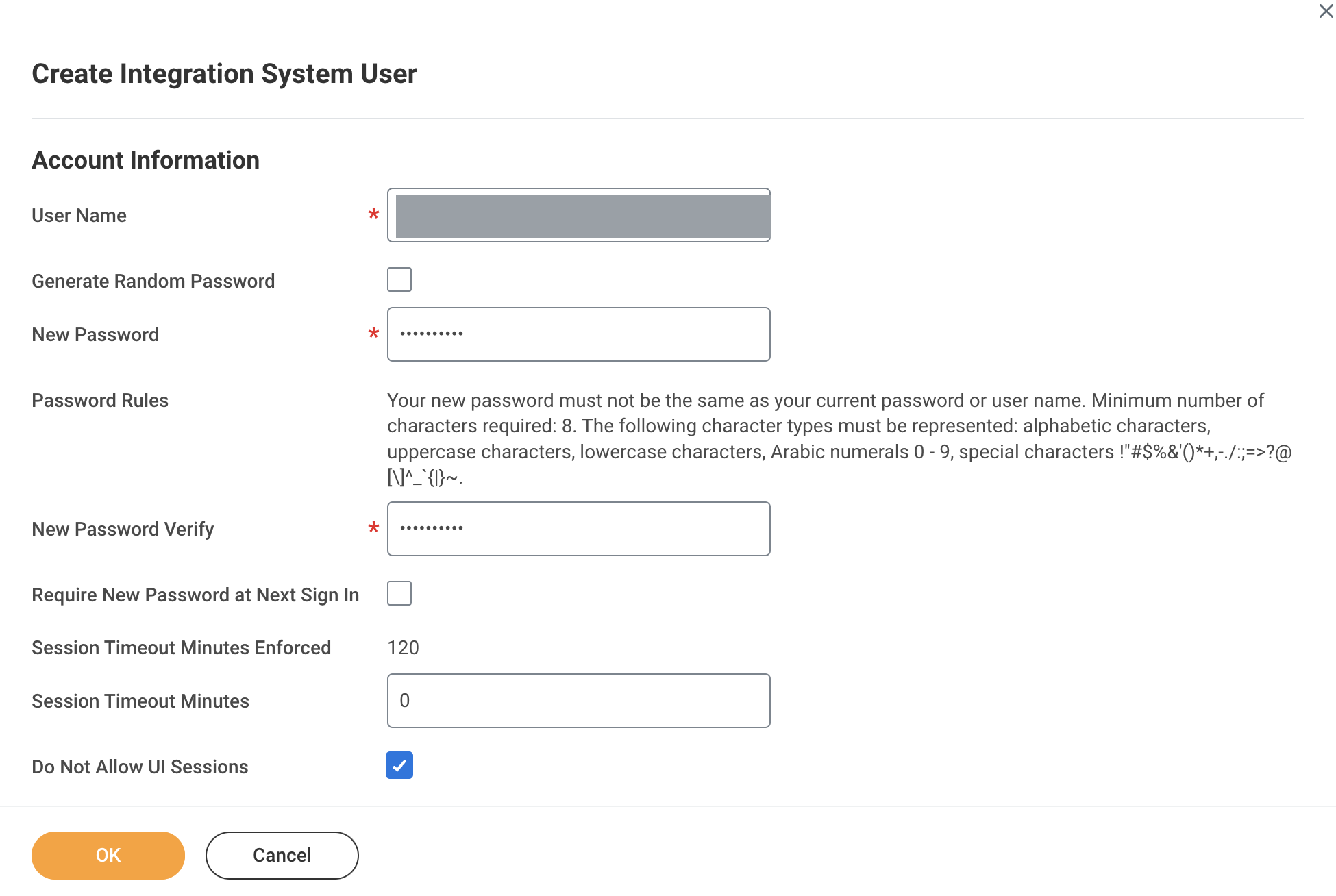
2. Create the integration system user
Run Create Integration System User.
| Field | Value |
|---|---|
| User Name | A name with no spaces: underscores or hyphens instead. Workato's Workday guide warns that "Spaces in Workday ISU usernames can cause encoding and formatting issues." |
| New Password | Any password meeting the tenant's rules. The OAuth refresh-token flow never uses it, but the account cannot be created without one. |
| Session Timeout Minutes | 0, so the account never times out mid-collection. Note that Session Timeout Minutes Enforced above it shows the tenant default it is overriding. |
| Do Not Allow UI Sessions | Tick it. A collector authenticating with a refresh token never opens an interactive session, so this removes a way in without removing anything you need. |
Then run Maintain Password Rules and add the new account to System Users exempt from password expiration. Every published Workday integration guide includes this step; it costs nothing and removes a scheduled event that nobody will be watching for.
There is no permission screen for the refresh token. It is issued to a named Workday Account and reaches exactly what that account's security profile reaches, and it keeps doing so as that profile changes. Two failures follow, and neither produces an error that names its cause:
- The account's group membership is edited and the log silently narrows or widens. Because an under-permissioned account still returns
200, nothing surfaces this. - The account is deactivated: and the integration stops. If the credential is attached to a person rather than a system account, an ordinary offboarding takes the feed down. Workato states the risk plainly: "changes to a regular worker's security profile or their termination could disrupt integrations reliant on their account."
Use an integration system user, and use a fresh one. Workato's guidance is to "Limit each ISU to a single integration system", worth following here for a second reason specific to Workday, which is that refresh tokens are stored one per client-and-account pair, so a shared account means one consumer's rotation breaks the other's.
3. Create the security group and grant one domain
The integration system user has no permissions until it is in a security group and that group is granted a domain.
- Run Create Security Group. In Type of Tenanted Security Group choose Integration System Security Group (Unconstrained), and give it a name.
- Add the user from step 2 as a member, and select Done.
- Run Maintain Permissions for Security Group, choose the group as the Source Security Group, and on the Domain Security Policy Permissions tab add one row: Get Only against System Auditing.
- Run Activate Pending Security Policy Changes, enter a comment for the audit record, tick Confirm, and select OK.
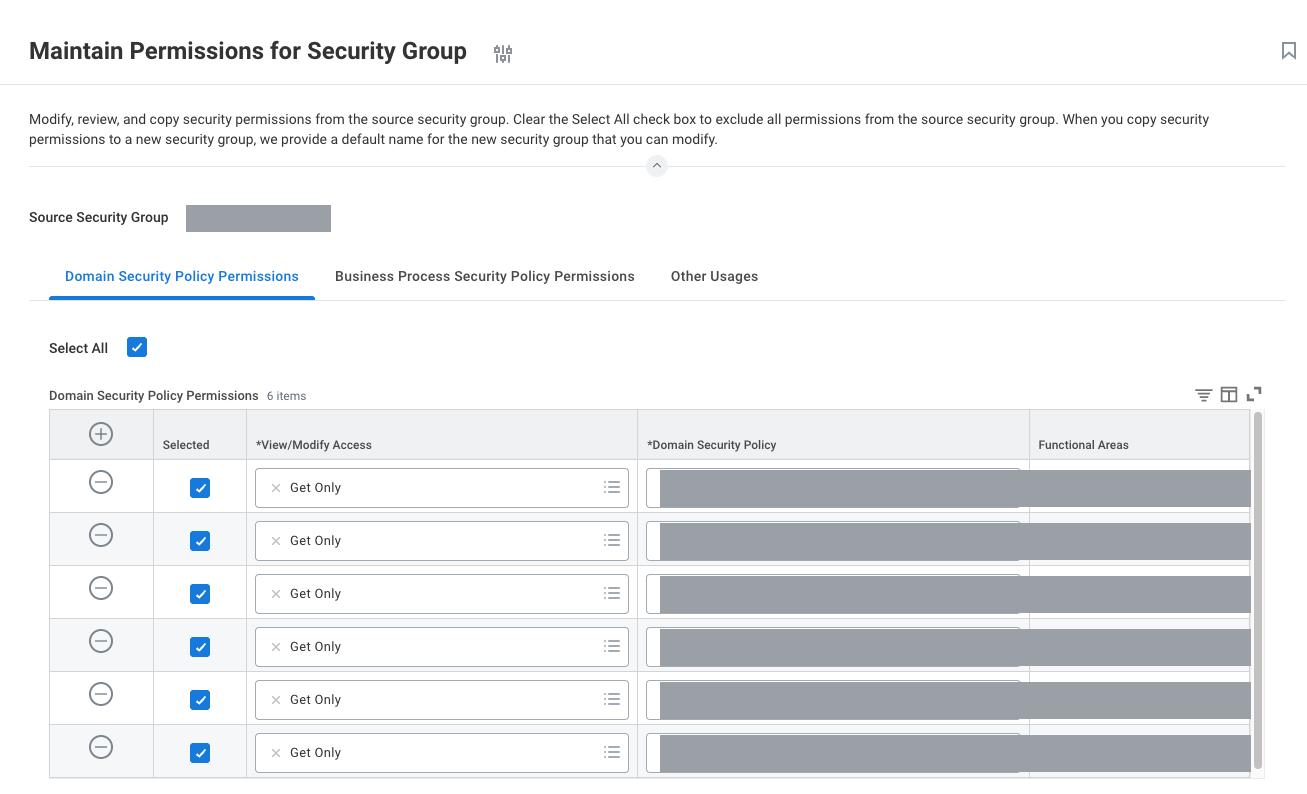
System Auditing is the domain the API itself names. Workday's published specification for the endpoint says, in as many words, "Secured By Domain: System Auditing" and "Scope: System". One row, one domain: nothing else on this page needs to be granted for the activity log.
The permissions you just assigned are pending until Activate Pending Security Policy Changes runs. Skipping it produces no warning in any of the tasks above; it surfaces later as a 403 from the API, or (worse, if some permissions were already active) as a log that is quietly incomplete.
Workday offers Integration System Security Group (Constrained) alongside the unconstrained type; a constrained group reaches only a subset of data instances, chosen by organisational context. Combined with Workday's rule that you only see the entries your security profile permits, a constrained group does not produce a permissions error; it produces a smaller log. For a security feed that is the wrong trade, so use the unconstrained type unless someone has a specific reason and knows what it costs.
Some vendor guides reach the same result from the other side, opening View Domain for System Auditing and editing its permissions there. That screen has two tables rather than one, and the domain needs an entry in both: View access in Report/Task Permissions, and Get access in Integration Permissions. Either route ends in Activate Pending Security Policy Changes.
4. Register the API client
Run Register API Client for Integrations.
Workday has two similarly named registration tasks and they produce different credentials. Only Register API Client for Integrations yields a client that can refresh a token unattended; Rapid7's Workday guide describes it as "the only OAuth flow that allows an expired access token to be refreshed, while not requiring the user to login."
You can tell afterwards which one you used: the View API Clients report has two tabs, API Clients and API Clients for Integrations, and yours has to appear on the second.
| Field | Value |
|---|---|
| Client Name | Anything identifying this integration. |
| Non-Expiring Refresh Tokens | Tick it. See below. |
| Scope (Functional Areas) | System, the scope Workday's own API specification names for this endpoint. |
| Include Workday Owned Scope | Leave clear. |
| Restricted to IP Ranges | Leave empty unless you know the collector's egress addresses. See below. |
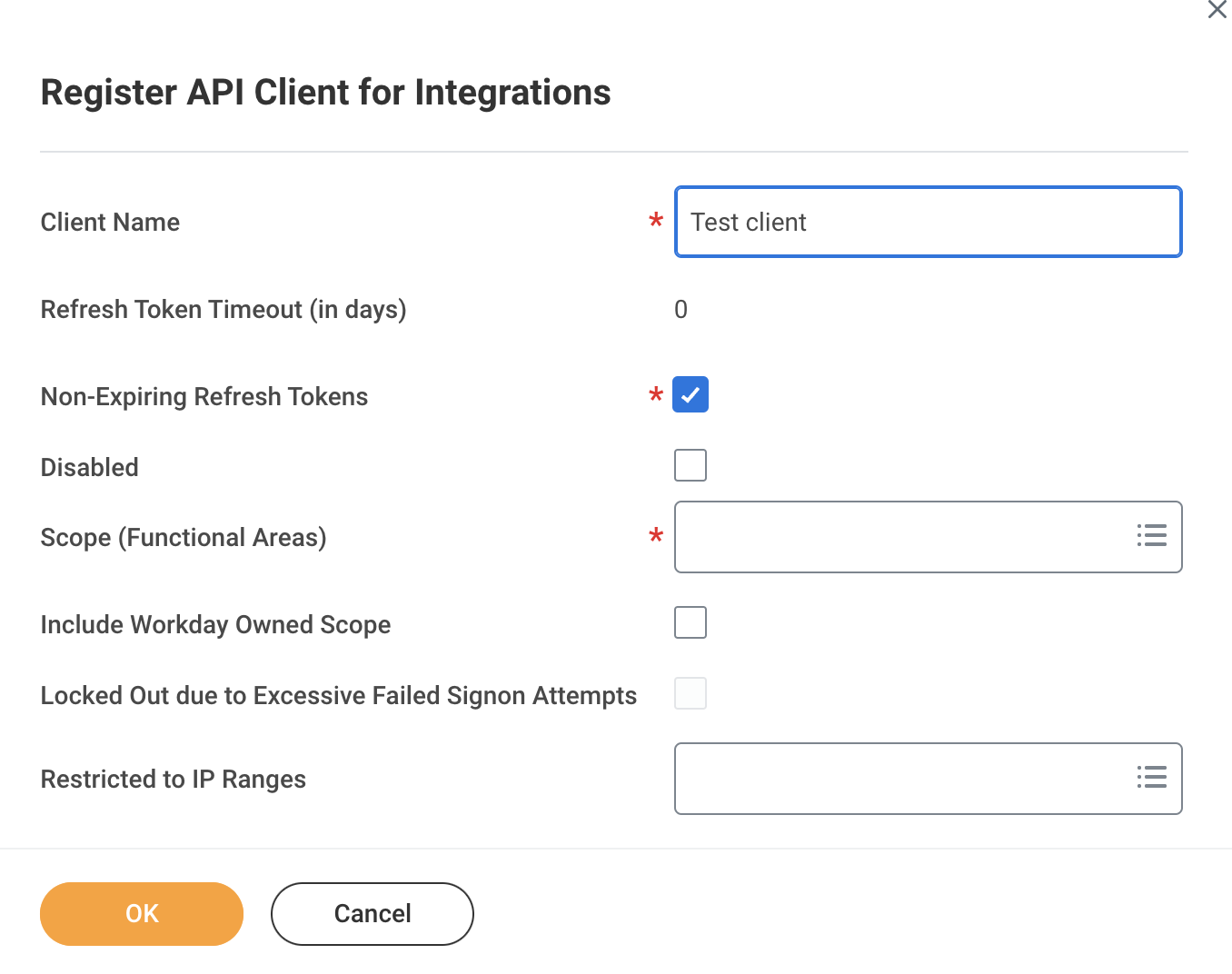
Directly above that checkbox sits Refresh Token Timeout (in days). Leave the box unticked and the token you generate in the next step carries an expiry, and the integration stops on a date nobody recorded: the failure arrives months later as an authentication error with no recent change to blame it on.
You can confirm afterwards which you got: the token table in step 5 has an Expiration Time column and a Non-Expiring column, and they answer the question directly.
This is offered at creation and looks like free hardening. It is only free if the collector's source addresses are known and stable, which for a cloud-hosted collector they generally are not. A credential restricted to the wrong range stays valid and simply refuses to work from where it is used, which presents as an authentication problem rather than a network one. Leave it empty unless someone can name the addresses.
Select OK. Workday shows the Client ID and Client Secret.
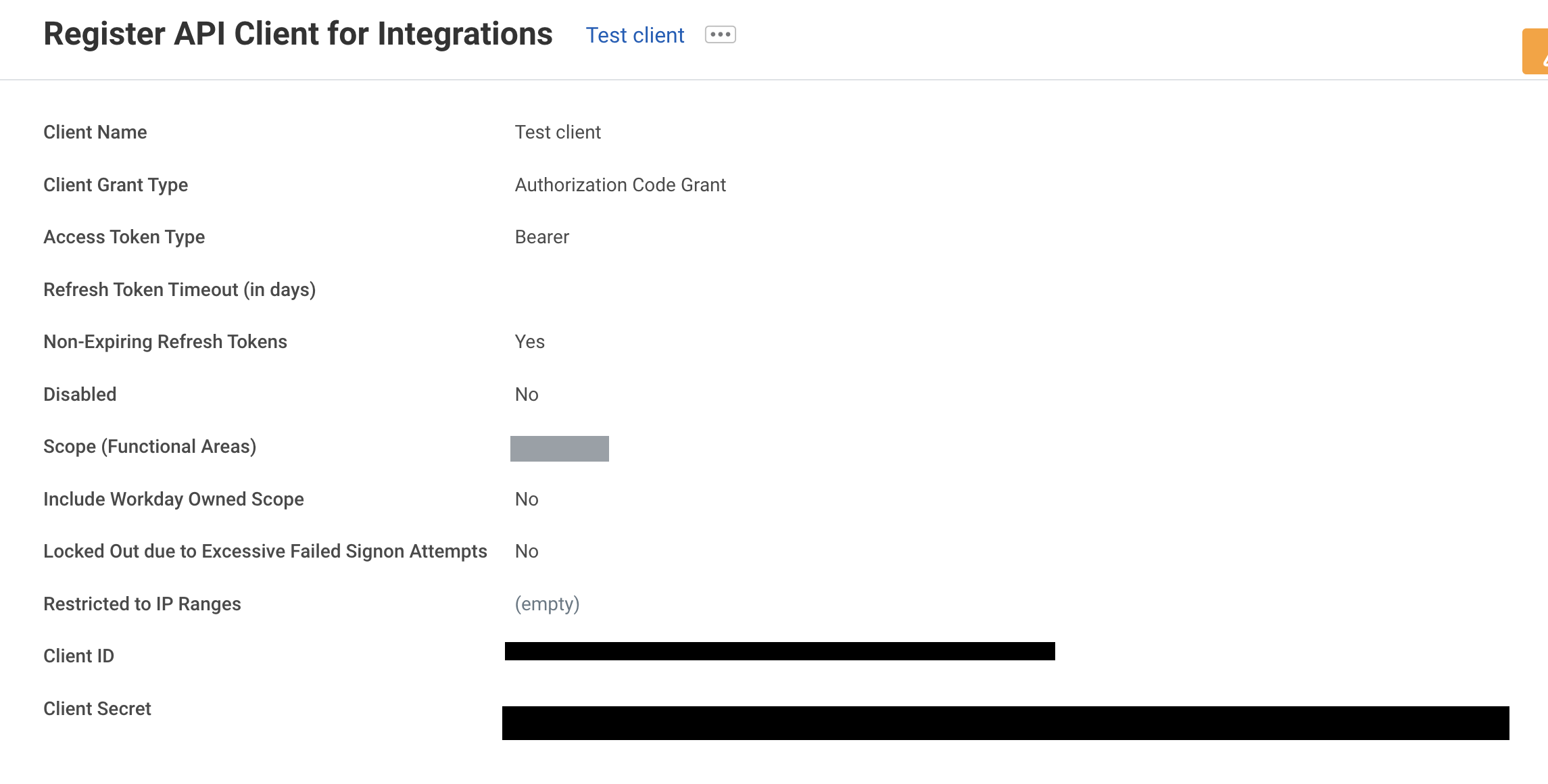
This screen also confirms two properties you did not choose and do not need to: Client Grant Type is Authorization Code Grant and Access Token Type is Bearer. Both are fixed for this kind of client.
Every published Workday integration guide instructs the reader to save the Client ID and Client Secret at this point. Treat the secret as one-time: if it cannot be read again later from View API Clients, the only remedy is to register a new client, which means a new Client ID and a new refresh token, and every existing consumer of the old one stops.
5. Issue the refresh token
- Run View API Clients and open the API Clients for Integrations tab.
- Find the client from step 4, select the … next to its name, and choose API Client → Manage Refresh Tokens for Integrations.
- In Workday Account, enter the integration system user from step 2. Select OK.
- On the Delete or Regenerate Refresh Token page, tick Generate New Refresh Token and select OK.
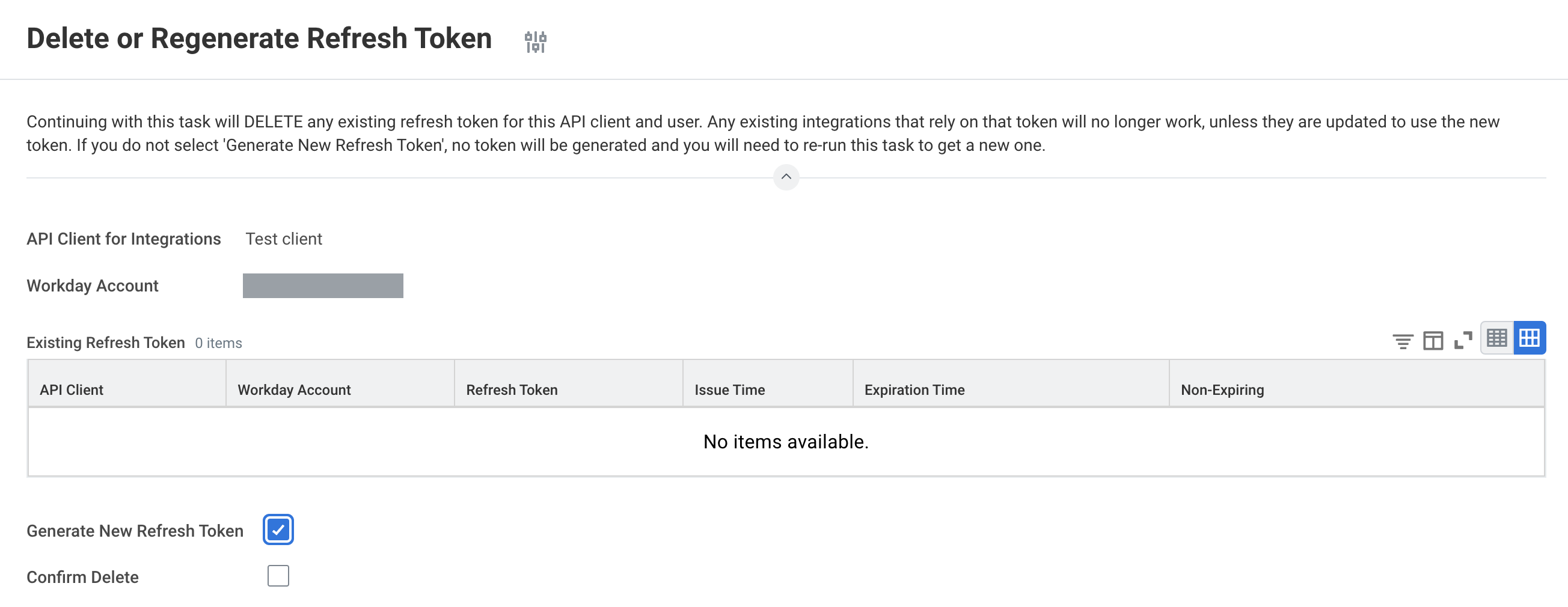
The page is titled Delete or Regenerate Refresh Token for a reason. Workday states the consequence at the top of it:
"Continuing with this task will DELETE any existing refresh token for this API client and user. Any existing integrations that rely on that token will no longer work, unless they are updated to use the new token. If you do not select 'Generate New Refresh Token', no token will be generated and you will need to re-run this task to get a new one."
Three things follow:
- Opening this task is safe; completing it is not. There is exactly one stored token per API client and Workday account pair, so anyone who runs it to look at the token has replaced it. Read the table and cancel out.
- If another integration shares this client and this account, you have just broken it. That is the practical reason for one integration system user per consumer.
- Ticking the box is not optional. Leave Generate New Refresh Token clear and the task deletes the old token and issues nothing.
Copy the token from the Successfully Regenerated Refresh Token page.
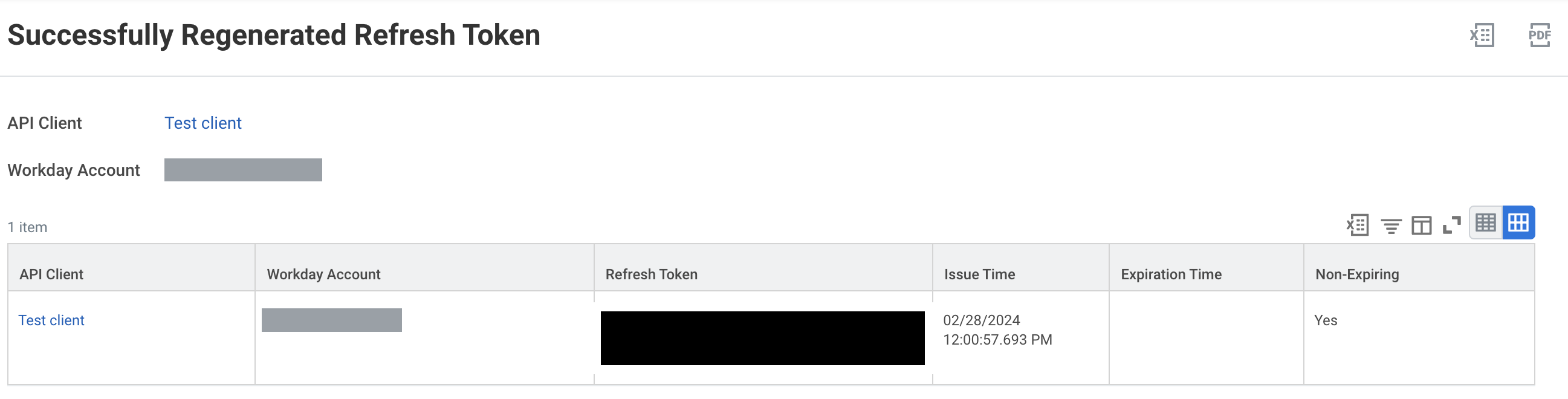
Read the Expiration Time and Non-Expiring columns while you are here. An empty expiry and Yes mean step 4's checkbox took effect. A date in Expiration Time means it did not, and the cheapest fix is to go back, tick it, and regenerate, not to write the date in a calendar.
6. Read the host and tenant
Run View API Clients again and read the three URLs at the top of the report.
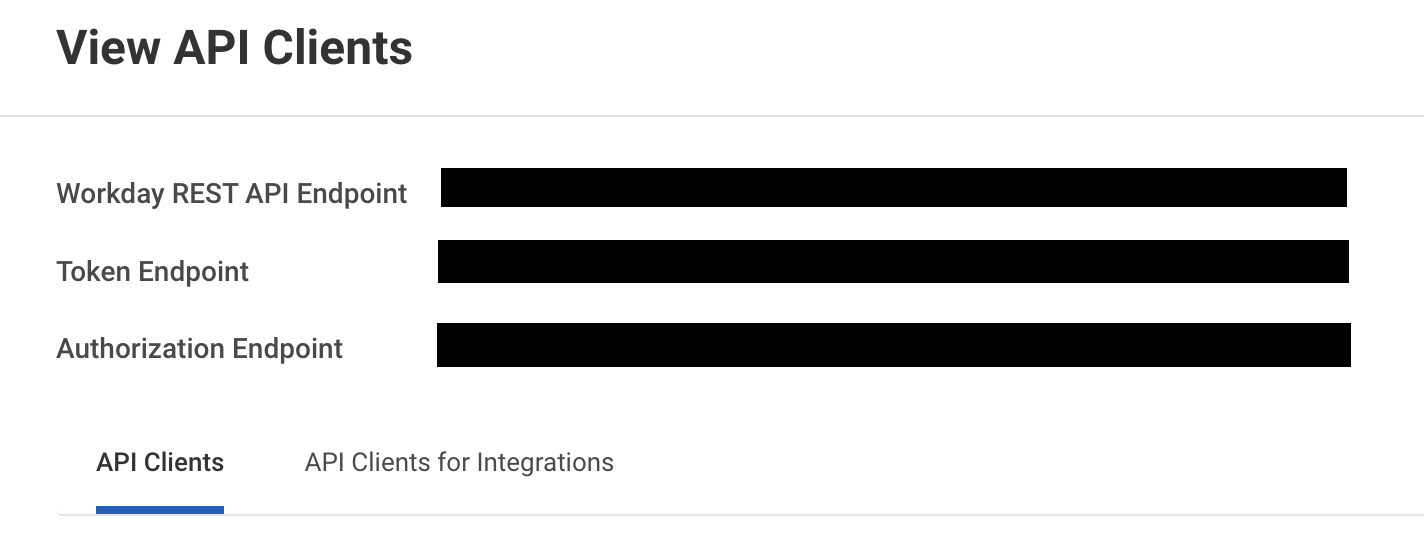
The Token Endpoint carries both values Fluency asks for:
https://<host>/ccx/oauth2/<tenant>/token
        ~~~~~~              ~~~~~~~~
        Host URL            Tenant
The tenant also appears in the browser address bar when you are signed in: https://impl.workday.com/<tenant>/d/home.htmld.
Workday tenants are spread across numbered pods, and the sign-in address is not the API address:
impl.workday.comandwww.myworkday.comboth resolve and both answer, but a request to/ccx/oauth2/<tenant>/tokenon either returns404with an HTML error page rather than JSON. These are sign-in hosts.wd2-impl-services1.workday.com,wd3-impl-services1.workday.comandwd5-impl-services1.workday.comresolve and answer JSON.wd5-services1.workday.comdoes not resolve at all.
The pattern is not guessable, and the failure it produces is misleading in a specific way. Read the host off View API Clients; do not construct it from the URL in your browser.
Verify before you leave Workday
Two calls: exchange the refresh token for a bearer token, then ask the activity log how many records it holds for a recent window. The second call uses returnUserActivityEntryCount, which returns only a count, so it exercises the credential, the scope and the domain grant without pulling any data.
WD_HOST=wd2-impl-services1.workday.com   # from the Token Endpoint, step 6
WD_TENANT=<tenant>                       # from the Token Endpoint, step 6
CID=<client id>
SEC=<client secret>
RT=<refresh token>

TOKEN=$(curl -s -X POST "https://$WD_HOST/ccx/oauth2/$WD_TENANT/token" \
  -d grant_type=refresh_token \
  -d "refresh_token=$RT" \
  -d "client_id=$CID" \
  -d "client_secret=$SEC" \
  | sed -n 's/.*"access_token":"\([^"]*\)".*/\1/p')

curl -s -G "https://$WD_HOST/ccx/api/privacy/v1/$WD_TENANT/activityLogging" \
  -H "Authorization: Bearer $TOKEN" \
  --data-urlencode "from=$(date -u -d '2 hours ago' +%Y-%m-%dT%H:%M:%SZ)" \
  --data-urlencode "to=$(date -u +%Y-%m-%dT%H:%M:%SZ)" \
  --data-urlencode 'returnUserActivityEntryCount=true'
| Response | What it means |
|---|---|
200 with a non-zero count | Everything works. Go to Part 2. |
200 with a zero count | Credentials, scope and domain are all fine; Workday says "A successful response can return no matched data." Either nothing happened in that window, or step 1 is not done. Sign in as a person, run any report, and try again. |
403 | Workday's own meaning for this code on this endpoint is "User has insufficient permissions." Go back to step 3: either the System Auditing grant is missing, or Activate Pending Security Policy Changes was not run. |
401 {"error": "Unauthorized"} | No usable bearer token reached the endpoint: the token call failed, or the header is missing. Returned for a request with no Authorization header, and for one sending Basic rather than Bearer. |
503 {"error": "Service unavailable"} | Reads like a Workday outage and usually is not. See below. |
404 with an HTML body | You are on a sign-in host rather than a pod host (step 6). |
400 {"error": "Invalid request"} from the token call | The request body is malformed, or grant_type is something this client does not support. Returned for grant_type=client_credentials, for an unrecognised grant type, and for an empty body. |
503 here is more likely to be your host or tenant than Workday's availabilityThis is the one status code here that will send you in the wrong direction. A well-formed, credential-bearing request naming a tenant Workday cannot resolve answers
HTTP/1.1 503 Service Unavailable
Content-Type: application/json; charset=UTF-8

{ "error": "Service unavailable" }
on both the token endpoint and the activity-logging endpoint. Nothing is down. The same shape appears whichever unresolvable tenant name is used.
The natural reaction to a 503 is to wait for it to clear, and this one never does. Before assuming an outage, re-read Host URL and Tenant off View API Clients: they are two free-text fields, the host is not guessable, and getting either wrong lands here.
Treat 503 as "check the address first", not as proof the credential is fine: a valid host and tenant with a bad credential may answer 503 too.
Part 2: Fluency
Install the Application
- v2 interface
- Classic v1 interface
In the navigation rail, open Applications and click Install Application, then choose Workday Events from the Cloud-based Business Softwares category of the Application Catalog. Every parameter is required.
Go to Platform → Applications → Install Application From Template and choose Workday Events from the Cloud-based Business Softwares category. Every parameter is required.
| Parameter | Notes |
|---|---|
| Host URL | The pod host from the Token Endpoint (step 6). Differs between sandbox and production. |
| Tenant | The tenant name from the same URL. |
| Client ID | From step 4. |
| Client Secret | From step 4. See the caution below. |
| Refresh Token | From step 5. |
| datalake | Pre-filled managed. |
| datalake index name | Pre-filled Workday. Two applications writing to the same index name in the same lake will collide, and the second one aborts. |
- v2 interface
- Classic v1 interface
datalake and datalake index name sit in the collapsed Advanced configuration section below Configuration; click its heading to reach them.
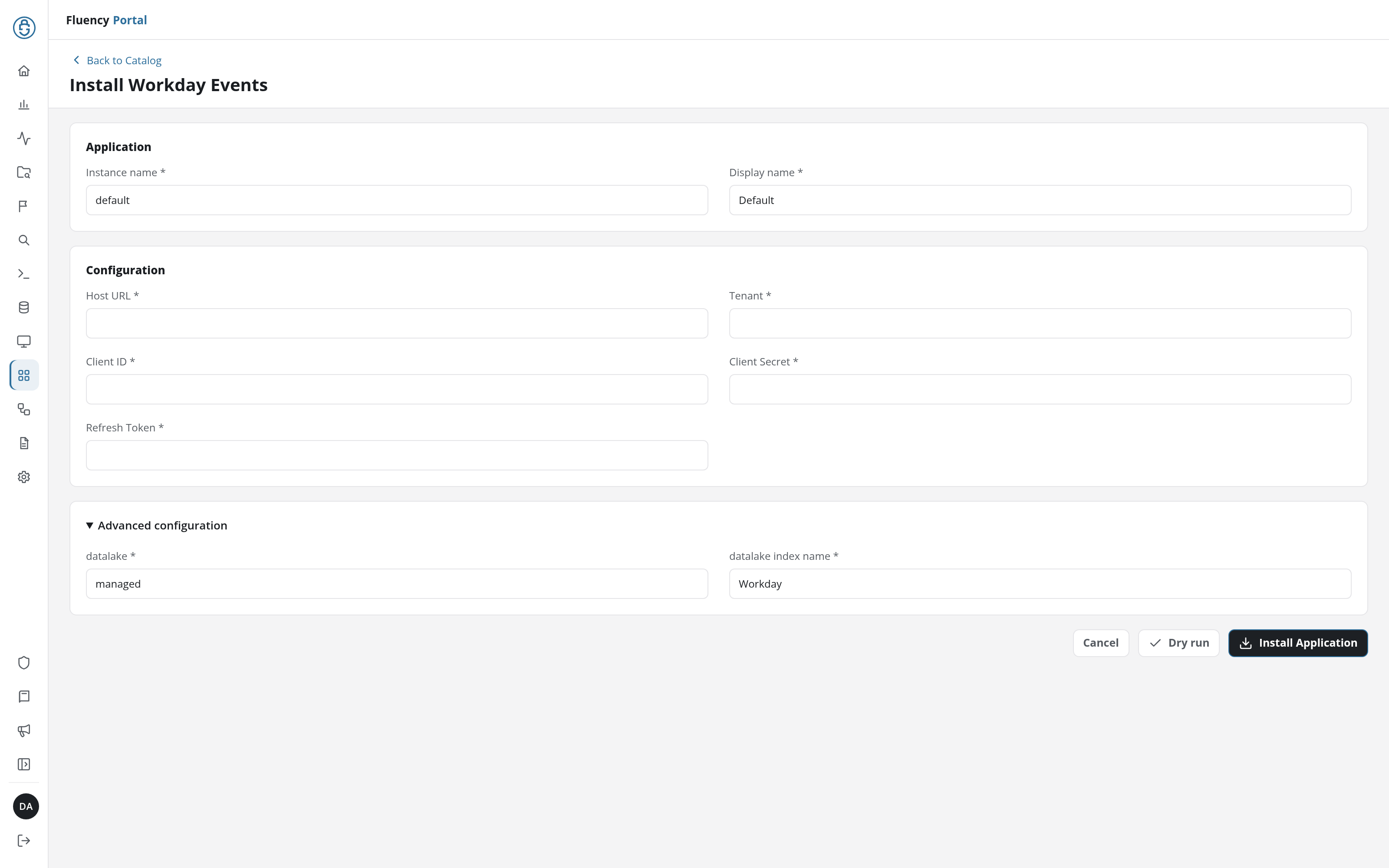
Click Dry run first to have the platform check the values before anything is installed, then click Install Application. The Applications page opens with the notice Default is launching., and the new application is listed with a green Running badge once the pipeline is up.
The form is taller than the panel; datalake index name is the last field and may sit below the fold when the panel opens.
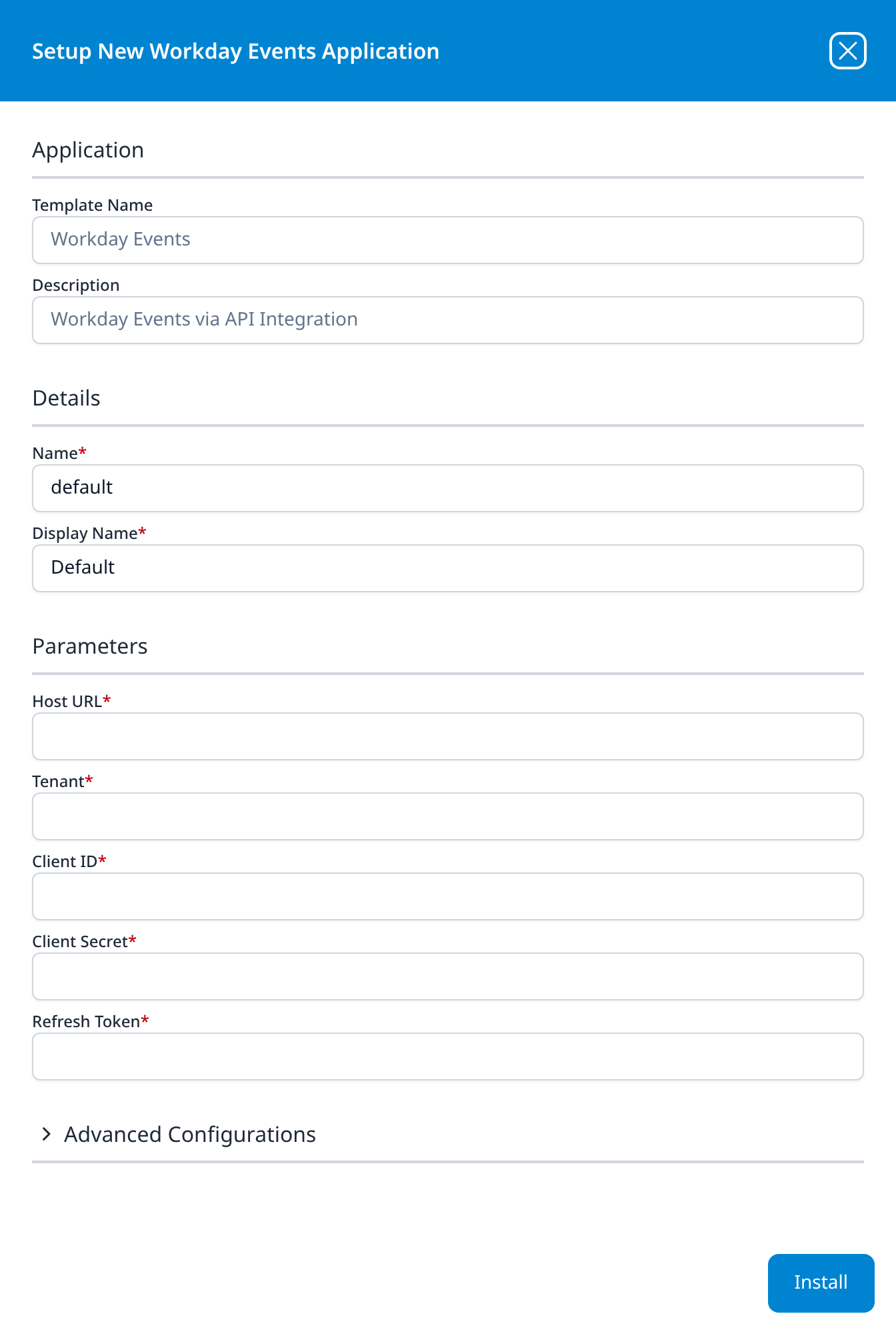
Press Install. The application then appears in the Installed Applications view, where its badge reads Running once the pipeline is up.
The label says URL, but the form does not say whether the field wants a bare host (wd2-impl-services1.workday.com), a scheme-prefixed origin (https://wd2-impl-services1.workday.com) or the whole Workday REST API Endpoint string. If the application installs and collects nothing, this is the first parameter to suspect, and the 503 above is what a wrong value looks like from the collector's side. Try the form the Token Endpoint gives you first.
The Workday Events template marks refreshToken as sensitive and does not mark clientSecret. Eleven other templates take a clientSecret parameter (Microsoft Defender, Office365, Office365-Audit, Office365 Resource Watch, Azure Directory Audit, Salesforce Event Monitoring, box.com, Mimecast CG Events, CrowdStrike Falcon, Sophos EDR and BlackKite Findings), and every one of them carries the flag. Workday is the exception.
Since an application's details show its parameters back "secrets masked" (v1: the details panel in Installed Applications), the consequence to expect is that the refresh token is masked there and the client secret is shown in full. Open the installed application's details after installing and look. If the secret is legible, treat the details as a place it can be read by anyone with access to them.
Confirm it is running
The application is named for the template. A healthy badge reads Running.
Do not use volume as the check. The activity log is filtered by the collecting account's permissions, so a thin feed and a broken feed look the same, and both look the same as a quiet Sunday. Use one of these instead:
- Compare against the source. Run the second
curlfrom Verify before you leave Workday for a window that has already been collected, and compare its count against the same window in theWorkdayindex. This is the only check that catches a permission-shaped gap. - Plant a needle. Sign in to Workday as a person and run something distinctive (an obscure report is ideal), then search the index for its
taskDisplayName. This proves the path end to end, including the parser.
Then see Confirm data is arriving.
Collection is on a cycle rather than continuous, so if the index is empty immediately after install, give it one before treating it as a fault. Under the hood has what other collectors on this feed use for cadence and backfill.
Maintenance
Nothing expires, so this is review rather than rotation
If step 4 was done correctly, the refresh token has no expiry date and there is no renewal to schedule. That removes one failure mode and introduces another: nothing will ever prompt anyone to look at this credential again, and it will keep working after everybody who set it up has moved on.
Four things are worth checking periodically, none of which produce an alert on their own:
| Check | Where |
|---|---|
| The integration system user is still active and still in the security group | View Security Group for the group from step 3 |
| The group still holds Get Only on System Auditing, with no pending changes | Maintain Permissions for Security Group |
| The API client still exists, is not Disabled, and is still on the API Clients for Integrations tab | View API Clients |
| The stored token still shows Non-Expiring: Yes | Manage Refresh Tokens for Integrations: open it, read the table, and cancel out without completing the task |
That last one carries the warning from step 5: completing the task replaces the token. Reading the table is safe; pressing OK on the regenerate page is not.
Rotating the credential
Template parameters are read-only after install, so changing a credential means uninstalling and reinstalling. The order matters, because generating a new refresh token invalidates the old one immediately:
- In Workday, run Manage Refresh Tokens for Integrations for the same client and account, tick Generate New Refresh Token, and copy the new value. The old token stops working at this moment.
- In Fluency, uninstall the Workday Events application. To uninstall, click Uninstall at the top right of the application's details page (v1: the red Uninstall button at the foot of its details panel on Platform → Applications).
- Reinstall it with the new refresh token.
There is a gap between steps 1 and 3 during which nothing is collected. Because the API serves a live query rather than a cursor, the records for that window stay retrievable until the retention window passes, but nothing reaches back for them on its own, so keep the gap short.
If any other system shares this API client and this Workday account, step 1 breaks it too.
Removing the integration
- Uninstall the application in Fluency first, so nothing is polling: the Uninstall button at the top right of its details page (v1: the red Uninstall button at the foot of its details panel on Platform → Applications).
- In Workday, run Manage Refresh Tokens for Integrations for the client and account, leave Generate New Refresh Token clear, tick Confirm Delete, and select OK.
- Tick Disabled on the API client, or delete it.
- Deactivate the integration system user if it served only this integration.
Leaving the API client in place with a live non-expiring refresh token is the untidy outcome worth avoiding: it is a working credential to your HR system with nothing consuming it.
Troubleshooting
| Symptom | Likely cause | Fix |
|---|---|---|
| The install succeeds and the index stays empty | User activity logging is not enabled tenant-wide | Run Edit Tenant Setup - System and tick Enable User Activity Logging. Nothing before that moment can be recovered (step 1). |
503 Service unavailable | Almost always Host URL or Tenant, not a Workday outage | Re-read both off the Token Endpoint on View API Clients (step 6). |
404 with an HTML page | The host is a sign-in host, not an API pod host | impl.workday.com and www.myworkday.com are not API hosts (step 6). |
403 | The System Auditing grant is missing, or pending | Grant Get Only on System Auditing, then run Activate Pending Security Policy Changes (step 3). |
401 Unauthorized on the data endpoint | The token exchange failed, so no bearer token was sent | Run the token call on its own and read its response (Verify before you leave Workday). |
400 Invalid request from the token endpoint | Malformed body, or an unsupported grant_type | This client supports the refresh-token grant. client_credentials returns exactly this error. |
| It worked for months, then stopped, with no change on the Fluency side | The Workday account behind the token was deactivated: an offboarding, or a sandbox refresh | Check the account is active. Then check whether the token was regenerated by someone setting up a second integration against the same client and account (step 5). |
| It stopped on a date nobody can explain | Non-Expiring Refresh Tokens was not ticked at registration | Check Expiration Time on Manage Refresh Tokens for Integrations. Re-register with the box ticked (step 4). |
| Data arrives but far less than expected | The collecting account's security profile does not permit the rest | Workday returns 200 with fewer records rather than an error. Check the group is Unconstrained and holds System Auditing (step 3). |
| Some users' activity never appears | The same cause, seen from the other end | A constrained security group, or a narrower profile, filters by organisational context. This is not a collection fault. |
| No sign-in or failed-sign-in events at all | They are not in this feed | Sign-on data is a Report-as-a-Service report, and this template cannot be pointed at one: There is no sign-on feed here. |
| No before-and-after values on changes | They are not in this feed either | The user activity log records the task, not the field values: This is an activity log, not a change log. |
| Another integration to Workday broke when this one was set up | The refresh token was regenerated for a shared client and account pair | Workday stores one token per pair. Give each consumer its own integration system user (step 5). |
| Everything was working in the sandbox and is now broken | A tenant refresh rebuilt the sandbox from production | The integration system user, security group and API client have to be rebuilt after every refresh. |
Data reference
What the user activity log looks like once it lands, for searches and detection rules written against it.
Streams, endpoints and permissions
| Stream | Endpoint | Permission | Contents |
|---|---|---|---|
| User activity | GET /ccx/api/privacy/v1/{tenant}/activityLogging | Domain System Auditing, scope System | One record per task execution: the account, the task, the instance acted on, the request time, and the session, IP address, device type and user agent behind it. |
That is the whole feed.
The log is filtered by the collecting account's own permissions
Workday states this in the API's own description of the resource:
"You can only view the audit log entries permitted by the security profile of the current user."
So the security group you attach the integration user to is not merely an access control; it is the shape of the data. An under-permissioned account does not get an error. It gets 200 OK and a shorter list, forever, and Workday's own documentation confirms that this reads as success:
"Successful response. A successful response can return no matched data."
Two consequences follow. Grant the domain before the install, not after a gap is noticed. The records themselves stay in Workday (the endpoint answers a live query over a date range rather than reading a cursor), so a gap remains retrievable within the retention window, but nothing reaches back for it on its own. And do not use volume as the health check, because a feed that is quietly half-blind looks exactly like a quiet tenant. Confirm it is running gives a check that does not depend on how much arrives.
There is no sign-on feed here, and there is none in the REST API at all
This is the most common wrong expectation about Workday collection. Sign-ins, failed sign-ins, MFA outcomes and account lockouts are not in the user activity log, and they are not in any other Workday REST service either.
Workday publishes its complete REST directory as a set of OpenAPI documents covering more than fifty services: staffing, payroll, recruiting, wql, oAuthClient and so on. Exactly one of them describes itself as carrying audit data: privacy, whose own summary reads "The Privacy service enables access to log entries containing audit information about user activities." There is no signon, no authentication and no security service in the list.
Sign-on data lives instead in a report. Vendors who collect it build a custom report from Workday's Signons and Attempted Signons standard report, filtered by Workday System Account Signons in Range, and expose it as a Report-as-a-Service URL: a completely different address, authorised differently. Workday Events has no parameter that could carry a report URL, so this install cannot be pointed at one. If you need sign-on telemetry from Workday, it is a separate piece of work, not a setting on this template.
This is an activity log, not a change log
A record says who ran what, against which object, when. It does not say what the object's values were before or after. These are every field Workday defines on the record, with Workday's own descriptions:
| Field | Workday's description |
|---|---|
systemAccount | "The system account that initiated the request." |
taskDisplayName | "The action executed in the transaction." |
taskId | "The Workday ID of the task executed in the transaction." |
activityAction | "The type of action that was executed." |
target | "The instance which the action is executed on." - an object carrying id, descriptor (the display name) and href |
requestTime | "The request time of the action." |
sessionId | "The system ID for tracking signons from the user signon used to make the request." |
ipAddress | "The user's IP Address from the user signon used to make the request." |
deviceType | "The device type from the user signon used to make the request." |
userAgent | "The client browser and operating system information from the user signon used to make this request." |
So "this account opened the compensation report for that worker, from this address, in this session" is answerable. "This worker's salary changed from X to Y" is not; that is Workday's business-process audit trail, which is a different mechanism and is not what this template collects.
The useful consequence is that sessionId ties a run of records together and target.descriptor gives you a readable name rather than only an ID, so detections can be written against names without a second lookup.
Under the hood
Engineering reference: API behaviour and observed responses
What this section describes
Everything below describes the Workday REST API and the responses it returns. The settings that belong to your own install rather than to the API (the endpoint it calls, its pagination, its cadence, how far the first collection reaches back) are recorded on the install itself: open the installed application's details and read its Actions list, which records every object the install produced.
One thing about this template is worth reading off its schema. Unlike Okta Events, Cisco Duo Admin API or BlackKite Findings, which each declare a resource group named for their product, Workday Events declares System, the group used by infrastructure templates such as the syslog endpoint and the collector. Do not expect a Workday entry on the Resources page (v1: a Workday-branded card on SIEM → Resources); the event index is the place to look.
Endpoint and parameters
GET https://<host>/ccx/api/privacy/v1/<tenant>/activityLogging
From Workday's own OpenAPI document for the privacy service, version v1:
| Parameter | Workday's description |
|---|---|
from | "(Required) The date and time of the earliest log entry. The default timezone is UTC/GMT. The time format is {yyyy}-{mm}-{dd}T{hh}:{mm}:{ss}Z." |
to | "(Required) The date and time of the latest log entry." Same format and default timezone. |
limit | "The maximum number of objects in a single response. The default is 20. The maximum is 100." - but see below. |
offset | "The zero-based index of the first object in a response collection. The default is 0." |
instancesReturned | "This number multiplied by 10,000 determines the total number of requested user activity instances… The default and maximum values are 25. By default, the method requests the maximum 250,000 instances." |
returnUserActivityEntryCount | "If true, returns only the total count of user activity instances for the specified parameters." |
systemAccount | Filter by account. No description published. |
taskId | Filter by task. No description published. |
The response envelope is {"total": <int>, "data": [ … ]}, with data holding the records whose fields are listed in This is an activity log, not a change log.
Two inconsistencies in the current document are worth knowing about, because both will make a correct collector look wrong:
limitcontradicts itself. The parameter's own description says the maximum is 100. The endpoint description, in the same file, says: "limit=1000 (Note that the maximum value of the limit parameter has been increased from 100 to 1000.)"fromandtoare described as required but not marked required. The prose says "(Required)" for both; the machine-readablerequiredflag on each isfalse.
Workday's recommended calling pattern, quoted from the same document, is limit=1000, instancesReturned=1, and offset incremented by 1000 until the response is empty.
One more surprise for anyone pointing generic tooling at this API: the document declares no security requirement at all in machine-readable form. The security and scope requirements live only in the endpoint's prose description, which says "Secured By Domain: System Auditing" and "Scope: System".
Observed response behaviour
Responses from wd2-impl-services1.workday.com to requests naming a tenant that does not exist. They characterise address-and-shape failures rather than credential failures.
| Request | Response |
|---|---|
POST /ccx/oauth2/<unknown tenant>/token, well-formed grant_type=refresh_token body | 503 { "error": "Service unavailable" } |
Same, grant_type=client_credentials | 400 { "error": "Invalid request" } |
Same, unrecognised grant_type | 400 { "error": "Invalid request" } |
| Same, empty body | 400 { "error": "Invalid request" } |
GET …/activityLogging, no Authorization header | 401 { "error": "Unauthorized" } |
Same, Authorization: Basic … | 401 { "error": "Unauthorized" } |
Same, Authorization: Bearer <garbage> | 503 { "error": "Service unavailable" } |
POST /ccx/oauth2/<tenant>/token on impl.workday.com or www.myworkday.com | 404, HTML body |
The readable pattern is that Workday answers 401 while it can still reject the request at the authentication layer, and 503 once it has accepted a credential-bearing request and failed to route it to a tenant. Workday's published error list for this endpoint names 400, 401, 403 and 404, plus a catch-all default entry reading "An error occurred."; 503 is not among the named codes.
Host names are not guessable. wd2-impl-services1.workday.com, wd3-impl-services1.workday.com and wd5-impl-services1.workday.com all resolve; wd5-services1.workday.com does not.
What the REST directory does and does not contain
Workday publishes its whole REST catalogue as OpenAPI documents, and the browser at community.workday.com loads them by name. The set covers more than fifty services, including staffing, payroll, recruiting, person, wql, prismAnalytics, systemMetrics and oAuthClient. Exactly one describes itself as an audit service: privacy, whose entire surface is the single /activityLogging operation described above. No service in the list is named for sign-on, authentication or sessions, so sign-on telemetry is not reachable through this integration.
How other collectors handle this feed
For calibration on what this feed is normally polled at: Sumo Logic's Workday source polls every 10 minutes and begins 24 hours back by default, and collects sign-on data as a second source built on a custom RaaS report. RunReveal polls every 5 minutes and states plainly that it performs no historical backfill: "Activity logs start flowing from the time you connect the source." Both figures are those vendors' choices, not Workday's limits, and neither describes what Workday Events does.
References
Vendor
- Workday REST API directory: the published OpenAPI documents for every Workday REST service, including
privacy. - Example: Call the User Activity Logging REST API Using Python: Workday's own worked example of iterating the endpoint.
- Workato: Workday connector setup: the fullest public walkthrough of the Workday-side tasks, and the source of most captures on this page.
Other collectors' guides
- Datadog: Workday User Activity Logs: names the tenant switches, the security group type and the System Auditing domain.
- Sumo Logic: Workday source: the two-feed setup, including the sign-on report this template cannot use.
- Rapid7 InsightIDR: Workday: on why API Client for Integrations is the required registration task.
Fluency
- Workday Events install form: the template's fields and defaults (v1: Install Application From Template).
- Application Details: the details page and its Actions list (v1: Installed Applications).
- Confirm data is arriving
Related
- Business Software: other SaaS business applications.
- Okta: the identity side of the joiner–mover–leaver picture, and the other credential in this section whose reach is an account's rather than its own.