Cisco Duo
Duo is where multi-factor authentication succeeds or fails, so its logs record who proved they were themselves, from what device and where, and who tried and could not. Fluency polls the Duo Admin API on a schedule for those logs, with a read-only credential you create in the Duo Admin Panel.
Authentication is an Admin API application's integration key, secret key and API hostname. Duo does not issue bearer tokens: every request is signed with an HMAC of the secret key, so there is nothing to expire or refresh, and the credential works until somebody resets it.
The setup has two halves:
- In Duo: add an Admin API application, check the permissions it needs, and copy its integration key, secret key and API hostname.
- In Fluency: install the Cisco Duo Admin API application template and paste those three values in.
What arrives
| Stream | What it holds | Lands in |
|---|---|---|
| Authentication | Every 2FA attempt, with its result, factor, and access and approving devices. | The Duo index |
| Activity | Administrative changes: roles, bypass codes, directory syncs, policies. | The Duo index |
| Administrator | The older flat view of administrative actions. | The Duo index |
| Telephony | SMS and voice calls, with the credits each used. | The Duo index |
| Offline enrollment | Offline access for Duo Authentication for Windows Logon. | The Duo index |
| Trust Monitor | Duo's own anomaly events, on Premier and Advantage accounts created before 29 September 2025. | The Duo index |
| Account utilisation | Edition, user and administrator counts, telephony credits remaining. | Named in the installed application's Actions list |
| Resource roster | Users, phones, hardware tokens, groups and administrators. | Resources |
Log streams need Grant read log; the roster needs a separate checkbox, Grant resource - Read, and without it stays empty with no error (step 3). Duo serves at most 180 days, and your account's log-retention setting can shorten that: check it before you install (Before you begin).
Endpoints and permissions per stream are in Data reference; the record format is in Under the hood.
Before you begin
| Requirement | Detail |
|---|---|
| Duo edition | Admin API is available to Duo Essentials, Duo Advantage and Duo Premier paying customers, and to new Advantage or Premier trials. It is not part of the free tier. If the Admin API card is missing from the Application Catalog in step 2, this is usually why. |
| Duo administrator role | Owner. Duo states that only administrators with the Owner role can create or modify an Admin API application. Other roles cannot see it, so this is not a step you can delegate to a read-only admin. |
| Where you work | The Duo Admin Panel at admin.duosecurity.com. |
| Log retention | Settings → Logging. Confirm the retention period before you install; see the warning below. |
Every log endpoint serves the last 180 days and no more. That is a hard ceiling in the API, in the Admin Panel, and in exported reports alike; there is no parameter that reaches further back, and Duo does not offer an archive endpoint.
Underneath that ceiling sits a setting most people never look at. Settings → Logging → Delete logs after ___ days purges log entries in your Duo account entirely, and it accepts anything from 1 to 365 days. New accounts default to keeping logs indefinitely, so this only bites where somebody set it; but where somebody did, it is the number that matters, not 180.
Check it before you install, because it decides what an outage costs. If the collector is down for a week and your retention is set to 3 days, four of those days were purged at the source and are not recoverable from anywhere. Duo's own documentation is explicit that this setting does not extend the 180-day limit either; it can only shorten it.
Part 1: Cisco Duo
1. Open the Application Catalog
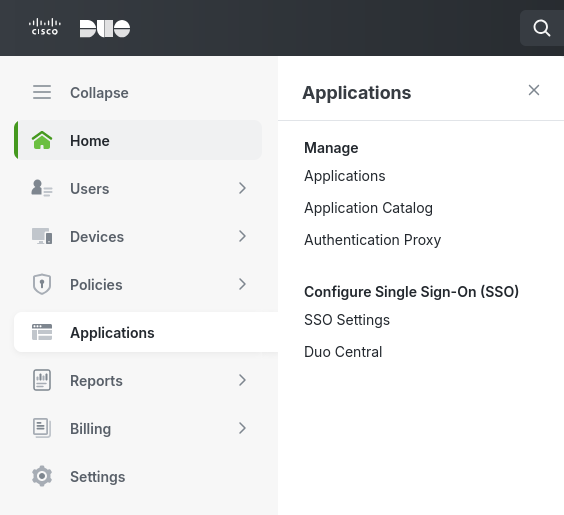
Sign in to the Duo Admin Panel as an Owner, then open Applications → Application Catalog.
2. Add the Admin API application
Search the catalog for admin api and add the card titled exactly Admin API, using the + Add button beneath it.
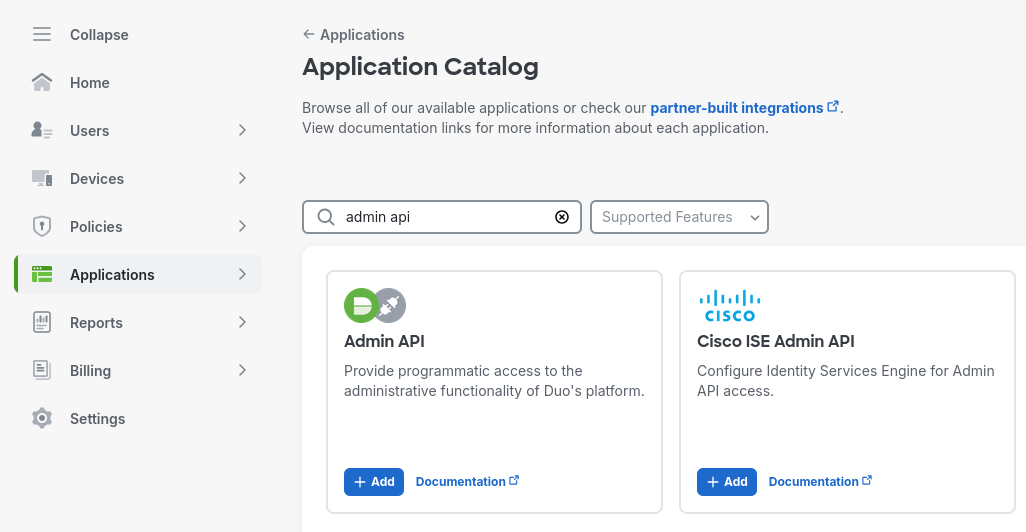
The search returns Admin API and Cisco ISE Admin API. They sit next to each other, they are both Cisco, and only the first one is the programmatic interface to your Duo account; the second configures Duo protection for Cisco Identity Services Engine and issues a credential of a completely different type.
Duo has several other application types whose names end in "API" as well: Auth API, which verifies individual authentications and is the one people reach for by mistake, and Accounts API, for managing MSP subaccounts, which Duo no longer allows new instances of.
Getting this wrong does not look like getting it wrong. The keys are the same shape, the install accepts them, and the credential authenticates; Duo then answers 403 on every Admin API endpoint, with the documented meaning "the ikey was created for a different integration type." The application's own page is where to check: Application Type must read Admin API.
3. Grant the permissions
Scroll to Settings → Permissions on the new application's page and check:
- Grant read information
- Grant read log
Leave everything else unchecked.
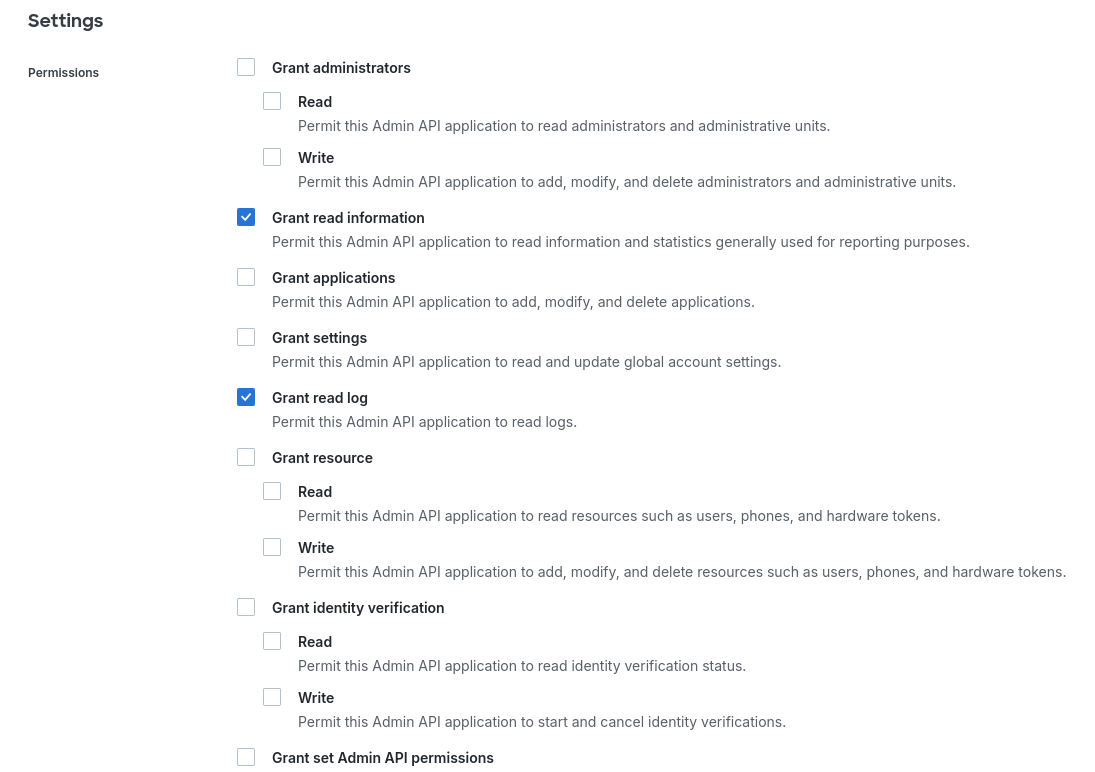
Grant read log is the one that matters: Duo defines it as covering "authentication, offline access, telephony, and administrator action log information", which is every event stream in What arrives. Grant read information adds the account utilisation endpoints.
Add Grant resource - Read as well if you want the Duo roster on the Resources page (v1: SIEM → Resources); the caution below says what that buys and what its absence looks like.
The template declares a CiscoDuo resource group, so the install produces a Duo roster on the Resources page (v1: a Duo card on SIEM → Resources) as well as an event index. Those two halves are gated by different permissions, and this is where least-privilege advice quietly costs you something.
- Every log endpoint in Streams, endpoints and permissions is covered by
Grant read log: one checkbox, all six streams. - Nothing in the roster is. Duo's user, phone, group and administrator endpoints require
Grant resource - Read, which is a separate checkbox in a separate group.
So an application granted only Grant read log collects events perfectly and leaves the Duo roster on Resources empty, and nothing about that reads as a permission failure: the events are arriving, so the integration looks healthy. It stays looking healthy until the first time someone needs to know which of your users has no phone enrolled.
The permission set this step grants (Grant read information and Grant read log) is what the event feed needs. Add Grant resource - Read if you want the roster too. Duo's other SIEM integrations converge on the same three: Rapid7 InsightIDR asks for read information, read log and read resource, and Sumo Logic's Duo source asks for "read information, log, and resource".
Two of the unchecked boxes deserve to stay that way for a reason worth knowing:
- Grant applications lets the credential "add, modify, and delete applications … including permissions on itself or other Admin API applications." An application holding it can grant itself every other permission on this list.
- Grant set Admin API permissions does the same thing more directly, for other Admin API applications.
Either one turns a stolen log-reader into a full administrative credential, so neither belongs on a collector. Save the application settings when you are done.
4. Collect the credentials
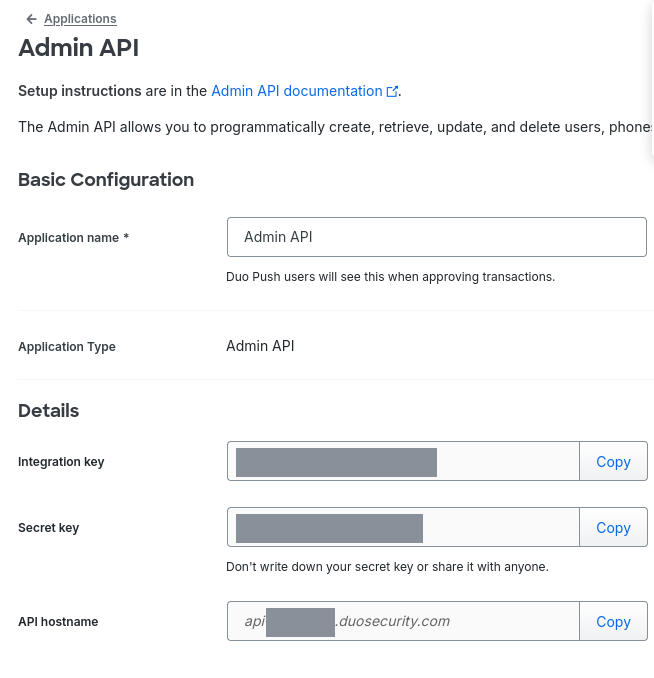
The three values are in the Details section of the application's page.
| Value | Format | Goes to |
|---|---|---|
| Integration key | 20 uppercase alphanumeric characters, beginning DI | Admin API Integration key |
| Secret key | 40 characters, masked in the panel until you use Copy | Admin API Secret key |
| API hostname | api-XXXXXXXX.duosecurity.com (bare host, no https:// and no trailing path) | Admin API hostname |
Most vendors show a secret once and mask it forever. Duo does not: the Copy button beside Secret key keeps working for the life of the application, so mislaying it costs you a trip back to this page rather than a rotation.
The cost of that convenience is that the secret key is permanently readable by anyone who can reach this page, which is any Owner. Duo's own guidance under the field is "Don't write down your secret key or share it with anyone," and its documentation adds "Treat your secret key like a password." Treat Owner-role membership as equivalent to holding this credential.
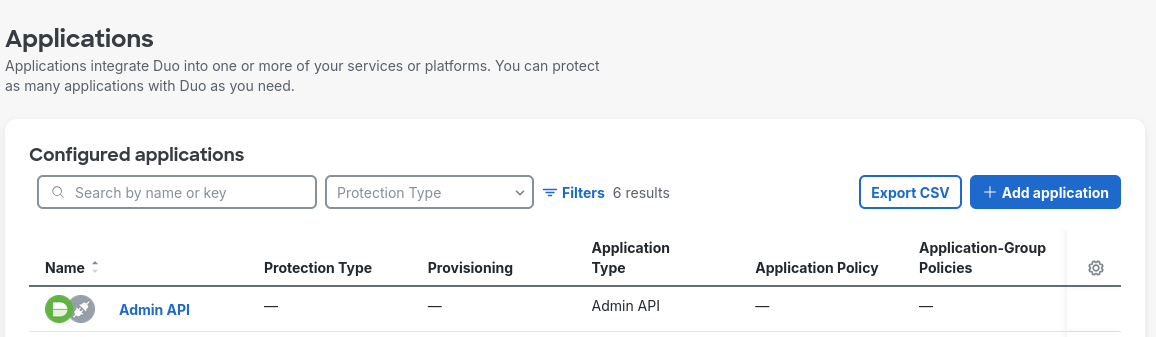
An existing application can be found again later from Applications, where its Application Type column reads Admin API:
Verify before you leave Duo
Duo signs requests rather than accepting a bearer token, so a one-line curl will not do it. This does, using nothing outside the Python standard library. Fill in the three values and run it:
import base64, email.utils, hashlib, hmac, json, urllib.error, urllib.request

IKEY = "<Integration key from step 4>"
SKEY = "<Secret key from step 4>"
HOST = "<API hostname from step 4>"      # api-XXXXXXXX.duosecurity.com, no https://

def call(path):
    date = email.utils.formatdate()
    canon = "\n".join([date, "GET", HOST.lower(), path, ""])
    sig = hmac.new(SKEY.encode(), canon.encode(), hashlib.sha1).hexdigest()
    auth = base64.b64encode(f"{IKEY}:{sig}".encode()).decode()
    req = urllib.request.Request(f"https://{HOST}{path}", headers={
        "Date": date, "Authorization": f"Basic {auth}"})
    try:
        with urllib.request.urlopen(req) as r:
            return r.status, json.load(r)
    except urllib.error.HTTPError as e:
        return e.code, json.load(e)

for path in ("/admin/v1/info/summary", "/admin/v1/logs/administrator"):
    status, body = call(path)
    print(f"{status}  {path}\n     {json.dumps(body)[:180]}")
The two calls test the two permissions separately (/info/summary needs Grant read information, /logs/administrator needs Grant read log), so a failure tells you which checkbox is missing rather than that something is wrong. A healthy run returns 200 twice, and /info/summary reports your account's edition, which is also the fastest way to confirm the Duo plan question from Before you begin:
200  /admin/v1/info/summary
     {"stat": "OK", "response": {"admin_count": 21, "edition": "Duo Premier",
      "integration_count": 44, "telephony_credits_remaining": 960, "user_count": 862}}
Duo checks the request in a fixed order (header present, then integration key, then signature, then permission), so the first failure masks everything after it. Work the table top to bottom:
| Response | What it means |
|---|---|
200 on both | Done. The credential and both permissions are correct. |
401 · 40101 Missing request credentials | The Authorization header did not arrive intact. A transcription problem in the script, not in Duo. |
401 · 40102 Invalid identity in request credentials | Duo does not recognise this integration key on this host, so either the key is wrong, or the API hostname is. See the caution below; both look identical here. Back to step 4. |
401 · 40103 Invalid signature in request credentials | The integration key is right and the secret key is not. Re-copy it with the Copy button rather than by selecting the text. |
401 · 40104 / 40105 | The Date header was malformed or out of range. Check the clock on the machine running the script. |
403 · 40301 Access forbidden on /info/summary only | Grant read information is unchecked. Back to step 3. |
403 · 40301 Access forbidden on /logs/administrator only | Grant read log is unchecked. Back to step 3. |
403 · 40301 Access forbidden on both | Neither permission is granted, or the application is not an Admin API application at all. Check Application Type on its page, then step 2. |
429 | Rate limited. Wait a minute and run it again. |
Duo resolves every api-*.duosecurity.com name, whether or not it belongs to an account. A typo in the hostname therefore does not produce a DNS error or a connection refusal; the request completes, reaches Duo, and comes back 401 with 40102 Invalid identity in request credentials, character for character what a wrong integration key returns.
So 40102 has two causes and no way to tell them apart from the response. Check the hostname against the application page before you assume the key is at fault, and copy it with the Copy button: the eight characters after api- are the account identifier and are the whole of what distinguishes your tenant from anyone else's.
Part 2: Fluency
Install the Application
- v2 interface
- Classic v1 interface
In the navigation rail, open Applications and click Install Application, then choose Cisco Duo Admin API from the Office Software (SaaS) and IAM category of the Application Catalog.
Go to Platform → Applications → Install Application From Template and choose Cisco Duo Admin API from the Office Software (SaaS) and IAM category.
| Parameter | Notes |
|---|---|
| Admin API Integration key | Duo's Integration key from step 4. Begins DI. |
| Admin API Secret key | Duo's Secret key from step 4. Masked once the application is installed. |
| Admin API hostname | Duo's API hostname from step 4. Bare host only: api-XXXXXXXX.duosecurity.com, not a URL. admin.duosecurity.com is the console and is not this value. |
| datalake | Pre-filled managed. |
| datalake index name | Pre-filled Duo. Two applications writing to the same index name in the same lake will collide, and the second one aborts. |
- v2 interface
- Classic v1 interface
datalake and datalake index name sit in the collapsed Advanced configuration section below Configuration; click its heading to reach them.
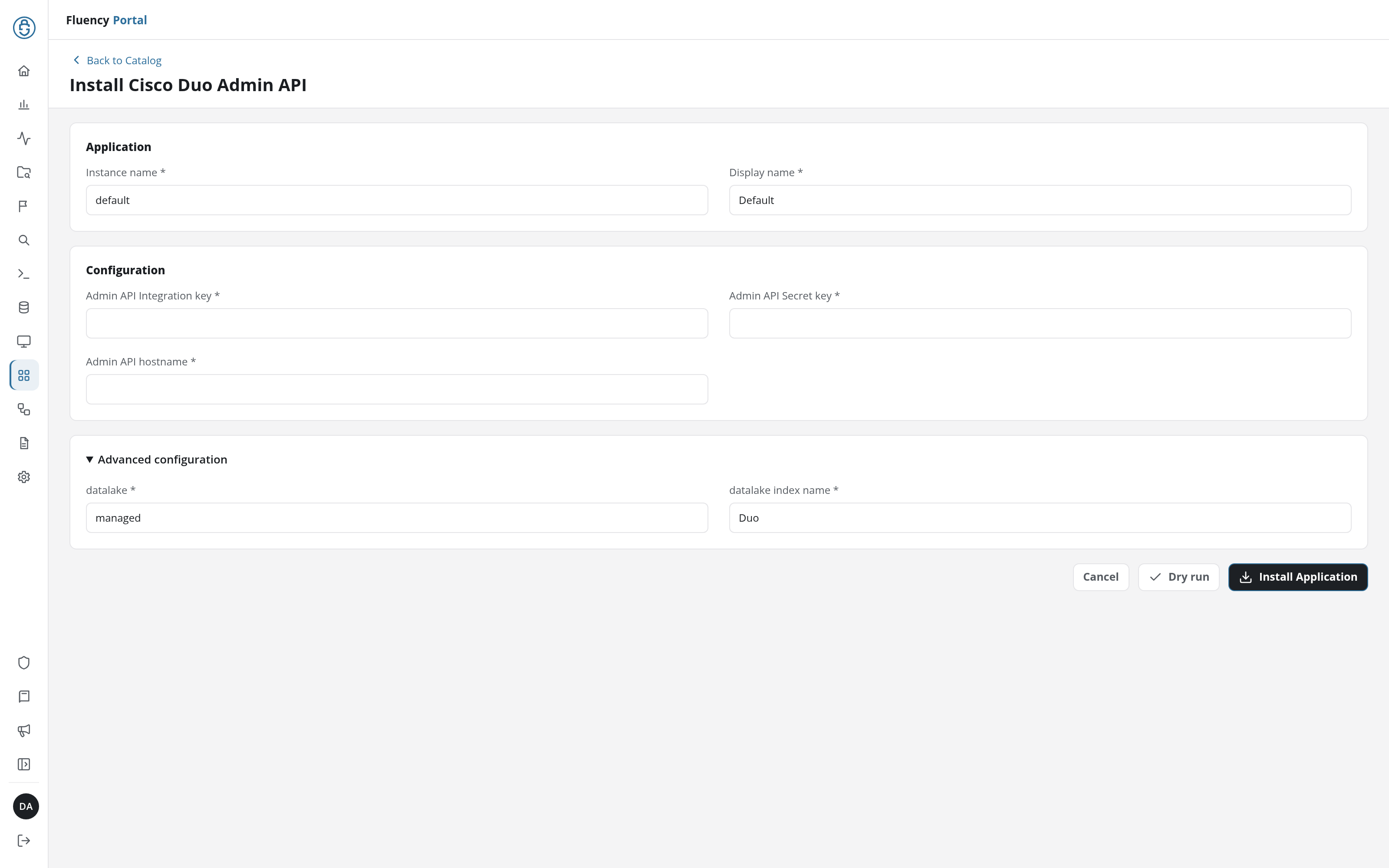
Click Dry run first to have the platform check the three values before anything is installed, then click Install Application. The Applications page opens with the notice Default is launching., and the new application is listed with a green Running badge once the pipeline is up.
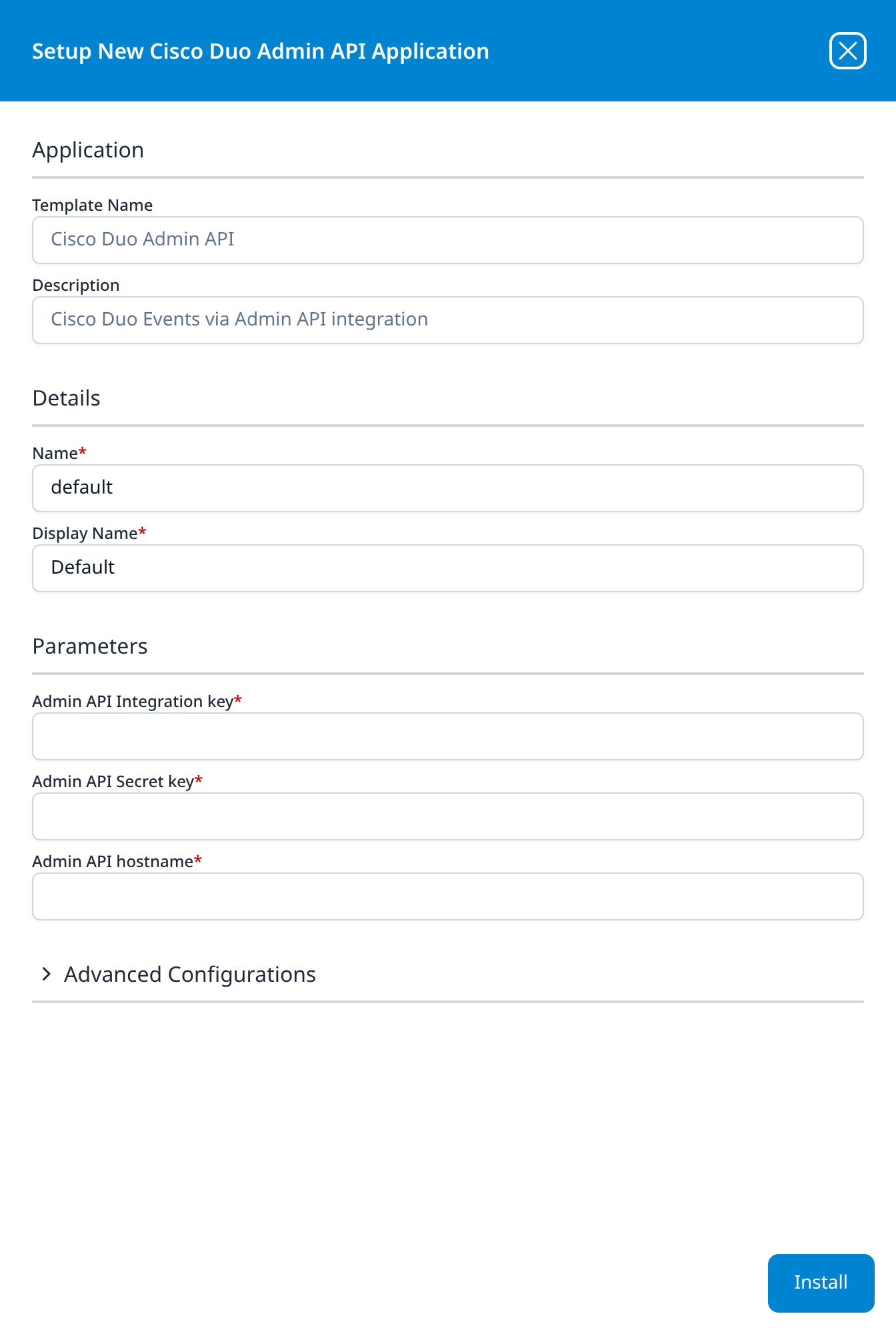
Press Install. The application then appears in the Installed Applications view, where its badge reads Running once the pipeline is up.
Confirm it is running
The application is named Cisco Duo Admin API. A Running badge means the pipeline started, not that Duo accepted the credential; the two checks that distinguish those are:
- Query the
Duoindex. See Confirm data is arriving. Give it time: Duo holds every event back for two minutes by design (see Under the hood), and the collector polls on its own cadence on top of that. - Compare against Duo's own Reports. Duo's Admin Panel has Reports → Authentication Log over the same window. If Duo shows authentications for a period and the index is empty for it, the problem is the integration; if Duo is empty too, the problem is that nobody authenticated.
That second check matters more here than on most integrations, because an empty index is genuinely ambiguous. Duo only records events when somebody authenticates, so a small organisation outside working hours can legitimately produce nothing for hours. Administrator and telephony events are rarer still. Do not treat silence as failure without looking at Duo's side of it.
If you granted Grant resource - Read, the Resources page should also list the Duo roster (v1: a Duo card on SIEM → Resources). That is the faster check where it applies: a roster is never legitimately empty the way an event feed can be.
Maintenance
Rotating the credential
The secret key does not expire, so rotation is something you choose to do rather than something that falls due. Do it immediately if the key has been exposed.
- In Duo, open Applications, then the Admin API application.
- Use Reset Secret Key.
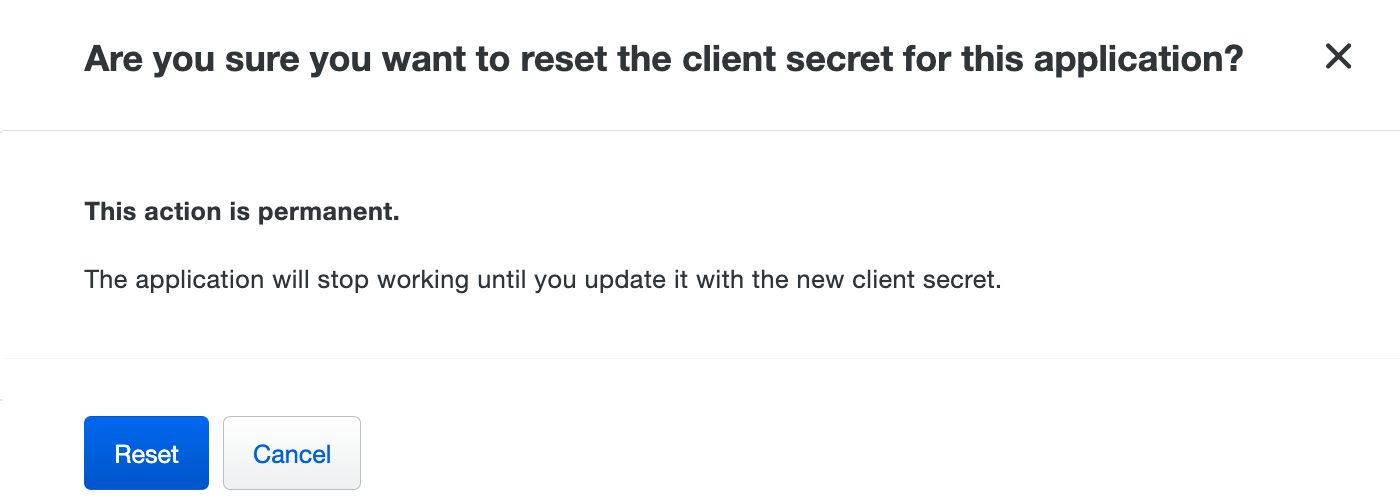
- Copy the new secret key.
- In Fluency, uninstall and reinstall the application with the new value. To uninstall, click Uninstall at the top right of the application's details page (v1: the red Uninstall button at the foot of its details panel on Platform → Applications).
Duo's confirmation says it plainly: "This action is permanent. The application will stop working until you update it with the new client secret." There is no overlap window and no way back to the previous value, so collection stops between the reset and the reinstall, and anything Duo emitted in that gap has to be caught by the next poll's backfill rather than re-requested.
Two things follow. Do the reset and the reinstall in one sitting rather than scheduling them apart. And check first whether anything else uses this application: the integration key and secret key are the application's, not Fluency's, and a reset breaks every consumer of them at once.
Fluency's template parameters are read-only after install, which is why step 4 is a reinstall rather than an edit.
Removing the integration
- Uninstall the Cisco Duo Admin API application in Fluency: the Uninstall button at the top right of its details page (v1: the red Uninstall button at the foot of its details panel on Platform → Applications).
- In Duo, open Applications, select the Admin API application, and delete it.
Deleting the Duo application invalidates the keys, which is the part that actually revokes access; leaving it in place leaves a working administrative credential behind. Duo notes there is no way to restore an application deleted in error from either the Admin Panel or the API, so confirm nothing else uses it first.
Troubleshooting
| Symptom | Likely cause | Fix |
|---|---|---|
| Admin API is not in the Application Catalog | The Duo edition does not include it, or you are not signed in as an Owner | Check the plan against Before you begin; /admin/v1/info/summary reports edition. Confirm your admin role before assuming the plan is at fault. |
Application installs, index stays empty, 401 in the logs | Integration key or secret key mistyped, or the API hostname belongs to a different account | Run the verification script. 40102 means the key or the host; 40103 means the secret key. |
403 on every request | The permissions were never saved, or the credential came from an Auth API or Cisco ISE Admin API application | Re-open the application and confirm Application Type reads Admin API, then re-check the boxes in step 3. |
| Events arrive; the Duo roster on Resources is missing or empty | Grant resource - Read is not granted | Check that box in Duo. The log feed is unaffected either way, which is why this fails quietly. |
| Index is empty but the application is healthy | Nobody authenticated in the window | Compare against Reports → Authentication Log in Duo before treating it as a fault. |
| Newest events are always a couple of minutes behind | Duo's deliberate two-minute buffer | Expected. Duo withholds events younger than two minutes so that paged reads stay consistent; nothing to fix. |
| Events visible in Duo's Reports never reach the lake | The collector was down longer than your log retention window | Check Settings → Logging in Duo. Purged entries are gone at the source and cannot be re-requested. |
| Ingestion falls behind after a busy period | Duo rate limiting (429) | Duo throttles per account and recovers on its own. Sustained throttling slows the catch-up rather than dropping data. |
| Events stopped abruptly with no configuration change | The secret key was reset, or the application was deleted | Both invalidate the credential immediately. Check the application still exists in Duo, then rotate as above. |
| Duplicate events after a reinstall | The new install backfilled over ground already collected | Deduplicate on the authentication log's txid, which is unique per transaction. |
Data reference
Which endpoint and permission sit behind each stream, for searches and detection rules written against them.
Streams, endpoints and permissions
The credential reaches exactly what its permission checkboxes allow, so the boxes you check in step 3 decide the shape of the feed:
| Stream | Endpoint | Permission | Contents |
|---|---|---|---|
| Authentication | GET /admin/v2/logs/authentication | Grant read log | Every 2FA attempt: user, application, factor, result (success / denied / failure / error / fraud) and a reason from a controlled list of 51 (user_approved, user_marked_fraud, frequent_attempts, no_response, locked_out, location_restricted, out_of_date). Carries the access device (browser, OS, IP, city/state/country) and the approving device separately. |
| Activity | GET /admin/v2/logs/activity | Grant read log | Administrative change history as structured actor / action / target records: role changes, bypass codes created and viewed, directory syncs, SSO configuration, policy edits, secrets revealed. |
| Administrator | GET /admin/v1/logs/administrator | Grant read log | The older flat view of the same administrative actions. Superseded by Activity; see Under the hood. |
| Telephony | GET /admin/v2/logs/telephony | Grant read log | SMS and voice-call events with the credits each consumed: the feed that shows toll fraud as spend before it shows as compromise. |
| Offline enrollment | GET /admin/v1/logs/offline_enrollment | Grant read log | Offline-access enrollment for Duo Authentication for Windows Logon. |
| Trust Monitor | GET /admin/v1/trust_monitor/events | Grant read log | Duo's own anomaly surface: the events it thinks are worth a second look. Gated: Premier and Advantage accounts created before 29 September 2025. An account that postdates that cutoff does not get it whatever it pays, so an empty Trust Monitor stream is not a fault. |
| Account utilisation | GET /admin/v1/info/* | Grant read information | Account edition, user and administrator counts, telephony credits remaining, authentication attempt counts by result. |
| Resource roster | GET /admin/v1/users, /phones, /groups, /admins | Grant resource - Read | Users, phones, hardware tokens, groups and administrators, as record sets on the Resources page (v1: SIEM → Resources) rather than as events. |
Under the hood
Engineering reference: the Duo Admin API and how this credential reaches it
What this section describes
Everything below describes the Duo Admin API: the endpoints, the signing scheme and the responses the credential reaches. The settings that belong to your own install rather than to the API (which of the log endpoints it polls, its cadence, what the CiscoDuo resource group holds and the field names events land under) are recorded on the install itself: open the installed application's details and read its Actions list, which lists every object the install created.
Authentication
Duo uses signed requests rather than bearer tokens, so there is no token endpoint, no expiry and no refresh. Each request carries two headers:
Date: RFC 2822, and byte-identical to the value that was signed.Authorization: Basic base64(ikey + ":" + signature).
The signature is an HMAC over a five-line canonical string built from the request itself:
Tue, 21 Aug 2012 17:29:18 -0000
GET
api-xxxxxxxx.duosecurity.com
/admin/v1/info/summary
The fifth line is the sorted, URL-encoded parameter list and stays blank when there are none, but the line itself is not optional. Duo supports two signing versions: v2 (HMAC-SHA1, the form above) and v5 (HMAC-SHA512, which also hashes the request body and any X-Duo-* headers). v5 is preferred and is the default in Duo's own API clients. The log and info endpoints accept either; the Integrations v2/v3, Policies v2 and Passport v2 endpoints require v5 and reject v2-signed requests.
Because the Date header is part of what is signed, the caller's clock is part of the credential: a machine with a badly skewed clock fails authentication with a correct key.
Error codes
Duo returns a JSON body on failure with a numeric code whose first three digits are the HTTP status. It checks in order, so the earliest failure is the one you see:
| Code | Meaning |
|---|---|
40101 | Missing request credentials: no usable Authorization header. |
40102 | Invalid identity: the integration key is unknown on this host. |
40103 | Invalid signature: the secret key is wrong. |
40104 / 40105 | The Date header is malformed or outside the accepted range. |
40301 | Access forbidden: the permission is not granted, or the key belongs to another application type. |
40401 | Resource not found: the path is wrong. |
429 | Rate limited. |
Note that api-*.duosecurity.com is effectively a wildcard: any subdomain of that form resolves and serves the API, so a wrong hostname returns 40102 rather than failing to connect.
The 180-day window and the two-minute buffer
All log endpoints serve at most the last 180 days, and none of them serve anything newer than two minutes. Duo describes the delay as deliberate: "Duo operates a large scale distributed system, and this two minute buffer period ensures that calls will return consistent results. Querying for results more recent than two minutes will return as empty."
Duo's guidance is to request logs no more than once per minute.
The account-level Settings → Logging value (log_retention_days in the API, 1–365 days, null by default) purges entries below that ceiling and cannot raise it.
Endpoints
| Endpoint | Notes |
|---|---|
GET /admin/v2/logs/authentication | Paged by next_offset. Filters on users, groups, applications, results, reasons and factors. |
GET /admin/v2/logs/activity | Requires mintime and maxtime as 13-digit millisecond timestamps, at most 180 days apart. |
GET /admin/v1/logs/administrator | Returns only the 1000 earliest matching events; paging is by advancing mintime. Announced for deprecation in favour of Activity Logs v2, with no date given. |
GET /admin/v2/logs/telephony | Paged by next_offset. |
GET /admin/v1/logs/offline_enrollment | Same 1000-event cap and the same deprecation notice. |
GET /admin/v1/trust_monitor/events | Paged by next_offset. Returns nothing on accounts outside the eligibility window described in Streams, endpoints and permissions. |
GET /admin/v1/info/summary | edition, user_count, admin_count, integration_count, telephony_credits_remaining. |
Timestamps are Unix seconds except where noted: the Activity Logs v2 endpoint uses milliseconds, and the authentication log carries both an integer timestamp and an ISO-8601 isotimestamp.
An authentication event
{
  "access_device": {
    "browser": "Chrome", "browser_version": "67.0.3396.99",
    "epkey": "EP18JX1A10AB102M2T2X", "ip": "169.232.89.219",
    "location": {"city": "Ann Arbor", "country": "United States", "state": "Michigan"},
    "os": "Mac OS X", "os_version": "10.14.1",
    "is_encryption_enabled": true, "is_firewall_enabled": true
  },
  "application": {"key": "DIY231J8BR23QK4UKBY8", "name": "Acme Corp IdP",
                  "destination_name": "Microsoft 365"},
  "auth_device": {"ip": "192.168.225.254", "key": "DP5BJ05HI4WRBVI4Q7JF",
                  "name": "My iPhone X (734-555-2342)"},
  "email": "narroway@example.com",
  "event_type": "authentication",
  "factor": "duo_push",
  "isotimestamp": "2020-02-13T18:56:20.351346+00:00",
  "reason": "user_approved",
  "result": "success",
  "timestamp": 1581620180,
  "trusted_endpoint_status": "not trusted",
  "txid": "340a23e3-23f3-23c1-87dc-1491a23dfdbb",
  "user": {"key": "DU3KC77WJ06Y5HIV7XKQ", "name": "narroway@example.com",
           "groups": ["Duo Users", "CorpHQ Users"]}
}
Three properties are worth knowing:
txidis the deduplication key. It is unique per authentication transaction and survives a reinstall that re-reads ground already collected.- Names are present, not just identifiers. Unlike many audit APIs, Duo returns
user.name,user.groups,application.nameandauth_device.nameinline, so a detection can name its subject without a second lookup.user.keyis theuser_idthat joins to the resource roster where you have collected it. access_deviceandauth_deviceare different machines: the one signing in and the one approving. A push approved from a device in a different country from the browser requesting it is visible in a single record.
On Premier and Advantage accounts the record also carries adaptive_trust_assessments, Duo's own scoring of the attempt, with a trust_level and a human-readable reason.
MSP subaccounts
One Admin API application in a parent account can query its subaccounts by sending the subaccount's API host and passing its account_id as a request parameter; there is no need to create a separate application per subaccount. Duo no longer allows new Accounts API applications, so this is the supported path. The Fluency install form has no account_id parameter, so a separate install per subaccount is the straightforward arrangement.
References
Vendor
- Duo Admin API: the full endpoint reference, permission table, signing specification and error codes.
- Protecting Applications: adding an application from the catalog, resetting the secret key, deleting an application.
- Duo Administrator Roles: what the Owner role can do that other roles cannot.
- Logs and Reports: the Admin Panel reports to check your collection against.
- Global Settings: where the log retention period lives.
Fluency
- Cisco Duo Admin API install form (v1: Install Application From Template)
- Confirm data is arriving
- Resources (v1: SIEM → Resources)
Related
- Okta: the other identity feed in this section, and the one Duo most often sits alongside.
- Integration Matrix: which ingress method each product supports.
- Business Software: the rest of this category.