Okta
Okta's System Log records every sign-in attempt, every multi-factor prompt and its outcome, every administrator action, and every change to a user, group or application assignment: the first place an account takeover shows up, and the record of what the attacker did once inside. Fluency polls Okta's /api/v1/logs endpoint on a schedule and writes the events into a datalake index.
Authentication is an API token from the Okta Admin Console, sent on every request in an Authorization: SSWS … header. There is no client ID, no secret, no consent screen and nothing to scope: the token carries the permissions of the admin account that created it, so which account owns the token is the one decision you make.
The setup has two halves:
- In Okta: decide which admin account will own the token, create the token, and copy its value and your org domain.
- In Fluency: install the Okta Events application template and paste those two values in.
What arrives
| Stream | What it holds | Lands in |
|---|---|---|
| System Log | Every event in the org: sign-ins, multi-factor outcomes, administrator actions, and user, group, application and policy changes, each with actor, client, geolocation, outcome and target. | The Okta index |
| Okta roster | The org's users, groups and applications. | Resources: Okta |
The token owner's admin role decides what is collected, and follows any later change to that role: an owner who cannot view the System Log produces a token that authenticates and then collects nothing (step 1). Okta serves only the last 90 days, so an outage longer than that is permanent loss; see Okta serves 90 days.
Endpoints, event ordering and deduplication, and the retention boundary are in Data reference.
Before you begin
| Requirement | Detail |
|---|---|
| Admin role that can create tokens | "Super admins, org admins, group admins, group membership admins, and read-only admins may create tokens." Whoever signs in to do step 2 must hold one of these. |
| Admin role that can read the System Log | A separate question from the one above, and the one that decides whether the integration works. See step 1. |
| A service account, ideally | Not strictly required, but the token dies with its owner. Step 1 covers why this matters more here than it does elsewhere. |
| Your Okta org domain | example.okta.com, example.okta-emea.com, example.oktapreview.com, or a custom domain. Not the Admin Console address. Step 4. |
| Outbound network access | The collector calls https://<your-org-domain>/api/v1/logs from Fluency's infrastructure, not from your network. This matters for the network-zone setting in step 2. |
Part 1: Okta
1. Choose who will own the token
Most integrations ask you to tick permission boxes on a credential. Okta has no such screen for API tokens. The Create token dialog asks for a name and a network restriction, and that is all: there is nowhere to say what the token may read.
The permissions come from the admin account that created it, and they are not a snapshot. Okta's wording:
API tokens are generated with the permissions of the user that created the token. If a user's permissions change, then so do the token's.
So the integration's reach is a live property of somebody's admin role. Change that person's role and you have changed what Fluency can collect, without touching Fluency. Two consequences follow, and neither announces itself:
- Narrow the owner's role and the feed stops. A Read-Only Administrator can view the System Log. Group admins and group membership admins may also create tokens but do not have that view: a token owned by one of those authenticates perfectly and then returns
E0000006on every log request. - Deactivate the owner and the token dies. "If a user account is deactivated in Okta, any API token created by that user account is deprovisioned at the same time." An offboarding takes the integration with it, on the day the account is disabled, with nothing in Fluency to explain why.
This is why this step is about choosing an account and not about ticking boxes. It is the only permission decision this integration has.
Because the token inherits its owner's permissions and expires with the owner's account, this choice is the whole permission model. Two recommendations are in circulation and they disagree, so both are worth stating.
Okta's own advice is to optimise for stability:
To avoid service interruptions, generate API tokens using a service account that won't be deactivated and that has super admin permissions that won't change.
The least-privilege answer is a dedicated service account with the Read-Only Administrator role. Okta's description of it is that read-only admins "have view access to most data in the Admin Console" and "are unable to edit data", and the list of what they can view explicitly includes System Log, Users, Groups and Apps and app instances: everything this integration reads, and nothing it writes. Rapid7's Okta integration asks for the same thing: "Ensure you have Okta administrator privileges with 'Read-Only' permissions or higher."
Read-Only Administrator is the recommended role. The two positions are not really in conflict (Okta's concern is that the role should not change, not that it should be Super Admin), and a read-only service account satisfies both as long as nobody edits it later.
Whichever you pick, make it a service account rather than a person. An admin who leaves takes the integration down with them the day their account is deactivated, and the failure looks like an authentication error rather than an offboarding.
Before going further, have the account sign in and open Reports → System Log. If that view loads, a token created by this account can read the API. If it does not, no amount of configuration on the Fluency side will help.
2. Create the token
In the Okta Admin Console, go to Security → API and click the Tokens tab, signed in as the account chosen above.
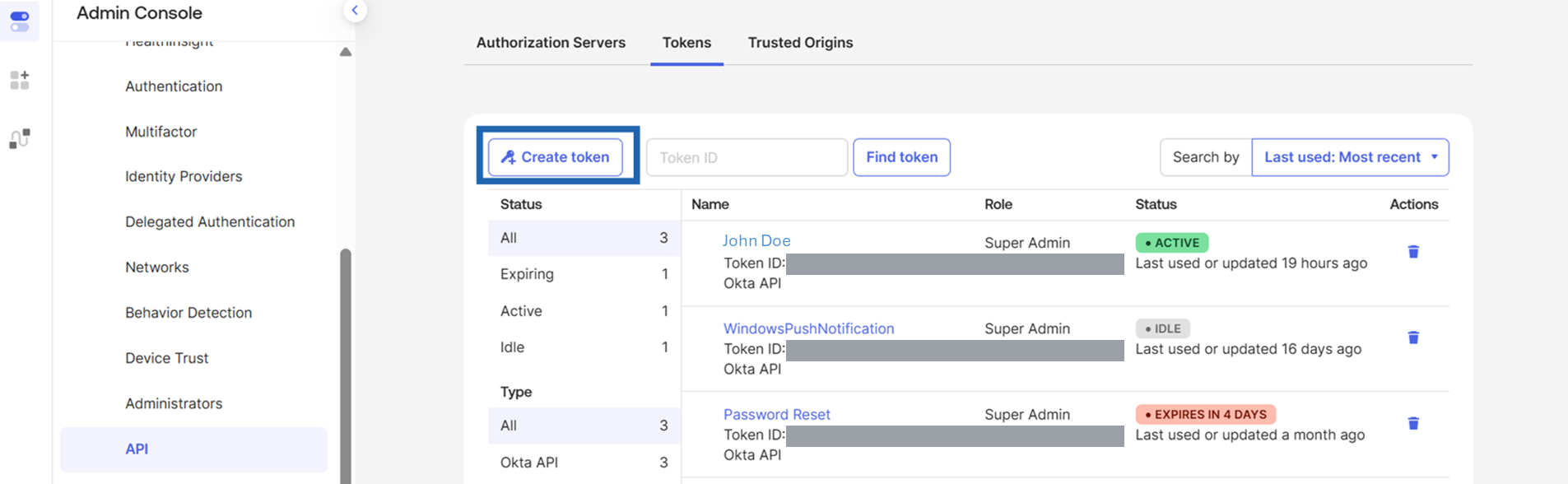
Click Create token.
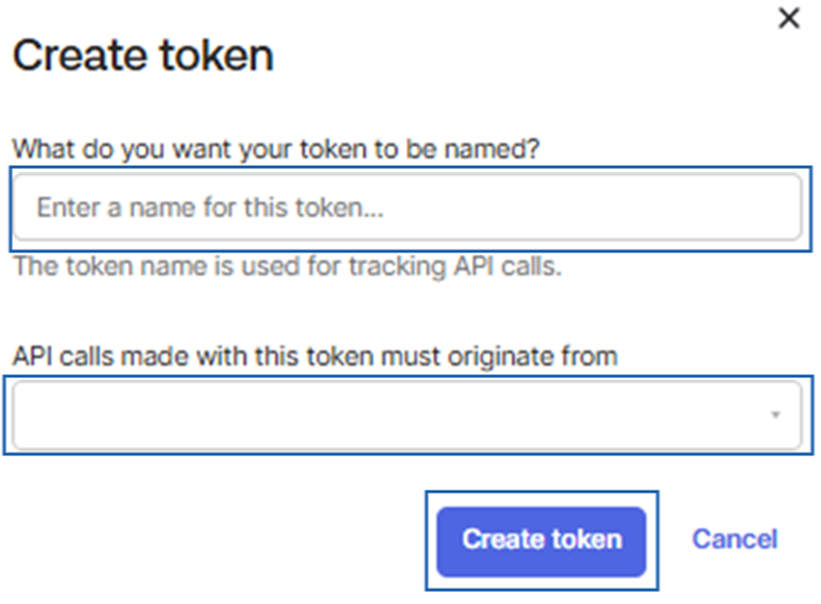
- In What do you want your token to be named?, enter a name that identifies the consumer:
fluency-ingextworks. The name is how you will find this token later among the agent tokens Okta creates for itself, and Okta notes it "is used for tracking API calls." - Leave API calls made with this token must originate from set to Any IP unless you have read the caution below.
- Click Create token.
That second field is a source restriction, and its instinctive answer is wrong here. The options are Any IP, In any network zone defined in Okta, In any of the following zones, Not in any network zone defined in Okta, and Not in any of the following zones.
Restricting the token to your corporate zones is a reasonable habit and it will break this integration, because the calls do not come from your network. Fluency polls Okta from its own infrastructure, so a token pinned to the office ranges is rejected on every request, and the token itself is perfectly valid, which makes the failure read as a credential problem rather than a network one.
Choose Any IP unless you know the collector's egress addresses and have built an Okta zone for them. Two further constraints apply if you do: "You can only use IP-based zones with SSWS tokens", and "You can't use blocklist zones with SSWS tokens."
The setting is editable after the fact (open the token and use Edit in its Security section, where the same dropdown is labelled Token can be used from), so this is recoverable, once you work out that it is the cause.
3. Copy the token value
Okta's own wording on the confirmation dialog: "Please make a note of this token as it will be the only time that you will be able to view it. After this, it will be stored as a hash for your protection."
There is no reveal, no download and no reissue. A lost value means revoking the token and creating another one.
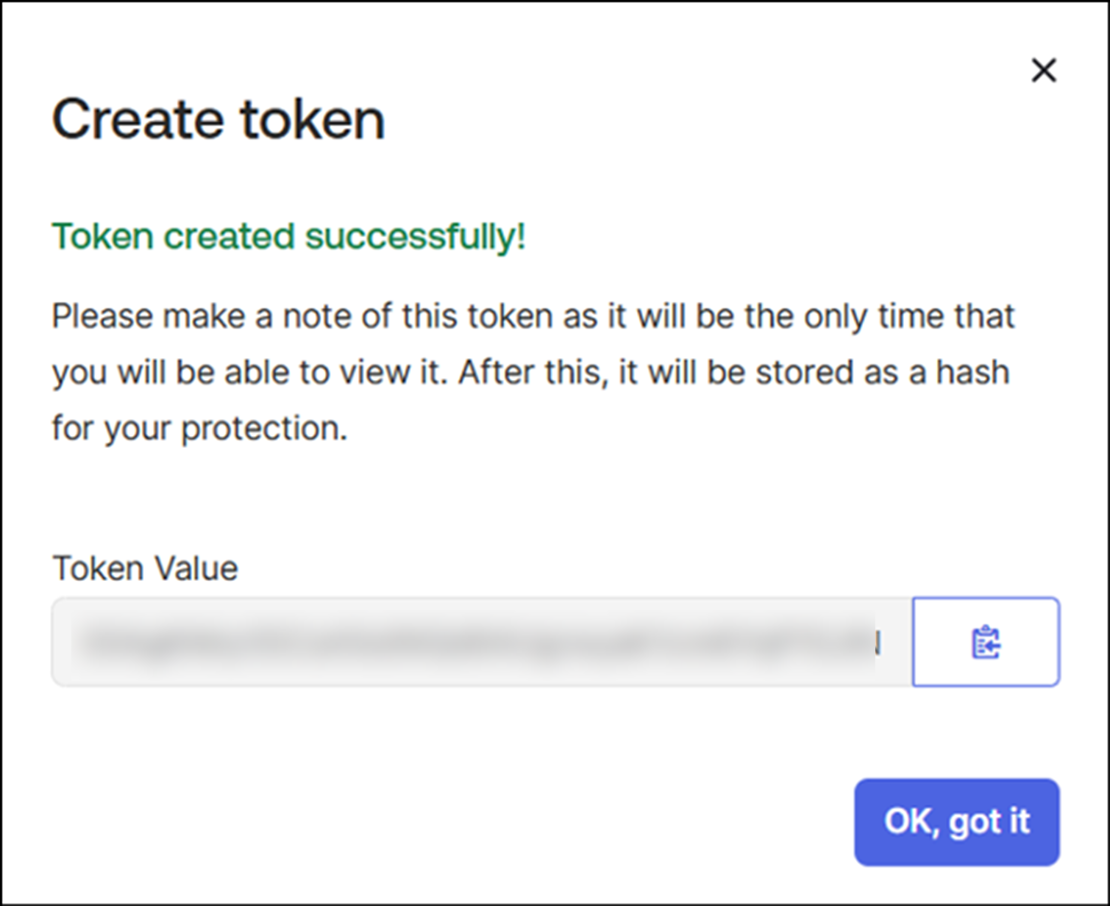
Click the copy to clipboard button beside Token Value and paste it somewhere safe until you reach the install. Then click OK, got it.
Okta API tokens have no fixed expiry date. They have an inactivity timer instead:
API tokens are valid for 30 days and automatically renew every time they're used with an API request. When a token has been inactive for more than 30 days, it's revoked and can't be used again.
The window is "fixed and can't be changed for your org." Under normal operation this never fires, because a polling collector resets the clock every cycle. It fires after a long outage: if the application is uninstalled, suspended or broken for more than a month, the token is revoked at the source and reinstalling with the same value will not work. Recovery means creating a new token, which means reinstalling the application, because template parameters are read-only after install.
The Tokens tab warns you before this happens: a token turns red and reads EXPIRES IN n DAYS once it is within seven days of the deadline.
4. Collect the org domain
The domain is the host Fluency will call. Find it by clicking your username in the upper-right corner of the Admin Console: Okta puts the domain in the dropdown.
It looks like example.okta.com, example.okta-emea.com or example.oktapreview.com, or it is a custom domain you configured. Record it as a bare host: no https://, no trailing slash, no path.
Okta resolves every name under okta.com, whether or not an org exists behind it. A typo therefore does not produce a DNS failure or a refused connection; the request completes, reaches Okta, and comes back:
HTTP/2 401
{"errorCode":"E0000011","errorSummary":"Invalid token provided", … }
which is character for character what a revoked, mistyped or expired token returns. E0000011 has two unrelated causes and the response does not distinguish them, so check the domain before you conclude the token is bad.
The specific trap is the Admin Console address. Copying it out of the browser's address bar gives you the -admin form (example-admin.okta.com), which is not the form Okta documents for API calls; its own guide gives example.okta.com. Take the value from the username dropdown rather than the address bar, and strip -admin if it is there.
Verify before you leave Okta
Two calls, one per half of the integration. Run them from anywhere with network access; the point is to prove the credential works before an install can fail silently on it.
DOMAIN="example.okta.com"          # step 4: bare host, no https://
TOKEN="00…"                        # step 3

# The event feed
curl -sS -o /dev/null -D - \
  -H "Authorization: SSWS $TOKEN" \
  "https://$DOMAIN/api/v1/logs?limit=1"

# The resource roster
curl -sS -o /dev/null -w '%{http_code}\n' \
  -H "Authorization: SSWS $TOKEN" \
  "https://$DOMAIN/api/v1/users?limit=1"
The first call prints response headers so you can see the link: …; rel="next" header, which is how the collector pages forward. Splitting the two endpoints matters: they are backed by different parts of the owner's admin role, so a failure on one and not the other tells you which.
| Response | What it means |
|---|---|
HTTP/2 200 with a link: …; rel="next" header | Domain, token and permissions are all good. An empty [] body is fine: a polling request "always" returns a next link "even if there are no new events." |
401 · E0000011 Invalid token provided | The token is wrong, was revoked, expired after 30 days idle, or its owner was deactivated, or the domain is wrong. Recheck step 4 before step 3; it is the cheaper of the two to rule out. |
403 · E0000006 You do not have permission to perform the requested action | The token is valid and its owner's admin role does not cover that endpoint. Go back to step 1. If this appears on /api/v1/logs but not /api/v1/users, the owner is an admin type that cannot see the System Log. |
403 on both calls, from a host inside your network but not elsewhere | The network-zone restriction from step 2. |
429 · E0000047 API call exceeded rate limit due to too many requests. | Something else is already consuming this org's /api/v1/logs budget. See Under the hood. |
curl: (6) or a TLS error | Not Okta at all. The domain has a scheme, a path or a typo in the TLD. |
Part 2: Fluency
Install the Application
- v2 interface
- Classic v1 interface
In the navigation rail, open Applications and click Install Application, then choose Okta Events from the Cloud-based Business Softwares category of the Application Catalog.
Go to Platform → Applications → Install Application From Template and choose Okta Events from the Cloud-based Business Softwares category.
| Parameter | Notes |
|---|---|
| Okta Domain | The org domain from step 4: example.okta.com. Bare host: no scheme, no path, no -admin. |
| API Token | The value copied in step 3. Stored masked; sent to Okta as Authorization: SSWS …. |
| datalake | Pre-filled managed. |
| datalake index name | Pre-filled Okta. Two applications writing to the same index name in the same lake will collide, and the second one aborts. |
- v2 interface
- Classic v1 interface
datalake and datalake index name sit in the collapsed Advanced configuration section below Configuration; click its heading to reach them.
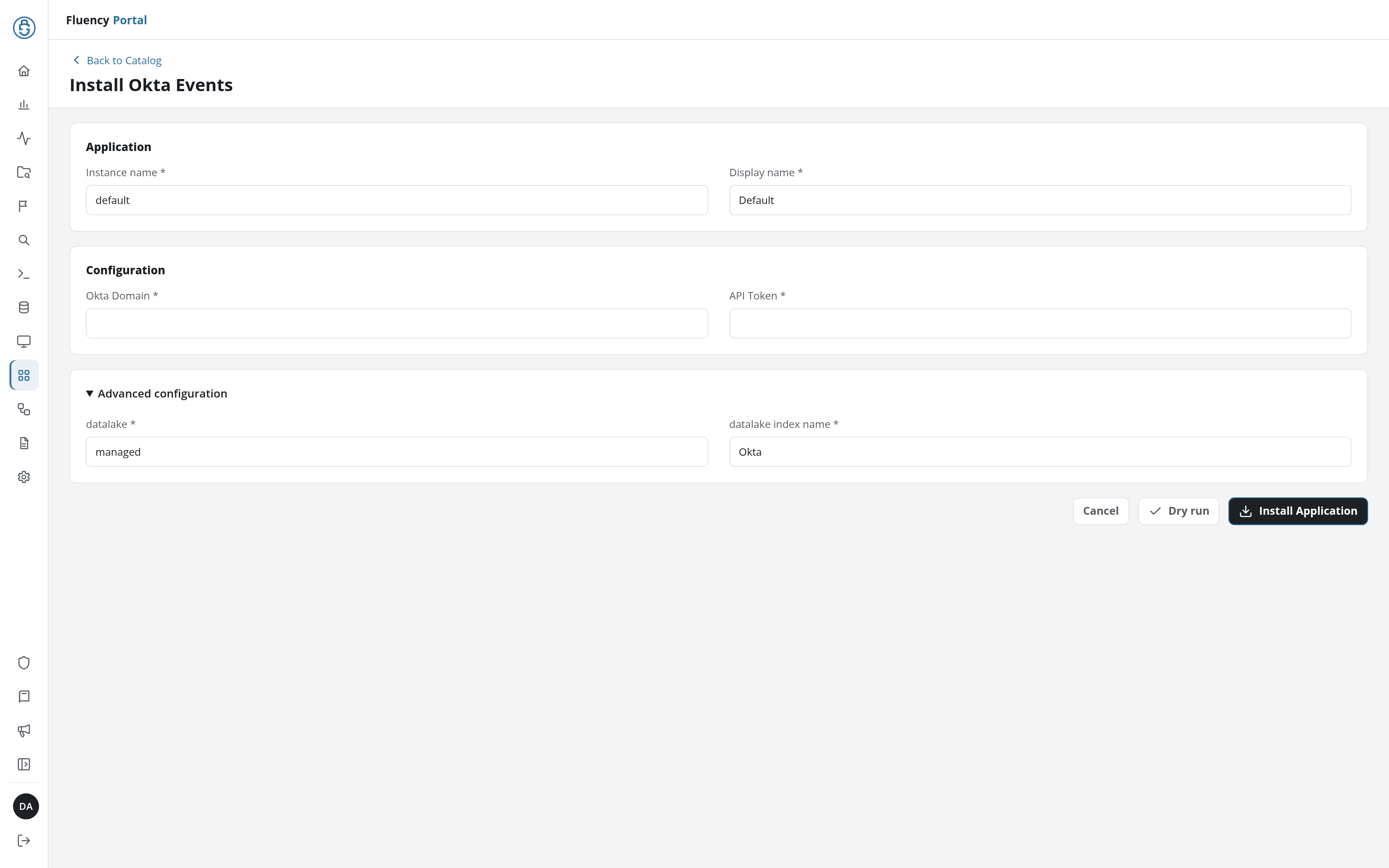
Click Dry run first to have the platform check the domain and token before anything is installed, then click Install Application. The Applications page opens with the notice Default is launching., and the new application is listed with a green Running badge once the pipeline is up.
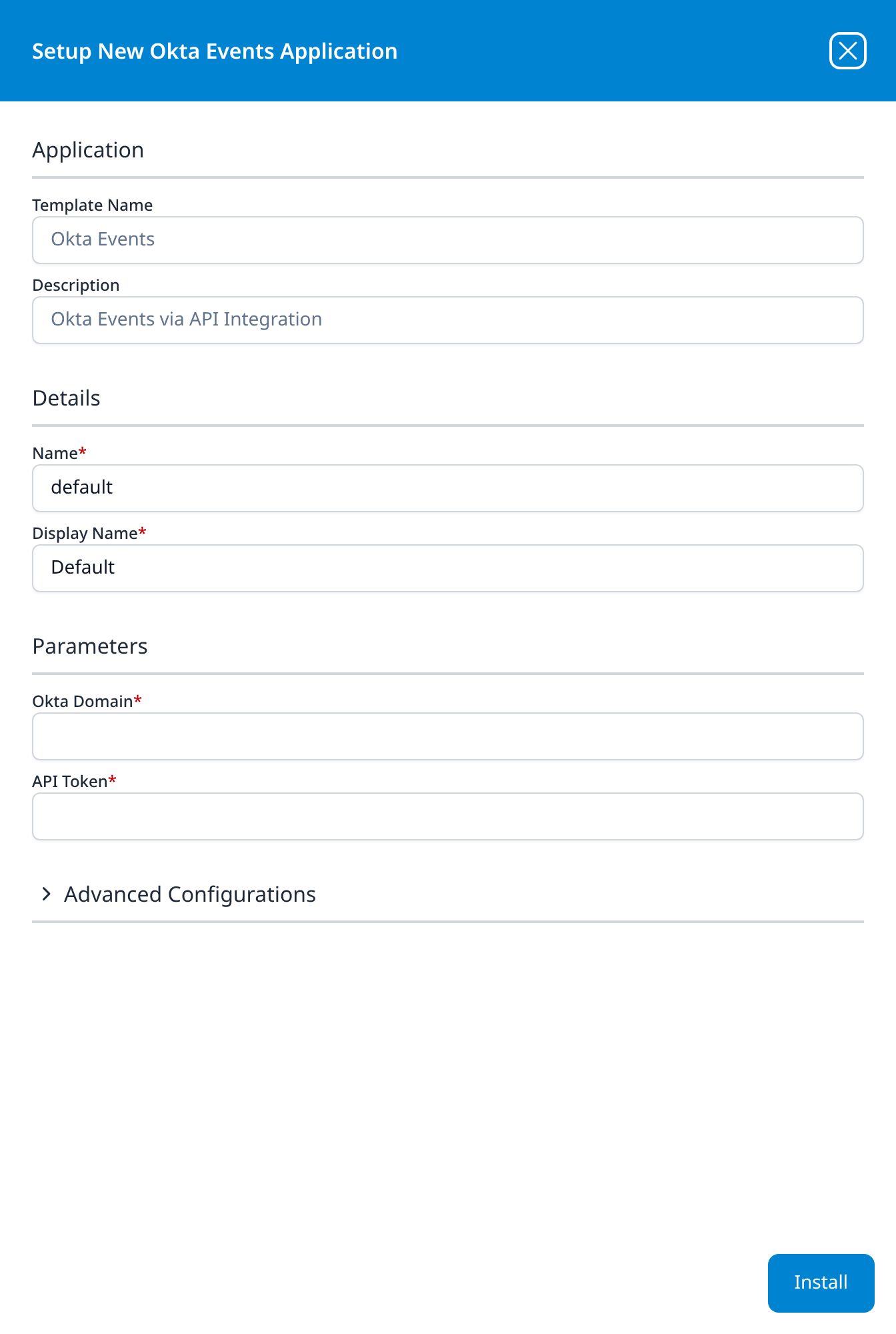
Press Install. The application then appears in the Installed Applications view, where its badge reads Running once the pipeline is up.
Confirm it is running
Unusually, the better health check is on Okta's side rather than Fluency's. Okta records when each token was last used and shows it on the token list, so the vendor will tell you whether the Fluency collector is actually calling, which an empty index on a quiet org will not.
In Okta, go to Security → API → Tokens:
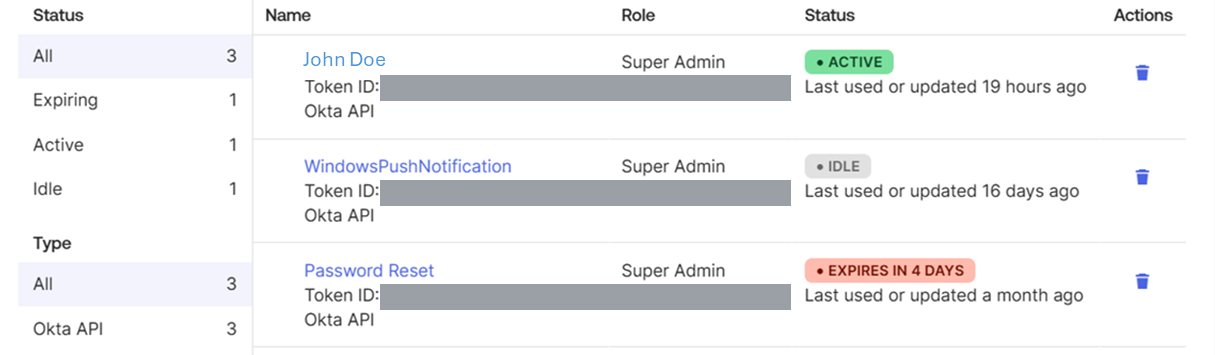
- ACTIVE, green, with Last used or updated a few hours or less ago: the collector is polling. This is the state you want, and it is the single fastest way to tell a credential problem from a quiet tenant.
- IDLE, grey: nothing has used the token for more than three days. If the application says Running, it is not reaching Okta.
- EXPIRES IN n DAYS, red: within seven days of the 30-day inactivity cutoff. Something has been broken for over three weeks and you are about to lose the token as well.
In Fluency, query the Okta index; see Confirm data is arriving. Give the first collection room: Okta's default lower bound for a query with no since is "7 days prior to until", so an initial backfill may be short and is not a fault.
If the install produced a roster on the Resources page (v1: a card on SIEM → Resources), the roster is the stricter check of the two: a record set is never legitimately empty, where a log feed on a quiet org can be.
Maintenance
Rotating the token
Template parameters are read-only after install, so a new token means a new application. Do it in this order to avoid a gap:
- In Okta, Security → API → Tokens → Create token, and copy the new value (steps 2–3). Use the same owner account, or the permissions change with it.
- In Fluency, uninstall the existing Okta Events application and install it again with the new token. To uninstall, click Uninstall at the top right of the application's details page (v1: the red Uninstall button at the foot of its details panel on Platform → Applications).
- Back in Okta, revoke the old token: the trash icon under Actions on the Tokens tab, or Revoke token on the token's own page. "API tokens are always revocable."
Revoking is immediate, so leave step 3 until the replacement is collecting.
Rotation is also the fix for a role change. If the owner's admin role is edited, the token's permissions move with it silently; if the owner is deactivated, the token is gone. Neither produces a Fluency-side message that names the cause.
Removing the integration
- Uninstall the Okta Events application in Fluency, so nothing is polling: the Uninstall button at the top right of its details page (v1: the red Uninstall button at the foot of its details panel on Platform → Applications).
- Revoke the token in Security → API → Tokens.
- If you created a service account for it, deactivate that too, which revokes any other tokens it owns, so check the Role column on the Tokens tab first.
Okta records both ends of this in its own System Log: "The message associated with these operations is either API token created or API token revoked."
Troubleshooting
| Symptom | Likely cause | Fix |
|---|---|---|
Application installs, index stays empty, E0000011 | Wrong domain or wrong token: the same error covers both | Run the verification calls. Check the domain first: no scheme, no -admin, correct TLD for your org region. |
E0000006 on /api/v1/logs only | The token owner's admin role cannot view the System Log | Step 1. Have the owner open Reports → System Log in the console; if they cannot see it, neither can the token. |
| Worked for months, then stopped dead | The token owner was deactivated, or their role was changed | Both revoke or narrow the token instantly. Check the Role column on the Tokens tab, then rotate. |
| Token shows IDLE while the application shows Running | Requests are not reaching Okta | Network-zone restriction on the token, or a wrong domain; a bad domain still returns a valid HTTP response, so nothing looks disconnected. |
| Token expired although the collector was configured | More than 30 days of inactivity | The token is permanently revoked. Create a new one and reinstall; the old value cannot be reactivated. |
| Events arrive out of chronological order | Expected: polling requests order by persistence time, not published | Sort on published. Do not treat ingest order as event order. |
| The same event appears twice | Expected at page boundaries | Deduplicate on uuid. |
| Counts do not match the console's System Log view | Different query semantics, and possibly the 90-day edge | The console runs bounded queries; the collector polls. Compare a bounded window, not a running total. |
| Nothing older than about three months, however far back you query | The 90-day retention limit | Not recoverable from Okta. Out-of-range queries return 200 with less data rather than an error. |
E0000047, intermittently | Rate limit on the /api/v1/logs bucket | A token gets 50% of the org bucket by default, and org-level alerts do not fire for one token's share. See Under the hood. |
| Okta roster on Resources empty but events arriving | Owner's role covers the System Log but not users and groups, or the resource sync was not part of this install | Read-Only Administrator covers both. Check the install's Actions list; see Under the hood. |
Data reference
What the System Log looks like once it lands, for searches and detection rules written against it.
Streams and endpoints
| Stream | Endpoint | Contents |
|---|---|---|
| System Log | GET /api/v1/logs | Every event in the org: user.session.start, user.authentication.*, user.lifecycle.*, application.lifecycle.*, application.user_membership.*, group.user_membership.*, policy.* and security.request.blocked, each with actor, client, geolocation, outcome and target. |
| Resource roster | Okta user, group and application objects | The template declares an Okta resource group, so the install produces an Okta roster on the Resources page (v1: a card on SIEM → Resources) alongside the event index. The installed application's Actions list records exactly what it creates; see Under the hood. |
Polling trades ordering for completeness, and Okta says so plainly
Fluency reads the System Log as what Okta calls a polling request, the mode Okta documents for "ingesting System Log data into an external SIEM system". It returns "every event that occurs in your org", which is what you want, but it pays for that with ordering:
The returned events are ordered by the internal persistence time, which reflects when an event is actually committed to the log, and not necessarily the timestamp when the event occurred. … They may return events out of order according to the
publishedfield.
So events can land in the lake in a different order than they happened, and a detection that assumes arrival order is chronological will occasionally be wrong. Sort on published, which is Okta's own event timestamp, rather than on ingest order. Deduplicate on uuid, which Okta defines as the "unique identifier for an individual event".
Okta's alternative (a bounded request, with both since and until set) is "guaranteed to be in order according to the published field", but it is the wrong tool here: it has a finite number of pages, so it cannot follow a live stream, and Okta warns that paginating that way "may lead to skipped or duplicated events." Ordering is the right thing to give up.
Okta serves 90 days, and a query for older data succeeds anyway
The System Log API returns the last 90 days and no more. There is no parameter that reaches further back and no archive endpoint, so an outage longer than 90 days is permanent loss rather than a delay.
The part that catches people is what happens at the boundary. Okta does not reject an out-of-range query:
System Log data older than 90 days isn't returned, in accordance with Okta's Data Retention Policy. Queries that exceed the retention period succeed, but only those results that have a published timestamp within the window are returned.
A backfill request for six months of history therefore returns 200 OK with three months of data in it. Nothing errors, nothing warns, and the gap only shows up later as a period nobody can search. If you need longer retention than 90 days, the lake is where it has to live, which is an argument for installing this before you need it, not after.
Under the hood
Engineering reference: authentication, collection behaviour and event format
What this section describes
Everything below describes the Okta System Log API: its authentication, its polling model and the shape of an event. The settings that belong to your own install rather than to the API (its cadence, what the Okta resource group populates and the field names events land under in the lake) are recorded on the install itself: open the installed application's details and read its Actions list, which lists every object the install created.
Authentication
A single header, on every request:
Authorization: SSWS 00…
No token endpoint, no refresh, no expiry date. The only lifetime rule is the 30-day inactivity revocation. SSWS is Okta's proprietary scheme, and Okta would rather you did not use it:
Okta strongly recommends using the OAuth 2.0 authentication scheme with Okta APIs rather than relying on the Okta-propriety
SSWSAPI token scheme.
And on the System Log API reference itself, it gives the reason:
OAuth 2.0 and OIDC access tokens provide fine-grain control over the bearer's actions on specific endpoints.
The Okta Events template takes an API token and nothing else, so that is not a choice available here, but it explains the shape of this integration. The scoped alternative for this endpoint would be the okta.logs.read OAuth scope; SSWS has no equivalent, which is why the owner's admin role ends up carrying the whole permission model.
Request types
| Polling request | Bounded request | |
|---|---|---|
| Parameters | until unspecified, sortOrder=ASCENDING | both since and until set |
| Ordering | internal persistence time; may be out of order by published | guaranteed in order by published |
| Pages | infinite: next link always present | finite: last page has no next link |
| Completeness | "every event that occurs in your org" | "Not all events for the specified time range may be present. Some events may be delayed." |
| Used for | SIEM ingestion | debugging, auditing a fixed window |
Paging follows the link: …; rel="next" header rather than incrementing timestamps, because Okta warns that "Don't transfer data by manually paginating using since and until, as this may lead to skipped or duplicated events."
Endpoint and parameters
GET /api/v1/logs on https://{yourOktaDomain}. OAuth equivalent scope: okta.logs.read.
| Parameter | Default | Notes |
|---|---|---|
since | 7 days prior to until | ISO 8601. Mutually exclusive with after. |
until | current time | Setting it makes the request bounded. |
after | - | Opaque page token from the next link. |
filter | - | SCIM expression: eventType eq "…", actor.id eq "…", target.id eq "…". |
q | - | Keyword search. Max 40 characters per keyword, 10 keywords per query. |
limit | 100 | 0–1000. |
sortOrder | ASCENDING | ASCENDING or DESCENDING. |
Individual queries time out at 30 seconds. Retention is 90 days.
Rate limits
The /api/v1/logs bucket is org-scoped, and a single credential does not get all of it:
By default, each API token or OAuth 2.0 app can use up to 50% of a bucket's total rate limit. For example, if your org-wide limit for the
/api/v1/logsbucket is 120 requests per minute, a single API token can only make 60 requests per minute to that endpoint before being rate-limited.
The share is adjustable per token: open the token and use Edit in its Token rate limits section. Two things make this worth knowing:
- Another SIEM, an archiver or a script polling the same org is competing for the same bucket, and the ceiling that bites first is the token's half, not the org's whole.
- Okta's alerting does not cover it. "Alerts (email and dashboard notifications) are triggered based on the consumption of the overall quota assigned to an org-scoped bucket, not the allocated capacity of an individual API token or app." A token can sit at its ceiling indefinitely without anyone being told.
Violations are recorded in the System Log, and Okta lets you attribute them: the filter transaction.detail.requestApiTokenId eq "00T…" "returns all events that were the result of an action made using the token". The token ID is on the Tokens tab. That is the one query that proves whether the throttling is Fluency's or somebody else's.
Event format
Okta's own example of a user.session.start event, trimmed:
{
  "uuid": "dc9fd3c0-598c-11ef-8478-2b7584bf8d5a",
  "published": "2024-08-13T15:58:20.353Z",
  "eventType": "user.session.start",
  "displayMessage": "User login to Okta",
  "severity": "INFO",
  "legacyEventType": "core.user_auth.login_success",
  "actor": {
    "id": "00uttidj01jqL21aM1d6",
    "type": "User",
    "alternateId": "john.doe@example.com",
    "displayName": "John Doe"
  },
  "client": {
    "userAgent": { "os": "Mac OS X", "browser": "CHROME" },
    "device": "Computer",
    "ipAddress": "10.0.0.1",
    "geographicalContext": {
      "city": "New York", "state": "New York", "country": "United States"
    }
  },
  "outcome": { "result": "SUCCESS", "reason": null },
  "securityContext": {
    "asNumber": 394089, "asOrg": "ASN 0000", "isp": "google", "isProxy": false
  },
  "authenticationContext": { "externalSessionId": "idxBager62CSveUkTxvgRtonA" },
  "transaction": { "type": "WEB", "id": "ab609228fe84ce59cdcbfa690bgce016" },
  "target": [
    { "id": "pfdfdhyjf0HMbkP2e1d7", "type": "AuthenticatorEnrollment", "displayName": "Okta Verify" },
    { "id": "0oatxlef9sQvvqInq5d6", "type": "AppInstance", "displayName": "Okta Admin Console" }
  ]
}
Four properties are worth knowing when writing detections against this:
uuidis the deduplication key andpublishedis the event time. Arrival order is neither.actorcarries names inline (alternateIdis the login anddisplayNamethe human name), so unlike many audit APIs, events are readable without a second lookup.targetis an array whose order is not stable. Okta: "When searching the target array, search for a giventyperather than the array location. Target types, such asUserandAppInstance, for a giveneventTypeare not always in the same array location." Indexingtarget[0]will work until it does not.severityis one ofDEBUG,ERROR,INFO,WARN, and describes the log record rather than the security significance. A successful sign-in from a new country isINFO.
transaction.id groups events produced by one operation, and authenticationContext.externalSessionId groups a user's session: several events per transaction, several transactions per session, and neither relationship is strictly many-to-one.
References
Okta
- Manage Okta API tokens: the console procedure, token lifetime, status colours and network zones
- Create an API token: privilege inheritance and the OAuth recommendation
- System Log query: polling versus bounded requests, pagination, retention
- System Log API: endpoint reference and the event schema
- Read-only administrators: what the recommended role can see
- Token and OAuth 2.0 application rate limits: the per-token share of an org bucket
- Find your Okta domain: where the domain value comes from
- Okta API error codes:
E0000011,E0000006,E0000047
Fluency
- Okta Events install form (v1: Install Application From Template)
- Confirm data is arriving
- Resources (v1: SIEM → Resources)
Related
- Business Software integrations: the rest of this category
- Integration Matrix: which ingress method each product uses
- Cisco Duo: the other multi-factor and access feed, and the same one-install-two-halves shape resolved by permission checkboxes rather than by an admin role