Black Kite
Black Kite rates the security posture of third parties from the outside (exposed services, certificate and email hygiene, leaked credentials, patch levels, compliance gaps) and publishes the result as findings against each company in your portfolio; Fluency polls those findings from the Black Kite API v2 into the lake. Unlike everything else in this section, this is not telemetry from your own estate but a periodic assessment of your suppliers: whether a vendor you exchange traffic, credentials or data with is getting worse.
Authentication is an OAuth2 client credential, and its role is the one decision that matters: the wizard pre-selects read/write Super Admin, and the collector needs only read-only Super User (step 3).
The setup has two halves:
- In Black Kite: create an API client credential under Admin → Integrations Exchange, give it a read-only role, and copy the Client ID and Client Secret.
- In Fluency: install the BlackKite Findings application template and paste those values in.
What arrives
| Stream | What it holds | Lands in |
|---|---|---|
| Findings delta | Which findings were first seen or updated in a date range: module, finding ID, status and dates. | Fixed by the template |
| Finding detail | The finding itself: title, severity, affected domain, evidence. | Fixed by the template |
| Portfolio | The monitored companies and their ratings. | Fixed by the template |
Findings arrive on Black Kite's scanning cadence, not on an event cadence, so a week with no records is normal. A delta record names a finding without describing it, and whether the template also fetches each finding's detail is not visible on its form; check a stored record for a title before relying on one (why). Every findings route is per company and the API allows 60 requests a minute per credential, so on a large portfolio read step 5 before leaving Company ID empty.
Endpoints, the record layout, status values and deduplication keys are in Data reference; the installed application's Actions list names the destination (Install the Application).
Before you begin
- A Black Kite tenant with API access, and an account that can reach Admin → Integrations Exchange. The Admin menu is where every credential in this guide comes from; if you cannot see it, you cannot finish Part 1.
- Which companies you are entitled to. Findings are per-company and every findings route in the API takes a company ID. A credential can only read companies its role covers.
- Egress on TCP 443 to
app.blackkitetech.com. - A collector user-agent that CloudFlare will accept. Black Kite sits behind CloudFlare and this is not theoretical; see the warning below.
Black Kite's API documentation puts this first among the things to check: "Make sure the User-Agent header value your client side program uses is not denied by the CloudFlare. For example, CF denies User-Agent with Python-urllib/2.6 or Jakarta Commons-HttpClient/3.1."
Both of those user-agent strings are refused by app.blackkitetech.com with:
HTTP/2 403
error code: 1010
No JSON, no Message field, nothing that mentions authentication, because this is CloudFlare answering, not Black Kite. A default user-agent or an ordinary browser string gets 200 from the same endpoint.
This matters when you are testing by hand with a script, and it matters if you ever put a proxy or a middlebox in front of the collector that rewrites the user-agent. Black Kite also asks that clients send Accept-Encoding: gzip, deflate, br and meet CloudFlare's TLS cipher requirements.
Part 1: Black Kite
1. Open the API integration
From the top navigation, choose Admin → Integrations Exchange.

Filter for Black Kite API and open the tile named Black Kite / Black Kite API. The Integration Details panel opens.
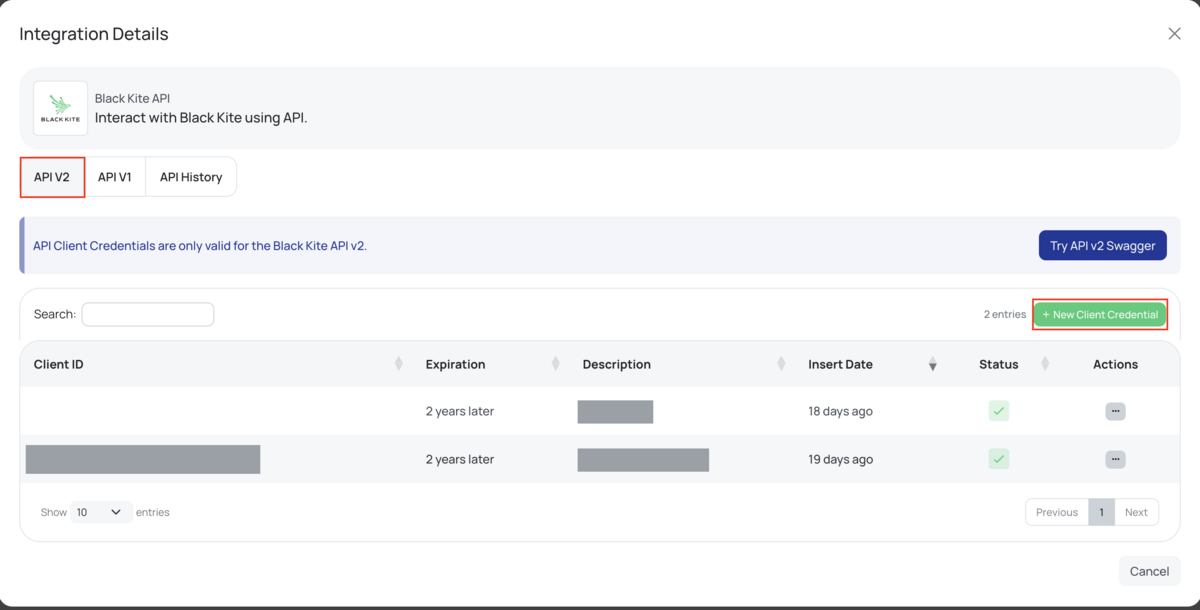
The panel has three tabs (API V2, API V1 and API History), and Black Kite states the rule in a banner on the page itself: "API Client Credentials are only valid for the Black Kite API v2."
The two API generations do not take the same kind of credential. v2 uses the OAuth2 client-credentials pair this guide creates; v1 uses a single static API key issued by Black Kite support, which is what integrations written against the older API still consume. The BlackKite Findings template asks for a Client ID and a Client Secret, so it is a v2 client, and an API key from the v1 era is not a substitute for either field.
2. Create the client credential
Press + New Client Credential. The wizard has two steps, Information and Role.
On Information:
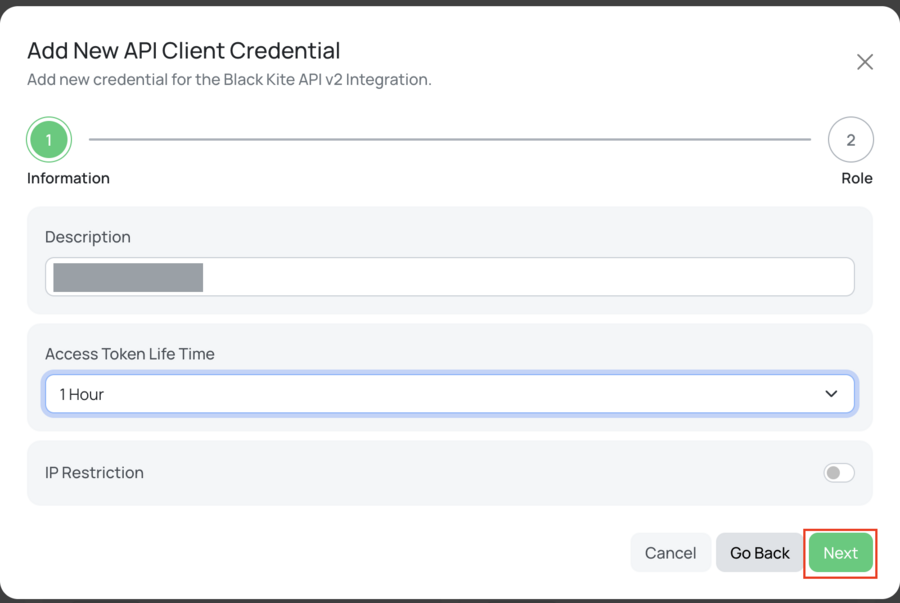
| Field | What to do |
|---|---|
| Description | Name it for the consumer, not the person: Fluency or Fluency SIEM. This string is the only thing distinguishing rows in the credential table later, and it is what you will search when you need to know whether this credential is still in use. |
| Access Token Life Time | Eight options: 10 Minutes (the default), 1 Hour, 6 Hours, 1 Day, 3 Days, 15 Days, 1 Month, 3 Months. Pick 1 Hour. |
| IP Restriction | Leave it off unless you know the collector's egress addresses. See below. |
This setting fixes how long each issued access token stays valid, not how long the credential lives. The default of 10 Minutes means a poller re-authenticates constantly, and every one of those token calls counts against a rate limit shared by everything using this credential. At the other end, a 3 Months token is a bearer token with a quarter-year life that cannot be revoked independently of the credential that minted it. 1 Hour is the value DataBee's published Black Kite guide tells its readers to pick, and it is a reasonable middle.
Turning it on binds the credential to an allow-list of source IPs. A request from anywhere else fails while the credential itself remains perfectly valid, so the symptom is an authentication failure that survives re-copying the secret and re-issuing the credential, and nothing in the error names an IP.
If Fluency polls Black Kite from managed cloud infrastructure, you do not own that egress address and it is not guaranteed stable. Leave the toggle off unless you have a fixed egress you can commit to. If your security policy requires the restriction, get the collector's egress range first, and note that the verification step below reports both the address Black Kite is seeing and the list it is checking against: CurrentIp and IpWhiteList.
3. Choose the role: this is the step that matters
Press Next. The Role step opens with Super Admin already selected.
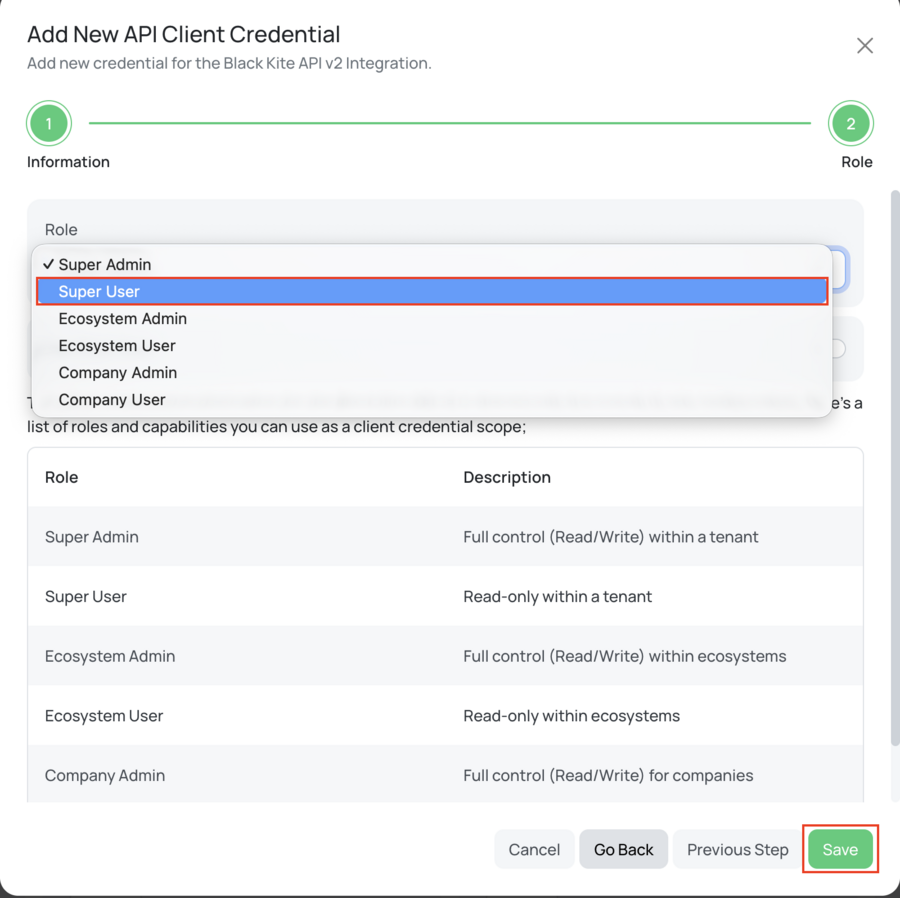
Select Super User.
Black Kite renders its own role table on this screen, and the first two rows say everything:
| Role | Black Kite's description |
|---|---|
| Super Admin | "Full control (Read/Write) within a tenant" |
| Super User | "Read-only within a tenant" |
| Ecosystem Admin | "Full control (Read/Write) within ecosystems" |
| Ecosystem User | "Read-only within ecosystems" |
| Company Admin | "Full control (Read/Write) for companies" |
| Company User | Read-only for companies |
Super Admin is the pre-selected value. A reader who accepts the wizard's defaults and presses Save creates a read/write credential for a read-only job, and nothing warns them: the credential works, findings arrive, and the integration looks correct forever.
What that credential can also do, from the same API the collector authenticates against:
DELETE /api/v2/companies/{id}: "Removes a monitored company altogether from the monitored company collection." Black Kite's note on it: "it doesn't redeem the license used." Deleting a vendor by accident costs you the vendor and the licence slot it occupied.POST /api/v2/companies: starts monitoring a new company, consuming a licence entity from a pool with a fixedNumberOfMaxEntitiesand a finiteRemainingSwapCount.PATCH /api/v2/companies/{id}/findings/{findingId}: changes a finding's status, including toDeleted.DELETEon ecosystems and on assessments;PATCHon the financial-risk exposure values your FAIR numbers are computed from.POST /api/v2/bridge/companies/{id}/documents/share: shares a document with a vendor through the Black Kite Bridge. That one sends data outward, to a third party.
None of this is reachable from Super User, and the collector needs none of it.
Super User is read-only but tenant-wide: it can read every company in the portfolio. If you intend to set Company ID on the Fluency form and collect a single vendor, Company User is the tighter fit and is the honest least-privilege answer for that case.
The trade is that it stops working the moment someone wants a second company, and the failure will present as an empty or partial feed rather than as a permission error. Pick Super User if the portfolio is the target or if you expect the scope to grow; pick Company User if the single company is a deliberate, durable boundary. The verification step below reports which role you actually got, so you can confirm either choice rather than assume it.
Press Save.
4. Collect the credentials
The Client Secret is displayed once, at creation. DataBee's guide to the same screen puts it plainly: copy both values "to a safe place as they won't be visible afterwards." The credential table that lists your credentials afterwards has no secret column, so treat a lost secret as meaning a replacement credential, not a lookup.
| Value | Where it came from | Goes into |
|---|---|---|
| Client ID | Shown when the credential is created; also listed in the credential table afterwards. 32 characters. | Client ID |
| Client Secret | Shown once, at creation only. 32 characters. | Client Secret |
| Company ID | Not from this screen (see below). | Company ID (optional) |
Both values are exactly 32 characters long; Black Kite's API schema pins client_id and client_secret to minLength: 32, maxLength: 32. If what you pasted is a different length, it is not one of these.
5. Find the Company ID, if you need one
The Company ID (optional) parameter takes Black Kite's internal integer identifier for a company, not its name and not its domain. It is not shown as a labelled field in the portal. The reliable way to read it is the URL: open the company's dashboard in the Black Kite portal and take the number after /company/.
https://app.blackkitetech.com/ecosystem/12/company/22/dashboard
                                                    ^^
                                              the Company ID
Via the API, GET /api/v2/companies returns every monitored company with its CompanyId, and each record also carries a DashboardLink in exactly that form.
Every findings route in the Black Kite API is per-company. There is no tenant-wide findings endpoint: the collection is /api/v2/companies/{id}/findings, and {id} is required. So an empty Company ID cannot mean "one call for everything"; it can only mean the collector enumerates your portfolio and walks it.
That runs into a documented ceiling. Black Kite rate-limits "all API requests" at 60 requests per minute, and states: "Sources sending over 60 requests per minute will receive HTTP 429. This response will be sent until a one minute of blocking time expires." The limit is per client credential, so every consumer sharing this Client ID (Fluency, a ticketing integration, someone's notebook) draws from the same 60.
A portfolio of a few dozen vendors is comfortable. A portfolio of several hundred, each needing at least one call per poll before any per-finding detail calls, is an arithmetic problem you should do before you install rather than after. If you only care about a subset, set Company ID and install one application per company; if you need the whole portfolio, expect the collection to be paced rather than instant, and see the 429 row in Troubleshooting.
Verify before you leave Black Kite
Black Kite has a status endpoint that reports everything this integration depends on. Run this before you touch the Fluency form.
BK=https://app.blackkitetech.com
CID=<client id>
SEC=<client secret>

TOKEN=$(curl -s -X POST "$BK/api/v2/oauth/token" \
  -H 'Content-Type: application/json' \
  -d "{\"grant_type\":\"client_credentials\",\"client_id\":\"$CID\",\"client_secret\":\"$SEC\"}" \
  | sed -n 's/.*"access_token":"\([^"]*\)".*/\1/p')

curl -s "$BK/api/v2/status" -H "Authorization: Bearer $TOKEN"
A working credential returns its own description of itself:
{
  "IsValid": true,
  "ClientId": "269d98e4922fb3895e9ae2108cbb5064",
  "CanStartScan": false,
  "CurrentIp": "203.0.113.10",
  "ExpirationDateOfClientCredential": "2028-08-02T09:14:00.000Z",
  "ExpirationDateOfToken": "8/2/2026 10:14:00",
  "IpWhiteList": null,
  "Role": "SuperUser"
}
Read four things off it:
Role: confirms step 3 actually took. The enum isSuperAdmin,EcosystemAdmin,CompanyAdmin,SuperUser,EcosystemUser,CompanyUser. If this saysSuperAdmin, go back and fix it.ExpirationDateOfClientCredential: the date this integration dies. Write it down now. Black Kite's own note: "this is the expiration date of the client credential, NOT the access token."CurrentIpandIpWhiteList: what Black Kite sees you coming from, and what it is checking against.nullmeans no restriction.IsValid: see the warning immediately below before you trust the HTTP status code.
Two behaviours will mislead an ordinary health check.
A bad credential returns 500, not 401. Every malformed or unrecognised token request (wrong length, unknown pair, wrong grant_type, missing grant_type, a form-encoded body instead of JSON) returns the identical response:
HTTP/2 500
{"Message":"An unexpected error occured."}
A 500 reads as the vendor is having an outage, so the natural response is to wait and retry, which never resolves it. Here it means your credentials are wrong, and because one message covers every mistake, it does not say which.
An invalid token returns 200. GET /api/v2/status answers 200 OK with no token at all, and 200 OK with a garbage bearer token:
{"IsValid":false,"ClientId":null,"CanStartScan":null,"CurrentIp":null,
 "ExpirationDateOfClientCredential":null,"ExpirationDateOfToken":null,
 "IpWhiteList":null,"Role":null}
A monitor that checks the status code alone sees a healthy endpoint and an authenticated client. Read IsValid in the body. The data endpoints do behave differently (GET /api/v2/companies with no token returns 403 {"Message":"Token can not be empty."}), so a failure that reaches the collector may surface as 403 while the same credential shows a cheerful 200 on /status.
| Response | What it means |
|---|---|
IsValid: true, Role: "SuperUser" | Correct. Continue to Part 2. |
IsValid: true, Role: "SuperAdmin" | The credential works but has read/write over the tenant. Return to step 3. |
500 {"Message":"An unexpected error occured."} from the token call | Client ID or Client Secret is wrong, truncated, or the pair does not exist. Check both are exactly 32 characters. Re-do steps 2–4; the secret cannot be re-read. |
500 {"Message":"An error has occurred."} | The same failure reached through HTTP Basic auth rather than a JSON body. Same causes. |
403 error code: 1010 (no JSON) | CloudFlare rejected the user-agent before Black Kite saw the request. Not a credential problem. |
IsValid: false with a token you just minted | The token expired (check Access Token Life Time if you left it at 10 Minutes) or the source IP is outside IP Restriction. Compare CurrentIp against IpWhiteList. |
429 | Rate limit. 60 requests per minute per credential, cleared after a minute of silence. |
405 {"Message":"The requested resource does not support http method 'GET'."} | The token endpoint is POST only. |
Part 2: Fluency
Install the Application
- v2 interface
- Classic v1 interface
In the navigation rail, open Applications and click Install Application, then choose BlackKite Findings from the Cloud-based Business Softwares category of the Application Catalog.
Go to Platform → Applications → Install Application From Template and choose BlackKite Findings from the Cloud-based Business Softwares category.
| Parameter | Notes |
|---|---|
| Client ID | Required. The 32-character Client ID from step 4. |
| Client Secret | Required. The 32-character secret shown once at creation. |
| Company ID (optional) | Optional: the label carries the word optional in the interface as well. Leave it empty to collect across the portfolio; set it to Black Kite's integer company ID from step 5 to restrict collection to one company. Read the warning in step 5 before leaving it empty on a large portfolio. |
- v2 interface
- Classic v1 interface
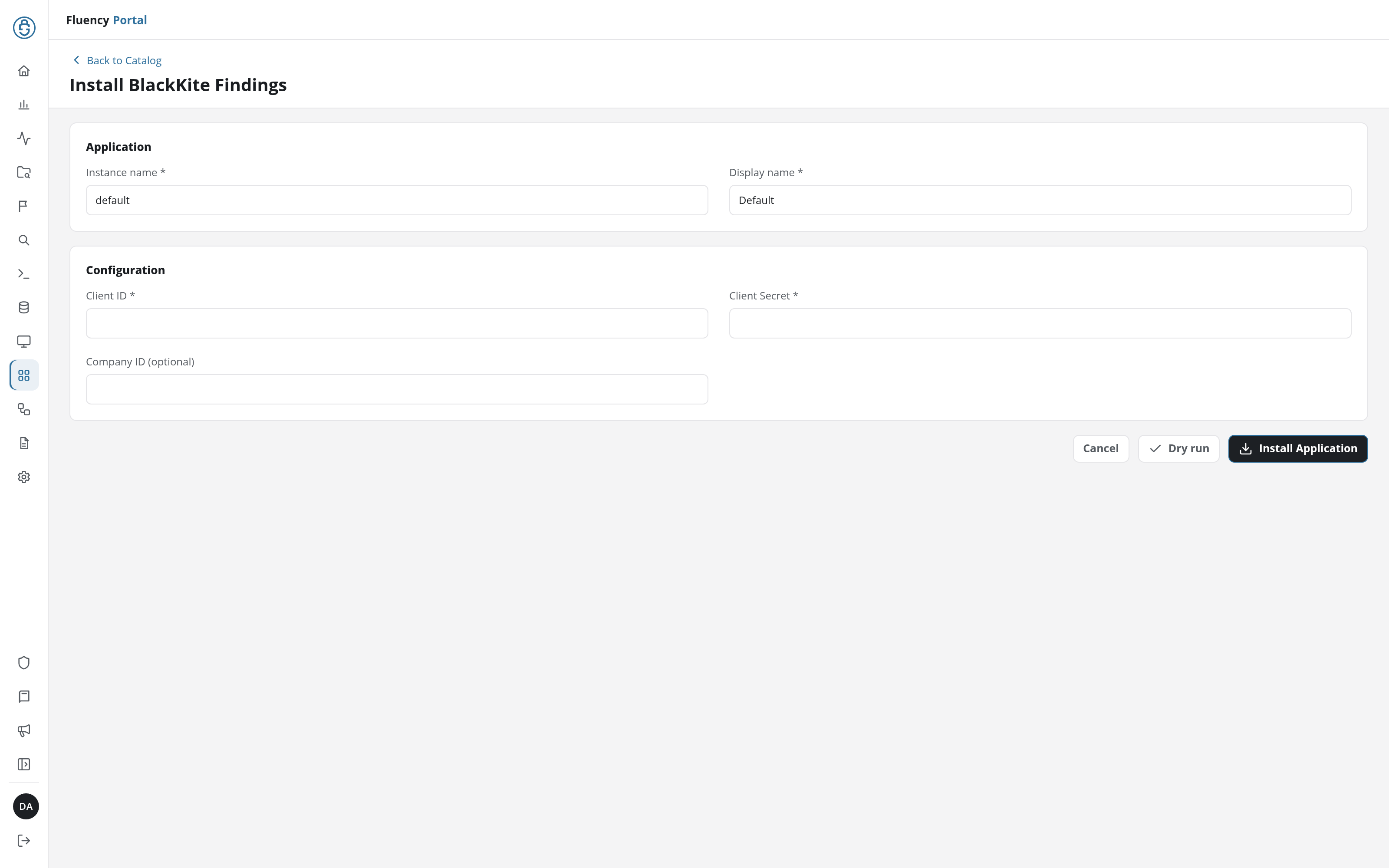
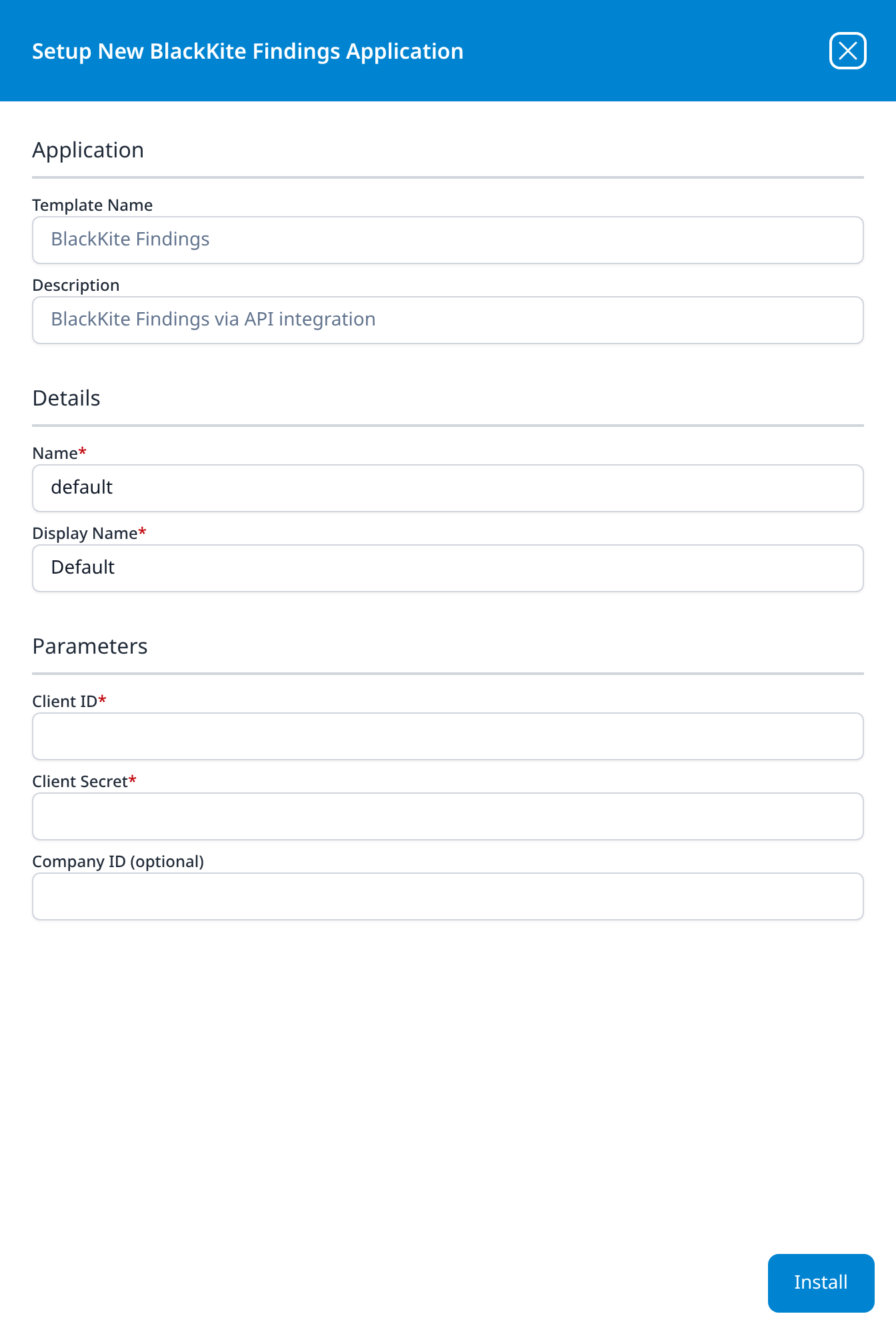
Unlike most templates, BlackKiteAPI takes no datalake or datalake index name parameter: the destination is fixed by the template rather than chosen on the form, so there is nothing here to collide with another application. To see where the data actually lands, open the installed application's details and read its Actions list, which records every object the install created.
- v2 interface
- Classic v1 interface
Click Dry run first to have the platform check the credential before anything is installed, then click Install Application. The Applications page opens with the notice Default is launching., and the new application is listed with a green Running badge once the pipeline is up.
Press Install. The application then appears in the Installed Applications view, where its badge reads Running once the pipeline is up.
Because there is no index parameter, two installations of this template cannot be separated by destination on the form. If you install one application per company, distinguish them by the application's Instance name and Display name (v1: Name and Display Name), and check the Actions list of each to see whether they share a destination.
Confirm it is running
The application is listed under whatever you entered as its display name. A Running badge means the pipeline started; it does not mean Black Kite accepted the credential, because an authentication failure here is a 500 that a poller may treat as a transient vendor error and retry indefinitely.
Check in this order:
- The credential, from the vendor's side. Re-run the
/api/v2/statuscall from Verify before you leave Black Kite. It is the only check that distinguishes wrong credential from nothing has happened yet. - The portfolio, not the findings.
GET /api/v2/companiesreturns your monitored companies and is never legitimately empty on a live tenant, which makes it a stricter test than the findings feed. - A named finding, traced end to end. Pick a company in the Black Kite portal, open a finding you can see there, note its module and date, and look for the matching
FindingIdin the lake.
This is an assessment feed on a scanning cadence, not an event stream. A vendor's posture may not change for weeks, and the delta endpoint is explicitly a date range query for findings that were newly seen or updated, so zero records is a normal state, and on a small portfolio it may be the usual state.
The first collection is also bounded in a way that is easy to misread: GET /api/v2/companies/{id}/findings requires start_date and end_date and Black Kite caps the span at "maximum 15 days apart". A first collection therefore cannot sweep in a year of history in one call, and a newly added company sits in an Extended Scan phase, Black Kite's first comprehensive scan, before its results are ready at all.
Whether the Fluency template walks backwards across multiple 15-day windows to backfill, and how far, is not visible on its form. See Under the hood.
Maintenance
The credential expires: record the date at install time
Black Kite client credentials have a fixed lifetime. The credential table shows it in the Expiration column, and /api/v2/status returns it as ExpirationDateOfClientCredential. The credential table in step 1 shows existing credentials with an expiration of 2 years later.
When it lapses the integration stops, and the symptom is the same undifferentiated 500 that a wrong secret produces, so an expiry is indistinguishable from a typo unless you know the date. Record it when you install, not when it breaks.
DataBee's guide describes the remedy as issuing a fresh credential ("a new secret must be generated"), so plan for replacement rather than renewal, and follow the rotation steps below.
Rotating the credential
Template parameters are read-only after install, so rotating means replacing the application.
- In Black Kite, Admin → Integrations Exchange → Black Kite API → API V2, press + New Client Credential and repeat steps 2–4. Give it a description that distinguishes it from the outgoing one.
- Install a second BlackKite Findings application with the new values.
- Confirm the new one is collecting.
- Uninstall the old application, from the Uninstall button at the top right of its details page (v1: the red Uninstall button at the foot of its details panel on Platform → Applications).
- In Black Kite, delete the old credential from the credential table.
Do it in that order. Deleting the credential first takes the integration down for the length of the rotation, and on a feed this sparse you may not notice for days.
Reviewing what the credential can reach
The credential's reach is one field away at any time:
curl -s https://app.blackkitetech.com/api/v2/status -H "Authorization: Bearer $TOKEN"
Role should read SuperUser, or CompanyUser if you scoped it to one company. Anything ending in Admin is read/write and should be replaced rather than left in place; the role is fixed when the credential is created, so there is no editing it.
Removing the integration
Uninstall the application in Fluency first, with the Uninstall button at the top right of its details page (v1: the red Uninstall button at the foot of its details panel on Platform → Applications), then delete the client credential in Black Kite. Removing the Fluency side alone leaves a live read credential in the vendor's tenant.
Troubleshooting
| Symptom | Likely cause | Fix |
|---|---|---|
500 {"Message":"An unexpected error occured."} | Wrong or expired Client ID / Client Secret. This API returns 500 for authentication failures, not 401. | Confirm both are 32 characters. Check the credential's Expiration in the credential table. If it has lapsed, create a replacement; see Maintenance. |
| Authentication fails and re-copying the secret does not help | IP Restriction is on and the collector's egress is not on the list. | Call /api/v2/status and compare CurrentIp with IpWhiteList. Recreate the credential with the toggle off, or add the address. |
403 with body error code: 1010 and no JSON | CloudFlare rejected the user-agent. Not Black Kite, not the credential. | Send an ordinary user-agent. Black Kite names Python-urllib/2.6 and Jakarta Commons-HttpClient/3.1 as examples of denied values. |
403 {"Message":"Token can not be empty."} | No Authorization header reached the API. | The bearer token was empty: usually the token call failed and its error was swallowed. Run the token call on its own. |
429, repeatedly | 60 requests per minute per client credential, shared with every other consumer of that credential. | Set Company ID to narrow the walk, or give other consumers their own credential. The block clears after a minute of silence. |
524 timeouts on collection | Black Kite's own documented behaviour at large page sizes: "It's highly probable to get 524 timeout errors when using page sizes more than 50" on the companies endpoint, and the findings endpoint carries the same warning. | Not fixable from the Fluency form. Raise it with Black Kite with the affected company and page size. |
| Records arrive but carry no title or severity | Expected for the delta feed: it returns module, ID, status and dates only. | Confirm from a stored record whether detail is being fetched. See The delta feed is a list of pointers, not a list of findings. |
| A rule fires when a vendor fixes something | The feed carries Remediated, FalsePositive, Suppressed, Acknowledged and Deleted findings, not only Active ones. | Filter on Status. |
| The same finding keeps arriving | Correct behaviour: findings are re-emitted when updated, carrying current state. | Deduplicate on FindingId; order by UpdateDate. |
| Nothing at all, and no error | On a sparse portfolio this is normal; see Confirm it is running. | Verify with /api/v2/companies rather than with the findings feed. |
| A company you expect is missing | The credential's role does not cover it, or the company is still in its first Extended Scan. | Check Role on /api/v2/status. In the portal, a company's scan status must contain both Extended and Ready. |
| History older than about a year is absent | Black Kite deletes it. "For storage optimization, the system permanently deletes all findings that haven't been detected by the Black Kite scanner for over a year. Findings with manually changed statuses or associated tickets are excluded." | Nothing to recover. Treat the lake as the archive from install onward. |
| A vendor disappeared from Black Kite entirely | Someone called DELETE /api/v2/companies/{id} with a read/write credential. Black Kite: "it doesn't redeem the license used." | Check which credentials hold SuperAdmin and replace them. See step 3. |
Data reference
What the Black Kite API returns, for searches and detection rules written against the findings.
Streams, endpoints and permissions
The template is named for one thing, and it is worth being precise about what that thing is, because Black Kite's API draws a hard line between a finding's identity and a finding's content.
| Stream | Endpoint | Role needed | Contents |
|---|---|---|---|
| Findings delta | GET /api/v2/companies/{id}/findings | Any read role covering that company | Which findings were first seen or updated in a date range: module, finding ID, current status, first-seen date, update date. Five fields. |
| Finding detail | GET /api/v2/companies/{id}/findings/<module>/{findingId} | Same | The finding itself: title, severity, affected domain, evidence, confidence, control ID, whether it feeds the ransomware index. One endpoint per module, nineteen modules. |
| Portfolio | GET /api/v2/companies | Any read role | The monitored companies and their ratings: technical grade, Ransomware Susceptibility Index, Data Breach Index, compliance and financial-impact scores. |
The delta feed is a list of pointers, not a list of findings
GET /api/v2/companies/{id}/findings is the endpoint that answers what changed, and it is the natural thing for a collector to poll. Here is the entire record it returns, from Black Kite's own schema:
{
  "Module": "Email Security",
  "FindingId": 2590965999,
  "Status": "Active",
  "FirstSeenDate": "2023-08-01T08:30:30.682Z",
  "UpdateDate": "2023-08-01T08:30:30.682Z"
}
There is no title, no severity, no affected host and no evidence. To learn what finding 2590965999 actually is, you make a second call to the endpoint for its module, and which endpoint that is depends on the Module field of the record you just received. Black Kite publishes nineteen of them: DNS Health, Email Security, SSL/TLS Strength, Application Security, DDoS Resiliency, Network Security, Fraudulent Domains, Fraudulent Apps, Credential Mgmt., IP Reputation, Hacktivist Shares, Social Network, Attack Surface, Brand Monitoring, Patch Management, Web Ranking, Information Disclosure, CDN Security and Website Security.
So a lake that contains only the delta feed can tell you that a vendor's email security changed on Tuesday and not what changed. Whether the Fluency template makes the second call is not visible on its form; see Under the hood. Check the installed application's Actions list, and check a stored record for a Title field, before you write detection content that assumes one.
These records are state, not events, and they supersede each other
Black Kite's own note on this endpoint: "the response contains the current status of the finding. So, for example, a returned finding might be first seen between the given date range, however, it might also be updated to be fixed between the same date range."
Two consequences. First, Status is not a description of what happened, it is the finding's condition at the moment you asked, and the same FindingId will come back with a different status later. The field to deduplicate on is FindingId; the field that tells you which version you are holding is UpdateDate. Black Kite's rule for reading them: "If the UpdateDate equals to the FirstSeenDate or the UpdateDate is null that means the finding is NEW, otherwise the finding is UPDATED."
Second, the status values are not all bad news:
| Status | Meaning, in Black Kite's words |
|---|---|
Active | "the finding is still active with no review as of yet" |
Remediated | "the finding is mitigated" |
FalsePositive | "the finding is considered to be false alarm" |
Suppressed | "the finding is suppressed, similar to FalsePositive" |
Acknowledged | "the finding is accepted, for example will not be fixed" |
Deleted | "the finding is deleted, similar to FalsePositive" |
A rule that fires whenever a Black Kite record arrives will fire when a vendor fixes something, and when an analyst marks something a false positive. Filter on Status explicitly rather than on arrival.
Under the hood
Engineering reference: API behaviour
What belongs to your install. The collector's own settings are not exposed on the template's form: which endpoints it calls, whether it fetches per-module finding detail or stores only the delta records, its cadence, how far the first collection reaches back, and where it writes. Read the installed application's Actions list for the destination, and inspect a stored record for the field set. What the API fixes for any collector is that there is no tenant-wide findings route, so portfolio-wide collection must enumerate companies and iterate.
Authentication. OAuth2 client credentials. POST /api/v2/oauth/token with a JSON body of grant_type, client_id, client_secret; both credential values are fixed at 32 characters by the schema. The response carries access_token, token_type: "bearer", expires_in in seconds, and tenant_id. The token is a JWT, and its payload is readable without the signing key: the schema's own example token decodes to {"description":"…","iat":…,"role":"Ecosystem Admin","authorize_on":["My Companies","Finance"],"canStartScan":false,"canAddDomains":true}, so the role a credential carries can be read straight out of the token as well as from /api/v2/status. The endpoint also accepts HTTP Basic auth, which is the method the Swagger UI uses.
Error behaviour. What app.blackkitetech.com returns for common mistakes:
| Request | Result |
|---|---|
POST /api/v2/oauth/token, unrecognised 32-char pair | 500 {"Message":"An unexpected error occured."} |
| Same, 31- or 33-character client ID | identical 500 |
Same, grant_type wrong or absent | identical 500 |
| Same, form-encoded rather than JSON | identical 500 |
| Same via HTTP Basic auth | 500 {"Message":"An error has occurred."} |
GET /api/v2/oauth/token | 405 {"Message":"The requested resource does not support http method 'GET'."} |
GET /api/v2/status, no token or a garbage token | 200 with IsValid: false and every other field null |
GET /api/v2/companies, no token | 403 {"Message":"Token can not be empty."} |
GET /api/v2/companies/1/findings, no token | 403 {"Message":"Token can not be empty."} |
Any path, user-agent Python-urllib/2.6 or Jakarta Commons-HttpClient/3.1 | 403, body error code: 1010, served by CloudFlare |
The spec documents 400 and 401 responses on the token endpoint, but in practice every failure produces 500. Note also that the misspelling in "An unexpected error occured." is Black Kite's, and is stable; it is a usable string to match on.
No X-RateLimit-* headers are returned, so a client cannot see how much of the 60-per-minute budget it has left; the only signal is the 429 itself.
Pagination. List endpoints return X-Total-Items, X-Current-Page-Number and X-Current-Page-Size, and take page_number and page_size. page_size on the findings endpoint is an enum up to 5000, but Black Kite warns of 524 timeouts at high values and, on /api/v2/companies, states that "It's highly probable to get 524 timeout errors when using page sizes more than 50" against a maximum of 250.
Retention and windowing. The findings delta endpoint requires start_date and end_date no more than 15 days apart, and a type of New, Updated or All (default New). Findings not re-detected for over a year are permanently deleted server-side, except those with manually changed statuses or attached tickets.
Company identifiers. CompanyId is an int64. GET /api/v2/companies returns it alongside a DashboardLink of the form https://app.blackkitetech.com/ecosystem/{ecosystemId}/company/{companyId}/dashboard, which is where the portal URL exposes it. POST /api/v2/companies/search returns a search key rather than results, which is then passed to GET /api/v2/companies as key; Black Kite caps this at 100,000 search keys per client ID per day.
Licence gating. GET /api/v2/licenses/modules reports which Black Kite modules the tenant has: SupplyChain, BlackKiteBridge, DocumentStorage, CyberAssessments, ThreatActor, AIAgent. Findings collection does not depend on any of them, but assessment, supply-chain and threat-actor endpoints do.
Older guides. Third-party guides written for NormShield (Black Kite's former name) direct readers to support@normshield.com for an API key. That is the v1 static key, not the client-credential pair this template needs.
References
Vendor
- Black Kite API v2 Swagger UI: the interactive reference; the raw OpenAPI document is served at
/api/v2/schema. - Black Kite Help Center: the vendor's support portal, linked as API support from the schema itself.
- Black Kite integrations: the tech-alliance list behind the Integrations Exchange catalog.
Third-party guides
- DataBee: Black Kite TPRM: the source of the Black Kite console screenshots on this page, and a second recommendation of the Super User role.
- Axonius: Black Kite V2 adapter: corroborates the 60-calls-per-minute rate limit.
Fluency
- BlackKite Findings install form: the template's fields and defaults (v1: Install Application From Template, every template's parameters).
- Confirm data is arriving
- Business Software: other SaaS business applications.
- Integration Matrix: which ingress method each product supports.