Bitwarden
Bitwarden is a credential vault, so its event log records who signed in, who read or copied which vault item, who was added to or removed from the organization, and who changed a collection's membership or an enterprise policy. Vault access is one of the few places where an attacker's first move after taking an account looks like an ordinary, successful action, so this feed pairs well with the identity provider's authentication data. Fluency polls the Bitwarden Public API on a schedule for the events and for the organization's members, groups, policies and collections.
Authentication is the organization API key, a client_id and client_secret pair (OAuth 2.0 Client Credentials) that already exists for every Teams or Enterprise organization: you create nothing in Bitwarden, but only an organization Owner can read the key, and only after re-entering their master password.
The setup has two halves:
- In Bitwarden: read the organization API key from the Admin Console and note which Bitwarden cloud the organization lives on.
- In Fluency: install the Bitwarden application template and paste those values in.
What arrives
| Stream | What it holds | Lands in |
|---|---|---|
| Event logs | Sign-ins, vault item views and copies, membership, group, collection and policy changes, organization settings, Secrets Manager and Send activity, as numeric type codes. | The Bitwarden index |
| Members | The organization roster, which puts names to the user IDs in events: name, email, status, two-step login and account-recovery enrollment. | Resources: Members |
| Groups, Policies, Collections | The organization's groups, enterprise policies and collections. | Resources: Groups, Policies, Collections |
Bitwarden itself says the log "may not suffice for security, legal forensics, or auditing purposes": item views and copies are reported by the client and can be suppressed on a compromised endpoint, so alert on what is present and never conclude from what is absent; see Bitwarden does not vouch for the completeness of this log.
Type codes, the ID-to-name join and the completeness caveat in full are in Data reference.
Before you begin
| Requirement | Why, and how to check |
|---|---|
| A Teams or Enterprise organization | Event logs and the Public API are both business-tier features. Free, Families and Premium have neither: there is no organization API key to find and nothing for the integration to read. Not a workaround case: the plan has to change. |
| An organization Owner | Bitwarden restricts Manage API key to Owners alone. An Admin can read event logs in the console and still not be able to retrieve the key; an Enterprise custom role can be granted Access event logs and still not be able to retrieve the key. If you are not an Owner, this step belongs to someone who is. |
| That Owner's master password | Viewing the key re-prompts for it. An Owner signed in with an unlocked vault still gets the prompt, so it needs to be the person themselves, not a shared session. |
| Which Bitwarden cloud the organization is on | Look at the web vault address the organization's members sign in to: vault.bitwarden.com is the US cloud, vault.bitwarden.eu is the EU cloud. This becomes the Region parameter, which opens empty and has to be typed, and it is not derivable from the credentials. |
| Self-hosted or Gov cloud | The template takes a Region, not a URL, so it cannot name a self-hosted server. Bitwarden also runs a US Government cloud (api.bitwarden-gov.com) that the two documented region values do not cover. In either case, confirm support with your Fluency contact before promising ingestion rather than guessing at a value. |
Part 1: Bitwarden
1. Open the Admin Console
The organization API key lives in the Admin Console, which is a different application from the vault most people see when they sign in. Log in to the web vault and use the product switcher at the foot of the left-hand navigation:
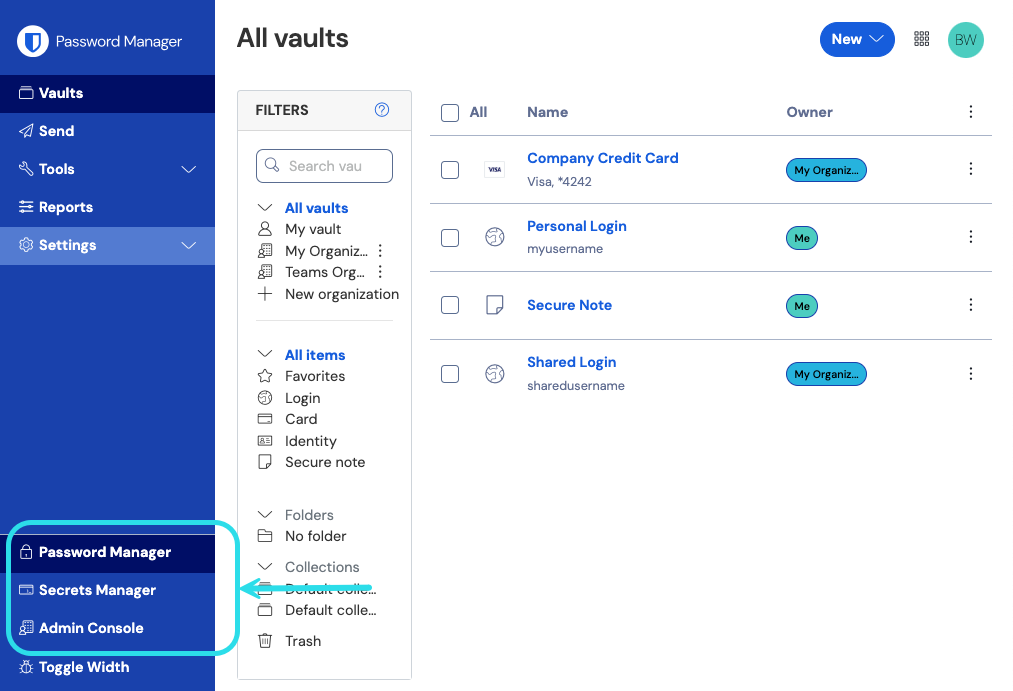
Select Admin Console. If the entry is not there, the account is not a member of a Teams or Enterprise organization.
2. Read the organization API key
In the Admin Console, go to Settings → Organization info and scroll to the API Key section:
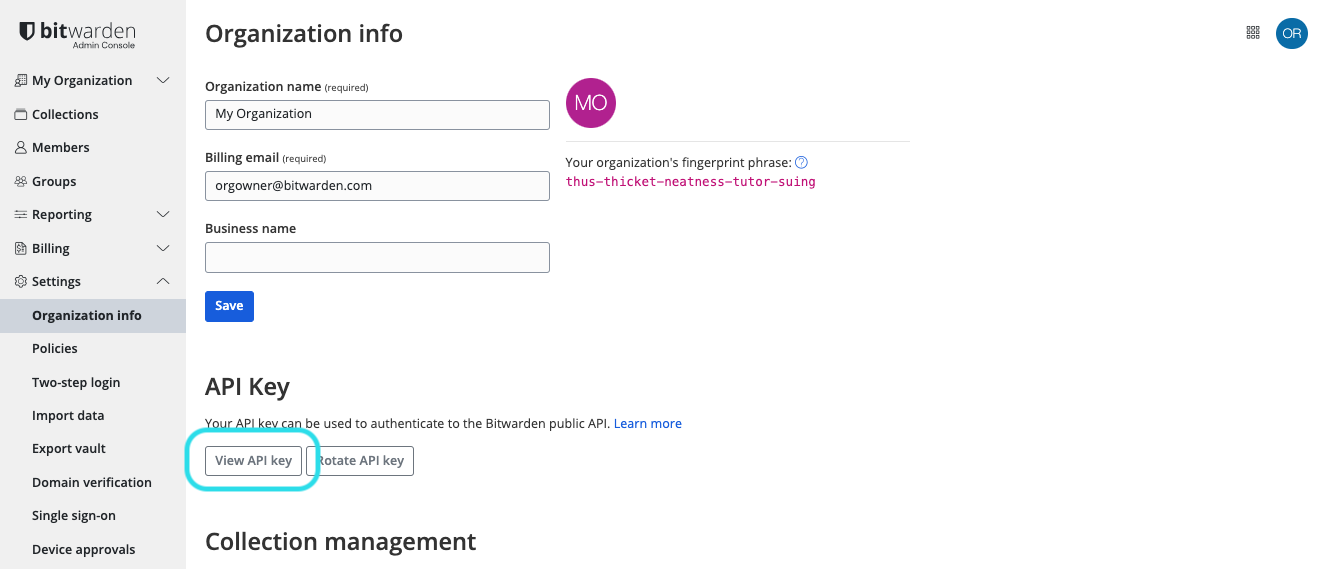
Select View API key. Bitwarden asks for your master password, then shows the credential:
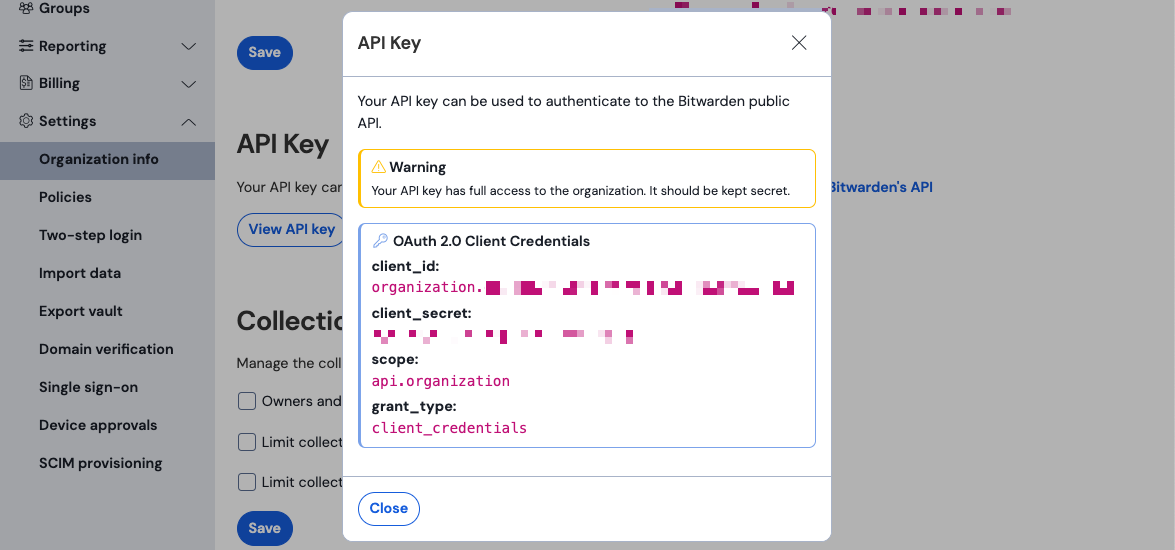
Copy both values. They map to the Fluency form directly:
| Bitwarden label | Fluency parameter |
|---|---|
client_id | ClientID |
client_secret | ClientSecret |
The dialog also shows scope: api.organization and grant_type: client_credentials. Both are fixed, and neither is something you enter anywhere; they are shown so you can confirm you are looking at the right key.
Unlike many API secrets, this one is not a once-only reveal: an Owner can come back and read it again. What you cannot do is hold two live keys at once, which shapes Rotating the credential below.
There is a personal API key at Settings → Security → Keys in the Password Manager. It has its own View API key button, its own master-password prompt, and a dialog that looks almost identical to the one above. It is not this key, and it will not authenticate against the Public API.
Two things tell them apart, both visible in the dialog:
| Organization key (correct) | Personal key (wrong) | |
|---|---|---|
client_id begins | organization. | user. |
scope | api.organization | api |
If the key you copied starts with user., you are in the Password Manager's settings rather than the Admin Console's. Go back to step 1.
Bitwarden puts the warning in the dialog itself: "Your API key has full access to the organization. It should be kept secret." That is not boilerplate. The api.organization scope is the only scope this key has, and it covers the entire Public API: of its sixteen paths, thirteen accept writes.
The same credential Fluency uses to read events can create and remove members, revoke and restore their access, edit groups and their memberships, update and delete collections, change enterprise policies, bulk-import members and groups, and alter the organization's subscription. There is no read-only variant to drop to and no way to narrow it.
Treat it as an administrative credential, not a log-reader: hand it over only through a secure channel (Bitwarden suggests Bitwarden Send), never by email or in a ticket, and rotate it if it has ever been somewhere it should not have been.
Verify before you leave Bitwarden
Two calls prove the key, the region and the plan entitlement at once. The first exchanges the credentials for a token; the second uses it. Swap identity.bitwarden.com and api.bitwarden.com for the .eu hosts if the organization is on the EU cloud.
BW_CLIENT_ID='<client_id from step 2>'
BW_CLIENT_SECRET='<client_secret from step 2>'

TOKEN=$(curl -s -X POST https://identity.bitwarden.com/connect/token \
  -H 'Content-Type: application/x-www-form-urlencoded' \
  -d "grant_type=client_credentials&scope=api.organization&client_id=$BW_CLIENT_ID&client_secret=$BW_CLIENT_SECRET" \
  | python3 -c 'import json,sys; print(json.load(sys.stdin)["access_token"])')

curl -s -H "Authorization: Bearer $TOKEN" \
  'https://api.bitwarden.com/public/events'
A working setup returns the last 30 days of events:
{"object":"list","data":[{"object":"event","type":1000,"itemId":null,"collectionId":null,"groupId":null,"policyId":null,"memberId":null,"actingUserId":"a2549f79-a71f-4eb9-9234-eb7247333f94","date":"2026-07-31T15:01:21.698Z","device":9,"ipAddress":"172.16.254.1"}],"continuationToken":"string"}
| Response | What it means |
|---|---|
{"error":"invalid_client"}, HTTP 400 | The credential was rejected. See the note below: this one message covers several distinct causes. |
HTTP 401, www-authenticate: Bearer error="invalid_token" | The token is wrong or expired. Usually the first call failed and the shell carried on with an empty variable; run the token request on its own and read what it returns. |
| HTTP 404 | The organization has no Public API entitlement, or you called a host that does not serve this organization. Confirm the plan is Teams or Enterprise, and that the host matches the cloud from Before you begin. |
{"object":"list","data":[],"continuationToken":null} | Everything works; the organization has had no recorded activity in the last 30 days. Sign in to the web vault to generate a 1000 and try again. |
| HTTP 429 | Rate limited. Bitwarden meters in one-minute windows and reports the budget in x-rate-limit-remaining and x-rate-limit-reset response headers. Wait for the reset time. |
Bitwarden's token endpoint answers with a bare {"error":"invalid_client"} and no error_description, and returns exactly that for every one of these:
- a mistyped or stale
client_id - a mistyped or stale
client_secret - a personal API key used instead of the organization key
- a missing or incorrect
scope - a key from the other cloud: US credentials against
identity.bitwarden.eu, or the reverse
Work through them in that order rather than re-copying the secret repeatedly. The cheapest check is the client_id prefix: it must begin organization..
Part 2: Fluency
Install the Application
- v2 interface
- Classic v1 interface
In the navigation rail, open Applications and click Install Application, then choose Bitwarden from the Cloud-based Business Softwares category of the Application Catalog. The form asks for three values, all required, and all three open empty:
Go to Platform → Applications → Install Application From Template and choose Bitwarden from the Cloud-based Business Softwares category. The form asks for three values, all required, and all three open empty:
| Parameter | Notes |
|---|---|
| Region | Opens empty, and is required. Type the cloud the organization belongs to: US for vault.bitwarden.com, EU for vault.bitwarden.eu. See the caution below. |
| ClientID | Bitwarden's client_id from step 2. Begins organization.. |
| ClientSecret | Bitwarden's client_secret from step 2. Masked once the application is installed. |
| datalake | Pre-filled managed. |
| datalake index name | Pre-filled Bitwarden. Two applications writing to the same index name in the same lake will collide, and the second one aborts. |
- v2 interface
- Classic v1 interface
The last two sit in the collapsed Advanced configuration section below Configuration; click its heading to reach them. The two credential fields carry bare parameter names on the form rather than the friendly labels most templates use, so they read as ClientID and ClientSecret rather than Client ID and Client Secret.
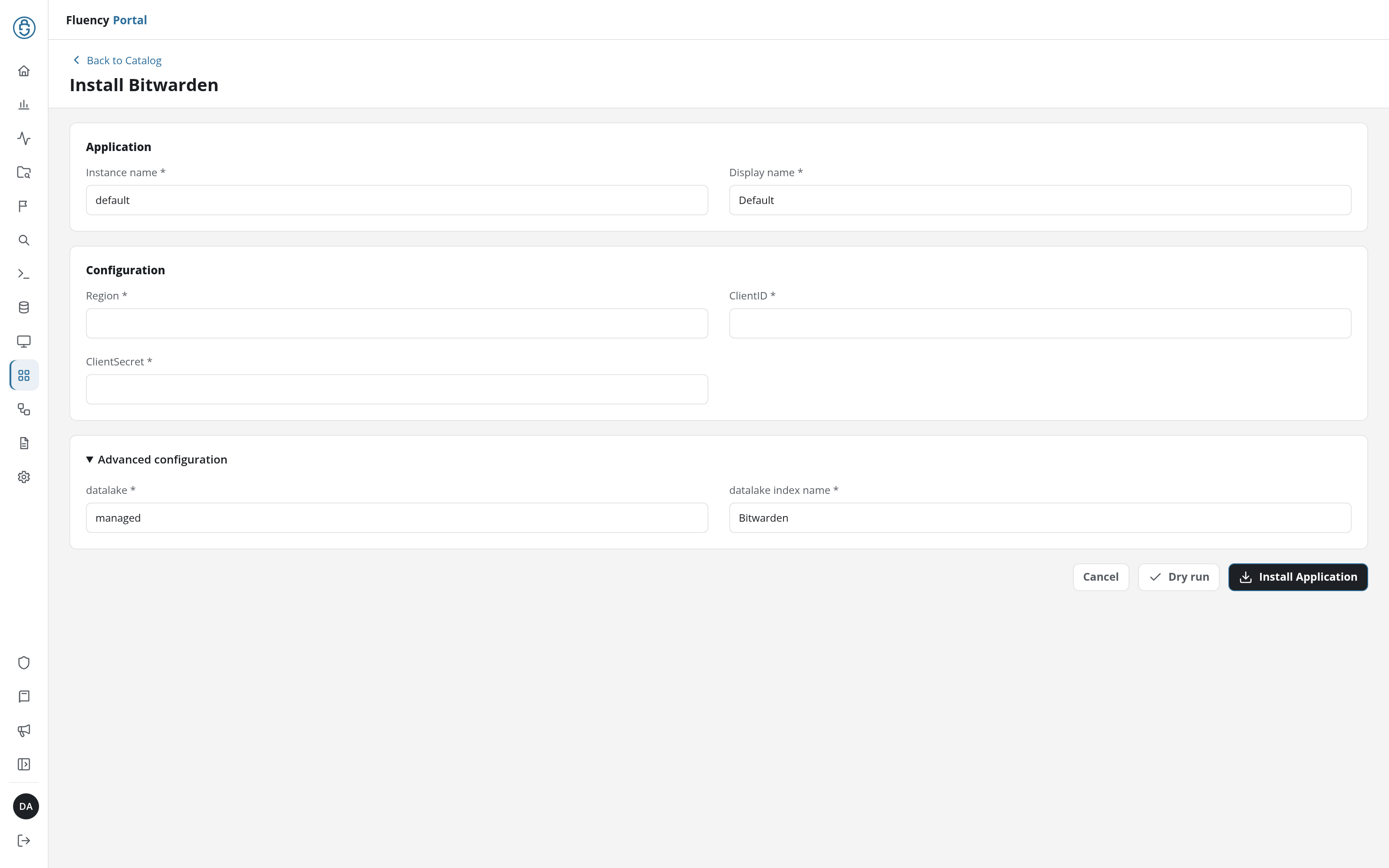
The last two sit in the collapsed Advanced Configurations row below the parameters; expand it to reach them. The two credential fields carry bare parameter names on the form rather than the friendly labels most templates use, so they read as ClientID and ClientSecret rather than Client ID and Client Secret.
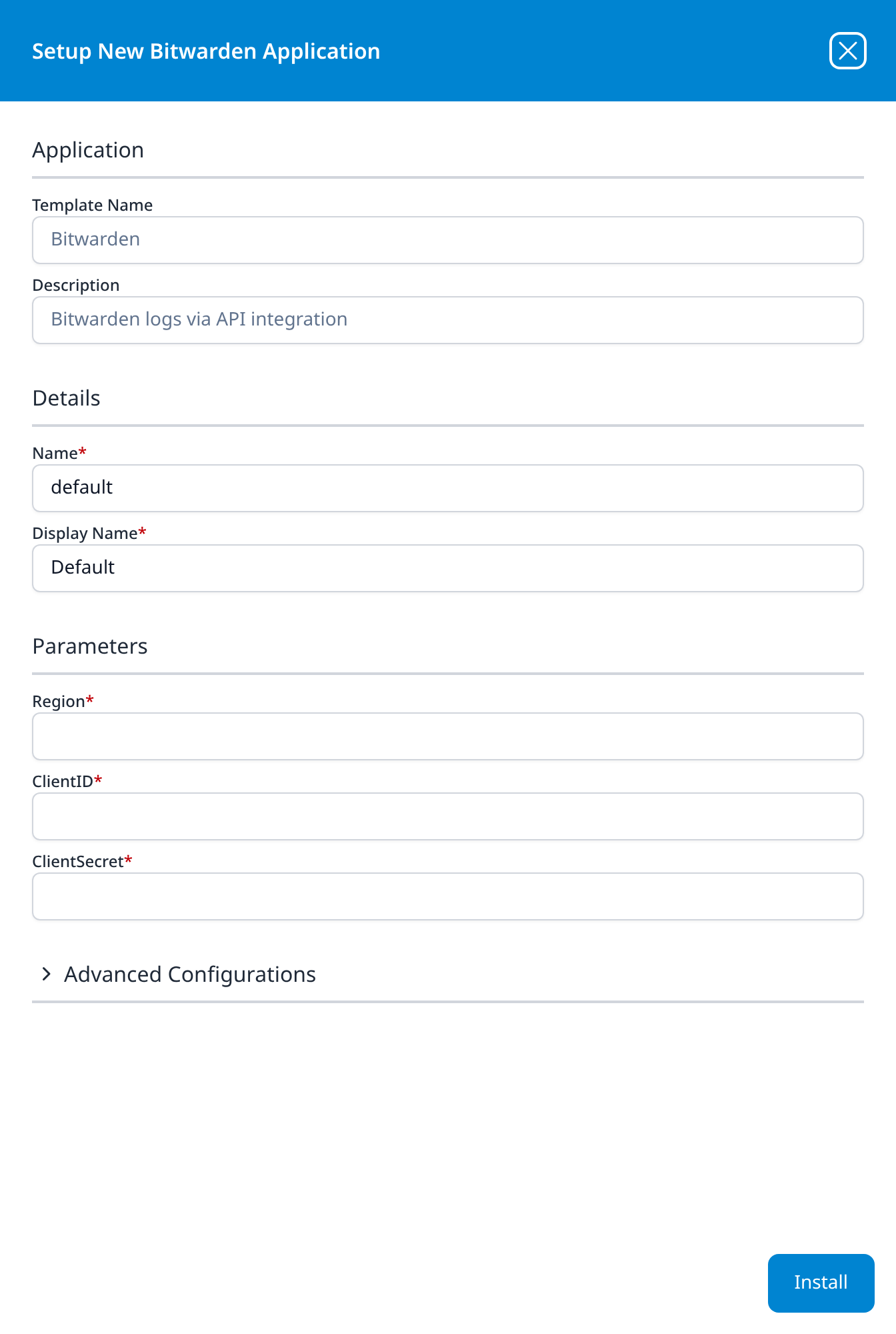
Region is a required free-text field that arrives empty: there is no default to accept, and no drop-down of valid values, so nothing catches a typo or a wrong cloud at install time. It selects which pair of Bitwarden hosts the connector talks to (identity.bitwarden.com and api.bitwarden.com, or their .eu counterparts), and the credentials are cloud-specific.
Point a correct US key at the EU cloud and Bitwarden answers invalid_client, the same message it gives for a wrong secret. The application installs cleanly and collects nothing, and the obvious next move, re-reading the key, will not help. Establish the region in Part 1 by looking at the web vault address the organization's members sign in to, then type it here.
The field is not pre-filled for US organisations either: a US organisation types US like anyone else, and an install with the field left empty does not get past the required-field marker.
- v2 interface
- Classic v1 interface
Click Dry run first to have the platform check the region and the key before anything is installed, then click Install Application. The Applications page opens with the notice Default is launching., and the new application is listed with a green Running badge once the pipeline is up.
Press Install. The application then appears in the Installed Applications view, where its badge reads Running once the pipeline is up.
Confirm it is running
The application is named after the template. A healthy install shows Running, but because this template writes resources as well as events, Running on its own is a weaker signal here than usual; check both halves.
The resources are the faster confirmation.
- v2 interface
- Classic v1 interface
Open Resources from the navigation rail. Once the application has run, Bitwarden is listed with an entry for each record set it collects: members, groups, policies and collections. The members set is the one to check: it is the organization roster, it is never legitimately empty, and records listed in it prove the credential and the region are both right.
A members set that opens on No data found is the state you do not want. Note that this is distinct from a record set missing from the list altogether, which means it was never loaded at all.
Open SIEM → Resources. Once the application has run, a Bitwarden card appears with a button for each record set it collects: Members, Groups, Policies and Collections. Members is the one to check: it is the organization roster, it is never legitimately empty, and a non-zero count proves the credential and the region are both right.
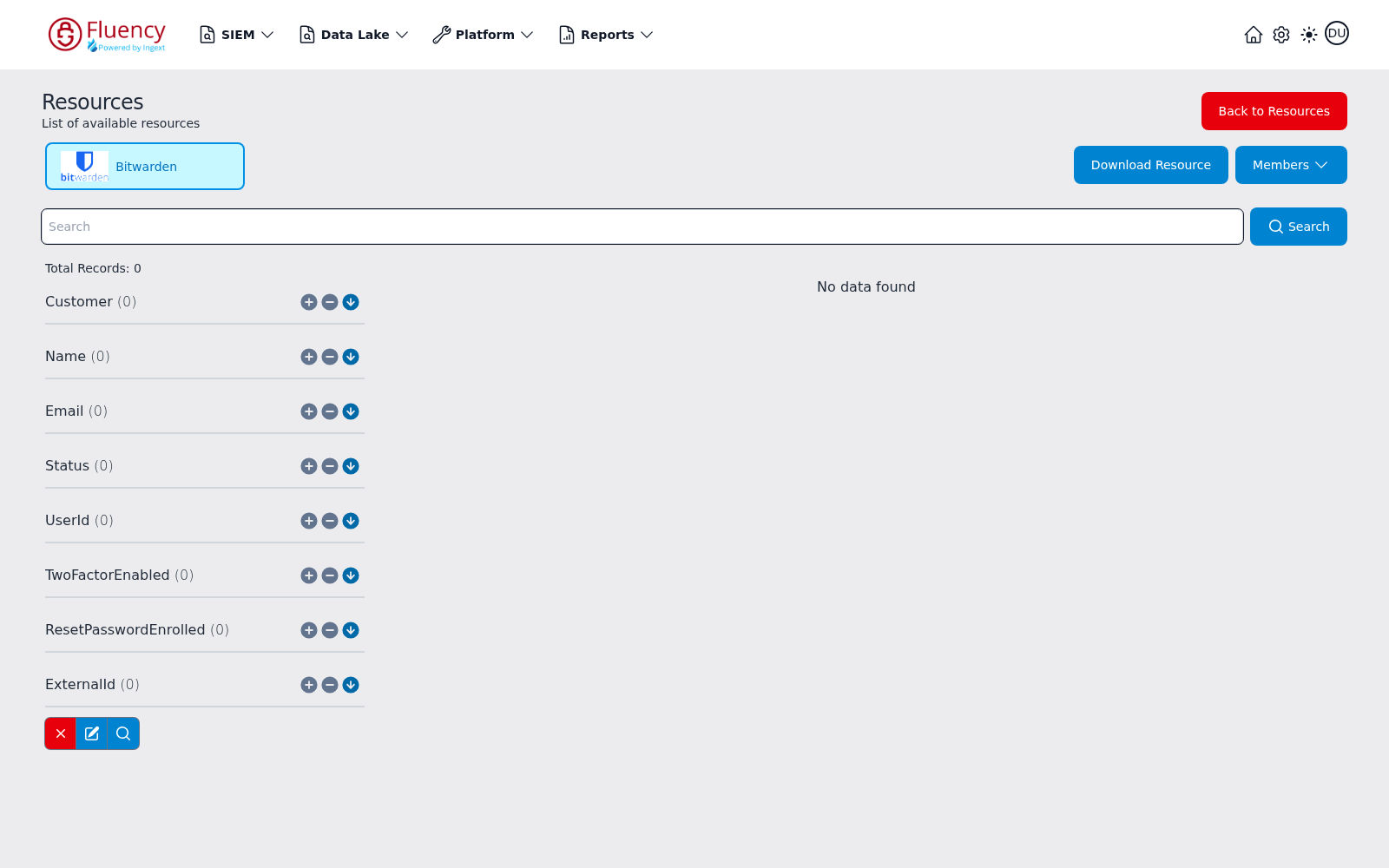
The screenshot above shows the state you do not want: Total Records 0, every facet group reading (0), and No data found. Note that this is distinct from a Resource Load Failed message, which means the record set was never loaded at all. See Resources for the full page reference.
Then confirm events. Generate one that is easy to recognise: sign out and back in to produce a 1000, or view a password in an organization collection to produce a 1108. Two delays stack before it can arrive:
- Bitwarden batches client events and transmits them every 60 seconds. A login recorded by the server appears sooner than an item view recorded by the browser extension.
- The connector then polls on its own schedule.
Allow several minutes before concluding anything is wrong, and cross-check against Bitwarden's own view of the same window in Admin Console → Reporting → Event logs:
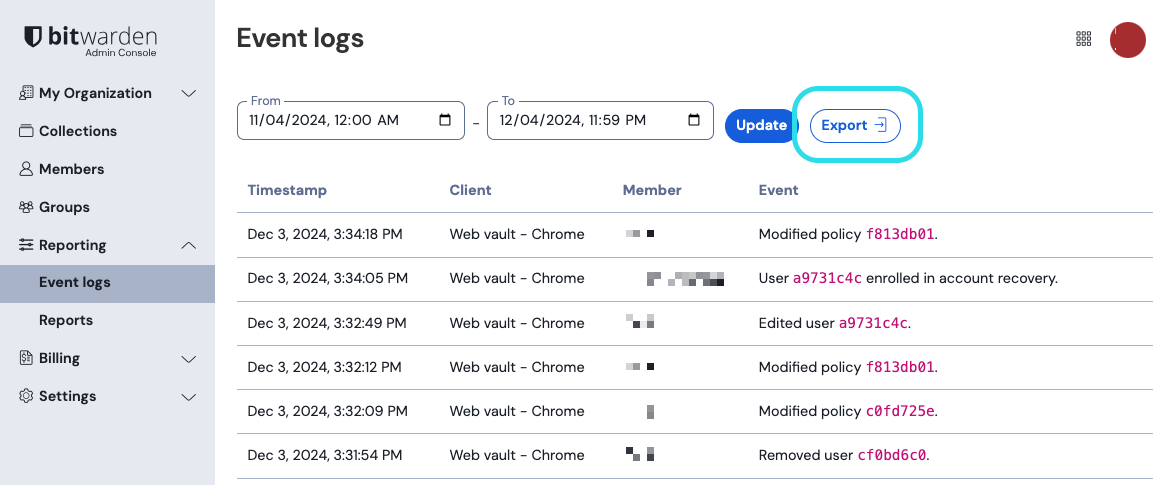
If that page is also empty for the window, the integration is fine and the organization is simply quiet: a small organization can genuinely produce very little. If it shows events that never reach Fluency, work through Troubleshooting.
See Confirm data is arriving for the general procedure.
Maintenance
Rotating the credential
Bitwarden holds one active key per organization, so there is no overlap window: Rotate API key invalidates the old client_secret the moment it issues the new one. Bitwarden's own wording is that "active implementations of your current API key will need to be reconfigured with the new key before use"; this integration is one of those implementations, and so is anything else using the same key, including Directory Connector and any other SIEM.
Work in this order, and account for the other consumers before you start:
- Find out what else uses the organization API key. It is one key for the whole organization, not one per application, so rotating for Fluency rotates for everything.
- In the Admin Console, Settings → Organization info → Rotate API key, and copy the new
client_secret. - In Fluency, uninstall the Bitwarden application and reinstall it with the new secret. Template parameters are read-only after install, so there is no edit path. To uninstall, click Uninstall at the top right of the application's details page (v1: the red Uninstall button at the foot of its details panel on Platform → Applications).
- Reconfigure every other consumer found in step 1.
- Confirm events resume, and that the members record set on the Resources page is still populated.
Bitwarden retains event log data indefinitely and the API's start and end parameters can reach back up to 367 days, so a short gap is not inherently lost data: the records stay retrievable from Bitwarden's side. Do not count on the connector to fetch them for you: if the gap matters, export the period from Reporting → Event logs while you still know the dates.
The key does not expire on a timer, so there is no renewal date to record.
Removing the integration
- Uninstall the Bitwarden application in Fluency, so the connector stops calling Bitwarden: the Uninstall button at the top right of its details page (v1: the red Uninstall button at the foot of its details panel on Platform → Applications).
- If nothing else uses the organization API key, rotate it in the Admin Console. That is the only way to revoke it: there is no per-application grant to withdraw, so a key left un-rotated remains a working administrative credential wherever a copy of it survives.
Deleting the Fluency application does not delete already-collected events from the lake, or the collected resource records.
Troubleshooting
| Symptom | Likely cause | Fix |
|---|---|---|
invalid_client at install, or no data at all | Wrong client_id, wrong client_secret, a personal key, or the wrong Region | All four give the same bare error. Check the client_id prefix is organization. first, then the region against the web vault address. See the note in Part 1. |
| Application installs, Resources shows no Bitwarden record sets | The first collection has not completed, or the credential is rejected | Give it a poll interval, then run the verification calls yourself. A working key that returns members proves the fault is not the credential. |
| The members record set is empty: No data found (v1: Total Records 0) | Credential or region wrong, or the sync has not run | The roster is never legitimately empty. Treat zero as a failure, not as quiet. |
| A record set missing from Resources (v1: Resource Load Failed on the record set) | That record set was never loaded | Different from an empty list. Check the application's Actions list for what the install actually created. |
| Events arrive but every actor is a UUID | Expected: the API sends no names | Join actingUserId to UserId on the Members record set. See The event stream carries IDs, not names. |
Item-access events (1107, 1108, 1111) missing for a user | Client-reported events were never transmitted | The client batches every 60 seconds and cannot report if it is offline or tampered with. Absence is not evidence; corroborate elsewhere. See Bitwarden does not vouch for the completeness of this log. |
| Membership and policy events arrive, item events do not | The same cause, seen at scale | Server-side events are unaffected by client reporting; client-side ones are. A feed with only server events suggests clients are not reaching Bitwarden. |
| Worked yesterday, stopped today | The API key was rotated without updating Fluency | Rotation is immediate and organization-wide. Reinstall with the new secret (Rotating the credential). |
| Stopped, and the key was not rotated | The plan lapsed below Teams | Public API access and event logs both disappear with the entitlement. |
| HTTP 429 | The organization's API budget is shared with every other tool using this key | Bitwarden meters per minute and reports x-rate-limit-remaining and x-rate-limit-reset. Directory Connector and a second SIEM on the same key are the usual company. |
| Counts do not match Reporting → Event logs | Console and API do not span the same window by default | The console shows the date range in its From/To fields; the API defaults to the last 30 days. Compare like for like before treating a difference as loss. |
Data reference
What the event log and the resources look like once they land, for searches and detection rules written against them. The two are different kinds of data, from the same credential.
Event type codes
Event logs come from GET /public/events and land in the data lake. Bitwarden records them against numeric type codes rather than names, and the API returns the code (1000, not User_LoggedIn):
| Event family | Codes | Examples |
|---|---|---|
| Authentication | 1000–1011 | Logged in (1000), changed account password (1001), two-step login saved (1002) and turned off (1003), failed login with incorrect password (1005), failed login with incorrect two-step login (1006), individual vault exported (1007), device approval requested (1010) |
| Vault item access | 1100–1132 | Created (1100), edited (1101), permanently deleted (1102), viewed (1107), viewed password (1108), viewed hidden field (1109), copied password (1111), autofilled (1114), sent to trash (1115), viewed card number (1117), viewed TOTP seed (1118), copied bank account number (1119), copied passport number (1125), copied IBAN (1129) |
| Collections and groups | 1300–1302, 1400–1402 | Collection and group created, edited, deleted |
| Membership | 1500–1524 | Invited (1500), confirmed (1501), edited (1502), removed (1503), groups changed (1504), enrolled in account recovery (1506), first SSO login (1510), access revoked (1511), restored (1512), device approved (1513) or denied (1514), left organization (1516), revoked for two-factor non-compliance (1520), staged (1523) |
| Organization settings | 1600–1628, 1700 | Settings edited (1600), vault purged (1601), organization vault exported (1602), vault accessed by a managing provider (1603), SSO enabled (1604) or disabled (1605), Key Connector enabled (1606), collection-management restrictions changed (1610–1617), policy modified (1700) |
| Domains and providers | 1800–1803, 1900–1903, 2000–2003 | Provider user and provider organization changes, domain added, removed, verified, not verified |
| Secrets Manager | 2100–2305 | Secret retrieved (2100), created, edited, deleted; project and machine-account changes |
| Phishing blocker | 2400–2402 | Site accessed, site exited, bypassed |
| Send | 2500–2511 | Send created with or without password and email verification, edited, deleted, accessed (2510, 2511) |
The table above is a map of the neighbourhoods rather than a complete index. For the full list, use Bitwarden's OpenAPI specification rather than its event log reference; see below.
Bitwarden's two published code lists disagree; use the specification
The EventType enum in the live API specification carries 149 codes. The prose list on Bitwarden's event log help page carries 113, and the difference is not only length:
- 37 codes exist in the specification and are absent from the help page. Several matter for detection: revoked for two-factor non-compliance (
1520) and for single-organization non-compliance (1521), the provider-user and provider-organization ranges (1800–1803,1900–1903) including provider vault access (1903), the phishing blocker events (2400–2402), invite-link creation and use (1524,1624–1628), secret permanently deleted and restored (2104,2105), and the whole1119–1132block covering copying and revealing bank account numbers, licence numbers, passport numbers, SWIFT codes, IBANs and national identification numbers. - One code on the help page no longer exists.
2004"Clicked vault banner button" has been renumbered to1522. - One label is wrong. The help page gives
1118as "viewed security code", which is a duplicate of its own entry for1110. The specification has1118as revealing an item's TOTP seed, a materially different and more sensitive action.
A detection built from the help page's list will therefore miss real events and mislabel two of them. The specification is generated from the server's own enum; prefer it.
The event stream carries IDs, not names; the resources are how you read it
Organization resources come from the other four list endpoints (/public/members, /public/groups, /public/policies and /public/collections) and land on the Resources page (v1: SIEM → Resources) rather than in the lake, as the Members, Groups, Policies and Collections record sets. They are not a second event feed. They are the lookup tables for the first one.
Every actor and object in an event is a bare UUID. The EventResponseModel has actingUserId, memberId, itemId, collectionId, groupId and policyId, and no name or email field anywhere. A login event tells you that a9731c4c-… signed in; it does not tell you who that is.
Bitwarden's own web console resolves these for display, and its .csv export adds userName and userEmail columns. The JSON API does neither. Neither do the SIEM integrations Bitwarden ships: Splunk's app documents actingUserEmail, actingUserName and memberName as fields it adds, not fields Bitwarden sends.
This is what the Resources sync is for. The Members record set carries userId, name, email, status, twoFactorEnabled, resetPasswordEnrolled and externalId (exactly the fields of the Public API's member model), so actingUserId from an event joins to UserId on a member record. Confirm Members is populated before you write a detection that names people, or every alert you raise will identify its subject as a UUID.
Bitwarden does not vouch for the completeness of this log
Unusually, the vendor says in its own documentation that this feed may not be good enough for the purpose most people collect it for:
Event logs rely on user-reported and client-level data, which technically could be modified or suppressed. Because of this potential situation, Bitwarden event logs may not suffice for security, legal forensics, or auditing purposes for all users and organizations.
The mechanism is worth understanding, because it decides which events you can trust:
- Server events are recorded instantly. Membership changes, policy edits, organization settings, SSO: anything the server performs, the server records.
- Client events are batched and self-reported. They are "transmitted to the server every 60 seconds", and Bitwarden is explicit that "events cannot be recorded if the client loses API connectivity or is somehow modified to not send events."
The irony is that the client-reported half is the interesting half. Viewed password (1108), copied password (1111) and autofilled (1114) are the events that tell you a credential was actually taken, and they are precisely the ones reported by software running on the endpoint you are investigating. An attacker with control of that endpoint can stop them being sent, and nothing in the feed will record the silence.
There is no configuration that fixes this; it is a property of where the data comes from. What it changes is how you reason with the feed. Alert on what is present; never conclude from what is absent. An account with no 1108 events has not been shown to be safe. Corroborate item-access findings against server-side evidence (the endpoint agent, the identity provider, network egress) rather than treating this log as the record of what happened.
Under the hood
Engineering reference: endpoints, pagination and response format
What this section describes
Everything below describes the Bitwarden API rather than the collector's use of it. The settings that belong to your own install (its cadence, how far the first collection reaches back, which data lake index the events land in and the field names they land under) are recorded on the install itself: read the installed application's Actions list for where the data goes, and treat the Resources page (v1: SIEM → Resources) as the confirmation that the resource half is working.
Authentication
POST https://identity.bitwarden.com/connect/token
Content-Type: application/x-www-form-urlencoded

grant_type=client_credentials
scope=api.organization
client_id=<Client ID>
client_secret=<Client Secret>
Returns {"access_token": "…", "expires_in": 3600, "token_type": "Bearer"}. Tokens last 60 minutes; an expired one returns 401. There is no refresh token in this flow; a new token is requested when the old one expires.
Hosts
| Cloud | Identity endpoint | API base |
|---|---|---|
| US | https://identity.bitwarden.com/connect/token | https://api.bitwarden.com |
| EU | https://identity.bitwarden.eu/connect/token | https://api.bitwarden.eu |
| Gov | https://identity.bitwarden-gov.com/connect/token | https://api.bitwarden-gov.com |
| Self-hosted | https://your.domain.com/identity/connect/token | https://your.domain.com/api |
The template's Region parameter covers the first two. Bitwarden's OpenAPI specification lists the Gov cloud as a third server; for that cloud, or for a self-hosted server, see Before you begin.
Events endpoint
GET /public/events, with optional start, end, actingUserId, itemId, secretId, projectId and continuationToken query parameters.
Two behaviours matter for collection:
- No filters means the last 30 days. The specification is explicit: "If no filters are provided, it will return the last 30 days of event for the organization." A collector that does not send
startgets a 30-day window on every call, not everything since the last poll. - Pagination is by continuation token, 50 records to a page. Bitwarden documents that "a continuation token is provided for queries that return over 50 logs"; the next page is fetched by appending
?continuationToken=<value>. There is no page-size parameter.
Retention is unusual for this class of feed: event data is "retained indefinitely", with the constraint that "you can only view up to 367 days worth of data at a time". Unlike the short API windows on many other integrations, an outage here does not put the data permanently out of reach: the events remain fetchable with an explicit start.
Event object
{
  "object": "event",
  "type": 1000,
  "itemId": null,
  "collectionId": null,
  "groupId": null,
  "policyId": null,
  "memberId": null,
  "actingUserId": "a2549f79-a71f-4eb9-9234-eb7247333f94",
  "installationId": null,
  "date": "2026-07-31T15:01:21.698Z",
  "device": 9,
  "ipAddress": "172.16.254.1",
  "secretId": null,
  "projectId": null,
  "serviceAccountId": null
}
Three properties of this object shape how it should be queried:
- Fields not relevant to the event type are
null. A login carries atype, adate, anactingUserId, adeviceand anipAddress, and nulls for everything else. Filter ontypefirst. - There is no event ID. The model has no unique identifier for the record itself, so there is no key to deduplicate on if an overlapping window is ever fetched twice. The nearest thing to a natural key is the whole tuple.
deviceis a numeric enum where0is meaningful. The specification's 27 values run0Android,1iOS,2ChromeExtension,3FirefoxExtension,4OperaExtension,5EdgeExtension,6WindowsDesktop,7MacOsDesktop,8LinuxDesktop,9ChromeBrowser,10FirefoxBrowser,11OperaBrowser,12EdgeBrowser,13IEBrowser,14UnknownBrowser,15AndroidAmazon,16UWP,17SafariBrowser,18VivaldiBrowser,19VivaldiExtension,20SafariExtension,21SDK,22Server,23WindowsCLI,24MacOsCLI,25LinuxCLI,26DuckDuckGoBrowser. Bitwarden's own sample payload shows"device": 0, which is Android rather than "unknown"; do not read a zero as a missing value.
Resource endpoints
The four record sets on the Resources page correspond one-to-one with the Public API's other list endpoints, and their fields are the API's response models unchanged:
| Resource | Endpoint | Model fields |
|---|---|---|
| Members | GET /public/members | id, userId, name, email, status, type, externalId, ssoExternalId, twoFactorEnabled, resetPasswordEnrolled, collections, permissions |
| Groups | GET /public/groups | id, name, externalId, collections |
| Policies | GET /public/policies | id, type, enabled, data |
| Collections | GET /public/collections | id, externalId, groups |
All four paginate by continuation token in the same way as events. The Members facets shown on the Resources page (Name, Email, Status, UserId, TwoFactorEnabled, ResetPasswordEnrolled, ExternalId) match the member model exactly: the sync is a direct projection of this endpoint.
Rate limiting
Responses carry x-rate-limit-limit, x-rate-limit-remaining and x-rate-limit-reset headers. The window is one minute and x-rate-limit-reset is an absolute timestamp. Exceeding the budget returns 429, which Bitwarden documents as "too many requests hit the API too quickly. We recommend scaling back the number of requests."
The budget belongs to the organization's key rather than to this integration, so Directory Connector, another SIEM, or a script on the same key all draw from the same allowance.
References
Bitwarden
- Bitwarden Public API: where the organization API key lives, the auth flow, hosts, response codes and continuation tokens
- Public API OpenAPI specification: the live spec: endpoints, parameters, response models, and the event type and device enums
- Event logs: the full type-code list with descriptions, retention, and the client-reporting caveat
- Monitoring event logs: Bitwarden's own suggestions for which codes to alert on
- Non-native SIEM: Bitwarden's guidance for platforms without a purpose-built integration, which is the category this one falls into
- Member roles and access control: why Manage API key is Owner-only
- Bitwarden plans: which tiers include event logs and API access
Fluency
- Bitwarden install form: the Bitwarden template's parameters (v1: Install Application From Template)
- Resources: the Members, Groups, Policies and Collections record browser (v1: SIEM → Resources)
- Application Details: the details page and its Actions list (v1: Installed Applications)
- Confirm data is arriving
- Integration Matrix: which ingress method each product uses