Box.com
Box records every login, preview, download, share, collaboration change and administrative action in an enterprise-wide audit trail, and Fluency polls it from the Box Events API into the data lake. Because Box is where the organization's documents live, this feed is what tells you which files an attacker reached after taking someone's credentials, and, if the enterprise has Box Shield, it carries Shield's own detections alongside the raw activity.
Authentication is a Client Credentials Grant (CCG) application in the Box Developer Console, which acts as its own Service Account rather than as a person, so the feed survives staff changes. It does nothing until a Box administrator also authorizes it in the Admin Console (step 6), a second approval that is easy to overlook because the developer side looks finished without it.
The setup has two halves:
- In Box: create a CCG Platform App, give it enterprise access and one scope, collect three values, and have an admin authorize it.
- In Fluency: install the box.com application template and paste those three values in.
What arrives
| Stream | What it holds | Lands in |
|---|---|---|
| Authentication | Logins, failed and admin logins, new devices, failed device-trust checks. | Fixed by the template |
| Content and sharing | Previews, downloads, uploads, edits, deletes and moves; shares, shared links and collaborations. | Fixed by the template |
| Administration and applications | User, group, admin-role, MFA and sharing-setting changes; app authorizations and OAuth tokens. | Fixed by the template |
| Governance, Box Sign and Box AI | Legal holds, retention, watermarks, signatures and Box AI requests, where those products are in use. | Fixed by the template |
| Box Shield | Shield's alerts and blocks, where Shield is licensed. | Fixed by the template |
Shield alerts reach the event stream only from rules with Publish alerts to Box Event Stream turned on (off by default), and an alert raised while it is off can never be collected: turn it on in step 7 before installing. Box keeps only two weeks of events on the stream Fluency polls, so an outage longer than that is a permanent gap (detail).
The endpoint, event types, duplicates and ordering are in Data reference; the installed application's Actions list names the destination.
Before you begin
| Requirement | Why, and how to check |
|---|---|
| A Box enterprise, not an individual account | The feed is the enterprise event stream, so the account needs an Admin Console and an Enterprise ID. If Admin Console appears in the Box left sidebar alongside Dev Console, you are covered; a free developer account has the second without the first. |
| A Box admin, not just a co-admin | The app authorization step needs an administrator with edit rights on enterprise settings. A co-admin granted view-only rights gets "Something went wrong" at the point of authorizing, with nothing indicating that the role is the cause. |
| Two-factor authentication on your own Box account | Box will not reveal the Client Secret without it. You can create the whole app without 2FA and only discover this at step 4. |
| The enterprise's monthly API allocation | Box licenses a fixed number of API calls per enterprise per month by plan. This integration's share is small (see Under the hood for the arithmetic), but it is not zero, and it is shared with every other tool that talks to Box. |
| Box Shield, if you want Shield alerts | Shield is a separate purchase. Without it the integration installs and collects everything else quite happily; SHIELD_ALERT simply never appears. |
Part 1: Box
1. Create the Platform App
Log in to Box and open the Developer Console. Select Create Platform App, then choose Custom App, described as "Best for the majority of apps and integrations".
Give it a name (Fluency SIEM reads clearly in the Admin Console later), an optional description, and a Purpose. Purpose is metadata for Box; it does not affect what the app can do.
On the next screen, choose Server Authentication (Client Credentials Grant).
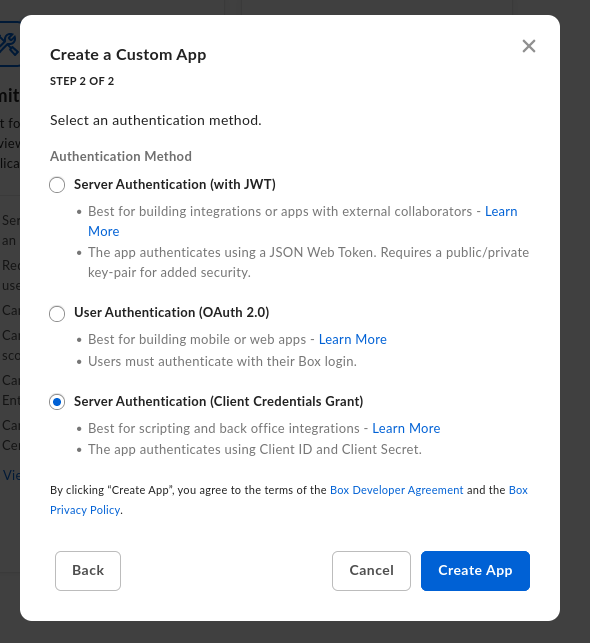
Box states it plainly: "Once you make a selection, you will not be able to change to a different authentication method without creating a new application." Picking Server Authentication (with JWT) or User Authentication (OAuth 2.0) here means deleting the app and starting over. There is no edit path.
Click Create App.
Depending on the console, the button reads Create Platform App, Create New App or Create a Custom App. Whatever the labels, the shape of the flow is the same: name, then authentication method, then a Configuration tab.
2. Set the App Access Level
You land on the app's Configuration tab. Scroll to App Access Level and select App + Enterprise Access.
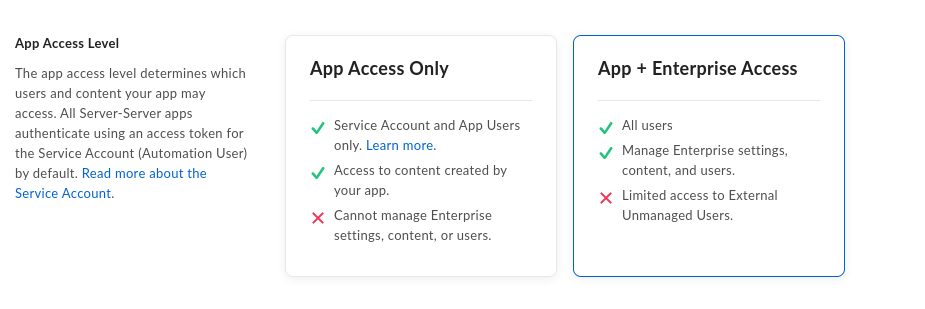
The default, App Access Only, restricts the app to content its own Service Account created. That is not enough here: an enterprise-wide event stream is by definition outside the Service Account's own content, and Box's scope reference is explicit that "App + Enterprise Access is required to use this scope."
3. Grant the one scope you need
Still on Configuration, find Application Scopes and tick exactly one box, under Administrative Actions:
- Manage enterprise properties
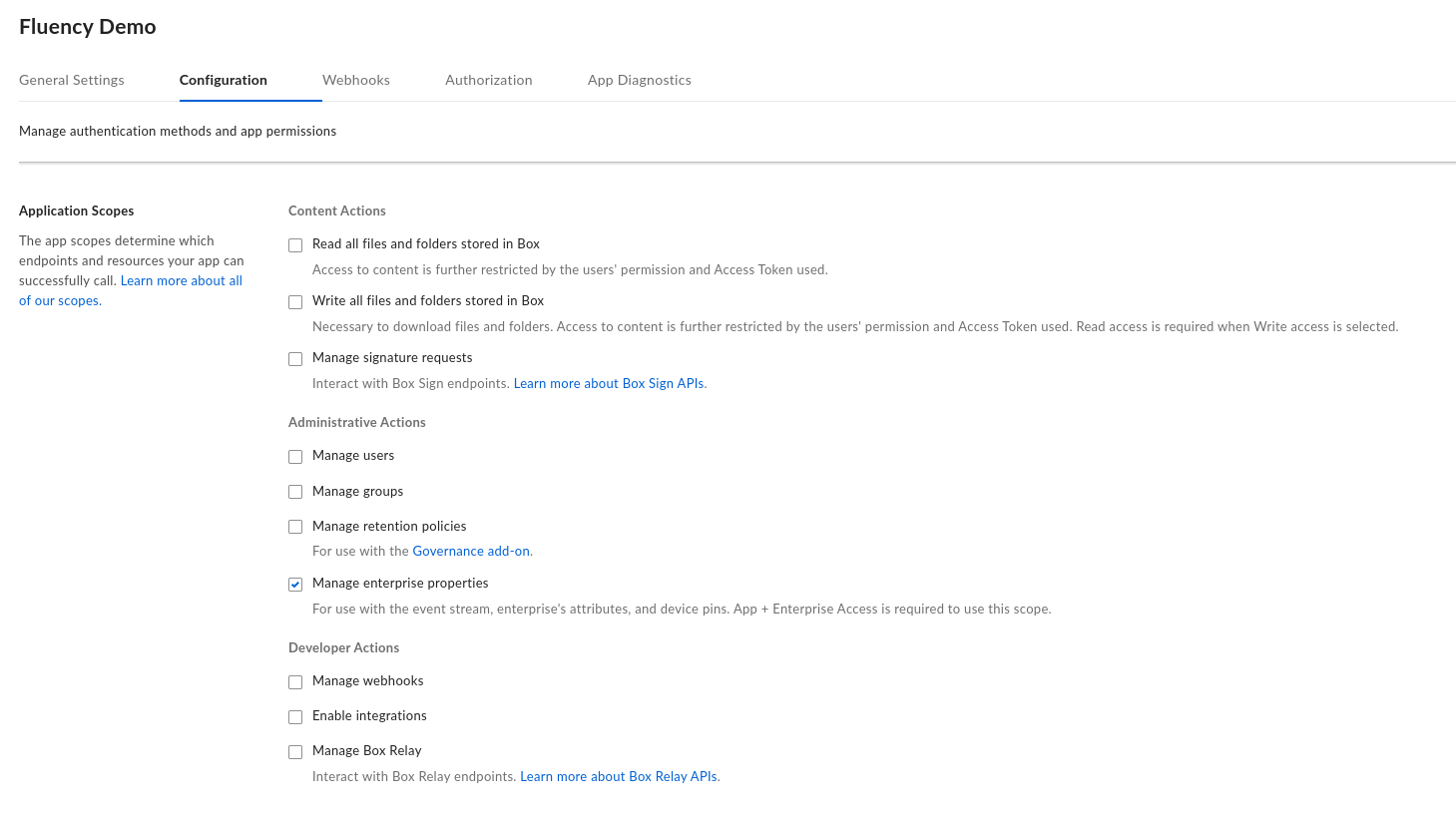
Leave everything else clear. In particular:
| Do not tick | Why |
|---|---|
| Read all files and folders stored in Box | Grants the app the contents of every file in the enterprise. The event stream reports that a file was downloaded; it never needs to read one. |
| Manage users | Several third-party Box guides ask for it because their integrations resolve or impersonate users. This one does not: the events carry the acting user inline. |
| Manage webhooks, Manage groups, Manage retention policies | Unrelated to events, and each one widens what a leaked Client Secret is worth. |
manage_enterprise_properties is the narrowest scope that reaches the event stream, but Box bundles more into it than the name suggests: it "gives an application permission to view the enterprise event stream, as well as view and edit the enterprise's attributes and reports. It also allows the application to edit and delete device pins." There is no read-only variant to drop to. Treat the Client Secret accordingly: it is a credential that can change enterprise settings, not merely read a log.
Click Save Changes.
4. Collect the Client ID and Client Secret
Scroll down the Configuration tab to OAuth 2.0 Credentials.
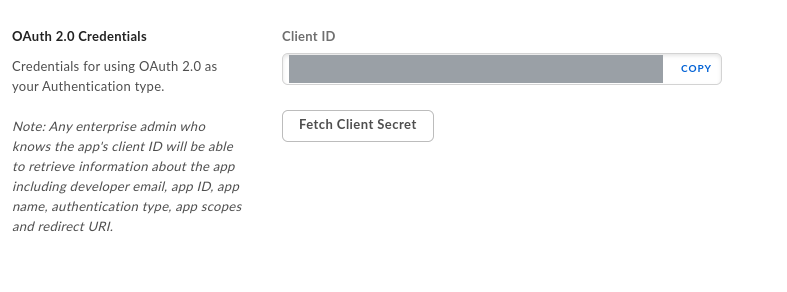
Client ID is displayed with a COPY button. Client Secret is not displayed; press Fetch Client Secret to reveal it.
Box requires two-factor authentication on the account viewing the secret. If Fetch Client Secret fails, the fix is on your Box user profile, not on the app. Enable 2FA and return to this screen.
Unlike many API secrets, the Box secret is not a once-only value; you can come back and fetch it again. What you cannot do is have two live secrets at once: Box does not support multiple active secrets against one Client ID, so rotation is a hard cutover rather than an overlap. That shapes Rotating the credential below.
Keep both values. They map to the Fluency form directly:
| Box label | Fluency parameter |
|---|---|
| Client ID | ClientID |
| Client Secret | ClientSecret |
5. Read the Enterprise ID
The third value the template needs is not in the Developer Console. Switch to the Admin Console and open Account & Billing. Enterprise ID sits under Account Information.
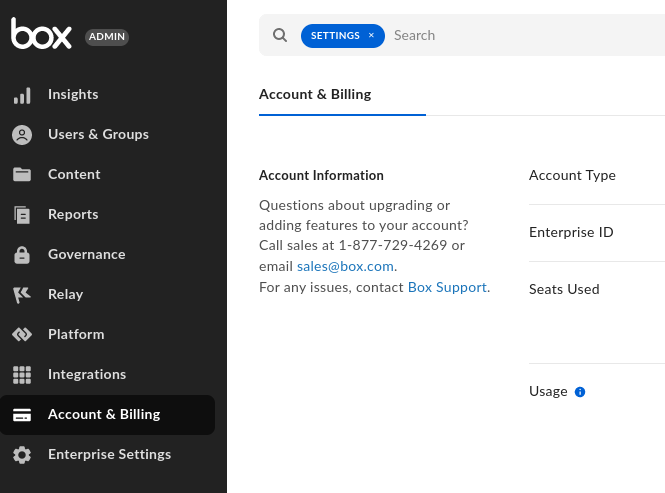
Copy it: this is the Fluency EnterpriseID parameter. It is a numeric string, and it is what tells Box's token endpoint which enterprise the Service Account should act for.
Everything else on this page happens in the Developer Console (app.box.com/developers/console); this one value and the authorization in step 6 happen in the Admin Console (app.box.com/master). They are different applications behind the same login, and the Developer Console gives no hint that the Enterprise ID exists. If you are working from a ticket someone else raised, this is the value they will have forgotten to include.
6. Have an admin authorize the app
Nothing works until this step is done. A CCG application is inert in the enterprise until a Box administrator adds it by Client ID.
There are two ways to trigger it, and the outcome is the same.
From the Developer Console, open the app's Authorization tab and click Review and Submit. Box emails the enterprise's Primary Admin with the request, and emails you back when they approve or decline.
From the Admin Console, an administrator can add it directly: Integrations → Platform Apps Manager → Server Authentication Apps → Add Platform App.
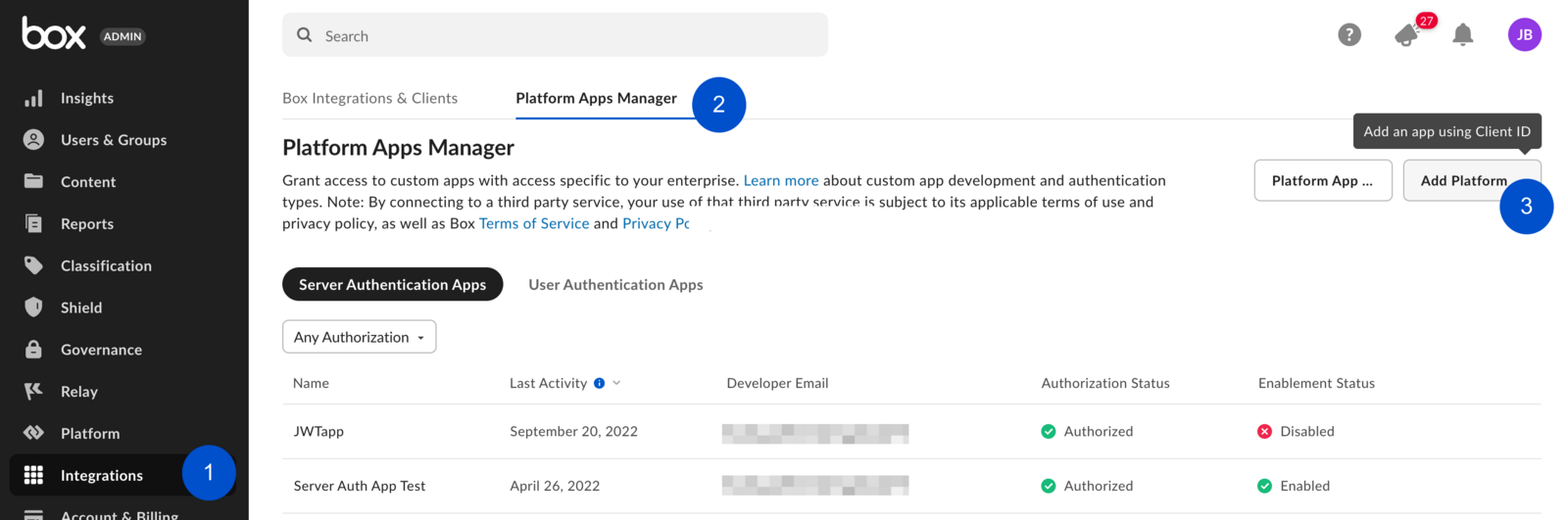
The dialog asks for one thing:
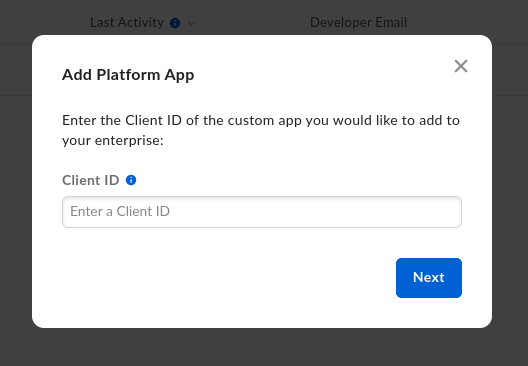
Paste the Client ID from step 4 and click Next. Box then shows what it is about to grant:
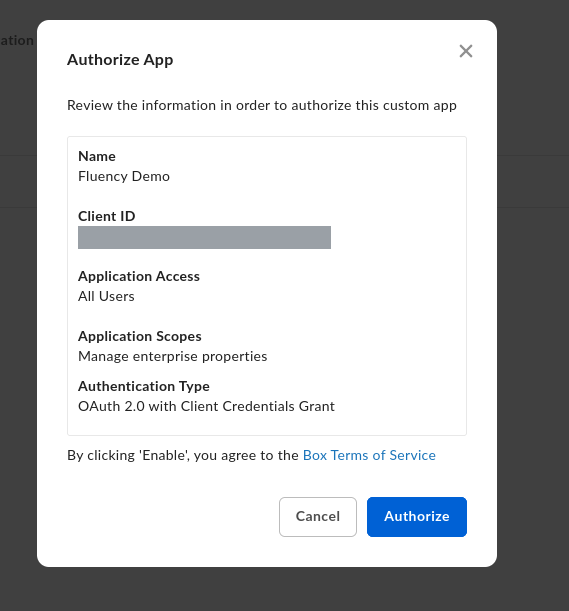
This screen is worth reading rather than clicking through: it is the only place the three decisions from steps 2 and 3 are shown back to you together. It should say Application Access: All Users, Application Scopes: Manage enterprise properties, and Authentication Type: OAuth 2.0 with Client Credentials Grant. If Application Scopes is blank or Application Access reads anything other than All Users, cancel and revisit steps 2 and 3: authorizing now would grant the wrong thing and you would have to come back and reauthorize.
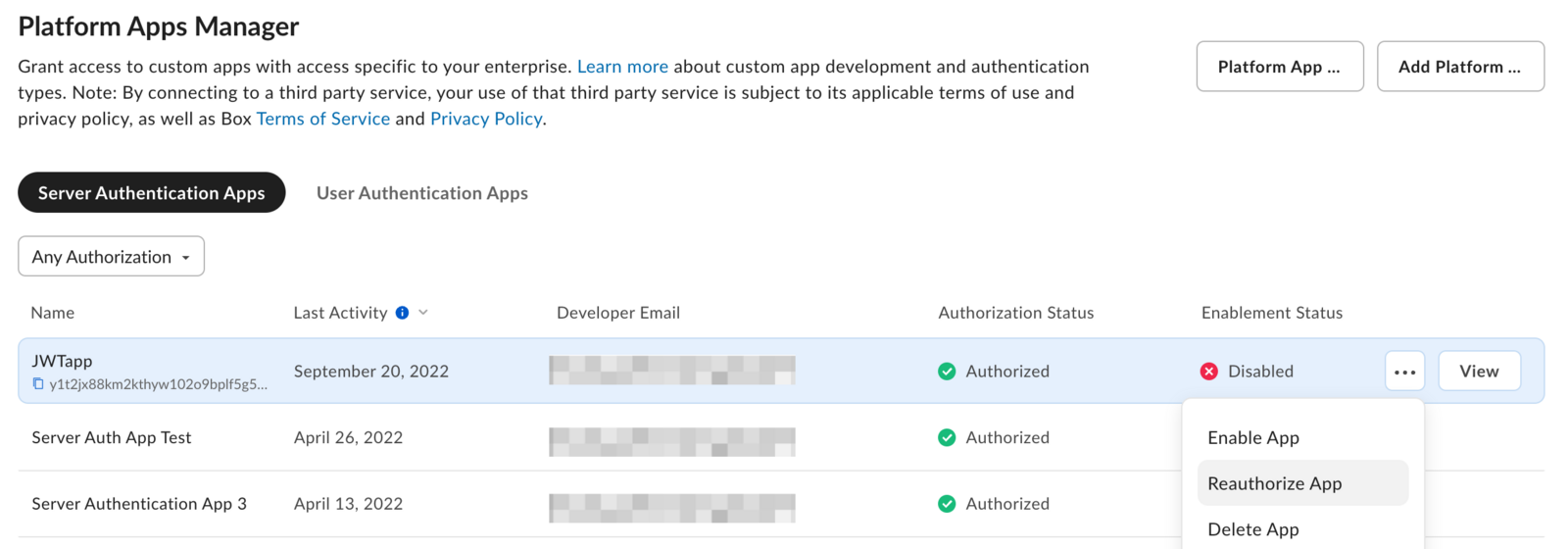
Click Authorize. The app then appears in the list with both statuses green:

Authorization Status: Authorized and Enablement Status: Enabled are the two signals that this step actually landed. One green and one not means the app is half-configured and the token call will still fail.
Box's rule: "When the application's scopes or access level change the application needs to be re-authorized." The catch is what that looks like from outside: the Developer Console accepts your new scope, shows it saved, and the integration carries on running on the old grant. Nothing warns you.
If you edit Application Scopes or App Access Level after this point, an admin must return to Platform Apps Manager, open the row's ⋯ menu and choose Reauthorize App, and the connector must then request a fresh access token.
7. Publish Shield alerts to the event stream
Skip this step if the enterprise does not have Box Shield.
Shield alerts are the most valuable thing in this feed and the easiest to miss, because a Shield rule does not publish to the event stream unless it is told to, and the setting is off by default on every rule.
Go to Admin Console → Shield → Detection Rules. For each rule you care about (Suspicious Locations, Suspicious Sessions, Anomalous Downloads, Malicious Content, Ransomware Activity) open it and enable Publish alerts to Box Event Stream. Existing rules are edited the same way: select the rule, Edit, change the toggle, Update Rule.
Everything else on this page is recoverable within the two-week window. This is not. An alert raised while the toggle was off is never written to the event stream at all, so there is nothing for any collector to fetch, not now, and not after you turn the toggle on. The alert still exists in the Box Shield console, and that is the only place it will ever exist.
Turn this on before you install in Fluency, not after you notice Shield alerts are missing.
Verify before you leave Box
Two calls prove all three values and both approvals at once. The first exchanges the credentials for a token; the second uses it.
BOX_CLIENT_ID='<Client ID from step 4>'
BOX_CLIENT_SECRET='<Client Secret from step 4>'
BOX_ENTERPRISE_ID='<Enterprise ID from step 5>'

TOKEN=$(curl -s -X POST https://api.box.com/oauth2/token \
  -d "grant_type=client_credentials" \
  -d "client_id=$BOX_CLIENT_ID" \
  -d "client_secret=$BOX_CLIENT_SECRET" \
  -d "box_subject_type=enterprise" \
  -d "box_subject_id=$BOX_ENTERPRISE_ID" | python3 -c 'import json,sys; print(json.load(sys.stdin)["access_token"])')

curl -s -H "Authorization: Bearer $TOKEN" \
  'https://api.box.com/2.0/events?stream_type=admin_logs_streaming&limit=1'
A working setup returns a single event and a cursor:
{"chunk_size":1,"next_stream_position":"1152922976252290000","entries":[{"source":{...},"created_by":{...},"created_at":"2026-07-31T09:14:22-07:00","event_id":"...","event_type":"LOGIN","type":"event",...}]}
| Response | What it means |
|---|---|
{"error":"invalid_client","error_description":"The client credentials are invalid"}, HTTP 400 | The Client ID or the Client Secret is wrong. A stray newline from copying is the usual cause. Re-fetch both from step 4. |
{"error":"unauthorized_client",...}, "This app is not authorized by the enterprise admin" | The app exists but no administrator has added it. Go back to step 6. This is the single most common failure, because the developer side looks complete without it. |
{"error":"invalid_request","error_description":"Invalid \"box_subject_type\" parameter found"} | box_subject_type must be the literal string enterprise. Typo in the call above, not in your credentials. |
HTTP 401 with www-authenticate: ... error_description="The access token was not found." | The token variable is empty: the first call failed and the shell carried on. Run the token request on its own and read its response. |
HTTP 403, "code":"access_denied_insufficient_permissions" | The token is valid but the app lacks Manage enterprise properties, or the scope was added after authorization and the app has not been reauthorized. See step 3 and the reauthorization warning in step 6. |
{"chunk_size":0,...,"entries":[]} | Everything works; the enterprise has simply had no activity in the moment you sampled. Add &stream_position=0 to read from the start of the retained window. |
Box answers a bad box_subject_id with the same invalid_client / "The client credentials are invalid" as a bad Client ID or Secret: the response does not distinguish which of the three inputs it rejected. If the ID and secret are freshly copied and it still fails, re-read the Enterprise ID from the Admin Console rather than re-fetching the secret a third time.
Part 2: Fluency
Install the Application
- v2 interface
- Classic v1 interface
In the navigation rail, open Applications and click Install Application, then choose box.com from the Cloud Infrastructure (IaaS) category of the Application Catalog.
Go to Platform → Applications → Install Application From Template and choose box.com from the Cloud Infrastructure (IaaS) category.
| Parameter | Notes |
|---|---|
| ClientID | Box's Client ID from step 4. |
| ClientSecret | Box's Client Secret from step 4. Masked once the application is installed. |
| EnterpriseID | Box's Enterprise ID from step 5, from the Admin Console, not the Developer Console. |
- v2 interface
- Classic v1 interface
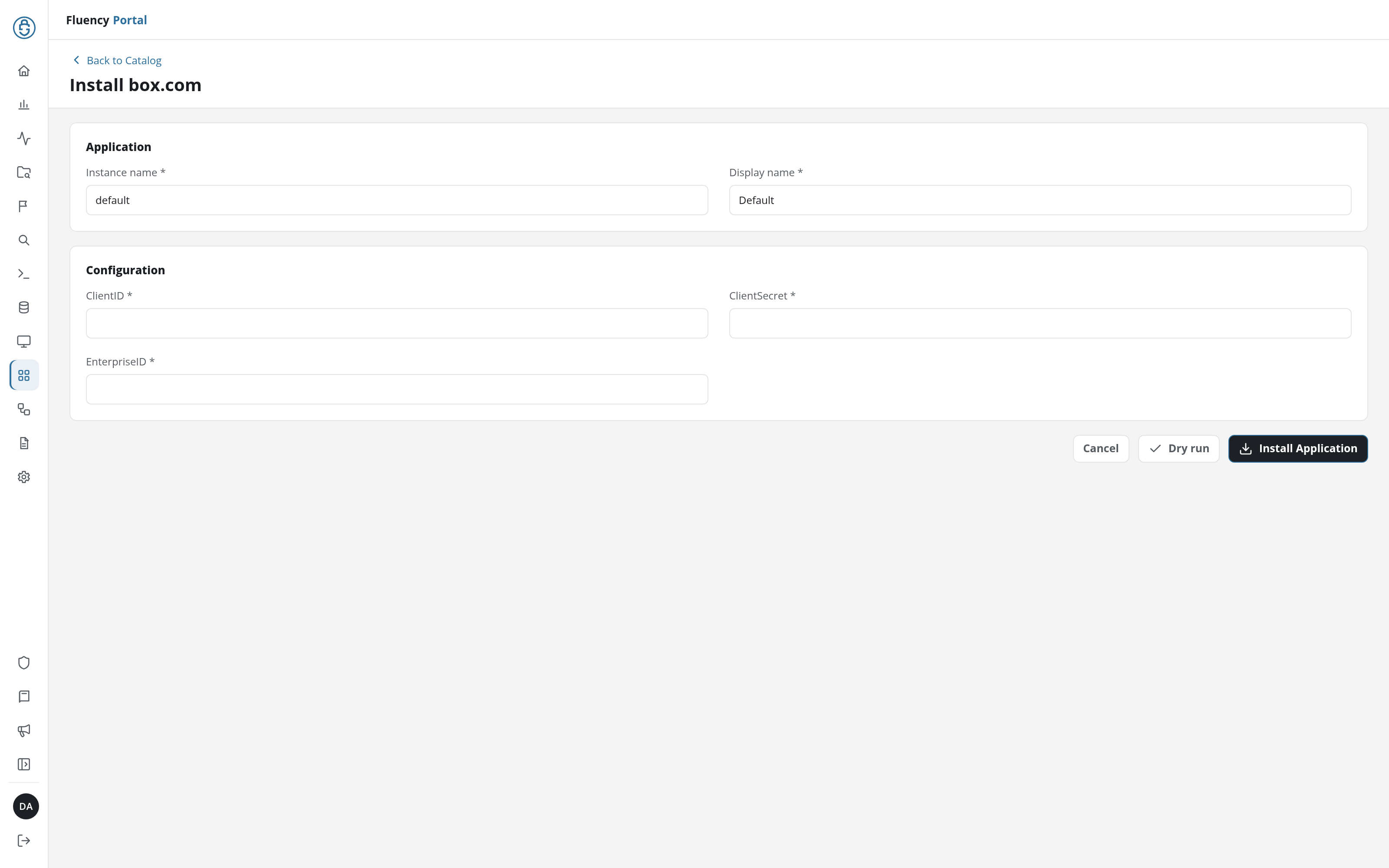
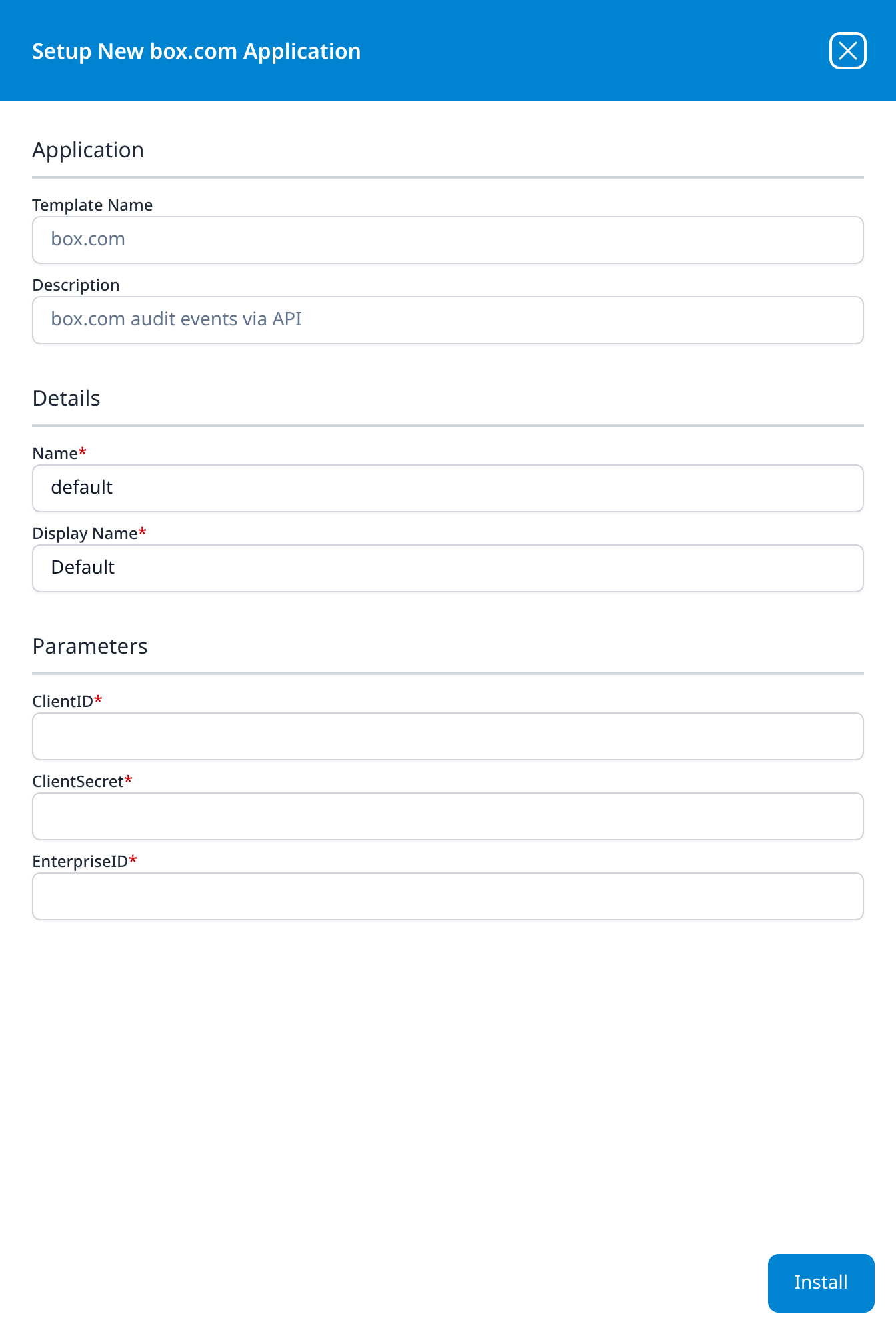
These three appear on the form as bare parameter names rather than the friendly labels most templates carry, so match them by position against the table above.
Unlike most templates, box.com takes no datalake or datalake index name parameter: the destination is fixed by the template rather than chosen on the form, so there is nothing here to collide with another application. To see where the data actually lands, open the installed application's details and read its Actions list, which records every object the install created.
- v2 interface
- Classic v1 interface
Click Dry run first to have the platform check the three values before anything is installed, then click Install Application. The Applications page opens with the notice Default is launching., and the new application is listed with a green Running badge once the pipeline is up.
Press Install. The application then appears in the Installed Applications view, where its badge reads Running once the pipeline is up.
Confirm it is running
The application is named after the template. A healthy install shows Running and activity that is not flat: the Signals strip on its row of Applications (v1: the throughput sparkline on its card).
Give it one poll interval (five minutes) before deciding anything is wrong.
Plan for the first collection to reach back. The collector has no stored position on its first run, and Box treats an absent stream_position differently from now, so the opening poll may replay some or all of the two weeks Box is holding rather than starting from the present. If a burst of backdated events arrives on day one, that is the connector catching up, not a duplicate feed, so watch the first hour rather than reconciling it, and do not compare its count against a Box report covering the same hour.
Search the lake for @event_type: box (or @eventType: BoxEnterprise) and confirm rows are landing. See Confirm data is arriving for the general procedure.
Two checks worth doing on day one, because both failure modes are invisible from the Fluency side:
- Generate an event and find it. Log in to Box in a private browser window, or download a file. A
LOGINorDOWNLOADevent should appear within a few minutes. This proves the whole path end to end in a way that a Running badge does not. - If you have Shield, confirm a Shield rule reaches the lake. The rules that fire on their own (Suspicious Locations, Anomalous Downloads) may not fire for days. Rather than wait, re-open each rule in Admin Console → Shield → Detection Rules and confirm Publish alerts to Box Event Stream is on. It is the only way to tell "no alerts yet" apart from "alerts are being raised and discarded".
Maintenance
Rotating the credential
Box supports only one active Client Secret per Client ID, so there is no overlap window: the moment you generate a new secret, the old one stops working. Work in this order:
- In the Developer Console, open the app's Configuration tab and generate a new Client Secret.
- In Fluency, uninstall the box.com application and reinstall it with the new secret. Template parameters are read-only after install, so there is no edit path. To uninstall, click Uninstall at the top right of the application's details page (v1: the red Uninstall button at the foot of its details panel on Platform → Applications).
- Confirm events resume.
The gap between steps 1 and 3 costs nothing permanent. The collector resumes from its stored position, so events raised during the changeover are collected late rather than lost, provided the gap stays well inside the two-week window. This is the one place Box's short streaming retention is forgiving: take an hour if you need it, just not a fortnight.
Neither the Client Secret nor the app itself expires on a timer, so there is no renewal date to record. What does change is scope: if anyone edits Application Scopes or App Access Level, an admin has to Reauthorize App and the connector needs a fresh token before the change takes effect.
Removing the integration
- Uninstall the box.com application in Fluency, so the collector stops calling Box: the Uninstall button at the top right of its details page (v1: the red Uninstall button at the foot of its details panel on Platform → Applications).
- In the Box Admin Console → Integrations → Platform Apps Manager → Server Authentication Apps, open the app's ⋯ menu and delete it. Removing the authorization is what actually revokes access; deleting the app in the Developer Console alone does not.
Deleting the Fluency application does not delete already-collected events from the lake.
Troubleshooting
| Symptom | Likely cause | Fix |
|---|---|---|
| Application installs, no events ever arrive | The app was never authorized in the Admin Console | Step 6. Confirm Authorization Status: Authorized and Enablement Status: Enabled; one without the other still fails. |
invalid_client / "The client credentials are invalid" | Wrong Client ID, wrong Client Secret, or wrong Enterprise ID | All three produce this one error. Re-read the Enterprise ID from the Admin Console before assuming the secret is at fault. |
403 access_denied_insufficient_permissions | Manage enterprise properties missing, or added after authorization | Tick the scope (step 3), then have an admin Reauthorize App. Saving the scope alone changes nothing. |
| Worked yesterday, stopped today, nothing changed in Fluency | Someone edited the app's scopes or access level in the Developer Console | Box invalidates the grant on any scope change. Reauthorize App in the Admin Console. |
| Fetch Client Secret does nothing | 2FA is not enabled on your Box account | Enable two-factor authentication on your own Box profile, then return to the app. |
| Event counts higher than Box's own reports | Expected: the streaming feed may repeat events | Deduplicate on @box.event_id. See This feed is fast, not exact. |
| Events appear out of order in the index | Expected: the streaming feed is not chronological | Sort and correlate on @box.created_at, not on ingest order. |
No SHIELD_ALERT events, but Shield shows alerts in its console | Publish alerts to Box Event Stream is off on the rules | Step 7. Alerts raised while it was off cannot be recovered. |
| Events visible in a Box report but missing from the lake | The collector was down longer than two weeks | Unrecoverable from the API. Export the period from Admin Console → Reports and treat it as a one-off import. |
429 Too Many Requests with a retry-after header | Another tool is consuming the enterprise's API budget, or a bulk job is running | Box's limit is 1,000 requests per minute per user and a licensed monthly allocation per enterprise. This integration's own share is small; see below. |
Events show a user with ID 2 | Not a fault | 2 is Box's internal identifier for an anonymous user: someone acting on an open shared link without logging in. Often exactly what you want to see. |
Data reference
What the Box event stream carries once it lands, for searches and detection rules written against it.
Endpoint, scope and event types
One endpoint, GET /2.0/events with stream_type=admin_logs_streaming, backed by one scope: Manage enterprise properties. Everything below arrives on that single stream.
| Event family | Examples | Notes |
|---|---|---|
| Authentication | LOGIN, FAILED_LOGIN, ADMIN_LOGIN, ADD_LOGIN_ACTIVITY_DEVICE, DEVICE_TRUST_CHECK_FAILED | ADD_LOGIN_ACTIVITY_DEVICE fires on a device Box has not seen before. |
| Content access | PREVIEW, DOWNLOAD, CONTENT_ACCESS, UPLOAD, EDIT, DELETE, COPY, MOVE, UNDELETE | The bulk of the volume in an active enterprise. |
| Sharing and collaboration | SHARE, UNSHARE, SHARED_LINK_SEND, ITEM_SHARED_UPDATE, COLLABORATION_INVITE, COLLABORATION_ACCEPT, COLLABORATION_ROLE_CHANGE | External sharing is the main data-egress path in Box. |
| Administration | NEW_USER, DELETE_USER, EDIT_USER, CHANGE_ADMIN_ROLE, GROUP_ADD_USER, ENABLE_MULTI_FACTOR_AUTH, DISABLE_MULTI_FACTOR_AUTH, EXTERNAL_COLLAB_SECURITY_SETTINGS | Tenant-level changes an attacker makes to keep access. |
| Application and token activity | APPLICATION_CREATED, ENTERPRISE_APP_AUTHORIZATION_UPDATE, USER_AUTHENTICATE_OAUTH2_ACCESS_TOKEN_CREATE, OAUTH2_ACCESS_TOKEN_REVOKE | Includes the authorization of this integration. |
| Governance | LEGAL_HOLD_POLICY_CREATE, RETENTION_POLICY_ASSIGNMENT_ADD, DATA_RETENTION_REMOVE_RETENTION, WATERMARK_LABEL_CREATE | Requires the Governance add-on to be generating them at all. |
| Box Shield | SHIELD_ALERT, SHIELD_DOWNLOAD_BLOCKED, SHIELD_EXTERNAL_COLLAB_INVITE_BLOCKED, SHIELD_SHARED_LINK_ACCESS_BLOCKED, the information-barrier events | Licensed separately, and gated by a per-rule toggle that is off by default; see step 7. |
| Box Sign and Box AI | SIGN_DOCUMENT_SIGNED, SIGNER_DOWNLOADED, BOX_AI_USER_REQUEST | Only where those products are in use. |
Box's list runs to more than 130 types and carries its own disclaimer: "This list is not exhaustive, so it is possible events appear that are not listed", so treat the event type reference as the source of truth rather than this table.
This feed is fast, not exact: expect duplicates and out-of-order events
admin_logs_streaming is the low-latency stream, and Box is explicit about what it trades away for that: "the emphasis for this feed is on low latency rather than chronological accuracy, which means that Box may return events more than once and out of chronological order."
Two consequences you will meet:
- Event counts in Fluency will not match Box's own reports. They are expected to run slightly high. A mismatch is not evidence that something is misconfigured. Box's guidance is that "duplicate events can be identified by their event IDs"; deduplicate on
@box.event_idbefore counting anything that matters. - Do not use arrival order as sequence. Correlate on
@box.created_at, which is Box's own timestamp for the action, rather than on the order events land in the index.
The alternative stream, admin_logs, is chronological and duplicate-free but explicitly unsuitable here: Box warns that "consuming events in near real time may lead to missed events as events can arrive later than your filtering window." Fluency polls the streaming feed for exactly that reason.
Two weeks, against a year in Box's own console
Box keeps two weeks of events on admin_logs_streaming, one year on admin_logs, and seven years in the Admin Console's exported reports.
The collector holds a watermark (Box's next_stream_position), so an outage shorter than the window backfills on the next successful poll: you get the events, just late. Past two weeks the events are no longer in the stream to be fetched at all, and Box does not document what a stream_position older than the window returns. Treat a fortnight as the hard edge: an integration left broken for longer has a permanent gap that only a manual Admin Console report export can fill.
Under the hood
Engineering reference: collection behaviour, output format, and the manual build
Collection behaviour
The connector authenticates with the Client Credentials Grant, exchanging client_id, client_secret and box_subject_id for an access token scoped to the enterprise's Service Account:
POST https://api.box.com/oauth2/token
  grant_type=client_credentials
  client_id=<ClientID>
  client_secret=<ClientSecret>
  box_subject_type=enterprise
  box_subject_id=<EnterpriseID>
CCG returns no refresh token: Box's documentation states that "because a Refresh Token is not returned, you must request a new token when the Access Token expires." The connector therefore fetches a token per collection cycle rather than caching one.
It then reads GET /2.0/events?stream_type=admin_logs_streaming, carrying next_stream_position from the previous response as stream_position on the next request. That cursor is the watermark: it is what makes an outage recoverable, and what makes an outage longer than Box's two-week retention permanent.
The reference implementation polls every 300 seconds and pages within a cycle until Box returns an empty batch, with a hard stop after eleven iterations so one poll cannot run away. With Box's default page size of 100 events, that puts a ceiling of roughly 1,100 events per five-minute cycle, about 3.7 events per second sustained. An enterprise generating more than that will fall progressively behind, and the failure is silent until the lag reaches two weeks and events start dropping off the end of the window. If you expect that kind of volume, raise it with your Fluency contact before install rather than after.
For API budgeting: two calls per page in the reference processor, so a quiet enterprise costs about 576 calls a day and a busy one up to roughly 6,300, against a per-minute ceiling of 1,000 and whatever monthly allocation the Box plan carries.
Box does not support long polling on this feed, so there is no push alternative; polling is the only mechanism available.
Output format
Each Box event is wrapped one-to-one:
| Field | Value |
|---|---|
@box | The complete Box event object, unmodified |
@event_type | box |
@eventType | BoxEnterprise |
@type | event |
@timestamp | Box's created_at, parsed from RFC 3339 and stored as epoch milliseconds |
Because the whole event is preserved under @box, fields Box adds later are available without a parser change. The ones worth knowing: @box.event_id (the deduplication key), @box.event_type (Box's own type name, distinct from Fluency's @event_type), @box.created_by (the acting user), @box.source (the file, folder or user acted on), @box.ip_address, and, on Shield events, @box.additional_details.shield_alert, which carries the risk score and the alert's own context.
Manual build
The application template is the supported path and builds all of the below in one step. The manual equivalent below shows exactly what the template constructs, and is the starting point if you need to modify the collection logic.
- Create a REST API integration on the Integrations page (v1: Integrations) with URL
https://api.box.com, Authentication None, and Timeout30. Add three environment variables:CLIENT_ID,CLIENT_SECRET,ENTERPRISE_ID. Authentication is None because the processor performs the OAuth exchange itself rather than delegating it to the integration. - Deploy the report processor
BoxAPI_EventPull(below). - Create an API Pull data source using that integration and processor, with a poll interval of
300. - Create a router
BoxAPIAdjustmentswith a passthrough processor. - Connect the router to the EventWatch sink, then the source to the router.
function main({integration, state}) {
    printf("integration name : %s", integration)
    printf("current state :    %s", state)

    let items = []
    let newState = {}

    let result = {}
    let args = { next_stream_position: state.next_stream_position }

    let continue_loop = true
    for let n=0; continue_loop; n++ {
        result = getEvents(integration, args)
        args = { next_stream_position: result.next_stream_position }
        continue_loop = len(result.items) > 0
        newState.next_stream_position = result.next_stream_position
        if(result.items) {
            for _, item = range result.items {
                items = append(items, item)
            }
        }
        if (n > 10) {
            printf("force loop break, hold off until next poll")
            continue_loop = false
        }
    }
    let events = []
    for _, item = range items {
        let ts = new Time("2006-01-02T15:04:05Z07:00", item.created_at)
        let event = {
            "@box": item,
            "@event_type": "box",
            "@eventType": "BoxEnterprise",
            "@type":"event",
            "@timestamp": ts.UnixMilli()
        }
        events = append(events, event)
    }
    printf("newState: %v", newState)
    return {state: newState, events}
}

function getEvents(integration, args) {
    let response = Platform_REST_Call(integration, {
        debug: false,
        method: "POST",
        path: "/oauth2/token",
        encoding: "form",
        paras: [
            {name: "client_id", variable:"CLIENT_ID"},
            {name: "client_secret", variable:"CLIENT_SECRET"},
            {name: "grant_type", value:"client_credentials"},
            {name: "box_subject_type", value:"enterprise"},
            {name: "box_subject_id", variable:"ENTERPRISE_ID"}
        ]
    })

    let callArgs = {
        debug: false,
        method: "GET",
        path: "/2.0/events",
        encoding: "url",
        headers: [
            {header: "authorization", value: sprintf("Bearer %s", response.data.access_token)}
        ],
        paras:[
            {name: "stream_type", value:"admin_logs_streaming"}
        ]
    }

    if(args.next_stream_position) {
        callArgs.paras = append(callArgs.paras,{ name: "stream_position", value: args.next_stream_position } )
    }

    let result = Platform_REST_Call(integration, callArgs)
    printf("events next_stream_position: %d", result.data.next_stream_position)
    printf("events fetched entries :     %d", len(result.data.entries))
    return {items: result.data.entries, next_stream_position: sprintf("%d",result.data.next_stream_position)}
}
References
Box
- Get Enterprise Events: the two stream types, retention, the duplicate and ordering caveats, and the full event type list
- List user and enterprise events: the
GET /2.0/eventsreference, parameters and response fields - Client Credentials Grant: how CCG works and what
box_subject_typeselects - Setup with Client Credentials Grant: the Developer Console walkthrough
- Platform App Approval: the Admin Console authorization and reauthorization procedure
- Authorization common errors: what each Admin Console failure message means
- Scopes: what
manage_enterprise_propertiesactually grants - Rate limits: the per-minute and per-enterprise limits and the
429contract - Shield alert events: the
SHIELD_ALERTpayload and the five alert types - Create, edit, and delete a threat detection rule: where Publish alerts to Box Event Stream lives
Fluency
- box.com install form: the box.com template's parameters (v1: Install Application From Template)
- Application Details: the details page and its Actions list (v1: Installed Applications)
- Integrations: where the manual build's REST integration lives (v1: Integrations)
- Confirm data is arriving
- Integration Matrix: which ingress method each product uses
Related
- Salesforce Event Monitoring: the same API-pull pattern on a CRM, with a paid add-on that thins the data
- Google Workspace: the equivalent audit feed for the other major collaboration suite
- Okta: sign-in events for the identity provider that most Box logins pass through first