GitHub Audit
Fluency collects GitHub organization webhook events: everything GitHub emits for an organization and every repository it owns, from membership, repository and branch-protection changes and token requests to secret-scanning and Dependabot alerts and the pushes, pull requests and workflow runs those controls sit around. The mechanism is push, not poll: GitHub sends an HTTP POST as each event happens, and nothing is fetched on a schedule. For an organization whose source code, CI pipelines and deployment credentials live in GitHub, that is a first-class security feed.
Authentication is a shared secret you invent: GitHub never transmits it, but uses it to sign every delivery (HMAC-SHA256, in the X-Hub-Signature-256 header), which is what proves a delivery came from GitHub and was not tampered with.
The setup has two halves, and they run in the opposite order to most integrations, because the Webhook URL GitHub needs does not exist until the application is installed:
- In Fluency: install the GitHub via Org Webhook application template with a Security Token you choose. The install produces a Webhook URL.
- In GitHub: create an organization webhook pointing at that URL, with that token as its Secret.
What arrives
| Stream | What it holds | Lands in |
|---|---|---|
| Organization webhook deliveries | One record per delivery, with GitHub's whole payload: membership and access, credentials and GitHub Apps, repository settings, code and CI, security alerts, collaboration. | Fixed by the template; the installed application's Actions list names it |
The webhook's event subscription on GitHub decides what is collected: this guide asks for Send me everything, because an event class left out cannot be collected after the fact (step 4). A webhook carries no history, no sign-ins and no clones or fetches; those exist only in GitHub's audit log, a separate feed with no template that complements this one rather than replacing it (What the audit log adds). GitHub does not retry a failed delivery, and failed deliveries can be replayed for only three days, so a longer outage is lost from this feed (Recovering a gap).
The record layout, the full event list, what does not arrive, and ordering and duplicates are in Data reference.
Before you begin
Organization owner on GitHub. GitHub's wording is "You must be an organization owner to create webhooks in that organization." Repository admin is not enough, and a repository webhook is not a substitute: it covers one repository and carries none of the organization-level events (memberships, teams, org settings) that make this feed worth collecting.
Any GitHub plan. Organization webhooks are not gated behind GitHub Enterprise Cloud. The audit-log API is, which is the main practical reason this template exists.
A publicly resolvable, HTTPS Fluency endpoint. The Webhook URL the install produces is on your Fluency instance and GitHub has to reach it from the internet. Two constraints are GitHub's, not Fluency's: localhost and 127.0.0.1 are rejected outright, and GitHub webhooks do not support IPv6 (an endpoint published only as an AAAA record cannot be delivered to). If anything filters inbound traffic to your instance, GitHub's current delivery ranges are the hooks array of https://api.github.com/meta:
curl -s https://api.github.com/meta | jq -r '.hooks[]'
GitHub changes these occasionally, so an allow list built from them needs re-checking.
Access to the Fluency portal with permission to install applications.
A decision about the Security Token before you start. It is a template parameter, and template parameters are read-only after install; changing it later means uninstalling and reinstalling. Step 1 is the whole of that decision.
Part 1: Fluency
1. Choose the Security Token
This is the one credential in this catalog you invent rather than fetch. GitHub's requirement for it is that you "choose a random string of text with high entropy", and its only job is to be the HMAC key: GitHub's API reference describes the field as the value that "will be used as the key to generate the HMAC hex digest value for delivery signature headers".
Generate one rather than typing one:
openssl rand -hex 32
Keep it somewhere you can paste from twice. It has to be byte-identical on both sides, and neither side has a confirmation field or shows you the value again in plain text once saved.
2. Install the application
- v2 interface
- Classic v1 interface
In the navigation rail, open Applications and click Install Application, then choose GitHub via Org Webhook from the Cloud-based Business Softwares category of the Application Catalog.
Go to Platform → Applications → Install Application From Template and choose GitHub via Org Webhook from the Cloud-based Business Softwares category.
| Parameter | Notes |
|---|---|
| Security Token | The string from step 1. It has to match the Secret you will set on the GitHub webhook exactly. |
- v2 interface
- Classic v1 interface
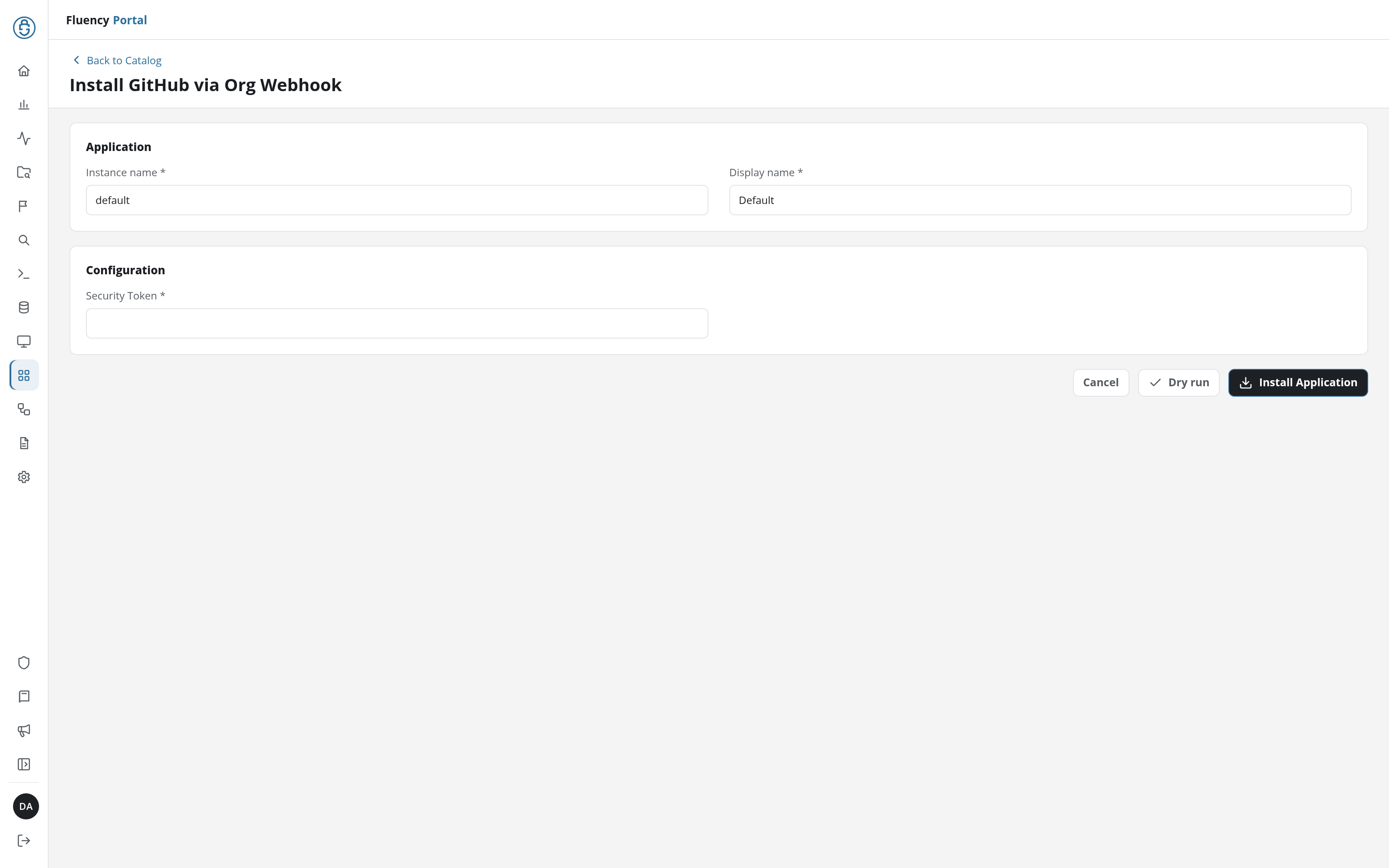
One parameter is the whole form. There is no Advanced configuration section, because there is no lake or index to choose, and nothing here selects which events to collect; that decision belongs entirely to the GitHub side.
Leave Instance name and Display name at default / Default unless you are installing a second instance (collecting from a second GitHub organization, for example), in which case give each one a name you will recognise on the applications list. The instance name is what the pipeline objects are named after, so two instances with different names do not collide.
Click Install Application. The Applications page opens with the notice Default is launching., and the new application is listed with a green Running badge once the pipeline is up.
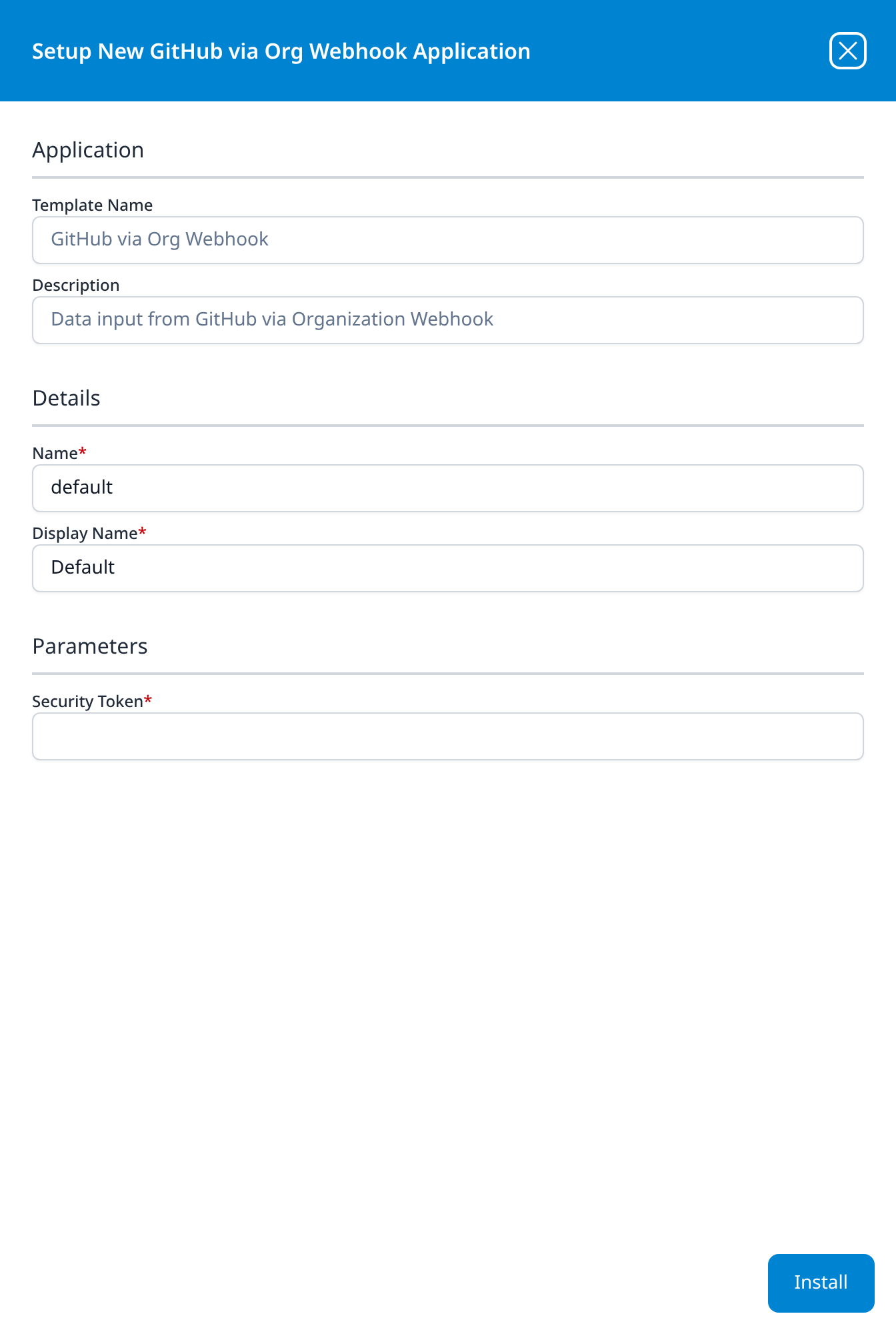
One parameter is the whole form. There is no Advanced Configurations section, because there is no lake or index to choose, and nothing here selects which events to collect; that decision belongs entirely to the GitHub side.
Leave Name and Display Name at default / Default unless you are installing a second instance (collecting from a second GitHub organization, for example), in which case give each one a name you will recognise on the applications list. The instance name is what the pipeline objects are named after, so two instances with different names do not collide.
Press Install. The application then appears in the Installed Applications view, where its badge reads Running once the pipeline is up.
A Running badge means listening, not working. Between the install and the webhook being configured on GitHub, an empty index is the expected state and proves nothing either way. The signal that the link is live is GitHub's own ping; see step 5.
3. Collect the Webhook URL
- v2 interface
- Classic v1 interface
On Applications, click the application's row to open its details page. Besides the Parameters card, which lists the Security Token, it has an Outputs card: the card the templates that issue a credential use, rather than consume one. It holds the Webhook URL the install created.
The Actions card is the record of what the install built: a router, a data sink, a data source and one pipe carrying the GitHub_Adjustments processor, each named after the instance. Because nothing is polled, the source only moves when GitHub posts.
Open the installed application's details panel with the blue eye button on its card. The panel is titled Viewing GitHubOrg Application and adds an Outputs section: the part of the panel the templates that issue a credential use, rather than consume one. It holds the Webhook URL the install created, with a copy button at the right edge of the field.
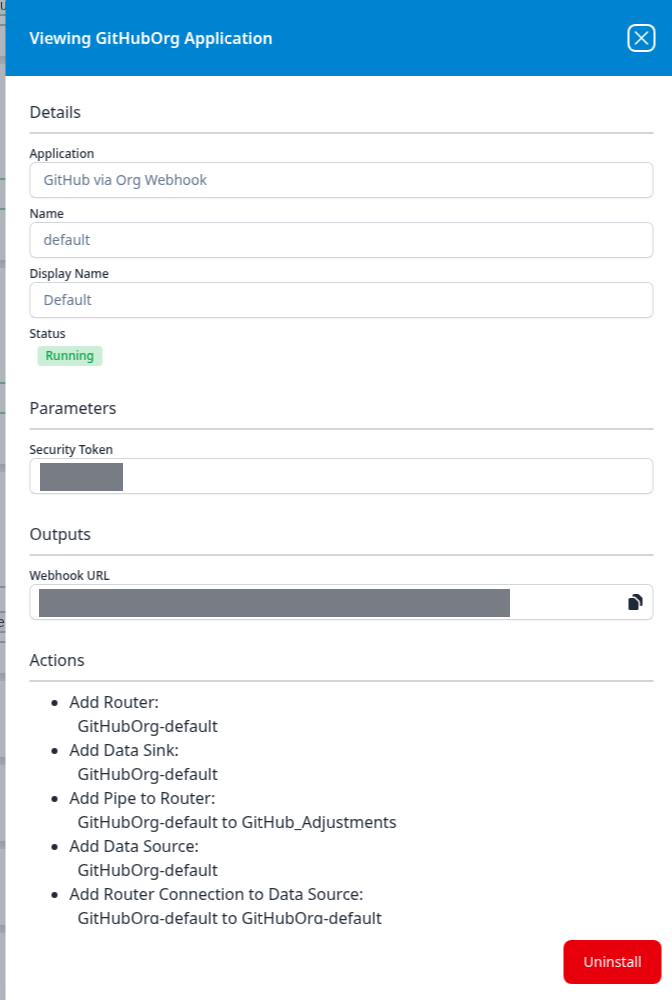
The Actions list below it is the record of what the install built: a router, a data sink, a data source and one pipe carrying the GitHub_Adjustments processor, each named after the instance. Because nothing is polled, the source node in the card's pipeline diagram is a Webhook rather than a Plugin Data Source; it only moves when GitHub posts.
That URL and the token from step 1 are the two values GitHub needs. Everything else happens in the other tab.
A Webhook URL and its token together are write access to your lake: anything that can POST to that URL with that signature produces records. They are far easier to leave behind in a ticket or a chat thread than a credential you fetched from a vendor. Paste them straight into GitHub's form.
Part 2: GitHub
4. Create the organization webhook
-
In the upper-right corner of any page on GitHub, click your profile picture, then Your organizations.
-
To the right of the organization, click Settings.
-
In the left sidebar, click Webhooks.
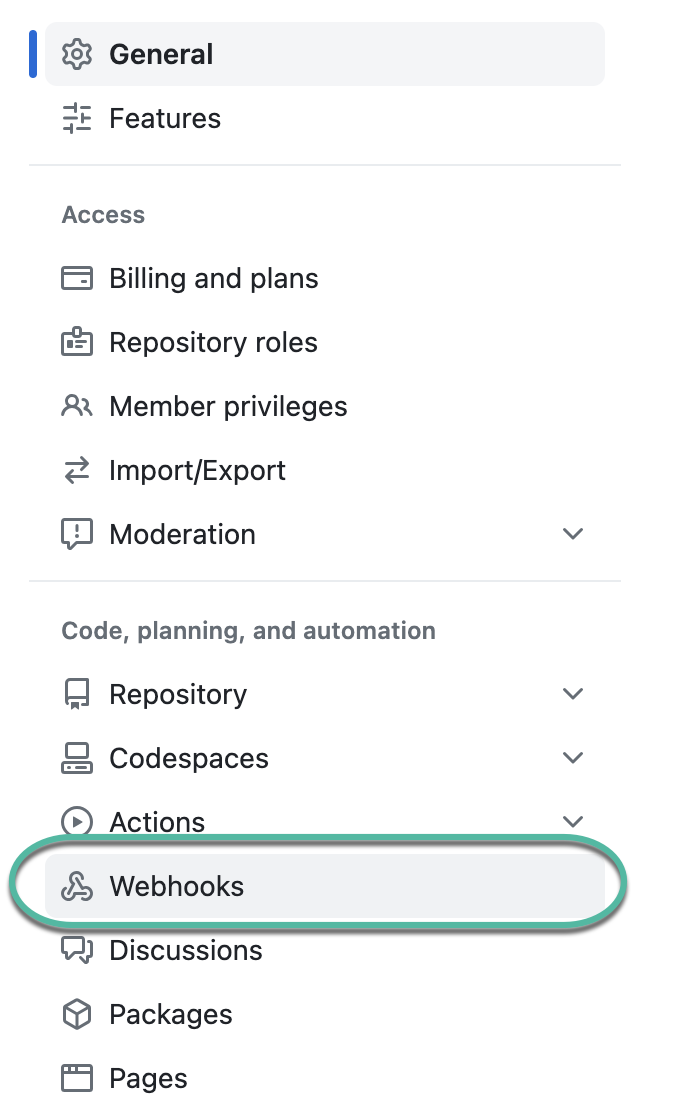
-
Click Add webhook.
-
Under Payload URL, paste the Webhook URL from step 3.
-
Set Content type to application/json.
-
Under Secret, paste the Security Token from step 1.
-
Leave SSL verification on Enable SSL verification.
-
Under Which events would you like to trigger this webhook?, select Send me everything.
-
Leave Active ticked.
-
Click Add webhook.
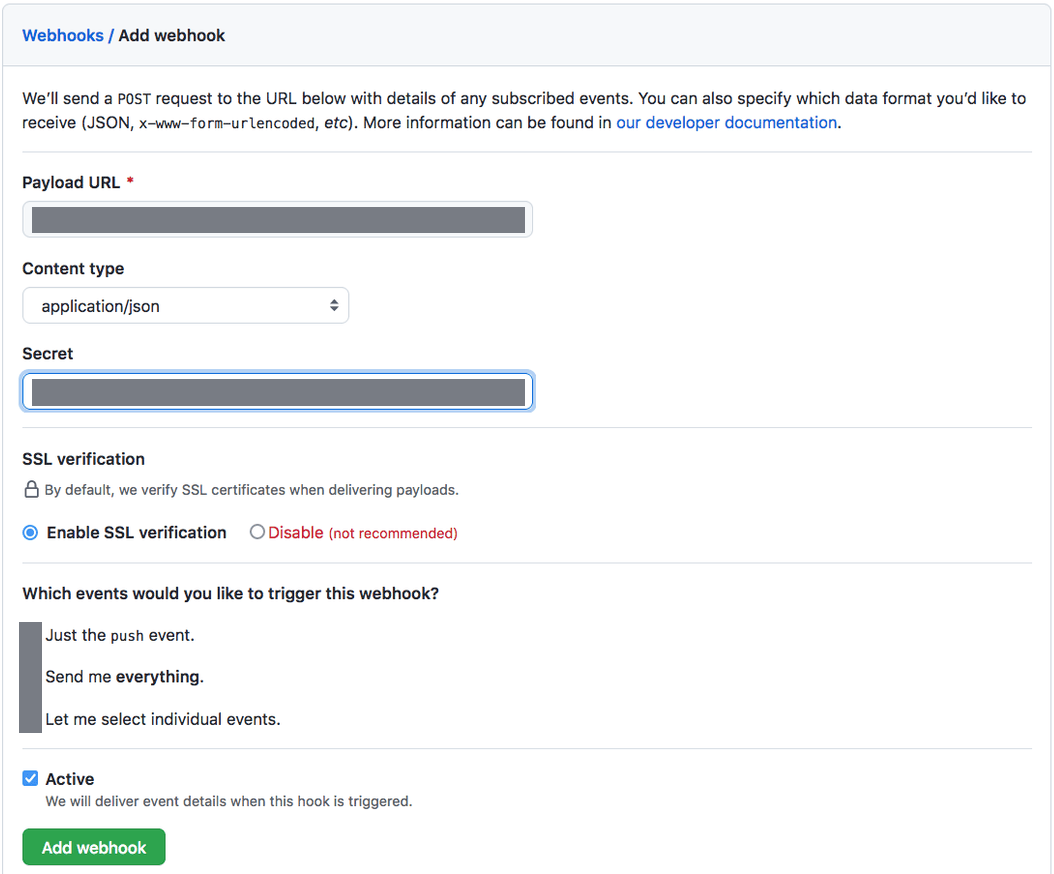
Three of those steps are worth a sentence each.
Step 6 changes a default, and the default is the wrong one here. GitHub's own API reference gives the content type default as form. Left alone, application/x-www-form-urlencoded "will send the JSON payload as a form parameter called payload" rather than as the request body: the same data in a different envelope. Choose application/json so the delivery arrives as the JSON document the rest of this page describes.
Step 9 is deliberately the opposite of GitHub's general advice. GitHub tells integrators to "only subscribe to the webhook events that you need", which is right for an application that reacts to events and wrong for a log collector that has to answer questions nobody has asked yet. Two things make Send me everything the better default here: a webhook is not retroactive, so an event class you did not subscribe to on day one is simply gone; and Send me everything is stored as the wildcard subscription GitHub documents as "all possible events", which means event types GitHub adds later are included without anybody revisiting the webhook. An individually selected list is frozen on the day it was made. If volume forces the issue, narrow it deliberately and write down what you gave up.
Step 8 is the default and should stay that way. The Webhook URL is HTTPS; disabling certificate verification buys nothing and GitHub labels it (not recommended) on the form.
5. Check the ping
After you create a new webhook, GitHub will send you a simple
pingevent to let you know you've set up the webhook correctly.
That single delivery is the vendor-side proof the link is live, and it is the check that separates configured correctly and quiet from never connected.
Click the webhook in the list, then Recent deliveries. A ping should be listed with a green tick and a 2xx response. Click the delivery GUID to see the request headers, the payload GitHub sent and the response it got back.
Deliveries can take a few minutes to appear, and Recent deliveries only lists the past three days. If you need another one later, ping the webhook again from the REST API:
curl -sS -X POST \
  -H "Authorization: Bearer $GH_TOKEN" \
  -H "Accept: application/vnd.github+json" \
  https://api.github.com/orgs/ORG/hooks/HOOK_ID/pings
A classic personal access token needs the admin:org_hook scope for that, and the caller must be an organization owner. HOOK_ID is in the webhook's URL in the browser, and GET /orgs/ORG/hooks lists them.
Confirm it is running
Three checks, in the order that narrows fastest.
1. GitHub says the delivery succeeded. Recent deliveries with a green tick and a 2xx is the only place that tells you GitHub tried and Fluency accepted. A red icon means GitHub tried and Fluency did not; the error string it prints is diagnostic, and the troubleshooting table is keyed on those strings. No deliveries listed at all means GitHub never fired: the webhook is inactive, or it was created on a repository rather than the organization.
2. Fluency says the application is up.
- v2 interface
- Classic v1 interface
The application is listed on Applications as GitHub via Org Webhook, with the display name Default beneath it and a green Running badge; a red Error badge means the pipeline aborted or reported errors in the last hour, and the details page shows the error message beneath the summary figures.
The card in Installed Applications reads GitHub via Org Webhook: Default with a Running badge; Aborted in red means the pipeline stopped on an error, and the details panel carries the message.
Remember that Running here only means the endpoint is listening.
3. The ping is in the lake. This is the one that proves both halves at once. The ping payload is the only GitHub delivery that carries a zen property, so @github.zen matches exactly one record (the moment the webhook was created) and no others. Every record from this integration also carries @sender of GitHub and @eventType of GitHubWebhook.
Once the ping is through, generate something ordinary and auditable (invite and remove a test member, or change a repository setting) and look for it. There is no polling interval to wait out; a webhook delivery is near-immediate, and GitHub's own advice is to wait a few minutes before concluding anything, because deliveries can take that long to appear even in its own log.
See Confirm data is arriving for the three platform-side checks: application health, ingress volume and storage-side queueing.
An empty result means one of three things: nothing happened in the organization, GitHub is not delivering, or Fluency is rejecting what it delivers. Those look identical from the Fluency side and are trivially distinguished from GitHub's Recent deliveries tab. Check there first, always.
Maintenance
Nothing here expires. There is no token lifetime, no consent to renew and no certificate to rotate. What there is instead is a configuration on somebody else's console that any organization owner can switch off, and nothing that tells Fluency when they do.
Rotating the Security Token
Template parameters are read-only after install, so changing the token means replacing the application. Done naively that leaves a gap, because the new install issues a new Webhook URL as well as taking a new token: GitHub keeps posting to an endpoint that no longer exists, and GitHub does not retry.
Install the replacement before removing the original, so the two overlap:
- Install GitHub via Org Webhook again with a different instance name (v1: Name),
rotate-2026-09, say, and the new token. Because the template has no index parameter and names its objects after the instance, the second install does not collide with the first. - Collect the new Webhook URL from the Outputs of its details.
- On GitHub, edit the existing webhook: replace Payload URL with the new URL and Secret with the new token, then Update webhook. Editing in place keeps the webhook's delivery history and its ID.
- Confirm a delivery succeeds against the new endpoint.
- Uninstall the original application in Fluency. To uninstall, click Uninstall at the top right of the application's details page (v1: the red Uninstall button at the foot of its details panel on Platform → Applications).
Steps 1 to 4 are a single browser session; anything delivered during them lands on one endpoint or the other.
Reviewing the webhook
Because nothing expires, maintenance here is review rather than rotation. Two things are worth putting on a calendar:
- Is the webhook still active? Any organization owner can clear Active, edit the Payload URL, or delete the webhook outright, and nothing on the Fluency side reports it. The feed simply stops. GitHub's own audit log records all three under its
hookcategory, readable in the web view by any organization owner, but collectable into Fluency only on Enterprise Cloud, where the audit-log API exists. Without that, the check is Recent deliveries. - Deleting the webhook announces itself once. The
metaevent fires when a webhook is deleted, and it is delivered to that webhook before it goes. Ametarecord in the lake is the last thing this integration will ever send, worth a detection rule of its own.
Recovering a gap
If the endpoint was unreachable for a period, GitHub has the failed deliveries and will not resend them on its own. You can replay them for three days afterwards, and no longer:
- From the browser: the webhook's Recent deliveries tab, open a delivery, click Redeliver.
- From the REST API:
GET /orgs/ORG/hooks/HOOK_ID/deliverieslists them, with astatusthat is notOKon the failures, andPOST /orgs/ORG/hooks/HOOK_ID/deliveries/DELIVERY_ID/attemptsreplays one. Both needadmin:org_hookand organization ownership. GitHub publishes a worked script that runs this on a schedule.
A redelivery re-sends the original payload, so replaying a window that partly succeeded will duplicate the part that did. Beyond three days the deliveries are gone from GitHub's side; whatever the audit log covers is the only route back to them.
Removing the integration
Take the GitHub side down first, which is the reverse of the usual order and for a reason: an uninstalled application leaves a dead URL, and GitHub keeps posting to it and logging failures until somebody notices.
- On GitHub, open the webhook and either clear Active (which stops deliveries and keeps the configuration) or delete it.
- In Fluency, uninstall the application. To uninstall, open the application's details page and click Uninstall at the top right (v1: open its details panel on Platform → Applications and press the red Uninstall button).
What the audit log adds
The webhook is the live feed. GitHub's audit log is a separate record that GitHub serves on request, and it holds three things the webhook structurally cannot:
| Organization webhook | Organization audit log | |
|---|---|---|
| Delivery | Pushed as events happen | Pulled on request |
| History | None: starts when the webhook is created | The last 180 days; Git events, 7 days |
| Sign-in and authentication activity | Not published as webhook events | Present |
| Git clone and fetch | Not published as webhook events | Present in the git category |
| Code, CI and review activity | Present: pushes, pull requests, reviews, workflow runs | Largely absent |
| Availability | Any GitHub plan | The web view on any plan; the API requires GitHub Enterprise Cloud |
There is no application template for the audit-log API, so collecting it means building a connector by hand on the Integrations page (v1: Integrations): a credential with the read:audit_log scope held by an organization owner, an API-pull source against GET /orgs/{org}/audit-log with a polling interval, include=git if Git events are wanted, and a processor that sets the event type. See the Integration Matrix for how the two paths are recorded.
Two limitations are worth knowing before that work is scheduled. The audit-log REST API returns only the last three months unless the query names a wider window explicitly, and when it is asked for Git events it omits any change made through the browser or the APIs: merging a pull request in the web interface pushes to the base branch, and that push is not in the Git-event response.
If you already collect GitHub's audit log through a REST integration built by hand on the Integrations page, that poller is still doing something useful, because it covers the parts of the record a webhook genuinely cannot deliver. But it is not a substitute for GitHub via Org Webhook (GitHubOrg), in the Cloud-based Business Softwares category, which is the supported path for this feed, and this template is not a substitute for it.
Organizations on Enterprise Cloud have a third option that is neither of these: audit log streaming, which GitHub delivers to object storage and to several SIEM destinations on its own schedule. It is a different delivery model again, and it is not what this template does.
Troubleshooting
The error strings in the first column are GitHub's own, printed against the delivery in Recent deliveries. Start there rather than on the Fluency side: this integration's failures are almost all visible from GitHub, and almost none of them are visible from here.
| Symptom | Likely cause | Fix |
|---|---|---|
| Application Running, no records, no deliveries listed on GitHub | GitHub never fired. The webhook is inactive, was created on a repository rather than the organization, or nothing has happened in the organization yet. | Check Active on the webhook and that you are looking at the organization's Settings → Webhooks, not a repository's. Then trigger something: inviting and removing a test member does it. |
Deliveries listed, but every response is a 4xx | The Secret on GitHub and the Security Token on the application are not identical, or the Payload URL is not the one the install issued. | Compare both against the application's details. If the token is the suspect, rotate it: it cannot be edited in place. |
timed out | GitHub gives a webhook endpoint 10 seconds to return a 2xx and records anything slower as a failure. | Check the platform's health. Redeliver from Recent deliveries once it is back. |
failed to connect to host | GitHub could not resolve the Payload URL, or network restrictions blocked it. GitHub webhooks do not support IPv6, so an AAAA-only endpoint fails here. | Confirm the host resolves to an IPv4 address from outside your network, and that GitHub's hooks ranges from https://api.github.com/meta are permitted inbound. |
failed to connect to network | The connection was refused. | Same check as above. |
Peer certificate cannot be authenticated with given CA certificates | The endpoint is serving a self-signed certificate, or an incomplete chain. | Test it with openssl s_client -connect HOST:443 and look for verify error. Do not answer this by disabling SSL verification on the webhook. |
invalid HTTP response | The endpoint returned a 4xx or 5xx. GitHub records anything that is not 2xx as a failure. | Read the response body on the delivery detail; it is captured next to the request. |
URL host localhost is not supported | The Payload URL is localhost or 127.0.0.1. | Use the Webhook URL the install produced, unchanged. |
Cannot have more than 20 webhooks | GitHub allows up to 20 organization webhooks per event type, and Send me everything counts against all of them. | Remove a webhook that is no longer used, or forward from one endpoint to several. |
| Data stopped, nothing changed on the Fluency side | Somebody cleared Active, edited the Payload URL, or deleted the webhook. | Check the webhook on GitHub. A meta record in the lake dates the deletion; on Enterprise Cloud, the audit log's hook category dates any of the three. |
| Data stopped after the application was reinstalled | A reinstall issues a new Webhook URL. The old one is gone and GitHub is still posting to it. | Edit the webhook's Payload URL to the new value. Next time, use the overlap procedure. |
| Records appear out of sequence | GitHub does not guarantee delivery order, and @timestamp is set at ingest. | Sort on a timestamp inside the payload: @github.head_commit.timestamp, or the object's created_at / updated_at. |
| Duplicate records for the same event | Someone redelivered a window that had partly succeeded. Redeliveries re-send the original payload. | Expected. Deduplicate on the payload's own identifiers: a commit SHA, an alert number, an issue or pull request node_id. |
| One event class never appears | It was not in the subscription, or it is one of the four events organization webhooks cannot carry. | Check Which events would you like to trigger this webhook? on the webhook. Note that widening it is not retroactive. |
| Sign-ins, or repository clones, never appear | They are not webhook events. | See What does not arrive and What the audit log adds. |
| Counts do not reconcile with GitHub's audit log | They are different feeds covering overlapping but different ground. | Expected. The comparison table above says which is which. |
Data reference
What the deliveries look like once they land, for searches and detection rules written against them.
The feed and where it lands
| Stream | How it gets here | What decides its contents | Contents |
|---|---|---|---|
| Organization webhook deliveries | GitHub POSTs to the Webhook URL as each event happens | The event set chosen on the GitHub webhook; this guide asks for Send me everything | One record per delivery, carrying GitHub's whole event payload |
There is one feed and one destination. Unlike most templates, GitHubOrg takes no datalake or datalake index name parameter: the destination is fixed by the template rather than chosen on the form, so there is nothing here to collide with another application. To see where the data actually lands, open the installed application's details and read its Actions list, which records every object the install created.
One record per delivery, wrapped rather than flattened
Each delivery is handled by the standard GitHub_Adjustments processor, which you can read in full on Configuration → Processors (v1: Platform → Processors). It does not flatten GitHub's payload into columns. It puts the delivery body whole under @github and stamps the record with a fixed set of fields:
| Field | Value |
|---|---|
@github | GitHub's event payload, verbatim |
@type | event |
@event_type | github |
@eventType | GitHubWebhook |
@sender | GitHub |
@source | Webhook |
@parser | fpl-GitHubWebhookAdjustments |
@timestamp | Set when the delivery is processed |
Two of those decide how you write anything against this feed.
Everything you care about is nested under @github. The actor is @github.sender.login, the repository is @github.repository.full_name, the organization is @github.organization.login, and on the events that carry one, the specific thing that happened is the payload's own top-level action (@github.action). GitHub's payload shape differs per event, and the event name itself travels in a header rather than in the body, so there is no single field that names the event type across all of them; the webhook events and payloads reference is the schema.
@timestamp is arrival time, not event time. The processor stamps it at ingest. That matters more than usual here, because GitHub does not guarantee delivery order; see Ordering and duplicates below.
Which events arrive
Send me everything subscribes to every event an organization webhook can carry. Grouped by what a security team does with them:
| Group | Events | Why it matters |
|---|---|---|
| Membership and access | organization, membership, member, team, team_add, org_block | Who joined, left, was promoted to owner, or was added to a team with write access. |
| Credentials and applications | personal_access_token_request, deploy_key, installation_repositories, installation_target | Tokens requested against the org, keys added to repositories, GitHub Apps given more repositories. |
| Repository lifecycle and controls | repository, public, fork, create, delete, repository_ruleset, branch_protection_rule, branch_protection_configuration, custom_property, custom_property_values | A private repository made public, a repository deleted, branch protection removed before a push. |
| Code and CI | push, pull_request, pull_request_review, pull_request_review_comment, pull_request_review_thread, commit_comment, workflow_run, workflow_job, check_run, check_suite, deployment, deployment_status, release, package, registry_package, page_build, status | What changed, who approved it, and what ran as a result. |
| Security alerting | code_scanning_alert, secret_scanning_alert, secret_scanning_alert_location, secret_scanning_scan, dependabot_alert, repository_advisory, repository_vulnerability_alert, security_and_analysis | GitHub Advanced Security findings, and the settings that turn them on and off. |
| Collaboration | issues, issue_comment, issue_dependencies, discussion, discussion_comment, label, milestone, project, project_card, project_column, projects_v2, projects_v2_item, projects_v2_status_update, star, watch, gollum | Bulk of the volume on an active org; rarely the bulk of the value. |
| The webhook itself | ping, meta | ping is sent once when the webhook is created. meta fires when the webhook is deleted, which makes it the one event that reports its own feed being switched off. |
Four events exist for repository webhooks and are not available to an organization webhook: deployment_protection_rule, deployment_review, repository_dispatch and repository_import.
Volume lives in CI, not in security
On an organization with active pipelines, workflow_job, check_run and check_suite fire several times per run and will dominate the record count by a wide margin, with push, pull_request and issue_comment behind them. If volume has to be cut, cut there, but read step 4 first, because narrowing the subscription has a cost that is not obvious.
What does not arrive
A webhook is a notification of things that happen after it exists. Three gaps follow, and none of them is a misconfiguration to hunt for.
No history. Nothing from before the webhook was created will ever arrive through it. Configure the webhook on day one of the investigation window you care about, not on the day you start searching.
No authentication events. Enumerate the organization webhook event list above and there is nothing about a user signing in: no session, no SSO assertion, no failed password, no MFA outcome. GitHub does not publish sign-in activity as a webhook event at all, so no subscription setting and no Fluency parameter will produce it. It exists only in the audit log.
No Git operations other than push. A push event is delivered; a clone and a fetch are not. Repository exfiltration by clone, the thing most people picture when they say "GitHub audit", is invisible to this feed. It is recorded in the audit log's git category, which is GitHub Enterprise Cloud only, reachable only through the REST API, and retained for seven days.
GitHub itself frames the two as complementary rather than as alternatives, in the note at the top of its own audit-log page:
Webhooks might be a good alternative to the audit log or API polling for certain use cases. […] Compared to the API or searching the audit log, webhooks can be more efficient if you just want to learn and possibly log when certain events occur on your enterprise, organization, or repository.
What the audit log adds sets out what a second, API-based collection would buy and what it costs.
Ordering and duplicates
GitHub documents both, so neither is a fault to raise:
GitHub may deliver webhooks in a different order than the order in which the events took place. If you need to know when the event occurred relative to another event, you should use the timestamps that are included in the delivery payload.
Because @timestamp is set at ingest, sorting on it gives you arrival order. Where the payload carries its own time (@github.head_commit.timestamp on a push, the object's created_at or updated_at on most others), that is the field to reason about sequence with.
Duplicates arrive only when somebody creates them. GitHub does not retry a failed delivery of its own accord, and a redelivery requested from Recent deliveries re-sends the original payload, so replaying a missed window will produce a second copy of anything that did arrive the first time. That is the expected cost of recovering a gap.
Under the hood
Engineering reference: delivery mechanics, signature scheme, record shape and API limits
What the install builds
The GitHubOrg template creates five objects, named after the instance:
Add Router:                            GitHubOrg-default
Add Data Sink:                         GitHubOrg-default
Add Pipe to Router:                    GitHubOrg-default to GitHub_Adjustments
Add Data Source:                       GitHubOrg-default
Add Router Connection to Data Source:  GitHubOrg-default to GitHubOrg-default
There is no addDatalakeIndex line, which is consistent with the template exposing no lake or index parameter. The Actions list on your own installation is the authoritative record of where its data lands.
The data source is a Webhook node rather than a plugin poller, so the pipeline is idle until GitHub posts (v1: grey connectors in the card's diagram).
The processor
One pipe, carrying the standard GitHub_Adjustments processor, described in the catalog as "Standard: GitHub Webhook integration event adjustments" and readable on Configuration → Processors (v1: Platform → Processors). It takes the delivery body, places it whole under @github, and stamps @type, @timestamp, @event_type, @eventType, @sender, @source, @parser and @parserVersion. @timestamp comes from the processor's own clock, not from the payload.
Delivery mechanics
| Method | POST to the Payload URL |
| Body | The event payload as JSON, when Content type is application/json |
| Response deadline | 10 seconds for a 2xx; anything else is recorded as a failure |
| Automatic retry | None. "GitHub does not automatically redeliver failed deliveries." |
| Delivery log | The past 3 days, in Recent deliveries and via the REST API |
| Ordering | Not guaranteed |
| Webhook limit | 20 organization webhooks per event type |
| Throttling | GitHub may slow deliveries during a surge; affected deliveries carry a throttled_at timestamp in the API |
| Source addresses | The hooks array of https://api.github.com/meta, which GitHub changes occasionally: currently 192.30.252.0/22, 185.199.108.0/22, 140.82.112.0/20, 143.55.64.0/20 and two IPv6 ranges. IPv6 is published but not yet used for webhook delivery. |
Headers on every delivery
| Header | Contents |
|---|---|
X-GitHub-Event | The event name that triggered the delivery: push, membership, ping |
X-GitHub-Delivery | A GUID unique per event. A redelivery reuses the original GUID. |
X-GitHub-Hook-ID | The webhook's own identifier |
X-GitHub-Hook-Installation-Target-Type | organization for this integration |
X-GitHub-Hook-Installation-Target-ID | The organization's identifier |
X-Hub-Signature-256 | sha256= followed by the HMAC-SHA256 hex digest of the request body, keyed with the Secret |
X-Hub-Signature | The SHA-1 predecessor, sent for compatibility |
User-Agent | Always prefixed GitHub-Hookshot/ |
The signature is the whole of the authentication: the secret itself is never transmitted. GitHub omits X-Hub-Signature-256 entirely when no secret is configured, which is why leaving Secret blank turns the endpoint into an unauthenticated ingest point.
Payload shape
GitHub documents a common core across the payloads: action naming what happened on the events that have one, sender naming the GitHub user who caused it, organization because the webhook is org-scoped, and repository where the event came from one. Everything else is per-event; the webhook events and payloads reference is the schema.
The ping sent at creation is the smallest of them, and the only one with a zen:
{
  "zen": "Non-blocking is better than blocking.",
  "hook_id": 000000000,
  "hook": {
    "type": "Organization",
    "id": 000000000,
    "name": "web",
    "active": true,
    "events": ["*"],
    "config": {
      "content_type": "json",
      "insecure_ssl": "0",
      "secret": "********",
      "url": "https://<your-instance>/..."
    }
  },
  "organization": { "login": "example-org" },
  "sender": { "login": "octocat" }
}
"events": ["*"] is what Send me everything stores; GitHub's API reference describes it as "all possible events", which is why the subscription does not need revisiting when GitHub adds an event type.
REST endpoints for the webhook itself
All four require organization ownership, and admin:org_hook on a classic personal access token:
GET    /orgs/{org}/hooks
POST   /orgs/{org}/hooks/{hook_id}/pings
GET    /orgs/{org}/hooks/{hook_id}/deliveries
POST   /orgs/{org}/hooks/{hook_id}/deliveries/{delivery_id}/attempts
GET /orgs/{org}/audit-log is deliberately absent from that list: it is not part of the public GitHub REST description and requires GitHub Enterprise Cloud.
References
GitHub: webhooks
- About webhooks: push versus polling, and why
- Types of webhooks: what an organization webhook covers, and the owner requirement
- Creating webhooks: the numbered procedure step 4 follows
- Webhook events and payloads: the per-event schema, and which events organization webhooks can carry
- Validating webhook deliveries: the secret, the HMAC, and
X-Hub-Signature-256 - Best practices for using webhooks: the 10-second deadline and the IP allow list
- Handling failed webhook deliveries: that GitHub does not retry
- Viewing webhook deliveries and Redelivering webhooks: the three-day window
- Troubleshooting webhooks: the error strings in the troubleshooting table
- REST API endpoints for organization webhooks: ping, list deliveries, redeliver
GitHub: audit log
- Reviewing the audit log for your organization: 180-day retention, seven days for Git events, and the Enterprise Cloud gate on the API
- Audit log events for your organization: every action the log records, by category
Fluency
- GitHub via Org Webhook install form: the template's fields and defaults (v1: Install Application From Template)
- Application Details: the details page, and how Outputs works (v1: Installed Applications)
- Configuration → Processors: where
GitHub_Adjustmentscan be read (v1: Platform → Processors) - Confirm data is arriving
- Integration Matrix: which products use which ingress path
- What is an audit log?: background on audit-log sources
- Business Software: the rest of this category