Google Workspace (OAuth)
Fluency polls the Google Workspace audit log through the Admin SDK Reports API: the same activity records the Admin console shows under Reporting → Audit and investigation. It is the record of who signed in, what administrators changed, what happened to files, and which third-party applications users let into Workspace data. The same grant also reads your user and group directory.
Authentication is by OAuth consent: a Workspace administrator signs in to Google and approves Fluency's OAuth client, and Google returns a refresh token that Fluency stores. There is no key to generate and nothing to paste, but the grant belongs to the administrator who approved it, and it can be withdrawn from two different consoles.
The setup has two halves, and they interleave rather than running in sequence:
- In Google Workspace: decide which administrator will approve the grant, and confirm your organisation permits it at all.
- In Fluency: install the Google Workspace (OAuth) application template with that administrator's address, which sends them to Google to approve, and returns them here.
| Google Workspace (OAuth) | Google Workspace | |
|---|---|---|
| Guide | This page | Google Workspace (Service Account) |
| Who owns the OAuth client | Fluency, which holds a refresh token | You, in a Google Cloud project you create |
| You supply | An administrator's email address (minutes of work, in one browser tab) | An administrator's email address and a key file you generate, paste in once and store (after creating a Cloud project, a service account and a domain-wide delegation entry) |
| Stops working when | That administrator is deactivated, or any super admin revokes the grant | You delete the key or the service account |
| Unavailable when | Your organisation restricts third-party app access | An organisation policy forbids service-account key creation |
Google Alert Center (apps.alerts) | Not available: the Alert Center API requires a service account with domain-wide delegation | Authorised in the delegation entry |
Both read the same audit log from the same API; the difference is where the trust sits, and the Google Alert Center, which only the service-account route can be authorised for. If App access control under Security → Access and data control → API controls in the Admin console restricts third-party access, or your organisation will not approve an outside OAuth client, this route cannot complete: use Google Workspace (Service Account).
What arrives
| Stream | What it holds | Lands in |
|---|---|---|
| Sign-ins | Successes and failures, the challenges passed or failed, suspicious-login verdicts, and SAML sign-ins | The GSuite index |
| Administrator actions | Every change made in the Admin console | The GSuite index |
| OAuth grants | Which third-party applications users authorise, and to which scopes | The GSuite index |
| Drive | File sharing, download and permission changes | The GSuite index |
| Accounts, groups, calendars and devices | Password and 2-step verification changes, group membership, calendar and mobile device activity | The GSuite index |
| Directory | Users, groups and group memberships, read-only | Resources |
Drive and Keep activity need a Business or Enterprise edition, and are empty on others; see Before you begin. Google reports some streams hours after the event, and says that "In rare cases, events might not be reported"; see its lag figures.
Google's full stream list, lag figures and retention limit, and the directory read, are in Data reference.
Before you begin
| Requirement | How to check |
|---|---|
| A Workspace administrator account whose role includes the Reports privilege, and read access to users and groups | In the Admin console, that account can open Reporting → Audit and investigation and see events. If it cannot see them there, a grant it approves cannot read them through the API. See step 2 for the directory privileges. |
| Your organisation permits third-party OAuth applications | Security → Access and data control → API controls. See the admonition below. |
| Multi-Factor Authentication ready on that account | The administrator signs in interactively during the install. |
| Drive and Keep activity require Business or Enterprise | Google states the Drive activity report "is only available for Google Workspace Business and Enterprise customers", and says the same of Keep. On Business Starter these streams are simply empty. |
Security → Access and data control → API controls governs which outside applications may hold a grant against your Workspace data. If your organisation has set the relevant Google services to restricted, or blocked unconfigured third-party apps, the administrator's consent will not complete.
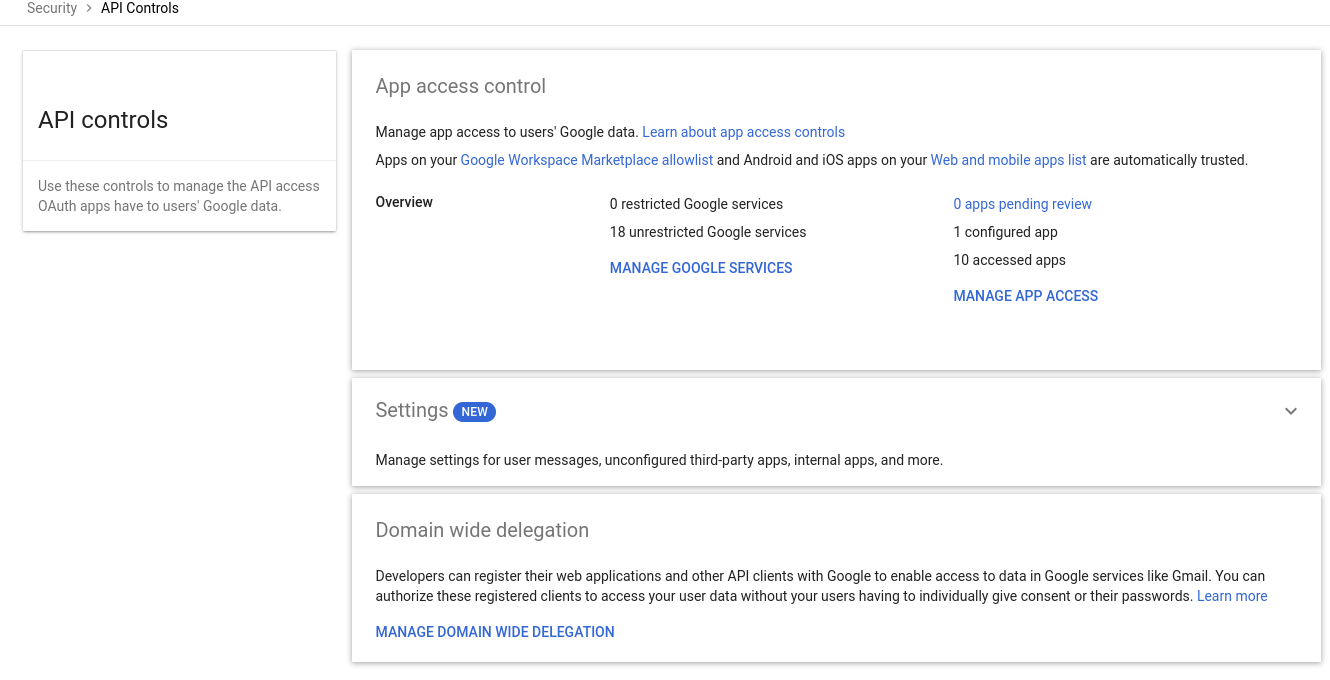
What the administrator sees is Google's error, not Fluency's:
admin_policy_enforced
which Google defines as "The Google Account is unable to authorize one or more scopes requested due to the policies of their Google Workspace administrator." Read literally, it means the account was not allowed to agree, not that anything is misconfigured in Fluency, and not that the administrator lacks a privilege.
There are two ways forward and they are genuinely different decisions. Either a super admin allowlists Fluency's OAuth client under Manage App Access, which is a policy exception your security team has to be willing to make; or you use Google Workspace (Service Account), where the client is one you build inside your own Google Cloud project and no third-party app access is involved at all. Organisations that maintain this restriction on purpose usually want the second.
Part 1: Google Workspace
1. Choose the administrator who will approve the grant
This route has no permission checkboxes. The grant Google issues carries the scopes Fluency requests, and it acts as the administrator who approved it, so the only decision here is which account that is, and it is a decision with consequences that outlast the install.
Two failure modes follow from an OAuth grant being tied to a user, and neither announces its cause:
- Narrow that administrator's role and collection stops. The grant can only read what the account can read. Remove the Reports privilege from their role and the API begins refusing calls, while the grant itself stays perfectly valid, so it reads as a Fluency fault.
- Deactivate or delete that administrator and the grant dies with them. An ordinary offboarding takes the integration down on the day the account is disabled, and the symptom is an authentication error weeks of tickets away from the leaving-date change that caused it.
Use a dedicated administrator account rather than a person's own, for the same reason you would anywhere else: so the integration's lifetime is not tied to somebody's employment. Give it a role carrying the Reports privilege, exclude it from the offboarding process, and record what it is for. Google's own token rules add a third reason to keep it in service: a refresh token stops working when "The refresh token has not been used for six months", though a healthy poll makes that theoretical.
If your organisation will not create a service-style user in Workspace, that is a fair reason to prefer the service-account route, where the credential is owned by a Google Cloud project instead of a person. Note the limit of that argument, though: that route still names an administrator to impersonate, so the account-lifetime problem moves rather than disappearing.
2. Confirm the account can see the data
Sign in to the Admin console as that account and open Reporting → Audit and investigation → Login log events. If events are listed, the account holds what the API needs. If the section is missing or empty of everything, its role is short of the Reports privilege, and no amount of consenting will fix that.
Every super administrator carries Reports. A custom role needs it granted explicitly, under Account → Admin roles → the role → Privileges:
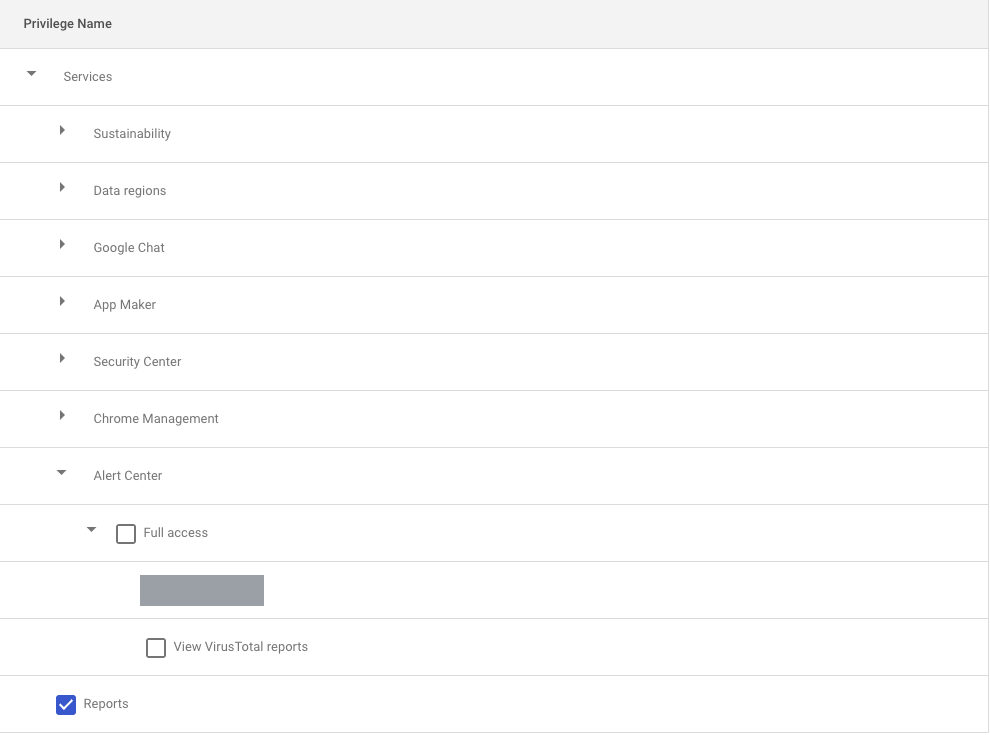
The directory read needs two more privileges on the same screen, under Admin API privileges: Users → Read and Groups → Read. A super administrator has both. Without them the audit log still arrives, and users and groups do not.
The same privileges on the same screen govern the service-account route, where it is the impersonated account that needs them rather than the consenting one.
That is the whole of the Google-side preparation for this route. Everything else happens during the install.
Part 2: Fluency
Install the Application
- v2 interface
- Classic v1 interface
In the navigation rail, open Applications and click Install Application, then choose Google Workspace (OAuth) from the Office Software (SaaS) and IAM category of the Application Catalog.
Go to Platform → Applications → Install Application From Template and choose Google Workspace (OAuth) from the Office Software (SaaS) and IAM category.
| Parameter | Notes |
|---|---|
| admin email address | The administrator from step 1. This is who Google will prompt, so it has to be an account someone can sign in as right now. |
| datalake | Pre-filled managed. |
| datalake index name | Pre-filled GSuite, the same default the service-account template ships. Two applications writing to the same index name in the same lake will collide, and the second one aborts. |
- v2 interface
- Classic v1 interface
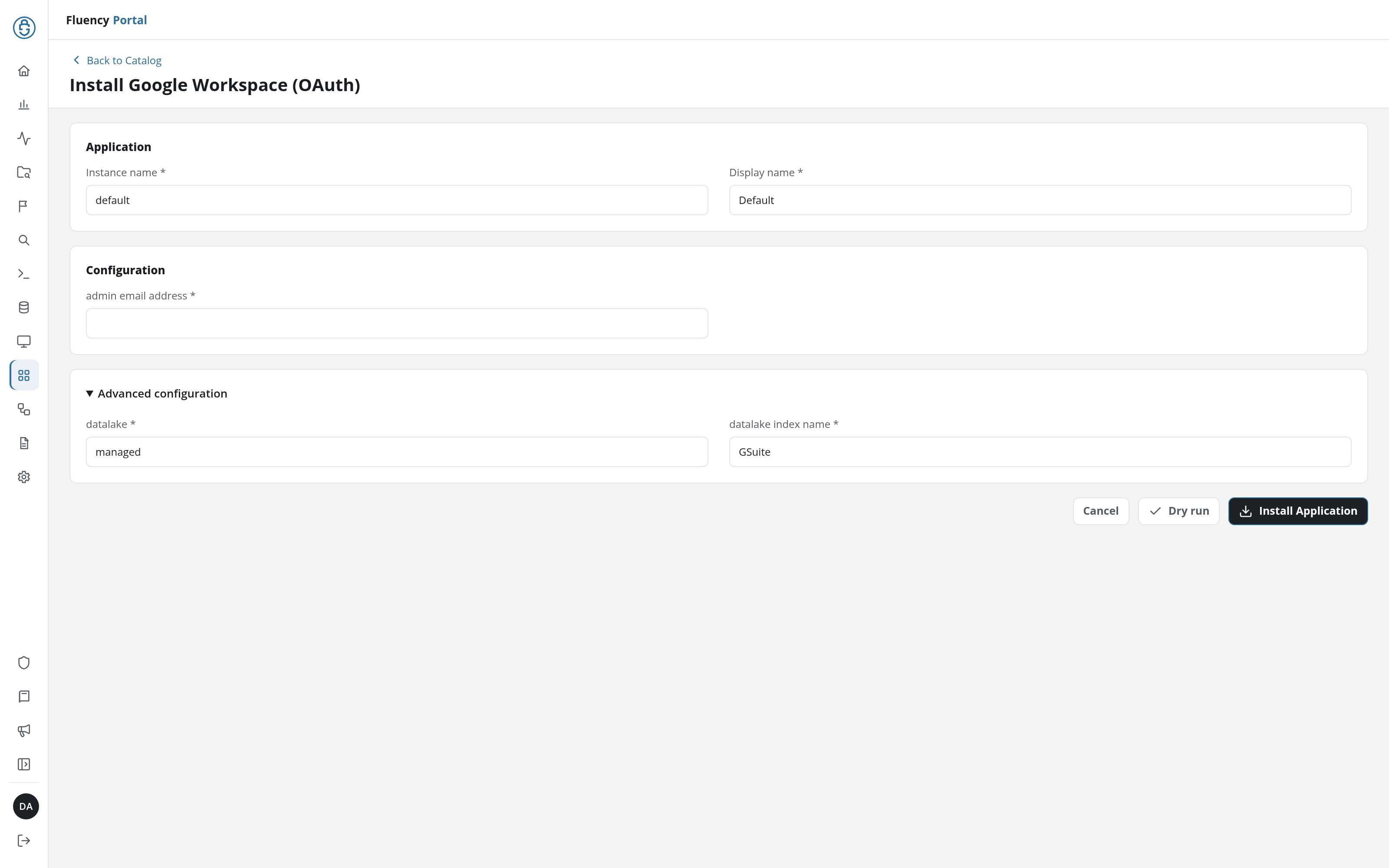
Click Install Application. The Applications page opens with the notice Default is launching., and the new application is listed with an amber Waiting for consent badge until the administrator approves the grant. Its details page lists Sent invitation under Actions.
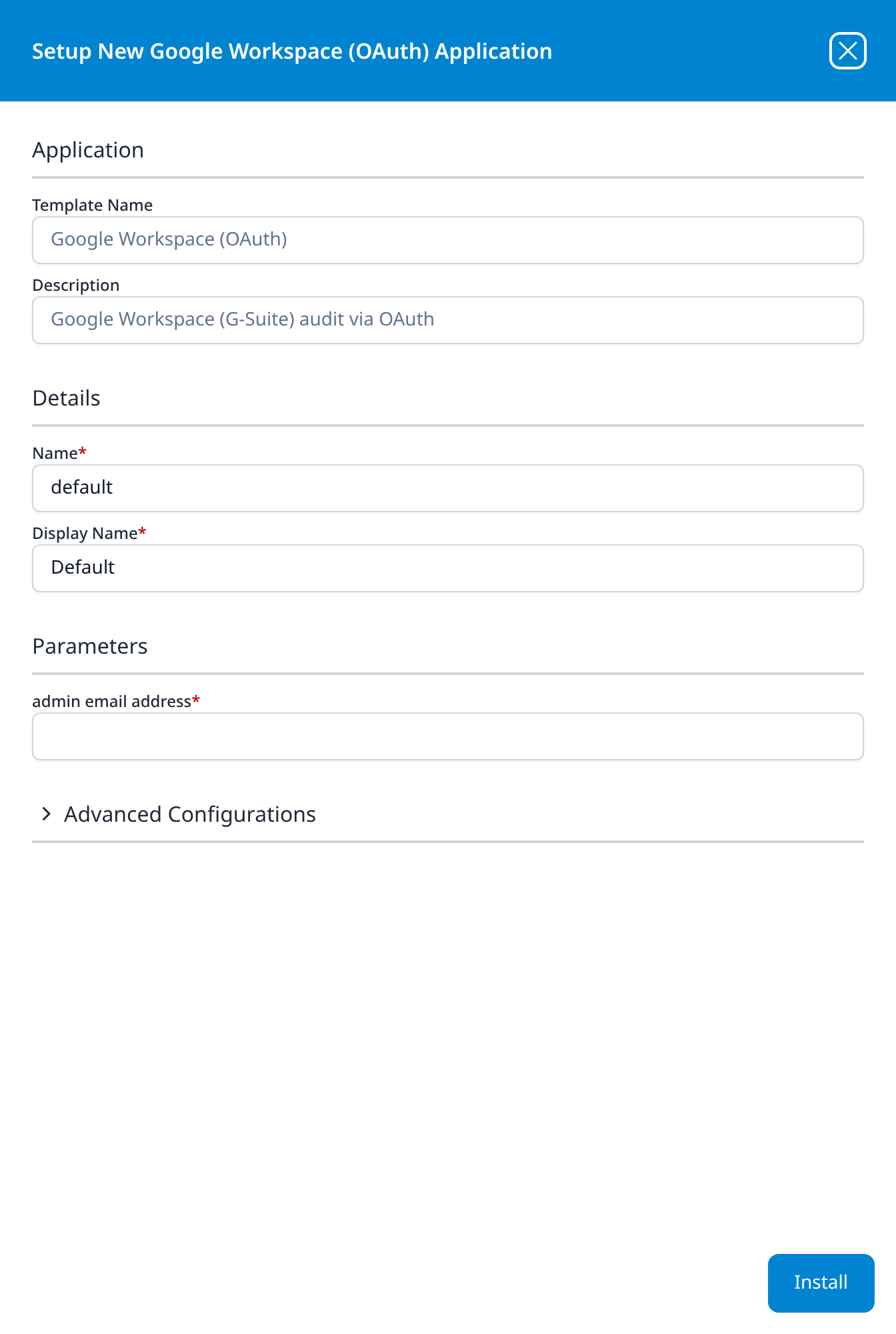
Press Install. The application then appears in the Installed Applications view, where its badge reads Running once the pipeline is up.
The Configuration section (v1: Parameters) asks only for the administrator's address, which is the whole of the credential side of this template. The destination sits below it in the collapsed Advanced configuration section (v1: the Advanced Configurations row): datalake, pre-filled managed, and datalake index name, pre-filled GSuite.
Open it if you need to change either. It is the escape hatch for the collision with a Google Workspace (Service Account) install, which ships the same GSuite default: at the defaults, the second install aborts on a name clash that has nothing obviously to do with Google.
Running both permanently still makes little sense (the two routes fetch identical audit events, so you would be paying twice for one feed), but if you are trying the other route before committing to it, changing the index name is the way to do it without uninstalling the first.
Approve the grant in Google
The install hands off to Google, and the named administrator completes it there. Three screens follow, in order.
Choose the account. Google asks which account is granting access. It must be the administrator named on the form.
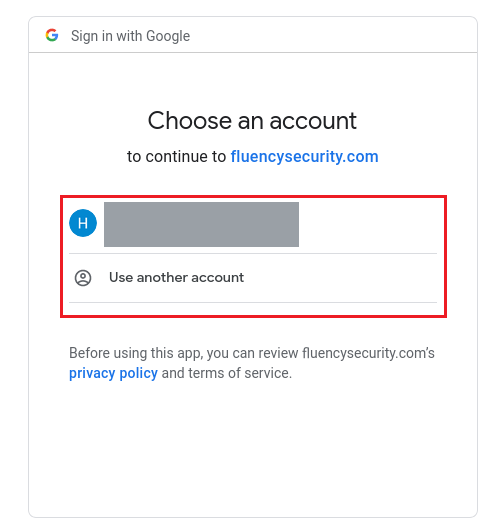
Approve the scopes. The consent screen names exactly what Fluency is asking for, and it is worth reading rather than clicking past: this screen is the entire permission model of the OAuth route.
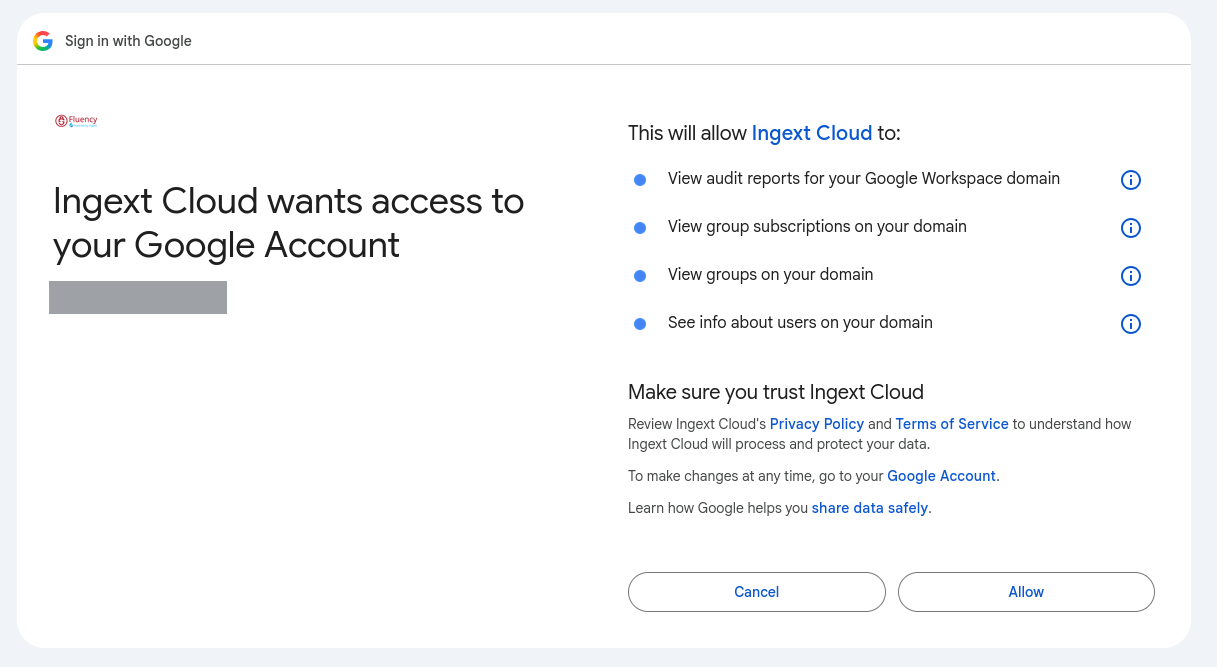
The screen names the application Ingext Cloud, which is Fluency's OAuth client. It asks for four permissions, all read-only:
| Consent screen wording | Scope | What it buys |
|---|---|---|
| View audit reports for your Google Workspace domain | admin.reports.audit.readonly | The activity log: every audit stream. This is the one the integration exists for. |
| View group subscriptions on your domain | admin.directory.group.member.readonly | Read-only over group memberships. |
| View groups on your domain | admin.directory.group.readonly | Read-only over groups. |
| See info about users on your domain | admin.directory.user.readonly | Read-only over the user directory. |
Nothing on this screen grants read access to mail, files or calendars, and nothing on it grants write access of any kind. If the screen you are looking at asks for more than these four, stop and raise a support ticket rather than approving it.
Press Allow. Google returns the administrator to Fluency.
Depending on the verification state of Fluency's OAuth client, an interstitial may appear before the consent screen:
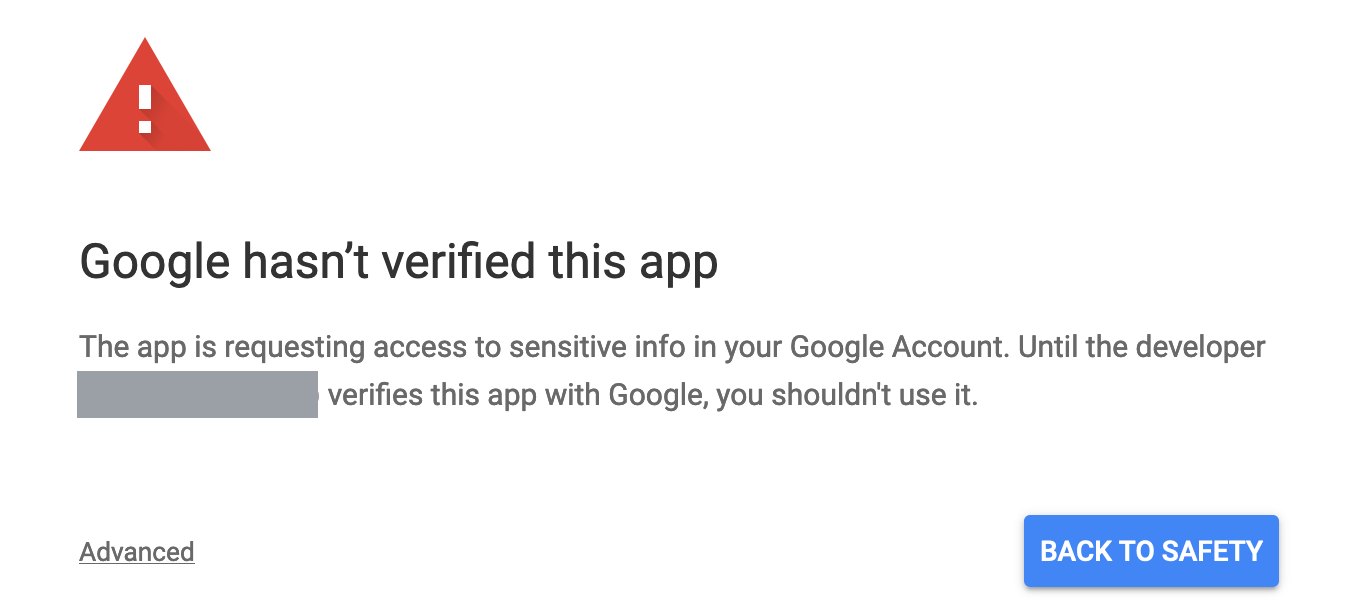
Do not click Advanced and continue without checking first: it is the same click an administrator would make on a phishing page, and the screen exists precisely to interrupt it.
What it means: Google has not completed its verification review of the OAuth client for the scopes being requested. What it does not mean is that anything is wrong with the request, or that the scopes are broader than the ones listed above; the consent screen behind it is unchanged either way.
Before continuing, check the developer address the interstitial names. If it does not belong to Fluency, do not continue, and send the screen to Fluency support by raising a support ticket. If it does, the decision is your organisation's to make, and preferring the service-account route is a legitimate answer to it: there the OAuth client is one you created in your own project, so Google's verification status of a third party never enters into it.
Whether this screen appears at all depends on the client's current verification state with Google. If you do not see it, nothing is missing.
Confirm it is running
Give the first poll a few minutes, then search the GSuite index. A healthy install shows login activity almost immediately on any tenant with people in it, because Google reports sign-ins in "Near real time (couple of minutes)".
Two checks are worth more than the index count on its own, because an empty index is ambiguous on a quiet tenant and unambiguous on a broken grant:
- The grant is listed in Google. As the consenting administrator, open https://myaccount.google.com/permissions. Ingext Cloud should be listed with the four permissions from the consent screen. If it is not there, the grant was never completed or has been revoked, whatever the application badge says.
- Fluency's own reads show up in the log it is reading. Once collection is running, the
tokenstream records the grant itself, and administrator activity inadmincontinues to flow. Note the lag before concluding anything from the absence of either:tokenis the slowest stream Google publishes a figure for.
See Confirm data is arriving for the general procedure.
Maintenance
Rotating the credential
There is no credential to rotate. An OAuth grant has no expiry to renew and no secret you hold, which is most of this route's appeal.
What does need attention is the account the grant belongs to. Moving the integration to a different administrator is not an edit: template parameters are read-only after install, so it means uninstalling the application, installing it again with the new address, and having that person approve the grant. Do it in that order. To uninstall, click Uninstall at the top right of the application's details page (v1: the red Uninstall button at the foot of its details panel on Platform → Applications). Revoking the old grant first leaves the integration collecting nothing in between.
Removing the integration
- Uninstall the application, from the Uninstall button at the top right of its details page (v1: the red Uninstall button at the foot of its details panel on Platform → Applications).
- Revoke the grant in Google. Either the consenting administrator removes it at https://myaccount.google.com/permissions, or a super admin removes it for the whole domain under Security → Access and data control → API controls → Manage App Access.
Step 2 is not optional housekeeping. Uninstalling in Fluency stops the polling; it does not withdraw Google's permission, and a grant nobody is using is exactly the kind of thing an access review is supposed to find.
Troubleshooting
| Symptom | Likely cause | Fix |
|---|---|---|
Consent fails with admin_policy_enforced | Your organisation restricts third-party app access | Allowlist the client under Manage App Access, or use the service-account route. See Before you begin. |
| Google shows Google hasn't verified this app | Fluency's OAuth client is not verified for these scopes | Check the developer address before continuing; see the admonition above. |
| Consent completes, but nothing is collected | The consenting account's role lacks the Reports privilege | The grant cannot exceed the account. Confirm the account can open Reporting → Audit and investigation, then reinstall. |
| Collection worked, then stopped with no configuration change | The consenting administrator was deactivated, or their role was narrowed | Both kill the grant. Reinstall against a dedicated administrator account; see step 1. |
| Collection stopped, and the account is fine | Somebody revoked the grant | Check https://myaccount.google.com/permissions and Manage App Access. Revocation from either console is silent on the Fluency side. |
| Audit events arrive, but users and groups do not | The grant was approved when the consent screen asked for two permissions (audit and usage reports) and carries no directory access. Or the consenting account lacks Users → Read and Groups → Read | Check the permissions listed for Ingext Cloud at https://myaccount.google.com/permissions. If the directory permissions are missing, uninstall and reinstall so the administrator approves the four-permission screen. Otherwise see step 2. |
| Events are in the Admin console but not in the lake | Stream lag | Check the lag table. token runs hours behind; Calendar and Groups can. Re-check before treating it as loss. |
| A backfill returned far less than the range requested | The 180-day / 6-month ceiling | Requests past the window succeed and return only what is retained. The rest is gone: Google does not keep it. |
| Drive or Keep activity is empty, everything else works | Edition gate | Google restricts both reports to Business and Enterprise. Nothing to fix. |
| Duplicate events in the lake | Expected of a polled feed | Deduplicate on id.uniqueQualifier with id.time; see Under the hood. |
| Install fails on an index-name clash | A Google Workspace (service account) application already holds GSuite | The two templates share a default index name. Reinstall with a different datalake index name under Advanced configuration, or uninstall the other one. |
Requests intermittently return 503 | Rate limit | Google returns 503 rather than 429 for quota. See Under the hood. |
Data reference
What the audit log looks like once it lands, for searches and detection rules written against it.
The audit streams
Google exposes the audit log as one endpoint per product area. Each request names a single applicationName, so every stream is a separate poll:
GET https://admin.googleapis.com/admin/reports/v1/activity/users/all/applications/{applicationName}
The streams that matter for security work:
applicationName | Contents |
|---|---|
login | Sign-in successes and failures, the challenge type, the IP address, and suspicious-login verdicts. |
admin | Every action taken in the Admin console: role grants, setting changes, user creation and suspension. |
token | OAuth grants and revocations: which third-party application a user authorised, and to which scopes. |
drive | File create, view, download, share and permission-change events. Business and Enterprise editions only. |
user_accounts | Self-service account activity: password changes, recovery-option edits, 2-step verification changes. |
groups / groups_enterprise | Group creation, membership and posting-policy changes. |
mobile | Device enrolment, compliance and wipe events. |
saml | SAML sign-ins where Workspace is the identity provider. |
rules | Firing of Workspace alerting and DLP rules. |
context_aware_access | Access denied by a Context-Aware Access rule. |
Google publishes roughly forty applicationName values in total, including chrome, meet, calendar, chat, vault, classroom and gemini_in_workspace_apps. The applicationName enumeration is the current list.
The directory
Alongside the audit log, the grant reads the directory through the Directory API on the same host, read-only over users, groups and group memberships. That is what the three directory permissions on the consent screen are for.
Which of these streams the template polls is not on the form
The install form takes an administrator's address and nothing else. There is no stream selector, so the choice of applicationName values is made inside the template rather than by you. The table above is what the Google Workspace audit log contains, not a list of what lands in your lake. Gmail message events (the gmail application) are not among the streams collected. To see what your install collects, open the installed application's details and read its Actions list.
Google publishes a lag figure per stream, and some of them are hours
Audit events do not appear the instant they happen. Google publishes a per-stream lag table, and the spread across it is wide:
| Stream | Google's stated lag |
|---|---|
| Admin, Login, Drive, Gmail, SAML, Devices | "Near real time (couple of minutes)" |
| Rules | "Near real time" |
| User account events | "Tens of minutes" |
| Calendar, Groups | "Tens of minutes (can also go up to a couple of hours)" |
| Token | "A couple of hours" |
| OAuth, Cloud Search | "Up to a few hours" |
Google's own warning is that this is a floor and not a guarantee: "There's a small chance that reports and log event data for some events will be delayed beyond the following specified times." And, in the same sentence pair, the harder admission: "In rare cases, events might not be reported."
The practical consequence is that a Fluency search and the Admin console will disagree for a while, in both directions, and the disagreement is largest exactly where it is most annoying: token, the stream that records a user handing an OAuth grant to an outside application. Do not treat a fresh gap as a fault. See Under the hood for the fields to deduplicate and sort on.
Six months, and the API will not tell you when you have asked for more
Google retains "Audit data retrieved using the API" for 6 months, and states that "Administrators cannot delete log event data or change the length of time that the data is available for." The API applies a matching ceiling of its own: "If the endTime is not specified, the report returns all activities from the startTime until the current time or the most recent 180 days if the startTime is more than 180 days in the past."
A request reaching further back therefore succeeds and returns less data than was asked for, rather than failing. An outage longer than six months is unrecoverable, and nothing in the response says so.
Under the hood
Engineering reference: the Admin SDK Reports API
What this section describes
Everything below describes the Admin SDK Reports API.
The settings that belong to your own install rather than to the API (which applicationName streams it polls, its cadence, what the GSuites resource group populates and the field names events land under in the lake) are recorded on the install itself: open the installed application's details and read its Actions list.
Authentication
OAuth 2.0 authorisation-code grant. The administrator's approval yields a refresh token, which Fluency exchanges for short-lived access tokens. Four scopes are requested, and the consent screen above shows all four:
https://www.googleapis.com/auth/admin.reports.audit.readonly            View audit reports for your Google Workspace domain
https://www.googleapis.com/auth/admin.directory.group.member.readonly   View group subscriptions on your domain
https://www.googleapis.com/auth/admin.directory.group.readonly          View groups on your domain
https://www.googleapis.com/auth/admin.directory.user.readonly           See info about users on your domain
Google lists the conditions under which a refresh token stops working; the ones that apply here are "The user has revoked your app's access", "The refresh token has not been used for six months", and the case where "an admin set any of the services requested in your app's scopes to Restricted". When a refresh fails, Google's error is invalid_grant, described as "the token may have expired or has been invalidated": one string covering revocation, deactivation and policy change alike, so diagnose by what changed rather than by what the error says.
The endpoint
GET https://admin.googleapis.com/admin/reports/v1/activity/users/all/applications/{applicationName}
| Parameter | Behaviour |
|---|---|
userKey | all for the whole domain, or one user. Google notes it "Must not be a deleted user"; a deleted user has to be addressed by profile ID instead. |
applicationName | One per request. Collecting n streams means n independent polls. |
startTime / endTime | RFC 3339. startTime must precede endTime and the current time, "or the API returns an error". |
maxResults | 1–1000, default 1000. |
pageToken | From nextPageToken in the previous response. |
filters, eventName, orgUnitID, groupIdFilter, actorIpAddress | Server-side narrowing. Each of these makes the request count against a tighter quota; see below. |
Two boundary behaviours are worth knowing because neither produces an error. Without endTime, the report "returns all activities from the startTime until the current time or the most recent 180 days if the startTime is more than 180 days in the past". And Gmail is special-cased: "For Gmail requests, startTime and endTime must be provided and the difference must not be greater than 30 days", so gmail cannot be collected with the same call shape as everything else.
Deduplicating and ordering
The Reports API filters on event occurrence time, not on when Google committed the record, and the lag between the two is the whole of the ordering problem. An event that occurred at 09:00 and was committed at 11:00 is invisible to a poll made at 10:00 and still carries its 09:00 timestamp when it appears.
The identity fields are on id:
| Field | Google's description |
|---|---|
id.time | "Time of occurrence of the activity. This is in UNIX epoch time in seconds." |
id.uniqueQualifier | "Unique qualifier if multiple events have the same time." |
id.applicationName | Which stream the record came from. |
id.customerId | "The unique identifier for a Google Workspace account." |
Sort on id.time and deduplicate on id.uniqueQualifier together with id.time: the qualifier exists because id.time has only second resolution, so neither field is a key on its own. A collector that overlaps its polling windows to catch late arrivals will re-fetch events it already has, which is the correct trade and the reason a dedup key is needed at all.
On the actor: actor.email "May be absent if there is no email address associated with the actor", and actor.profileId "may be the number 105250506097979753968 which acts as a placeholder ID": a literal magic value, not a real account, and worth excluding from any per-user aggregation.
Rate limits
Google's published limits for this API are "2,400 queries per minute per user per Google Cloud project", with a much tighter secondary ceiling: "The activities.list API has an additional limit of 250 filter queries per minute (15,000 filter queries per hour)." Google defines the term as it goes: "A filter query is an API request that contains at least one of the following query parameters: userKey, actorIpAddress, eventName, filters, orgUnitID, groupIdFilter".
Read literally that catches everything, since userKey appears in every call to this endpoint, which would make 250/minute the real ceiling rather than 2,400. Google does not say which reading is intended, so plan against the lower number.
When a limit is hit, "the server returns an HTTP 503 status code", not the 429 most APIs use. A throttled collector therefore looks like a Google outage in any log that groups by status class, which is worth knowing before you go looking for one.
Retention and completeness
Retention for "Audit data retrieved using the API" is 6 months, and "For reports and log events data not mentioned here, the retention time is generally 6 months." Two of Google's other statements about its own log belong on the record: "There's a small chance that reports and log event data for some events will be delayed beyond the following specified times", and "In rare cases, events might not be reported."
Treat the second one the way you would any self-reported log: alert on what is present, and do not conclude from an absence alone.
References
- Reports API overview: what the API is and what it serves
activities.listreference: every parameter, and the fullapplicationNameenumeration- Directory API
users.listreference: the endpoint the three directory scopes reach - Data retention and lag times: the per-stream lag and retention tables quoted above
- Usage limits: quotas and the 503 response
- Control which apps access Google Workspace data: the API controls that can block this route
- Using OAuth 2.0 to access Google APIs: refresh-token lifetime and revocation
Fluency
- Google Workspace (OAuth) install form (v1: Install Application From Template)
- Confirm data is arriving
Related
- Google Workspace (Service Account): the same audit integration, built on a client in your own Google Cloud project
- Office 365 Audit: the equivalent audit feed for the other major productivity suite
- Okta: another integration whose credential inherits an administrator's permissions rather than carrying its own
- Integration Matrix: which ingress method each product supports