Freshservice
Freshservice's Audit Log is the record of who changed the service desk itself. In Freshservice's words it "keeps track of all the changes that take place under the Admin section of your service desk": agents created, edited, promoted or deactivated; roles and groups changed; workflows, SLA and OLA policies rewritten; change lifecycles edited; account and security settings altered. For an attacker who has reached an IT administrator's account, the service desk is where access gets granted and approval paths get bent, and this log is where that shows up. Fluency collects it by polling Freshservice's List Audit Logs API every five minutes.
Authentication is an API key sent as the user name of an HTTP basic-auth header, with X as the password. There is no client ID, no scope and no consent screen. The key has no permissions of its own: it carries the role of the Freshservice user it belongs to, so the decision that matters is whose key it is.
The setup has two halves:
- In Freshservice: create an integration user, give it an admin role that can read the Audit Log, and copy its API key and your service-desk domain.
- In Fluency: install the Freshservice application template and paste those two values in.
What arrives
| Stream | Endpoint | Contents |
|---|---|---|
| Audit log | POST /api/v2/audit_logs | One record per administrative change, in every module the account records, from every workspace the key's role can see. |
There is one feed and no resource roster. Unlike most templates, Freshservice takes no datalake or datalake index name parameter: the destination is fixed by the template rather than chosen on the form, so there is nothing here to collide with another application. To see where the data actually lands, open the installed application's details panel with the blue eye button and read its Actions list, which records every object the install created.
What one record holds
Freshservice's own example entry, as the API returns it:
{
  "time": "2026-09-20T11:42:03Z",
  "what_changed": "Agent",
  "name": "John",
  "action": "Updated",
  "performed_by": "Sam",
  "details": { "changes": { "last_name": ["VVV", "John"] } },
  "ip_address": "127.0.0.1",
  "workspace": "IT Services"
}
Each entry is stored whole under @freshserviceAudit, with a fixed set of fields added around it:
| Field | Value |
|---|---|
@freshserviceAudit | The audit-log entry, verbatim |
@event_type | freshserviceAudit |
@eventType | FreshserviceAuditLog |
@type | event |
@parser | fpl-plugin |
@timestamp | The entry's own time: when the change was made, not when it was collected |
Inside the entry, the fields that carry the weight in a detection are these. The descriptions in quotes are Freshservice's.
| Field | Meaning |
|---|---|
time | "Timestamp when the change occurred." |
what_changed | The module or object type, "such as Agent, Ticket, or Workflow." |
name | The record that was changed. |
action | "such as Created, Updated, or Deleted." |
performed_by | The actor's display name, not an ID and not an email address, so two people with the same name are indistinguishable here. Freshservice adds that it "includes assumed-by or support-access context when applicable", which is how a change made by an administrator acting as someone else, or by Freshworks support, is told apart. |
details.changes | One key per field changed, each holding [old_value, new_value]. This is where a role going from agent to admin is visible. |
ip_address | The actor's address, "Masked as System for integration users", so changes made by any automation running as an integration user carry no address. |
workspace | Present only on accounts running several workspaces. |
The API's module filter names the categories Freshservice records: "Supported values include account, agent, group, change_field, change_lifecycle, sandbox_job, sla_policy, ola_policy, workflow, requester, and plans & billing." Fluency applies no filter, so every module the account records arrives, including any Freshservice adds later.
What does not arrive
Ticket, problem and change activity. The Audit Log covers the service desk's configuration, not the work done in it. Freshservice's own guidance is that "specific module events, including those for Tickets, Problems, or Changes, can be monitored under the respective Activity" section of each record, rather than in the Audit Log. A ticket being reassigned or a change request being approved is not in this feed.
Sign-ins. None of the module types above is a sign-in, and Freshservice describes the log as administrative and configuration changes. Agent and requester authentication is recorded by whichever identity provider signs them in (Okta, Entra ID or Google Workspace), and that is the feed to collect it from.
Rosters. The template collects the audit log only. It does not synchronise agents, requesters or assets.
History from before the install. The first poll reaches back 24 hours. Freshservice keeps the log for six months ("Across all subscription plans, Freshservice retains audit log data for a duration of 6 months"), but nothing older than the day before installation is collected.
Freshservice API keys have no permission screen. A key is issued to a user and can do exactly what that user's roles allow, live: change the roles and you have changed what Fluency can collect, without touching Fluency. Two consequences follow, and neither announces itself on the Fluency side.
- The owner's roles decide what the feed contains. Freshservice returns "logs for every workspace your role can access." A key whose role covers one workspace collects that workspace's changes and silently omits the rest, with
200 OKon every call. That is why step 3 asks for an account-wide role. - Deactivate the owner and the key stops working. For an integration user Freshservice says so directly ("Any apps or automations using this Integration user's API key will stop working"), and an agent's key goes the same way when the agent leaves.
This is why step 1 is about choosing an account rather than ticking boxes. It is the only permission decision this integration has.
Before you begin
| Requirement | Detail |
|---|---|
| The Audit Log feature | Freshservice's API reference: "Audit Logs are available on the Forest plan and above, or as an add-on. Accounts without the audit log feature receive a 403 response with the code require_feature." On the current price list that is the Enterprise plan. The verify call answers this in one request. |
| An administrator who can manage users and roles | To create the integration user in step 2 and give it a role in step 3. |
| A free integration-user slot | Freshservice allows 5 on Starter and Growth and 20 on Pro and Enterprise. Integration users are not available to MSP accounts; see the alternative. |
| Your service-desk domain | yourcompany.freshservice.com: not a custom domain, and not the Freshworks sign-in address. Step 5. |
| Outbound reach from Fluency to Freshservice | The collector calls https://<your domain>/api/v2/audit_logs from Fluency's infrastructure, not from your network. If the account restricts access by IP address under Admin → Account Settings → Service Desk Security, take that into account when a key that works from your office is refused from Fluency. |
Part 1: Freshservice
1. Decide whose key it will be
Freshservice offers two kinds of account that can hold an API key, and for a collector the choice is not close.
An integration user is the recommendation. Freshservice built them for exactly this: "API-only accounts for connecting Freshservice with your external tools without using a human's login credentials." Three properties make them the right owner:
- No person to leave. Freshservice's own reason for them is to "protect integrations from breaking if an employee leaves." An integration user is deactivated only when somebody deactivates it.
- No sign-in. "Integration users cannot access the Freshservice web UI or mobile app", so the key is the only credential the account has, and there is no password or SSO session to compromise alongside it.
- No licence. They "don't count against your agent licenses."
A dedicated agent's key still works, and is the route for accounts that cannot create integration users. It is covered as an alternative after step 4.
2. Create the integration user
In Freshservice, open Admin and go to Global Settings → User Management → Integration Users. The same Global Settings page lists Audit Log under Account Settings, which is where the entries this integration collects can be viewed in the console.
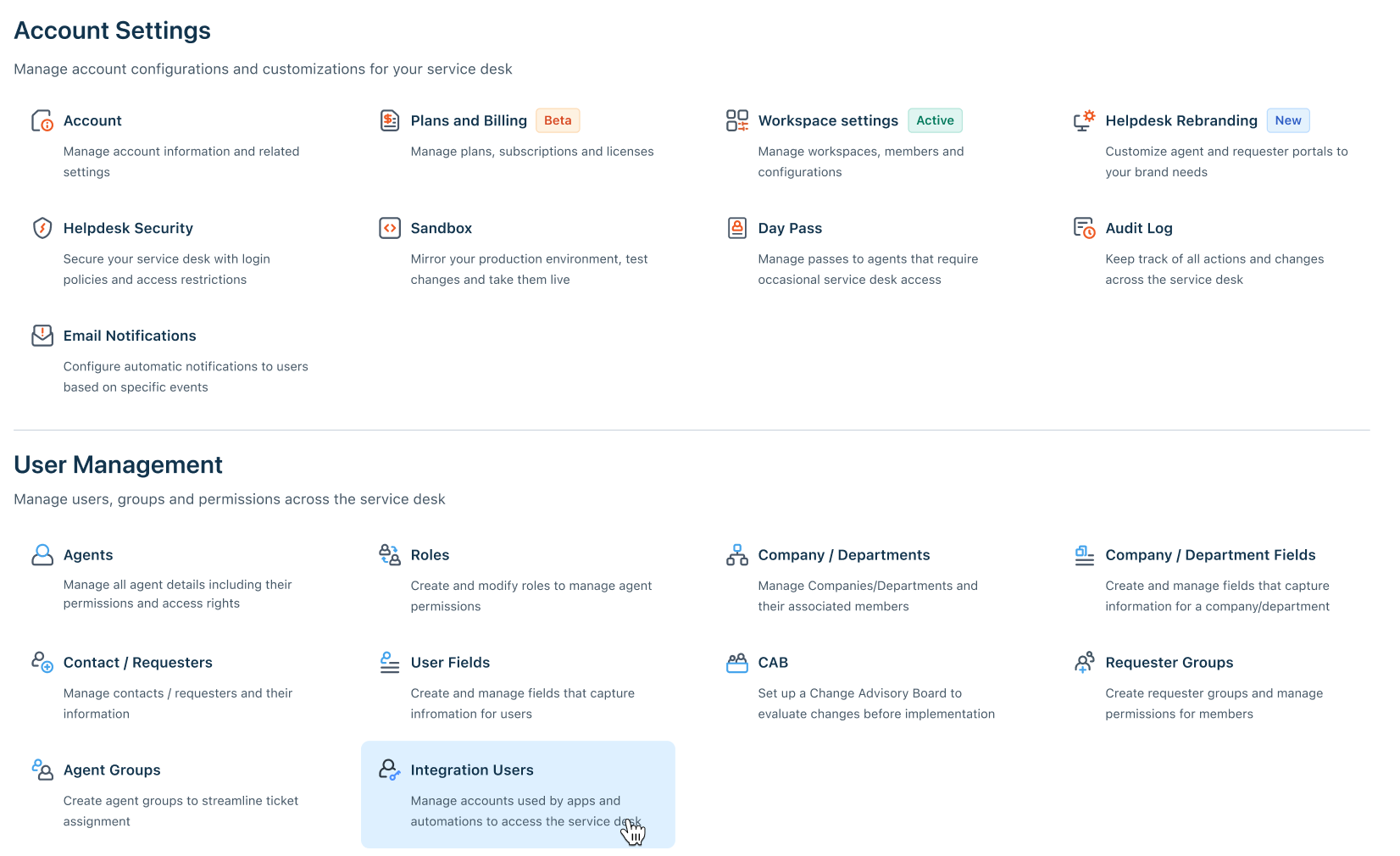
- Click Create integration user.
- In Display name, enter a name that identifies the consumer;
Fluency SIEMworks. This is the name that appears under Performed by in the Audit Log if the user ever changes anything, so make it recognisable. - Optionally fill in Description, then click Create.
Freshservice opens the new user's User details page.
3. Give it an account-wide admin role
On the User details page, on the Permissions tab, two sections assign roles. Use the second one.
- Workspace: "Assign workspaces where this System User can work on tickets and take actions." Leave this empty. Nothing in this integration touches tickets.
- Account-wide permissions: "Assign roles that give this System User access across all workspaces." Click Add admin role.
In the Account-Wide Permissions panel, choose a role that can view the Audit Log and click Save.
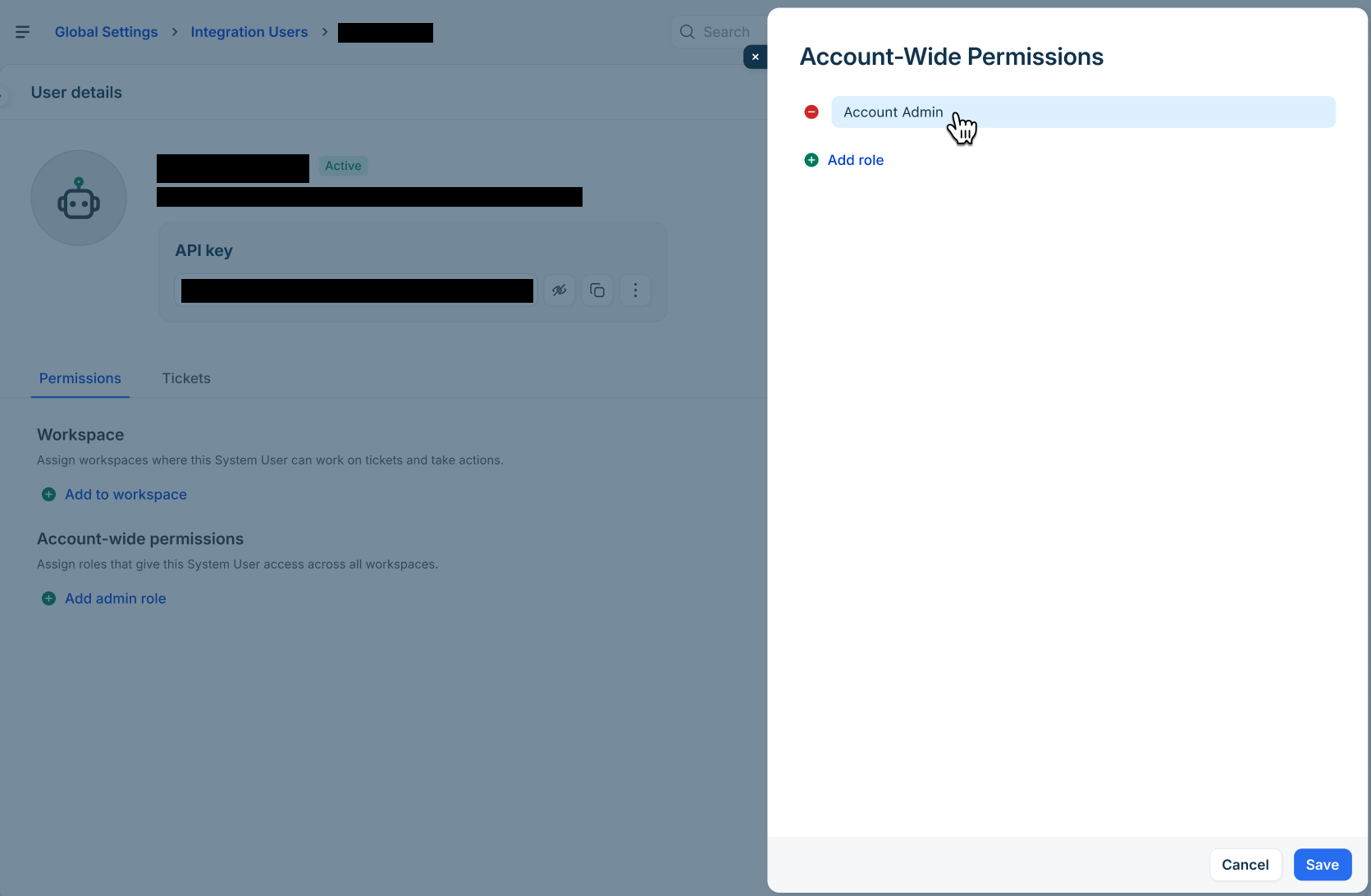
Freshservice is plain about who can read the log ("Audit logs are exclusively accessible to administrators"), and the permission that grants it is View Audit Logs. Account Admin, the role Freshservice's own integration-user walkthrough assigns, includes it.
Fluency only reads, but the key carries the whole role. A key holding Account Admin can create agents, change roles and rewrite workflows through the API, which makes it among the most valuable secrets in the service desk. If your account has a custom admin role that grants View Audit Logs without the rest, assign that instead; the verify call tells you within a minute whether it is enough.
Whatever the role, assign it under Account-wide permissions. A role held in a single workspace returns only that workspace's entries and never reports that anything is missing.
4. Copy the API key
The API key card sits at the top of the same User details page, masked. Click the Show (eye) icon to reveal it and the Copy icon beside it to copy it.
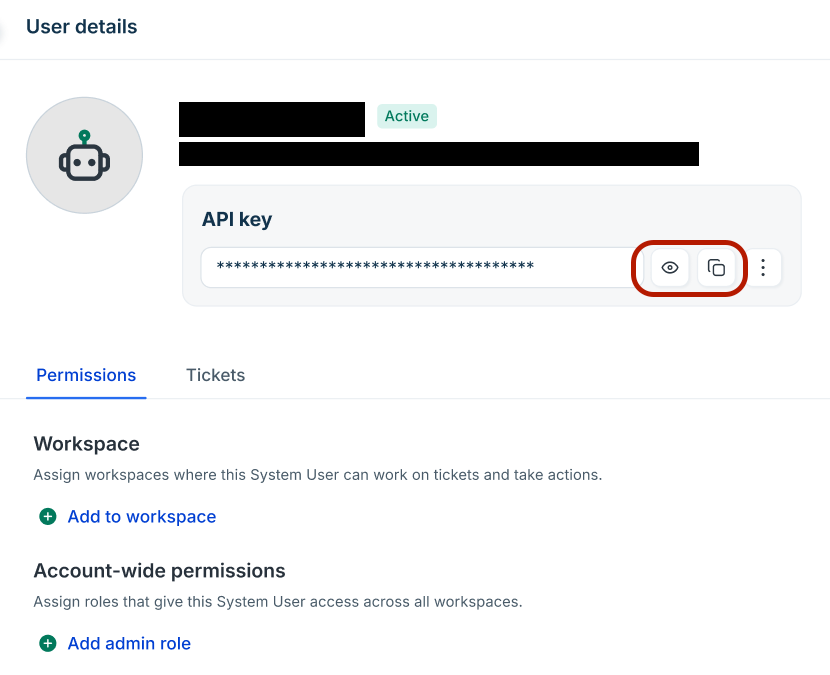
Unlike many vendors' credentials, this one is not shown once and lost: the card can be revealed again later. Keep it out of tickets and chat anyway: it is a standing admin credential with no expiry.
The card's ⋮ menu holds Reset API key. Freshservice's confirmation reads: "This will break any apps or automations using the current API key. You'll need to update them with the new key." That is the rotation procedure (see Maintenance), not a way to look at the key.
Alternative: a dedicated agent's API key
Use this only where integration users are not available: on an MSP account, or when every slot is taken.
- Create, or choose, a full-time agent used for nothing else, and give it an admin role that includes View Audit Logs, account-wide, as in step 3.
- Sign in to Freshservice as that agent.
- Click the profile picture in the top-right corner and open Profile settings. The key is on the right of the page under Your API key; Freshservice may ask you to complete a captcha before it shows it.
Three things are different from an integration user, and all of them argue for the integration user where you can have one:
- The agent consumes a paid agent licence.
- Do not use an occasional agent. Freshservice: "Using the API key of occasional agents in Workflow Automators, Integrations, Custom Apps, etc. will consume a day pass." The collector calls every five minutes, so it would spend a day pass every day.
- The key lives and dies with a person's account. Use an agent nobody signs in as and nobody will offboard.
5. Collect the service-desk domain
The domain is the host Fluency calls: yourcompany.freshservice.com. Take it from your browser's address bar while you are in the Freshservice agent portal, and record it as a bare host, with no https:// and no path.
Two other addresses look plausible and are wrong:
- A custom domain. If your service desk is published as, say,
help.example.com, that is not the API host. Freshservice's API reference: "Works only via Freshservice domains and not via custom CNAMEs." - The Freshworks sign-in address. Accounts that sign in through Freshworks may pass through a host ending in
myfreshworks.com. That is the sign-in service, not the service desk.
Every name under freshservice.com resolves, whether or not an account exists behind it. A typo therefore produces no DNS error: the request reaches Freshservice and comes back 404 with an empty HTML page (observed 28 October 2026). A 404 from the verify call below is always the domain, never the key.
Verify before you leave Freshservice
One call exercises the domain, the key, the role and the plan feature together. Run it from anywhere with network access.
DOMAIN="yourcompany.freshservice.com"   # step 5: bare host
KEY="..."                               # step 4

# The last 24 hours of audit log (GNU date; on macOS use: date -u -v-1d +%FT%TZ)
SINCE=$(date -u -d '-1 day' +%FT%TZ)
BEFORE=$(date -u -d '-5 min' +%FT%TZ)

curl -sS -u "$KEY:X" -X POST \
  -H "Content-Type: application/json" \
  -d "{\"since\":\"$SINCE\",\"before\":\"$BEFORE\"}" \
  -w '\nHTTP %{http_code}\n' \
  "https://$DOMAIN/api/v2/audit_logs"
| Response | What it means |
|---|---|
HTTP 200 with {"data":[…],"next_page_token":…} | Domain, key, role and plan are all good. An empty data array is fine on a quiet day; make an admin change and run it again if you want to see an entry. |
HTTP 401, or a body with invalid_credentials | The key is wrong or incomplete. Copy it again from step 4. |
HTTP 403 with require_feature | The account does not have the Audit Log feature. See Before you begin; this is a plan question, not a permission one. |
HTTP 403 with access_denied | Two different causes share this answer. Freshservice documents access_denied as "Insufficient privileges to perform this action": the key works but its role cannot read the Audit Log, so go back to step 3. But some accounts also return it for a key that is not accepted at all: mistyped, reset, or belonging to a deactivated user. Check the role first, then the key. |
HTTP 404, empty HTML body | The domain is wrong. See step 5. |
HTTP 400 | The time window was rejected: since more than 180 days ago, before in the future, or more than 90 days between them. Check the two dates the command printed. |
HTTP 429 | The account's API rate limit is spent for this minute; something else is using the budget. Wait a minute and retry; see Under the hood. |
curl: (6) or a TLS error | Not Freshservice at all: the domain has a scheme, a path or a typo in freshservice.com. |
Part 2: Fluency
Install the Application
Go to Platform → Applications → Install Application From Template and choose Freshservice from the Cloud-based Business Softwares category. Both parameters are required and both open empty.
| Parameter | Notes |
|---|---|
| Domain (w/o https) | The host from step 5, yourcompany.freshservice.com. The bare account name, yourcompany, is accepted too and completed to .freshservice.com; a leading https:// or a trailing / is stripped, but anything after the host is not. |
| API Key | The key copied in step 4. Masked as you type. |
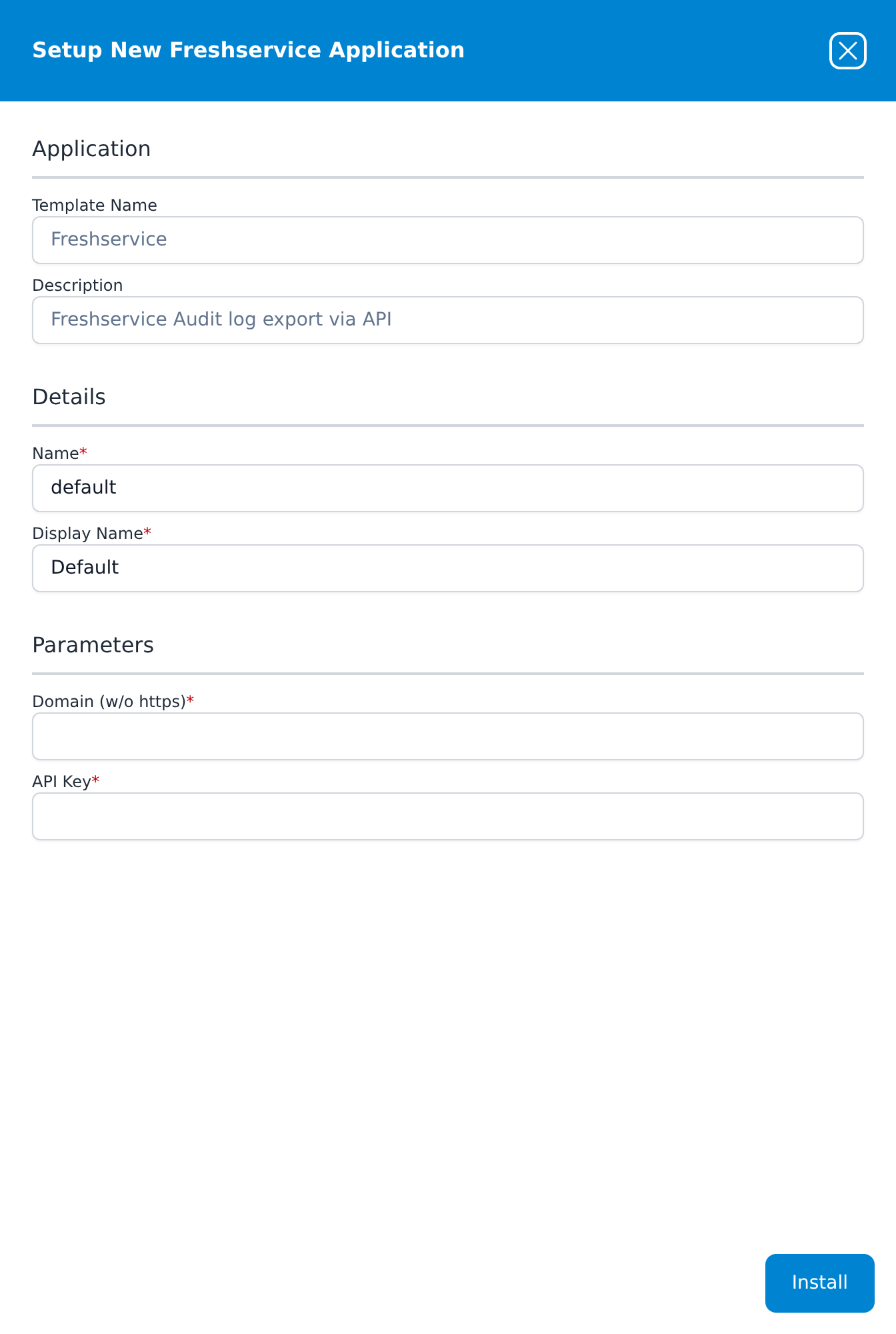
Leave Name and Display Name at default / Default unless you are installing a second instance (collecting from two Freshservice accounts, for example), in which case give each one a name you will recognise on the applications list.
There is no Advanced Configurations section, because the template has no lake or index to choose, and nothing on the form selects which modules to collect: the collector takes them all.
Press Install. The application then appears in the Installed Applications view, where its badge reads Running once the pipeline is up.
Confirm it is running
A Running badge means the pipeline started; it does not mean Freshservice accepted the key. And the Audit Log is a quiet feed (a small team may change nothing administrative for days), so an empty result proves nothing on its own. Check it the way that gives an unambiguous answer:
- The application is up. The card in Installed Applications reads
Freshservice: Defaultwith a Running badge. Expanding it draws a Plugin Data Source feeding a router and a Mgmt Queue destination. Aborted in red means the pipeline stopped on an error, and the details panel carries the message. - Make a change you can recognise. In Freshservice, edit something harmless in the Admin section, such as the description of an agent group, and save it. Confirm it is listed in Freshservice's own Admin → Global Settings → Account Settings → Audit Log.
- Find it in Fluency. Allow up to ten minutes: the collector polls every five minutes and reads up to two minutes behind the clock. Look for a record whose
@event_typeisfreshserviceAuditand whose@freshserviceAudit.nameis the group you edited. The installed application's Actions list says where the pipeline writes.
If the change is in Freshservice's Audit Log and not in Fluency after fifteen minutes, run the verify call again with the key you installed. It separates a wrong key, a wrong role and a missing plan feature, which no view from the Fluency side can.
See Confirm data is arriving for the three platform-side checks: application health, ingress volume and storage-side queueing.
Maintenance
Rotating the key
Template parameters are read-only after install, so a new key means a new application. Reset API key invalidates the old key the moment it is confirmed, so do it in this order to keep the gap short:
- In Freshservice, open the integration user, use ⋮ → Reset API key, and copy the new key.
- In Fluency, uninstall the Freshservice application and install it again with the same domain and the new key.
A fresh installation's first poll reaches back 24 hours, so a gap of less than a day is filled automatically. The same reach means entries the previous installation already collected in those 24 hours arrive a second time. Audit entries carry no ID of their own; deduplicate on time, what_changed, name, action and performed_by together.
If the integration user is ever edited (a role added or removed), the key's reach changes with it, immediately and without a reinstall.
Outages
The collector keeps a checkpoint and catches up from it: after an outage it reads forward a day at a time, up to 30 days per poll, until it is current. Freshservice serves the last 180 days through this API, so an outage shorter than that loses nothing. Beyond 180 days, the entries older than the limit cannot be collected; the collector moves its checkpoint forward and reports a Freshservice Audit Log Warning naming the period it could not reach.
Removing the integration
- Uninstall the Freshservice application in Fluency, so nothing is polling.
- In Freshservice, deactivate the integration user under Global Settings → User Management → Integration Users, or delete it. Freshservice's warning on deactivation is that "any apps or automations using this Integration user's API key will stop working"; a deactivated user can be restored from the Deactivated tab.
Troubleshooting
| Symptom | Likely cause | Fix |
|---|---|---|
| Running, nothing arrives, Freshservice's Audit Log has entries | Key, role or plan | Run the verify call; its response table names the step to revisit. |
Error mentioning require_feature | The account has no Audit Log feature | A plan or add-on question for your Freshservice account owner. No key or role fixes it. |
Error mentioning access_denied, described as the key working but unable to read audit logs | The user's role lacks View Audit Logs | Add an admin role that has it, account-wide (step 3). No reinstall: it takes effect on the next poll, which after repeated failures can be up to an hour away. |
Error mentioning access_denied, described as the key not being accepted at all | The key was reset, its user was deactivated, or the account blocks the collector's address; or the role is wrong and the user also has no ticket access | The collector tells these apart by also calling the tickets endpoint, which an integration user holding only an account-wide admin role may not be allowed to read. Run the verify call: if the key returns 200 from your network, check the role and any IP restriction under Service Desk Security before replacing the key. |
Error mentioning a 404 or the service-desk host | The domain is a custom domain, a myfreshworks.com address or a typo | Reinstall with yourcompany.freshservice.com (step 5). |
| Worked for months, then stopped with no change in Fluency | The integration user was deactivated, its key was reset, or its role was removed | Check the user under Integration Users. A reset key means a reinstall; a restored role does not. |
| Entries from one workspace never appear | The role is held in some workspaces, not account-wide | This is correct behaviour for that role: Freshservice returns "logs for every workspace your role can access." Assign the admin role under Account-wide permissions. |
Changes made by an automation show System instead of an address | Expected | Freshservice masks ip_address as System for every integration user. |
| Ticket, problem or change activity is missing | Not in this feed | Freshservice records those in each module's Activity, not in the Audit Log; see What does not arrive. |
| The same entry appears twice | A reinstall overlapping the previous installation's last 24 hours | Deduplicate on time, what_changed, name, action and performed_by. |
Errors mentioning 429 | The account-wide per-minute budget is spent, and it is shared with every other integration and script calling the account | The collector already retries 429 with Freshservice's Retry-After, and its own share is about one request every five minutes; look at the other consumers first. See Under the hood. |
Under the hood
Engineering reference: authentication, collection behaviour and output format
Template. Template ID Freshservice, display name Freshservice, filed under Cloud-based Business Softwares. The form's description reads Freshservice Audit log export via API; despite the word export, the collector does not use Freshservice's Audit Log Export API (POST /api/v2/audit_log/export), which schedules a CSV for delivery out of band rather than returning records. Two parameters, both required: domain and apiKey (sensitive). No datalake or index parameter. The install creates a plugin data source, a router, one pipe through the standard Plugin_Passthrough processor, and a data sink on the EventWatch management queue; the installed application's Actions list is the record of these on your own installation.
Authentication. HTTP basic auth on every request, with the API key as the user name and X as the password. Freshservice withdrew user-name-and-password basic auth for its API in June 2023; the key is the only form this template takes.
Endpoint. POST https://<domain>/api/v2/audit_logs, body {"since": …, "before": …, "next_page_token": …}, no filters. The response's next_page_token is followed until Freshservice returns null. Freshservice's limits on the window: since "cannot be more than 180 days in the past"; before "cannot be in the future, and the span from since to before cannot exceed 90 days." The equivalent OAuth scope is freshservice.audit_log.view; the template does not use OAuth.
Cadence and window. Every five minutes the collector requests the period from its checkpoint, less a five-minute overlap, up to two minutes before the current time. The two-minute lag keeps before out of the future and lets late entries land; the overlap re-reads the tail of the previous window to catch entries that landed later still. Because entries have no ID, the overlap is deduplicated by a hash of the whole entry, which is kept between polls. Long windows are split into 24-hour requests, at most 30 per poll, and the checkpoint advances after each one, so a failure part-way keeps the progress made.
First poll. With no checkpoint, the window starts 24 hours before the install.
Failures. Requests answered 429 or 5xx, and network errors, are retried up to five times with backoff, honouring Retry-After. A poll that fails outright is retried after 5, 10, 20, 40 and then 60 minutes. The error is reported as Freshservice Poll Error when it first occurs or changes, and again once a day while it persists. A 403 is followed by one probe of GET /api/v2/tickets?per_page=1 to tell a role problem (the probe succeeds) from a key the account does not accept (the probe is refused too).
Rate limits. Freshservice applies one per-minute budget to the whole account ("applied on an account wide basis irrespective of factors such as the number of agents or IP addresses used to make the calls") of 100 (Starter), 200 (Growth), 400 (Pro) or 500 (Enterprise) requests, raised by paid add-ons on Pro and Enterprise. "Even invalid requests will count towards the rate limit." The collector makes one request per page per poll, normally one a poll.
Output. One gzip-JSONL file per non-empty request window, one line per entry:
{
  "@freshserviceAudit": { "time": "2026-09-20T11:42:03Z", "what_changed": "Agent", "…": "…" },
  "@event_type": "freshserviceAudit",
  "@eventType": "FreshserviceAuditLog",
  "@customer": "<integration name>",
  "@timestamp": 1789904523000
}
@timestamp is the entry's time in epoch milliseconds. Plugin_Passthrough adds @type: event and @parser: fpl-plugin and otherwise passes the record unchanged.
References
Freshservice
- List Audit Logs: the endpoint, its window limits, filters and response fields
- Authentication and Rate limit: API keys, the API host, and the account-wide budget
- Integration users: creating one, assigning roles, viewing and resetting its API key
- Audit Log: what the log records, where to view it, and its six-month retention
- Occasional agents and day passes: why an occasional agent's key spends day passes
Fluency
Related
- Business Software integrations: the rest of this category
- Integration Matrix: which ingress method each product uses
- Okta: the same credential shape (a token that inherits its owner's role), resolved the same way with a dedicated account