Cisco ASA
Fluency collects the system log of a Cisco Secure Firewall ASA (Adaptive Security Appliance), which the ASA pushes to a Fluency syslog listener as each message is generated: connections built and torn down with their byte counts, address translations, packets denied by an access list, AAA authentications, and AnyConnect VPN sessions. Every ASA message carries a numeric message ID (%ASA-6-302013 is a TCP connection being built, at severity 6), so each kind of event has a stable name, which makes this feed unusually good material for detection: VPN logins from somewhere new, a host suddenly hitting a deny rule hundreds of times, a session teardown with an unusual byte count.
There is no credential. The decision that matters is the transport: over TCP or TLS, an ASA that cannot reach the listener stops new connections through the firewall unless logging permit-hostdown is set; see Before you begin.
The setup has two halves, joined by a destination: an address and a port, plus a CA certificate if the transport is TLS. Fluency issues the destination, so its half comes first:
- In Fluency: read the syslog destination, download the CA if you will use TLS, and install the Cisco ASA Syslog application, so the parser is in place before the first message arrives.
- On the ASA: trust the CA, point logging at the destination, choose what is sent, and save the configuration.
What arrives
| Stream | What it holds | Lands in |
|---|---|---|
| Connections and translations | TCP, UDP and ICMP connections built and torn down, with duration and bytes, and NAT translations. | The CiscoASA index |
| Access lists and denied packets | Packets denied by an access list or another check, and permitted flows whose access-list entry carries log. | The CiscoASA index |
| Authentication (AAA) | AAA and cut-through proxy authentications: user, server and outcome. | The CiscoASA index |
| VPN sessions | AnyConnect sessions starting, being assigned an address and disconnecting. | The CiscoASA index |
| Firewall Threat Defense | %FTD- messages, including FTD connection events, parsed by the same template. | The CiscoASA index |
The parser extracts fields from about 45 message IDs; everything else, administrator commands and management logins among them, is stored raw with its ID, severity and text. Whether a message is generated at all is decided on the ASA, chiefly by the logging trap severity: nearly all connection, NAT, AAA and VPN messages are severity 6, so this integration is built for informational.
Every parsed message ID with its severity and fields, and the ASA settings that decide what is sent, are in Data reference.
Before you begin
By default, an ASA sending syslog over TCP or TLS stops allowing new connections through the firewall when it cannot reach the syslog server. Cisco's own wording is that "new connections through the ASA are blocked", and since ASA 8.3(2) a full logging queue has the same effect. This is a deliberate security behaviour, not a fault, and it is switched off by logging permit-hostdown, which is off by default.
Decide which behaviour you want before you configure anything (the transport decision below sets out the trade), and if you choose TCP or TLS, set logging permit-hostdown in the same change as the logging host line, not afterwards.
Privileged access to the ASA: configuration mode at the CLI, or ASDM with a privilege-15 account. In multiple-context mode, logging is configured per context.
A path from the ASA to the destination. The ASA sends from the interface you name in logging host. To the cloud endpoint, that interface needs outbound access to your tenant's syslog domain on the port you will use. To a collector appliance, it needs a route to the collector on your own network, the usual choice when the ASA's management network has no route out.
A decision about the transport. This is the decision that matters most on this integration, because on an ASA the choice of transport has a consequence for the firewall itself:
| Transport | Encrypted | When the destination is unreachable | Use it when |
|---|---|---|---|
| UDP | No | Messages are lost silently. Traffic is unaffected. | The ASA sends to a collector on the same trusted network. |
| TCP | No | The ASA blocks new connections through the firewall, unless logging permit-hostdown is set. | Rarely: if you accept the TCP behaviour, TLS gives you encryption for the same price. |
TLS (secure) | Yes | The ASA blocks new connections through the firewall, unless logging permit-hostdown is set. | Sending to the cloud endpoint over the internet. |
ASA logs are not low-sensitivity (they carry internal addressing, NAT mappings and VPN usernames), so send to the cloud endpoint over TLS. Then decide logging permit-hostdown:
- Set it (recommended). The firewall keeps passing traffic when the syslog server is unreachable, and you lose log messages for as long as it is. Cisco's guidance agrees: "Unless required, we recommended allowing connections when syslog messages cannot be sent or received."
- Leave it off only where a compliance regime genuinely requires the firewall to stop rather than pass unlogged traffic. Then an outage of the syslog server, its network path, or the Fluency listener is an outage of the firewall. Write that decision down where your operations team will find it.
Three Cisco limits narrow the choice further:
- IPv6 cannot be used for secure (TLS) logging. Send to an IPv4 address.
- A standby unit in a failover pair sends nothing by default, and never over TCP or TLS.
logging standby(ASDM: Enable logging on the failover standby unit) makes it send over UDP, which roughly doubles the volume for messages the active unit is already sending. Leave it off: the active unit carries the traffic, and its log is the one that matters. - Ports must be 1025–65535 unless you take the protocol's default (514 for UDP, 1470 for TCP).
Whether the ASA already sends syslog somewhere else. The severity filter (logging trap, or a message list) applies to every syslog server the ASA sends to. Cisco: "It is not possible to have two different lists or classes being assigned to different syslog servers." If the ASA already feeds another collector at warnings, setting informational for Fluency raises it for that collector too, so agree the change with whoever owns it. Cisco's guidelines also suggest limiting the level to warnings once two or more syslog servers are configured, to spare the ASA's resources; this integration's connection records are all at informational, so that is a trade to make knowingly rather than by default.
Part 1: Fluency
1. Read the destination
For the cloud endpoint, open Configuration → Syslog Ports (v1: Platform → Administration → Syslog Ports). The card shows your tenant's Domain, the Port range allocated to it, and one row per protocol with the port it listens on; a dash means that protocol is not enabled.
- v2 interface
- Classic v1 interface
The domain and each port have a copy button beside them, and Update Config, Delete Syslog Config and Download CA (ca.crt) sit below the card.
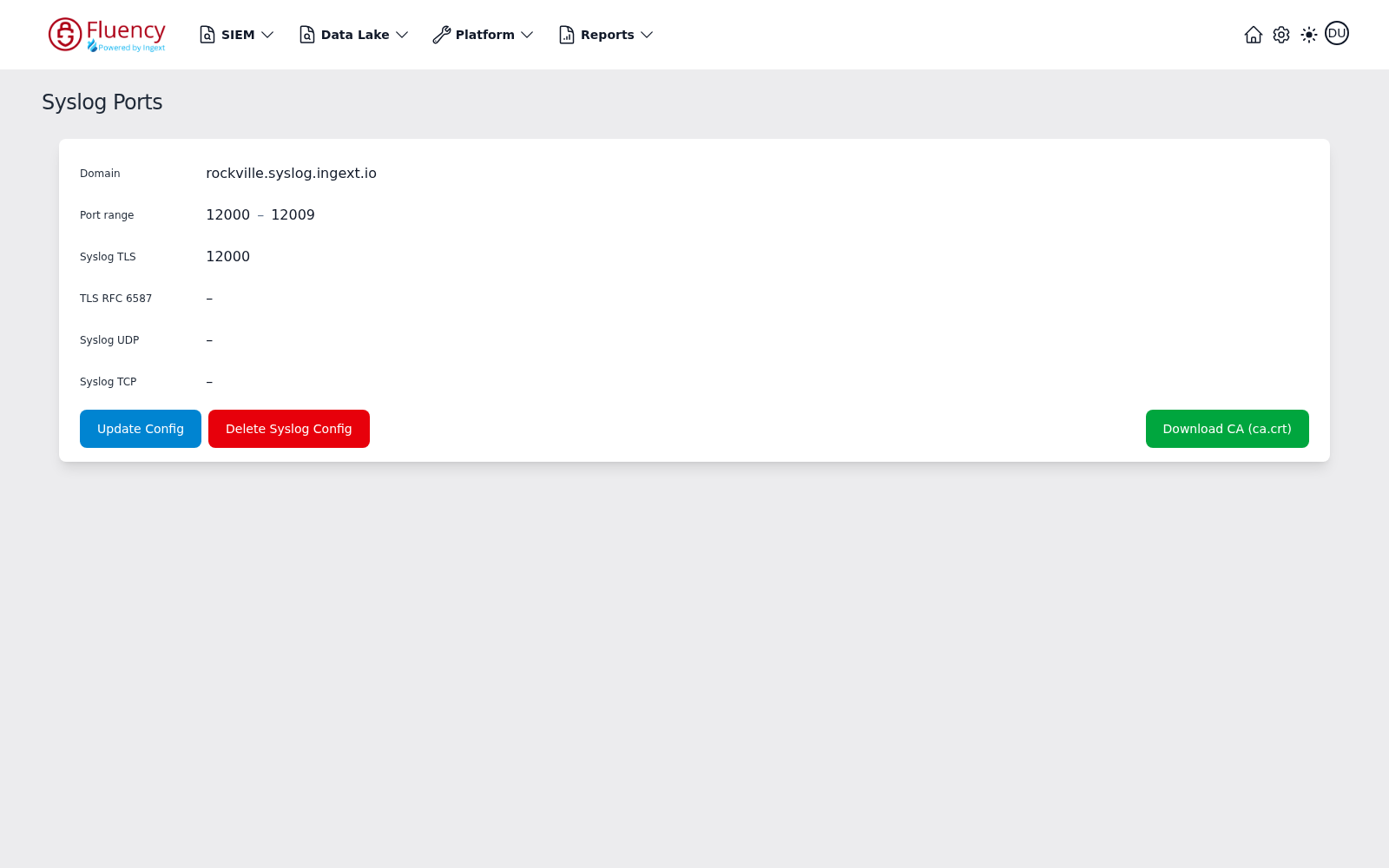
Take the port from the row that matches your transport:
- TLS: the Syslog TLS row. Not TLS RFC 6587. The two TLS listeners expect different framing, and an ASA frames each message with a newline, which is what Syslog TLS expects. Sent to the RFC 6587 listener, newline-framed messages are dropped without an error on either side.
- UDP: the Syslog UDP row. TCP: the Syslog TCP row.
If the row you need shows a dash, click Update Config, tick that protocol and Save. Adding a protocol does not disturb the devices already sending; removing one does (see Maintenance).
The ASA needs an address, not the domain. logging host takes an IP address (Cisco's command reference describes the field as "the IP address (IPv4 or IPv6) of the syslog server" and offers no hostname form), so resolve the Domain yourself:
nslookup <your-tenant>.syslog.ingext.io
The domain is an alias for a load balancer and resolves to several addresses. Choose one IPv4 address and note which. Do not add a logging host line for each: the ASA sends every message to every configured host, so three lines would store everything three times. Because the ASA never looks the name up again, it will keep sending to that address if the domain's addresses ever change; Maintenance covers what that looks like.
For a collector appliance, read the listener from the collector's configuration (Syslog ports). A new collector listens on udp 514 and tcp 514; a TLS listener, usually tls on 6514, is one you add there and open in the collector's firewall. From an ASA, use udp 514 or tls 6514: TCP to port 514 falls outside the ASA's permitted range, and the RFC 6587 listener has the framing problem described above. A collector is addressed by its IP, so there is nothing to resolve.
2. Download the CA (TLS only)
On the same page, Download CA (ca.crt). For the cloud endpoint the file is a bundle of five public root certificates (Amazon Root CA 1, 2, 3 and 4 and Starfield Services Root Certificate Authority – G2), because the endpoint presents a publicly trusted certificate that chains to one of them. An ASA trusts only the CAs it has been given, and an ASA trustpoint holds a single CA certificate, so step 4 picks the right one out of this file.
A collector appliance's TLS listener presents its own certificate; trust the CA that issued it in the same way.
3. Install the application
- v2 interface
- Classic v1 interface
In the navigation rail, open Applications and click Install Application, then choose Cisco ASA Syslog from the On-Premise IT category of the Application Catalog.
Go to Platform → Applications → Install Application From Template and choose Cisco ASA Syslog from the On-Premise IT category.
The template supplies the parser and builds the pipeline: there is no source to add, no processor to attach, and no sink to wire by hand.
| Parameter | Notes |
|---|---|
| datalake | Pre-filled managed. |
| datalake index name | Pre-filled CiscoASA. Two applications writing to the same index name in the same lake will collide, and the second one aborts. |
- v2 interface
- Classic v1 interface
Both sit in the collapsed Advanced configuration section (the form has no Configuration section), so click its heading to reach them. The defaults are usually right.
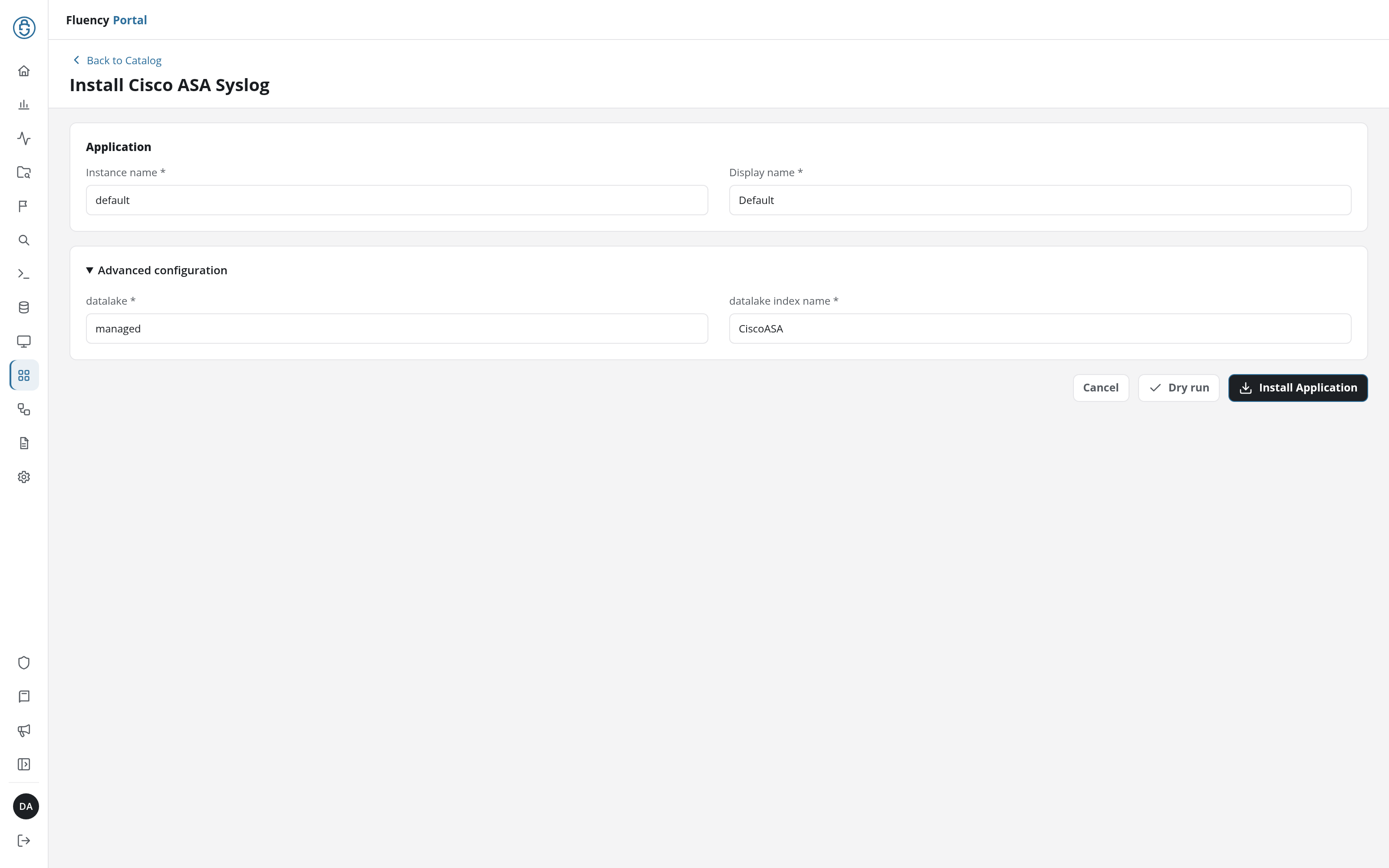
Leave Instance name and Display name at default / Default. One installation serves every ASA that sends to your listeners (the firewalls are told apart by @source, not by application), so a second firewall needs no second install.
Click Install Application. The Applications page opens with the notice Default is launching., and the new application is listed with an amber Inactive badge until messages from an ASA arrive.
Both sit in the collapsed Advanced Configurations row below the Parameters heading, which is otherwise empty; expand the row to reach them. The defaults are usually right.
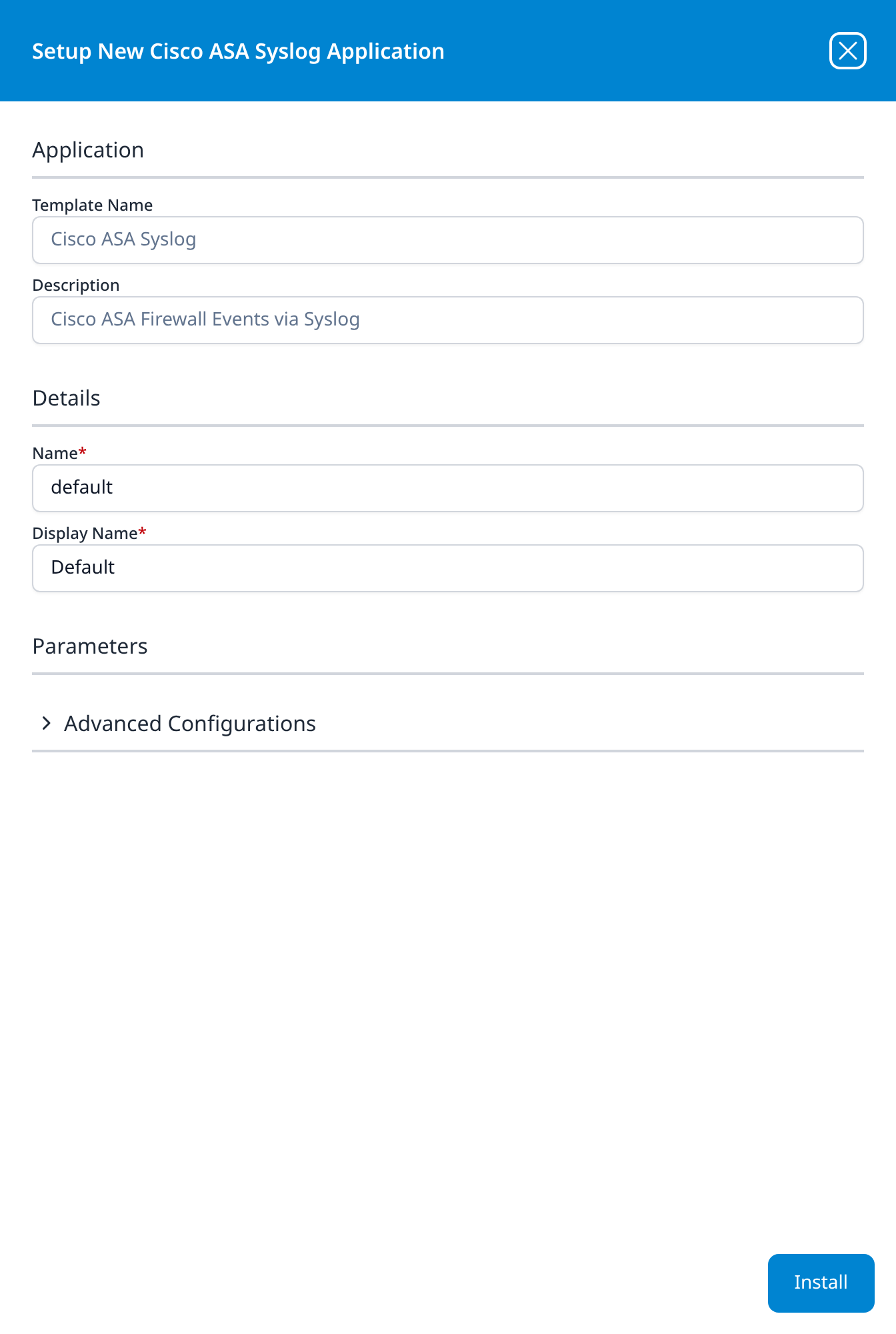
Leave Name and Display Name at default / Default. One installation serves every ASA that sends to your listeners (the firewalls are told apart by @source, not by application), so a second firewall needs no second install.
Press Install. The application then appears in the Installed Applications view, where its badge reads Running once the pipeline is up.
Until the ASA is configured, an empty index is the expected state and proves nothing either way (v1: so is the Running badge, which here means listening).
Part 2: Cisco ASA
Every step below has a CLI and an ASDM tab; choosing one switches them all. The CLI commands run in global configuration mode (configure terminal). Either way, the configuration has to be saved at the end: nothing here survives a reload otherwise.
4. Trust the CA (TLS only)
First find which root your endpoint chains to. From any workstation with OpenSSL:
openssl s_client -connect <your-tenant>.syslog.ingext.io:<Syslog TLS port> -showcerts </dev/null 2>/dev/null | grep -E '^ *[0-9]+ s:|^ *i:'
The last i: line names the certificate at the top of the chain the endpoint presents. Find the matching block in ca.crt (the file holds Amazon Root CA 1, 2, 3 and 4 and then the Starfield root, in that order, and openssl crl2pkcs7 -nocrl -certfile ca.crt | openssl pkcs7 -print_certs -noout prints their names in file order), and copy it, from -----BEGIN CERTIFICATE----- to -----END CERTIFICATE----- inclusive.
- CLI
- ASDM
crypto ca trustpoint FLUENCY-SYSLOG-CA
 enrollment terminal
 revocation-check none
 exit
crypto ca authenticate FLUENCY-SYSLOG-CA
The ASA asks you to "Enter the base 64 encoded CA certificate", ending with a blank line or the word quit; paste the block. It then shows the fingerprint and asks whether to accept the certificate: answer yes. show crypto ca certificates FLUENCY-SYSLOG-CA confirms the import.
Go to Configuration → Device Management → Certificate Management → CA Certificates and click Add. Name the trustpoint FLUENCY-SYSLOG-CA, choose Paste certificate in PEM format, paste the block, and click Install Certificate. Under More Options → Revocation Check, choose Do not check certificates for revocation.
enrollment terminalmakes this a paste-in trustpoint. The ASA enrols no certificate of its own: secure syslog is one-way TLS, where the ASA checks the server and presents nothing.revocation-check nonestops the ASA trying to reach the root's revocation servers before it will connect. That is a real reduction in checking, and normal for a root used to identify one server, but it is your decision.- If you cannot run the
opensslcheck, create one trustpoint per certificate in the bundle (FLUENCY-SYSLOG-CA1toFLUENCY-SYSLOG-CA5) and paste one block into each. An unused trustpoint is harmless.
5. Guard against the fail-closed default (TCP and TLS only)
Do this before the logging host line, in the same change: the moment a TCP or TLS host is configured without it, an unreachable destination stops new connections through the firewall. Skip it only if you decided in Before you begin that the firewall must fail closed.
- CLI
- ASDM
logging permit-hostdown
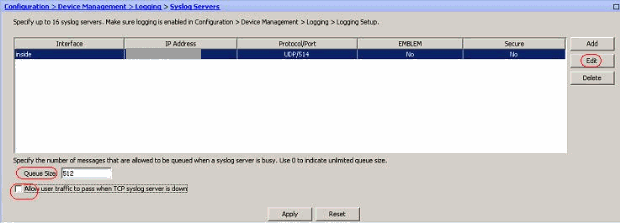
Go to Configuration → Device Management → Logging → Syslog Servers, tick Allow user traffic to pass when TCP syslog server is down at the foot of the pane, and click Apply. The Queue Size field above it is the logging queue setting.
6. Point logging at Fluency
Use the address from step 1, the port from the matching row, and the name of the interface the ASA reaches it through (outside in the examples).
- CLI
- ASDM
TLS to the cloud endpoint (recommended):
logging enable
logging timestamp
logging device-id hostname
logging host outside 203.0.113.10 tcp/12000 secure
UDP to a collector on the local network:
logging enable
logging timestamp
logging device-id hostname
logging host inside 10.20.0.5
For plain TCP, use tcp/<port> without secure, and step 5 applies.
logging enableturns on logging to every configured destination.logging host <interface> <ip> tcp/<port> secureis the destination.securemeans TLS and is valid only withtcp/. With no protocol given, the ASA uses UDP on port 514.
-
Configuration → Device Management → Logging → Logging Setup: tick Enable logging. Leave Send syslogs in EMBLEM format and Send debug messages as syslogs clear, and see Before you begin on Enable logging on the failover standby unit. Click Apply.

-
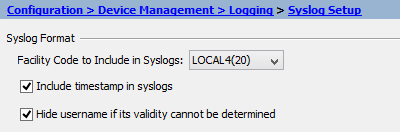
Configuration → Device Management → Logging → Syslog Setup: tick Include timestamp in syslogs (on ASA 9.10(1) and later a timestamp format of Legacy or RFC 5424 is offered, and either parses), then click Advanced, tick Enable syslog device ID and choose the hostname, for the reasons in the table below. Click Apply.
-
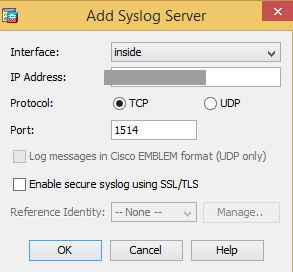
Configuration → Device Management → Logging → Syslog Servers → Add: choose the Interface, enter the IP Address from step 1, choose TCP or UDP and the Port. For TLS, tick Enable secure syslog using SSL/TLS, which is available only with TCP. Leave Log messages in Cisco EMBLEM format (UDP only) clear. Click OK, then Apply.
The timestamp and the device ID go together, and both matter to the parser:
| ASA configuration | What arrives |
|---|---|
logging timestamp and logging device-id hostname | Recommended. Parsed; the record is timed by the ASA's clock and @source is the firewall's hostname. |
logging timestamp only | Parsed; @source is the address the message came from, so firewalls behind one NAT look like one source. |
logging device-id without logging timestamp | Parsed, but the device ID is wasted: with no timestamp in front of it, the listener reads it as the program name, so @source is still the sending address and the record is timed by arrival. |
| Neither | Parsed; timed by arrival rather than by the ASA, and @source is the sending address. |
Any of the above with format emblem | Not parsed. See below. |
Keep the ASA's clock on UTC (synchronised by NTP, with no clock timezone offset), or its events land hours away from where you search for them. The default logging timestamp format carries no time zone at all. logging timestamp rfc5424 (ASA 9.10(1) and later) parses the same way and is documented as UTC with a Z, but in practice it carries an offset such as +02:00 when the clock has a time zone, and an offset does not survive the listener: the local time is kept and the offset dropped. Where the clock has to stay on local time, the Time Adjustment recipe corrects it on the way in.
Do not use EMBLEM format (format emblem on the host line, ASDM's Log messages in Cisco EMBLEM format). It is a Cisco-specific, UDP-only layout that puts a colon straight after the syslog priority (Cisco: "when EMBLEM is enabled, the syslog message prints colon (:) after <PRI> field"), which the listener cannot read a header from, so the parser never claims the message. Check every logging host line, not just the one for Fluency: before ASA 9.24(1), EMBLEM on one host could change the format sent to the others (Cisco bug CSCwp17700).
7. Choose what is sent
Send severity informational (6) and everything more severe: the level this integration is built for. Leave out debugging (7): Cisco warns that debug output "can render the system unusable", and it is not what the parser handles. Parsed message IDs gives each parsed message's default severity.
At informational, the connection (3020xx) and translation (30501x) messages are nearly all of the volume on a busy firewall: a build and a teardown for every flow. If the volume has to come down, cut deliberately with a message list (below) rather than by lowering the severity, because the severity cut takes the whole connection record with it. Translation messages are usually the first to go when the ASA is not doing NAT that matters to you; the teardown messages (302014, 302016) are the last, because they carry the duration and byte counts.
- CLI
- ASDM
logging trap informational
To send a narrower set, define a message list and send that instead of a bare severity. A message is sent if it matches any line of the list:
logging list FLUENCY level warnings
logging list FLUENCY level informational class vpn
logging list FLUENCY message 302013-302016
logging list FLUENCY message 113004-113039
logging trap FLUENCY
Do not give the list a name that is, or begins like, a severity level: Cisco rejects it.
Two per-message controls are worth knowing. The first adds log to an access-list entry so its permitted flows produce 106100; the second stops one message being generated at all, and logging message 305011 reverses it:
access-list OUTSIDE_IN extended permit tcp any host 198.51.100.20 eq 443 log
no logging message 305011
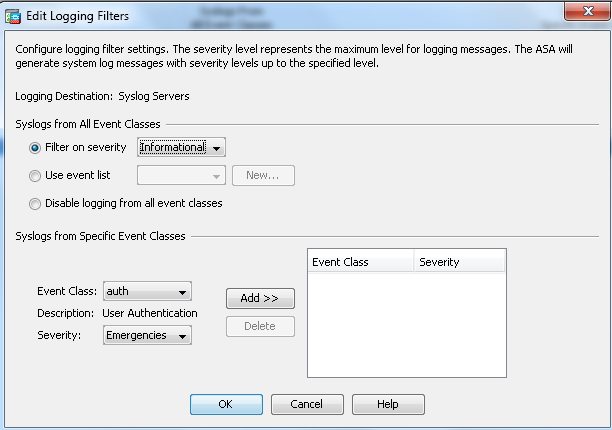
Configuration → Device Management → Logging → Logging Filters: select Syslog Servers, click Edit, choose Filter on severity and Informational, then OK and Apply. To send a narrower set, build a list under Logging → Event Lists and choose Use event list here instead.
8. Save the configuration
- CLI
- ASDM
write memory
File → Save Running Configuration to Flash.
Verify before you leave the ASA
show logging is the ASA's own account of what it is doing:
show logging
Look for Syslog logging: enabled, a Trap logging: level informational, facility 20, <n> messages logged line, and your host under Logging to. The messages logged counter is the proof the ASA is sending: run the command twice a minute apart, and on a firewall carrying traffic the number climbs. For a TCP or TLS host, the line for the host also reports whether it is connected; after a destination goes away, Cisco says it takes about six minutes to change from Connected to Not connected, and about a minute to reconnect after the server comes back.
Then make a record you can find. Re-enter any harmless configuration command:
logging timestamp
Any command other than a show command produces %ASA-5-111008: User '<you>' executed the 'logging timestamp' command., severity 5, so it is sent at informational. Confirm it is running looks for it.
If the ASA is producing faster than it can send, show logging queue reports discarded messages. Raise the queue with logging queue <n> (the default is 512) or narrow what is sent (step 7). On TCP and TLS without logging permit-hostdown, a full queue blocks new connections, another reason not to skip step 5.
While you are in show logging, check the Console logging line. Cisco's TAC note on ASA syslog warns that with logging to the serial console enabled, "all log generation on the ASA is rate limited to 9800 bps", a limit that applies to every destination, including this one. If it is on at anything above a low severity, turn it off with no logging console.
Confirm it is running
Three checks, in the order that narrows fastest.
1. The ASA says it is sending. The messages logged counter in show logging is climbing, and for TCP or TLS the host is Connected. If the counter climbs and nothing arrives, the problem is between the ASA and the listener; if it does not climb, the problem is on the ASA.
2. Fluency says the application is up. Applications lists Cisco ASA Syslog, with the display name Default beneath it and a green Running badge once messages arrive; it reads Inactive until then (v1: the card in Installed Applications reads Cisco ASA Syslog: Default, and its Running badge means listening; it says nothing about whether the ASA has been configured).
- v2 interface
- Classic v1 interface
3. The test event is in the lake. Open Datalake Search, choose the managed-CiscoASA index, and choose Default-Cisco_ASA in the FACET drop-down of the Filters panel, which offers to set the query to @tags:ASA. Look for the 111008 message from the previous section:
3. The test event is in the lake. Open Data Lake → Search, choose the CiscoASA index, and select the Default-Cisco_ASA facet configuration, which offers to set the query to @tags:ASA. Look for the 111008 message from the previous section:
@fields.fid:"ASA-111008"
Its ID facet should list several message IDs within minutes on a firewall carrying traffic, and its Source facet should show your firewall's hostname. An address there instead means logging device-id hostname is not set; one source for several firewalls means they all reach the listener through the same NAT and none of them carries a device ID.
On a firewall carrying traffic at informational, this feed is never quiet: connections are built and torn down every second. An ASA that produces nothing for an hour is a fault, not a slow day: unlike most event feeds, you can check this one by volume. See Confirm data is arriving for the three platform-side checks: application health, ingress volume and storage-side queueing.
Maintenance
Nothing in this integration expires on its own, and there is no credential to rotate. What needs looking after is the destination.
Adding another firewall
Point it at the same destination with the same commands. The installed application already parses it, and its hostname distinguishes it under @source. Give every firewall a distinct hostname, or use logging device-id string <name> where hostnames repeat.
If the destination address changes
The ASA resolved nothing: it sends to the literal address you gave it in step 1. If the domain's addresses change, the ASA keeps sending to the old one. Over UDP the records are lost silently; over TCP or TLS the host shows Not connected in show logging, and, without logging permit-hostdown, new connections through the firewall are blocked. When records stop arriving, resolve the domain again and compare it with the address in show running-config logging. To move the ASA, add the new logging host line first, then remove the old one with no logging host <interface> <old-ip>, then write memory.
If the CA changes
The ASA trusts only the root you imported. If the endpoint's certificate is ever issued from a different root, the TLS connection fails and the host shows Not connected. Repeat step 4 with the new root; the old trustpoint can be removed with no crypto ca trustpoint FLUENCY-SYSLOG-CA.
Changing the listener on the Fluency side
If an ASA is sending over TCP or TLS without logging permit-hostdown, anything that makes the Fluency listener unreachable stops new connections through that firewall: clearing Syslog TLS or Syslog TCP in Update Config, Delete Syslog Config, or removing a collector's listener. Nothing on the Fluency side warns you who is sending to a protocol. Before changing any of these, confirm with the firewall's owners that logging permit-hostdown is set, or move the ASA off that listener first.
Removing the integration
Remove the ASA side first, then the Fluency side (the reverse of the usual order, for the reason above):
- On the ASA,
no logging host <interface> <ip>, thenwrite memory. Removing the TLS trustpoint is optional. - In Fluency, uninstall the application, with the Uninstall button at the top right of its details page (v1: the red Uninstall button at the foot of its details panel on Platform → Applications). Leave the syslog listener alone unless nothing else uses it.
Troubleshooting
| Symptom | Likely cause | Fix |
|---|---|---|
Users report the firewall stopped passing new traffic; the ASA logs %ASA-3-201008: Disallowing new connections. | A TCP or TLS syslog host is unreachable (or the logging queue is full) and logging permit-hostdown is not set | Set logging permit-hostdown now. It takes effect at once, and the ASA logs %ASA-6-414008: New connections are now allowed due to change of logging permit-hostdown policy. Then find out why the host is unreachable (show logging) and write memory. Do not wait for it to clear by itself: Cisco's configuration guide says traffic resumes once the server is back and the queue has drained, but its message reference for 201008 says to disable and restart TCP logging. If traffic stays blocked with permit-hostdown set, remove the host with no logging host: Cisco bug CSCwr10732, fixed in 9.24(1), kept connections blocked despite it. |
show logging counter climbs; nothing arrives (UDP) | UDP fails silently: wrong address, wrong port, or the wrong interface named in logging host | Check the address against the resolved domain, the port against the Syslog UDP row, and that the named interface has a route to it. |
| Host stays Not connected (TLS) | The trustpoint does not hold the root the endpoint chains to; the endpoint was reached over IPv6; or the port is not the Syslog TLS port | Re-run the openssl check in step 4 and compare with show crypto ca certificates. Use an IPv4 address. |
| Connected, counter climbing, nothing in the lake (TLS) | The ASA is pointed at the TLS RFC 6587 port | Use the Syslog TLS port. The RFC 6587 listener drops newline-framed messages without an error. |
| Admin and VPN events arrive; no connection records | logging trap is below informational; or the logging host interface has management-only access enabled, which drops 302014, 302015, 106023 and 304001 | Set logging trap informational; send from an interface without management-only access. |
Records arrive with @fields.error Unknown Syslog message ID | Expected. The parser extracts fields only from the listed message IDs; everything else is stored with its ID and text | Nothing to fix. Search by @fields.fid and the message text. |
The ASA's counter climbs and the address is right (UDP), but nothing lands in the CiscoASA index | EMBLEM format is on: format emblem on the host line, or logging emblem | Remove it (step 6). EMBLEM messages have a colon straight after the priority and are never claimed by the parser. |
@source shows an address even though logging device-id hostname is set | logging timestamp is not set, so the listener reads the device ID as the program name | logging timestamp. The device ID is only recognised after a timestamp. |
Every firewall appears under one @source address | No device ID, and the firewalls reach the listener through one NAT | logging device-id hostname on each, with logging timestamp. |
| Events land hours away from when they happened | The ASA's clock is on local time; the legacy timestamp carries no zone | Run the clock on UTC, or apply the Time Adjustment recipe. |
No connection records, though access-list denies and admin events arrive; show running-config logging includes logging flow-export-syslogs disable | NetFlow export (NSEL) has replaced the connection syslog messages | logging flow-export-syslogs enable, or accept that connection data lives in the NetFlow export rather than here. |
Connection records arrive with @fields.regexError set to true | The names command is substituting names for addresses, or the connection is IPv6; the patterns match IPv4 addresses | no names restores addresses in the log. IPv6 connections keep their ID and message text only. |
| Expected permitted flows are missing | Only denies log by default | Add log to the access-list entry to produce 106100. |
| A failover pair reports only from one unit | TCP and TLS syslog are not sent from a standby unit | Expected. Use UDP if the standby must report too. |
| Configuration gone after a reload | It was never saved | Re-apply and write memory (ASDM: File → Save Running Configuration to Flash). |
Data reference
Which messages the parser extracts fields from, what every record carries, and the ASA settings that decide what is generated, for searches and detection rules written against this feed.
Parsed message IDs
Each syslog message is one record, with the message ID, its severity and, for the IDs below, the fields extracted from its text.
The parser claims any message whose text starts with %ASA- (or %FTD-, below) and leaves everything else on the listener alone. It extracts fields from these message IDs; the severity is Cisco's default, and it matters because the ASA's logging trap setting selects messages by severity:
| Family | Message IDs (default severity) | Fields extracted |
|---|---|---|
| Connections | 302013 / 302015 built TCP / UDP (6), 302014 / 302016 teardown TCP / UDP (6), 302020 / 302021 ICMP built / teardown (6) | Direction, protocol, connection ID, source and destination interface, address and port, mapped (NAT) addresses; duration and bytes on teardown |
| Address translation | 305011 built, 305012 teardown (6) | Translation type, protocol, interfaces, addresses and ports; duration on teardown |
| Access lists | 106023 denied by access group (4), 106100 access-list entry hit (6 by default), 106103 denied for user (4) | Action, protocol, interfaces, addresses, ports, access-group or access-list name, hit count |
| Denied packets | 106001, 106006, 106007 (2); 106010, 106014 (3); 106012, 106015 (6); 106021, 106022 (1); 110002 (6) | Action, protocol, addresses, ports, interface, TCP flags or reason |
| Authentication (AAA) | 113003, 113004, 113005, 113008, 113009, 113010, 113011 (6); cut-through proxy 109201–109213 (3–6) | User, AAA server, user IP, group policy, outcome |
| VPN sessions | 113039 AnyConnect parent session started (6), 722051 address assigned to session (6), 113019 session disconnected (4), 725001 SSL handshake started (6) | Group, user, public IP, assigned IPv4 and IPv6 addresses, with a GeoIP lookup on the public IP for 722051. For 113019, only Group, Username and IP; the session's duration, byte counts and disconnect reason stay in the message text |
Every other ASA message arrives too, just without extracted fields. It is stored with its message ID, its severity name and the whole message text, plus the marker "error": "Unknown Syslog message ID", which reads like a fault and is not one. Several messages worth keeping fall into this group, so search for them by ID: 111008 and 111010 (an administrator ran a command or changed the configuration, severity 5), 605004 / 605005 (management login denied / permitted, 6), 611101 / 611103 (management user authenticated / logged out, 6 / 5), and 201008 (the ASA refusing new connections, 3; see Troubleshooting).
Every record carries @eventType CiscoASA and two tags (ASA, and the message ID as ASA-302013), with the parsed values under @fields: @fields.fid is the message ID, @fields.msg_type the severity name (Informational, Warning, …). @source names the firewall, which is why step 6 sets a device ID.
What the ASA decides before anything is sent
No parser can extract a message the ASA never generated, or fields the ASA did not write into it. These ASA settings decide that:
logging trapseverity. The ASA sends the chosen severity and everything more severe. Connections, NAT, AAA and VPN session messages are almost all severity 6, soinformationalis the level this integration is built for. Atwarnings(4) you keep access-list denies and lose every connection record.- The
logkeyword on access-list entries. Denied packets log106023by default; a permitted flow logs106100only if its access-list entry carrieslog. - The interface named in
logging host. Cisco: if syslog is configured on an interface with management-only access enabled, the data-plane messages302015,302014,106023and304001are dropped. The symptom is an ASA whose admin events arrive and whose traffic never does. - Disabled messages.
no logging message <id>stops a message being generated at all.show logging messagelists the messages that are disabled or have a changed severity. - NetFlow export (NSEL). An ASA exporting NetFlow is often set to
logging flow-export-syslogs disable, which stops the connection messages (302013–302016) and several deny messages being generated as syslog, because the flow records carry the same information. Ifshow running-config loggingshows that line, this integration receives no connection records. names. Where the configuration uses thenamescommand, messages carry the configured name in place of the address. The connection and translation patterns match addresses, so they extract nothing from those messages.- Usernames in failed logins. By default the ASA masks the username in a failed-authentication message when it cannot tell whether the username is valid (ASDM's Hide username if its validity cannot be determined), so that a password typed into the username field does not end up in the log.
no logging hide usernameturns that off; it is a privacy decision as much as a detection one.
Firewall Threat Defense
The parser also claims %FTD- messages from Cisco Secure Firewall Threat Defense (FTD), including the FTD connection events 430002 and 430003, whose Name: value pairs each become a field. An FTD device managed by Firewall Management Center is not configured with the commands on this page (its syslog destination is set in Management Center's platform settings), but it is parsed by the same template. The message IDs and tags keep the ASA- prefix.
Under the hood
Engineering reference: parsing, header handling and output
What the install creates
The template (CiscoASAFWLog) installs one pipe, CiscoASAFWLog-<instance>, on the shared SyslogRouter at priority 1000, running the FPL processor CiscoASA_FWLog ("Standard: Syslog (Event/Traffic logs) from Cisco ASA / FTD devices"); a data sink to the chosen lake and index, shown on the Platform page as the Mgmt Queue sink EventWatch: CiscoASAFWLog-<instance>; and the index itself, created with the CiscoASA schema. It adds no data source: the pipe takes its messages from the sources that already feed SyslogRouter. The installed application's Actions list records each object (addDatalakeIndex, Add data sink, Add pipe to router).
How a message is claimed
The parser claims a record when its message text starts with %ASA or %FTD. If it does not, it retries with the syslog program name prepended (<program>: <message>), because with no device ID the listener takes %ASA-6-302013 as the program name and the rest as the message. Anything that still does not match is returned with abort, which passes it on to the next processor on the router; it does not land in the CiscoASA index.
The header table in step 6 follows from how the listener (the syslog-ng 3.35.1 build and configuration that the collector installer ships) reads each form of ASA header, with the parser's claim rule applied to the result. The device-ID separator is shown as real ASA traffic carries it; Cisco's own documentation samples disagree with each other on it:
| ASA configuration | Line received | @source | Timestamp used | Claimed |
|---|---|---|---|---|
| neither | <166>%ASA-6-302013: … | sending address | arrival | yes |
logging timestamp | <166>Jun 26 2024 01:35:42: %ASA-6-302013: … | sending address | ASA's | yes |
logging timestamp + device ID | <166>Jun 26 2024 01:35:42 asa-edge-1 : %ASA-6-302013: … | asa-edge-1 | ASA's | yes |
logging timestamp rfc5424 | <166>2024-06-26T01:35:42Z: %ASA-6-302013: … | sending address | ASA's | yes |
logging timestamp rfc5424 + device ID | <166>2024-06-26T01:35:42Z asa-edge-1 : %ASA-6-302013: … | asa-edge-1 | ASA's | yes |
| device ID only | <166>asa-edge-1 %ASA-6-302013: … | sending address | arrival | yes (device ID read as the program name) |
| EMBLEM | <166>:Jun 26 01:35:42 UTC: %ASA-session-6-302013: … | sending address | arrival | no |
An rfc5424 timestamp carrying an offset (2024-06-26T03:35:42+02:00) is claimed, but the listener keeps the local time and drops the offset.
Parsing
Fields are written under @fields. Every record gets fid (ASA-<id>) and msg_type (the severity name); @tags is ["ASA", "ASA-<id>"]; @eventType is CiscoASA; @parser is fpl-CiscoASAParser. A recognised ID whose text does not match the expected layout keeps its ID and text and gains regexError: true: the connection and translation patterns match IPv4 addresses only, so IPv6 connection records land this way.
The parser also registers each firewall as an asset on first sight, named after @source, in the group FPL-detect: Cisco ASA/FTD Firewall with machine type Cisco Firewall, and counts records and bytes per device. A firewall whose @source is its address is registered under that address, another reason to set a device ID before the first message arrives.
Output
The CiscoASA index schema is dynamic, rooted at @fields: each extracted field becomes a column, alongside the raw document, the timestamp and the aliases _source (@source) and _message (@message).
References
Cisco
- CLI Book 1: General Operations, 9.24, Logging: every
loggingcommand on this page, the TCP blocking behaviour, the management-only interface caveat and the failover limits. - ASDM Book 1: General Operations, 7.24, Logging: the ASDM panes in the ASDM tabs.
- Command Reference:
logging host,logging permit-hostdown,logging timestamp,logging trap - CLI Book 1, 9.24: Digital Certificates: trustpoints and
crypto ca authenticate. - Cisco Secure Firewall ASA Series Syslog Messages: every message ID, its severity and its text.
- Configure ASA Syslog: Cisco TAC's walkthrough, including access-list logging and the console-logging rate limit. Written for ASA 8.4 and ASDM 7.1, but still current on these points.
Fluency
- Syslog Ports and Configuration → Syslog Ports: the cloud listener (v1: Platform → Administration → Syslog Ports).
- Managing Collectors → Syslog ports: a collector's listeners.
- Cisco ASA Syslog install form (v1: Install Application From Template)
- Confirm data is arriving
- Parser cookbooks: the template's parser works as shipped, and is the starting point if you need to customise it.
- On-Prem / Syslog: the other syslog devices.