Microsoft Defender
Fluency polls Microsoft Defender XDR for incidents and alerts, and Defender for Endpoint for the device inventory and vulnerability posture those detections land on. Defender correlates the alerts raised by its own components (Defender for Endpoint, for Identity, for Office 365, for Cloud Apps) into incidents, so this one integration covers all of them.
Authentication is app-only: you register one application in Microsoft Entra ID, grant it six read-only permissions, and give its credentials to Fluency. The six permissions come from two APIs, Microsoft Graph and Defender for Endpoint, which is why step 2 and step 3 are separate. Missing the second is the most common mistake.
The setup has two halves:
- In Microsoft Entra ID: register an application, add two Microsoft Graph permissions and four Defender for Endpoint permissions, grant admin consent, and create a client secret. This produces three values: a Tenant ID, a Client ID and a Client Secret.
- In Fluency: install the Microsoft Defender application template and paste those three values into its form.
| Template | Template ID | Data lake and index |
|---|---|---|
| Microsoft Defender (this page) | MSDefender | Chosen on the form, under Advanced configuration (v1: Advanced Configurations) |
| Microsoft Defender Legacy | DefenderATPLegacy | Fixed by the template |
Both take the same three credentials and carry the same description, so the tile name is the only difference in the catalog; on the form, the current one has the Advanced configuration section. Microsoft Defender Legacy is the earlier template, kept so existing deployments keep working. Install the current one unless you are matching an existing deployment; Part 1 applies to either.
An application registered before then typically holds only the two Microsoft Graph permissions. It still collects incidents and alerts, but its MS Defender entry on the Resources page stays empty, with no error anywhere. Add the four permissions in step 3 and grant consent again; there is no need for a new secret or a reinstall.
What arrives
| Stream | What it holds | Lands in |
|---|---|---|
| Incidents | Correlated attacks: severity, classification, status, assignee and the Defender portal link. | The MSDefender index |
| Alerts | Individual detections, with MITRE techniques and an evidence array naming the devices, users, processes, files and addresses involved. | The MSDefender index |
| Device inventory | Every onboarded device, and its antivirus health. | Resources: Machine, AvHealth |
| Vulnerabilities | CVEs per device, and per-device configuration compliance. | Resources: Vulnerability, SecureConfig |
| Security recommendations | The prioritised remediation list. | Resources: Recommendation |
| Device secure score | Microsoft Secure Score for Devices over time. | Resources: SecureScore |
Incidents and alerts are events, so a quiet tenant legitimately produces none. The other four rows are record sets describing the current state of your estate, each backed by its own permission: skip one and its record set is empty, with no error. The last three rows also need Defender Vulnerability Management; see Before you begin. Every permission is read-only, and Fluency never writes back to Defender.
Endpoints, the permission behind each record set, and how alerts join to devices are in Data reference.
Before you begin
You need four things.
A Defender XDR licence that provisions incidents. Any of Microsoft 365 E5/A5, Microsoft 365 E3 with the Defender Suite add-on, Office 365 E5, Defender for Endpoint, Defender for Business, or Microsoft 365 Business Premium will do; Microsoft's Defender XDR prerequisites has the complete list. The practical test is simpler: if https://security.microsoft.com shows you an Incidents queue, you are covered for the first two streams.
Defender for Endpoint, provisioned and licensed for vulnerability management. The four Defender for Endpoint permissions reach capabilities licensed separately from incidents and alerts, and a tenant can be fully entitled to one and not the other. Two checks answer it, and each one takes a second:
-
Assets → Devices in the Defender portal shows a Device inventory. If it does,
Machine.Read.Allwill return data.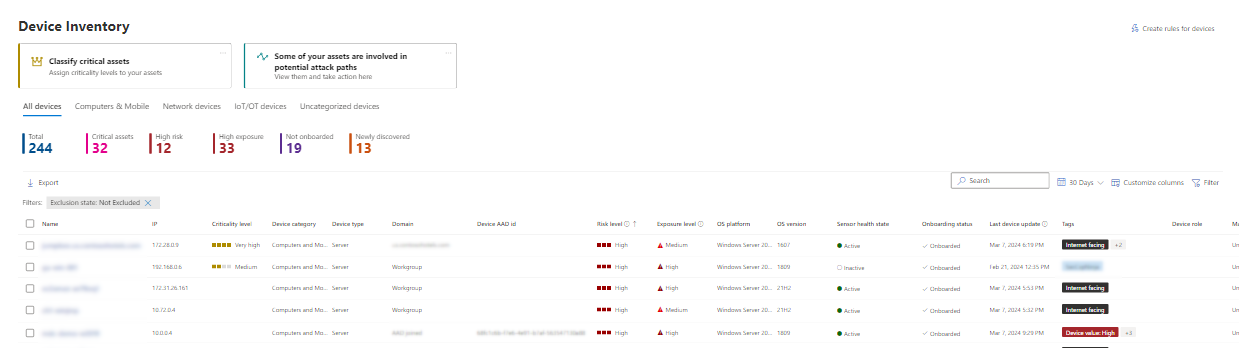
-
Exposure management → Recommendations (or, on tenants not yet moved, Endpoints → Vulnerability management → Recommendations) shows a populated recommendations list. If it does, the three vulnerability-management permissions will return data.
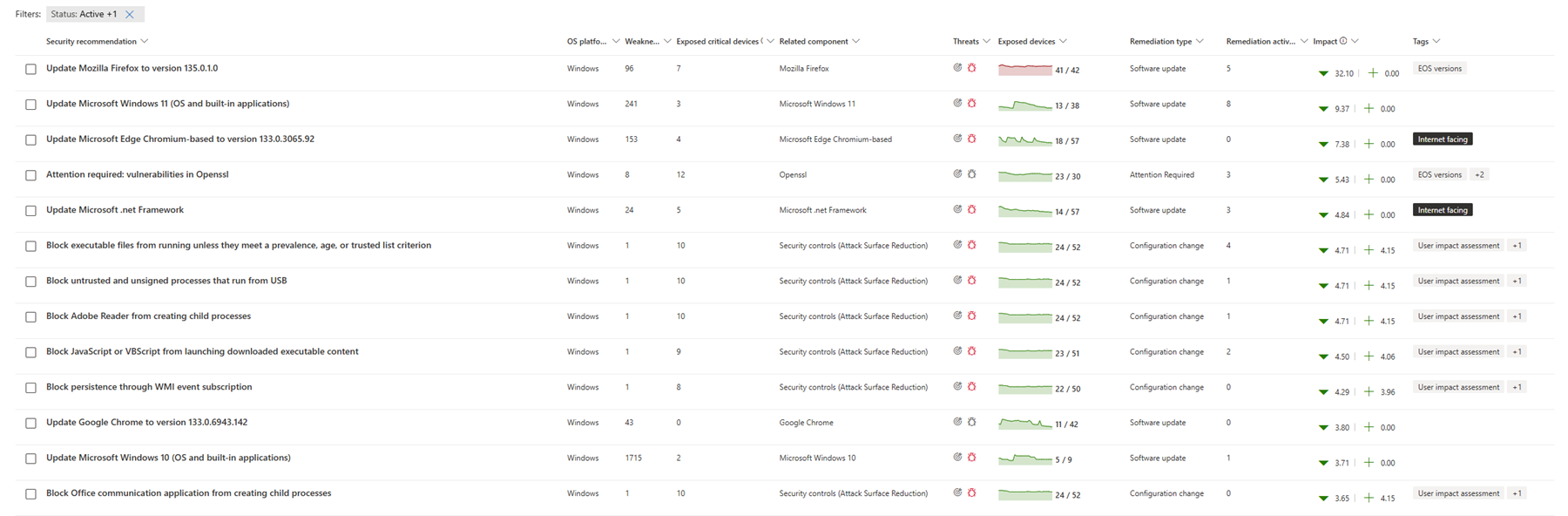
A plan gate sits behind the second check. Microsoft Defender Vulnerability Management "is available as an add-on for Microsoft Defender for Endpoint Plan 2 or as a standalone subscription", though "Defender for Endpoint Plan 2 includes core vulnerability management capabilities" on its own. Four of the six record sets (Vulnerabilities, Secure Config, Recommendations and Secure Score) depend on it.
The gate does not block the install. A tenant without the entitlement installs the application successfully, collects incidents and alerts, populates Machines and AV Health, and leaves the other four record sets empty, so settle this before you install, rather than diagnosing an empty card a month later.
An Entra identity that can register an application and grant tenant-wide admin consent. That means Global Administrator, or Privileged Role Administrator combined with Application Administrator or Cloud Application Administrator. Consent rights are the part people miss: without them you can create the application, but its permissions stay unconsented and no data ever flows.
Access to the Fluency portal with permission to install applications.
Part 1: Microsoft Entra ID
Work through this half in the Microsoft Entra admin center, or in the Azure portal under Microsoft Entra ID. If you would rather script it, skip to Automated alternative: Azure CLI; the result is identical.
1. Register the application
Go to App registrations → New registration.
- Name: anything recognisable.
ingext-defenderis the name Fluency's own tooling uses, and is a good default. - Supported account types: Accounts in this organizational directory only (single tenant).
- Redirect URI: leave blank. This application never signs a user in.
Click Register.
2. Add the Microsoft Graph permissions
On the new application, go to API permissions → Add a permission. On the Microsoft APIs tab, choose Microsoft Graph.
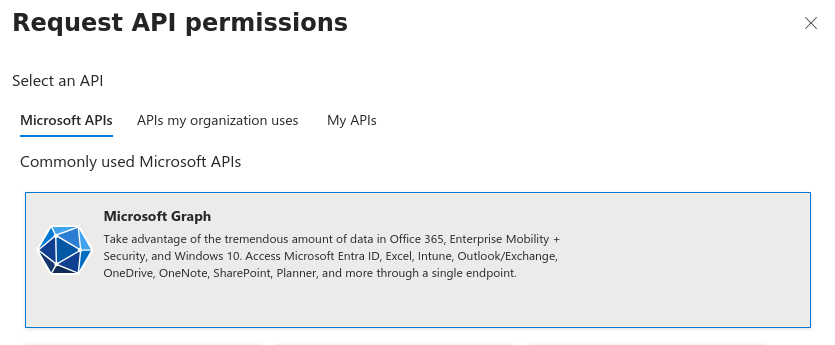
Choose Application permissions: "Your application runs as a background service or daemon without a signed-in user." This is the app-only path; Delegated permissions would require a signed-in user and will not work here.
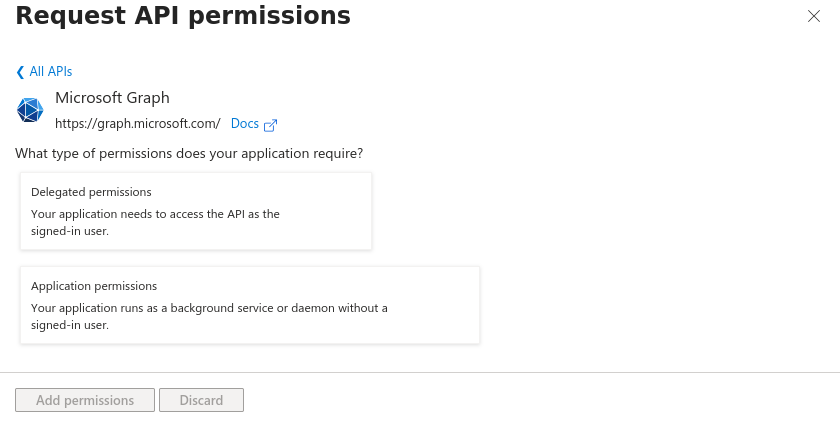
Tick two permissions. The search box takes a fragment of the name:
| Search for | Tick | Listed as |
|---|---|---|
securityincident | SecurityIncident.Read.All | Read all security incidents |
securityalert | SecurityAlert.Read.All | Read all security alerts |
Be careful to pick SecurityAlert.Read.All, not SecurityAlert.Create.All or SecurityAlert.ReadWrite.All. Admin consent required reads Yes for both; that is step 4.
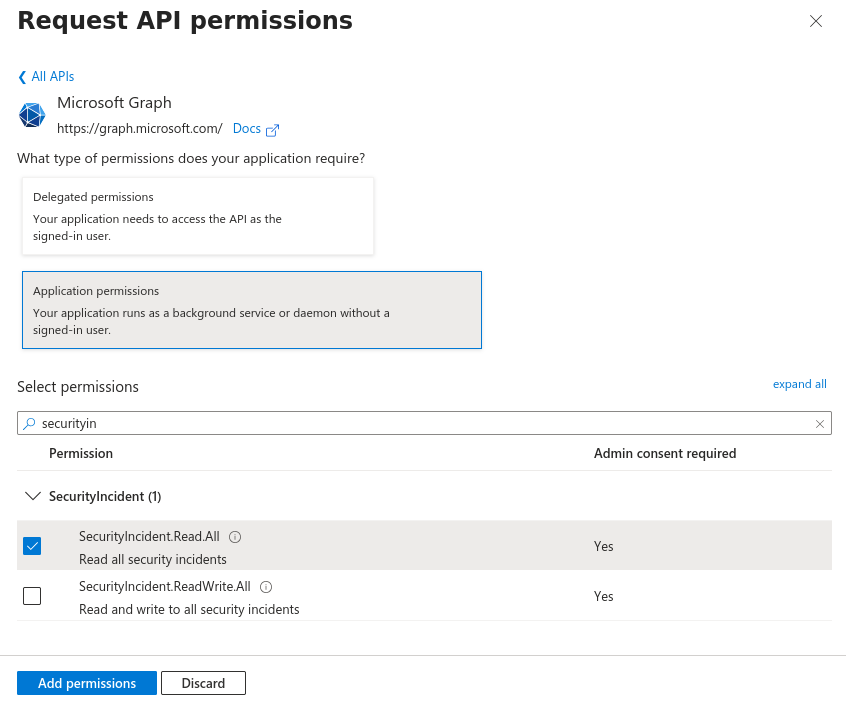
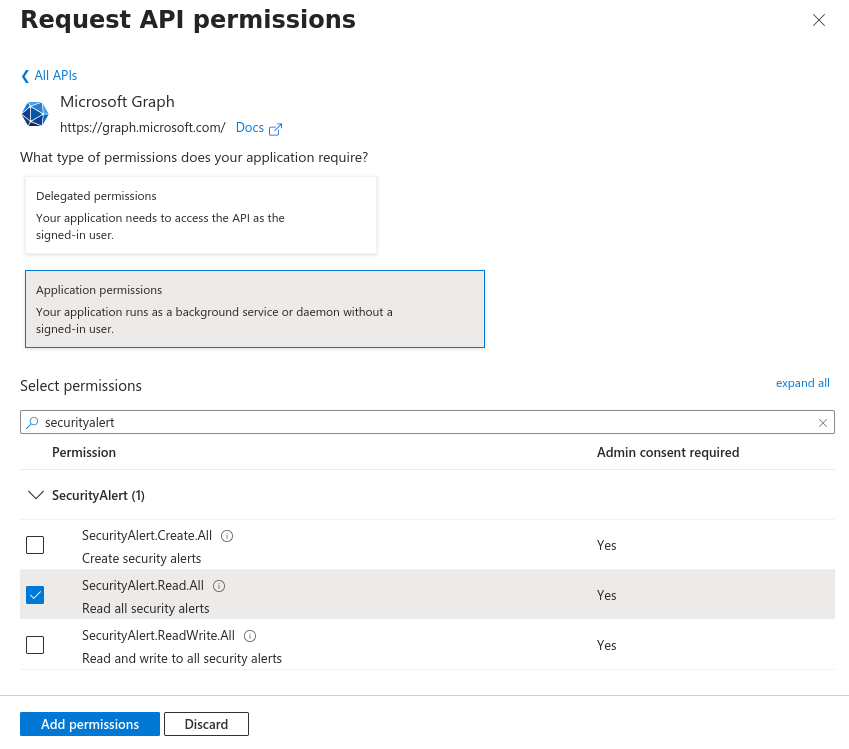
Click Add permissions.
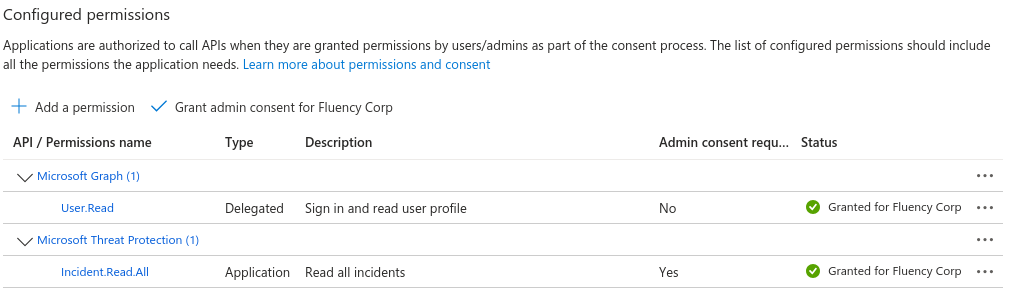
Microsoft still publishes an older Defender XDR walkthrough, Create an app to access Microsoft Defender XDR without a user. Do not follow it for this integration. It grants Incident.Read.All and Alert.Read.All on the legacy Microsoft Threat Protection resource (api.security.microsoft.com as an audience), which are different permissions on a different API. Fluency calls Microsoft Graph for incidents and alerts, so those two permissions must come from the Microsoft Graph tile shown above.
Note that this is not the same thing as the WindowsDefenderATP tile you are about to use: Microsoft Threat Protection and WindowsDefenderATP are two different resources with two different application IDs. See Troubleshooting for what a wrongly-registered app looks like.
3. Add the Defender for Endpoint permissions
Still on API permissions, click Add a permission again. This time switch to the APIs my organization uses tab, type WindowsDefenderATP, and select it. The application ID should read fc780465-2017-40d4-a0c5-307022471b92.
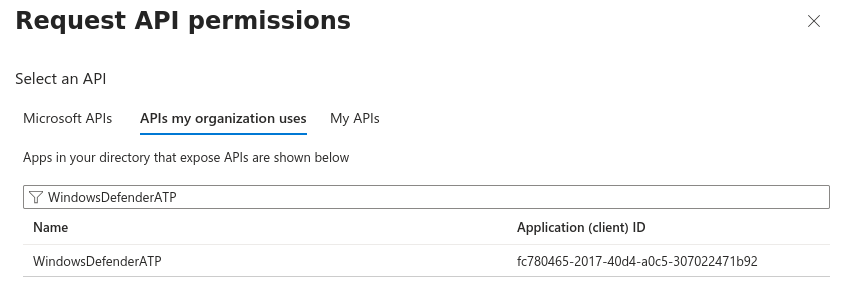
WindowsDefenderATP is Entra's name for the Microsoft Defender for Endpoint API. It is not on the Microsoft APIs tab, which is why the first tab is the wrong place to look for it.
Choose Application permissions again: the same reason as before, and the same mistake is available.
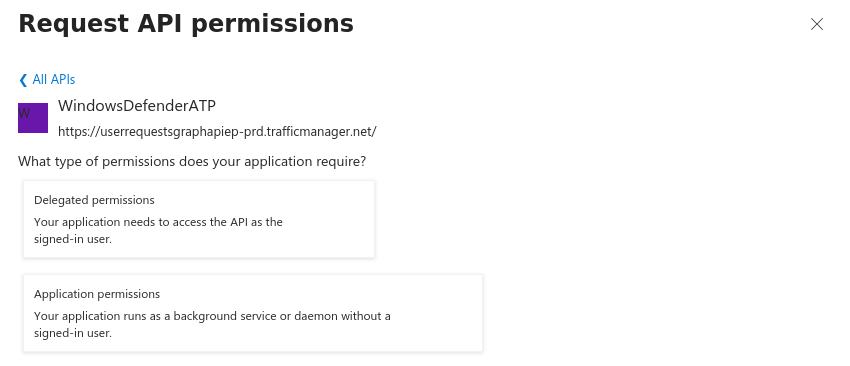
Tick four permissions:
| Permission | Listed as | What it buys |
|---|---|---|
| Machine.Read.All | Read all machine profiles | Machines and AV Health |
| Vulnerability.Read.All | Read Threat and Vulnerability Management vulnerability information | Vulnerabilities and Secure Config |
| SecurityRecommendation.Read.All | Read Threat and Vulnerability Management security recommendation information | Recommendations |
| Score.Read.All | Read Threat and Vulnerability Management score | Secure Score |
"Threat and Vulnerability Management" is the former name of Defender Vulnerability Management, which the permission picker still uses.
Click Add permissions.
The APIs my organization uses tab shows only APIs that exist as service principals in your directory: "Apps in your directory that expose APIs are shown below." If WindowsDefenderATP returns nothing, Defender for Endpoint has not been provisioned in this tenant yet. Sign in to https://security.microsoft.com, complete Defender for Endpoint setup so the service principal is created, then come back to this step. The two Microsoft Graph permissions from step 2 are unaffected and do not need to be re-added.
4. Grant admin consent
Application permissions do nothing until an administrator consents on the tenant's behalf. On the same API permissions page, click Grant admin consent for <tenant>.

Confirm with Yes. All six rows must then show a green Granted for <tenant>, under two group headings, Microsoft Graph and WindowsDefenderATP (4):
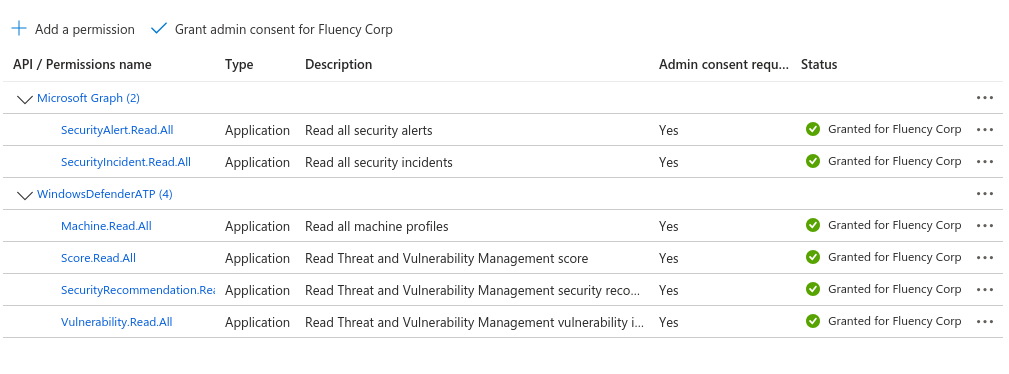
Before consent, the same rows read Not granted in the Status column. Two group headings is the thing to check: anyone who missed the second tab will see only the Microsoft Graph group here, and that page looks perfectly healthy.
If the button is greyed out, the account you are signed in as does not hold consent rights. The application and its permissions are already saved; ask an administrator who does to open the same page and click it.
5. Create a client secret
Go to Certificates & secrets → Client secrets → New client secret. Give it a description you will recognise in two years' time, and choose an expiry.
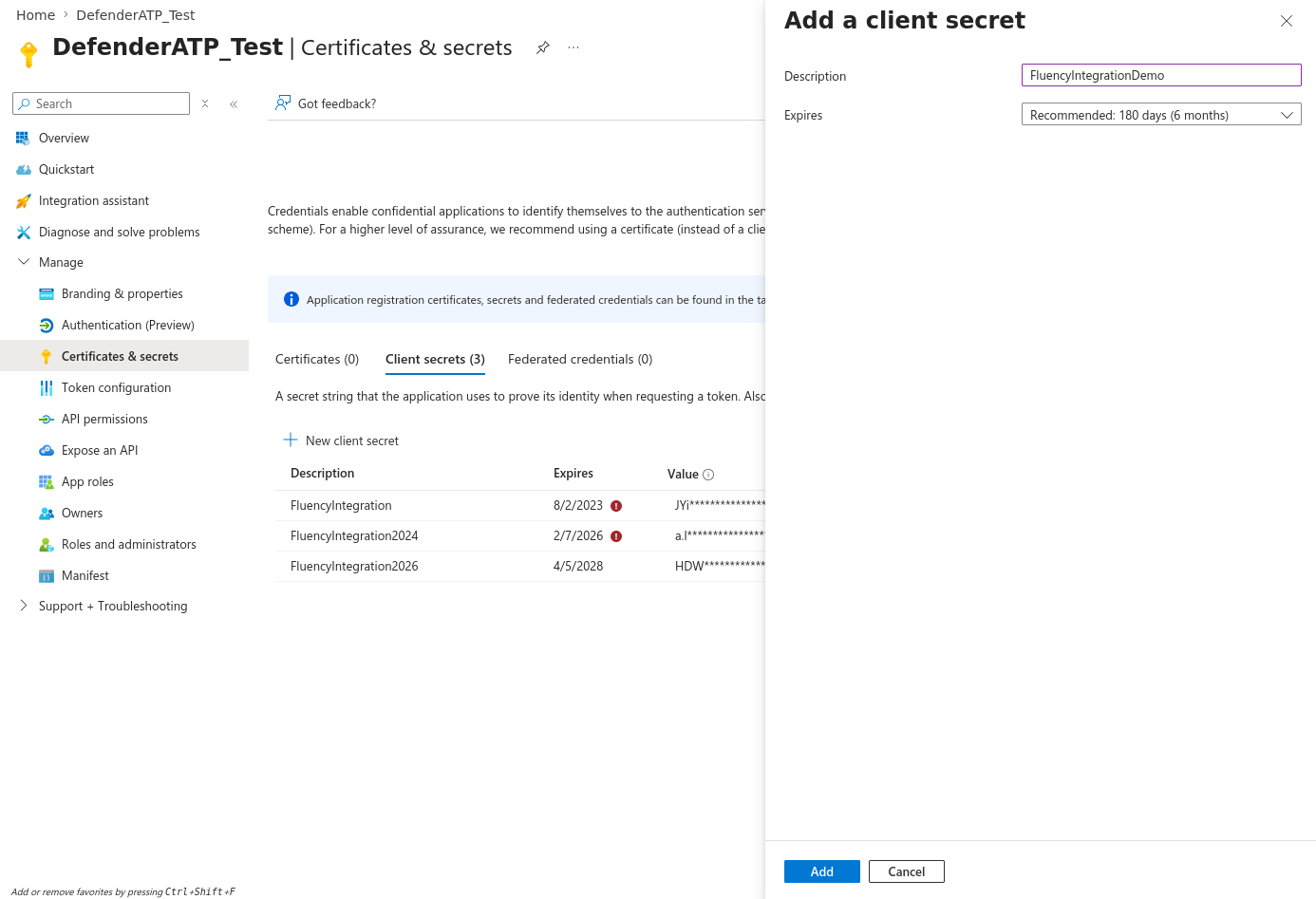
The drop-down opens on Recommended: 180 days (6 months). Microsoft caps the portal's maximum at 24 months; pick whatever your credential-rotation policy allows, and write the date down. When the secret expires the integration stops collecting, and it fails quietly from Defender's side; see Rotating the client secret.
Click Add. The new secret appears in the list with its Value shown in full, exactly once.
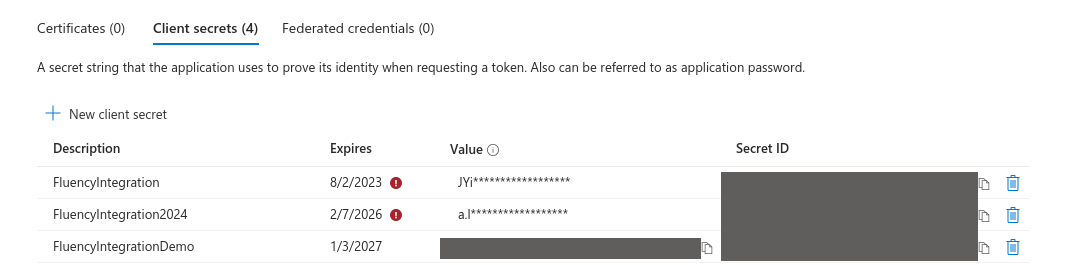
The Value column is readable only until you navigate away; on reload it is masked forever and the secret cannot be recovered. The Secret ID in the next column is not the secret; it is an identifier for the credential record. Pasting the Secret ID into Fluency is the single most common cause of a Defender application that installs and then immediately aborts.
6. Record the Tenant ID and Client ID
Go to the application's Overview page. Under Essentials, copy:
- Application (client) ID → Fluency's Client ID
- Directory (tenant) ID → Fluency's Tenant ID
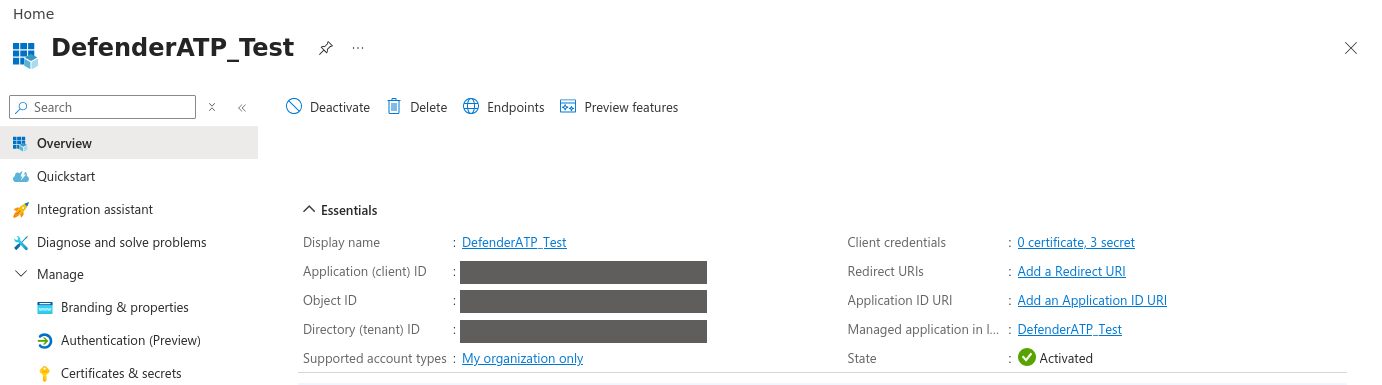
You should now be holding all three values:
| Value | Where it came from |
|---|---|
| Tenant ID | Overview → Directory (tenant) ID |
| Client ID | Overview → Application (client) ID |
| Client Secret | Certificates & secrets → the secret's Value |
Unlike the client secret, the tenant and client IDs are not sensitive and can be read from the portal at any time.
Automated alternative: Azure CLI
The same registration as a script, in the same seven steps. Useful when onboarding several tenants, and the path Fluency's own onboarding tooling takes. Requires Azure CLI and the same consent rights as the portal walkthrough.
# Sign in to the target tenant, then confirm which tenant you are in
az login
az account show --query '{tenant:tenantId, account:user.name}' -o table

# 1. Register the application (single tenant, no redirect URI)
APP_ID=$(az ad app create \
  --display-name ingext-defender \
  --sign-in-audience AzureADMyOrg \
  --query appId -o tsv)

# 2. The two resources. GRAPH is a well-known constant; MDE is WindowsDefenderATP.
GRAPH=00000003-0000-0000-c000-000000000000
MDE=fc780465-2017-40d4-a0c5-307022471b92

# 3. Resolve the application-role IDs at runtime, no hardcoded GUIDs
role() { az ad sp show --id "$1" --query "appRoles[?value=='$2'].id | [0]" -o tsv; }

INCIDENT=$(role $GRAPH SecurityIncident.Read.All)
ALERT=$(role $GRAPH SecurityAlert.Read.All)

MACHINE=$(role $MDE Machine.Read.All)
VULN=$(role $MDE Vulnerability.Read.All)
RECO=$(role $MDE SecurityRecommendation.Read.All)
SCORE=$(role $MDE Score.Read.All)

# 4. Request them as Application permissions (=Role, as opposed to =Scope for delegated).
#    One call per API: --api takes a single resource.
az ad app permission add --id $APP_ID --api $GRAPH \
  --api-permissions $INCIDENT=Role $ALERT=Role
az ad app permission add --id $APP_ID --api $MDE \
  --api-permissions $MACHINE=Role $VULN=Role $RECO=Role $SCORE=Role

# 5. Create the service principal, then grant tenant-wide admin consent
az ad sp create --id $APP_ID
az ad app permission admin-consent --id $APP_ID

# 6. Append a client secret valid for two years, and print it
az ad app credential reset --id $APP_ID \
  --display-name ingext-defender --years 2 --append \
  --query password -o tsv

# 7. Print the tenant and client IDs
az account show --query tenantId -o tsv
echo $APP_ID
--append is not optionalWithout --append, az ad app credential reset "clears all passwords and keys" before creating the new one. On a fresh application that is harmless; run it against an application already in service and you will revoke the credential that is currently collecting data.
Step 3 fails if WindowsDefenderATP has no service principal in the tenant: az ad sp show --id $MDE returns a not-found error, and the four role $MDE ... variables come back empty. That means Defender for Endpoint has never been provisioned here; see step 3.
Step 5 can fail with a replication delay immediately after step 1: if admin-consent reports that the service principal was not found, wait a few seconds and run it again. The commands are otherwise safe to re-run: az ad app create will create a second application of the same name, so on a retry substitute the existing appId rather than re-running step 1.
Confirm consent landed by counting the app-role assignments (six is correct):
az rest --method GET \
  --url "https://graph.microsoft.com/v1.0/servicePrincipals(appId='$APP_ID')/appRoleAssignments" \
  --query "length(value)"
To see the split by resource, which is what actually catches a missed second tab:
az rest --method GET \
  --url "https://graph.microsoft.com/v1.0/servicePrincipals(appId='$APP_ID')/appRoleAssignments" \
  --query "value[].resourceDisplayName" -o tsv | sort | uniq -c
Expect 2 Microsoft Graph and 4 WindowsDefenderATP.
Verify before you leave Microsoft
The credential is now doing two jobs against two different token audiences, and only one of them can be exercised with a Graph call. Ten minutes here is worth an afternoon later.
TENANT=<tenantId>; CLIENT=<clientId>; SECRET=<clientSecret>

# 1. Microsoft Graph: incidents and alerts
GRAPH_TOKEN=$(curl -s -X POST "https://login.microsoftonline.com/$TENANT/oauth2/v2.0/token" \
  -d "client_id=$CLIENT" -d "client_secret=$SECRET" \
  -d "scope=https://graph.microsoft.com/.default" \
  -d "grant_type=client_credentials" | jq -r .access_token)

curl -s -o /dev/null -w '%{http_code}\n' -H "Authorization: Bearer $GRAPH_TOKEN" \
  "https://graph.microsoft.com/v1.0/security/incidents?\$top=1"

# 2. Defender for Endpoint: the roster. Note the different scope.
MDE_TOKEN=$(curl -s -X POST "https://login.microsoftonline.com/$TENANT/oauth2/v2.0/token" \
  -d "client_id=$CLIENT" -d "client_secret=$SECRET" \
  -d "scope=https://api.securitycenter.microsoft.com/.default" \
  -d "grant_type=client_credentials" | jq -r .access_token)

curl -s -o /dev/null -w '%{http_code}\n' -H "Authorization: Bearer $MDE_TOKEN" \
  "https://api.security.microsoft.com/api/machines?\$top=1"
Two 200s means both halves work. Otherwise, match the error against the table below; the AADSTS… strings are Microsoft's standard identity-platform error codes.
| Response | What it means |
|---|---|
AADSTS7000215: Invalid client secret provided | The Secret ID was pasted instead of the secret Value, or the secret has expired. Back to step 5. |
AADSTS700016: Application with identifier … was not found | Wrong Client ID, or the right one against the wrong tenant. Back to step 6. |
AADSTS500011: The resource principal named https://api.securitycenter.microsoft.com was not found in the tenant | Defender for Endpoint has never been provisioned in this tenant, so there is no resource to issue a token for. Back to step 3. |
403 Forbidden on both calls | Admin consent was never granted. Back to step 4. |
403 Forbidden on the Defender call while the Graph call returns 200 | Either the four WindowsDefenderATP permissions are missing, or the token was requested with the wrong scope. Check the scope on the second token first: it is https://api.securitycenter.microsoft.com/.default, and it is not the host the request goes to. |
404 Not Found on /api/machines | Authorised, but no devices in the tenant's retention window. This is not a URL error: Microsoft documents 404 as the empty response for this endpoint. |
To check what the application is actually authorised for rather than inferring it, decode either token at https://jwt.ms. The Graph token's roles claim should hold SecurityIncident.Read.All and SecurityAlert.Read.All with aud of https://graph.microsoft.com; the Defender token's should hold Machine.Read.All, Vulnerability.Read.All, SecurityRecommendation.Read.All and Score.Read.All with aud of https://api.securitycenter.microsoft.com.
Part 2: Fluency
Install the Application
- v2 interface
- Classic v1 interface
In the navigation rail, open Applications and click Install Application, then choose Microsoft Defender from the Endpoint Management category of the Application Catalog.
Go to Platform → Applications → Install Application From Template and choose Microsoft Defender from the Endpoint Management category.
| Parameter | Notes |
|---|---|
| Tenant ID | The directory the application is registered in: Entra's Directory (tenant) ID. |
| Client ID | The registered application: Entra's Application (client) ID. |
| Client Secret | The secret Value, not the Secret ID. Masked once the application is installed. |
| datalake | Pre-filled managed. |
| datalake index name | Pre-filled MSDefender. Two applications writing to the same index name in the same lake will collide, and the second one aborts, so a second tenant needs its own index name as well as its own instance name. |
The form takes three credentials and a destination. Nothing here selects which streams to collect: the template asks the credential for everything, and what arrives is decided entirely by what you granted in Part 1. There is no Fluency-side setting that can compensate for a missing permission, and no Fluency-side symptom when one is missing.
- v2 interface
- Classic v1 interface
datalake and datalake index name sit in the collapsed Advanced configuration section below Configuration; click its heading to reach them.
Leave Instance name and Display name at default / Default unless you are installing a second instance (collecting from two Defender tenants, for example), in which case give each one a name you will recognise on the applications list.
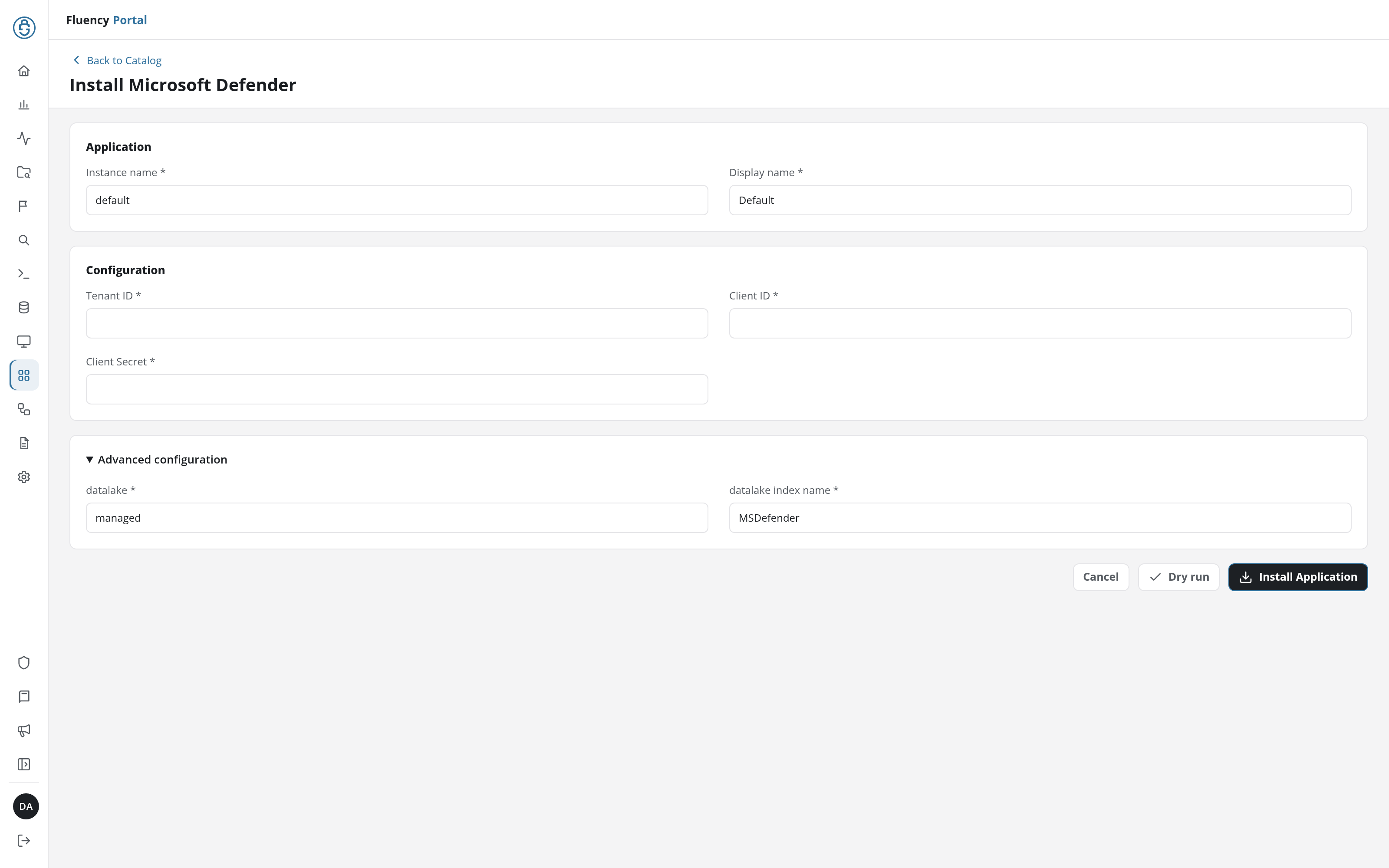
Click Dry run first to have the platform check the three credentials against Microsoft before anything is installed, then click Install Application. The Applications page opens with the notice Default is launching., and the new application is listed with a green Running badge once the pipeline is up.
datalake and datalake index name sit in the collapsed Advanced Configurations row below the parameters; expand it to reach them.
Leave Name and Display Name at default / Default unless you are installing a second instance (collecting from two Defender tenants, for example), in which case give each one a name you will recognise on the applications list.
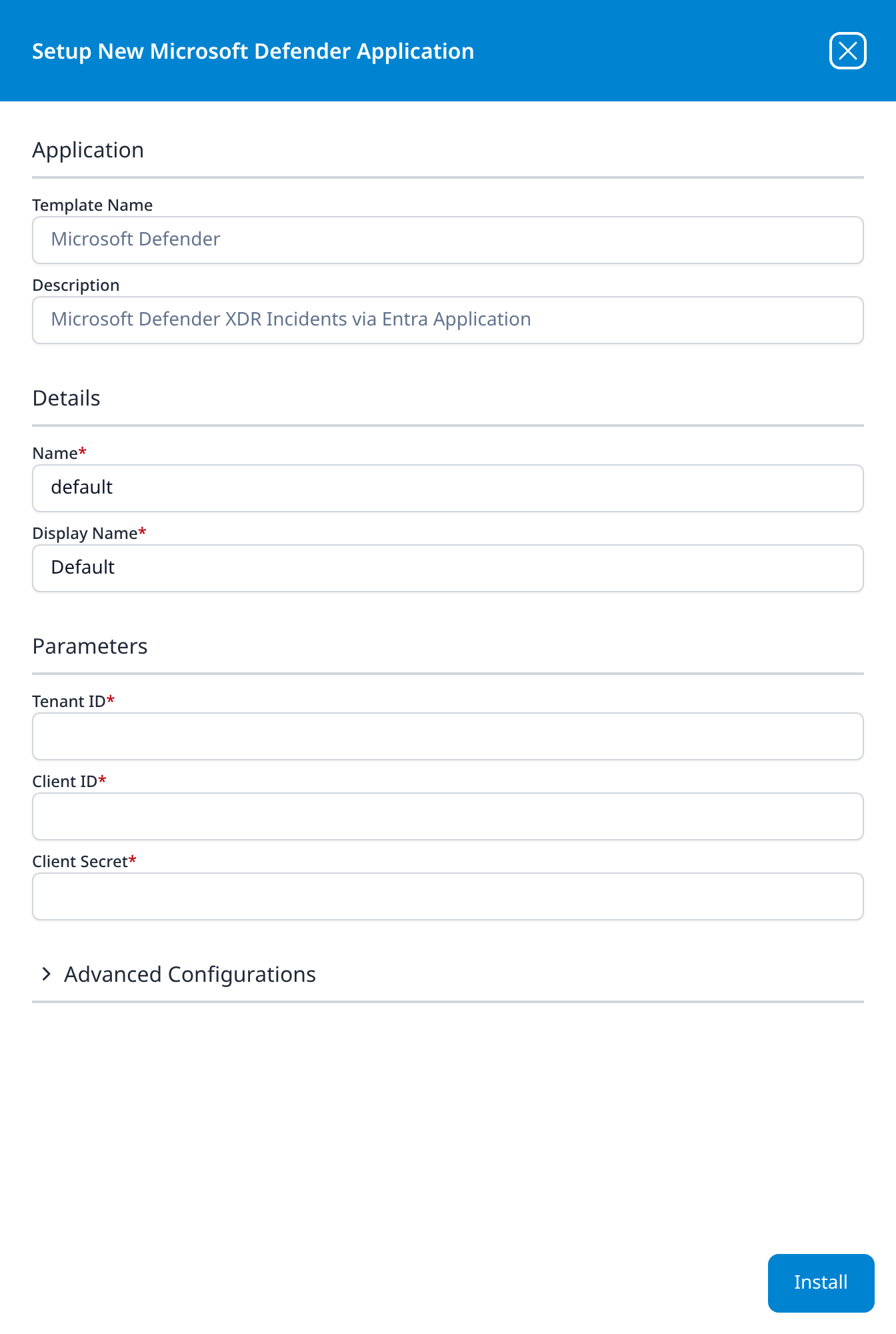
Press Install. The application then appears in the Installed Applications view, where its badge reads Running once the pipeline is up.
Confirm it is running
- v2 interface
- Classic v1 interface
The application is listed on Applications as Microsoft Defender, with the display name Default beneath it. Its badge should read Running in green within a few seconds; a red Error badge means the pipeline aborted or reported errors in the last hour, and the details page shows the error message beneath the summary figures.
Click its row to open the application details page. The summary card carries the status and the traffic in and out; Pipeline draws the integration, the router and the data sinks the install created; Parameters shows the three values back with the client secret masked; and Actions lists, one line per object, the setup steps the install carried out.
The application appears under Installed Applications as Microsoft Defender: Default. Its badge should read Running in green within a few seconds; Aborted in red means the pipeline stopped on an error, and the details panel will carry the message.
The blue eye button on the card opens the details panel, titled Viewing MSDefender Application. Details repeats the template name, the internal Name, the Display Name and the Status badge. Parameters shows the three values back with the client secret masked. Actions lists, one line per object, the pipeline objects the install created.
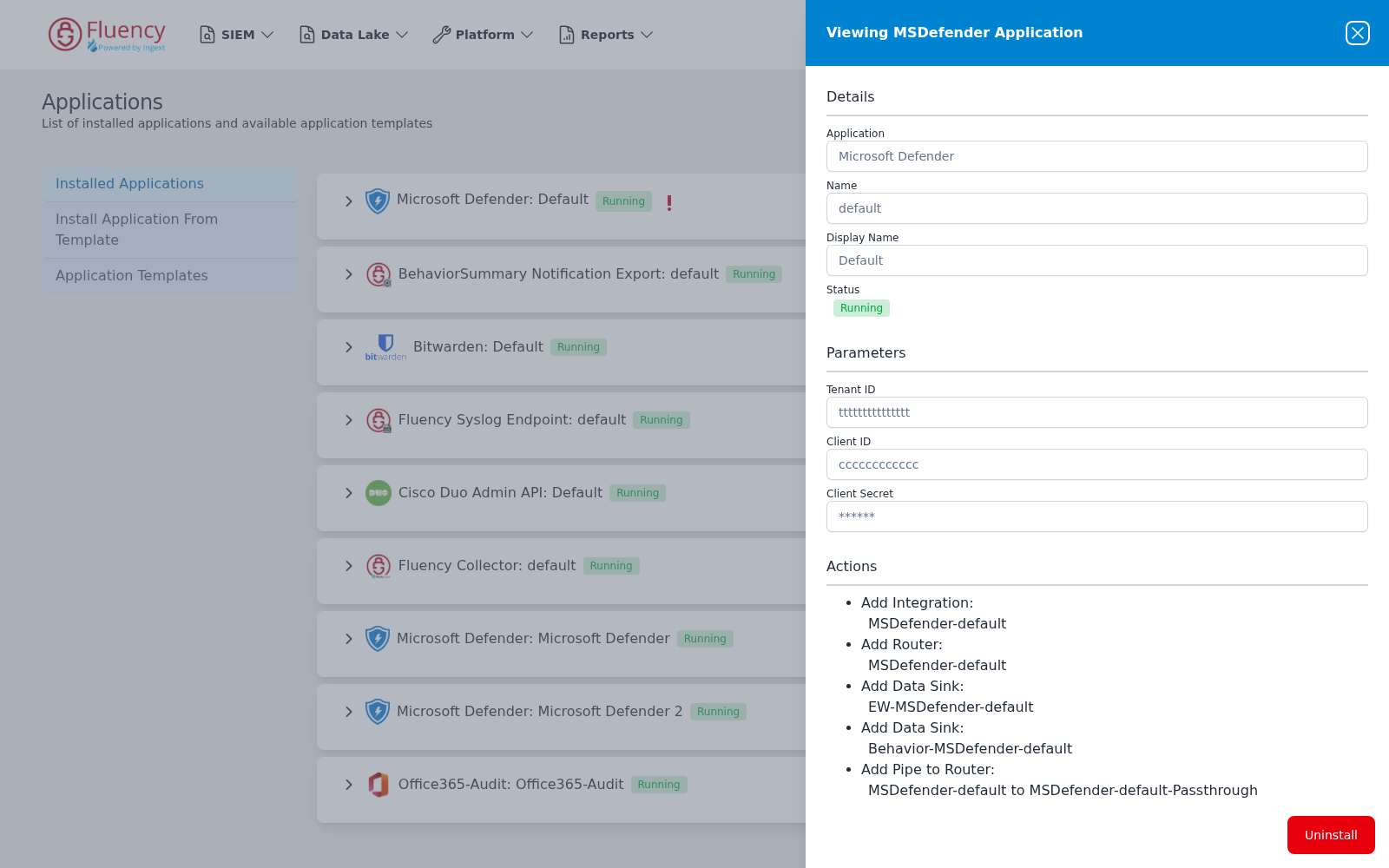
An events-only install creates five objects: an integration, a router, the two data sinks EW-MSDefender-<name> and Behavior-MSDefender-<name>, and a pipe to the router. Your own Actions list is the authoritative record of what your install built.
Nothing an install records can be edited afterwards. Changing a credential means uninstalling the application and installing it again; see Rotating the client secret.
Check the roster, not the event count. First collection of events reaches back 24 hours and the two event streams then poll independently every five minutes, so a quiet tenant can legitimately produce nothing for a while, which makes an empty index useless as a health signal. The MS Defender entry on the Resources page is the stricter check, because a device roster is never legitimately empty on a tenant that has any devices at all:
- v2 interface
- Classic v1 interface
Open Resources from the navigation rail. MS Defender is listed with its six record sets: AvHealth, Machine, Recommendation, SecureConfig, SecureScore and Vulnerability. Open each one in turn; a record set that has loaded lists its records, and one that has loaded and is genuinely empty reads No data found. A record set that was never loaded is missing from the list.
On SIEM → Resources, the MS Defender card has a button for each of the six record sets:
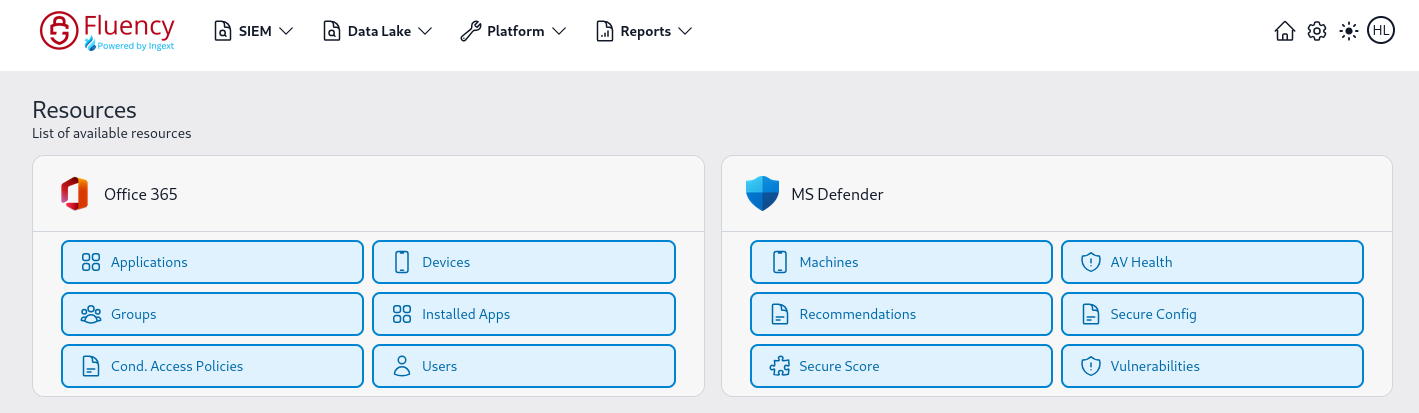
Click through each of the six buttons. A record set that has loaded shows a Total Records count and populated facets; one that has loaded and is genuinely empty shows Total Records 0 and No data found; one that was never loaded at all shows Resource Load Failed instead of a list. Those three states mean different things (see Resources), and the difference between the last two is usually the difference between a licence gate and a missing permission.
See Confirm data is arriving for how to check that events are landing.
Maintenance
Rotating the client secret
Client secrets expire, and Defender gives no warning on the Fluency side when one does: collection simply stops. Rotate before the expiry date you recorded in step 5:
- In Entra, go to the application's Certificates & secrets and add a New client secret. Leave the old one in place for now; an application can hold several.
- Copy the new Value.
- In Fluency, uninstall the Microsoft Defender application and install it again with the new secret. The parameters are read-only after install, so reinstalling is the supported way to change a credential. To uninstall, click Uninstall at the top right of the application's details page (v1: the red Uninstall button at the foot of its details panel on Platform → Applications).
- Once data is flowing again, delete the old secret in Entra.
Rotation does not touch the permission set. The six permissions live on the app registration and survive any number of secrets.
Reviewing the permission set
When the template gains a stream, the app registration needs the new permission, and nothing on the Fluency side reports that it is missing. The symptom is an empty record set on a card that is otherwise full, which reads as "we have no vulnerabilities" rather than as a fault.
Re-read the API permissions page against the table in step 3 when a stream you expect is empty, and after any Fluency upgrade that mentions Defender. The appRoleAssignments count in the CLI section answers the same question in one command.
Removing the integration
Uninstall the application in Fluency first, with the Uninstall button at the top right of its details page (v1: the red Uninstall button at the foot of its details panel on Platform → Applications), so the pipeline stops cleanly before its credentials stop working.
To revoke access on the Microsoft side, delete the app registration, or revoke just the consent from Microsoft Entra ID → Enterprise applications, where the application appears as a service principal. Deleting it there removes the tenant's consent without deleting the registration.
Troubleshooting
403 Forbidden is doing double duty on this integration. It is the honest answer when consent was never granted, and it is also what Defender for Endpoint returns to a perfectly authorised application that asked for a token against the wrong audience: Microsoft's own note says requests fail with 403 Forbidden "even if the API endpoint uses https://api.security.microsoft.com" when the token audience does not match. If Graph calls succeed and Defender for Endpoint calls do not, it is the audience, not the consent.
| Symptom | Likely cause | Fix |
|---|---|---|
| The application shows Aborted immediately after install | The Secret ID was pasted instead of the secret Value, or the secret has expired | Uninstall, then reinstall with the secret's Value. If it was never captured, create a new secret; the old value is unrecoverable. |
Every call returns 403 Forbidden | Admin consent was never granted | Entra → App registrations → the app → API permissions → Grant admin consent. All six rows must read Granted for <tenant>. |
| Incidents and alerts arrive; the MS Defender card on Resources is missing entirely | None of the four WindowsDefenderATP permissions were added, usually because only the Microsoft APIs tab was used | Add them from the APIs my organization uses tab (step 3) and consent again. The event feed is unaffected either way, which is why this fails quietly. |
| The card is there, but one record set is empty while the others are full | The permission behind that one record set is missing | Match the empty set against the mapping table and add the permission it names. |
| Machines and AV Health are full; Vulnerabilities, Secure Config, Recommendations and Secure Score are all empty | Defender Vulnerability Management is not licensed on this tenant, so the permissions are granted over data that does not exist | Confirm in the Defender portal under Exposure management → Recommendations. If that page is empty too, this is a licence gate rather than a fault. |
WindowsDefenderATP returns nothing on the APIs my organization uses tab | Defender for Endpoint has never been provisioned in the tenant, so its service principal does not exist | Complete Defender for Endpoint setup at https://security.microsoft.com, then add the permissions. |
A direct call to /api/machines returns 404 Not Found | No devices in the retention window; this is the documented empty response, not a bad URL | Check Assets → Devices in the Defender portal. If it is empty there, nothing is onboarded yet. |
| Incidents arrive but alerts do not, or the reverse | Only one of the two Graph permissions was added or consented | Check that both SecurityIncident.Read.All and SecurityAlert.Read.All are listed and green. |
| Permissions are listed under Microsoft Threat Protection rather than Microsoft Graph | The app was registered by following Microsoft's legacy Defender XDR walkthrough | Add the two Microsoft Graph application permissions (step 2) and grant consent again. The legacy permissions can be removed. Microsoft Threat Protection is a different API from WindowsDefenderATP; the four permissions in step 3 belong on the latter. |
| Collection worked, then stopped around the six-month mark | The client secret expired; 180 days is the portal's default | Rotate the secret. |
| The application is Running but no Defender events appear | The tenant genuinely has no incidents or alerts in the polled window | Confirm at https://security.microsoft.com that the Incidents queue is non-empty, and check the Resources card instead: it is the health signal that does not depend on event volume. |
A wrongly-registered application looks like this; note Microsoft Threat Protection as the API and Incident.Read.All as the permission. Consent is granted and the portal shows no error, which is what makes this one hard to spot:
Data reference
What the streams look like once they land, for searches and detection rules written against them.
Streams, endpoints and permissions
| Stream | API and endpoint | Permission | Contents |
|---|---|---|---|
| Incidents | Microsoft Graph: GET /security/incidents | SecurityIncident.Read.All | Correlated attacks: severity, classification, determination, status, assignee, priority score, and the Defender portal link. |
| Alerts | Microsoft Graph: GET /security/alerts_v2 | SecurityAlert.Read.All | Individual detections: MITRE technique IDs, recommended actions, the detecting service, and an evidence array. |
| Device inventory | Defender for Endpoint: GET /api/machines, GET /api/deviceavinfo | Machine.Read.All | The Machines and AV Health record sets: hostname, OS, last-seen, risk and exposure level, onboarding status, tags, and per-device antivirus engine, platform and signature state. |
| Vulnerabilities | Defender for Endpoint: GET /api/vulnerabilities, GET /api/machines/SecureConfigurationsAssessmentByMachine | Vulnerability.Read.All | The Vulnerabilities and Secure Config record sets: CVEs with CVSS, EPSS and exploit status, and per-device configuration compliance. |
| Security recommendations | Defender for Endpoint: GET /api/recommendations | SecurityRecommendation.Read.All | The Recommendations record set: the prioritised remediation list, with exposed-device counts and exposure impact. |
| Device secure score | Defender for Endpoint: GET /api/configurationScore | Score.Read.All | The Secure Score record set: Microsoft Secure Score for Devices as a tenant-level figure over time. |
Alerts carry the richest event payload: evidence is where device names, user SIDs, process command lines, file hashes and IP addresses live. Every permission above is read-only: Fluency never writes back to Defender.
Two feeds, and only one of them is an event stream
The install produces an event index and a resource roster, and they behave nothing alike.
The first two rows of the table are events: they arrive when something happens, and a quiet tenant legitimately produces none. The last four rows are not events at all. They are record sets (six of them, holding the current state of your estate), and they appear under MS Defender on the Resources page:
- v2 interface
- Classic v1 interface
Resources, in the navigation rail, lists MS Defender with one entry per record set, under the record set's own name: AvHealth, Machine, Recommendation, SecureConfig, SecureScore and Vulnerability.
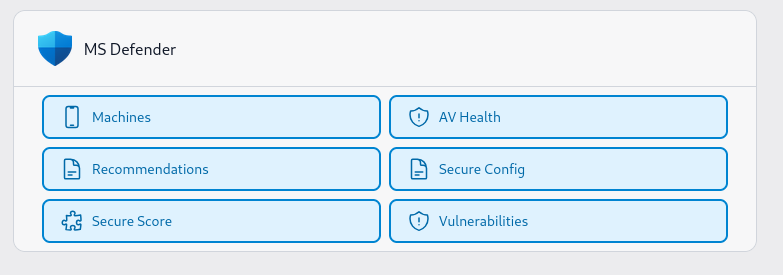
This is where least privilege quietly costs you something. Each of those six buttons is backed by a different endpoint, and the endpoints are gated by four different permissions:
| Record set | Endpoint behind it | Permission that buys it |
|---|---|---|
| Machine (v1: Machines) | GET /api/machines | Machine.Read.All |
| AvHealth (v1: AV Health) | GET /api/deviceavinfo | Machine.Read.All |
| Recommendation (v1: Recommendations) | GET /api/recommendations | SecurityRecommendation.Read.All |
| SecureConfig (v1: Secure Config) | GET /api/machines/SecureConfigurationsAssessmentByMachine | Vulnerability.Read.All |
| SecureScore (v1: Secure Score) | GET /api/configurationScore | Score.Read.All |
| Vulnerability (v1: Vulnerabilities) | GET /api/vulnerabilities | Vulnerability.Read.All |
Skip one permission and you lose the record sets it backs, not with a permission error, but with an empty list. An application granted only the two Microsoft Graph permissions collects incidents and alerts perfectly and shows no MS Defender card at all, and nothing about that reads as a failure, because the events are arriving. It stays looking healthy until the first time someone needs to know which devices a CVE is actually on.
Grant all four. The narrower sets are only worth considering if a policy forbids them, and the checkbox you skip is the record set you will not have.
The two halves are also meant to be read together. Alert evidence identifies its host by Defender's device ID: the 40-character hex string that is also id on a Machines record. Without the roster, a detection can tell you that 1e5bc9d7e413… was involved; with it, the same detection can name the machine, its owner, its risk level and the CVEs open on it.
The permission-to-endpoint mapping above follows Microsoft's API reference for the Defender for Endpoint API. Microsoft offers both a paginated JSON form and a bulk file-export form for the assessment and antivirus-health data, and they do not always take the same permission.
To see what your install actually created, open the installed application's details and read its Actions list, which records every object the install produced.
Under the hood
Engineering reference: collection behaviour, the two token audiences, output format and API limits
This section describes how the collector works and the APIs it calls. Administrators connecting Defender do not need it.
Two audiences, one credential
The single client-credentials pair is exchanged for two different tokens, because the six permissions are split across two resources:
| Microsoft Graph | Defender for Endpoint | |
|---|---|---|
| Entra API name | Microsoft Graph | WindowsDefenderATP |
| Application ID | 00000003-0000-0000-c000-000000000000 | fc780465-2017-40d4-a0c5-307022471b92 |
| Token scope | https://graph.microsoft.com/.default | https://api.securitycenter.microsoft.com/.default |
| Request host | https://graph.microsoft.com/v1.0 | https://api.security.microsoft.com/api |
| Permissions | SecurityIncident.Read.All, SecurityAlert.Read.All | Machine.Read.All, Vulnerability.Read.All, SecurityRecommendation.Read.All, Score.Read.All |
The scope and the host do not match on the Defender for Endpoint side, and that is deliberate on Microsoft's part rather than a documentation error. Microsoft states it twice in its own API reference:
Some Microsoft Defender for Endpoint APIs continue to require access tokens issued for the legacy resource
https://api.securitycenter.microsoft.com. If the token audience doesn't match the resource expected by the API, requests fail with403 Forbidden, even if the API endpoint useshttps://api.security.microsoft.com.
If permission is defined under WindowsDefenderATP, the scope must be set to:
https://api.securitycenter.microsoft.com/.default
Both hosts answer, and both are documented, so a wrong-audience token produces an authorisation failure rather than a routing one. There is no combination of hostnames that turns this into a clearer error.
Collection behaviour
The two event streams poll on a five-minute cadence:
- Incidents:
GET https://graph.microsoft.com/v1.0/security/incidents - Alerts:
GET https://graph.microsoft.com/v1.0/security/alerts_v2
Each maintains an independent watermark (lastPoll for incidents, lastAlertPoll for alerts). On each poll, the filter lastUpdateDateTime ge <watermark> returns everything updated since the last successful run; pagination follows @odata.nextLink. On first run with no state, both watermarks default to 24 hours back.
Auth is OAuth2 client credentials.
POST https://login.microsoftonline.com/{tenantId}/oauth2/v2.0/token
scope=https://graph.microsoft.com/.default                # incidents and alerts
scope=https://api.securitycenter.microsoft.com/.default   # machines, TVM
grant_type=client_credentials
Retry and backoff handle 429/503/504, with Retry-After honoured.
API limits worth knowing
| API | Limit |
|---|---|
GET /api/machines | 100 calls/min, 1,500/hour; $top max 10,000; devices are returned per the tenant's configured retention period; 404 when there are none |
GET /api/vulnerabilities | $top max 8,000 |
GET /api/recommendations | $top max 10,000 |
GET /api/deviceavinfo | 30 calls/min, 1,000/hour; max page size 200,000; default page size 20 |
GET /api/machines/SecureConfigurationsAssessmentByMachine | 30 calls/min, 1,000/hour; max page size 200,000 |
The record sets are state, not events, which matters to anything written against them. A vulnerability record carries a status of RemediationRequired, NoActionRequired, UnderException or PartialException, and a recommendation carries Active, Full exception or Partial exception, so a rule that fires on the arrival of a record rather than on its status will fire on the ones Microsoft has already ruled out. Deduplicate vulnerabilities on id (the CVE) and recommendations on id (va-_-microsoft-_-edge_chromium-based and similar); device-scoped rows key on deviceId plus the finding's own identifier.
Two further properties of the vulnerability-management data are worth carrying into detection content. It is a current-state snapshot with no history (Microsoft: "Data that is collected (using either JSON response or via files) is the current snapshot of the current state, and does not contain historic data"), so trend analysis has to come from successive collections stored in Fluency. And its device population is scoped differently from the device inventory's: "Vulnerability management shows devices that were in use within the last 30 days. This is different from device status in Defender for Endpoint, where if a device has Inactive status if it doesn't communicate with the service for more than seven days." A device count taken from Machines and one taken from Vulnerabilities will not agree, and neither is wrong.
Output
Event output goes to gzip-JSONL files under the plugin's home directory, named msdefender_incident_<ts>.log.gz and msdefender_alert_<ts>.log.gz. Each line is {"@fields": <event>, "@customer": <name>}. Incidents are emitted with Sourcetype / Importsource = microsoftDefender; alerts with microsoftDefenderAlert.
The plugin reads three values from its integration config/secret: tenantId, clientId, clientSecret.
What your own install records
Three things vary with the release you are running, and the Actions list on the installed application, reached with the blue eye button on its details panel, is the authoritative record of all three:
- Which endpoint variant backs each record set. Microsoft offers both a paginated JSON form and a bulk file-export form for the secure-configuration and antivirus-health data, and they take different permissions (
Vulnerability.Read.Allfor the export form,Machine.Read.Allfor the JSON form ofdeviceavinfo). - The sync cadence and watermarking for the six record sets. They are snapshots rather than event streams, so a watermark may not apply.
- Whether the install creates exactly the five pipeline objects shown under Confirm it is running, or an
MSDefenderresource group alongside them.
Migration notes: legacy API to Graph (April 2026)
This plugin previously polled https://api.security.microsoft.com/api/incidents and /api/alerts with the legacy Threat Protection scope. Microsoft has marked those endpoints as deprecated in favour of the unified Microsoft Graph security API. The plugin was migrated to Graph in April 2026.
| Legacy | Microsoft Graph | |
|---|---|---|
| Base URL | https://api.security.microsoft.com | https://graph.microsoft.com/v1.0 |
| Incidents path | /api/incidents | /security/incidents |
| Alerts path | /api/alerts | /security/alerts_v2 |
| Token scope | https://api.security.microsoft.com/.default | https://graph.microsoft.com/.default |
| Filter field | lastUpdateTime | lastUpdateDateTime |
| App permissions | Incident.Read.All, Alert.Read.All (Threat Protection) | SecurityIncident.Read.All, SecurityAlert.Read.All (Graph) |
| Pagination | @odata.nextLink | @odata.nextLink (unchanged) |
Schema also changed: incidents use id / displayName / createdDateTime / lastUpdateDateTime instead of incidentId / incidentName / createdTime / lastUpdateTime. Alerts gained richer evidence (evidence[], mitreTechniques, priorityScore).
Design decisions
- Pass through Graph schema as-is. No legacy-name remapping or aliasing:
id,displayName,createdDateTime,lastUpdateDateTime, evidence and mitreTechniques are emitted verbatim. - Sourcetype/importsource names unchanged (
microsoftDefender,microsoftDefenderAlert). Downstream parsers must be updated to handle the new schema under the same sourcetype. - No
$expand=alertson incidents. The two-stream design (independent watermarks, separate dump files) is preserved.
References
Microsoft: Graph security API
- Microsoft Graph security API overview: what the unified security API covers
- List incidents: the incidents endpoint and its filterable properties
- List alerts_v2: the alerts endpoint and the evidence schema
- Get access without a user: the canonical client-credentials walkthrough
Microsoft: Defender for Endpoint API
- Create an app to access Defender for Endpoint without a user: the APIs my organization uses → WindowsDefenderATP path, and the token-audience note
- Supported Defender for Endpoint APIs: the endpoint list and regional hosts
- List machines:
Machine.Read.All, rate limits, and the404-when-empty behaviour - Export device antivirus health:
/api/deviceavinfoand the permission split between its two forms - List all vulnerabilities:
Vulnerability.Read.All - List all recommendations:
SecurityRecommendation.Read.All - Get the device secure score:
Score.Read.Alland/api/configurationScore - Export secure configuration assessment per device: the Secure Config record set
Microsoft: licensing and prerequisites
- Microsoft Defender XDR prerequisites: licensing for incidents and alerts
- Defender Vulnerability Management prerequisites: what gates the four Defender for Endpoint streams
- Explore devices in the device inventory: the Assets → Devices check
- Security recommendations: the Exposure management → Recommendations check
- Add and manage app credentials: client secret lifetimes and rotation
Fluency
- Applications: what the Applications page does (v1: Platform → Applications)
- Microsoft Defender install form: the template's fields and defaults (v1: Install Application From Template)
- Resources: the record-set browser the four Defender for Endpoint permissions feed (v1: SIEM → Resources)
- Confirm data is arriving
- Microsoft integrations: the rest of this category