KQL
KQL is the pipe-oriented query language the platform uses against data lake indexes. It is what the KQL Search page (v1: the KQL Query Builder on Data Lake → KQL Query Builder) executes, and it is what the platform's programmatic search and validation calls accept.
This page covers where KQL runs, the data model it queries, the shape of a query, and how runs are costed and recorded. Do not assume this dialect behaves like another KQL implementation you know: check a query with the validation call, or run it over a short range on KQL Search (v1: the KQL Query Builder), before relying on it.
What KQL is used for here
KQL is the query language of the data lake. It answers tabular questions (filter these records, project these columns, aggregate them this way) over indexes that may hold months of collected events.
Where KQL is available
- KQL Search (v1: Data Lake → KQL Query Builder): the primary interactive editor, described below.
- Programmatic search: the platform exposes KQL search over its automation surface, so an external client or AI agent can run the same queries. See MCP Server.
- Query validation: a separate call that parses and checks a query without executing it, for editors and agents that want to fail fast.
- v2 interface
- Classic v1 interface
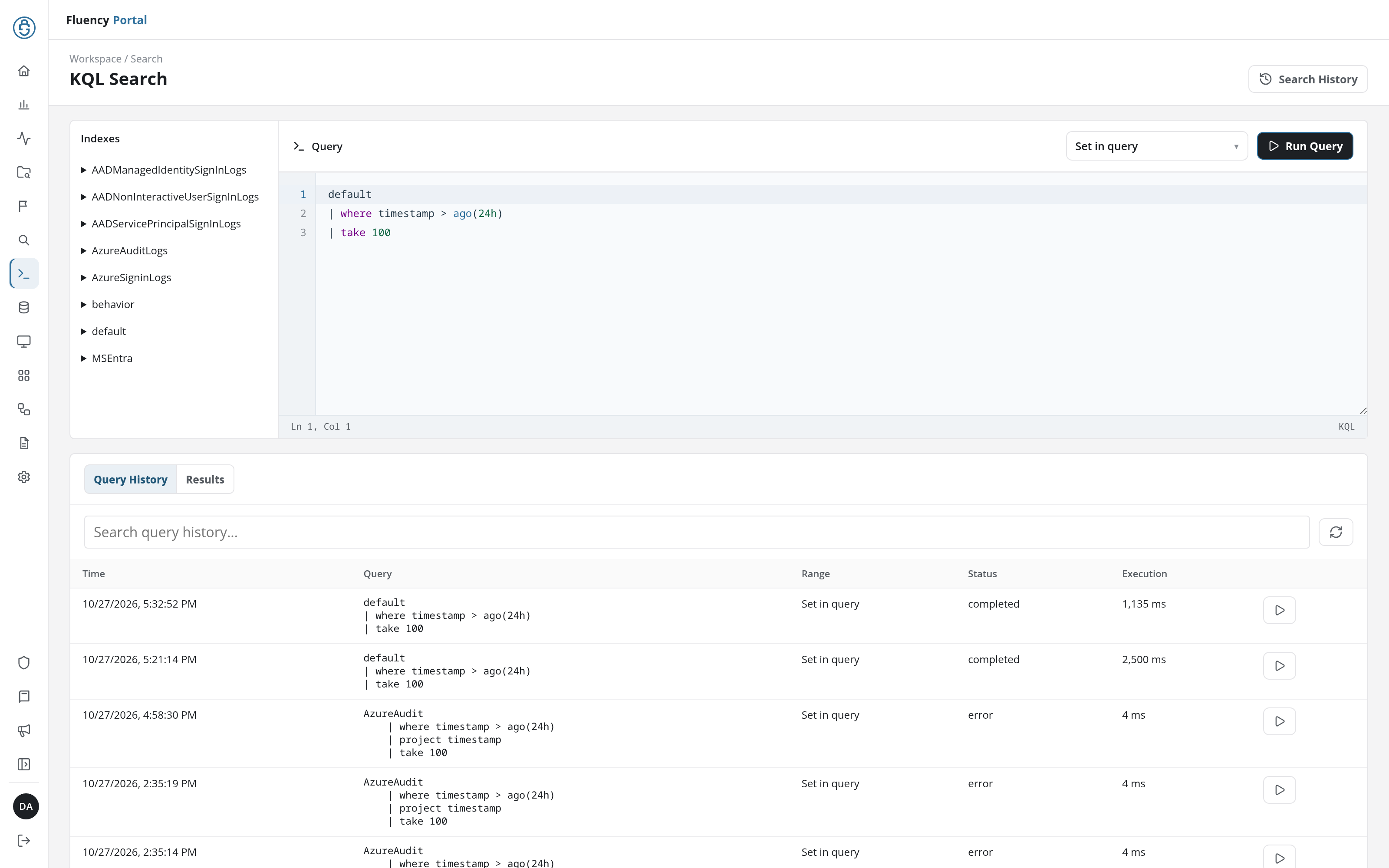
KQL Search, in the navigation rail (/v2/kql-search), is the interactive editor. A left Indexes list names the queryable indexes, each expanding in place to show its columns and types; above the editor, a time-range drop-down, Set in query by default, sits beside the Run Query button; the editor holds the query with line numbers and syntax highlighting; and a Query History / Results tab pair sits underneath, opening on Query History.
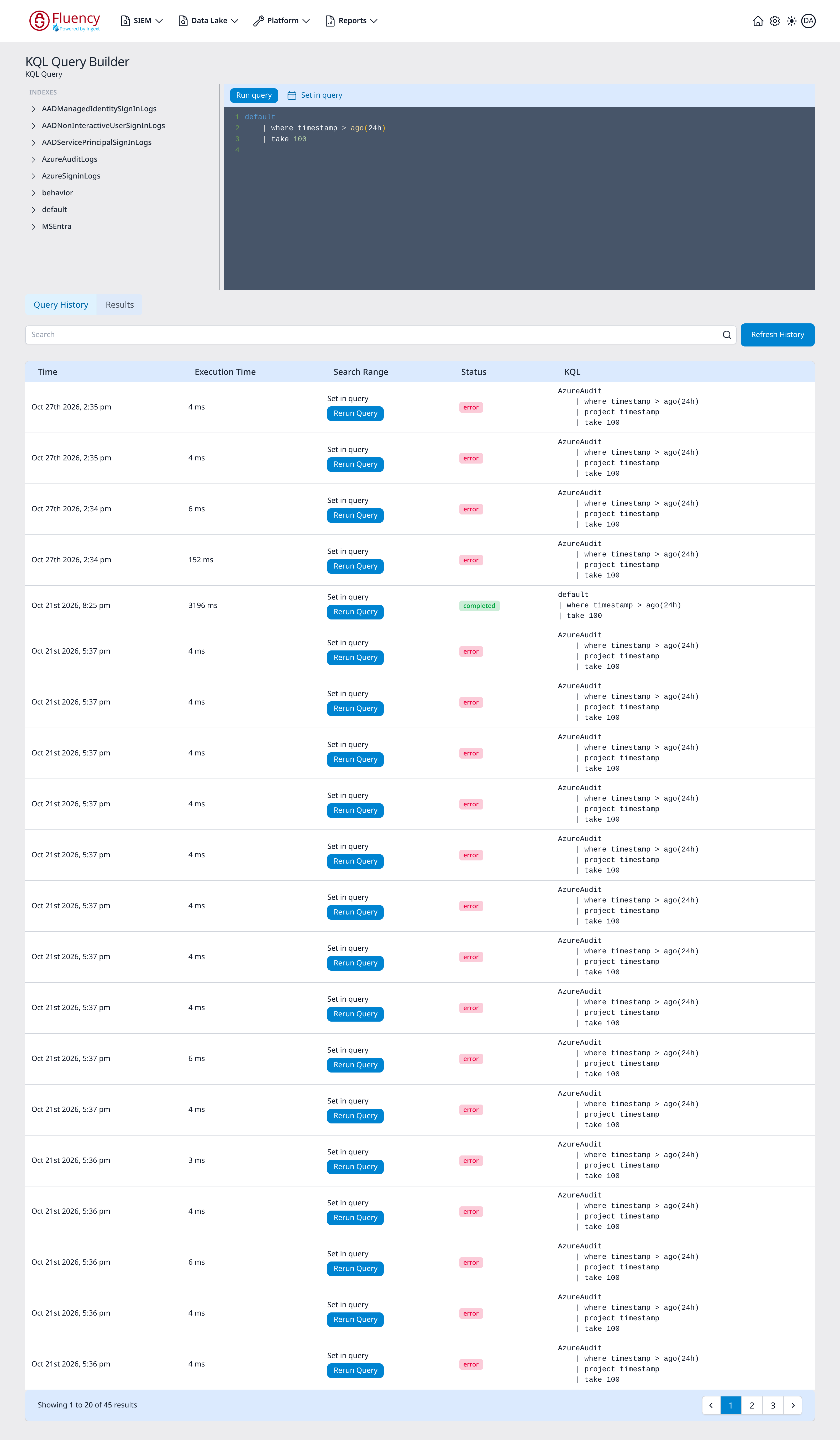
Data Lake → KQL Query Builder (/dataLake/schemas/builder) is the interactive editor. A left INDEXES panel lists the queryable indexes, each expanding in place to show its columns and types; a toolbar carries the Run query button and a Set in query control marked with a calendar icon; the dark editor below holds the query with line numbers and syntax highlighting; and a Query History / Results tab pair sits underneath, opening on Query History.
KQL vs. Lucene vs. FPL
Three query languages coexist and are easy to mix up. Lucene drives the free-text search on Datalake Search (v1: Events Search on Data Lake → Search), the platform's primary event search, over the event model. KQL answers tabular questions over data lake indexes. FPL is the language of the programs that produce and process the data in the first place. See Lucene Queries and FPL.
The tabular data model
Every KQL query runs against a table.
Indexes
An index is the named table a query starts from. The Indexes list on KQL Search (v1: the KQL Query Builder's INDEXES panel) lists the queryable ones.
Base columns
The base columns of a typical index are:
| Column | Type | Notes |
|---|---|---|
timestamp | INT64 | The record's time; the column time filters operate on. |
size | INT32 | The record's size. |
doc | BYTE_ARRAY | The record body. |
labels | MAP | Key/value labels attached to the record. |
The types shown are the physical types the index list reports. Expand an index in the list to see the columns it carries; on KQL Search, an index that uses the standard event layout shows Default event schema in place of its columns.
An index with typed columns of its own, such as AzureSigninLogs, AzureAuditLogs, or the AAD…SignInLogs indexes, has its own time column in place of timestamp: TimeGenerated on those. A filter on timestamp against such an index fails with an error that names the index's time column:
AzureSigninLogs | where TimeGenerated > ago(7d) | summarize count() by AppDisplayName
Schemas and typed columns
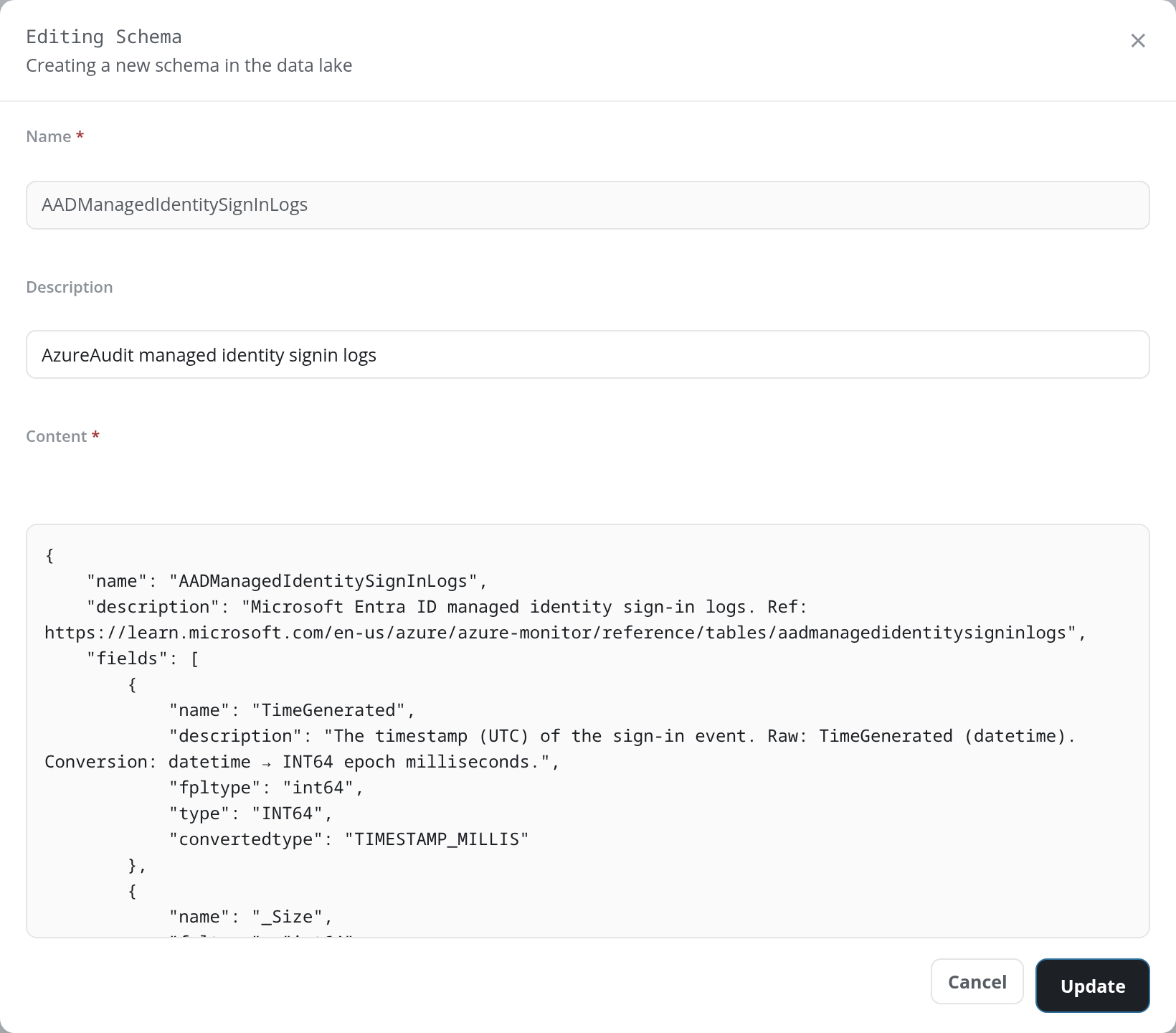
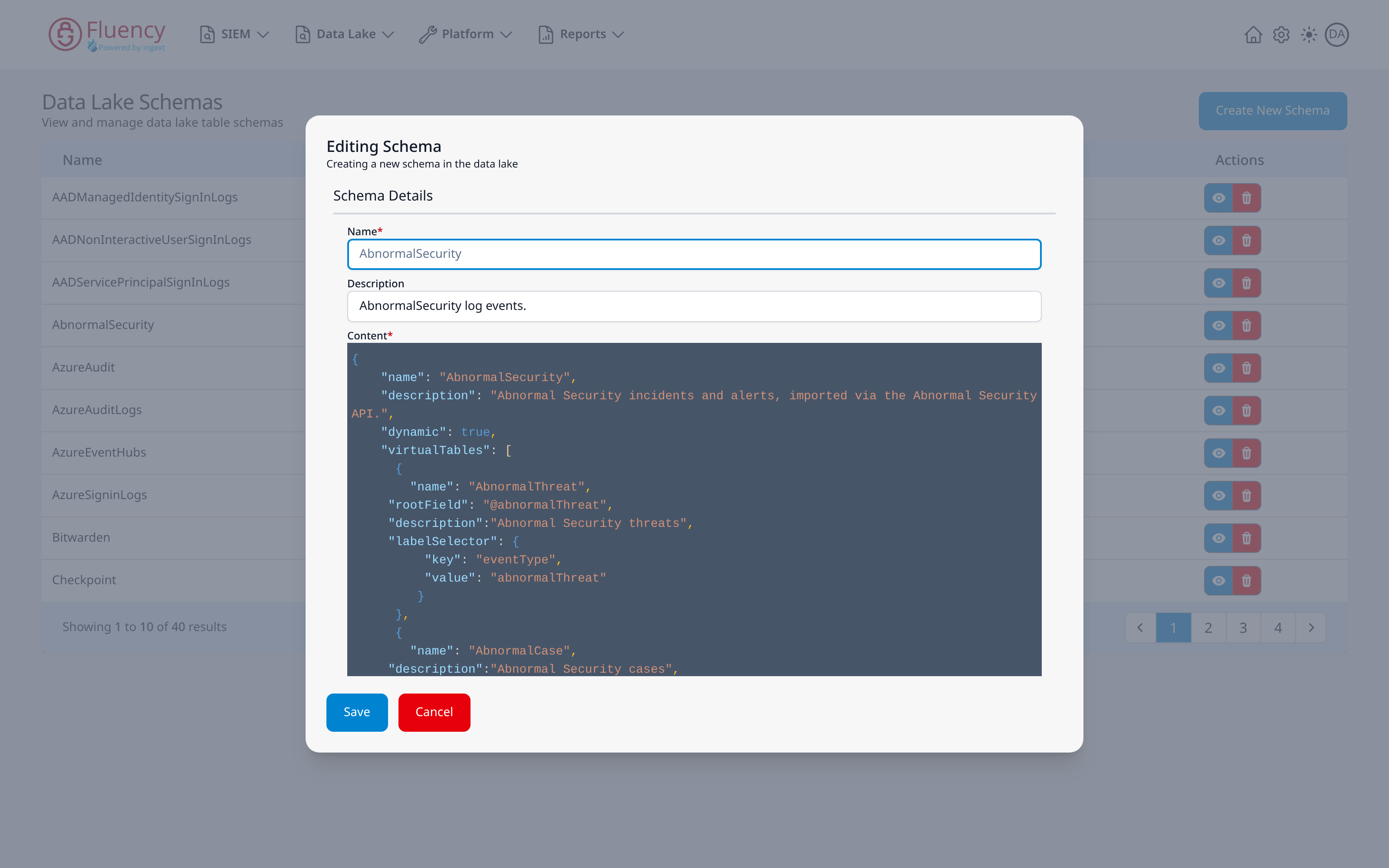
Beyond the base columns, an index's shape comes from its schema. Schema definitions carry a name, a description, a dynamic flag, aliases, virtualTables, and a fields list where each field has a name, a description, and type information (fpltype, type, convertedtype); a schema can also set a rootField, a field can carry nullable and a logical_hint, and a structured field (type MAP) holds its own fields list. The Schemas reference lists these keys.
- v2 interface
- Classic v1 interface
The definitions are on Configuration → Schemas; a row's View opens the Editing Schema dialog with that schema's JSON in the Content box, which is where those property names can be read directly:
The definitions are on Data Lake → Schemas; a row's eye button opens the Editing Schema dialog with that schema's JSON in the Content editor, which is where those property names can be read directly:
Virtual tables
A virtual table is a projection of an index defined by a name, a root field, and a label selector, letting a subset of a wide index be queried as its own table. An index's virtual tables are listed from the Virtual Tables link on its card on Configuration → Data Lakes (v1: Data Lake → Management).
Query structure
A KQL query names a source table and then applies a sequence of operators, each separated by |, each consuming the table produced by the one before it. The in-product sample query is:
default | where timestamp > ago(24h) | take 100
This reads as: start from the default index, keep only records from the last 24 hours, then return at most 100 of them. Every stage takes a table in and passes a table out, which is the mental model the rest of the language rests on.
Time
ago() produces a time relative to now, and is the idiomatic way to write a rolling window: where timestamp > ago(24h) is the in-product default.
- v2 interface
- Classic v1 interface
KQL Search also has a time-range drop-down beside Run Query. Its default, Set in query, applies no window from outside, and query-history rows whose window comes from the query text itself show Set in query in their Range column; the other choices (Last 3 hours to Last 7 days, or a Custom range) apply a window of their own, and their history rows show the UTC window that was searched. See Time Range.
The KQL Query Builder also has a Set in query control beside the editor, and query-history rows whose window comes from the query text itself show Set in query in their Search Range column. See KQL Query Builder.
Set the time range in one place (in the query or outside it), not both.
Query cost
Data lake searches are metered, so the cost of a query matters before it runs.
How searches are costed
The Investigation Search dialog previews a run's scope and shows an estimated cost before the search starts (v1: an estimated Search Cost in dollars), and the investigation history records the cost of each completed run. See Investigation History (v1: Data Lake → Search and Investigations).
What the Results view reports
A completed run on KQL Search (v1: in the KQL Query Builder) reports the search range, the total records searched, and the total bytes searched: the figures to read when predicting the cost of a wider run.
Writing cheaper queries
Filter on the time column first (timestamp, or the typed index's own, such as TimeGenerated), restrict to one index, project early, prefer aggregation over returning raw rows, and use take while iterating.
Query history
- v2 interface
- Classic v1 interface
Every run is recorded on KQL Search's Query History tab with its Time, Query text, Range, Status, and Execution time; the tab lists your own runs. The list is searchable and refreshable. Searches are also kept, account-wide and with their stored results, on KQL Search History (/v2/kql-search/history), opened with Search History in the page header.
The ▷ button at the end of a history row (Rerun query) loads that entry's KQL and its time-range setting into the editor, runs it again, and switches to the Results tab. A query run over a preset such as Last 7 days reruns over that preset ending now; one run over a Custom range gets its From and To back.
Every run is recorded in the KQL Query Builder's Query History tab with its Time, Execution Time, Search Range, Status, and KQL text. The list is searchable and refreshable. Completed runs are also kept, with their stored results, on Data Lake → KQL Search History (/dataLake/search/history/kql).
The Rerun Query button on a history row re-executes that entry's KQL and switches to the Results tab.
Note that a query using a relative expression such as ago(24h) covers a different window on each rerun.
Related
- KQL Search: the page walkthrough (v1: KQL Query Builder)
- KQL Search History: saved runs and their stored results (v1: KQL Search History)
- Schemas: index schemas and their fields (v1: Schemas)
- Datalake Search: the Lucene-based event search (v1: Data Lake → Search, with investigation runs)
- Lucene Queries: the other query syntax, used by event search over the event model
- Event Data Model: normalized field reference
- MCP Server: running KQL programmatically
- FPL: the language that produces the data KQL queries