Proofpoint Essentials
Fluency polls the Threat API of Proofpoint Essentials, the SIEM-facing half of the Essentials service, for its threat events: clicks on malicious URLs and whether URL Defense stopped them, and messages carrying a threat recognised by URL Defense or Attachment Defense and whether they were blocked or delivered. A permitted click followed by an unusual sign-in is one of the strongest signals in a mail-borne intrusion.
Authentication is an Integration Key, an API key and secret created in the Essentials console and sent to the SIEM host for your tenant's region.
The setup has two halves:
- In Proofpoint Essentials: create an Integration Key with the SIEM Threat Events access type. This produces two values, an API Key and an API Key Secret, and you also need to know which region your tenant is in.
- In Fluency: install the Proofpoint Essentials application template, point it at the regional endpoint, and paste those two values into its form.
| Template | Where the credential is made | Pre-filled API Endpoint URL |
|---|---|---|
| Proofpoint Essentials (this page) | Essentials → Account Management → Integrations | https://us-siem.proofpointessentials.com |
| Proofpoint TAP | TAP Dashboard → Connected Applications | https://tap-api-v2.proofpoint.com |
On the form, the pre-filled endpoint host tells them apart. Essentials is the small-business service, usually delivered through a partner, Targeted Attack Protection the enterprise service that runs alongside Proofpoint's mail gateway, and an organisation has one or the other: if your administrators sign in at threatinsight.proofpoint.com, you want Proofpoint TAP.
What arrives
| Stream | What it holds | Lands in |
|---|---|---|
| Clicks blocked | Clicks on rewritten URLs that URL Defense recognised as malicious and blocked. | The Proofpoint index |
| Clicks permitted | Clicks on malicious URLs that were not blocked, typically because the campaign was classified after delivery: the events that need a response. | The Proofpoint index |
| Messages blocked | Messages carrying a threat recognised by URL Defense or Attachment Defense, blocked before delivery. | The Proofpoint index |
| Messages delivered | Messages carrying a known threat that reached the mailbox. | The Proofpoint index |
This is not a mail log: message tracking stays in the Essentials console, and every record here comes from URL Defense or Attachment Defense, so a package without them yields nothing (Before you begin). Expect low, bursty volume and long, legitimately empty stretches; Confirm it is running shows how to tell a quiet organisation from a broken feed. A partner-scoped key does not by itself bring in customers' events; for per-customer separation, create a key and install an application in each customer organisation (step 1).
Endpoints, time windows and response behaviour are in Under the hood.
Before you begin
A package that includes URL Defense and Attachment Defense. Everything this API returns is produced by those two services, so on a package without them the key is issued, the application installs, and the feed stays empty because there is nothing generating events. They are included from the Business package upwards.
Your region. Essentials runs in more than one data centre, and the SIEM host follows the console you sign in to. Proofpoint documents two SIEM hosts:
| If administrators sign in at | The API endpoint is |
|---|---|
us1 – us5.proofpointessentials.com | https://us-siem.proofpointessentials.com |
eu1.proofpointessentials.com | https://eu-siem.proofpointessentials.com |
If you are unsure which US instance you are on, sign in to any of them: Essentials redirects you to the right one, and the address bar then tells you. Proofpoint's API documentation names only those two SIEM hosts, so if your console address matches neither pattern, confirm the endpoint with Proofpoint before installing rather than guessing at a third.
An administrator who can reach Account Management → Integrations. In a partner-managed tenant that may be the partner rather than anyone at the organisation itself; if Integrations is not in your menu, the key has to come from whoever manages the account.
Access to the Fluency portal with permission to install applications.
The Essentials Threat API serves at most the last three days (less than half what Proofpoint's enterprise TAP API offers) and a single request may cover at most one hour. A collection gap longer than three days is a permanent gap.
Proofpoint states that an Integration Key may take up to thirty minutes to become active. A 401 in the first half hour is expected and is not a reason to recreate the key.
Part 1: Proofpoint Essentials
1. Create the Integration Key
Sign in to the Essentials console for your region and go to Account Management → Integrations, then select the Integration Keys tab. Click Add Integration Key in the upper right.
Fill in the form:
- Description: what the key is for. Something like
Fluency Ingext - SIEMbeatsapi key 2, because the description is all you will have to go on when deciding which key to delete later. - Access Type: SIEM Threat Events. The other option in the dropdown is the Security Awareness reporting API, which is a different feed and will not authenticate against the SIEM endpoints.
- Scope: see below.
Click Create.
About Scope. If your account is an organisation, this field is locked to My Organisation Only and there is nothing to decide. If you are a partner, you choose between My Organisation Only and My Organisation and All Child Organisations, which controls whether the key is allowed to read data for the customers beneath you in the partner hierarchy.
The API decides what to return from two request parameters: ownData, which defaults to true, and customerData, which defaults to false. A caller that sets neither receives only the key-holding organisation's own events, whatever the key's Scope allows. If you want per-customer separation (and as an MSP you generally do, because it keeps one customer's mail telemetry out of another's index), create a key inside each Essentials organisation and install one Fluency application per customer.
2. Copy the API key and secret
Both values are displayed once, on the confirmation that follows Create.
Proofpoint's own wording is "These values will not be shown again, please store them securely." There is no regenerate action on an Integration Key: if you lose the secret, the only path is to add a new key and delete this one. Put them in a secrets manager rather than a document.
The two products name these values differently, and the Fluency form follows Proofpoint's API examples rather than its console:
| Value in the Essentials console | Fluency parameter | Proofpoint's API examples call it |
|---|---|---|
| API Key | Principal | $PRINCIPAL |
| API Key Secret | Secret | $SECRET |
Verify before you leave Proofpoint
Wait out the activation delay, then exercise the key against your own region's host before going anywhere near Fluency:
curl -s -w '\n%{http_code}\n' \
  "https://us-siem.proofpointessentials.com/v2/siem/all?sinceSeconds=3600" \
  --user "<API key>:<API key secret>"
| Response | What it means |
|---|---|
200 with populated arrays | The key works and Essentials has recent threat activity. Continue to Part 2. |
200 with empty arrays: "messagesDelivered": [] and the rest | The key works. Essentials simply had nothing to report in the last hour, which for a small organisation is the normal answer. |
401 within thirty minutes of creating the key | The activation delay. Wait and repeat before treating it as a real failure. |
401 that persists | Wrong values, or the request went to the wrong regional host. Check both against step 1. |
403 | Authenticated, but not authorised for the organisation whose data was requested; check the key's Scope. |
400 | The time parameter is malformed or asks for more than one hour. |
429 | The rolling 1800-request 24-hour pool is exhausted. |
| A connection failure | Outbound HTTPS to the SIEM host is blocked from wherever you ran this. |
Change the host to eu-siem.proofpointessentials.com if that is your region. Unlike the TAP API, this one returns JSON and nothing else, so there is no format parameter to get wrong; Proofpoint's own examples include format=json, which is accepted and redundant.
Part 2: Fluency
Install the Application
- v2 interface
- Classic v1 interface
In the navigation rail, open Applications and click Install Application, then choose Proofpoint Essentials from the Email Audit and Protection category of the Application Catalog. All three parameters are required, and the endpoint is filled in for the US region.
Go to Platform → Applications → Install Application From Template and choose Proofpoint Essentials from the Email Audit and Protection category. All three parameters are required, and the endpoint is filled in for the US region.
| Parameter | Notes |
|---|---|
| API Endpoint URL | Pre-filled https://us-siem.proofpointessentials.com. Change it to https://eu-siem.proofpointessentials.com if your tenant is in the EU region. |
| Principal | The API Key from step 2. |
| Secret | The API Key Secret. Masked once the application is installed. |
| datalake | Pre-filled managed. |
| datalake index name | Pre-filled Proofpoint. Two applications writing to the same index name in the same lake will collide, and the second one aborts; and Proofpoint TAP ships the same default. See the caution below. |
- v2 interface
- Classic v1 interface
The last two sit in the collapsed Advanced configuration section below Configuration; click its heading to reach them.
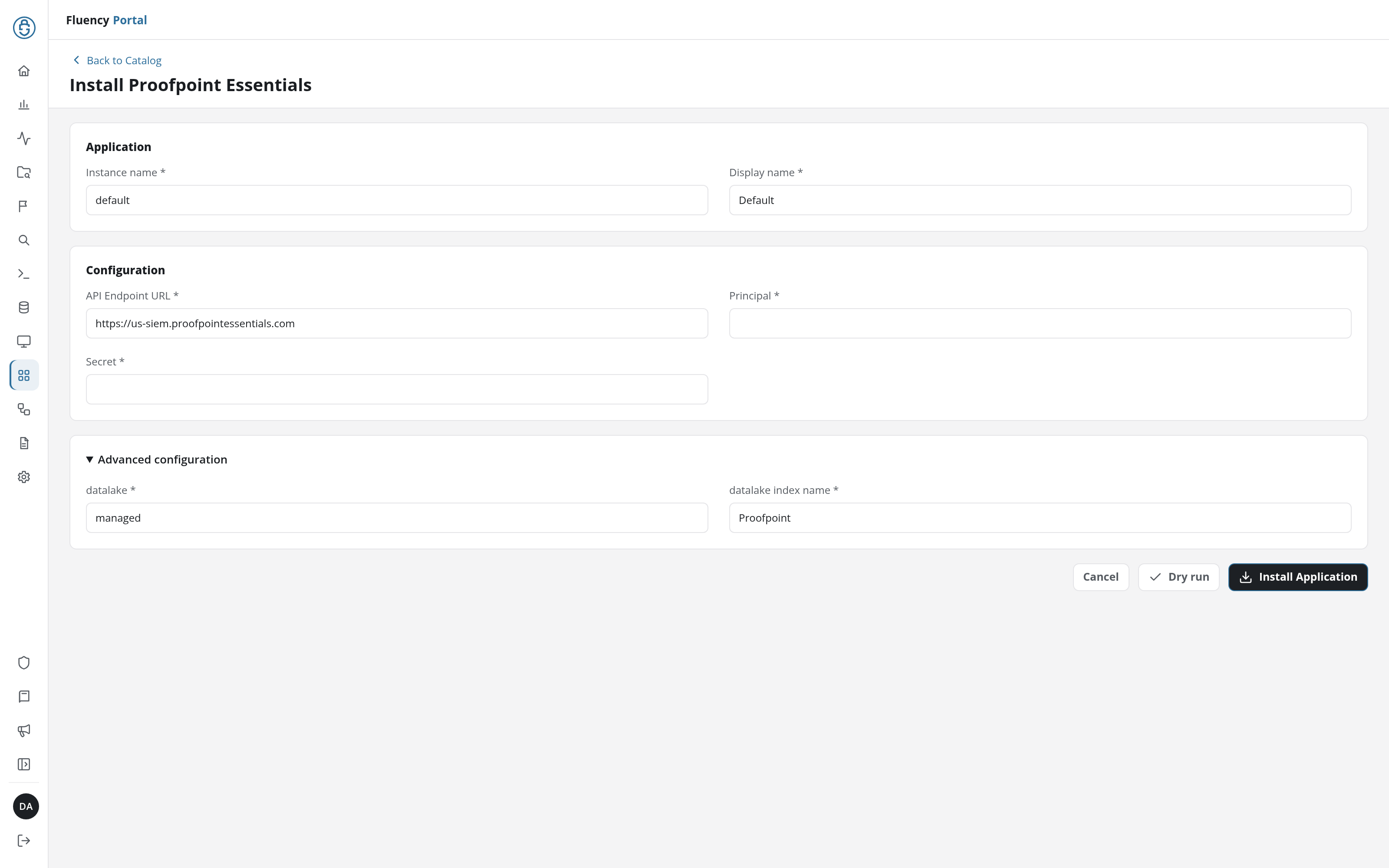
Leave Instance name and Display name at default / Default unless you are installing a second instance (one per Essentials organisation, for a partner collecting from several), in which case give each one a name you will recognise on the applications list.
Click Dry run first to have the platform check the key before anything is installed, then click Install Application. The Applications page opens with the notice Default is launching., and the new application is listed with a green Running badge once the pipeline is up.
The last two sit in the collapsed Advanced Configurations row below the parameters; expand it to reach them.
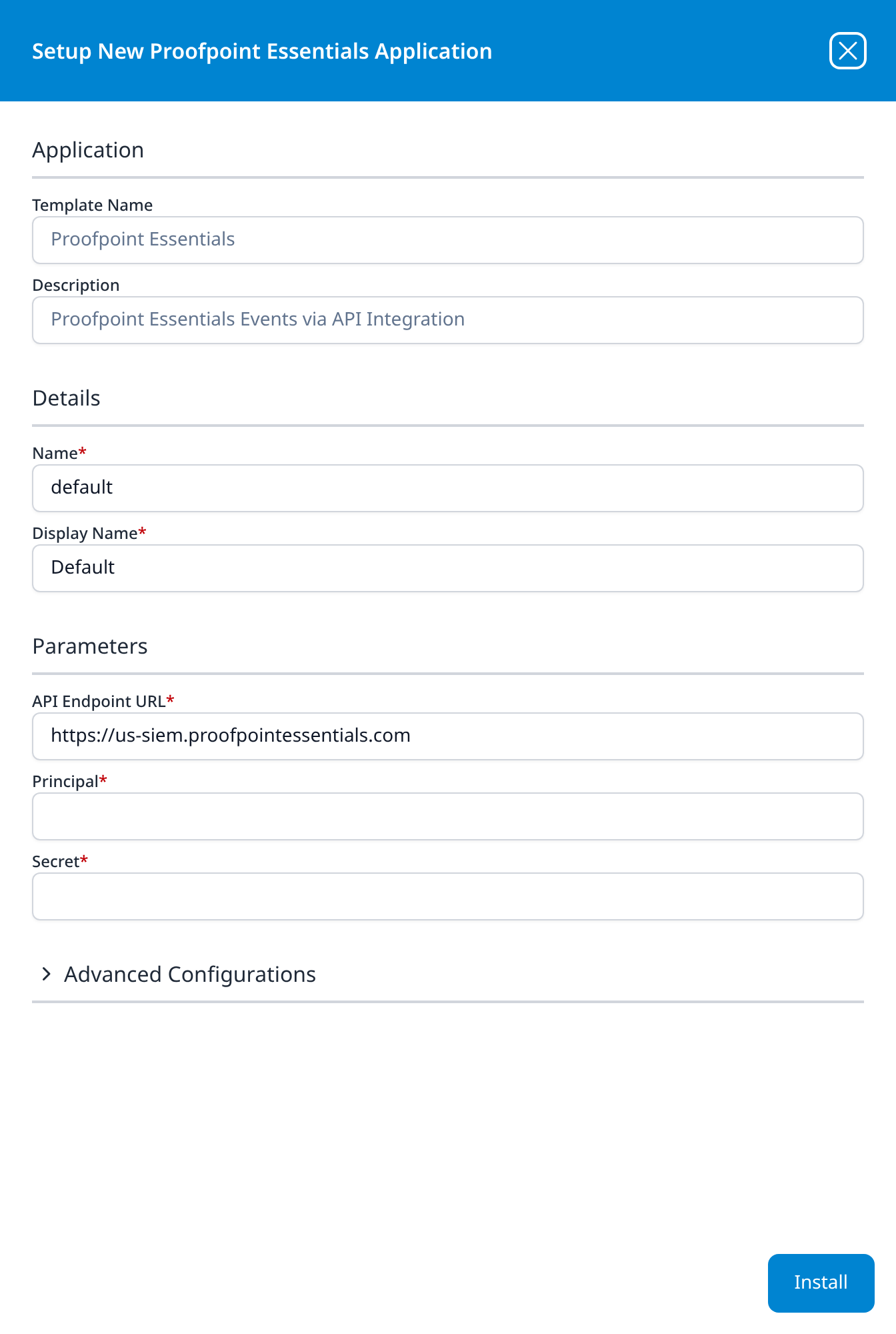
Leave Name and Display Name at default / Default unless you are installing a second instance (one per Essentials organisation, for a partner collecting from several), in which case give each one a name you will recognise on the applications list.
Press Install. The application then appears in the Installed Applications view, where its badge reads Running once the pipeline is up.
Proofpoint TAP sits next to Proofpoint Essentials in the same category, and the two forms ask for the same three things, in a different order. Nothing on the form stops you filling in the wrong one. An Essentials key offered to the TAP host is not a credential that host ever issued: the install succeeds, every poll fails authentication, and the index stays empty.
The give-away is the API Endpoint URL the form arrives with. On this template it reads https://us-siem.proofpointessentials.com; on TAP it reads https://tap-api-v2.proofpoint.com. The field order differs too (this template puts the endpoint first, TAP puts it second, between Principal and Secret), but the host is the value to check, because it is the one that decides where the credential is sent.
Do not go by whether the form has an endpoint field: both templates have one.
Proofpoint indexProofpoint Essentials and Proofpoint TAP ship the same Proofpoint default for datalake index name. An organisation runs one or the other, so this rarely bites, but a partner collecting from both, or anyone migrating between the two products, installs the second application into a name the first already holds. The second install aborts, and the error is a name clash with nothing obviously to do with Proofpoint.
Change one of them under Advanced configuration (v1: Advanced Configurations) before installing rather than after. A partner installing one application per Essentials organisation has the same problem several times over: give each one its own index name as well as its own instance name and display name.
Confirm it is running
- v2 interface
- Classic v1 interface
The application is listed on Applications as Proofpoint Essentials, with the display name Default beneath it. Its badge should read Running in green within a few seconds; a red Error badge means the pipeline aborted or reported errors in the last hour, and the details page shows the error message beneath the summary figures.
Click its row to open the application details page. Parameters shows the values back with the secret masked, and Actions names the index the events land in, worth reading, because this template has no facet configuration of its own on Datalake Search, so you will search that index by name.
The application appears under Installed Applications as Proofpoint Essentials: Default. Its badge should read Running in green within a few seconds; Aborted in red means the pipeline stopped on an error, and the details panel carries the message.
The blue eye button opens the details panel. Parameters shows the values back with the secret masked, and Actions names the index the events land in, worth reading, because this template has no facet configuration of its own in Data Lake → Search, so you will search that index by name.
With recent threat activity, the first events should reach the lake within roughly 15 to 30 minutes. Past that, an empty index has three plausible explanations and they are worth separating before anything is changed:
- Nothing to report. Check the Essentials console for the same period. A small organisation genuinely goes days without a blocked click.
- The key was not active yet when the application first polled. Give it half an hour from creation.
- The package does not include URL Defense or Attachment Defense, in which case there is no source of events at all (see Before you begin).
Maintenance
Rotating the key
Integration Keys cannot be regenerated, so rotation means replacing one. Do it in this order:
- In Essentials, Add Integration Key with a new description, access type SIEM Threat Events, and the same Scope. Copy both values and allow up to thirty minutes for it to become active.
- In Fluency, uninstall the Proofpoint Essentials application and install it again with the new pair. Template parameters are read-only after install, so reinstalling is the supported way to change a credential. To uninstall, click Uninstall at the top right of the application's details page (v1: the red Uninstall button at the foot of its details panel on Platform → Applications).
- Back in Essentials, open the old key's menu in the Actions column and choose Delete API Key.
Deleting first would break collection for at least the thirty minutes the replacement needs to activate, and with only three days of retention there is little room to absorb a mistake.
Removing the integration
Uninstall the application in Fluency first, with the Uninstall button at the top right of its details page (v1: the red Uninstall button at the foot of its details panel on Platform → Applications), so the pipeline stops cleanly before its credential stops working. Then delete the key: Account Management → Integrations → Integration Keys, the Actions menu on the key's row, Delete API Key, and confirm.
Proofpoint deactivates a deleted key within thirty minutes, so it may keep working briefly after you confirm. The deletion itself cannot be undone: a key deleted by mistake has to be replaced with a new one, and the Fluency application reinstalled with it.
Troubleshooting
| Symptom | Likely cause | Fix |
|---|---|---|
| The application shows Error (v1: Aborted) shortly after install | The key has not activated yet, or the values are wrong | Wait out the thirty minutes and reinstall. If it still fails, confirm the pair with the curl in Verify before you leave Proofpoint. |
| Running, but the index stays empty and the Essentials console is quiet too | Nothing to report | Not a fault. Only threat events reach this API. |
| Running, index empty, console shows blocked clicks or messages | The wrong regional endpoint, or the key is not accepted | Run the curl against both us-siem and eu-siem. A 401 on both means the pair is wrong. |
| Nothing has ever arrived, on any endpoint | The package does not include URL Defense or Attachment Defense | Confirm the package with whoever manages the account. Without those services there are no threat events to collect. |
403 when testing the key | The key's Scope does not cover the organisation whose data is being requested | Create the key inside the organisation you want to collect from. |
| Collection worked, then stopped dead | The key was deleted, or rotated without reinstalling in Fluency | Add a new key and reinstall the application with it. |
| Events stop appearing after an outage of a few days | Retention | The API serves at most three days. That gap cannot be recovered. |
| Installed, but nothing arrives and the key tests fine | The Proofpoint TAP template was installed by mistake | Check which template the installed application names, and the API Endpoint URL it was installed with: this template's ends proofpointessentials.com, TAP's ends proofpoint.com. |
Under the hood
Engineering reference: Threat API endpoints, parameters and throttling
This section describes the mechanics of the Essentials Threat API. Administrators connecting Essentials do not need it.
Transport. Endpoints are served from one of two regional hosts (us-siem.proofpointessentials.com or eu-siem.proofpointessentials.com) over SSL, GET only, authenticated with HTTP Basic where the API key is the username and the API key secret is the password. There is no token exchange.
Endpoints, all under /v2/siem/:
| Path | Returns |
|---|---|
clicks/blocked | Clicks on malicious URLs that were blocked |
clicks/permitted | Clicks on malicious URLs that were permitted |
messages/blocked | Threat-carrying messages that were blocked |
messages/delivered | Threat-carrying messages that were delivered |
issues | clicks/permitted plus messages/delivered |
all | Every click and message relating to a known threat |
Time window. Every request carries exactly one of interval (an ISO 8601 interval, minimum thirty seconds, maximum one hour), sinceSeconds, or sinceTime. The maximum reach into the past is three days and the maximum span per request is one hour, so a collector catching up after an outage walks the window an hour at a time. Overlapping intervals may return duplicate records.
Partner-hierarchy parameters. ownData (default true) controls whether the key-holding organisation's own events are returned; customerData (default false) controls whether events for the organisations beneath it in the partner hierarchy are included. At least one of the two must be true. These bound what a partner-scoped key can pull in a single call, and they are the reason a key scoped to child organisations does not automatically produce child-organisation data.
Optional filters. threatType (url, attachment, messageText) and threatStatus (active, cleared, falsePositive; the default returns active and cleared).
Throttling is a simple rolling 24-hour counter: 1800 requests per 24 hours, after which the API returns 429 until the oldest request in the window ages out. Requests to clicks/permitted are counted in a separate pool from every other endpoint, which is what allows that one to be polled more often.
Response behaviour. JSON only: there is no syslog format and therefore no 204 No Content case; an empty window returns the full structure with empty arrays. There is no paging, results come back in no guaranteed order, and all timestamps are UTC.
Where this differs from TAP. Same endpoint paths, same time parameters, same throttle shape, but a regional host instead of one global host, three days of retention instead of seven, JSON only instead of syslog-or-JSON, and the two partner-hierarchy parameters, which the enterprise API does not have. The credentials are also issued by a different console under different names.
References
Proofpoint
- Essentials Threat API: the primary reference for every endpoint, parameter, throttle limit and status code above
- Integration Keys: creating, scoping and deleting the credential
- Where and how to log in to Proofpoint Essentials: the regional console addresses
Fluency
- Proofpoint TAP: the other Proofpoint template, for the enterprise product
- Proofpoint Essentials install form: the template's fields and defaults (v1: Install Application From Template)
- Confirm data is arriving
- Email Security integrations: the rest of this category