EKS Logs
Amazon EKS clusters commonly ship their container logs with Fluent Bit, writing them into an S3 bucket. The AWS EKS Logs template reads that bucket the same way the other AWS templates do (the bucket raises an S3 notification, the notification lands on an SQS queue, and the platform consumes the queue), so the cluster keeps its existing Fluent Bit output and Fluency picks the objects up from storage rather than from the cluster.
AWS-side setup
Fluent Bit output
The cluster keeps its existing Fluent Bit deployment; configure its S3 output (bucket, prefix and rotation) per the aws-for-fluent-bit documentation. The stream worth shipping is container stdout/stderr.
EKS control-plane logs (API server, audit, authenticator, controller manager and scheduler) don't pass through Fluent Bit. EKS sends them only to CloudWatch Logs, to the /aws/eks/<cluster-name>/cluster log group, so collect them as described in Amazon CloudWatch.
S3 notification and SQS queue
The bucket must notify an SQS queue on object creation. This is the same wiring as every other S3-delivered AWS source; see AWS S3 (with SQS) for how it works and its constraints.
Access
Use the AWS role registered on Configuration → AWS Roles (v1: Settings → Advanced → AWS Roles), and select it in the form's Pre-defined AWS Role. If the account has no role yet, Connecting to AWS sets one up. Run its S3 template against the bucket Fluent Bit writes to, which creates the queue, the notification, and the read grant in one stack. An IAM user's access key and secret also work, as the alternative method.
Install the Application
- v2 interface
- Classic v1 interface
In the navigation rail, open Applications and click Install Application, then choose AWS EKS Logs from the AWS Services category of the Application Catalog.
Go to Platform → Applications → Install Application From Template and choose AWS EKS Logs from the AWS Services category.
The form asks for:
| Parameter | Notes |
|---|---|
| AWS Region | Drop-down, opens on US N.Virginia. The region the queue lives in. |
| SQS notification queue url | The full queue URL, not the ARN. |
| Pre-defined AWS Role | Optional on the form, but the recommended credential: the display name of a role registered on Configuration → AWS Roles (v1: Settings → AWS Roles). See Connecting to AWS. |
| IAM access key | Optional. Alternative: an IAM user's access key, entered directly. Use instead of a role, not as well as. |
| IAM access secret | Optional. |
| datalake | Pre-filled managed. |
| datalake index name | Pre-filled default; change it. Leaving it at default on more than one application will collide, and the second install aborts. |
- v2 interface
- Classic v1 interface
datalake and datalake index name sit in the collapsed Advanced configuration section below Configuration; click its heading to reach them.
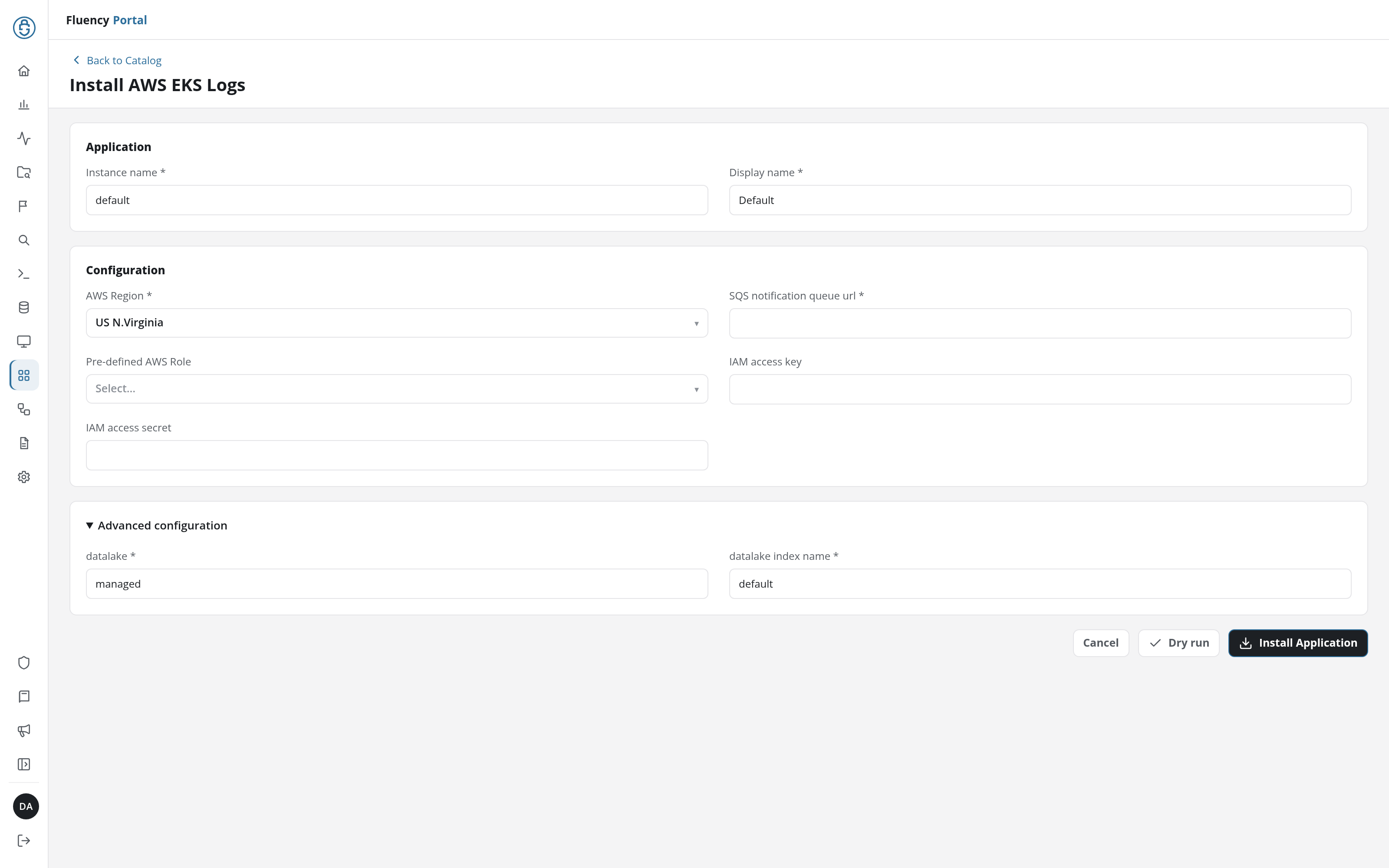
Click Dry run first to have the platform check the form's values and credentials before anything is installed, then click Install Application. The Applications page opens with the notice Default is launching., and the new application is listed with a green Running badge once the pipeline is up.
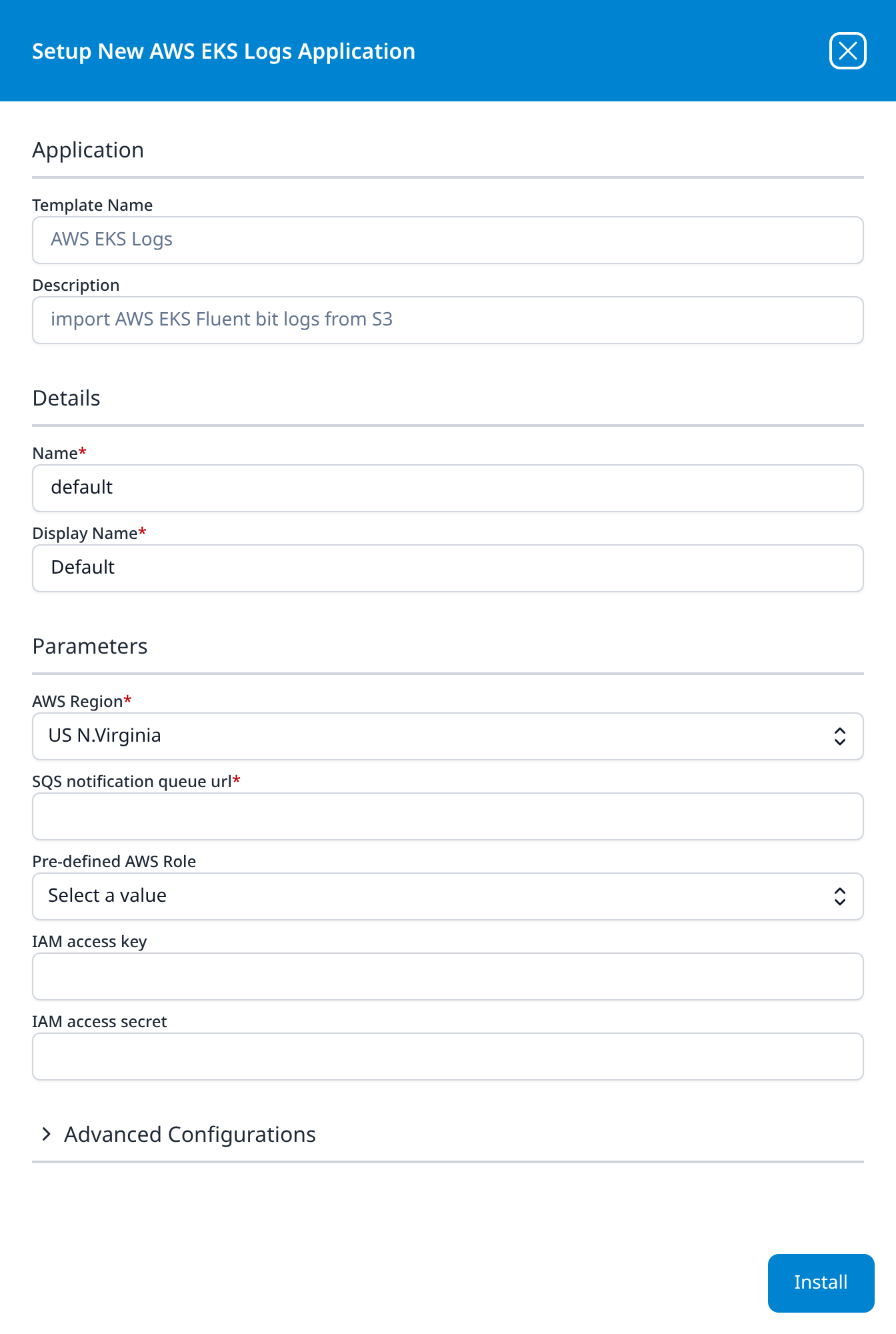
Press Install. The application then appears in the Installed Applications view, where its badge reads Running once the pipeline is up.
Related
- AWS: the other AWS sources.
- S3 Notification: the bucket-to-queue wiring shared by these templates.
- AWS CloudTrail and Amazon CloudWatch: the same delivery path for other AWS log types.