Risk Scoring
The "Scored Event" screenshot below, and the yellow/red behavior markers described with it, belong to the legacy Behavior Summary presentation. In the current interface, scored groupings appear as cases on Cases Search, each opening on Behavior Summary (v1: cards on SIEM → Behavior Summary), using the same score bands.
Overview
Fluency uses an open-ended scoring system, which scores risk based on learning, behavioral categorization, askew-prevention, and fault tolerance algorithms. The foundation of the risk scoring system is a traditional severity-based scoring system. The system then considers behavioral models to add additional insight beyond the deployed product's detection. Lastly, the system includes a suppression mechanism to capture analyst feedback. This combination has proven to be highly effective in highlighting events that require review.
Why Not a Simple Scoring System?
Early SIEM solutions used a network operation's approach to security alerts by assigning a label hierarchy. Two popular hierarchies are:
- Status Labeling: information, warning, error, and critical.
- Impact Labeling: low, medium, high, and critical.
The system then sorts alerts by label and presents the list of issues to the analyst. This is still common today, and the results are high false positives, detection gaps, and information overload. Attempts to use simple point systems of aggregating the alerts by flows, systems, or user have reduced the number of alerts, for they are now grouped, but demonstrate the same results.
There are a significant number of reasons why this solution fails. The core reason is that alerts are analyzed atomically. Atomic means that the event is valued without any other consideration of the environment, history, or other messages.
Algorithm Stack
Fluency uses multiple algorithms to generate and adjust risk scoring:
- Severity Categorization
- Learning
- Behaviors
- Vectors
- Fault Tolerance
- Askew Prevention
- Suppression
Severity Categorization
Impact severity is the start of the Fluency scoring system. While any tag can be added to the signature, there are defined tags that are related to the impact severity.
These start with ALERT_SEVERITY and are completed with the level:
- Low
- Medium
- High
- Critical
There are also tags to the risk to provide further categorization. These start with ALERT and are completed with their descriptor:
- Normal
- Endpoint
- High Confidence
- Malware
- Policy
The tags can be combined, meaning that there can be alerts with a series of risk tags:
ALERT_SEVERITY_CRITICALALERT_HIGH_CONFIDENCEALERT_MALWARE
Risk tags are used for scoring, searching, and reporting.
For example, policy violations, like logging into a system using just a username and password, are not something that would normally trigger an incident response. However, having a report on users who are active and not using multi-factor authentication would be useful. This can be done by tagging events with ALERT_POLICY and then using those alerts to create a report.
Banded Ordinal Risk Score
Fluency uses a banded ordinal scale to label risk. Ordinal means that the enumerated type has a hierarchy articulated as order. In this case the enumerated types range from 'none' to 'critical'. Banded means that the value of the enumerated types is scaled by a numeric value, in this case called Risk Score. The values for the top of each band are as follows:
| Score Range | Category |
|---|---|
| 0 | None |
| 1 - 1000 | Low |
| 1001 - 2000 | Medium |
| 2001 - 4000 | Serious |
| 4001 - 8000 | High |
| Greater than 8000 | Critical |
Fluency groups scored alerts into a single grouping based on a UEBA key. In the example below, the key is the AWS username. The Risk Score value is the aggregated value of all its behaviors. In this example, the two (2) medium and two (2) serious behaviors combine to give a 'High' score for the grouping.
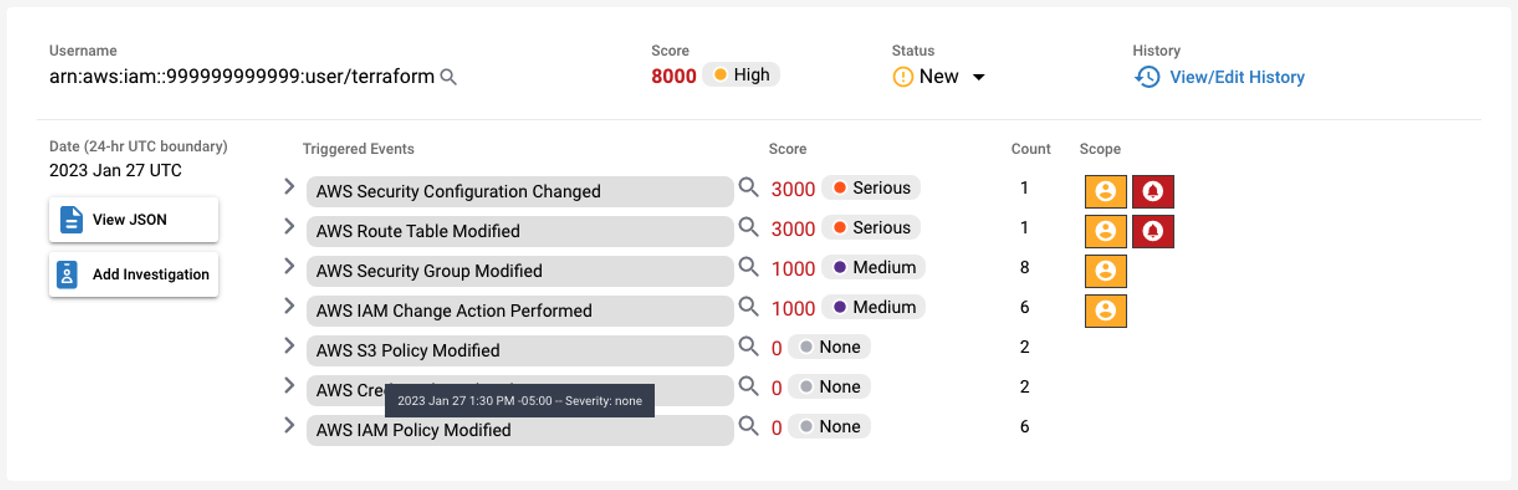
- v2 interface
- Classic v1 interface
In the current interface the same grouping is a case: Cases Search lists the cases, and each one opens on Behavior Summary for its entity and day (through Open case in the case's detail panel):
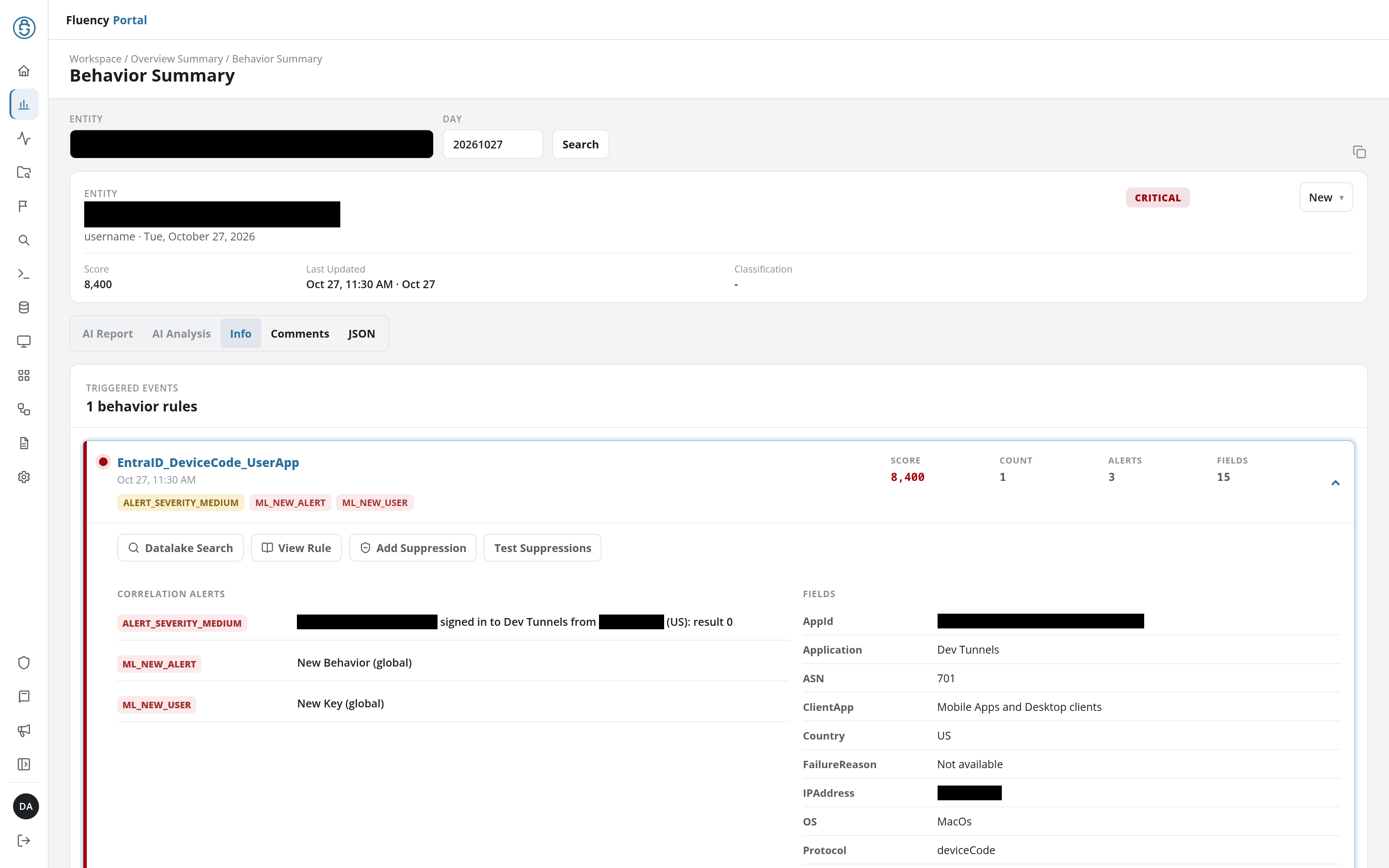
The case header carries the entity, its key type and the day, the severity (such as CRITICAL, drawn from the bands in the table above), the status, the Score (the numeric risk score), and the Classification. Triggered Events below it lists each behavior rule that contributed, with its own Score and a chip for each correlation alert it raised. On Cases Search, the Score Level filter groups cases into the same bands; on Overview Summary, only summaries at or above the notification threshold are listed unless Show 0 score events is ticked.
In the current interface the same grouping is presented on SIEM → Behavior Summary, one card per summary:
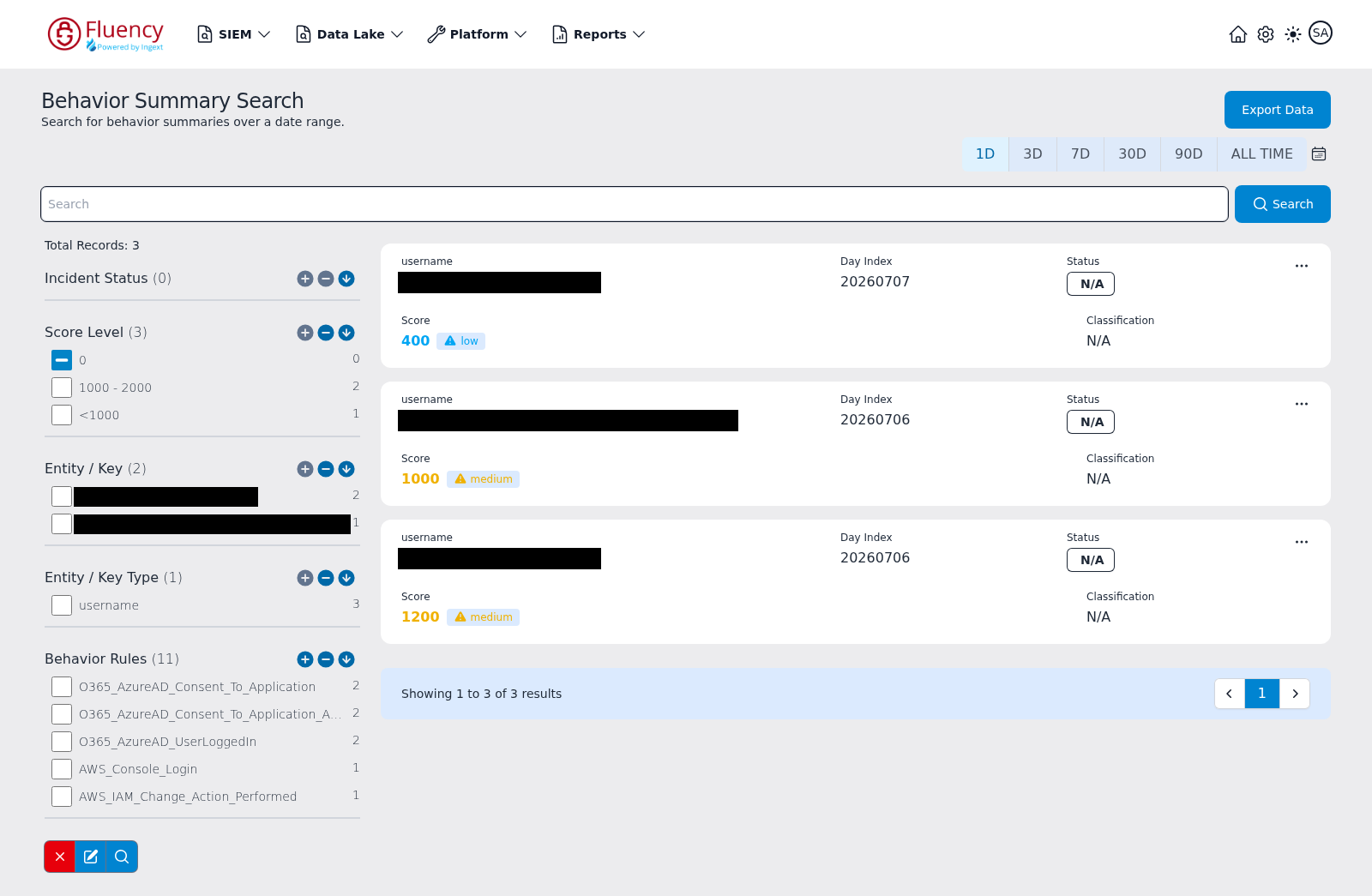
Each card carries the entity (username), the Day Index the summary belongs to in YYYYMMDD form, the ticket Status badge, the Score (the numeric risk score with a severity chip such as medium, drawn from the bands in the table above) and the Classification. The sidebar's Score Level facet groups results into the same bands (for example 1000 - 2000), and by default excludes the 0 bucket so zero-score summaries stay hidden.
To the right of each behavior, there may appear entity or alert behavior markers. The markers highlight unique events.
- Yellow, Local: The marker is unique for this UEBA key.
- Red, Global: The marker is the first time seen for this organization.
In this example, there are red alerts that represent alerts that have not been seen by this organization in the learning window. Also, this user has not triggered all the behaviors marked with yellow.
The context of uniqueness is important in security. Malicious activity is not normal; it is a fault of the security system that someone is bypassing it. So, while an individual alert that is uncommon should be reviewed, a group of uncommon behavior has a higher risk. It is this combination of abnormal activity combined with fault analysis that makes risk score powerful.
Notification Threshold
A behavior summary sends a notification when its Risk Score goes above 3000, the middle of the Serious band. Crossing the threshold also moves the summary's status from N/A to New. In terms of the bands above:
- None, Low, and Medium summaries never send a notification.
- Serious summaries send one only once their score is above 3000.
- High and Critical summaries are always above the threshold.
The threshold is set on the back end and is a single value for the whole instance. It is not set per rule, and a notification rule has no severity or score setting: the threshold decides which summaries notify, and the rules on Notifications decide where those notifications are delivered.
The bands and the threshold both apply to the summary's accumulated score, not to individual behaviors. A rule's severity tags and risks set how much each of its behaviors adds to the score (see Severity Categorization), so a behavior tagged ALERT_SEVERITY_CRITICAL leads to a notification only when the summary it belongs to is above 3000.
A summary's score, and with it its band, can rise during the day. A behavior summary collects one entity's behaviors for one day, and each new behavior adds to its score. A summary that starts below the threshold sends its notification when an update takes its score above 3000, so a summary that was Medium in the morning can notify in the afternoon.
Summaries below the threshold are not muted or discarded. They stay on Cases Search (v1: SIEM → Behavior Summary) in their score band; they just do not send a notification.
Purpose of None, Low, and Medium Alerts
Marking audit events with critical, high, or high confidence means that this event needs to be validated. Validating the event is the main job of the analyst. How does an analyst validate a key event?
The use of lower impact alerts, such as those marked with none, low, or medium, allows an analyst a means to make an educated determination of validity for an event. This process is how endpoint detection and response (EDR) systems can make decisions in the cloud.
In a validation process, incoming data is roughly divided into three categories: key events, indicators, and suppressors. It is possible to have more than one key event triggering.
Validating a Response with Indicators
When the key event is reviewed, a time window around the key event(s) is created. In this window, a list of supporting indicators is included to support the key event. For example, a process performs a root escalation. The window is reviewed to determine that a list of events has occurred that supports the key event as worthy of being responded to.
The validation process does not actually validate the key event; it is validating that a response is required.
Suppressing an Alert with Indicators
Suppressors remove possible indicators or key events from being considered malicious or an issue. Let's say that the previous event was investigated and it was determined that the unregistered software was BigFix, a patching software agent. The ticket is closed, but just as important, a suppression signature is added to the system.
The next time there is an alert, the suppression acts like the opposite of an indicator. It lets the analyst know that the key event is not valid.
Suppression in Fluency
In Fluency, suppression is added into the scoring. It is also common to create 'timeline' events that show a proper behavior that acts like a suppressor. For example, when a user logs into the system and they are authenticated with multi-factor authentication, there is often a timeline event that displays that information.